Toyota Prius (2023 year). Manual in english - page 8
 

  Index      Toyota     Toyota Prius (2023 year). Manual in english


Search            copyright infringement  


Content      ..     6      7      8      9     ..


Toyota Prius (2023 year). Manual in english - page 8


127

2

2. Instrument cluster

In

st

rum

ent cl

ust
e

r

Multi-information display

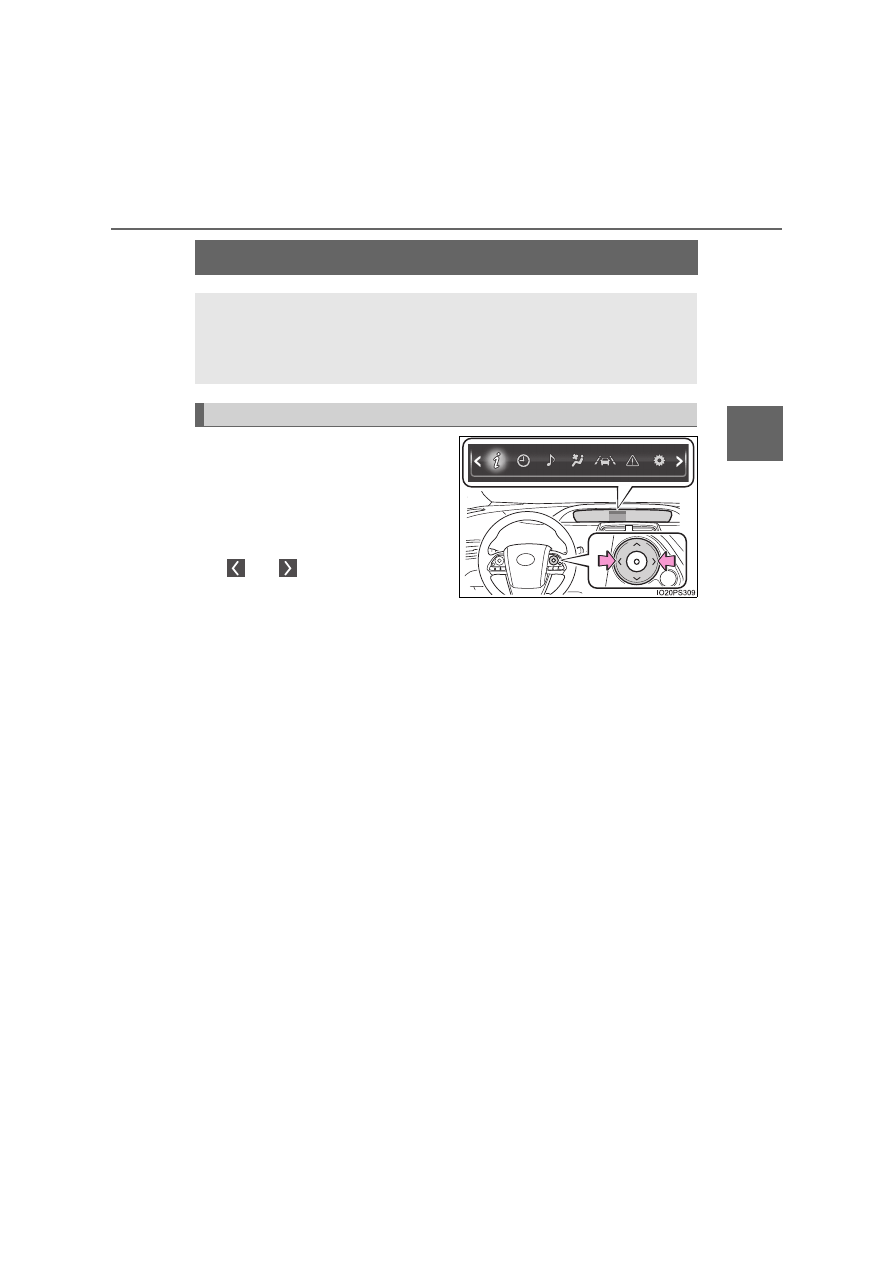
Information related to each icon
on the upper portion of the multi-
information display can be dis-
played by operating the meter
control switches to select the icon.

Icons are displayed when pressing

 or 

 of the meter control

switches and turn off shortly after
pressing the switch.
Screens linked with vehicle functions may be automatically displayed
according to the operation status of the corresponding functions.

A variety of information related to the vehicle can be displayed,
including the operation status of each system and data related
to Eco driving, and the settings of each system can be changed
according to user preference.

Display contents

128

2. Instrument cluster

*

1

: If equipped

*

2

: When there is a warning message that can be displayed, the color of 

changes to amber.

Menu icons

Contents

Pages

Drive information

The energy monitor that shows the operation
status of the hybrid system, or other informa-
tion such as fuel consumption is displayed.

P. 129

Clock setting display

The clock settings can be changed.

P. 147

Audio system-linked display

The audio system settings can be changed.

P. 147

Air conditioning system settings screen

The air conditioning system settings can be
changed.

P. 148

Driving assist system information

The information related to driving assist sys-
tems such as the LTA (Lane Tracing Assist)

*

1

and dynamic radar cruise control with full-
speed range

*

1

 is displayed.

P. 152

Warning message display

*

2

The warning messages are displayed.

P. 152

Settings display

The settings of the vehicle functions, meter
display, etc. can be changed.

P. 153

129

2. Instrument cluster

2

In

st

rum

ent cl

ust
e

r

Press 

 or 

 of the meter control switches and select the icon

of the desired item.

The selected icon is highlighted and the display switches to the information
screen.
When split screen display is selected for the main display or RSA (Road
Sign Assist)

*

 and speed limiter

*

 is off, the sub-screen of the main display

can also be selected. (

P. 124)

*

: If equipped

Press 

 or 

 of the meter control switches to switch the con-

tents of the display.

Press 

 on screens where it

is necessary to select or con-
firm an item.

On screens with tab displays,
pressing 

 selects the tab dis-

play, and the screen display can be
changed by pressing 

 or 

 of

the meter control switches.

Press 

 to return to the previous screen.

When 

 is selected, the following information can be displayed by

pressing 

 or 

 of the meter control switches.

Energy monitor (

P. 130)

Hybrid System Indicator (

P. 132)

“Fuel Consumption Record” (

P. 136)

“Drive Monitor” (

P. 140)

“Eco Savings” (

P. 141)

“Eco-Diary” (

P. 144)

AWD display (for AWD vehicles only) (

P. 146)

Basic Operations

1

2

Tab display

3

 Drive information

4

130

2. Instrument cluster

Energy monitor

The energy monitor can be used to check the vehicle drive status,
hybrid system operation status and energy regeneration status.
When energy is flowing, an arrow appears and a bright point of light
moves to show the direction of the flow of energy. When energy is
not flowing, the bright point of light is not displayed.

Gasoline engine
Electric motor 
(traction motor)
Hybrid battery 
(traction battery)
Tire
Bright point of light showing
the flow of energy

As an example, all arrows are shown in the illustration, but the actual con-
tents of the display will differ.

(Display example)

When the hybrid battery (traction battery) is being charged, the
bright point of light moves towards 

.

During driving, the bright point of light moves from 

 or 

 (or

both depending on the situation) towards 

.

*

During driving, the image of the tires rotates.

*

: The display may differ depending on the driving status.

1
2

3

4
5

3

1

2

4

131

2. Instrument cluster

2

In

st

rum

ent cl

ust
e

r

Hybrid battery (traction battery) status

The display changes in 8 levels according to the remaining charge amount
of the hybrid battery (traction battery).

The hybrid battery (traction battery) status is also displayed on the following
screen, but the contents of the display are the same.
• Sub-screen of the main display (

P. 125)

• Hybrid System Indicator (

P. 132)

• Head-up display (if equipped) (

P. 161)

The charge amount of the hybrid battery (traction battery) is automatically
controlled by the hybrid system. For this reason, even if electricity is recov-
ered via the regenerative braking, or electricity is generated via the gasoline
engine, the displayed hybrid battery (traction battery) charge amount may
not reach the highest level (level 8). However, this does not indicate a mal-
function.

Remaining charge amount warning of hybrid battery (traction battery)

The buzzer sounds intermittently when the hybrid battery (traction battery)
remains without charging while the shift position is in N, or the remaining
charge amount drops below a certain level. 
If the remaining charge amount drops further, the buzzer sounds continu-
ously.

When a warning message is shown on the multi-information display and the
buzzer sounds, follow the instructions displayed on the screen to perform
troubleshooting.

Low
High

1

2

132

2. Instrument cluster

Hybrid System Indicator

The display changes according to accelerator pedal operation and
displays the current driving status and energy regeneration status.

The Hybrid System Indicator can be displayed on the sub-screen of the
main display (

P. 125) and the head-up display (if equipped) 

(

P. 161).

How to read the display

Charge area

Shows that energy is being recovered via the regenerative charging.

Eco area

Shows that the vehicle is being driven in an Eco-friendly manner.

Power area

Shows that an Eco-friendly driving range is being exceeded (during full
power driving etc.)

Hybrid Eco area

*

1

Shows that gasoline engine power is not being used very often.
The gasoline engine will automatically stop and restart under various
conditions.

Head-up display 

(if equipped)

Sub-screen

Multi-information 

display

1

2

3

4

133

2. Instrument cluster

2

In

st

rum

ent cl

ust
e

r

EV indicator

*

2, 3

The EV indicator comes on when the vehicle is driven using only the
electric motor (traction motor) or the gasoline engine is stopped.

Hybrid battery (traction battery) status

P. 131

Eco score

P. 134

By keeping the indicator within Eco area, more Eco-friendly driv-
ing can be achieved.

Charge area indicates regeneration

*

4

 status. Regenerated

energy will be used to charge the hybrid battery (traction battery).

*

1

: Not displayed on the sub-screen.

*

2

: Not displayed on the sub-screen or head-up display.

*

3

: The EV indicator function can be turned off in the “Meter Customize”

settings. (

P. 156)

*

4

: When used in this manual, “regeneration” refers to the conversion of

energy created by the movement of the vehicle into electrical energy.

“ECO Accelerator Guidance”

A blue zone is displayed in the
Eco area which can be used as
a reference operation range for
using the accelerator pedal
according to driving conditions
such as starting off and cruis-
ing.

The “ECO Accelerator Guid-
ance” display changes accord-
ing to the driving status, such as
when starting off or cruising.
It is easier to drive in an Eco-friendly manner by driving according to the
display showing the accelerator pedal operations and staying within the
“ECO Accelerator Guidance” range. (

P. 222)

The “ECO Accelerator Guidance” function can be turned off in the
“Meter Customize” settings. (

P. 156)

5

6

7

“ECO Accelerator Guidance”

134

2. Instrument cluster

Eco score

The driving status for the following 3 situations are evaluated in 5
levels: Smooth start-off acceleration (“Eco-Start”), driving without
sudden acceleration (“Eco-Cruise”) and smooth stopping (“Eco-
Stop”). Each time the vehicle is stopped, a score result is displayed
out of a perfect score of 100 points.

Score result
“Eco-Start” status
“Eco-Cruise” status
“Eco-Stop” status

How to read the bar display:

*

: For items not currently evaluated, the display reads 0.

The Eco score is reset each time the vehicle starts off to start a new
evaluation.

When the shift position is P, only the Eco score display area is
enlarged and displayed. When the shift position is shifted from P,
the display returns to normal.

When the hybrid system stops, the current total score result and
advice on how to increase the score are displayed. (

P. 105)

1
2
3
4

Score

Low

*

High

Bar display

135

2. Instrument cluster

2

In

st

rum

ent cl

ust
e

r

When operation of each function stops

The Hybrid System Indicator stops operating in the following situations.
• The “READY” indicator is not illuminated.
• The shift position is not D or B.

The Eco score and “ECO Accelerator Guidance” stop operating in the fol-
lowing situations.
• The Hybrid System Indicator is not operating.
• Cruise control (if equipped) or dynamic radar cruise control with full-

speed range (if equipped) is being used.

• The speed limiter system (if equipped) is being used and the vehicle

speed is approximately the limit speed or higher.

About the Eco score

After starting off, Eco score display does not start until the vehicle speed
exceeds approximately 30 km/h (19 mph).

In addition to the vehicle driving status, the Eco score also evaluates the air
conditioning system usage condition (

P. 150). The score displayed when

the hybrid system stops is the total result of the driving status after the
hybrid system starts and the air conditioning usage condition.

136

2. Instrument cluster

“Fuel Consumption Record”

The transitions of the average fuel consumption after the hybrid
system starts can be checked in such a unit as every 5 minutes or
every 1 km (0.6 mile)

*

1

 or 1 mile (1.6 km)

*

2

 of driving. Also, it is

possible to check the average fuel consumption history for each
month by switching to the “Monthly” display.

*

1

: When the unit is set to “km/h”

*

2

: When the unit is set to “MPH” (if equipped)

How to read the screen

The “5 min” display is shown as an example. However, the basic
method for how to read the screen is the same for each fuel con-
sumption history screen.

Current average fuel con-
sumption record (yellow dis-
play)

*

1

When the recorded unit is
exceeded (every 5 min., every
1 km [0.6 mile]

*

2

 or 1 mile

[1.6 km]

*

3

, etc.) the currently

displayed history moves
towards the left side and the old-
est record is deleted.

Past average fuel consumption record (green display)
Tab display

Displays types of “Fuel Consumption Record”.

*

1

: When displayed by “Monthly”, the average fuel consumption for the cur-

rent month is displayed.

*

2

: When the unit is set to “km/h”

*

3

: When the unit is set to “MPH” (if equipped)

1

2
3

137

2. Instrument cluster

2

In

st

rum

ent cl

ust
e

r

Types of “Fuel Consumption Record”

When the unit is set to “km/h”

*

1

: This record is reset each time the hybrid system stops.

*

2

: The maximum value of the graph can be switched in 3 levels (10 L/100 km,

6 L/100 km and 3 L/100 km) by operating the 

 or 

 of the meter con-

trol switches while the “Monthly” tab display is selected.

*

3

: The “Monthly” record can be reset on the “Meter Customize” settings

screen. (

P. 156)

Tab display

Recorded contents

Recorded range

“5 min”

Average fuel consumption
of every 5 minutes

*

1

The past 30 minutes

“1 km”

Average fuel consumption
of every 1 km (0.6 mile)
driven

*

1

The last 15 km (9.3 miles)
driven

“5 km”

Average fuel consumption
of every 5 km (3.1 miles)
driven

*

1

The last 30 km (18.6 miles)
driven

“Monthly”

Average fuel consumption
of this month

*

2, 3

Record of last 4 months and
the same month of the pre-
vious year

138

2. Instrument cluster

When the unit is set to “MPH” (if equipped)

*

1

: This record is reset each time the hybrid system stops.

*

2

: The maximum value of the graph can be switched in 3 levels (150 MPG,

100 MPG and 50 MPG) by operating the 

 or 

 of the meter control

switches while the “Monthly” tab display is selected.

*

3

: The “Monthly” record can be reset on the “Meter Customize” settings

screen. (

P. 156)

Tab display

Recorded contents

Recorded range

“5 min”

Average fuel consumption
of every 5 minutes

*

1

The past 30 minutes

“1 miles”

Average fuel consumption
of every 1 mile (1.6 km)
driven

*

1

The last 15 miles (24.1 km)
driven

“5 miles”

Average fuel consumption
of every 5 miles (8 km)
driven

*

1

The last 30 miles (48.3 km)
driven

“Monthly”

Average fuel consumption
of this month

*

2, 3

Record of last 4 months and
the same month of the pre-
vious year

139

2. Instrument cluster

2

In

st

rum

ent cl

ust
e

r

Switching the fuel consumption history screen

While the “Fuel Consumption Record” screen is displayed, press

.

The tab display is selected and it is possible to switch the contents of
the display.

Press 

 or 

 of the meter control switches to switch the con-

tents of the display.

Each time 

 is pressed, the display switches in the following order: 

When the unit is set to “km/h”

“5 min”, “1 km”, “5 km” and “Monthly”

*

. When 

 is pressed, it switches

in the reverse order.

When the unit is set to “MPH” (if equipped)

“5 min”, “1 miles”, “5 miles” and “Monthly”

*

. When 

 is pressed, it

switches in the reverse order.

*

: After “Monthly”, the display returns to “5 min”.

Calendar settings

P. 158

1

2

140

2. Instrument cluster

“Drive Monitor”

Displays information such as the driving time and average vehicle
speed, which are linked with the current mileage display. (

P. 121)

Current contents of the dis-
play

Displayed information shows
which driving record the cur-
rently displayed contents are
based on.

“Elapsed Time”
“Average Speed”
“EV Driving Ratio”

For the displayed distance of the mileage display, the percent traveled
using only electric motor power is displayed.

Each time 

 is pressed, the mileage display (

P. 121) switches

and the contents of the “Drive monitor” change as follows.

*

1

: When the average fuel consumption is reset (

P. 122), the “Drive monitor”

display is also reset.

*

2

: When the trip meter is reset (

P. 122), the “Drive monitor” display is also

reset.

*

3

: This item is reset each time the hybrid system starts.

1

2
3
4

Mileage display

Contents of the “Drive monitor”

ODO

After Reset

Information since last reset

*

1

TRIP A

TRIP A

Information based on driving record of
TRIP A

*

2

TRIP B

TRIP B

Information based on driving record of
TRIP B

*

2

After Start

Information since hybrid system was
started

*

3

Blank screen

1

141

2. Instrument cluster

2

In

st

rum

ent cl

ust
e

r

“Eco Savings” (if equipped)

“Gasoline Price”

*

1

 and “COMP. Consumption” information is regis-

tered in the “Meter Customize” settings (

P. 156), making it possi-

ble to display 2 types of information related to gasoline fuel
consumption.

“SAVINGS”

If information about the vehicle used to compare fuel consumption
(“COMP. Consumption”) is entered, when the fuel consumption of
this vehicle according to the mileage of the trip meter

*

2

 is greater

than that of the comparison vehicle, an estimation

*

3

 of the amount

of the fuel cost savings is displayed.

“FUEL COST”

If information about the vehicle used to compare fuel consumption
(“COMP. Consumption”) is not entered, an estimation

*

3

 of the

amount of fuel cost savings is displayed according to the mileage of
the trip meter

*

2

.

*

1

: “Gasoline Price” is information necessary to display the “SAVINGS”

and “FUEL COST” records.

*

2

: The display can be switched from the mileage history to the history by

month. (

P. 143)

*

3

: The displayed amount is only an estimate, and may differ from the

actual amount.

142

2. Instrument cluster

How to read the display

The units used on the display may differ depending on the target region.

Trip meter distance traveled

*

Estimate of fuel consumption saved for displayed distance trav-
eled

*

Estimate of fuel expenses necessary to drive currently displayed
distance

*

Estimate of fuel expenses to drive currently displayed distance
(your vehicle)

*

Estimate of fuel expenses to drive currently displayed distance
(comparison vehicle)

*

*

: When the trip meter is reset (

P. 122), the “Eco Savings” record is also

reset.

“FUEL COST” display

“SAVINGS” display

1
2

3

4

5


Content      ..     6      7      8      9     ..