Toyota Prius (2023 year). Manual in english - page 7
 

  Index      Toyota     Toyota Prius (2023 year). Manual in english


Search            copyright infringement  


Content      ..     5      6      7      8     ..


Toyota Prius (2023 year). Manual in english - page 7


111

2. Instrument cluster

2

In

st

rum

ent cl

ust
e

r

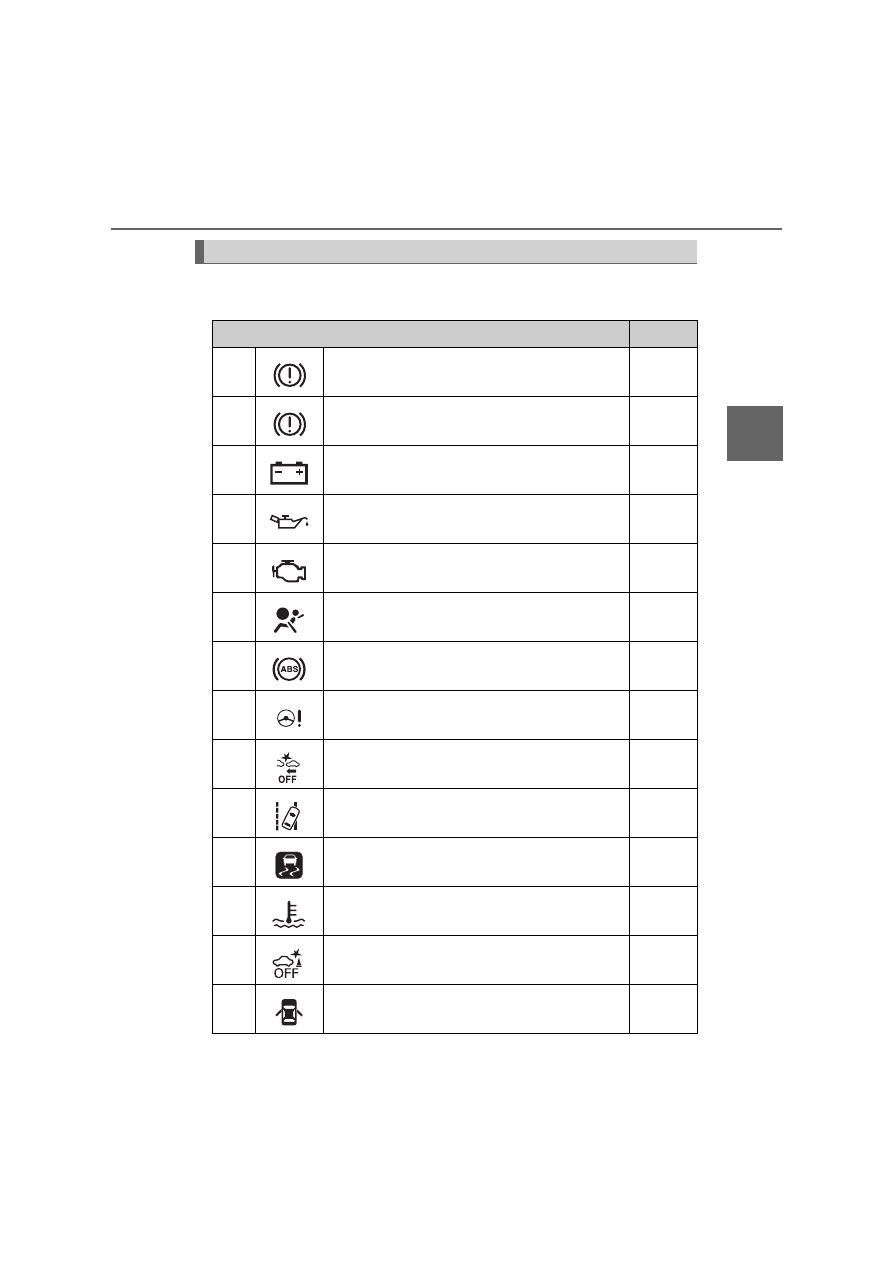
Warning lights inform the driver of malfunctions in any of the vehicle’s
systems.

Warning lights

Warning lights

Pages

*

1

Brake system warning light (Red)

P. 580

*

1

Brake system warning light (Yellow)

P. 580

*

1

Charging system warning light

P. 580

*

1

Low engine oil pressure warning light

P. 581

*

1

Malfunction indicator lamp

P. 581

*

1

SRS warning light

P. 581

*

1

ABS warning light

P. 581

*

1

Electric power steering system warning light 
(Red/yellow)

P. 581

*

1, 2

PCS warning light (if equipped)

P. 582

LTA indicator (Orange) (if equipped)

P. 582

*

1

Slip indicator light

P. 582

*

1

High coolant temperature warning light

P. 583

*

1, 3

PKSB OFF indicator (if equipped)

P. 583

Open door warning light

P. 583

112

2. Instrument cluster

*

1

: These lights turn on when the power switch is turned to ON mode to indi-

cate that a system check is being performed. They will turn off after the
hybrid system is on, or after a few seconds. There may be a malfunction in
a system if a light does not come on, or turn off. Have the vehicle
inspected by any authorized Toyota retailer or Toyota authorized repairer,
or any reliable repairer.

*

2

: The light flashes or illuminates to indicate a malfunction.

*

3

: The light flashes to indicate a malfunction.

The indicators inform the driver of the operating state of the vehicle’s
various systems.

Low fuel level warning light

P. 583

Driver’s and front passenger’s seat belt 
reminder light

P. 584

Rear passengers’ seat belt reminder light

P. 584

*

1

Master warning light

P. 584

*

1

Tire pressure warning light (if equipped)

P. 584

Indicators

Warning lights

Pages

Indicators

Pages

Turn signal indicator

P. 259

Tail light indicator

P. 261

Parking brake indicator

P. 260

Headlight high beam indicator

P. 262

113

2. Instrument cluster

2

In

st

rum

ent cl

ust
e

r

Front fog light indicator

P. 270

Rear fog light indicator

P. 270

Security indicator

P. 91, 93

“READY” indicator

P. 244

Shift position indicators

P. 253

*

1, 2

Slip indicator light

P. 442

*

1, 3

VSC OFF indicator

P. 443

Cruise control indicator

P. 340, 

346

Dynamic radar cruise control indicator (if
equipped)

P. 329

Cruise control “SET” indicator

P. 329, 

346

*

1, 3

PCS warning light (if equipped)

P. 300

*

4

LTA indicator (if equipped)

P. 316

Steering control indicator (if equipped)

P. 316

Automatic High Beam indicator (if equipped)

P. 266

“BSM” indicator (if equipped)

P. 356

Indicators

Pages

114

2. Instrument cluster

*

1

: These lights turn on when the power switch is turned to ON mode to indi-

cate that a system check is being performed. They will turn off after the
hybrid system is on, or after a few seconds. There may be a malfunction in
a system if a light does not come on, or turn off. Have the vehicle
inspected by any authorized Toyota retailer or Toyota authorized repairer,
or any reliable repairer.

*

2

: The light flashes to indicate that the system is operating.

*

3

: The light comes on when the system is turned off.

*

4

: Depending on the operating condition, the color and illuminating/flashing

state of the light change.

Main display and multi-information display

*

: The displayed indicator changes according to the current driving mode.

Toyota parking assist-sensor indicator 
(if equipped)

P. 381

*

1, 3

PKSB OFF indicator (if equipped)

P. 396

*

1

S-IPA indicator (if equipped)

P. 409

*

1

“PASSENGER AIR BAG” indicator

P. 51

Indicators and symbols displayed on the display

Indicators

Pages

Indicators

Pages

EV drive mode indicator

P. 250

*

“ECO MODE” indicator

P. 351

*

“PWR MODE” indicator

P. 351

EV Indicator

P. 133

Speed limiter indicator (if equipped)

P. 353

115

2. Instrument cluster

2

In

st

rum

ent cl

ust
e

r

Multi-information display (symbol display

*

)

*

: These symbols are displayed along with a message. Also, the symbol dis-

plays listed here are only an example, and different symbols may be dis-
played according to the contents of the multi-information display.

BSM (Blind Spot Monitor) outside rear view mirror indicators 
(if equipped) (

P. 356)

• When the BSM function is enabled on the 

 screen of the multi-infor-

mation display, the power switch is turned to ON mode.

If the system is functioning correctly, the BSM outside rear view mirror indi-
cators will turn off after a few seconds.
If the BSM outside rear view mirror indicators do not illuminate or do not
turn off, there may be a malfunction in the system.
If this occurs, have the vehicle inspected by any authorized Toyota retailer
or Toyota authorized repairer, or any reliable repairer.

Symbol display

Pages

Smart entry & start system

P. 244

Inappropriate pedal operation

P. 585

LTA (Lane Tracing Assist) (if equipped)

P. 321

P. 321

Indicators are also displayed on the out-
side rear view mirrors.

In order to confirm operation, the BSM
outside rear view mirror indicators illumi-
nate in the following situations:
• When the power switch is in ON

mode, the BSM function is enabled

on the 

 screen of the multi-infor-

mation display.

116

2. Instrument cluster

WARNING

If a safety system warning light does not come on

Should a safety system light such as the ABS and SRS warning light not
come on when you start the hybrid system, this could mean that these sys-
tems are not available to help protect you in an accident, which could result
in death or serious injury. Have the vehicle inspected by any authorized
Toyota retailer or Toyota authorized repairer, or any reliable repairer imme-
diately if this occurs.

NOTICE

To prevent damage to the engine and its components

The engine may be overheating if the high coolant temperature warning
light comes on or flashes. In this case, immediately stop the vehicle in a
safe place, and check the engine after it has cooled completely. (

P. 645)

117

2

2. Instrument cluster

In

st

rum

ent cl

ust
e

r

Main display

The units used on the display may differ depending on the target region.

The main display shows basic information, such as the vehicle
speed and remaining fuel amount. Also, the displayed informa-
tion can be switched according to user preference.

Display contents (vehicles without RSA [Road Sign Assist] and
speed limiter)

Simple screen

*

Split screen

*

*

: Refer to P. 123 for details on how to change the screen display.

118

2. Instrument cluster

Speedometer

Displays the vehicle speed

Fuel gauge

Displays the quantity of fuel remaining in the tank

Outside temperature

Displays the outside temperature within the range of -40°C (-40°F) to 50°C
(122°F).
The temperature display flashes for approximately 10 seconds when the
outside temperature drops to approximately 3

C (37

F) or less, and then

stops flashing.

Mileage display (odometer/trip meters/driving range)

The possible driving range estimated from the mileage and current remain-
ing fuel amount can be displayed. (

P. 121)

Average fuel consumption display

The average fuel consumption that is linked with the contents of the mile-
age display can be displayed. (

P. 121)

Sub-screen

When split screen is selected for the main display, information such as the
Hybrid System Indicator and current fuel consumption can be displayed.
(

P. 123)

1

2

3

4

5

6

119

2. Instrument cluster

2

In

st

rum

ent cl

ust
e

r

The units used on the display may differ depending on the target region.

Display contents (vehicles with RSA [Road Sign Assist] and/or
speed limiter)

120

2. Instrument cluster

Speedometer

Displays the vehicle speed

Fuel gauge

Displays the quantity of fuel remaining in the tank

Outside temperature

Displays the outside temperature within the range of -40°C (-40°F) to 50°C
(122°F).
The temperature display flashes for approximately 10 seconds when the
outside temperature drops to approximately 3°C (37°F) or less, and then
stops flashing.

Mileage display (odometer/trip meters/driving range)

The possible driving range estimated from the mileage and current remain-
ing fuel amount can be displayed. (

P. 121)

Average fuel consumption display

The average fuel consumption that is linked with the contents of the mile-
age display can be displayed. (

P. 121)

Sub-screen (when RSA [Road Sign Assist] and speed limiter are
off)

Information such as the Hybrid System Indicator and current fuel con-
sumption can be displayed. (

P. 124)

Sub-screen (when RSA [Road Sign Assist] and/or speed limiter is
on)

Displays information related to RSA (Road Sign Assist)

*

 or speed limiter.

(

P. 323, 353)

*

: When RSA (Road Sign Assist) information is displayed in the 

 screen

of the multi-information display (

P. 152), RSA (Road Sign Assist) infor-

mation is not displayed on the sub-screen.

1

2

3

4

5

6

7

121

2. Instrument cluster

2

In

st

rum

ent cl

ust
e

r

Each time 

 is pressed, the mileage display and fuel consumption

display change in the following order from 1 to 6.

Mileage display
Average fuel consumption dis-
play

After 1 to 6 are displayed, the dis-
plays return to 1.
Use the displayed average fuel
consumption as a reference.

Switching the mileage display and average fuel consumption
display

1
2

122

2. Instrument cluster

*

1

: If 

 is pressed and held while this item is displayed, the information is

reset.

*

2

: This item is reset each time the hybrid system starts.

 Mileage display

 Average fuel consumption display

1

ODO (Odometer)

Total mileage

Average fuel consumption since
last reset

Average fuel consumption since
last reset

*

1

2

TRIP A (Trip meter A)

Mileage since last reset

*

1

TRIP A average fuel consumption

Average fuel consumption since
TRIP A was reset

*

1

3

TRIP B (Trip meter B)

Mileage since last reset

*

1

TRIP B average fuel consumption

Average fuel consumption since
TRIP B was reset

*

1

4

 (Mileage since hybrid sys-

tem was started)

Mileage since hybrid system
started

*

2

Average fuel consumption after
hybrid system started

Average fuel consumption since
hybrid system was started

*

2

5

 (Distance to empty)

Approximate distance vehicle
can travel based on current
remaining fuel amount

Blank screen

6

Blank screen

Blank screen

1

2

123

2. Instrument cluster

2

In

st

rum

ent cl

ust
e

r

Simple screen or split screen can be selected for the main display.

When split screen is selected, a variety of information can be displayed on
a sub-screen in addition to the contents of the simple screen.

Select the “Meter Customize” settings ( 

 ) screen on the

 screen of the multi-information display, and then press 

.

(

P. 153)

Press 

 or 

 of the meter control switches to select “Simple/

Split Screen”.
Press 

 to display the setting screen.

Press 

 or 

 of the meter

control switches to select a dis-
play mode.

Press .

The contents of the main display switch to the selected display mode.
Press 

 to return to the previous screen.

Switching the display mode (vehicles without RSA [Road Sign
Assist] and/or speed limiter)

1

2

3

4

5

124

2. Instrument cluster

Vehicles without RSA (Road Sign Assist) and speed limiter

When split screen is selected for the main display, display contents on
the sub-screen can be selected. 

Vehicles with RSA (Road Sign Assist) and/or speed limiter

When RSA and speed limiter are off, display contents on the sub-
screen can be selected. 

Press 

 or 

 of the meter

control switches and select the
sub-screen.

When the sub-screen is selected,

 is displayed on the sub-

screen.

Switching contents displayed on the sub-screen

1

125

2. Instrument cluster

2

In

st

rum

ent cl

ust
e

r

Press 

 or 

 of the meter control switches to select the display

item.

One of the following 3 items can be displayed.

2

Display contents

Detail

Hybrid System Indicator

A convenient Hybrid System Indicator is displayed.
Refer to P. 132 for details on how to read the Hybrid
System Indicator.

Current fuel consumption

The current fuel consumption during driving is dis-
played.

• The 

 mark indicates the value displayed in the

average fuel consumption display (

P. 121).

Switching the average fuel consumption display
also changes the position of the 

 mark.

• When the average fuel consumption is reset, the

position of the 

 mark is reset to 0.

Hybrid battery (traction battery) status

The same contents as the hybrid battery (traction
battery) status on the energy monitor are displayed.
(

P. 131)

126

2. Instrument cluster

Outside temperature display

In the following situations, the correct outside temperature may not be dis-
played, or the display may take longer than normal to change.
• When stopped, or driving at low speeds (less than 20 km/h [12 mph])
• When the outside temperature has changed suddenly (at the entrance/

exit of a garage, tunnel, etc.)

When “-” or “E” is displayed, the system may be malfunctioning.
Take your vehicle to any authorized Toyota retailer or Toyota authorized
repairer, or any reliable repairer.

Distance to empty

This distance is computed based on your average fuel consumption. As a
result, the actual distance that can be driven may differ from that displayed.

When only a small amount of fuel is added to the tank, the display may not
be updated.
When refueling, turn the power switch off. If the vehicle is refueled without
turning the power switch off, the display may not be updated.

Switching the driving mode (

P. 351)

*

: The animation displayed when the driving mode is switched can be turned

off in the “Meter Customize” settings. (

P. 156)

When the driving mode is switched, the
driving mode indicator changes and an
animation

*

 is displayed on the multi-infor-

mation display.
Also, the background color of the main
display, energy monitor (

P. 130) and

Hybrid System Indicator (

P. 132)

change as follows.

Driving modes

Background color

Normal mode

Green

Power mode

Red

Eco drive mode

Blue


Content      ..     5      6      7      8     ..