Toyota Land Cruiser Prado (2023 year). Manual in english - page 8
 

  Index      Manuals     Toyota Land Cruiser Prado (2023 year). Manual in english


Search            copyright infringement  


Content      ..     6      7      8      9     ..


Toyota Land Cruiser Prado (2023 year). Manual in english - page 8


127

2. Instrument cluster

2

In

st

rum

ent cl

ust
e

r

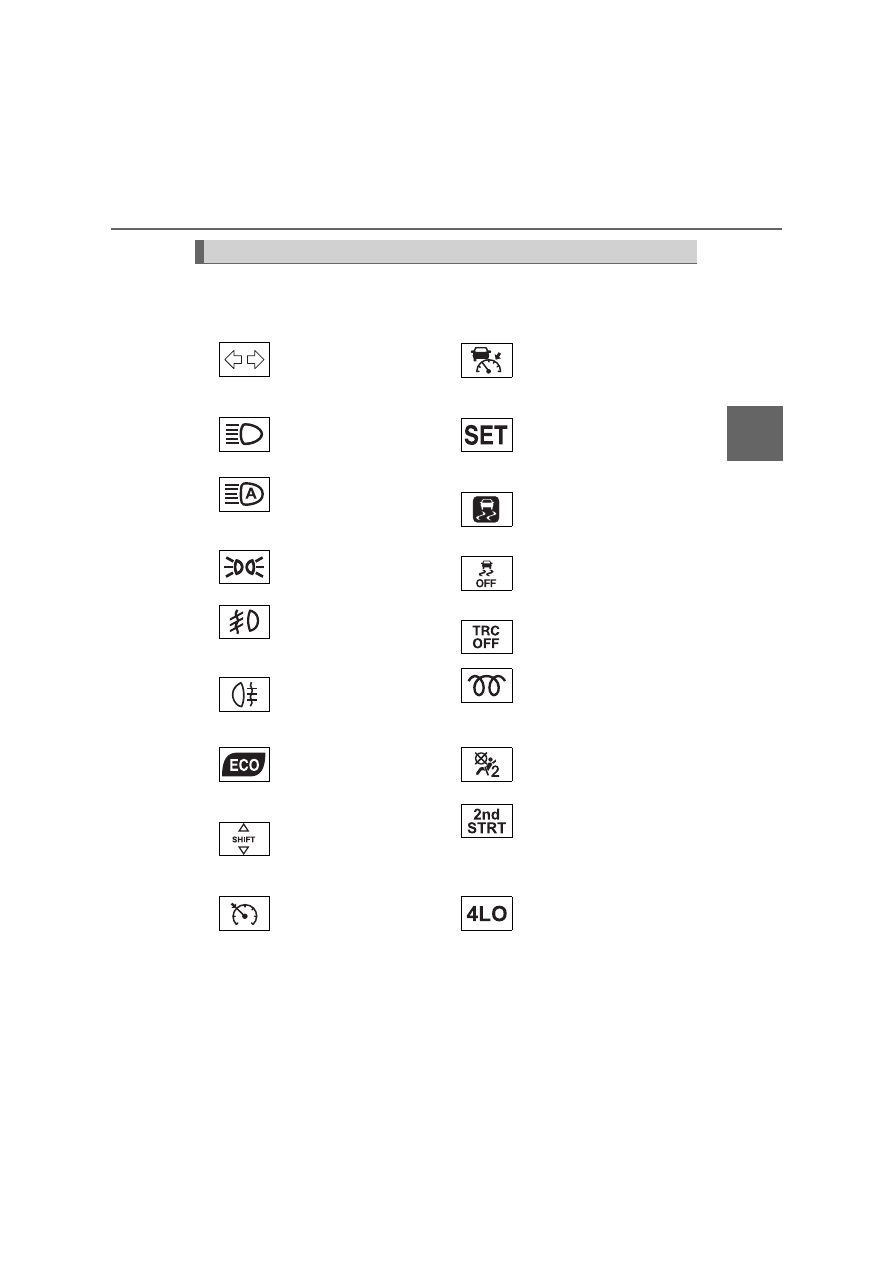
The indicators inform the driver of the operating state of the vehicle’s
various systems. 

Indicators

Turn signal indicator 
(

P. 291)

*

2

(if equipped)

Dynamic radar cruise 
control indicator
(

P. 370)

Headlight high beam 
indicator (

P. 301)

*

2

(if equipped)

Cruise control “SET” 
indicator (

P. 370, 387)

(if equipped)

Automatic High Beam 
indicator (

P. 314)

*

1

Slip indicator (

P. 417)

Tail light indicator 
(

P. 299) 

*

1, 3

VSC OFF indicator 
(

P. 418)

(if equipped)

Front fog light indicator 
(

P. 319)

*

1, 3

“TRC OFF” indicator 
(

P. 418)

Rear fog light indicator 
(

P. 319)

(diesel engine)

Engine preheating 
indicator (

P. 270)

*

1

(if equipped)

Eco Driving Indicator 
Light (

P. 138, 148)

*

1, 4

(if equipped)

AIR BAG OFF 
indicator (

P. 58)

*

1

(if equipped)

Gear Shift Indicator 
(

P. 288)

(automatic 

transmission)

Automatic transmission 
second start indicator 
(

P. 281)

*

2

(green)

(if equipped)

Cruise control indicator
(

P. 370, 387)

*

5

Low speed four-wheel 
drive indicator light

128

2. Instrument cluster

*

5

Center differential lock 
indicator

*

1, 5

(if equipped)

Downhill assist control 
system indicator

*

5

(if equipped)

Rear differential lock 
indicator

*

2, 5

(if equipped)

Crawl Control indicator

*

1, 4

(if equipped)

Toyota parking 
assist-sensor indicator 
(

P. 405)

*

2, 5

(if equipped)

Multi-terrain Select 
indicator

*

1, 3

(if equipped)

PCS warning light 
(

P. 342)

*

2, 5

(if equipped)

MTS AUTO indicator

*

6, 7

(if equipped)

BSM (Blind Spot 
Monitor) outside rear 
view mirror indicators 
(

P. 422)

*

2

(if equipped)

Eco drive mode indicator 
(

P. 401)

(if equipped)

“BSM” (Blind Spot 
Monitor) indicator
(

P. 422)

*

2

(if equipped)

Sport mode indicator 
(

P. 401)

*

1

(if equipped)

Stop & Start indicator 
(

P. 391)

*

2

(if equipped)

SPORT S mode indicator 
(

P. 401)

*

1, 3

(if equipped)

Stop & Start cancel 
indicator (

P. 392)

*

2

(if equipped)

SPORT S+ mode 
indicator (

P. 401)

*

2, 8

(if equipped)

LDA indicator (

P. 353)

*

2

(if equipped)

Comfort mode indicator 
(

P. 401)

*

2

(if equipped)

Smart entry & start 
system indicator 
(

P. 270)

*

2

(if equipped)

Ice warning indicator 
(

P. 137)

129

2. Instrument cluster

2

In

st

rum

ent cl

ust
e

r

*

1

: These lights turn on when the engine switch is turned to the “ON” position

(vehicles without a smart entry & start system) or the engine switch is
turned to IGNITION ON mode (vehicles with a smart entry & start system)
to indicate that a system check is being performed. They will turn off after
the engine is started, or after a few seconds. There may be a malfunction
in a system if a light does not turn on, or if the lights do not turn off. Have
the vehicle inspected by any authorized Toyota retailer or Toyota autho-
rized repairer, or any reliable repairer.

*

2

: Vehicles with the multi-information display type B: This light illuminates on

the multi-information display.

*

3

: The light turns on when the system is turned off.

*

4

: This light illuminates on the center panel.

*

5

: Refer to the “Off-road driving Owner’s manual”

*

6

: In order to confirm operation, the BSM outside rear view mirror indicators

illuminate in the following situations:

• When the engine switch is turned to the “ON” position (vehicles without a

smart entry & start system) or IGNITION ON mode (vehicles with a smart
entry & start system) while the system is set to ON.

• When the system is set to ON while the engine switch is in the “ON” posi-

tion (vehicles without a smart entry & start system) or IGNITION ON
mode (vehicles with a smart entry & start system).

If the system is functioning correctly, the BSM outside rear view mirror indi-
cators will turn off after a few seconds. 
If the BSM outside rear view mirror indicators do not illuminate or do not
turn off, there may be a malfunction with the system. If this occurs, have
the vehicle inspected by any authorized Toyota retailer or Toyota autho-
rized repairer, or any reliable repairer.

*

7

: This light illuminates on the outside rear view mirrors.

*

8

: Depending on the operating condition, the color and illuminating/flashing

state of the light change.

130

2. Instrument cluster

Eco Driving Indicator Light (vehicles with an automatic transmission)

The shift lever is in any position other than D.

A paddle shift switch (if equipped) is operated.

The vehicle is set to second start mode. (

P. 281)

Vehicles with drive mode select switch: the vehicle is set to sport mode.
(

P. 401)

The vehicle speed is approximately 130 km/h (81 mph) or higher.

Vehicles with Crawl Control: the Crawl Control is operating.

*

*

: Refer to the “Off-road driving Owner’s manual”.

During Eco-Friendly acceleration opera-
tion (Eco driving), Eco Driving Indicator
Light will turn on. When the acceleration
exceeds Zone of Eco driving (

P. 138,

148), or when the vehicle is stopped, the
light turns off. 
Eco Driving Indicator Light will not operate
in the following conditions:

WARNING

If a safety system warning light does not turn on

Should a safety system light such as ABS/Multi Terrain ABS and the SRS
warning light not turn on when you start the engine, this could mean that
these systems are not available to help protect you in an accident, which
could result in death or serious injury. Have the vehicle inspected by any
authorized Toyota retailer or Toyota authorized repairer, or any reliable
repairer immediately if this occurs.

131

2

2. Instrument cluster

In

st

rum

ent cl

ust
e

r

Gauges and meters

Vehicles with the multi-information display type A

Vehicles with the multi-information display type B

The units used on the speedometer may differ depending on the tar-
get region.

132

2. Instrument cluster

Engine coolant temperature gauge
Displays the engine coolant temperature
Multi-information display
Presents the driver with a variety of driving-related data 
(

P. 135, 139)

Fuel gauge
Displays the quantity of fuel remaining in the tank
Speedometer
Displays the vehicle speed
Odometer and trip meter display

P. 133

Shift position and shift range

*

Displays the selected shift position or selected shift range 
(

P. 280)

Tachometer
Displays the engine speed in revolutions per minute
“ODO/TRIP” button

P. 133, 136

*

: Vehicles with an automatic transmission only.

1

2

3

4

5

6

7

8

133

2. Instrument cluster

2

In

st

rum

ent cl

ust
e

r

Vehicles with the multi-information display type A

P. 135

Vehicles with the multi-information display type B

Display items

Odometer
Displays the total distance the vehicle has been driven.

Trip meter A/trip meter B
Displays the distance the vehicle has been driven since the
meter was last reset. Trip meters A and B can be used to record
and display different distances independently.

Distance until next engine oil change (if equipped)
Displays the distance the vehicle can be driven until an oil
change is necessary.

Changing the display

Each time the “ODO/TRIP” but-
ton is pressed, the displayed
item will be changed. When the
trip meter is displayed, pressing
and holding the button will reset
the trip meter.

Pop-up display (if equipped)

Distance until next engine oil change will be displayed when a
warning message indicating that oil maintenance is required or
should be performed soon is displayed.

Odometer and trip meter display

134

2. Instrument cluster

The brightness of the instrument cluster lights can be adjusted by
turning the dial.

Darker
Brighter

The meters and display illuminate when

Vehicles without a smart entry & start system

The engine switch is in the “ON” position.

Vehicles with a smart entry & start system

The engine switch is in IGNITION ON mode.

The brightness of the instrument cluster lights

Vehicles with the multi-information display type A

When the headlight switch is turned to on, the brightness will be reduced
slightly.

Vehicles with the multi-information display type B

When the headlight switch is turned to on, the brightness will be reduced
slightly unless the control dial is turned fully clockwise.

Instrument cluster light control

1
2

NOTICE

To prevent damage to the engine and its components

Do not let the indicator needle of the tachometer enter the red zone, which
indicates the maximum engine speed.

The engine may be overheating if the engine coolant temperature gauge is
in the red zone (H). In this case, immediately stop the vehicle in a safe
place, and check the engine after it has cooled completely. (

P. 730)

135

2

2. Instrument cluster

In

st

rum

ent cl

ust
e

r

Multi-information display (Type A)

The multi-information display presents the driver with a variety of driv-
ing-related data including the current outside air temperature.

Outside temperature display

(

P. 137)

Trip information contents

(

P. 136)

Shift position and shift range (if equipped)

(

P. 280)

Eco Driving Indicator Zone Display (if equipped)

(

P. 138)

: If equipped

Display contents

Automatic 
transmission

Manual 
transmission

136

2. Instrument cluster

Items displayed can be switched
by pressing the “ODO/TRIP” but-
ton.

Odometer

Displays the total distance the vehicle has been driven.

Trip meters A and B

Display the distance the vehicle has been driven since the meters
were last reset. Trip meters A and B can be used to record and dis-
play different distances independently.

Press the hold the button to reset.

DPF deposition status (if equipped)

Displays the amount of accumulated deposit in the DPF system. 
(

P. 293)

Distance until next engine oil change (if equipped)

Displays the distance the vehicle can be driven until an oil change
is necessary.

Driving range

Displays the estimated maximum distance that can be driven with
the quantity of fuel remaining

• When the quantity of fuel remaining becomes low, “----” is displayed.

Refuel the vehicle.

• This distance is computed based on your average fuel consumption. As

a result, the actual distance that can be driven may differ from that dis-
played. 

• When only a small amount of fuel is added to the tank, the display may

not be updated.
When refueling, turn the engine switch off. If the vehicle is refueled with-
out turning the engine switch off, the display may not be updated.

Switching the display

Trip information contents

137

2. Instrument cluster

2

In

st

rum

ent cl

ust
e

r

Current fuel consumption

Displays the current rate of fuel consumption

Eco Driving Indicator Zone Display

*

P. 138

Average fuel consumption

Displays the average fuel consumption since the function was reset

• The function can be reset by pressing the “ODO/TRIP” button for longer

than 1 second when the average fuel consumption is displayed.

• Use the displayed average fuel consumption as a reference.

Average vehicle speed

Displays the average vehicle speed since the engine was started or
the function was reset

The function can be reset by pressing the “ODO/TRIP” button for longer
than 1 second when the average vehicle speed is displayed. 

Outside temperature display

Displays the outside temperature 
The temperature range that can be displayed is from -40 

C (-40 

F)

to 50 

C (122 

F).

When the outside temperature drops below 3 

C (37 

F), the

numerical value flashes 10 times.

Eco Driving Indicator Light setting screen

*

Eco Driving Indicator Light can be set to on or off.

While the odometer is being
displayed, press and hold the
“ODO/TRIP” button for more
than 5 seconds to display the
Eco Driving Indicator Light
customization screen.
Press the “ODO/TRIP” but-
ton to set Eco Driving Indica-
tor Light to on or off.
Press and hold the “ODO/TRIP” button for more than 2 seconds
to complete the setting.

*

: Displayed on vehicles with an automatic transmission only

1

2

3

138

2. Instrument cluster

Distance until the next engine oil change will be displayed when a
engine oil maintenance indicator flashes or illuminates. (

P. 667)

Eco Driving Indicator (vehicles with an automatic transmission)

Outside temperature display

In the following situations, the correct outside temperature may not be dis-
played, or the display may take longer than normal to change:

When the vehicle is stopped, or moving at low speeds (less than 20 km/h
[12 mph])

When the outside temperature has changed suddenly (at the entrance/exit
of a garage, tunnel, etc.)

When “--” or “E” is displayed, the system may be malfunctioning. Take your
vehicle to any authorized Toyota retailer or Toyota authorized repairer, or
any reliable repairer.

Pop-up display (if equipped)

Eco Driving Indicator Light
During Eco-friendly acceleration (Eco
driving), Eco Driving Indicator Light will
turn on.
Eco Driving Indicator Zone Display
Suggests Zone of Eco driving with cur-
rent Eco driving ratio based on acceler-
ation.
Zone of Eco driving
Eco driving ratio based on acceleration
If the vehicle exceeds Zone of Eco driv-
ing, the right side of Eco Driving Indica-
tor Zone Display will blink and Eco
Driving Indicator Light will turn off.

WARNING

The multi-information display at low temperatures (vehicles with an
automatic transmission)

Allow the interior of the vehicle to warm up before using the multi-informa-
tion display. At extremely low temperatures, the multi-information display
monitor may respond slowly, and display changes may be delayed.
For example, there is a lag between the driver’s shifting and the new gear
number appearing on the display. This lag could cause the driver to down-
shift again, causing rapid and excessive engine braking and possibly an
accident resulting in death or serious injury.

1

2

3

4

139

2

2. Instrument cluster

In

st

rum

ent cl

ust
e

r

Multi-information display (Type B)

The multi-information display presents the driver with a variety of driv-
ing related data, such as the current outside temperature. The multi-
information display can also be used to change the display settings
and other settings.

Shift position and shift range (vehicles with an automatic transmis-
sion only:

P. 280)

Menu icon display area

Displays the following items.
When a menu icon is not selected, the outside temperature is displayed.

• Menu icons (

P. 141)

• Outside temperature (

P. 137)

Content display area

A variety of information can be displayed by selecting a menu icon. Addi-
tionally, warning or pop-up display will be displayed in some situations.

• Menu icon content (

P. 141)

• Warning message (

P. 670)

Odometer and trip meter (

P. 132)

Indicators (

P. 122)

: If equipped

Summary of functions

1

2

3

4
5

140

2. Instrument cluster

RSA (Road Sign Assist) (if equipped)

Displays recognized signs while the RSA (Road Sign Assist) (if equipped)
is operating. (

P. 364)

Meter control switches (

P. 140)

The multi-information display is operated using the meter control
switches.

Switching displayed items
Operate up and down: 
Switches screens and moves
the cursor
Press: 
Enters, moves to next screen

*

,

and turns functions on/off

*

*

: For some functions

Press: Displays the screen registered as the top screen

When no screen has been registered, the drive information screen will be
displayed.

Press and hold: Registers the currently displayed screen as the top
screen

When the confirmation screen is displayed, select yes to register the
screen. If the selected screen cannot be registered, a registration failure
message will be shown.

Return to the previous screen

Operating the meter control switches

6

7

1
2

3

4

141

2. Instrument cluster

2

In

st

rum

ent cl

ust
e

r

 Drive information

Select to display various drive data. (

P. 142)

 Vehicle information display

Select to display the vehicle information. (

P. 145)

 Navigation system-linked display (if equipped)

Select to display the following navigation system-linked information.

• Route guidance
• Compass display (north-up display/heading-up display)

 Audio system-linked display (if equipped)

Select to enable selection of an audio source or track on the display
using the meter control switches.

Stop & Start system information (if equipped)

Select to display the operation status of the Stop & Start system.
(

P. 391)

 Driving assist system information (if equipped)

Select to display the operational status of the following systems:

• LDA (Lane Departure Alert with Yaw Assist Function) (

P. 353)

• RSA (Road Sign Assist) (

P. 364)

• Dynamic radar cruise control (

P. 370)

 Warning message display

Select to display warning messages and measures to be taken if a
malfunction is detected. (

P. 657)

• When there are no current warning messages, “No Messages” is

displayed.

• When there are multiple warning messages, 

 can be used to

switch the displayed warning message.

 Settings display

Select to change the meter display settings and the operation set-
tings of some vehicle functions. (

P. 145)

Menu icons

142

2. Instrument cluster

Items displayed can be switched by operating 

 up and down.

After Start

Average fuel economy

*

Displays the average fuel con-
sumption since the engine was
started.

Average vehicle speed

Displays the average vehicle
speed since the engine was
started.

Elapsed time

Displays the elapsed time since the engine was started.

*

: Use the displayed average fuel economy as a reference.

After Reset

Current fuel economy

Displays the current rate of fuel
consumption.

Average fuel economy

*

1, 2

Displays the average fuel con-
sumption since the function was
reset.

Average speed

*

2

Displays the average vehicle
speed since the function was
reset.

Elapsed time

*

2

Displays the elapsed time since the function was reset.

*

1

: Use the displayed average fuel economy as a reference.

*

2

: Pressing and holding 

 will reset.

Drive information

1

2

3

1

2

3

4


Content      ..     6      7      8      9     ..