Toyota Supra (2023 year). Manual in english - page 13
 

  Index      Toyota     Toyota Supra (2023 year). Manual in english


Search            copyright infringement  


Content      ..     11      12      13      14     ..


Toyota Supra (2023 year). Manual in english - page 13


201

3-1. CONTROLS

3

CON

T

ROLS

When VSC is deactivated, driv-
ing stability is reduced during 
acceleration and when driving in 
curves.
To increase vehicle stability, 
activate VSC again as soon as 
possible.

When VSC is deactivated, VSC 
OFF is displayed in the instru-
ment cluster.

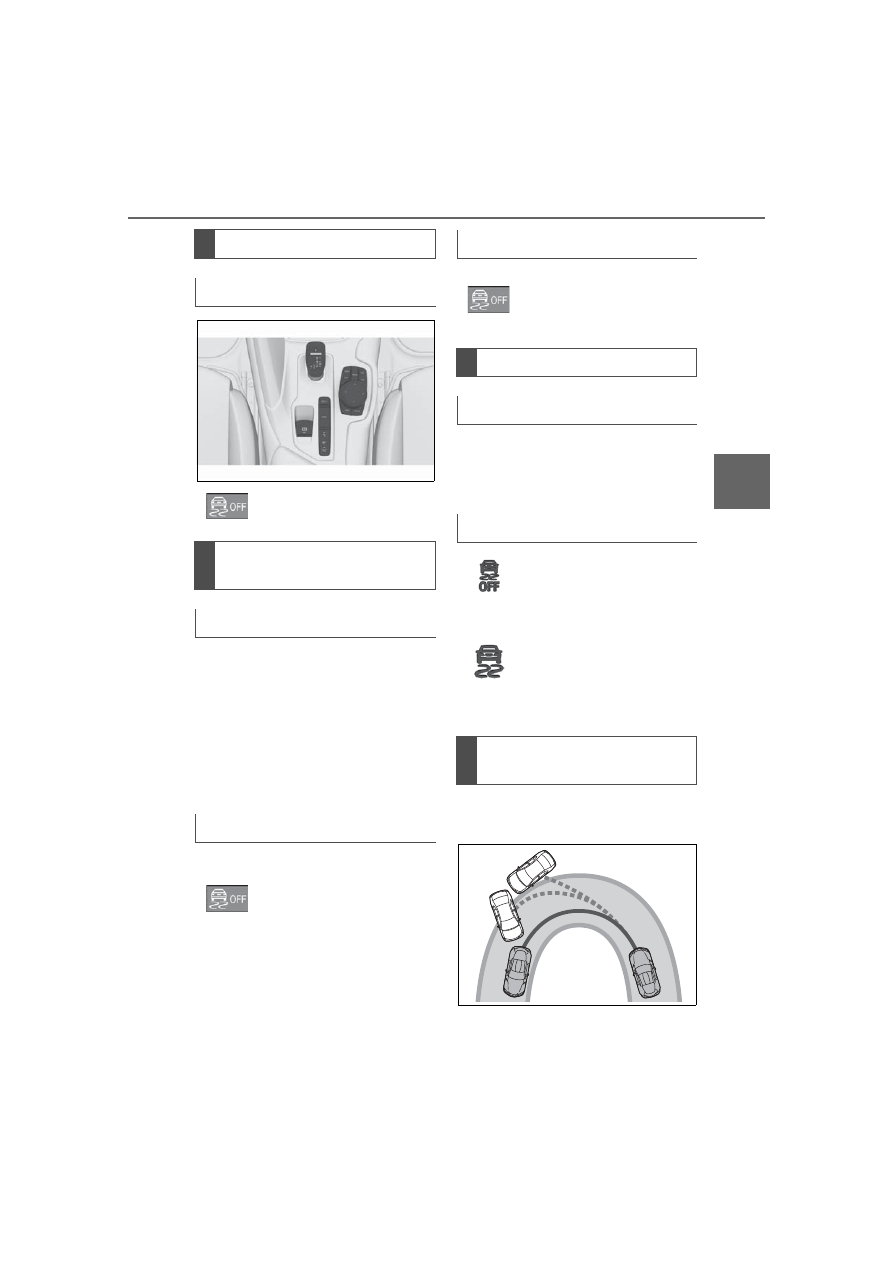
When entering a curve at an 
excessively high rate of speed

Overview

Button in the vehicle

VSC OFF

Deactivating/activating 
VSC

General information

Deactivating VSC

Hold the button down until 
VSC OFF is displayed in 
the instrument cluster and 
the VSC OFF indicator 
light is illuminated.

Activating VSC

Press the button.
VSC OFF and the VSC 
OFF indicator light go out.

Display

In the instrument cluster

Indicator/warning lights

The indicator light lights 
up: VSC is deactivated.

The indicator light flashes: 
VSC controls the drive 
and braking forces.
The indicator light lights 
up: VSC has malfunc-
tioned.

Situations which the VSC 
cannot operate sufficiently

202

3-1. CONTROLS

In this case, even if the VSC oper-
ates, it cannot operate sufficiently 
to avoid a possible dangerous situ-
ation. The driver is solely responsi-
ble for understanding their 
surroundings and driving at a safe 
speed.

Traction mode is a version of the 
VSC Vehicle Stability Control 
System where forward momen-
tum is optimized.
The system ensures maximum 
headway on special road condi-
tions or loose road surfaces, for 
instance unplowed snowy 
roads, but with somewhat lim-
ited driving stability.

When Traction mode is acti-
vated, the vehicle has maximum 
traction. Driving stability is lim-
ited during acceleration and 
when driving in curves.
You may find it useful to briefly 
activate Traction mode in the 
following situations:

When driving in slush or on 
uncleared, snow-covered 
roads.

When driving off from deep 
snow or loose ground.

When driving with snow 

chains.

If Traction mode is activated, 

Traction mode

Concept

General information

Overview

Button in the vehicle

VSC OFF

Activating/deactivating 
Traction mode

Activating Traction mode

Press the button.
TRACTION is displayed in 
the instrument cluster and 
the indicator light for VSC 
OFF lights up.

Deactivating Traction mode

Press the button again.
TRACTION and the VSC 
OFF indicator light go out.

Display

Display in the instrument 
cluster

203

3-1. CONTROLS

3

CON

T

ROLS

TRACTION is displayed in the 
instrument cluster.

In certain situations, the VSC is 
activated automatically:

If Dynamic radar cruise con-
trol with full-speed range is 
activated.

On a braking intervention by 
the Toyota Supra Safety sys-
tems.

The vehicle has a flat tire.

*

: if equipped

The active differential provides 
for continuously variable lock-
ing of the rear axle differential, 
depending on the driving situa-
tion. It prevents a single rear 
wheel from spinning and 
depending on the situation, 
increases the drive power of the 
wheel with greater road grip. 
This significantly improves the 
traction and driving dynamics of 
the vehicle.
The driver is responsible adapt-
ing his or her driving style to the 

situation.

Indicator/warning lights

The indicator light lights 
up: Traction mode is acti-
vated.

Automatic program 
change

Active differential*

204

3-1. CONTROLS

This chapter describes all stan-
dard, country-specific and 
optional features offered with 
the series. It also describes fea-
tures and functions that are not 
necessarily available in your 
vehicle, e.g., due to the selected 
options or country versions. This 
also applies to safety-related 
functions and systems. When 
using these functions and sys-
tems, the applicable laws and 
regulations must be observed.

Speed Limit Info shows the cur-
rent valid maximum speed in the 
instrument cluster and the 
Head-up Display.

The camera in the area of the 
interior mirror detects traffic 
signs at the edge of the road as 
well as variable overhead sign 
posts.
Traffic signs with extra symbols 

are considered and compared 
with the vehicle's onboard data. 
The traffic sign will then be 
either displayed or ignored 
depending on the situation in the 
instrument cluster and the 
Head-up Display.
The system takes into account 
any information that is stored in 
the navigation system and also 
displays speed limits present on 
routes without signs.

The system is controlled by the 
following sensors:
• Cameras behind the wind-

shield.

Additional information:
Sensors of the vehicle, refer to 
page 42.

Driver assistance sys-

tems

Vehicle features and 
options

Speed Limit Info

Speed Limit Info

Concept

General information

Safety information

WARNING

The system cannot serve as a 

substitute for the driver’s personal 

judgment in assessing the traffic 

situation. Based on the limits of 

the system, it cannot inde-

pendently react to all traffic situa-

tions. There is a risk of accident. 

Adjust driving style to traffic condi-

tions. Watch the surrounding traf-

fic situation closely, be ready to 

take over steering and braking at 

any time, and actively intervene 

where appropriate.

Overview

Sensors

205

3-1. CONTROLS

3

CON

T

ROLS

Depending on the vehicle equip-
ment, Speed Limit Info is dis-
played permanently in the 
instrument cluster or via Toyota 
Supra Command.

1

"My vehicle"

2

"System settings"

3

"Displays"

4

"Instrument panel"

5

"Road signs"

If the detected speed limit has 
been exceeded, the indicator 
light will flash.

Via Toyota Supra Command:

1

"My vehicle"

2

"System settings"

3

"Displays"

4

"Instrument panel"

5

Select desired setting:

"Warn when speeding": acti-
vating/deactivating the flash-
ing of the Speed Limit Info 
display in the instrument clus-
ter and Head-up Display 
when the currently valid 
speed limit is exceeded.

"Excess speed display": the 
speed limit that is detected by 
the Speed Limit Info is dis-
played with a marking in the 
speedometer in the instru-
ment cluster.

Additional information:
• Cameras, refer to page 42.

The system may not be fully 
functional and may provide 
incorrect information in the fol-
lowing situations:

When signs are fully or par-
tially concealed by objects, 
stickers or paint.

Displaying Speed Limit 
Info

General information

Display via Toyota Supra 
Command

Display

Speed Limit Info

Current speed limit.

Speed Limit Info not 
available.

Settings

System limits

System limits of the sensors

Functional limitations

206

3-1. CONTROLS

When driving very close to the 
vehicle in front of you.

If the speed limits or road data 
stored in the navigation sys-
tem are incorrect.

If the speed limits vary with 
the time of day and the day of 
the week.

In areas not covered by the 
navigation system.

When roads differ from the 
navigation, such as due to 
changes in road routing.

In case of electronic traffic 
signs.

When passing buses or trucks 
with traffic signs applied to 
them.

If the traffic signs are 
non-conforming.

When signs that are valid for 
a parallel road are detected.

In the presence of coun-
try-specific signs and road 
configurations.

*

: if equipped

Using this system, a desired 
speed can be adjusted using the 
buttons on the steering wheel. 
The system maintains the 
desired speed. The system 
accelerates and brakes auto-

matically as needed.

The system can be activated 
starting at 20 mph/30 km/h.
Depending on the vehicle set-
tings, the characteristics of the 
Cruise Control may change.

Cruise control*

Concept

General information

Safety information

WARNING

The system cannot serve as a 

substitute for the driver’s personal 

judgment in assessing the traffic 

situation. Based on the limits of 

the system, it cannot inde-

pendently react to all traffic situa-

tions. There is a risk of accident. 

Adjust driving style to traffic condi-

tions. Watch the surrounding traf-

fic situation closely, be ready to 

take over steering and braking at 

any time, and actively intervene 

where appropriate.

WARNING

The use of the system can lead to 

an increased risk of accidents in 

the following situations, for 

instance:

On winding roads.

In heavy traffic.

On slippery roads, in fog, snow, 

or wet conditions, or on a loose 

road surface.

There is a risk of accidents or risk 

of damage to property. Only use 

the system if driving at constant 

speed is possible.

207

3-1. CONTROLS

3

CON

T

ROLS

The indicator will come on.
Cruise control is active. The cur-
rent speed is maintained and 
stored as desired speed.
VSC Vehicle Stability Control 
System is switched on, if neces-
sary.

The displays go out. The stored 
desired speed is deleted.

The system is automatically 
interrupted in the following situa-
tions, for example:

When the driver applies the 
brakes.

Manual transmission: the 
clutch pedal is depressed for 
a few seconds or released 

WARNING

The desired speed can be incor-

rectly adjusted or called up by 

mistake. There is a risk of an acci-

dent. Adjust the desired speed to 

the traffic conditions. Watch traf-

fic closely and actively intervene 

where appropriate.

WARNING

When towing with Cruise Control 

switched on, individual functions 

may not work correctly. There is a 

risk of accident. Switch off all 

Cruise Control before towing.

Overview

Buttons on the steering 
wheel

Button

Function

Cruise control on/off, 
refer to page 208.

Press the button with 
the system interrupted: 
Continue cruise control 
with the last setting, 
refer to page 210.
When active, press the 
button: Pause cruise 
control, refer to page 
208.

Store current speed.

Rocker switch:
Set speed, refer to 
page 209.

Switching cruise control 
on/off

Switching on

Press the button on the 
steering wheel.

Switching off

Press the button on the 
steering wheel.

Pausing cruise control

Interrupting manually

When active, press the 
button.

Interrupting automatically

208

3-1. CONTROLS

while a gear is not engaged.

Manual transmission: if the 
gear engaged is too high for 
the current speed.

Automatic transmission: 
selector lever position D is 
disengaged.

Traction mode is activated or 
VSC Vehicle Stability Control 
System is deactivated.

If VSC Vehicle Stability Con-
trol System intervenes.

Press the rocker switch up or 
down once while the system is 
interrupted.
When the system is switched 
on, the current speed is main-
tained and stored as the desired 
speed.
The stored speed is displayed, 
refer to page 210, on the speed-
ometer.
VSC Vehicle Stability Control 

System is switched on, if neces-
sary.
The speed can also be stored 
by pressing a button.

Press the rocker switch up or 
down repeatedly until the 
desired speed is set.
If active, the displayed speed is 
stored and the vehicle reaches 
the stored speed when the road 
is clear.

Each time the rocker switch is 
pressed to the resistance 
point, the desired speed 
increases or decreases by 1 
mph/1 km/h.

Each time the rocker switch is 
pressed past the resistance 
point, the desired speed 
changes by a maximum of 5 
mph/10 km/h.

The maximum speed that can be 
set depends on the vehicle.

Pressing the rocker switch to 
the resistance point and hold-

Setting the speed

Maintaining and storing the 
speed

Press the button.

Changing the speed

209

3-1. CONTROLS

3

CON

T

ROLS

ing it accelerates or deceler-
ates the vehicle without 
requiring pressure on the 
accelerator pedal.

After the rocker switch is released, 
the vehicle maintains its final 
speed. Pressing the switch beyond 
the resistance point causes the 
vehicle to accelerate more rapidly.

An interrupted cruise control can 
be continued by calling up the 
stored speed.
Make sure that the difference 
between current speed and 
stored speed is not too large 
before calling up the stored 
speed. Otherwise, unintentional 
braking or accelerating may 
occur.

Cruise control is continued with 
the stored values.
In the following cases, the 
stored speed value is deleted 
and cannot be called up again:

When the system is switched 
off.

When drive-ready state is 
switched off.

With the proper equipment, the 
value of the selected speed is 
briefly displayed digitally.

Some system information can 
also be displayed in the 
Head-up Display.

The desired speed is also main-
tained downhill.
The speed may not be main-
tained on uphill grades if the 
engine power is insufficient.

Continuing cruise control

Press the button with the 
system interrupted.

Displays in the instrument 
cluster

Indicator light

Indicator light green: 
system is active.

Gray indicator light: the 
system has been inter-
rupted.

No indicator light: sys-
tem is switched off.

Status display

Displays in the Head-up 
Display

The symbol is displayed 
when the set desired 
speed is reached.

System limits

210

3-1. CONTROLS

*

: if equipped

Using this system, a desired 
speed and a distance to a vehi-
cle ahead can be adjusted using 
the buttons on the steering 
wheel.
The system maintains the 
desired speed on clear roads. 
For this purpose, the vehicle 
accelerates or brakes automati-
cally.
If a vehicle is driving ahead of 
you, the system adjusts the 
speed of your vehicle so that the 
set distance to the vehicle 
ahead is maintained. The speed 
is adjusted as far as the given 
situation allows.

Depending on the vehicle set-
tings, the characteristics of the 
Cruise Control may change.
The distance can be adjusted in 
several steps. For safety rea-
sons, it depends on the respec-
tive speed.
If the vehicle ahead of you 
brakes to a halt, and then pro-
ceeds to drive again within a 
brief period, the system is able 

to detect this within the given 
system limits.

Dynamic radar cruise 
control with full-speed 
range*

Concept

General information

Safety information

WARNING

The system cannot serve as a 

substitute for the driver’s personal 

judgment in assessing the traffic 

situation. Based on the limits of 

the system, it cannot inde-

pendently react to all traffic situa-

tions. There is a risk of accident. 

Adjust driving style to traffic condi-

tions. Watch the surrounding traf-

fic situation closely, be ready to 

take over steering and braking at 

any time, and actively intervene 

where appropriate.

WARNING

An unsecured vehicle can begin 

to move and possibly roll away. 

There is a risk of an accident. 

Before exiting, secure the vehicle 

against rolling.
In order to ensure that the vehicle 

is secured against rolling away, 

follow the following:

Set the parking brake.

On uphill grades or on a down-

hill slope, turn the front wheels 

in the direction of the curb.

On uphill grades or on a down-

hill slope, also secure the vehi-

cle, for instance with a wheel 

chock.

211

3-1. CONTROLS

3

CON

T

ROLS

The system is controlled by the 
following sensors:
• Cameras behind the wind-

shield.

WARNING

The desired speed can be incor-

rectly adjusted or called up by 

mistake. There is a risk of an acci-

dent. Adjust the desired speed to 

the traffic conditions. Watch traf-

fic closely and actively intervene 

where appropriate.

WARNING

Risk of accident due to too high 

speed differences to other vehi-

cles, for instance in the following 

situations:

When fast approaching a slowly 

moving vehicle.

There is a risk of injuries or dan-

ger to life. Watch traffic closely 

and actively intervene where 

appropriate.

Vehicle suddenly swerving into 

own lane.

When fast approaching stand-

ing vehicles.

WARNING

When towing with Toyota Supra 

Safety enabled or Cruise Control 

switched on, individual functions 

may not work correctly. There is a 

risk of accident. Switch off all Toy-

ota Supra Safety and Cruise Con-

trol before towing.

Overview

Buttons on the steering 
wheel

Button

Function

Cruise control on/off, 
refer to page 213.

Store current speed.

When active, press the 
button: Pause cruise 
control, refer to page 
213.
Press the button with 
the system interrupted: 
Continue cruise control 
with the last setting, 
refer to page 215.

Increase distance, refer 
to page 215.
Switch distance control 
on/off.

Reduce distance, refer 
to page 215.
Switch distance control 
on/off.

Rocker switch:
Set speed, refer to 
page 214.

Sensors

212

3-1. CONTROLS

• Front radar sensor.
Additional information:
Sensors of the vehicle, refer to 
page 42.

The system is best used on 
well-constructed roads.
The system is functional at 
speeds beginning at approx. 20 
mph/30 km/h.
The maximum speed that can 
be set is limited and, e.g., 
depends on the vehicle and the 
vehicle equipment version.
The system can also be acti-
vated when stationary.

The indicator will come on.
Cruise control is active. The cur-
rent speed is maintained and 
stored as desired speed.
VSC Vehicle Stability Control 
System is switched on, if neces-
sary.

To switch off the system while 
standing, step on brake pedal at 

the same time.
Press the following button on 
the steering wheel again:

The displays go out. The stored 
desired speed is deleted.

When active, press the following 
button on the steering wheel:

If interrupting the system while 
stationary, press on the brake 
pedal at the same time.

The system is automatically 
interrupted in the following situa-
tions:

When the driver applies the 
brakes.

Manual transmission: the 
clutch pedal is depressed for 
a few seconds or released 
while a gear is not engaged.

Manual transmission: if the 
gear engaged is too high for 
the current speed.

Automatic transmission:selec-
tor lever position D isdisen-
gaged.

Traction mode is activated or 
VSC Vehicle Stability Control 
System is deactivated.

Area of application

Switching on/off and inter-
rupting cruise control

Switching on

Press the button on the 
steering wheel.

Switching off

Button on the steering 
wheel.

Interrupting manually

Button on the steering 
wheel.

Interrupting automatically

213

3-1. CONTROLS

3

CON

T

ROLS

If VSC Vehicle Stability Con-
trol System intervenes.

If the safety belt is unbuckled 
and the driver's door is 
opened while the vehicle is 
standing still.

If the system has not detected 
objects for an extended 
period, for instance on a road 
with very little traffic without 
curb or shoulder markings.

If the detection range of the 
radar is impaired, for instance 
by dirt or heavy fog.

After a longer stationary 
period when the vehicle has 
been braked to a stop by the 
system.

Press the rocker switch up or 
down once while the system is 
interrupted. The system will be 
activated.
The current speed is maintained 
and stored as desired speed.

The stored speed is displayed 
on the speedometer.
VSC Vehicle Stability Control 
System is switched on, if neces-
sary.
The speed can also be stored 
by pressing a button.

Press the rocker switch up or 
down repeatedly until the 
desired speed is set.
If active, the displayed speed is 
stored and the vehicle reaches 
the stored speed when the road 
is clear.

Each time the rocker switch is 
pressed to the resistance 
point, the desired speed 
increases or decreases by 1 
mph/1 km/h.

Each time the rocker switch is 
pressed past the resistance 
point, the desired speed 
changes by a maximum of 5 
mph/10 km/h.

Hold the rocker switch in posi-

Setting the speed

Maintaining and storing the 
speed

Press the button.

Changing the speed

214

3-1. CONTROLS

tion to repeat the action.

Instrument cluster will display 
selected distance, refer to page 
215.

Instrument cluster will display 
selected distance, refer to page 
215.

An interrupted cruise control can 
be continued by calling up the 
stored speed.

Make sure that the difference 
between current speed and 
stored speed is not too large 
before calling up the stored 
speed. Otherwise, unintentional 
braking or accelerating may 
occur.

Cruise control is continued with 
the stored values.
In the following cases, the 
stored speed value is deleted 
and cannot be called up again:

When the system is switched 
off.

When drive-ready state is 
switched off.

Selected distance to the vehicle 
ahead of you is shown.

Adjusting distance

Safety information

WARNING

The system cannot serve as a 

substitute for the driver’s personal 

judgment. Due to the system lim-

its, braking can be late. There is a 

risk of accidents or risk of damage 

to property. Be aware to the traffic 

situation at all times. Adjust the 

distance to the traffic and weather 

conditions and maintain the pre-

scribed safety distance, possibly 

by braking.

Reduce distance

Press the button repeat-
edly until the desired dis-
tance is set.

Increase distance

Press the button repeat-
edly until the desired dis-
tance is set.

Continuing cruise control

Press the button to 
resume system operation 
when it is canceled.

Displays in the instrument 
cluster

Status display

The selected desired 
speed will be displayed.

Distance to vehicle ahead of 
you

SET

110

215

3-1. CONTROLS

3

CON

T

ROLS

As soon as the detected vehicle 
drives off, the vehicle symbol in 
the distance indicator will move 
away.
To accelerate, activate ACC, for 
instance by briefly stepping on 
the accelerator pedal or press-
ing the rocker switch.

Symbol

Description

Distance 1

Distance 2

Distance 3

Distance 4
This value is set 
automatically after 
the system is 
switched on.

System interrupted.

No distance control 
display, as the accel-
erator pedal is being 
pressed.

Detected vehicle

Symbol

Description

Green symbol:
A vehicle has been 
detected ahead of 
you. The system 
maintains the set dis-
tance to the vehicle 
in front.

216

3-1. CONTROLS

Some system information can 
also be displayed in the 
Head-up Display.

The distance information is 
active in the following situations:

Dynamic radar cruise control 
switched off.

Display in the Head-up Dis-
play selected, refer to page 
155.

Distance too short.

Speed greater than approx. 
40 mph/70 km/h.

Additional information:
• Cameras, refer to page 42.
• Radar sensors, refer to page 

43.

Indicator/warning lights

Symbol

Description

Indicator light green: 
system is active.
No indicator light: 
system is switched 
off.

Vehicle symbol 
flashes:
The conditions are 
not adequate for the 
system to work.
The system was 
deactivated but 
applies the brakes 
until you actively 
resume control by 
pressing on the 
brake pedal or accel-
erator pedal.

The vehicle symbol 
and distance bars 
flash red and an 
acoustic signal 
sounds:
Brake and make an 
evasive maneuver, if 
necessary.

Displays in the Head-up 
Display

Desired speed

The symbol is displayed 
when the set desired 
speed is reached.

Distance information

The symbol is displayed 
when the distance from 
the vehicle traveling 
ahead is too short.

System limits

System limits of the sensors


Content      ..     11      12      13      14     ..