Toyota Supra (2023 year). Manual in english - page 11
 

  Index      Toyota     Toyota Supra (2023 year). Manual in english


Search            copyright infringement  


Content      ..     9      10      11      12     ..


Toyota Supra (2023 year). Manual in english - page 11


169

3-1. CONTROLS

3

CON

T

ROLS

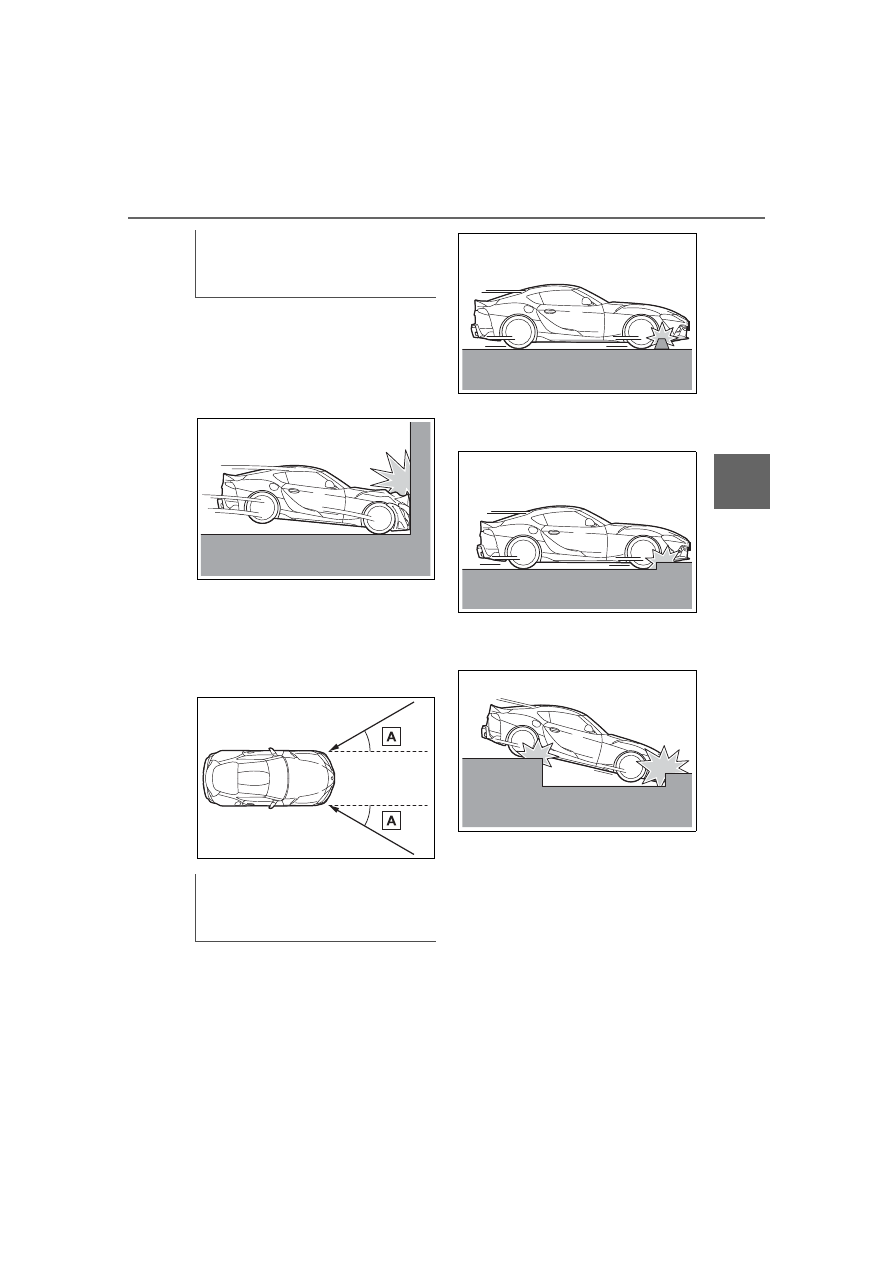
When the vehicle is involved in 
a frontal collision which exceeds 
a threshold equivalent to collid-
ing with a concrete wall which 
does not move or deform

When an impact which exceeds 
a threshold is applied to the 
vehicle at an angle of 30 
degrees or less of the front left 
or right corner of the vehicle (A)

When an impact which exceeds 
a threshold is applied to the 
underside of the vehicle

When the vehicle collides with a 
curb

When the vehicle falls into a 
deep hole or ditch

When the vehicle is jumped and 
lands hard

The SRS front airbags and 
SRS knee airbags will deploy 
when

The SRS front airbags and 
SRS knee airbags may 
deploy when

170

3-1. CONTROLS

When the vehicle is involved in 
a frontal collision with parked 
vehicle with approximately the 
same mass

When the vehicle is involved in 
an underride collision with a 
truck

When the vehicle collides with a 
power pole or tree

When the vehicle collides with 
an object which deforms or 
moves easily, such as a guard-
rail

When the vehicle is involved in 
a rear-end collision

When the vehicle is involved in 
a side collision

The threshold for the SRS 
front airbags and SRS knee 
airbags to deploy will 
increase considerably when

171

3-1. CONTROLS

3

CON

T

ROLS

When the vehicle is involved in 
a rollover

When a severe impact is applied 
to front of the vehicle while slid-
ing

When a severe impact is applied 
to the front of the vehicle in a 
side collision

When a subsequent collision 
occurs after the SRS front air-
bags or SRS knee airbags 
have operated

When only a small impact is 
applied to the front of the 
vehicle in a collision

When the SRS airbag warn-
ing light is illuminated

The airbags are not designed to 
be used in place of the seat 
belts.
The SRS side airbags and SRS 
curtain shield airbags are 
designed to deploy and protect 
the torso and head of occupants 
when a severe impact is applied 
to the side of the vehicle.
In the event of a side collision, 
the SRS side airbag and SRS 
curtain shield airbag on that side 
deploys (inflates), instantly cre-

The SRS front airbags and 
SRS knee airbags will not 
deploy when

SRS side airbag/SRS cur-
tain shield airbag

172

3-1. CONTROLS

ating an air cushion to help 
reduce the impact on the occu-
pants and restrain them from 
contacting the door window, 
door, etc. with their head and 
torso. When an airbag deploys, 
as it will inflate nearly instantly, it 
may impact an occupant and 
cause an injury, or the loud 
noise emitted by ignition or 
deployment may cause tempo-
rary partial loss of hearing. Also, 
as an airbag and nearby parts 
will be extremely hot after the 
airbag deploys, touching them 
may cause burns. For these rea-
sons, deployment of the airbags 
is not entirely risk free. There-
fore, in order to reduce this risk, 
the airbags are designed to only 
deploy when additional reduc-
tion of the impact applied to the 
occupants in a collision is nec-
essary.
If the force of the collision does 
not cause the airbags to deploy, 
the seatbelts will protect the 
occupants.

WARNING

Do not install seat covers which 

are not designed for use with this 

vehicle, or attach a cushion or any 

other accessory to either front 

seat or hang anything on either 

front seatback. Do not place 

objects around the side of either 

front seat. Refer to P.165for the 

installation position of the SRS 

side airbags.

WARNING

Do not lean against the door or 

door window.

Also, do not install a cup holder or 

any other accessories near the 

SRS side airbags.

If anything is attached to or left in 

the deployment area of an SRS 

side airbag, the airbag may be 

prevented from deploying or the 

object may become a projectile 

when the airbag deploys, possibly 

leading to injury. Also, if an occu-

pant is leaning into this area, the 

airbag may strike and injure the 

head or arm of the occupant when 

deploying.

WARNING

When using a cup holder, use the 

use the existing cup holders in the 

vehicle. Do not place anything but 

appropriately sized containers 

into the cup holders. Refrain from 

placing hot drinks or glass con-

tainers in the cup holders as they 

may cause burns or other injuries 

in the event of a collision or sud-

den braking.

173

3-1. CONTROLS

3

CON

T

ROLS

When the vehicle is involved in 
a severe side collision

When a severe impact is applied 
to the bottom of the vehicle, 
such as when driving over a 
large object in the road

When severe impact is applied 
to a wheel or tire, or the suspen-
sion of the vehicle

When the vehicle is involved in 
a side collision in an area away 
from the cabin (engine compart-
ment, luggage compartment, 
etc.)

When the vehicle is involved in 
an offset angle side collision

The SRS side airbags and 
SRS curtain shield airbags 
will deploy when

The SRS side airbags and 
SRS curtain shield airbags 
may deploy when

The threshold for the SRS 
side airbags and SRS curtain 
shield airbags to deploy will 
increase considerably when

174

3-1. CONTROLS

When a subsequent collision 
occurs after a SRS side air-
bag or SRS curtain shield air-
bag has operated

When only a small impact is 
applied to the side of the vehi-
cle in a collision

When the SRS airbag warn-
ing light is illuminated

When the majority of the initial 
force of an impact is applied 
only to a door

The explosive power that acti-
vates driver's/front-seat passen-
ger airbags very much depends 
on the positions of the 
driver's/front passenger seat.
To maintain the accuracy of this 
function over the long term, cali-
brate the front seats as soon as 
a respective message appears 
on the Control Display.

A corresponding message 
appears on the Control Display.

1

Press the switch and move 
the respective seat all the 
way forward, until it stops.

2

Press the switch forward 
again. The seat still moves 
forward slightly.

3

Readjust the seat to the 
desired position.

The calibration procedure is 
completed when the message 
on the Control Display disap-
pears.
If the message continues to be 
displayed, repeat the calibration.
If the message does not disap-
pear after a repeat calibration, 
have the system checked as 
soon as possible.

The system reads if the front 
passenger seat is occupied by 

The SRS side airbags and 
SRS curtain shield airbags 
will not deploy when

Strength of the driver's 
and front-seat passenger 
airbag

Calibrating the front seats

WARNING

There is a risk of jamming when 

moving the seats. There is a risk 

of injury or risk of damage to prop-

erty. Make sure that the area of 

movement of the seat is clear 

prior to any adjustment.

Automatic deactivation of 
the front-seat passenger 
airbags

Concept

175

3-1. CONTROLS

3

CON

T

ROLS

measuring the human body's 
resistance.
Front, knee, and side airbag on 
the front passenger's side are 
activated or deactivated.

Before transporting a child on 
the front passenger seat, refer 
to the safety information and 
instructions for children on the 
front passenger seat, see Chil-
dren.

When transporting older chil-
dren and adults, the front-seat 
passenger airbags may be 
deactivated in certain sitting 
positions. In this case, the indi-
cator light for the front-seat pas-
senger airbags lights up.
In this case, change the sitting 
position so that the front-seat 
passenger airbags are acti-

vated and the indicator light 
goes out.
If it is not possible to activate the 
airbags, have the person sit in 
the rear.
To enable correct recognition of 
the occupied seat cushion.

Do not attach covers, cush-
ions, ball mats or other items 
to the front passenger seat 
unless they are specifically 
determined to be safe for use 
on the front passenger seat.

Do not place any electronic 
devices on the front passen-
ger seat if a child restraint 
system is to be installed on it.

Do not place objects under 
the seat that could press 
against the seat from below.

No moisture in or on the seat.

The indicator light for the 
front-seat passenger airbag in 
the roofliner indicates the oper-
ating state of the front-seat pas-
senger airbag.
The light indicates whether the 
airbags are either activated or 
deactivated.
After drive-ready state is 
switched on, the light briefly 
lights up and then indicates 
whether the airbags are either 

General information

Safety information

WARNING

To ensure the front-seat passen-

ger airbag function, the system 

must be able to detect whether a 

person is sitting in the front pas-

senger seat. The entire seat cush-

ion area must be used for this 

purpose. There is a risk of injuries 

or danger to life. Make sure that 

the front passenger keeps his or 

her feet in the floor area.

Malfunction of the auto-
matic deactivation system

Indicator light for the 
front-seat passenger air-
bags

176

3-1. CONTROLS

activated or deactivated.

The system generally detects 
children seated in a child 
restraint system, particularly in 
child restraint systems required 
by NHTSA at the point in time 
when the vehicle was manufac-
tured. After installing a child 
restraint system, make sure that 
the indicator light for the 
front-seat passenger airbags 
lights up. This indicates that the 
child restraint system has been 
detected and the front-seat pas-
senger airbags are not acti-
vated.

Toyota Supra Safety enables 
central operation of the driver 
assistance systems.

Depending on how the vehicle is 
equipped, Toyota Supra Safety 
consists of one or more systems 
that can help prevent an immi-
nent collision.

Pre-Collision System, refer to 
page 179.

Pre-Collision System (for 
pedestrians and bicycles), 
refer to page 184.

Lane departure warning, refer 
to page 188.

Blind spot monitor, refer to 
page 192.

The indicator light 
lights up when a child 
is properly seated in a 
child restraint system 
or when the seat is 
empty. The airbags 
on the front passen-
ger side are not acti-
vated.

The indicator light 
does not light up 
when, for instance a 
correctly seated per-
son of sufficient size 
is detected on the 
seat. The airbags on 
the front passenger 
side are activated.

Detected child restraint 
systems

Toyota Supra Safety

Concept

General information

Safety information

WARNING

The system cannot serve as a 

substitute for the driver’s personal 

judgment in assessing the traffic 

situation. Based on the limits of 

the system, it cannot inde-

pendently react to all traffic situa-

tions. There is a risk of accident. 

Adjust driving style to traffic condi-

tions. Watch the surrounding traf-

fic situation closely, be ready to 

take over steering and braking at 

any time, and actively intervene 

where appropriate.

177

3-1. CONTROLS

3

CON

T

ROLS

Some Toyota Supra Safety sys-
tems are automatically active 

after every departure. Some 
Toyota Supra Safety systems 
activate according to the last 
setting.

The menu for the Toyota Supra 
Safety system is displayed.
If all Toyota Supra Safety sys-
tems were switched off, all sys-
tems are now switched on.
"Customize Settings": depend-
ing on the equipment version, 
the Toyota Supra Safety sys-
tems can be individually config-
ured. The individual settings are 
activated and stored. As soon 
as a setting is changed on the 
menu, all settings of the menu 
are activated.

WARNING

Indicators and warnings cannot 

serve as a substitute for the 

driver’s personal judgment. Due 

to its limits, the system might not 

output warnings or reactions or 

these might be output late, incor-

rectly. There is a risk of an acci-

dent. Adjust driving style to traffic 

conditions. Watch traffic closely 

and actively intervene where 

appropriate.

WARNING

Due to system limits, individual 

functions can malfunction during 

tow-starting/towing with the Toy-

ota Supra Safety systems acti-

vated. There is a risk of an 

accident. Switch all Toyota Supra 

Safety systems off prior to 

tow-starting/towing.

Overview

Button in the vehicle

Toyota Supra Safety

Switching on/off

Button

Status

Indicator lights up 
green: all Toyota Supra 
Safety systems are 
switched on.

Indicator lights up 
orange: some Toyota 
Supra Safety systems 
are switched off or cur-
rently unavailable.

Indicator does not light 
up: all Toyota Supra 
Safety systems are 
switched off.

Press the button:

178

3-1. CONTROLS

"ALL ON": all Toyota Supra 
Safety systems are switched on. 
Basic settings are activated for 
the sub-functions, for instance 
setting for warning time.
"Customized": the Toyota Supra 
Safety systems are switched on 
according to the individual set-
tings.
Some Toyota Supra Safety sys-
tems cannot be individually 
switched off.

All Toyota Supra Safety systems 
are switched off.

The system may prevent some 
accidents. In the event of an 
accident, the system may 
reduce impact speed.
The system sounds a warning 
before an imminentcollision and 
activates brakes inde-
pendently,if needed.

Depending on the equipment 
version, the system is controlled 

by the following sensors:

Camera in the area of the 
interior mirror.

Radar sensor in the front 
bumper.

The approach control warning is 
available even if cruise control 
has been deactivated.
With the vehicle approaching 
another vehicle intentionally, the 
approach control warning and 
braking are delayed in order to 
avoid false system reactions.
The system issues a two-phase 
warning of a possible risk of col-
lision with vehicles at speeds 
above approx. 3 mph/5 km/h. 
The timing of warnings may vary 
with the current driving situation.

Press the button repeat-
edly. The following set-
tings are switched 
between:

Press and hold this button:

Front collision mitigation

Concept

General information

Safety information

WARNING

The system cannot serve as a 

substitute for the driver's personal 

judgment in assessing the traffic 

situation. Based on the limits of 

the system, it cannot inde-

pendently react to all traffic situa-

tions. There is a risk of accident. 

Adjust driving style to traffic condi-

tions. Watch the surrounding traf-

fic situation closely, be ready to 

take over steering and braking at 

any time, and actively intervene 

where appropriate.

179

3-1. CONTROLS

3

CON

T

ROLS

The system is controlled by the 

following sensors:
• Cameras behind the wind-

shield.

• With radar sensor: front radar 

sensor.

Additional information:
Sensors of the vehicle, refer to 
page P.45.

The system is automatically 
active after every driving off.

The menu for the Toyota Supra 
Safety system is displayed.
If all Toyota Supra Safety sys-
tems were switched off, all sys-
tems are now switched on.
"Customize Settings": depend-
ing on the equipment version, 
the Toyota Supra Safety sys-
tems can be individually config-
ured. The individual settings are 
activated and stored. As soon 
as a setting is changed on the 
menu, all settings of the menu 
are activated.

WARNING

Indicators and warnings cannot 

serve as a substitute for the 

driver's personal judgment. Due 

to its limits, the system may not 

issue warnings or reactions, or 

these may be issued late or in a 

manner that is not consistent with 

their normal use. There is a risk of 

accident. Adjust driving style to 

traffic conditions. Watch traffic 

closely and actively intervene 

where appropriate.

WARNING

Due to system limits, individual 

functions can malfunction during 

tow-starting/towing with the Toy-

ota Supra Safety systems acti-

vated. There is a risk of accident. 

Switch all Toyota Supra Safety 

systems off prior to tow-start-

ing/towing.

Overview

Button in the vehicle

Toyota Supra Safety

Sensors

Switching on/off

Switching on automatically

Switching on/off manually

Press the button.

Press the button repeat-
edly.

180

3-1. CONTROLS

The following settings are 
switched between:
"ALL ON": all Toyota Supra 
Safety systems are switched on. 
Basic settings are activated for 
the subfunctions.
"Customize": the Toyota Supra 
Safety systems are switched on 
according to the individual set-
tings.
Some Toyota Supra Safety sys-
tems cannot be individually 
switched off.

All Toyota Supra Safety systems 
are switched off.

Via Toyota Supra Command:

1

"My Vehicle"

2

"Vehicle settings"

3

"Toyota Supra Safety"

4

"Front collision warning"

5

Select desired setting:

"early"

"medium"

"late": only acute warnings 
are displayed.

A warning symbol appears in 
the instrument cluster and in the 
Head-up Display, where avail-
able, if a collision with a 
detected vehicle is imminent.

This warning is provided, for 
instance when there is impend-
ing danger of a collision or the 
distance to the vehicle ahead is 
too small.

Press and hold this button.

Button

Status

Indicator lights up 
green: all Toyota Supra 
Safety systems are 
switched on.

Indicator lights up 
orange: some Toyota 
Supra Safety systems 
are switched off or cur-
rently unavailable.

Indicator does not light 
up: all Toyota Supra 
Safety systems are 
switched off.

Setting the warning time

Warning with braking 
function

Display

Symbol

Measure

Symbol lights up red: 
prewarning.
Brake and increase dis-
tance.

Symbol flashes red and 
an acoustic signal 
sounds: acute warning.
Brake and make an 
evasive maneuver, if 
necessary.

Prewarning

181

3-1. CONTROLS

3

CON

T

ROLS

If a prewarning is provided, 
respond by braking as war-
ranted.

An acute warning is displayed in 
case of the imminent danger of 
a collision when the vehicle 
approaches another object at a 
high differential speed.
Intervene in the case of an 
acute warning. Depending on 
the driving situation and the 
equipment version, the acute 
warning may be accompanied 
by a brief activation of the brak-
ing system.
With the warning time setting 
"late" the brief activation of the 
braking system is omitted.
If an acute warning is provided, 
the system may also provide 
assistance, such as through 
braking, when there is risk of 
collision.
Acute warnings may be pro-
vided even when there has been 
no prior warning.

The warning prompts the driver 
to intervene. When the brake 
pedal is pressed quickly and 
hard, the maximum braking 
force of the vehicle is used.
The system may also assist in 

braking if there is a risk of colli-
sion.
When the vehicle is traveling at 
a low speed, the vehicle may 
come to a complete stop.
Manual transmission: during a 
brake intervention up to a com-
plete stop, the engine may be 
shut down.
City brake function: the braking 
intervention occurs to up to 
approx. 53 mph/85 km/h.
With radar sensor: the braking 
intervention occurs to up to 
approx. 155 mph/250 km/h.
At speeds above approx. 130 
mph/210 km/h, the braking inter-
vention occurs as a brief braking 
pressure. No automatic delay 
occurs.
The driver may interrupt the 
braking intervention function by 
stepping on the accelerator 
pedal or by actively moving the 
steering wheel.
The system’s ability to detect 
objects may be limited in some 
circumstances. Refer to the 
information in this Owner’s Man-
ual regarding the limitations of 
the system and actively inter-
vene as warranted.

Acute warning with braking 
function

Braking intervention

182

3-1. CONTROLS

Only objects that are detected 
by the system are taken into 
account.
The following situations may not 
be detected, for instance:
Thus, a system reaction might 
not come or might come late.
The following situations may not 
be detected, for instance:

Slow moving vehicles when 
you approach them at high 
speed.

Vehicles that suddenly 

swerve in front of you, or 
sharply decelerating vehicles.

Vehicles with an unusual rear 
appearance.

Two-wheeled vehicles ahead 
of you.

If the vehicle speed exceeds 
approx. 155 mph/250 km/h, the 
system is deactivated temporar-
ily. When the vehicle slows 
down to below this speed, the 
system is reactivated.

Additional information:
• Cameras, refer to page 42.
• Radar sensors, refer to page 

43.

The system may not be fully 
functional in the following situa-
tions:

In tight curves.

If the driving stability control 
systems are limited or deacti-
vated, for instance VSC OFF.

Up to 10 seconds after the 
start of the engine via the 
Start/Stop button.

The more sensitive the warning 

System limits

Safety information

WARNING

The system is designed to oper-

ate in certain conditions and cir-

cumstances. Due to conditions or 

other factors, the system may not 

respond. There may be a risk of 

accident or risk of damage to 

property. Actively intervene as 

warranted. Refer to the informa-

tion in this Owner’s Manual 

regarding the scope of the sys-

tem’s operation and limitations.

Detection range

Upper speed limit

System limits of the sensors

Functional limitations

Warning sensitivity

183

3-1. CONTROLS

3

CON

T

ROLS

settings are, for example the 
warning time, the more warn-
ings are displayed. Therefore, 
there may also be an excess of 
premature or unjustified warn-
ings and reactions.

The system can help prevent 
accidents involving pedestrians 
and cyclists. In the event of an 
accident, the system may 
reduce impact speed. The sys-
tem sounds a warning in the city 
speed range before an imminent 
collision and activates brakes 
independently, if needed.

The system issues a warning of 
a possible risk of collision with 
pedestrians and cyclists at 
speeds above approx. 3 mph/5 
km/h.
The system reacts to pedestri-
ans and cyclists who are within 
the detection range of the sys-
tem.
Depending on the equipment 
version, the system is controlled 
by the following sensors:

Camera in the area of the 
interior mirror.

Radar sensor in the front 

bumper.

The detection area in front of the 
vehicle is divided into two areas:

Central area, arrow 

1

, directly 

in front of the vehicle.

Expanded area, arrows 

2

, to 

the right and left of the central 
area.

A collision is imminent if pedes-
trians are located within the cen-
tral area. A warning is issued 
about pedestrians who are 
located within the extended area 
only if they are moving in the 
direction of the central area.

Pre-Collision System (for 
pedestrians and bicycles)

Concept

General information

Detection range

184

3-1. CONTROLS

The system is controlled by the 
following sensors:
• Cameras behind the wind-

shield.

• With radar sensor: front radar 

sensor.

Additional information:
Sensors of the vehicle, refer to 
P.45.

The system is automatically 
active after every driving off.

Safety information

WARNING

The system cannot serve as a 

substitute for the driver's personal 

judgment in assessing the traffic 

situation. Based on the limits of 

the system, it cannot inde-

pendently react to all traffic situa-

tions. There is a risk of accident. 

Adjust driving style to traffic condi-

tions. Watch the surrounding traf-

fic situation closely, be ready to 

take over steering and braking at 

any time, and actively intervene 

where appropriate.

WARNING

Indicators and warnings cannot 

serve as a substitute for the 

driver’s personal judgment. Due 

to its limits, the system may not 

issue warnings or reactions, or 

these may be issued late or in a 

manner that is not consistent with 

their normal use. There is a risk of 

accident. Adjust driving style to 

traffic conditions. Watch traffic 

closely and actively intervene 

where appropriate.

WARNING

Due to system limits, individual 

functions can malfunction during 

tow-starting/towing with the Toy-

ota Supra Safety systems acti-

vated. There is a risk of accident. 

Switch all Toyota Supra Safety 

systems off prior to tow-start-

ing/towing.

Overview

Button in the vehicle

Toyota Supra Safety

Sensors

Switching on/off

Switching on automatically


Content      ..     9      10      11      12     ..