Toyota bZ4X (2023 year). Manual in english - page 21
 

  Index      Toyota     Toyota bZ4X (2023 year). Manual in english


Search            copyright infringement  


Content      ..     19      20      21      22     ..


Toyota bZ4X (2023 year). Manual in english - page 21


337

5-4. Using the driving support systems

5

Dr

iv

ing

When traveling at a low 
speed and the brake pedal 
is not depressed, or is 
depressed late

When the accelerator pedal 
is depressed excessively

When the vehicle moves in 
the unintended direction 
due to the wrong shift posi-
tion being selected

P.311

The system will operate when

The function will operate when the 

driving assist information indicator is 

not illuminated (

P.149, 517) and 

all of the following conditions are 

met:

EV system output restriction con-

Types of sensors

WARNING

To ensure the system can 

operate properly

P.312

If the PKSB (Parking Support 

Brake) system operates 

unnecessarily, such as at a 

railroad crossing

P.335

Notes when washing the vehi-

cle

P.313

338

5-4. Using the driving support systems

trol

• The Parking Support Brake is 

enabled.

• The vehicle speed is approxi-

mately 9 mph (15 km/h) or less.

• There is a static object in the trav-

eling direction of the vehicle and 

approximately 6 to 13 ft. (2 to 4 m) 

away.

• The Parking Support Brake deter-

mines that a stronger-than-nor-

mal brake operation is necessary 

to avoid a collision.

Brake control

• EV system output restriction con-

trol is operating.

• The Parking Support Brake deter-

mines that an immediate brake 

operation is necessary to avoid a 

collision.

The system will stop operating 

when

The function will stop operating if 

any of the following conditions are 

met:

EV system output restriction con-

trol

• The Parking Support Brake is dis-

abled.

• The system determines that the 

collision has become avoidable 

with normal brake operation.

• The static object is no longer 

approximately 6 to 13 ft. (2 to 4 m) 

away from the vehicle or in the 

traveling direction of the vehicle.

Brake control

• The Parking Support Brake is dis-

abled.

• Approximately 2 seconds have 

elapsed since the vehicle was 

stopped by brake control.

• The brake pedal is depressed 

after the vehicle is stopped by 

brake control.

• The static object is no longer 

approximately 6 to 13 ft. (2 to 4 m) 

away from the vehicle or in the 

traveling direction of the vehicle.

Detection range

The detection range of the system 

differs from the detection range of 

the intuitive parking assist-sensor. 

(

P.316)

Therefore, even if the intuitive park-

ing assist-sensor detects a static 

object and provides a warning, the 

PKSB (Parking Support Brake) sys-

tem may not start operating.

Situations in which the system 

may not operate properly

P.314

Situations in which the system 

may operate even if there is no 

possibility of a collision

P.315

339

5-4. Using the driving support systems

5

Dr

iv

ing

*

: If equipped

This function will operate in situ-
ations such as the following if a 
vehicle is detected in the travel-
ing direction of the vehicle.

When reversing, a vehicle is 
approaching and the brake 
pedal is not depressed, or 
is depressed late

P.303

The system will operate when

The function will operate when the 

driving assist information indicator is 

not illuminated (

P.149, 517) and 

all of the following conditions are 

met:

EV system output restriction con-

trol

• The Parking Support Brake is 

enabled.

• The vehicle speed is approxi-

mately 9 mph (15 km/h) or less.

• Vehicles are approaching from the 

right or left at the rear of the vehi-

cle at a traveling speed of approx-

imately 5 mph (8 km/h) or more.

• The shift position is in R.

• The Parking Support Brake deter-

mines that a stronger than normal 

brake operation is necessary to 

avoid a collision with an approach-

ing vehicle.

Brake control

• EV system output restriction con-

trol is operating.

• The Parking Support Brake deter-

mines that an emergency brake 

operation is necessary to avoid a 

collision with an approaching vehi-

cle.

The system will stop operating 

when

The function will stop operating if 

any of the following conditions are 

met:

EV system output restriction con-

trol

• The Parking Support Brake is dis-

abled.

• The collision becomes avoidable 

with normal brake operation.

• A vehicle is no longer approaching 

from the right or left at the rear of 

the vehicle.

Moving Vehicle Rear of 

the Vehicle

*

If a rear radar sensor 
detects a vehicle approach-
ing from the right or left at 
the rear of the vehicle and 
the system determines that 
the possibility of a collision 
is high, this function will 
perform brake control to 
reduce the likelihood of an 
impact with the approach-
ing vehicle.

Examples of function 
operation

Types of sensors

WARNING

To ensure the system can 

operate properly

P.303

340

5-4. Using the driving support systems

Brake control

• The Parking Support Brake is dis-

abled.

• Approximately 2 seconds have 

elapsed since the vehicle was 

stopped by brake control.

• The brake pedal is depressed 

after the vehicle is stopped by 

brake control.

• A vehicle is no longer approaching 

from the right or left at the rear of 

the vehicle.

Detection range

The detection area of the moving 

vehicles rear of the vehicle differs 

from the detection area of the RCTA 

function (

P.324). Therefore, even 

if the RCTA function detects a vehi-

cle and provides an alert, the mov-

ing vehicles rear of the vehicle may 

not start operating.

RCTA buzzer

Regardless of weather the RCTA 

function is on or off, if the PKSB 

(Parking Support Brake) system is 

not disabled, when the brake control 

operates, the buzzer will sounds to 

alert the driver.

Situations in which the system 

may not operate properly

P.325

Situations in which the system 

may operate even if there is no 

possibility of a collision

P.326

*

: If equipped

When a pedestrian is detected 
behind the vehicle while backing 
up, the brake pedal is not 
depressed or is depressed late.

Displays a message to urge the 

Pedestrians Rear of 

the Vehicle

*

If the rear camera sensor 
detects a pedestrian behind 
the vehicle while backing 
up and the system deter-
mines that the possibility of 
colliding with the detected 
pedestrian is high, a buzzer 
will sound. If the system 
determines that the possi-
bility of colliding with the 
detected pedestrian is 
extremely high, the brakes 
will be applied automati-
cally to help reduce the 
impact of the collision.

Examples of system oper-
ation

Multimedia display

341

5-4. Using the driving support systems

5

Dr

iv

ing

driver to take evasive action 
when a pedestrian is detected in 
the detection area behind the 
vehicle.(A message will also be 
displayed on the multi-informa-
tion display.)

Pedestrian detection icon

“BRAKE!”

The system will operate when

The function will operate when the 

driving assist information indicator is 

not illuminated (

P.149, 517) and 

all of the following conditions are 

met:

EV system output restriction con-

trol

• The Parking Support Brake is 

enabled.

• The vehicle speed is 9 mph (15 

km/h) or less.

• The shift position is in R.

• The rear camera sensor detects a 

pedestrian behind the vehicle 

while backing up and the system 

determines that the possibility of 

colliding with the detected pedes-

trian is high.

• When a pedestrian is detected 

behind the vehicle.

• The Parking Support Brake deter-

mines that a stronger-than-nor-

mal brake operation is necessary 

to avoid a collision.

Brake control

• EV system output restriction con-

trol is operating.

• The Parking Support Brake deter-

mines that an emergency brake 

operation is necessary to avoid a 

collision with a pedestrians.

The system will stop operating 

when

The function will stop operating if 

any of the following conditions are 

met:

EV system output restriction con-

trol

• The Parking Support Brake is dis-

abled.

• The collision becomes avoidable 

with normal brake operation.

• The pedestrian is no longer 

detected behind your vehicle.

Brake control

• The Parking Support Brake is dis-

abled.

• Approximately 2 seconds have 

elapsed since the vehicle was 

stopped by brake control.

• The brake pedal is depressed 

after the vehicle is stopped by 

brake control.

• The pedestrian is no longer 

detected behind your vehicle.

Re-enabling the pedestrians 

rear of the vehicle

P.335

WARNING

If the PKSB (Parking Support 

Brake) system operates 

unnecessarily

Depress the brake pedal immedi-

ately after the PKSB (Parking 

Support Brake) system operates. 

(Operation of the function is can-

celed by depressing the brake 

pedal.)

Correct use of the PKSB 

(Parking Support Brake) sys-

tem

P.328

342

5-4. Using the driving support systems

Detection range

The detection area of the pedestri-

ans rear of the vehicle differs from 

the detection area of the RCD func-

tion (

P.329). Therefore, even if the 

RCD function detects a pedestrian 

and provides an alert, the pedestri-

ans rear of the vehicle may not start 

operating.

Situations in which the system 

may not operate properly

P.330

Situations in which the system 

may operate unexpectedly

P.330

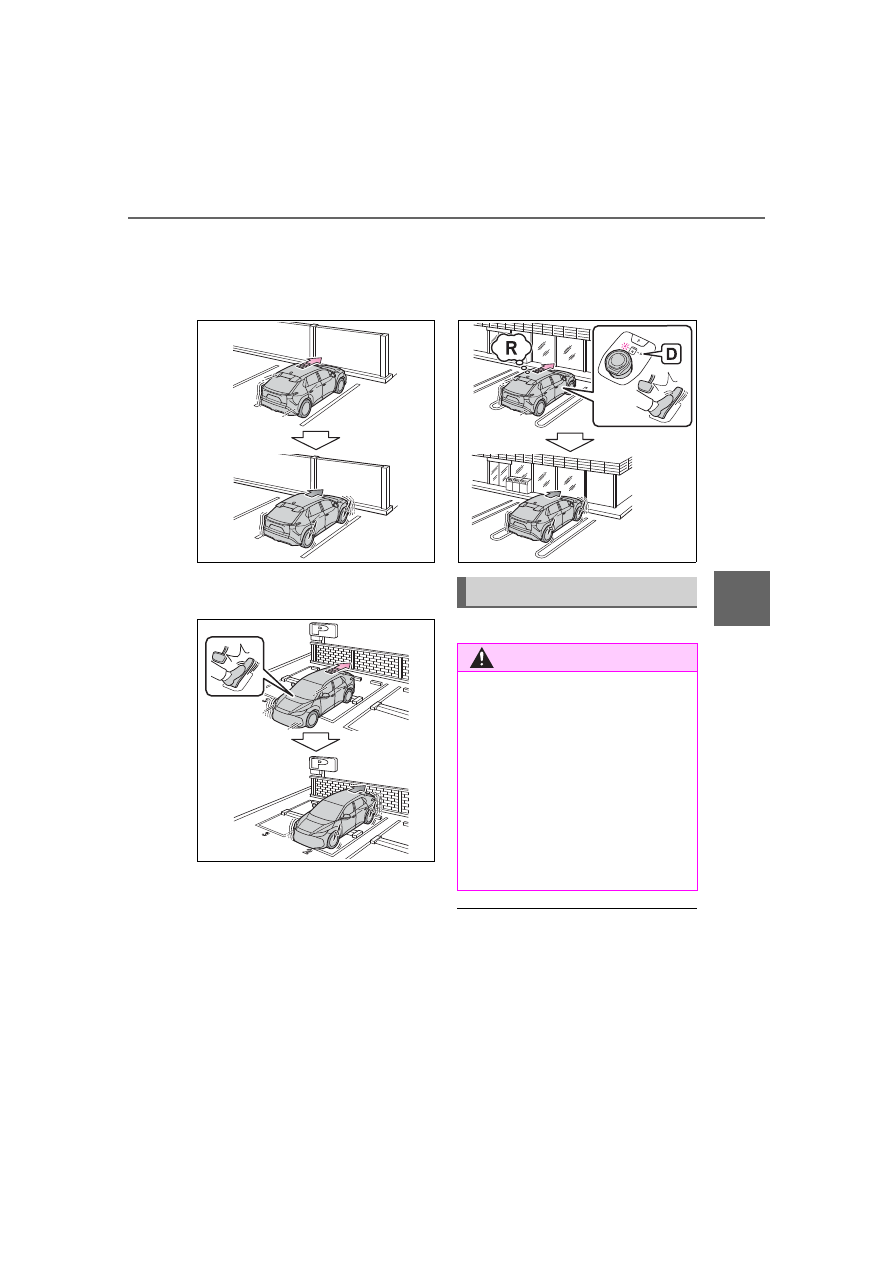
The system will operate in the following situations when a stationary 
object is detected in the surrounding area.

When moving forward and a collision with a stationary object 
on the inner side of a turn is likely

Static Objects Around 

the Vehicle (vehicles 

with Advanced Park)

While parking, if a sensor 
detects a surrounding sta-
tionary object, such as a 
wall, with which a collision 
is likely, the system will 
operate to help avoid a colli-
sion or reduce the impact of 
the collision.

Examples of function operation

343

5-4. Using the driving support systems

5

Dr

iv

ing

When reversing and a collision with a stationary object on the 
outer side of a turn is likely

Operating conditions

This function is operable when any 

of the operating conditions are met 

in addition to the following condi-

tions for stationary objects in around 

the vehicle.

After the EV system has been 

started, the vehicle has moved 

approximately 23.0 ft. (7 m) or 

less

The R shift position is selected

After the shift position has been 

changed from R to D, the vehicle 

has moved approximately 23.0 ft. 

(7 m) or less

The system will stop operating 

when

P.338

Sensor detection information

The detection range of the system 

differs from the detection range of 

the intuitive parking assist-sensor.
Therefore, even if the intuitive park-

ing assist-sensor detects a static 

object and provides a warning, the 

PKSB (Parking Support Brake) sys-

tem may not start operating.

Objects which the sensor may 

not be properly detected

P.314

Situations in which the system 

may operate even though there 

is no possibility of a collision

In addition to the situations in which 

stationary objects around the vehi-

cle (

P.337) may not be detected, 

objects may not be detected by the 

sensors in the following situations
When moving sideways, such as 

when parallel parking: 

P.338

Detection of objects along the 

sides of the vehicle

Objects along the sides of the 

vehicle are not instantaneously 

detected. The location of objects 

in relation to the vehicle is esti-

mated after they are first detected 

by the front or rear side sensors, 

or side cameras. Therefore, after 

the power switch is changed to 

ON, even if an object is along the 

side of the vehicle, it may not be 

detected until the vehicle has 

been driven a small amount and 

the side sensors or side cameras 

completely scan the areas along 

the sides of the vehicle.

If a vehicle, person, animal, etc, is 

344

5-4. Using the driving support systems

detected by a side sensors or side 

cameras, but then leaves the 

detection area of the side sensors 

or side cameras, the system will 

assume the object has not moved.

*

: If equipped

The Advanced Park is a system 
which assists in safely and 
smoothly parking in a target 
parking space by displaying the 
blind spots around the vehicle 
and the parking spot through a 
bird’s eye view, delivering oper-
ation guidance through displays 
and buzzer operation, and 
changing the shift position, 
operating the steering wheel, 
accelerator pedal, and brake 
pedal.
Additionally, the panoramic view 
monitor can display the area in 
front, behind, and from above 
the vehicle, helping confirm the 
condition of the area around the 
vehicle.
For details on the panoramic 
view monitor refer to “MULTIME-
DIA OWNER’S MANUAL”.
Depending on the condition of 
the road surface or the vehicle, 
the distance between the vehi-
cle and a parking space, etc., it 
may not be possible to assist in 
parking in the target space.

Preparation before using

P.375

Toyota Teammate 

Advanced Park

*

Purpose of the Advanced 
Park

345

5-4. Using the driving support systems

5

Dr

iv

ing

Remote control function is a 
system which assists in parking 
or exiting from a parking space 
selected on the multimedia dis-
play by allowing changing the 
shift position, operating the 
steering wheel, accelerator 
pedal, and brake pedal from out-
side of the vehicle via a smart-
phone.

Perpendicular parking (for-
ward/reverse) function

Assistance is provided from the 
position the vehicle is stopped 
near the target parking space 
until the vehicle is in the parking 
space. (

P.356)

Perpendicular exiting (for-
ward/reverse) function

Assistance is provided from the 
parked position until the vehicle 
is in a position where you can 
easily exit from the parking 
space. (

P.359)

Parallel parking function

Assistance is provided from the 
position the vehicle is stopped 
near the target parking space 
until the vehicle is in the parking 
space. (

P.360)

Parallel exiting function

Assistance is provided from the 

parked position until the vehicle 
is in a position where you can 
easily exit from the parking 
space. (

P.364)

Memory function

Assistance is provided until the 
vehicle is guided into a previ-
ously registered parking space. 
(

P.366)

Remote control function

By operating a smartphone, 
assistance in entering or exiting 
a nearby target parking space, 
confirmed on the screen of the 
smartphone, is provided from 
outside of the vehicle. (

P.371)

Purpose of the Remote 
control function

Advanced Park Functions

WARNING

Cautions regarding the use of 

the system

The recognition and control capa-

bilities for this system are limited. 

Do not overly rely on this system. 

The driver is always responsible 

for paying attention to the vehicle’ 

surroundings and driving safely.

As with a normal vehicle, take 

care to observe your surround-

ings while the vehicle is moving.

Always pay attention to the 

vehicle’s surroundings while the 

system is operating and 

depress the brake pedal as nec-

essary to slow or stop the vehi-

cle.

When parking, make sure that 

the vehicle can be parked in the 

target parking space before 

beginning operation.

346

5-4. Using the driving support systems

WARNING

Depending on the condition of 

the road surface or the vehicle, 

the distance between the vehi-

cle and a parking space, etc., it 

may not be possible to detect a 

parking space or the system 

may not be able to provide 

assistance to the point the vehi-

cle is fully parked.

This system will guide the vehi-

cle to appropriate positions for 

changing the direction of travel, 

however, if you feel that the 

vehicle is approaching too close 

to an adjacent parked vehicle at 

any time, depress the brake 

pedal and change the shift posi-

tion. However, if this is per-

formed, the number of times the 

vehicle changes direction may 

increase, and the vehicle may 

be parked at an angle.

As following objects may not be 

detected, make sure to check 

the safety of the area around 

your vehicle and depress the 

brake pedal to stop the vehicle if 

it may collide with an object.

• Thin objects such as wire, 

fences, rope, etc.

• Cotton, snow and other materi-

als that absorb sound waves

• Sharply-angled objects

• Low objects (curb stones, park-

ing blocks, etc.)

• Tall objects with upper sections 

that protrude outward

Even if there is an object in the 

target parking space, it may not 

be detected and assistance 

may be performed.

While the system is operating, if 

it is likely that your vehicle will 

collide with a nearby vehicle, 

parking block, object, or person, 

depress the brake pedal to stop 

the vehicle and press the 

Advanced Park main switch to 

disable the system.

Never use only the multimedia 

display to view the area behind 

the vehicle. The image dis-

played may differ than the 

actual situation. Using only the 

screen when backing up may 

lead to an accident, such as a 

collision with another vehicle. 

When backing up, make sure to 

look directly or use the mirrors 

to check the safety of the area 

around your vehicle, especially 

behind the vehicle.

When the ambient temperature 

is extremely low, the screen 

may appear dark or the dis-

played image may become 

unclear. Also, as moving objects 

may appear distorted or may 

not be able to be seen on the 

screen, make sure to directly 

check the safety of the area 

around your vehicle.

In the following situations, while 

the vehicle is stopped and held 

by Advanced Park, it may be 

canceled and the vehicle may 

start moving. Immediately 

depress the brake pedal. Fail-

ure to do so may lead to an 

accident.

• When the driver’s door is 

opened

• When operations instructed by 

the system are not performed 

within a certain amount of time

• When the brake pedal is 

depressed and the vehicle is 

stopped for a certain amount of 

time

347

5-4. Using the driving support systems

5

Dr

iv

ing

WARNING

• When the system malfunctions

As the steering wheel will turn 

while this system is operating, 

pay attention to the following.

• Be careful so that a necktie, 

scarf, or arm does not get 

caught. Keep your upper body 

away from the steering wheel. 

Also, keep children away from 

the steering wheel.

• Long fingernails may be caught 

and when the steering wheel is 

rotating, leading to injury.

• In an emergency, depress the 

brake pedal to stop the vehicle, 

and then press the Advanced 

Park main switch to disable the 

system.

Do not allow anyone to put their 

hands outside of a window while 

this system is operating.

Precautions for the cameras 

and sensors

Due to the characteristics of the 

camera lens, the position of and 

distance to people and objects 

displayed on the screen may 

differ from the actual situation. 

For details on the following, 

refer to “Panoramic view moni-

tor” of “Peripheral monitoring 

system” in the “MULTIMEDIA 

OWNER’S MANUAL”.

Make sure to observe the pre-

cautions for using the intuitive 

parking assist-sensor (

P.312), 

otherwise a sensor may not 

operate correctly, possibly lead-

ing to an accident.

In situations such as the follow-

ing, the sensors may not oper-

ate correctly, possibly leading to 

an accident. Proceed carefully.

• When there is a parked vehicle 

next to the target parking space, 

if the displayed target parking 

space is far from the actual tar-

get parking space, a sensor 

may be misaligned. Have the 

vehicle inspected by your Toy-

ota dealer.

• Do not install any accessories 

near the detection area of the 

sensors.

To ensure correct operation 

of the Advanced Park

Observe the following precau-

tions.

Failing to do so may result in the 

vehicle being unable to be driven 

safely and possibly leading to an 

accident.

Do not use this system in situa-

tions such as the following:

• When in areas other than com-

mon parking spaces

• When the surface of the parking 

space is sand or gravel and is 

not clearly defined with parking 

space lines

• When the parking space is not 

level, such as when on a slope 

or has differences in height

• Mechanical parking system

• Parking lot with a device which 

raises to contact the bottom of 

the vehicle

• When the road surface is fro-

zen, slick, or covered with snow

• When it is extremely hot and the 

asphalt is melting

• When there is an object in front 

of the vehicle

348

5-4. Using the driving support systems

WARNING

• When there is an object 

between your vehicle and the 

target parking spot or within the 

target parking spot (within the 

displayed blue box)

• When there is a gutter between 

your vehicle and the target park-

ing space or within the target 

parking spot (within the dis-

played blue box)

• When there is a hole or gutter in 

the exit direction

• When in high pedestrian or 

vehicle traffic areas

• When the parking space is in a 

location that is difficult to park in 

(too narrow for your vehicle, 

etc.)

• When images are unclear due 

to dirt or snow attached to the 

camera lens, light being shined 

into the camera or shadows

• When tire chains or a compact 

spare tire is installed to the vehi-

cle

• When the doors are not com-

pletely closed

• When an arm is held outside of 

a window

• In inclement weather such as 

heavy rain or snow

Make sure to use only standard 

sized tires, such as those that 

were installed to the vehicle 

when it was shipped from the 

factory. Otherwise, Advanced 

Park may not operate properly. 

Also, when the tires have been 

replaced, the displayed position 

of the lines or box displayed on 

the screen may become incor-

rect. When replacing the tires, 

contact by your Toyota dealer.

In situations such as the follow-

ing, it may not be possible for 

the system to provide assis-

tance to a registered parking 

spot:

• When the tires are extremely 

worn or the tire inflation pres-

sure is low

• When carrying a heavy load

• When the vehicle is tilted due to 

the carried load

• When a heater is installed in the 

surface of the parking space 

(road surface freeze prevention 

heater)

• When the wheels are mis-

aligned, such after a wheel has 

been subject to a strong impact

• When a pedestrian or passing 

vehicle is detected during assis-

tance

• When something is incorrectly 

detected as a parking line (light, 

reflections from a building, dif-

ference in height on the parking 

surface, a gutter, painted road 

lines, redrawn lines, etc.)

If the vehicle deviates greatly from 

the set parking space in any situa-

tion other than the above, have 

the vehicle inspected at your Toy-

ota dealer as soon as possible.

When using Remote control 

function

Remote control function is a 

function of the Advanced Park 

system. When using Remote 

control function on public roads, 

be sure to follow all local road 

traffic laws and regulations.

Remote control function can 

only be used after agreeing to 

the disclaimer of the smart-

phone application.

349

5-4. Using the driving support systems

5

Dr

iv

ing

WARNING

Remote control function can 

only perform some driving oper-

ations. It should only be oper-

ated by a driver with a valid 

driving license. While using 

application, carry, electronic 

key. While operating, do not 

stare at the application screen, 

and pay attention to the vehi-

cle’s surroundings. In an emer-

gency, cancel the Remote 

control function operation and 

stop the vehicle.

As with a normal vehicle, take 

care to observe the area around 

the vehicle while the vehicle is 

moving.

Always pay attention to the 

vehicle’s surroundings while the 

system is operating.

Remote control function is a 

system which assists in remote 

parking or exiting operations 

using a smartphone. When 

using Remote control function, 

the driver must carry the elec-

tronic key and smartphone and 

confirm the safety of the area 

around the vehicle.

While using Remote control 

function, the vehicle can be 

stopped by stop continuously 

operating the smartphone (stop-

ping movement of your finger, 

removing your finger from the 

screen, etc.). The vehicle can 

also be stopped by touching the 

cancel button on the smart-

phone application, unlocking the 

doors using the electronic key, 

or opening a door.

If it seems like your vehicle may 

contact an obstruction, etc., 

stop operating the smartphone 

and cancel Remote control 

function if necessary.

System operation will only be 

performed at a fixed speed and 

the vehicle cannot be acceler-

ated or decelerated even if the 

speed of continuous operation 

of the smartphone is increased 

or decreased.

Never drive the vehicle while 

staring at the smartphone 

screen.

When driving, make sure to 

directly check the safety of the 

area around your vehicle.

Do not use Remote control 

function when passengers or 

pets are in the vehicle.

In an emergency, the system 

can be canceled by operating a 

switch on the electronic key or 

by opening a door.

To use Remote control function, 

it is necessary to have a smart-

phone with the latest version of 

the Remote Park app. The fol-

lowing operating systems are 

supported:

• Android

• Apple

®

 iOS

When registering the vehicle to 

the Remote Park smartphone 

app, disconnect any other apps 

which are connected to the 

vehicle.

To enable Remote control func-

tion, make sure to disable the 

Apple CarPlay connection.

When parking, make sure that 

the vehicle can be parked in the 

target parking space before 

beginning operation.

350

5-4. Using the driving support systems

WARNING

Only use Remote control func-

tion on level road surfaces 

which are not slick. Do not use 

Remote control function for 

parking spaces on a downward 

or upward incline.

While Remote control function 

is operating, if a malfunction or 

system limitation is detected, 

the following will occur automat-

ically:

• Remote control function will be 

canceled

• The vehicle will stop

• The shift position will change to 

P and the parking brake will be 

engaged

• The power switch will turn off 

(for some malfunctions, the 

power switch will not turn off or 

cannot be turned off. Enter the 

vehicle and take corrective 

action according to the mes-

sage displayed on the smart-

phone.)

• The doors will remain locked

When starting Remote control 

function, unlock the doors with 

wireless remote control by elec-

tronic key.

When Remote control function 

is operating, the driver should 

remain within approximately 9.8 

ft. (3 m) of the vehicle. If the 

driver becomes more than 

approximately 9.8 ft. (3 m) 

away, Remote control function 

will be suspended and a mes-

sage will be displayed on the 

smartphone. Remote control 

function operation can be 

resumed by approaching the 

vehicle.

The headlights will be turned on 

if the surrounding area is dark.

If system operation is canceled 

due to a malfunction, the emer-

gency flashers will flash.

The emergency flashers will 

turn off if any of the following 

conditions are met:

• A door is opened

• 3 minutes have elapsed since 

the emergency flashers began 

flashing

Remote control function can 

only be started when the follow-

ing conditions are met:

• When the EV system is starting, 

after assist mode is selected

• When the power switch is off

• When the remote air condition-

ing is operating

After unlocking the doors using 

the wireless remote control, if 

the doors are locked using the 

smart entry function, the lock 

operation may be delayed.

NOTICE

Precautions for use 

Advanced Park

If the 12-volt battery was dis-

charged or has been removed 

and installed, fold and extend the 

outside rear view mirrors.

When using Remote control 

function

351

5-4. Using the driving support systems

5

Dr

iv

ing

NOTICE

Check the battery charge level 

of the smartphone before using 

Remote control function. If the 

battery of the smartphone dies 

while operating Remote control 

function, assist will be sus-

pended. Also, if the battery 

charge level of the smartphone 

is 20% or less when attempting 

to start Remote control function, 

Remote control function will not 

be started.

Turn on the Bluetooth communi-

cation function of the smart-

phone before using Remote 

control function. Remote con-

trol function cannot be used if 

the Bluetooth function is off.

Do not turn off the Bluetooth 

function of the smartphone or 

disconnect from the multimedia 

system while using Remote 

control function. If the vehicle 

cannot be connected to via 

Bluetooth, Remote control func-

tion cannot be used.

While using Remote control 

function, if a call is received, 

etc., and another app is 

opened, Remote control func-

tion will be suspended. Assist 

can be resumed if the Remote 

Park app is reopened within 3 

minutes. If 3 minutes or more 

elapse, assist will be canceled.

While using Remote control 

function, if the home button or 

power button of the smartphone 

is pressed and the screen is 

locked, Remote control function 

will be suspended. Assist can 

be resumed if the Remote Park 

app is reopened within 3 min-

utes. If 3 minutes or more 

elapse, assist will be canceled.

Do not use the Remote Park 

app with devices other than 

those which operation has been 

confirmed by the maker. Other-

wise the system may not oper-

ate correctly.

When the ambient temperature 

is low, it may take time for the 

system to start, due to 12-volt 

battery charging.

If the 12-volt battery voltage 

drops, assistance will be can-

celed.

When using Remote control 

function on a slope, the vehicle 

speed will be slower and the 

distance that the vehicle will 

approach objects will become 

longer than when on a level 

road surface.

If a system temporary failure 

occurs, after the vehicle is 

stopped by the electronic park-

ing brake or the shift position 

being changed to P, the power 

switch may turn off and the sys-

tem may be canceled. In this 

case, have the vehicle 

inspected by your Toyota 

dealer.

If a system malfunction occurs, 

assistance may be temporarily 

suspended. If the system 

returns to normal, operation can 

be resumed. Follow the content 

on the smartphone screen to 

resume operation.

Remote control function cannot 

be started if the EV system has 

been started using an aftermar-

ket remote starter.

352

5-4. Using the driving support systems

Cameras and sensors are used 
to detect parked vehicles, mak-
ing it easier to identify parking 
spaces.

Front camera

Side cameras

Rear camera

Sensors

P.311

Camera images

As special cameras are used, the 

colors in displayed images may dif-

fer from the actual color.

Precautions for use

For details on the following, refer to 

“MULTIMEDIA OWNER’S MAN-

UAL”.

Displayable range of the screens

Cameras

Differences between displayed 

images and the actual road

Differences between displayed 

images and the actual objects

Detection range of the cameras 

and sensors

If a parked vehicle is behind the 

target parking space and the dis-

tance between it and the vehicle 

NOTICE

After Remote control function 

completes, the parking brake 

will be engaged as per regula-

tions. As the parking brake may 

freeze and not be able to be 

released, avoid using Remote 

control function in extremely 

cold areas. Also, if the parking 

brake freezes, it may make a 

noise when it is released. How-

ever, this does not indicate a 

malfunction.

Do not use the remote function 

with an electronic key that has a 

depleted battery.

The remote function cannot be 

started while the vehicle 

charging connector is con-

nected. If support is accidentally 

started, it may end abnormally.

Type of Advanced Park 
cameras and sensors


Content      ..     19      20      21      22     ..