Toyota Yaris Cross (2022 year). Manual in english - page 8
 

  Index      Toyota     Toyota Yaris Cross (2022 year). Manual in english


Search            copyright infringement  


Content      ..     6      7      8      9     ..


Toyota Yaris Cross (2022 year). Manual in english - page 8


128

n

3-2. Opening, closing and locking the doors

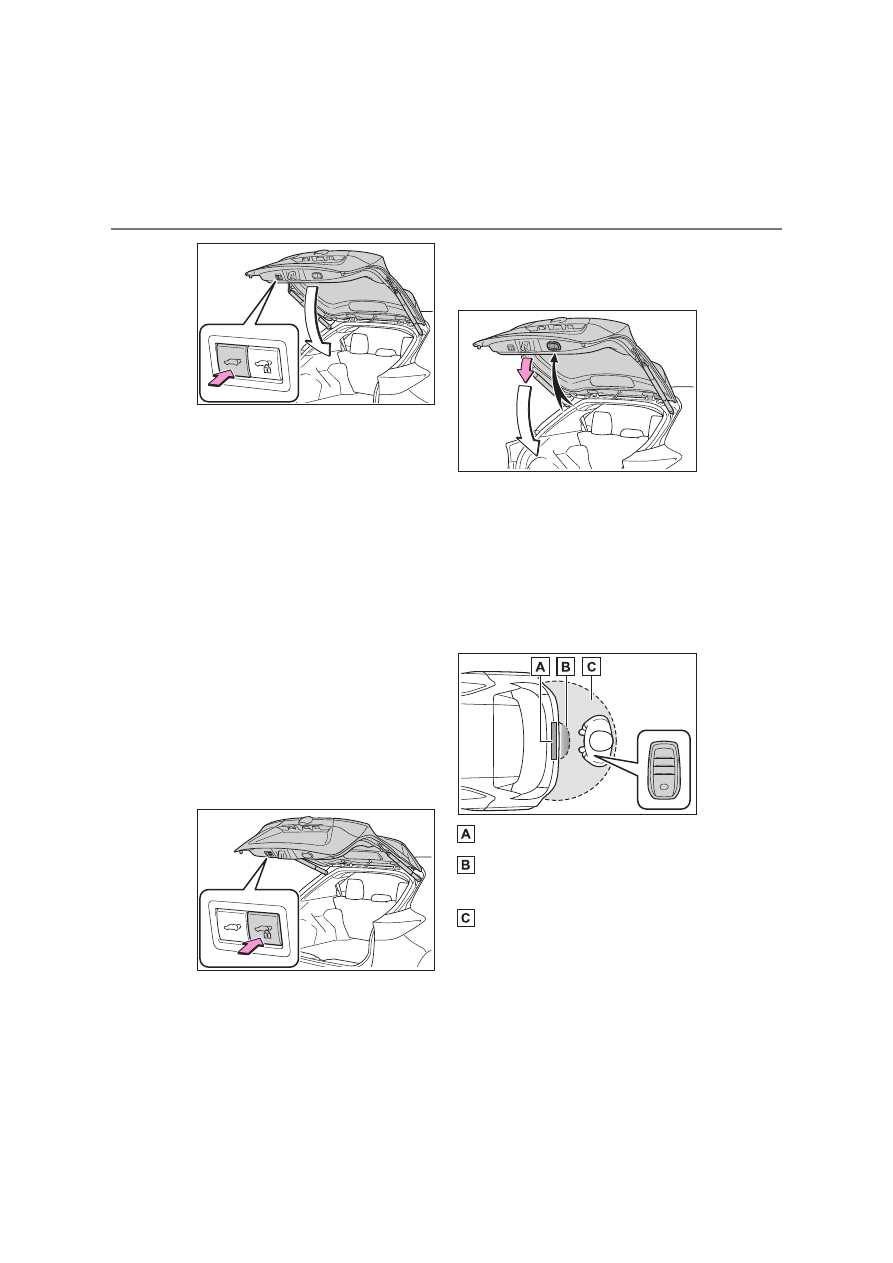
Close the back door and lock all 
doors (close & lock function)

Press the close & lock switch.
The power back door will close and all 
of the doors will be locked at the same 
time.
A different buzzer than the normal one 
will sound and the power back door will 
begin closing automatically. When the 
power back door is closed, all of the 
doors will lock simultaneously and 
operation signals will indicate that all of 
the doors have been locked.
If the close & lock switch is pressed 
during the power back door closing, the 
operation stops and all the doors 
unlock.
If the close & lock switch is pressed 
again, the power back door closes and 
all the doors lock.

Using the back door handles

Lower the back door using the back 

door handle, then a buzzer sounds 
and the back door automatically 
closes.

Using the kick sensor (Hands 
Free Power Back Door)

1

While carrying an electronic key, 
stand within the smart entry & 
start system operation range, 
approximately 30 to 50 cm (11.8 
to 19.7 in.) from the rear 
bumper.

Kick sensor

Hands Free Power Back Door 

operation detection area

Smart entry & start system oper-

ation detection area (

P.136)

2

Perform a kick operation by 
moving your foot to within 
approximately 10 cm (3.9 in.) of 

129

3

n

3-2. Opening, closing and locking the doors

Before dri

ving

the rear bumper and then pulling 
it back.

Perform the entire kick operation within 
1 second.
The back door will not start operating 

while a foot is detected under the rear 
bumper.
Operate the Hands Free Power Back 

Door without contacting the rear 
bumper with your foot.
If another electronic key is in the cabin 

or luggage compartment, it may take 
slightly longer than normal for the oper-

ation to occur.

Kick sensor

Hands Free Power Back Door 

operation detection area

3

When the kick sensor detects 
that your foot is pulled back, a 
buzzer will sound and the back 
door will automatically fully 
open/close.

If a foot is moved under the rear 
bumper while the back door is open-

ing/closing, the back door will stop 

moving.
If a foot is moved under the rear 

bumper again during the halted opera-

tion, the back door will perform the 
reverse operation.

Luggage compartment light

The luggage compartment light turns 

on when the back door is opened.

If the luggage compartment light is left 

on when the engine switch is turned 
off, the light will go off automatically 

after 20 minutes.

Back door closer

In the event that the back door is left 
slightly open, the back door closer will 

automatically close it to the fully closed 

position.
Whatever the state of the engine switch, 

the back door closer operates.

Power back door operating condi-

tions

The power back door can automatically 

open and close under the following con-

ditions:

When the power back door system is 

enabled. (

P.135)

When the back door is unlocked.

However, if the back door opener switch 
is pressed while carrying the electronic 
key on your person, the power back 
door will be operated even if the back 
door is locked. (

P.127)

When the engine switch is in ON, in 

addition to the above for the opening 

operations, the back door operates for 
any of the following conditions:

• Parking brake is engaged

• The brake pedal is depressed
• Vehicles with a Multidrive: The shift 

lever is in P.

Operation of the power back door

When the power back door system is 

disabled, the power back door does 

not operate but it can be opened and 
closed by hand.

When the power back door automati-
cally opens, if an abnormality due to 

people or objects is detected, opera-

tion will stop.

Jam protection function

Sensors are equipped on both sides of 

the power back door. If anything 

obstructs the power back door while it is 

130

n

3-2. Opening, closing and locking the doors

closing, the back door will automatically 
operate in the opposite direction or stop.

Back door reserve lock function

This function is a function which 

reserves locking of all doors, before-

hand, when the power back door is 
open.
When the following procedure is per-

formed, all the doors except the power 
back door are locked and then power 

back door will also be locked at the 

same time it is closed.

1

Close all doors, except the back 
door.

2

During the power back door closing 

operation, lock the doors using the 

smart entry & start system from the 
front doors (

P.119) or the wireless 

remote control. (

P.119)

A buzzer sounds and the emergency 
flashers flash to indicate that all the 

doors have been closed and locked.

If the electronic key is placed inside 

the vehicle after starting a close oper-

ation via the door reserve lock func-
tion, the electronic key may become 

locked inside the vehicle.

If the power back door does not fully 

close due to the operation of the jam 

protection function, etc., while the 
back door is automatically closing 

after a door reserve lock operation is 

performed, the door reserve lock func-
tion is canceled and all the doors will 

unlock.

Before leaving the vehicle, make sure 

that all the doors are closed and 

locked.

Close & lock function

When the power back door is open, this 

function closes the power back door and 
then locks all of the doors simultane-

ously.
When the following procedures are per-
formed and there are no electronic keys 

for the vehicle within the vehicle, all of 

the doors will lock when the power back 
door is completely closed.

1

Close all of the doors except the 

power back door.

2

While carrying an electronic key, 

press the close & lock switch on the 
lower part of the power back door 

(

P.127).

A different buzzer than the normal one 
will sound and then the power back door 

will begin closing automatically. When 

the power back door is closed, all of the 
doors will lock simultaneously and oper-

ation signals will indicate that all of the 

doors have been locked.
The double locking system will not oper-

ate at this time.

Situations in which the close & lock 

function may not operate properly

In the following situations, the close & 

lock function may not operate properly:

If the close & lock switch on the lower 

part of the power back door (

P.127) 

is pressed by a hand which is holding 
an electronic key

If the close & lock switch on the lower 
part of the power back door is pressed 

when the electronic key is in a bag, 

etc. that is placed on the ground

If the close & lock switch on the lower 

part of the power back door is pressed 
with the electronic key not near the 

vehicle

Kick sensor operating conditions

The Hands Free Power Back Door will 
open/close automatically when the fol-

lowing conditions are met:

The kick sensor operation is enabled 

(

P.135)

The electronic key is within the opera-

tional range. (

P.136)

131

3

n

3-2. Opening, closing and locking the doors

Before dri

ving

A foot is put near the lower center part 
of the rear bumper and moved away 

from the rear bumper.

The power back door may also be 
operated by putting a hand, an elbow, 

a knee, etc. near the lower center part 

of the rear bumper and moving it away 
from the rear bumper. Make sure to 

hold it close enough to the center part 

of the rear bumper.

Situations in which the Hands Free 
Power Back Door may not operate 

properly

In the following situations, the Hands 
Free Power Back Door may not operate 

properly:

When a foot remains under the rear 

bumper

If the rear bumper is strongly hit with a 

foot or is touched for a while

If the rear bumper has been touched for 
a while, wait for a short time before 
attempting to operate the Hands Free 
Power Back Door again.

When operated while a person is too 

close to the rear bumper

When an external radio wave source 

interferes with the communication 

between the electronic key and the 
vehicle (

P.138)

When the vehicle is parked near an 
electrical noise source which affects 

the sensitivity of the Hands Free 

Power Back Door, such as a pay park-
ing spot, gas station, electrically 

heated road, or fluorescent light

When the vehicle is near a TV tower, 

electric power plant, radio station, 

large display, airport or other facility 
that generates strong radio waves or 

electrical noise

When a large amount of water is 

applied to the rear bumper, such as 

when the vehicle is being washed or 
in heavy rain

When mud, snow, ice, etc. is attached 
to the rear bumper

When the vehicle has been parked for 
a while near objects that may move 

and contact the rear bumper, such as 

plants

When an accessory is installed to the 

rear bumper

If an accessory has been installed, turn 
the Hands Free Power Back Door (kick 
sensor) operation setting off.

Preventing unintentional operation 
of the Hands Free Power Back Door

When an electronic key is in the opera-

tion range, the Hands Free Power Back 
Door may operate unintentionally, so be 

careful in the following situations.

When a large amount of water is 

applied to the rear bumper, such as 

when the vehicle is being washed or 
in heavy rain

When dirt is wiped off the rear bumper

When a small animal or small object, 

such as a ball, moves under the rear 
bumper

When an object is moved from under 
the rear bumper

If someone is swinging their legs while 
sitting on the rear bumper

If the legs or another part of some-
one’s body contacts the rear bumper 

while passing by the vehicle

When the vehicle is parked near an 

electrical noise source which affects 

the sensitivity of the Hands Free 
Power Back Door, such as a pay park-

ing spot, gas station, electrically 

heated road, or fluorescent light

When the vehicle is near a TV tower, 

electric power plant, radio station, 
large display, airport or other facility 

that generates strong radio waves or 

electrical noise

When the vehicle is parked in a place 

where objects such as plants are near 
the rear bumper

If luggage, etc. is set near the rear 
bumper

132

n

3-2. Opening, closing and locking the doors

If accessories or a vehicle cover is 
installed/removed near the rear 

bumper

When the vehicle is being towed

To prevent unintentional operation, turn 
the Hands Free Power Back Door (kick 
sensor) operation setting off. (

P.135)

When reconnecting the battery

To enable the power back door to oper-

ate properly, close the back door manu-
ally.

Customization

Settings (e.g. power back door opening 

angle) can be changed. (Customizable 
features: 

P.457)

WARNING

Back door closer

In the event that the back door is 
left slightly open, the back door 

closer will automatically close it to 

the fully closed position. It takes 
several seconds before the back 

door closer begins to operate. Be 

careful not to catch fingers or any-
thing else in the back door, as this 

may cause bone fractures or other 

serious injuries.

Use caution when using the back 

door closer as it still operates when 
the power back door system is can-

celed.

Power back door

Observe the following precautions 

when operating the power back door. 
Failure to do so may cause death or 

serious injury.

Check the safety of the surrounding 
area to make sure there are no 

obstacles or anything that could 

cause any of your belongings to get 
caught.

If anyone is in the vicinity, make 
sure they are safe and let them 

know that the back door is about to 

open or close.

If the power back door system is 

turned off while the back door is 
operating automatically, the auto-

matic operation is stopped. The 

back door then has to be operated 
manually. Take extra care when on 

an incline, as the back door may 

open or close unexpectedly.

If the operating conditions of the 

power back door are no longer met, 
a buzzer may sound and the back 

door may stop opening or closing. 

The back door then has to be oper-
ated manually. Take extra care 

when on an incline, as the back 

door may open or close abruptly.

On an incline, the back door may 

suddenly shut after it opens. Make 
sure the back door is fully open and 

secure.

133

3

n

3-2. Opening, closing and locking the doors

Before dri

ving

WARNING

In the following situations, the 

power back door may detect an 
abnormality and automatic opera-

tion may be stopped. In this case, 

the back door has to be operated 
manually. Take extra care when on 

an incline, as the back door may 

open or close abruptly.

• When the back door contacts an 

obstacle

• When the battery voltage suddenly 

drops, such as when the engine 

switch is turned to ON or the engine 

is started during automatic opera-
tion

If a bicycle carrier or similar heavy 
object is attached to the back door, 

it may suddenly shut again after 

being opened, causing someone’s 
hands, head or neck to be caught 

and injured. When installing an 

accessory part to the back door, 
using a genuine Toyota part is rec-

ommended.

Jam protection function

Observe the following precautions. 

Failure to do so may cause death or 
serious injury.

Never use any part of your body to 

intentionally activate the jam pro-
tection function.

The jam protection function may not 
work if something gets caught just 

before the back door fully closes. 

Be careful not to catch fingers or 
anything else.

The jam protection function may not 
work depending on the shape of the 

object that is caught. Be careful not 

to catch fingers or anything else.

Hands Free Power Back Door

Observe the following precautions 

when operating the Hands Free 
Power Back Door.

Failure to do so may cause death or 

serious injury.

Check the safety of the surrounding 

area to make sure there are no 

obstacles or anything that could 
cause any of your belongings to get 

caught.

When putting your foot near the 

lower center part of the rear bumper 

and moving it from the rear bumper, 
be careful not to touch the exhaust 

pipes until they have cooled down 

sufficiently, as touching hot exhaust 
pipes can cause burns.

Do not leave the electronic key 
within the effective range (detection 

area) of the luggage compartment.

NOTICE

Back door spindles

The back door is equipped with spin-

dles that hold the back door in place.

Observe the following precautions. 
Failure to do so may cause damage 

to the back door spindle, resulting in 

malfunction.

Do not attach any foreign objects, 

such as stickers, plastic sheets, or 
adhesives to the spindle rod.

Do not touch the spindle rod with 
gloves or other fabric items.

134

n

3-2. Opening, closing and locking the doors

NOTICE

Do not attach heavy accessories to 

the back door. When attaching, ask 
any authorized Toyota retailer or 

Toyota authorized repairer, or any 

reliable repairer for details.

Do not place your hand on the spin-

dle or apply lateral forces to it.

To prevent back door closer mal-

function

Do not apply excessive force to the 

back door while the back door closer 

is operating. Applying excessive force 
may cause the back door closer to 

malfunction.

To prevent damage to the power 

back door

Make sure that there is no ice 
between the back door and frame 

that would prevent movement of the 

back door. Operating the power 
back door when excessive load is 

present on the back door may 

cause a malfunction.

Do not apply excessive force to the 

back door while the power back 
door is operating.

Take care not to damage the sen-
sors (installed on the right and left 

edges of the power back door) with 

a knife or other sharp object. If the 
sensor is disconnected, the power 

back door will not close automati-

cally.

Close & lock function

When closing the power back door 

using the close & lock function, a dif-
ferent buzzer than the normal one will 

sound before the operation begins.
To check that the operation has 
started correctly, check that a different 

buzzer than the normal one has 

sounded.
Additionally, when the power back 

door is fully closed and locked, opera-

tion signals will indicate that all of the 
doors have been locked.
Before leaving the vehicle, make sure 

that the operation signals have oper-
ated and that all of the doors are 

locked.

Hands Free Power Back Door 

precautions

The kick sensor is located behind 
lower center part of the rear bumper. 

Observe the following to ensure that 

the Hands Free Power Back Door 
function operates properly:

Keep the lower center part of the 

rear bumper clean at all times.
If the lower center part of the rear 

bumper is dirty or covered with 

snow, the kick sensor may not oper-
ate. In this situation, clean off the 

dirt or snow, move the vehicle from 

the current position and then check 
if the kick sensor operates.

If it does not operate, have the vehi-

cle inspected by any authorized 
Toyota retailer or Toyota authorized 

repairer, or any reliable repairer.

Do not apply coatings that have a 

rain clearing (hydrophilic) effect, or 

other coatings, to the lower center 
part of the rear bumper.

135

3

n

3-2. Opening, closing and locking the doors

Before dri

ving

The settings of the power back door 
system can be changed by display-
ing the “Vehicle Settings” - 

 (4.2-inch display) or 

 (7-inch display) screen from 

the setting screen of the multi-infor-
mation display. (

P.457)

The changed power back door settings 
are not reset by turning the engine 
switch to OFF. In order to restore the 
original settings, they need to be 
changed back on the setting screen of 
the multi-information display.

The open position of the power 
back door can be adjusted.

1

Stop the back door in the desir-
able position. (

P.126)

2

Press and hold the power back 
door switch on the back door for 
approximately 2 seconds.

When the settings are completed, the 

buzzer sounds 4 times.
When opening the back door the next 

time, the back door will stop at that 

NOTICE

Do not park the vehicle near objects 

that may move and contact the 
lower center part of the rear 

bumper, such as grass or trees.

If the vehicle has been parked for a 
while near objects that may move 

and contact the lower center part of 

the rear bumper, such as grass or 
trees, the kick sensor may not oper-

ate. In this situation, move the vehi-

cle from the current position and 
then check if the kick sensor oper-

ates. If it does not operate, have the 

vehicle inspected by any authorized 
Toyota retailer or Toyota authorized 

repairer, or any reliable repairer.

Do not subject the kick sensor or its 

surrounding area to a strong 

impact.
If the kick sensor or its surrounding 

area has been subjected to a strong 

impact, the kick sensor may not 
operate properly. If the kick sensor 

does not operate in the following 

situations, have the vehicle 
inspected by any authorized Toyota 

retailer or Toyota authorized 

repairer, or any reliable repairer.

• The kick sensor or its surrounding 

area has been subjected to a strong 

impact.

• The lower center part of the rear 

bumper is scratched or damaged.

Do not disassemble the rear 

bumper.

Do not attach stickers to the rear 

bumper.

Do not paint the rear bumper.

If a bicycle carrier or similar heavy 
object is attached to the power back 

door, disable the kick sensor. 

(

P.135)

Changing settings of the 
power back door system 
(vehicles with power back 
door)

Adjusting the open position 
of the back door (vehicles 
with power back door)

136

n

3-2. Opening, closing and locking the doors

position.

Canceling the adjusted open posi-

tion of the back door

Press and hold the power back door 
switch on the back door for approxi-

mately 7 seconds.
After the buzzer sounds 4 times, it 
sounds twice more. When the power 

back door does the opening operation 

the next time, the door will open to the 
initial settings position.

Customization

The opening position can be set with the 

multi-information display. (

P.135)

Priority for the stop position is given to 
the last position set by either the power 

back door switch on the back door or 

multi-information display.

*

: If equipped

Antenna location

Antennas outside the cabin

Antennas inside the cabin

Antenna outside the luggage com-

partment

Smart entry & start sys-
tem

*

The following operations can 
be performed simply by carry-
ing the electronic key on your 
person, for example in your 
pocket. The driver should 
always carry the electronic 
key.

Locks and unlocks the doors 
(

P.119)

Locks and unlocks the back 
door (

P.125)

Starts the engine (

P.174)

137

3

n

3-2. Opening, closing and locking the doors

Before dri

ving

Effective range (areas within which 
the electronic key is detected)

When locking or unlocking the doors

The system can be operated when the 
electronic key is within about 0.7 m (2.3 
ft.) of an outside front door handle and 
back door. (Only the doors detecting the 
key can be operated.)

When starting the engine or chang-

ing engine switch modes

The system can be operated when the 
electronic key is inside the vehicle.

Alarms and warning messages

A combination of exterior and interior 
buzzers as well as warning messages 

shown on the multi-information display 

are used to prevent theft of the vehicle 
and accidents resulting from erroneous 

operation. Take appropriate measures 

based on the displayed message. 
(

P.413)

When only an alarm sounds, circum-
stances and correction procedures are 

as follows.

Exterior buzzer sounds once for 5 

seconds

Interior buzzer sounds continuously

Battery-saving function

The battery-saving function will be acti-
vated in order to prevent the electronic 

key battery and the vehicle battery from 

being discharged while the vehicle is not 
operated for a long time.

In the following situations, the smart 
entry & start system may take some 

time to unlock the doors.

• The electronic key has been left within 

approximately 3.5 m (11 ft.) of the out-

side of the vehicle for 2 minutes or 

longer.

• The smart entry & start system has 

not been used for 5 days or longer.

If the smart entry & start system has 

not been used for 14 days or longer, 

the doors cannot be unlocked from 
any door except the driver’s door. In 

this case, hold the driver’s door han-

dle, or use the wireless remote control 
or mechanical key to unlock the 

doors.

Electronic key battery-saving func-

tion

When battery-saving mode is set, bat-

tery depletion is minimized by stop-
ping the electronic key from receiving 

radio waves.

Press 

 twice while pressing and 

Situation

Correction 

procedure

An attempt was made 
to lock the vehicle while 
a door was open.

Close all of 
the doors and 
lock the doors 
again.

Situation

Correction 

procedure

The engine switch was 
turned to ACC while the 
driver’s door was open 
(or the driver’s door 
was opened while the 
engine switch was in 
ACC).

Turn the 
engine switch 
off and close 
the driver’s 
door.

The engine switch was 
turned to off while the 
driver’s door was open.

Close the 
driver’s door.

138

n

3-2. Opening, closing and locking the doors

holding 

. Confirm that the electronic 

key indicator flashes 4 times.
While the battery-saving mode is set, 
the smart entry & start system cannot be 
used. To cancel the function, press any 
of the electronic key buttons.

Electronic keys that will not be used 

for long periods of time can be set to 

the battery-saving mode in advance.

Conditions affecting operation

The smart entry & start system uses 

weak radio waves. In the following situa-

tions, the communication between the 
electronic key and the vehicle may be 

affected, preventing the smart entry & 

start system, wireless remote control 
and engine immobilizer system from 

operating properly. (Ways of coping: 

P.437)

When the electronic key battery is 

depleted

Near a TV tower, electric power plant, 

gas station, radio station, large dis-
play, airport or other facility that gen-

erates strong radio waves or electrical 

noise

When carrying a portable radio, cellu-

lar phone, cordless phone or other 
wireless communication device

When the electronic key is in contact 
with, or is covered by the following 

metallic objects

• Cards to which aluminum foil is 

attached

• Cigarette boxes that have aluminum 

foil inside

• Metallic wallets or bags

• Coins

• Hand warmers made of metal
• Media such as CDs and DVDs

When other wireless keys (that emit 
radio waves) are being used nearby

When carrying the electronic key 
together with the following devices 

that emit radio waves

• Another vehicle’s electronic key or a 

wireless key that emits radio waves

• Personal computers or personal digi-

tal assistants (PDAs)

• Digital audio players

• Portable game systems

If window tint with a metallic content or 

metallic objects are attached to the 

rear window

When the electronic key is placed 

near a battery charger or electronic 
devices

When the vehicle is parked in a pay 
parking spot where radio waves are 

emitted

If the doors cannot be locked/unlocked 
using the smart entry & start system, 

lock/unlock the doors by performing any 

of the following:

Bring the electronic key close to either 

front door handle and operate the 
entry function.

Operate the wireless remote control.

If the doors cannot be locked/unlocked 

using the above methods, use the 

mechanical key. (

P.437)

If the engine cannot be started using the 

smart entry & start system refer to 

P.438.

Note for the entry function

Even when the electronic key is within 

the effective range (detection areas), 
the system may not operate properly 

in the following cases:

• The electronic key is too close to the 

window or outside door handle, near 

the ground, or in a high place when 

the doors are locked or unlocked.

• The electronic key is on the instru-

ment panel, luggage cover or floor, or 

in the door pockets or glove box when 

139

3

n

3-2. Opening, closing and locking the doors

Before dri

ving

the engine is started or engine switch 
modes are changed.

Do not leave the electronic key on top 
of the instrument panel or near the 

door pockets when exiting the vehicle. 

Depending on the radio wave recep-
tion conditions, it may be detected by 

the antenna outside the cabin and the 

door will become lockable from the 
outside, possibly trapping the elec-

tronic key inside the vehicle.

As long as the electronic key is within 

the effective range, the doors may be 

locked or unlocked by anyone. How-
ever, only the doors detecting the 

electronic key can be used to unlock 

the vehicle.

Even if the electronic key is not inside 

the vehicle, it may be possible to start 
the engine if the electronic key is near 

the window.

The doors may unlock or lock if a 

large amount of water splashes on the 

door handle, such as in the rain or in a 
car wash when the electronic key is 

within the effective range. (The doors 

will automatically be locked after 
approximately 30 seconds if the doors 

are not opened and closed.)

If the wireless remote control is used 

to lock the doors when the electronic 

key is near the vehicle, there is a pos-
sibility that the door may not be 

unlocked by the entry function. (Use 

the wireless remote control to unlock 
the doors.)

Touching the door lock or unlock sen-
sor while wearing gloves may prevent 

lock or unlock operation.

When the lock operation is performed 

using the lock sensor, recognition sig-

nals will be shown up to two consecu-
tive times. After this, no recognition 

signals will be given.

If the door handle becomes wet while 

the electronic key is within the effec-

tive range, the door may lock and 
unlock repeatedly. In that case, follow 

the following correction procedures to 

wash the vehicle:

• Place the electronic key in a location 2 

m (6 ft.) or more away from the vehi-

cle. (Take care to ensure that the key 
is not stolen.)

• Set the electronic key to battery-sav-

ing mode to disable the smart entry & 
start system. (

P.137)

If the electronic key is inside the vehi-
cle and a door handle becomes wet 

during a car wash, a message may be 

shown on the multi-information dis-
play and a buzzer will sound outside 

the vehicle. To turn off the alarm, lock 

all the doors.

The lock sensor may not work prop-

erly if it comes into contact with ice, 
snow, mud, etc. Clean the lock sensor 

and attempt to operate it again.

A sudden handle operation or a han-

dle operation immediately after enter-

ing the effective range may prevent 
the doors from being unlocked. Touch 

the door unlock sensor and check that 

the doors are unlocked before pulling 
the door handle again.

If there is another electronic key in the 
detection area, it may take slightly lon-

ger to unlock the doors after the door 

handle is gripped.

When the vehicle is not driven for 
extended periods

To prevent theft of the vehicle, do not 
leave the electronic key within 2 m (6 

ft.) of the vehicle.

The smart entry & start system can be 

deactivated in advance. (

P.457)

Setting the electronic key to battery-

saving mode helps to reduce key bat-

tery depletion. (

P.137)

To operate the system properly

Make sure to carry the electronic key 

when operating the system. Do not get 

the electronic key too close to the vehi-
cle when operating the system from the 

outside of the vehicle.

Depending on the position and holding 
condition of the electronic key, the key 

may not be detected correctly and the 

140

n

3-2. Opening, closing and locking the doors

system may not operate properly. (The 
alarm may go off accidentally, or the 

door lock prevention function may not 

operate.)

If the smart entry & start system 
does not operate properly

Locking and unlocking the doors: 

P.437

Starting the engine: 

P.438

Customization

Some functions can be customized. 

(

P.457)

If the smart entry & start system 

has been deactivated in a custom-
ized setting

Locking and unlocking the doors: Use 
the wireless remote control or 

mechanical key. (

P.119, 437)

Starting the engine and changing 

engine switch modes: 

P.438

Stopping the engine: 

P.176

Certification for the smart entry & 

start system

P.543

WARNING

Caution regarding interference 

with electronic devices

People with implantable cardiac 

pacemakers, cardiac resynchroni-

zation therapy-pacemakers or 
implantable cardioverter defibrilla-

tors should maintain a reasonable 

distance between themselves and 
the smart entry & start system 

antennas. (

P.136)

The radio waves may affect the 
operation of such devices. If neces-

sary, the entry function can be dis-

abled. Ask any authorized Toyota 
retailer or Toyota authorized 

repairer, or any reliable repairer for 

details, such as the frequency of 
radio waves and timing of the emit-

ted radio waves. Then, consult your 

doctor to see if you should disable 
the entry function.

Users of any electrical medical 
device other than implantable car-

diac pacemakers, cardiac resyn-

chronization therapy-pacemakers 
or implantable cardioverter defibril-

lators should consult the manufac-

turer of the device for information 
about its operation under the influ-

ence of radio waves.

Radio waves could have unex-
pected effects on the operation of 

such medical devices.

Ask any authorized Toyota retailer or 

Toyota authorized repairer, or any reli-

able repairer for details on disabling 
the entry function.

141

3

n

3-3. Adjusting the seats

Before dri

ving

3-3.Adjusting the seats

Seat position adjustment lever

Seatback angle adjustment 

lever

Vertical height adjustment lever 

(if equipped)

Lumber support switch (if 

equipped)

Front seats

Adjustment procedure

WARNING

When adjusting the seat position

Take care when adjusting the seat 

position to ensure that other pas-

sengers are not injured by the mov-
ing seat.

Do not put your hands under the 
seat or near the moving parts to 

avoid injury.

Fingers or hands may become 
jammed in the seat mechanism.

Make sure to leave enough space 
around the feet so they do not get 

stuck.

Seat adjustment

Be careful that the seat does not hit 

passengers or luggage.

To reduce the risk of sliding under 

the lap belt during a collision, do not 
recline the seat more than neces-

sary.

If the seat is too reclined, the lap 
belt may slide past the hips and 

apply restraint forces directly to the 

abdomen, or your neck may contact 
the shoulder belt, increasing the 

risk of death or serious injury in the 

event of an accident.
Adjustments should not be made 

while driving as the seat may unex-

pectedly move and cause the driver 
to lose control of the vehicle.

After adjusting the seat, make sure 
that the seat is locked in position.

NOTICE

When adjusting a front seat

When adjusting a front seat, make 
sure that the head restraint does not 

contact the headliner. Otherwise, the 

head restraint and headliner may be 
damaged.

142

n

3-3. Adjusting the seats

Folding down the rear seat-
backs

1

Move the front seats forward. 
(

P.141)

2

Stow the rear center seat belt 
buckle.

3

Lower the head restraints to the 
lowest position. (

P.145)

4

Pull the seatback lock release 
lever and fold the seatback 
down.

Each seatback may be folded sepa-
rately.

Returning the rear seatbacks

Raise the rear seatback until it 
locks.

Check that the seat belts are not 
twisted or caught in the seatback.

Folding down center seatback (rear 
center seat with cup holder)

While pulling the center seatback lock 

release strap behind the seatback, fold it 
down. Long items in the luggage com-

partment can be loaded on the folded 

seatback for convenience. To return the 
center seatback to its original position, 

lift it up until it locks.

Rear seats

The seatbacks of the rear seats 
can be folded down.

Folding down and returning 
the rear seatbacks

WARNING

Observe the following precautions. 
Failure to do so may result in death or 

serious injury.

When folding the rear seatbacks 

down

Do not fold the seatbacks down 
while driving.

143

3

n

3-3. Adjusting the seats

Before dri

ving

WARNING

Stop the vehicle on level ground, 

set the parking brake and shift the 
shift lever to P (Multidrive) or N 

(manual transmission).

Do not allow anyone to sit on a 

folded seatback or in the luggage 

compartment while driving.

Do not allow children to enter the 

luggage compartment.

Do not allow anyone to sit on the 

rear center seat if the rear right seat 
is folded down, as the seat belt 

buckle for the rear center seat belt 

is then concealed under the folded 
seat and cannot be used.

Be careful not to get your hand 
caught when folding the rear seat-

backs.

Adjust the position of the front seats 

before folding down the rear seat-

backs so that the front seats do not 
interfere with the rear seatbacks 

when folding down the rear seat-

backs.

After returning the rear seatback 

to the upright position

Make sure that the seatback is 

securely locked in position by lightly 

pushing it back and forth.

If the seatback is not securely locked, 
the red marking will be visible on the 
seatback lock release lever. Make 
sure that the red mark is not visible.

Check that the seat belts are not 

twisted or caught in the seatback.

If the seat belt gets caught between 
the seatback’s securing hook and 
latch, it may damage the seat belt.


Content      ..     6      7      8      9     ..