Toyota Prius Prime (2022 year). Manual in english - page 14
 

  Index      Toyota     Toyota Prius Prime (2022 year). Manual in english


Search            copyright infringement  


Content      ..     12      13      14      15     ..


Toyota Prius Prime (2022 year). Manual in english - page 14


225

3. Instrument cluster

3

Instrument clus

ter

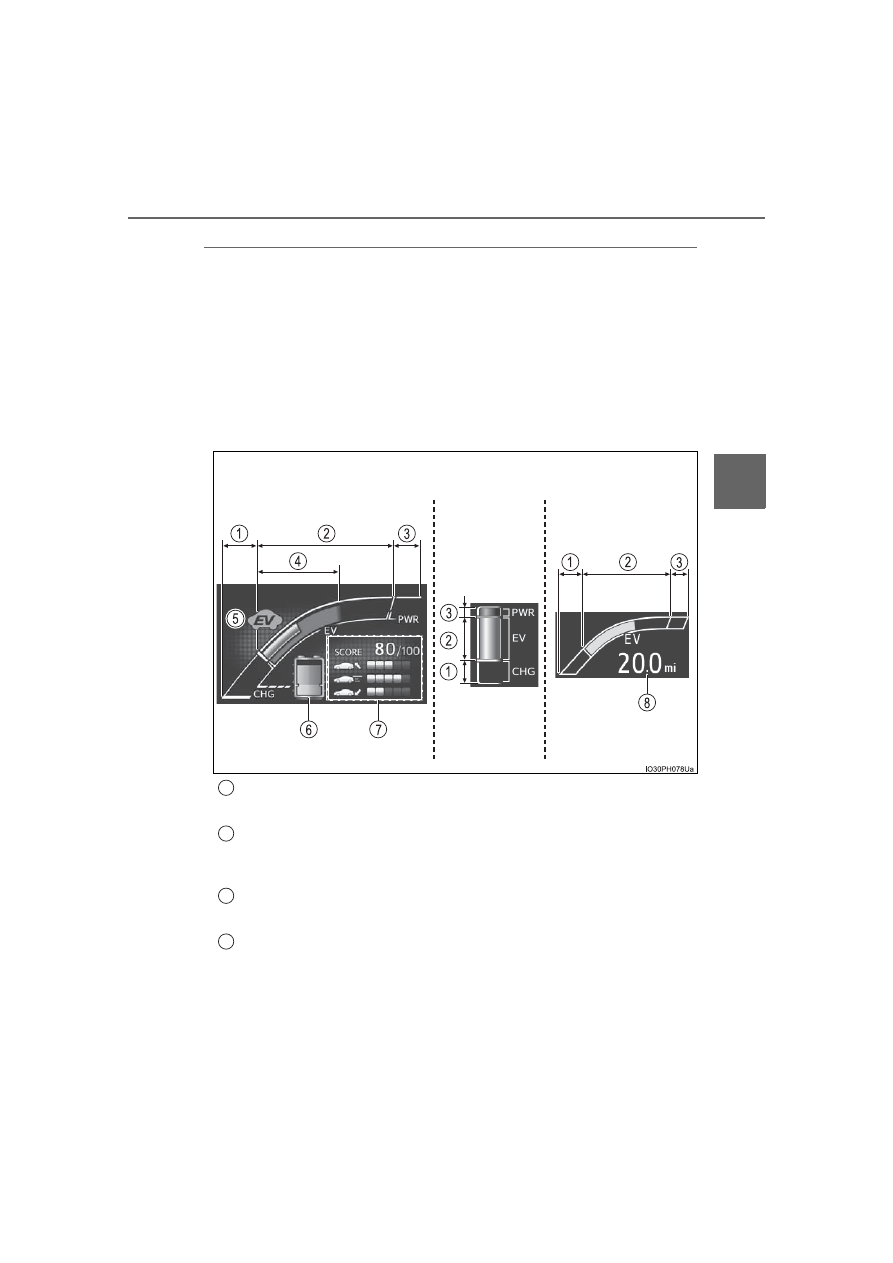
Hybrid System Indicator

The display changes according to accelerator pedal operation and
displays the current driving status and energy regeneration status.

The display contents of the Hybrid System Indicator are different in EV
mode and HV mode.
The Hybrid System Indicator can be displayed on the sub-screen of the
main display (

P. 217) and the head-up display (if equipped) 

(

P. 254).

How to read the display

In EV mode

Charge area

Shows that energy is being recovered via the regenerative charging.

EV driving area

Shows that the vehicle is driven using only the electric motor (traction
motor).

Gasoline engine running area

Shows that the gasoline engine is used as auxiliary power.

Eco area

Shows that the vehicle is being driven in an Eco-friendly manner.
Changed within the “ECO Accelerator Guidance” range. (

P. 228)

*

1

Head-up display 

(if equipped)

Sub-screen

Multi-information 

display

1

2

3

4

226

3. Instrument cluster

EV indicator

*

1, 2

The  EV  indicator  comes  on  when  the  vehicle  is  driven  using  only  the
electric motor (traction motor) or the gasoline engine is stopped.

Hybrid battery (traction battery) status

P. 231

Eco score

P. 229

EV driving range

P. 254

By keeping the indicator within Eco area, more Eco-friendly driv-
ing can be achieved.

Charge  area  indicates  regeneration

*

3

  status.  Regenerated

energy will be used to charge the hybrid battery (traction battery).

*

1

: Not displayed on the sub-screen or head-up display.

*

2

: The  EV  indicator  function  can  be  turned  off  in  the  “Meter  Customize”

settings. (

P. 248)

*

3

: When  used  in  this  manual,  “regeneration”  refers  to  the  conversion  of

energy created by the movement of the vehicle into electrical energy.

5

6

7

8

227

3. Instrument cluster

3

Instrument clus

ter

In HV mode

Charge area

Shows that energy is being recovered via the regenerative charging.

Eco area

Shows that the vehicle is being driven in an Eco-friendly manner.
Changed within the “ECO Accelerator Guidance” range. (

P. 228)

*

1

Power area

Shows that an Eco-friendly driving range is being exceeded (during full
power driving etc.)

Hybrid Eco area

*

2

Shows that gasoline engine power is not being used very often.
The  gasoline  engine  will  automatically  stop  and  restart  under  various
conditions.

EV indicator

*

1, 3

The  EV  indicator  comes  on  when  the  vehicle  is  driven  using  only  the
electric motor (traction motor) or the gasoline engine is stopped.

Hybrid battery (traction battery) status

P. 231

Eco score

P. 229

EV driving range

P. 254

Head-up display 

(if equipped)

Sub-screen

Multi-information 

display

1

2

3

4

5

6

7

8

228

3. Instrument cluster

By keeping the indicator within Eco area, more Eco-friendly driv-
ing can be achieved.

Charge  area  indicates  regeneration

*

4

  status.  Regenerated

energy will be used to charge the hybrid battery (traction battery).

*

1

: Not displayed on the sub-screen or head-up display.

*

2

: Not displayed on the sub-screen.

*

3

: The  EV  indicator  function  can  be  turned  off  in  the  “Meter  Customize”

settings. (

P. 248)

*

4

: When  used  in  this  manual,  “regeneration”  refers  to  the  conversion  of

energy created by the movement of the vehicle into electrical energy.

“ECO Accelerator Guidance”

A blue zone is displayed in the Eco area which can be used as a
reference operation range for using the accelerator pedal according
to driving conditions such as starting off and cruising.

The “ECO Accelerator Guidance” display changes according to the driv-
ing status, such as when starting off or cruising.
It is easier to drive in an Eco-friendly manner by driving according to the
display showing the accelerator pedal operations and staying within the
“ECO Accelerator Guidance” range. (

P. 316)

The  “ECO  Accelerator  Guidance”  function  can  be  turned  off  in  the
“Meter Customize” settings. (

P. 248)

In EV mode

In HV mode

“ECO Accelerator Guidance”

“ECO Accelerator Guidance”

229

3. Instrument cluster

3

Instrument clus

ter

Eco score

The driving status for the following 3 situations are evaluated in 5
levels:  Smooth  start-off  acceleration  (“Eco-Start”),  driving  without
sudden  acceleration  (“Eco-Cruise”)  and  smooth  stopping  (“Eco-
Stop”). Each time the vehicle is stopped, a score result is displayed
out of a perfect score of 100 points.

Score result
“Eco-Start” status
“Eco-Cruise” status
“Eco-Stop” status

How to read the bar display:

*

: For items not currently evaluated, the display reads 0.

The Eco score is reset each time the vehicle starts off to start a new
evaluation.

When  the  shift  position  is  P,  only  the  Eco  score  display  area  is
enlarged and displayed. When the shift position is shifted from P,
the display returns to normal.

When  the  hybrid  system  stops,  the  current  total  score  result  and
advice on how to increase the score are displayed. (

P. 196)

1
2
3
4

Score

Low

*

High

Bar display

230

3. Instrument cluster

Information display of EV driving

One of the following 2 information in the items of “HV System Indi-
cator” in “Meter Customize” settings can be selected to display in
the left upper corner of the Hybrid System Indicator. (

P. 248)

“EV Energy”

The  percentage  of  the  remain-
ing  hybrid  battery  (traction  bat-
tery)  that  can  be  used  for  EV
driving is displayed.

Becomes 100% when the hybrid
battery  (traction  battery)  is  fully
charged.

“EV Distance”

The  approximate  distance  that
can  be  driven  using  only  the
electric motor (traction motor).
(

P. 109)

When  the  air  conditioning  sys-
tem  is  operating,  the  icon  dis-
play  changes  to 

  and  the

driving range with the air condi-
tioning system on is displayed.

231

3. Instrument cluster

3

Instrument clus

ter

When operation of each function stops

The Hybrid System Indicator stops operating in the following situations.
• The “READY” indicator is not illuminated.
• The shift position is not D or B.

The Eco score and “ECO Accelerator Guidance” stop operating in the fol-
lowing situations.
• The Hybrid System Indicator is not operating.
• Dynamic radar cruise control with full-speed range is being used.

Display of the remaining hybrid battery (traction battery)

The current amount of the remaining hybrid battery (traction battery) is dis-
played in the Hybrid System Indicator or the sub-screen on the main display.
(

P. 217)

• The remaining battery for EV driving in EV mode is displayed in green,

and the remaining battery used in HV mode is displayed in blue.

• The amount of the remaining battery displayed decrease as the vehicle is

driven and increase when the hybrid battery (traction battery) is charged,
electrical energy is regenerated using the regenerative braking (

P. 95)

or electricity is generated by the gasoline engine.

• If the remaining battery is not displayed in green, HV mode is automati-

cally  selected  and  EV  mode  cannot  be  used.  To  enable  EV  driving,
charge the hybrid battery (traction battery). (

P. 111)

The amount of the hybrid battery (traction battery) in HV mode is automati-
cally controlled by the hybrid system. The amount of remaining hybrid battery
(traction battery) in HV mode may not reach the top line

*

 even if electrical

energy is regenerated using the regenerative braking (

P. 95) or electricity

is generated by the gasoline engine. However, this does not indicate a mal-
function. Also,  even  if  the  display  of  the  remaining  hybrid  battery  (traction
battery) exceeds the top line, the display is shown in blue until the vehicle
returns to EV mode.

*

: The position of the boundary line between EV mode and HV mode on the

display of the remaining hybrid battery (traction battery).

Depending  on  the  charging  situation,  when  the  display  of  the  remaining
hybrid battery (traction battery) is shown during charging, charging contin-
ues even after the display of the remaining hybrid battery (traction battery)
shows a fully charged state. However, this does not indicate a malfunction.
Please wait until charging is finished.

The hybrid battery (traction battery)
is fully charged
The hybrid battery (traction battery)
for EV mode is not remaining

1

2

232

3. Instrument cluster

Remaining charge amount warning of hybrid battery (traction battery)

The buzzer sounds intermittently when the hybrid battery (traction battery)
remains  without  charging  while  the  shift  position  is  in  N,  or  the  remaining
charge amount drops below a certain level. 
If  the  remaining  charge  amount  drops  further,  the  buzzer  sounds  continu-
ously.

When a warning message is shown on the multi-information display and the
buzzer  sounds,  follow  the  instructions  displayed  on  the  screen  to  perform
troubleshooting.

About the Eco score

After  starting  off,  Eco  score  display  does  not  start  until  the  vehicle  speed
exceeds approximately 19 mph (30 km/h).

In addition to the vehicle driving status, the Eco score also evaluates the air
conditioning system usage condition (

P. 243). The score displayed when

the  hybrid  system  stops  is  the  total  result  of  the  driving  status  after  the
hybrid system starts and the air conditioning usage condition.

“EV Energy” and “EV Distance” display

The  rate  at  which  the  “EV  Energy”  and  “EV  Distance”  remaining  amount
decreases  depends  on  the  driving  conditions  of  the  vehicle. Also,  the  “EV
Energy” and “EV Distance” remaining amount may decrease due to system
power consumption even though the vehicle is not being driven. 

233

3. Instrument cluster

3

Instrument clus

ter

“Fuel Consumption Record”

When the unit is set to “MPH”

The  transitions  of  the  average  fuel  consumption  after  the  hybrid
system starts can be checked in units of 1 mile (1.6 km) or 5 miles
(8 km) of driving.

When the unit is set to “km/h”

The  transitions  of  the  average  fuel  consumption  after  the  hybrid
system starts can be checked in units of 1 km (0.6 mile) or 5 km
(3.1 miles) of driving.

How to read the screen

The “

 1  miles” display is shown as an example. However, the

basic method for how to read the screen is the same for each fuel
consumption history screen.

Current  average  electricity
and  fuel consumption  record
(yellow display)

When the unit is set to “MPH”:
When  the  recorded  unit  is
exceeded (every 1 mile [1.6 km]
or  5  miles  [8  km]  the  currently
displayed 

history 

moves

towards the left side and the old-
est record is deleted.
When the unit is set to “km/h”:
When the recorded unit is exceeded (every 1 km [0.6 mile] or 5 km [3.1
miles]) the currently displayed history moves towards the left side and
the oldest record is deleted.

Past average electricity and fuel consumption record (green dis-
play)
Tab display

Displays types of “Fuel Consumption Record”.

1

2

3

234

3. Instrument cluster

Types of “Fuel Consumption Record”

When the unit is set to “MPH”

*

: This record is reset each time the hybrid system stops.

When the unit is set to “km/h”

*

: This record is reset each time the hybrid system stops.

Tab display

Recorded contents

Recorded range


1 miles”

Average  electricity  con-
sumption  of  every  1  mile
(1.6 km) driven

*

The last 15 miles (24.1 km)
driven


5 miles”

Average  electricity  con-
sumption of every 5 miles (8
km) driven

*

The last 30 miles (48.3 km)
driven


1 miles”

Average  fuel  consumption
of  every  1  mile  (1.6  km)
driven

*

The last 15 miles (24.1 km)
driven


5 miles”

Average  fuel  consumption
of  every  5  miles  (8  km)
driven

*

The last 30 miles (48.3 km)
driven

Tab display

Recorded contents

Recorded range


1 km”

Average  electricity  con-
sumption  of  every  1  km
(0.6 mile) driven

*

The  last  15  km  (9.3  miles)
driven


5 km”

Average  electricity  con-
sumption  of  every  5  km
(3.1 miles) driven

*

The last 30 km (18.6 miles)
driven


1 km”

Average  fuel  consumption
of  every  1  km  (0.6 mile)
driven

*

The  last  15  km  (9.3  miles)
driven


5 km”

Average  fuel  consumption
of  every  5  km  (3.1 miles)
driven

*

The last 30 km (18.6 miles)
driven

235

3. Instrument cluster

3

Instrument clus

ter

Switching the electricity and fuel consumption history screen

While the “Fuel Consumption Record” screen is displayed, press

.

The tab display is selected and it is possible to switch the contents of
the display.

Press 

 or 

 of the meter control switches to switch the con-

tents of the display.

Each time 

 is pressed, the display switches in the following order:

When the unit is set to “MPH”


1 miles”, “


5 miles”, “


1 miles” and “


5 miles”

*

1

. When 

is pressed, it switches in the reverse order.

When the unit is set to “km/h”


1  km”,  “


5  km”,  “


1  km”  and  “


5  km”

*

2

.  When 

  is

pressed, it switches in the reverse order.

*

1

: After “


5 miles”, the display returns to “


1 miles”.

*

2

: After “


5 km”, the display returns to “


1 km”.

1

2

236

3. Instrument cluster

“Drive Monitor”

Displays information such as the driving time and average vehicle
speed, which are linked with the current mileage display. (

P. 213)

Current  contents  of  the  dis-
play

Displayed  information  shows
which  driving  record  the  cur-
rently  displayed  contents  are
based on.

“Elapsed Time”
“Average Speed”
“EV Driving Ratio”

For the displayed distance of the mileage display, the percent traveled
using only electric motor power is displayed.

Each time 

 is pressed, the mileage display (

P. 213) switches

and the contents of the “Drive monitor” change as follows.

*

1

: When the average fuel consumption is reset (

P. 214), the “Drive monitor”

display is also reset.

*

2

: When the trip meter is reset (

P. 214), the “Drive monitor” display is also

reset.

*

3

: This item is reset each time the hybrid system starts.

1

2
3
4

Mileage display

Contents of the “Drive monitor”

ODO

After Reset

Information since last reset

*

1

TRIP A

TRIP A

Information  based  on  driving  record  of
TRIP A

*

2

TRIP B

TRIP B

Information  based  on  driving  record  of
TRIP B

*

2

After Start

Information  since  hybrid  system  was
started

*

3

Blank screen

1

237

3. Instrument cluster

3

Instrument clus

ter

“Drive Monitor 2”

The following information of EV driving is displayed.

Total average electricity con-
sumption
Indicates  the  total  average
electricity  consumption  since
last  reset  until  it  is  reset
again.

*

1

EV  driving  range  (without
using  the  air  conditioning
system)
Indicates the estimated distance that can be driven using the cur-
rent remaining hybrid battery (traction battery). (

P. 109)

*

2

EV driving range (with using the air conditioning system)
Indicates the estimated distance that can be driven using the cur-
rent remaining hybrid battery (traction battery) while using the air
conditioning system.

*

2

*

1

: When “Electricity Consumption Reset” (

P. 250) is performed, the data

of the total average electricity consumption is deleted.

*

2

: The EV driving range may shorten even when not driving due to power

consumption by the system.

1

2

3

238

3. Instrument cluster

“Eco-Diary”

The history of the average electricity consumption, air conditioning
system load ratio (“A/C Load Ratio”)

*

, distance traveled and aver-

age fuel consumption can be displayed in a table according to day
(“Daily”) or month (“Monthly”) units.

*

: It indicates the percentage of the electricity consumed from the hybrid

battery (traction  battery) that is  consumed  by the air conditioning sys-
tem.

How to read the display

Record of the day/month
Date/month of stored information
Average electricity consumption of the day/month
“A/C Load Ratio” of the day/month
Total distance traveled for the day/month
Average fuel consumption of the day/month
Tab display

The display can be switched by pressing 

 to enter the select condi-

tion, and then operating 

 or 

 of the meter control switches.

1
2
3
4
5
6
7

239

3. Instrument cluster

3

Instrument clus

ter

Checking history

When  each  screen  is  selected,  past  records  from  the  following

ranges can be displayed by pressing 

 or 

 of the meter con-

trol switches.

If the above number of records is exceeded, the oldest informa-
tion is deleted.

To reset the history, perform “History Reset” in the “Meter Cus-
tomize”  settings  (

P.  248).  (“Daily”  and  “Monthly”  information

can be reset independently.)

Calendar setting

P. 251

The  clock  settings  can  be
changed.

Displayed screen

Displayed information

Stored information

“Daily”

4 reports

Up to 32 reports 

(8 screens)

“Monthly”

Up to 12 reports 

(3 screens)

 Clock setting display

Item

Setting result

Adjusts the clock. 
(

P. 197)

Sets  the  minutes  to
“00”. (

P. 198)

240

3. Instrument cluster

Displays  a  compass  linked  with
the navigation system. Also, when
the navigation system is perform-
ing  intersection  guidance  during
destination  guidance,  the  inter-
section guidance is also displayed
on the multi-information display.

The illustration is only an example
and  may  differ  from  the  actual
screen.
For  details  on  how  to  set  the  destination  and  switch  the  map  direction,
refer to “NAVIGATION SYSTEM OWNER’S MANUAL”.

The  information  about  the  cur-
rently  selected  audio  source  is
displayed.

The illustration is only an example
and  may  differ  from  the  actual
screen.
To  switch  the  audio  source,  press

  to  display  the  audio  source

selection  screen,  press 

  or 

of  the  meter  control  switches  and
select  the  desired  audio  source,
and then press 

.

To  stop  audio  source  selection,  press 

  on  the  audio  source  selection

screen.

 Navigation system-linked display (if equipped)

 Audio system-linked display


Content      ..     12      13      14      15     ..