Toyota Prius Prime (2022 year). Manual in english - page 13
 

  Index      Toyota     Toyota Prius Prime (2022 year). Manual in english


Search            copyright infringement  


Content      ..     11      12      13      14     ..


Toyota Prius Prime (2022 year). Manual in english - page 13


209

3. Instrument cluster

3

Instrument clus

ter

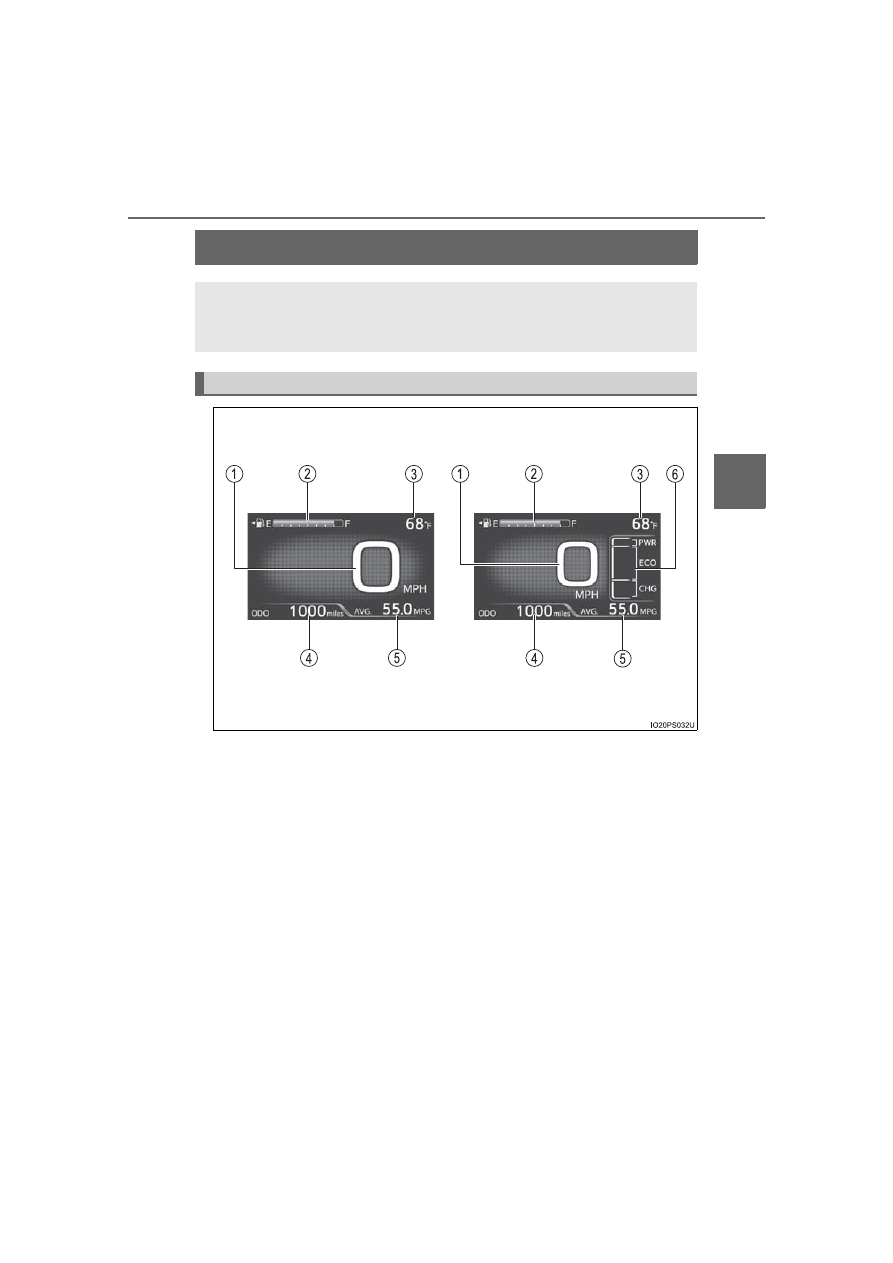
Main display

The units used on the display may differ depending on the target region.

The main display shows basic information, such as the vehicle
speed and remaining fuel amount. Also, the displayed informa-
tion can be switched according to user preference.

Display contents (vehicles without RSA [Road Sign Assist])

Simple screen

*

Split screen

*

*

: Refer to P. 215 for details on how to change the screen display.

210

3. Instrument cluster

Speedometer

Displays the vehicle speed

Fuel gauge

Displays the quantity of fuel remaining in the tank

Outside temperature

Displays  the  outside  temperature  within  the  range  of  -40°F  (-40°C)  to
122°F (50°C).
The temperature display flashes for approximately 10 seconds when the
outside temperature drops to approximately 37

F (3

C) or less, and then

stops flashing.

Mileage display (odometer/trip meters/driving range)

The possible driving range estimated from the mileage and current remain-
ing fuel amount can be displayed. (

P. 213)

Average fuel consumption display

The average  electricity and  fuel  consumption  that is linked  with  the  con-
tents of the mileage display can be displayed. (

P. 213)

Sub-screen

When split screen is selected for the main display, information such as the
Hybrid  System  Indicator and  current  fuel consumption  can be  displayed.
(

P. 215)

1

2

3

4

5

6

211

3. Instrument cluster

3

Instrument clus

ter

The units used on the display may differ depending on the target region.

Display contents (vehicles with RSA [Road Sign Assist])

212

3. Instrument cluster

Speedometer

Displays the vehicle speed

Fuel gauge

Displays the quantity of fuel remaining in the tank

Outside temperature

Displays  the  outside  temperature  within  the  range  of  -40°F  (-40°C)  to
122°F (50°C).
The temperature display flashes for approximately 10 seconds when the
outside temperature drops to approximately 37°F (3°C) or less, and then
stops flashing.

Mileage display (odometer/trip meters/driving range)

The possible driving range estimated from the mileage and current remain-
ing fuel amount can be displayed. (

P. 213)

Average fuel consumption display

The average fuel consumption that is linked with the contents of the mile-
age display can be displayed. (

P. 213)

Sub-screen (when RSA [Road Sign Assist] is off)

Information  such  as  the  Hybrid  System  Indicator  and  current  fuel  con-
sumption can be displayed. (

P. 216)

Sub-screen (when RSA [Road Sign Assist] is on)

Displays information related to RSA (Road Sign Assist)

*

. (

P. 405)

*

: When RSA (Road Sign Assist) information is displayed in the 

 screen

of the multi-information display (

P. 245), RSA (Road Sign Assist) infor-

mation is not displayed on the sub-screen.

1

2

3

4

5

6

7

213

3. Instrument cluster

3

Instrument clus

ter

Each time 

 is pressed, the mileage display and fuel consumption

display change in the following order from 1 to 7.

Mileage display
Average  fuel  consumption  dis-
play

After 1 to 7 are displayed, the dis-
plays return to 1.
Use  the  displayed  average  fuel
consumption as a reference.

Switching  the  mileage  display  and  average  fuel  consumption
display

1
2

214

3. Instrument cluster

*

1

: If 

 is pressed and held while this item is displayed, the information is

reset.

*

2

: This item is reset each time the hybrid system starts.

*

3

: This value is not displayed if electricity needed for EV driving is not remain-

ing.

*

4

: When the air conditioning system is operating, the icon display changes to

  and  the  driving  range  with  the  air  conditioning  system  on  is  dis-

played.

*

5

: The  EV  driving  range  may  shorten  even  when  not  driving  due  to  power

consumption by the system.

 Mileage display

 Average fuel consumption display

1

ODO (Odometer)

Total mileage

Average fuel consumption since
last reset

Average fuel  consumption  since
last reset

*

1

2

TRIP A (Trip meter A)

Mileage since last reset

*

1

TRIP A average fuel consumption

Average fuel  consumption  since
TRIP A was reset

*

1

3

TRIP B (Trip meter B)

Mileage since last reset

*

1

TRIP B average fuel consumption

Average fuel  consumption  since
TRIP B was reset

*

1

4

 (Mileage since hybrid sys-

tem was started)

Mileage  since  hybrid  system
started

*

2

Average  fuel  consumption  after
hybrid system started

Average fuel  consumption  since
hybrid system was started

*

2

5

 (Distance to empty)

Approximate  distance  vehicle
can  travel  based  on  current
remaining fuel amount

Blank screen

6

 (EV driving range)

Approximate driving range using
only  the  electric  motor  (traction
motor) (

P. 109)

*

3, 4, 5

Blank screen

7

Blank screen

Blank screen

1

2

215

3. Instrument cluster

3

Instrument clus

ter

Simple screen or split screen can be selected for the main display.

When split screen is selected, a variety of information can be displayed on
a sub-screen in addition to the contents of the simple screen.

Select the “Meter Customize” settings ( 

 ) screen on the

 screen of the multi-information display, and then press 

.

(

P. 246)

Press 

 or 

  of the meter  control switches to select  “Simple/

Split Screen”.

Press 

 to display the setting screen.

Press 

  or 

  of  the  meter

control switches to select a dis-
play mode.

Press 

.

The contents of the main display switch to the selected display mode.
Press 

 to return to the previous screen.

Switching  the  display  mode  (vehicles  without  RSA  [Road  Sign
Assist])

1

2

3

4

5

216

3. Instrument cluster

Vehicles without RSA (Road Sign Assist)

When split screen is selected for the main display, display contents on
the sub-screen can be selected.

Vehicles with RSA (Road Sign Assist)

When  RSA  (Road  Sign Assist)  is  off,  display  contents  on  the  sub-
screen can be selected.

Press 

  or 

  of  the

meter  control  switches  and
select the sub-screen.

When the sub-screen is selected,

  is  displayed  on  the  sub-

screen.

Press 

 or 

 of the meter control switches to select the dis-

play item.

One of the following 4 items can be displayed.

Switching contents displayed on the sub-screen

1

2

217

3. Instrument cluster

3

Instrument clus

ter

Display contents

Detail

Hybrid System Indicator

A convenient Hybrid System Indicator is displayed.
Refer to P. 225 for details on how to read the Hybrid
System Indicator.

Current electricity consumption

When  in  EV/EV  auto  mode,  the  current  electricity
consumption during driving is displayed.

• The 

 mark indicates the total average electric-

ity  consumption  since  last  reset  until  it  is  reset
again.

• When “Electricity Consumption Reset” (

P. 250)

is performed, the data of the total average elec-
tricity consumption is deleted and the 

 mark is

reset to 0.

Current fuel consumption

When  in  HV  mode,  the  current  fuel  consumption
during driving is displayed.

• The 

 mark indicates the value displayed in the

average  fuel  consumption  display  (

P.  213).

Switching  the  average  fuel  consumption  display
also changes the position of the 

 mark.

• When the average fuel consumption is reset, the

position of the 

 mark is reset to 0.

Hybrid battery (traction battery) status

The  same  contents  as  the  hybrid  battery  (traction
battery)  status  on  the  Hybrid  System  Indicator  are
displayed. (

P. 225)

218

3. Instrument cluster

Outside temperature display

In the following situations, the correct outside temperature may not be dis-
played, or the display may take longer than normal to change.
• When stopped, or driving at low speeds (less than 12 mph [20 km/h])
• When the outside temperature has changed suddenly (at the entrance/

exit of a garage, tunnel, etc.)

When “-” or “E” is displayed, the system may be malfunctioning.
Take your vehicle to your Toyota dealer.

Electricity consumption

When the unit is set to “MPH”:
Electricity  consumption  is  the  consumption  rate  of  the  electricity  when  EV
driving is performed and equivalent to the fuel consumption for the gasoline
vehicles.  For  this  vehicle,  driven  distance  per  kWh  of  electricity  consumed
(“miles/kWh”) is displayed as electricity consumption on each screen.
When the unit is set to “km/h”:
Electricity  consumption  is  the  consumption  rate  of  the  electricity  when  EV
driving is performed and equivalent to the fuel consumption for the gasoline
vehicles. For this vehicle, electricity consumed per 100 km (“kWh/100 km”) is
displayed as electricity consumption on each screen.

EV driving range

P. 109

Distance to empty

This distance is computed based on your average fuel consumption. As a
result, the actual distance that can be driven may differ from that displayed.

When only a small amount of fuel is added to the tank, the display may not
be updated.
When refueling, turn the power switch off. If the vehicle is refueled without
turning the power switch off, the display may not be updated.

219

3. Instrument cluster

3

Instrument clus

ter

Switching the driving mode (

P. 425)

*

: The animation displayed when the driving mode is switched can be turned

off in the “Meter Customize” settings. (

P. 248)

When  the  driving  mode  is  switched,  the
driving  mode  indicator  changes  and  an
animation

*

 is displayed on the multi-infor-

mation display.
Also,  the  background  color  of  the  main
display,  energy  monitor  (

P.  223)  and

Hybrid  System  Indicator  (

P.  225)

change as follows.

Driving modes

Background color

Normal mode

Green

Power mode

Red

Eco drive mode

Blue

220

3. Instrument cluster

Multi-information display

Information  related  to  each  icon
on the upper portion of the multi-
information  display  can  be  dis-
played  by  operating  the  meter
control switches to select the icon.

Icons are displayed when pressing

  or 

  of  the  meter  control

switches  and  turn  off  shortly  after
pressing the switch.
Screens  linked  with  vehicle  functions  may  be  automatically  displayed
according to the operation status of the corresponding functions.

A variety of information related to the vehicle can be displayed,
including the operation status of each system and data related
to Eco driving, and the settings of each system can be changed
according to user preference.

Display contents

221

3. Instrument cluster

3

Instrument clus

ter

*

: When there is a warning message that can be displayed, the color of 

changes to amber.

Menu icons

Contents

Pages

Drive information

The energy monitor that shows the operation
status of the hybrid system, or other informa-
tion  such  as  electricity  consumption  and  fuel
consumption are displayed.

P. 222

Clock setting display

The clock settings can be changed.

P. 239

Navigation 

system-linked 

display 

(if

equipped)

The information related to the navigation sys-
tem is displayed.

P. 240

Audio system-linked display

The audio system settings can be changed.

P. 240

Air conditioning system settings screen

The  air  conditioning  system  settings  can  be
changed.

P. 241

Driving assist system information

The  information  related  to  driving  assist  sys-
tems  such  as  the  LTA  (Lane  Tracing Assist)
and  dynamic  radar  cruise  control  with  full-
speed range is displayed.

P. 245

Warning message display

*

The warning messages are displayed.

P. 245

Settings display

The  settings  of  the  vehicle  functions,  meter
display, etc. can be changed.

P. 246

222

3. Instrument cluster

Press 

 or 

 of the meter control switches and select the icon

of the desired item.

The selected icon is highlighted and the display switches to the information
screen.
When split screen display is selected for the main display or RSA (Road
Sign  Assist)

*

  is  off,  the  sub-screen  of  the  main  display  can  also  be

selected. (

P. 216)

*

: If equipped

Press 

 or 

 of the meter control switches to switch the con-

tents of the display.
Press 

  on  screens  where  it

is  necessary  to  select  or  con-
firm an item.

On  screens  with  tab  displays,
pressing 

  selects  the  tab  dis-

play, and the screen display can be
changed by pressing 

 or 

 of

the meter control switches.

Press 

 to return to the previous screen.

When 

 is selected, the following information can be displayed by

pressing 

 or 

 of the meter control switches.

Energy monitor (

P. 223)

Hybrid System Indicator (

P. 225)

“Fuel Consumption Record” (

P. 233)

“Drive Monitor” (

P. 236)

“Drive Monitor 2” (

P. 237)

“Eco-Diary” (

P. 238)

Basic Operations

1

2

Tab display

3

 Drive information

4

223

3. Instrument cluster

3

Instrument clus

ter

Energy monitor

The energy monitor can be used to check the vehicle drive status,
hybrid system operation status and energy regeneration status.

While  charging  from  the  external  power  source,  the  flow  of  electrical
energy while charging is displayed.

When energy is flowing, an arrow appears and a bright point of light
moves to show the direction of the flow of energy. When energy is
not flowing, the bright point of light is not displayed.

The arrows from the image of the engine to that of the electric
motor (traction motor) or tires are displayed in red.

The arrow indicating energy consumption is displayed in yellow,
and the arrow indicating energy regeneration or charging is dis-
played in green. Also, the color around the image of the hybrid
battery (traction battery) is changed.

As an example, all arrows are shown in the illustration, but the actual
contents of the display will differ.

Except when charging

Gasoline engine
Electric motor 
(traction motor)
Air conditioning system oper-
ation

*

1

Hybrid battery 
(traction battery)
Tire
Bright point of light showing the flow of energy

(Display example)

When the hybrid battery (traction battery) is being charged, the
bright point of light moves towards 

.

During driving, the bright point of light moves from 

 or 

 (or

both depending on the situation) towards 

.

*

2

When the air conditioning compressor is operating, a bright point
of light moves from 

 to 

.

During driving, the image of the tires rotates.

*

1

: It is displayed while the air conditioning system is operating.

*

2

: The display may differ depending on the driving status.

1
2

3

4

5
6

4

1

2

5

4

3

224

3. Instrument cluster

While charging

Hybrid  battery  (traction  bat-
tery)
Charging connector

(Display example)
When the hybrid battery (traction battery) is being charged, a bright
point of light moves from 

 to 

.

When the charging connector is locked (vehicles with smart lid & con-
nector locking system) (

P. 149)

1

2

 is displayed in the charging connector

display portion on the energy monitor.

2

1


Content      ..     11      12      13      14     ..