Toyota Prius Prime (2022 year). Manual in english - page 12
 

  Index      Toyota     Toyota Prius Prime (2022 year). Manual in english


Search            copyright infringement  


Content      ..     10      11      12      13     ..


Toyota Prius Prime (2022 year). Manual in english - page 12


193

3. Instrument cluster

3

Instrument clus

ter

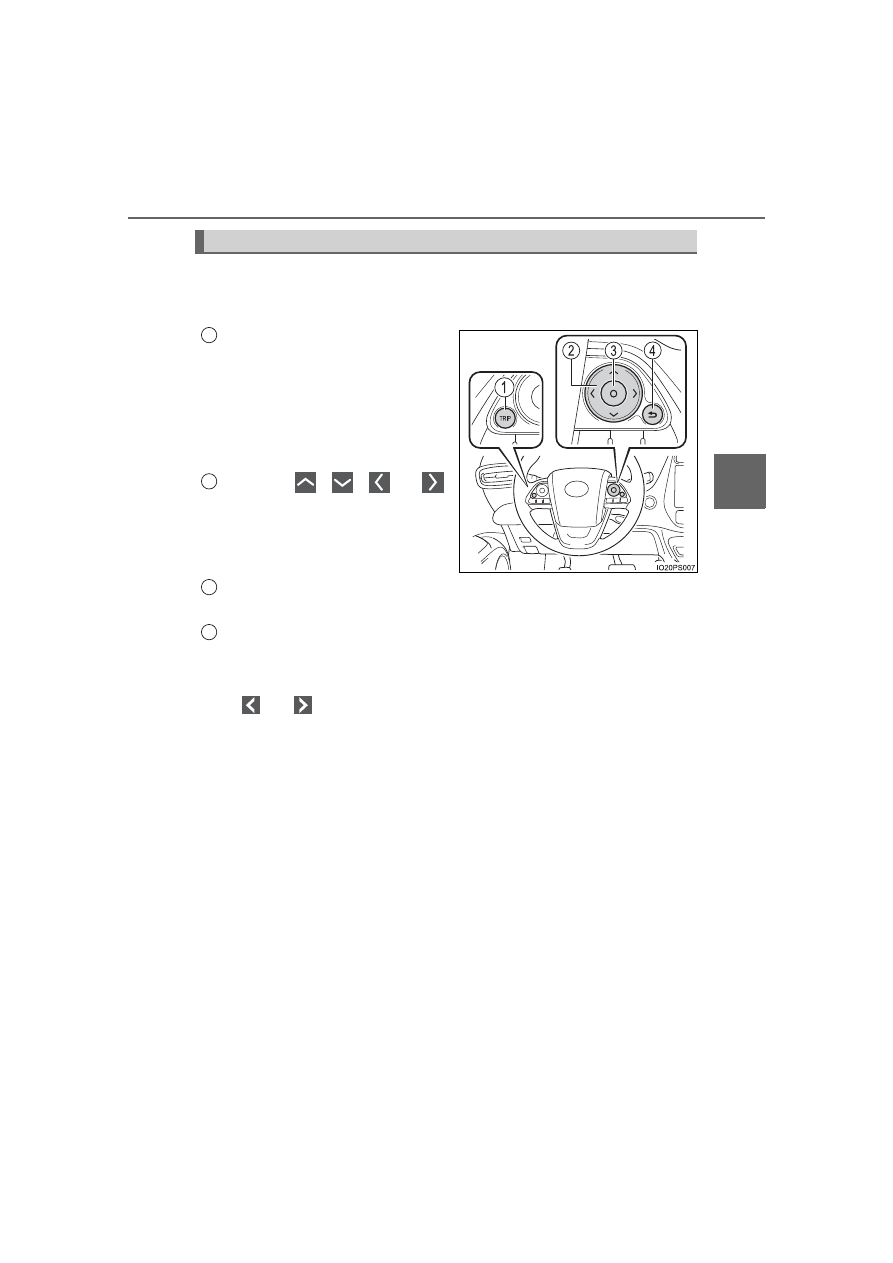
The  meter  control  switches  equipped  on  the  steering  wheel  can  be
used to switch the screen display and change settings related to func-
tions displayed on the screen.

Each  time  the  button  is
pressed,  the  mileage  display
switches  among  odometer,  trip
meters,  etc.,  and  the  fuel  con-
sumption  information  for  each
distance switches as well. 
(

 P. 213)

Pressing 

  or 

performs  such  operations  as
scrolling the screen

*

, switching

the contents of the display

*

 and

moving the cursor.
This button is used to perform such operations as selecting the cur-
rent item or switching between on and off.
When pressed, the display returns to the previous screen.

*

: On  screens  where  the  screen  can  be  scrolled  and  the  display  can  be

switched, marks are displayed to indicate the direction of operation (such
as 

 and 

).

Operations related to the combination meter

1

2

3

4

194

3. Instrument cluster

When the switches are pressed, the instrument cluster light changes
as follows.

The  instrument  cluster  brightness  levels  that  can  be  selected  differ
depending on whether the tail lights are on and surrounding brightness lev-
els. (

P. 199)

Darker
Brighter

When  the  switches  are  pressed,
the  adjustment  level  check  screen
(pop-up  display

*

)  is  displayed  on

the main display.
When the instrument cluster light is
adjusted,  the  brightness  of  the
instrument 

panel 

light 

also

changes.

*

: A short time after the operation is completed, the pop-up display turns off.

Furthermore,  the  pop-up  display  can  be  turned  on  and  off  in  the  “Meter
Customize” settings. (

P. 248)

Instrument cluster light control

1
2

195

3. Instrument cluster

3

Instrument clus

ter

Some information will be displayed automatically according to power
switch operation, vehicle condition, etc.

When starting the hybrid system

When the hybrid system starts,
an  opening  animation  is  dis-
played on the main display.

After  the  animation  ends,  the
screens  switch  to  the  normal
screen.
The  opening  animation  will  be
stopped  in  any  of  the  following
situations.

• When the shift position is changed to other than P
• When the Simple Advanced Parking Guidance System (if equipped)

is turned on

When the driving assist systems are operating

When  using  driving  assist  systems  such  as  the  dynamic  radar
cruise control with full-speed range (

P. 409) and LTA (Lane Trac-

ing Assist) (

P. 390), information related to each system is auto-

matically  displayed  on  the  multi-information  display  depending  on
the situation.

For details regarding the displayed information and the contents of the
display, refer to the explanation page of each system.

When there is information to be notified about the vehicle

When a shift position is mistakenly selected or a problem occurs in
a  vehicle  system,  a  warning  message  (or  image)  is  displayed  on
the multi-information display.

When a warning message is displayed, follow the instructions displayed
on the display. (

P. 681)

Information automatically displayed

196

3. Instrument cluster

When stopping the hybrid system

When the hybrid system is stopped, the “Ending” screen is dis-
played  on  the  multi-information  display  (for  approximately  30
seconds

*

1

).

While the “Ending” screen is displayed, the following information
can be displayed by pressing 

 or 

 of the meter

control switches.

Score for each Eco score items (

P. 229, 243)

Eco score result and advice
Driving time since the hybrid system started
Distance traveled since the hybrid system started
Average fuel consumption after the hybrid system started
Information for next charge schedule

*

2

On/off setting for “Charge Now” (

P. 167)

The setting can be switched each time 

 is pressed.

*

1

: The screen will be turned off immediately if the doors are locked.

*

2

: It can be displayed when the charge schedules are registered. 

(

P. 158)

A  check  screen  for  “Traction  Battery  Cooler”  may  be  displayed
when the hybrid system is stopped. (

P. 137)

1
2
3
4
5
6
7

197

3. Instrument cluster

3

Instrument clus

ter

To adjust the time, perform operations on the 

 screen (

P. 239)

of the multi-information display.

Adjusting the time

Press 

 or 

 of the meter control switches on the steering

wheel and select 

.

Press 

  or 

  of  the  meter  control  switches  and  select

.

Press 

 to display the cursor.

Press 

  or 

  of  the

meter  control  switches  to
adjust  the  cursor  position,

and then press 

 or 

 to

change the setting.

When  the  12-hour  display  is
selected,  “12H”  is  displayed,
and when the 24-hour display is
selected, “24H” is displayed.
When  adjusting  minutes,  operation  automatically  starts  from  00  sec-
onds.
After changing the settings, press 

 to return to the previous screen.

Clock adjustment

1

2

3

4

198

3. Instrument cluster

Resetting the minutes display

Press 

 or 

 of the meter control switches on the steering

wheel and select 

.

Press 

  or 

  of  the

meter  control  switches  and

select 

.

Press 

.

The minutes display switches to “00”.

*

*

: e.g. 1:00 to 1:29 

 1:00

1:30 to 1:59 

 2:00

1

2

3

199

3. Instrument cluster

3

Instrument clus

ter

The meters and display illuminate when

The power switch is in ON mode.

Adjusting the instrument cluster brightness (

P. 194)

The brightness levels that can be selected differ depending on whether the
tail lights are on and surrounding brightness levels, as shown in the table
below.

*

: 22 levels of the brightness are displayed on the setting screen. However,

the brightness setting will be the brightest when other than 1st level (the
darkest) is selected. If other than 1st or 22nd level is selected, when the
tail lights are turned on in a dark place, the instrument cluster brightness
setting will be the selected level.

If the taillights are illuminated in a dark environment, the instrument cluster
light dims. However, when the brightness of the instrument cluster is set to
minimum  or  maximum  (1st  or  22nd  level  of  the  instrument  cluster  bright-
ness),  even  if  the  taillights  are  illuminated,  the  instrument  cluster  light  will
not dim.

When disconnecting and reconnecting 12-volt battery terminals

The settings of the clock will be reset.

Calendar setting

Until the calendar setting is completed, the check screen is displayed every
time the power switch is turned to ON mode.

After the calendar information is set, it can be changed in the “Meter Cus-
tomize” settings. (

P. 248)

The tail lights are off

The tail lights are on

In a bright place

2 levels

*

2 levels

*

In a dark place

22 levels

If calendar recording is interrupted due to
replacement  of  the  12-volt  battery  or  12-
volt  battery  discharge,  etc.,  when  the
power switch is turned to ON mode after
maintenance,  the  calendar  setting  check
screen  is  automatically  displayed  on  the
multi-information display.

If date information is not set, the electric-
ity  and  fuel  consumption  record  cannot
be  stored  correctly.  Also,  the  charging
schedule function can not operate prop-
erly.  When  the  calendar  setting  check
screen is displayed, make sure to com-
plete the calendar setting. (

P. 246)

200

3. Instrument cluster

When the menu screen on the navigation system is operated (vehicles
with 11.6-inch display)

Liquid crystal display

Small  spots  or  light  spots  may  appear  on  the  display. This  phenomenon  is
characteristic of liquid crystal displays, and there is no problem continuing to
use the display.

Pop-up display

Some functions, such as the driving mode select switch and air conditioning
system, are operation-linked and display pop-up screens on the multi-infor-
mation display. If the pop-up screens of these functions are not desired, they
can be turned off in the “Meter Customize” settings. (

P. 248)

A pop-up display of the menu screen icon
is  displayed  on  the  multi-information  dis-
play.

*

*

: The  pop-up  display  on  the  navigation

system  can  be  turned  off  in  the  “Meter
Customize” settings. (

P. 249)

WARNING

To prevent an accident

Caution for use while driving

For safety, avoid operating the meter control switch while driving as much
as  possible,  and  do  not  look  continuously  at  the  multi-information  display
while driving. Stop the vehicle and operate the meter control switch. Failure
to do so may cause a steering wheel operation error, resulting in an unex-
pected accident.

NOTICE

The information display at low temperatures

Allow the interior of the vehicle to warm up before using the liquid crystal
information display. At extremely low temperatures, the information display
monitor may respond slowly, and display changes may be delayed.

Do not place anything or attach a sticker
in front of the instrument cluster. The item
may  obscure  or  obstruct  the  display,  or
could  reflect  off  the  display,  possibly
causing an accident.

201

3. Instrument cluster

3

Instrument clus

ter

Warning lights and indicators

The warning lights and indicators inform the driver of the status
of the vehicle’s various systems.
For  the  purpose  of  explanation,  the  following  illustration  dis-
plays all indicators and warning lights illuminated.

202

3. Instrument cluster

Warning lights inform the driver of malfunctions in any of the vehicle’s
systems.

Warning lights

Warning lights

Pages

*

1

Brake system warning light (U.S.A.)

P. 671

*

1

Brake system warning light (Canada)
(Red)

P. 671

*

1

Brake system warning light 
(Yellow)

P. 671

*

1

Charging system warning light

P. 671

*

1

Low engine oil pressure warning light

P. 671

*

1

Malfunction indicator lamp (U.S.A.)

P. 671

*

1

Malfunction indicator lamp (Canada)

P. 671

*

1

SRS warning light

P. 672

*

1

ABS warning light (U.S.A.)

P. 672

*

1

ABS warning light (Canada)

P. 672

*

1

Electric power steering system warning light 
(Red/yellow)

P. 672

*

1, 2

PCS warning light

P. 672

LTA indicator (Orange)

P. 672

*

1

Slip indicator light

P. 673

203

3. Instrument cluster

3

Instrument clus

ter

*

1

: These lights turn on when the power switch is turned to ON mode to indi-

cate  that  a  system  check  is  being  performed. They  will  turn  off  after  the
hybrid system is on, or after a few seconds. There may be a malfunction in
a  system  if  a  light  does  not  come  on,  or  turn  off.  Have  the  vehicle
inspected by your Toyota dealer.

*

2

: The light flashes or illuminates to indicate a malfunction.

*

3

: The light flashes to indicate a malfunction.

*

1

High coolant temperature warning light

P. 673

*

1, 3

PKSB OFF indicator (if equipped)

P. 673

Open door warning light

P. 673

Low fuel level warning light

P. 673

Driver’s  and  front  passenger’s  seat  belt
reminder light

P. 674

Rear passengers’ seat belt reminder light
(U.S.A.)

P. 674

Rear passengers’ seat belt reminder light 
(Canada)

P. 674

*

1

Master warning light

P. 674

*

1

Tire pressure warning light

P. 674

Warning lights

Pages

204

3. Instrument cluster

The indicators inform the driver of the operating state of the vehicle’s
various systems.

Indicators

Indicators

Pages

Turn signal indicator

P. 345

Headlight indicator (U.S.A.)

P. 347

Tail light indicator (Canada)

P. 349

Parking brake indicator (U.S.A.)

P. 346

Parking brake indicator (Canada)

P. 346

Headlight high beam indicator

P. 349

Fog light indicator (if equipped)

P. 357

Security indicator

P. 83

“READY” indicator

P. 332

Shift position indicators

P. 339

*

1, 2

Slip indicator light

P. 497

*

1, 3

VSC OFF indicator

P. 498

Cruise control indicator

P. 420

Dynamic radar cruise control indicator

P. 415

205

3. Instrument cluster

3

Instrument clus

ter

*

1

: These lights turn on when the power switch is turned to ON mode to indi-

cate  that  a  system  check  is  being  performed. They  will  turn  off  after  the
hybrid system is on, or after a few seconds. There may be a malfunction in
a  system  if  a  light  does  not  come  on,  or  turn  off.  Have  the  vehicle
inspected by your Toyota dealer.

*

2

: The light flashes to indicate that the system is operating.

*

3

: The light comes on when the system is turned off.

*

4

: Depending  on the  operating  condition,  the color  and  illuminating/flashing

state of the light change.

Cruise control “SET” indicator

P. 415

*

1, 3

PCS warning light

P. 383

*

4

LTA indicator

P. 399

Steering control indicator

P. 399

Automatic High Beam indicator

P. 352

Heated steering wheel indicator (if equipped)

P. 536

“BSM” indicator (if equipped)

P. 427

Intuitive parking assist indicator (if equipped)

P. 441

*

1, 3

PKSB OFF indicator (if equipped)

P. 453

*

1

S-APGS indicator (if equipped)

P. 466

*

1

“AIR BAG ON/OFF” indicator (U.S.A.)

P. 50

*

1

“AIR BAG ON/OFF” indicator (Canada)

P. 50

Indicators

Pages

206

3. Instrument cluster

Main display and multi-information display

*

1

: The  displayed  indicator  changes  according  to  the  current  plug-in  hybrid

system operation mode.

*

2

: The displayed indicator changes according to the current driving mode.

Indicators and symbols displayed on the display

Indicators

Pages

*

1

EV drive mode indicator

P. 90

*

1

EV auto mode indicator

P. 90

*

1

Hybrid battery charge mode indicator

P. 91

*

2

“ECO MODE” indicator

P. 425

*

2

“PWR MODE” indicator

P. 425

EV indicator

P. 227

207

3. Instrument cluster

3

Instrument clus

ter

Multi-information display (symbol display

*

)

*

: These symbols are displayed along with a message. Also, the symbol dis-

plays listed here are only an example, and different symbols may be dis-
played according to the contents of the multi-information display.

Symbol display

Pages

Smart key system

P. 332

Inappropriate pedal operation

P. 675

LTA (Lane Tracing Assist)

P. 403

P. 403

Low engine oil pressure warning 
(Canada only)

P. 675

208

3. Instrument cluster

BSM (Blind Spot Monitor) outside rear view mirror indicators 
(if equipped) (

P. 427)

• When the BSM function is enabled on the 

 screen of the multi-infor-

mation display, the power switch is turned to ON mode.

If the system is functioning correctly, the BSM outside rear view mirror indi-
cators will turn off after a few seconds.
If the BSM outside rear view  mirror  indicators do not illuminate or do not
turn off, there may be a malfunction in the system.
If this occurs, have the vehicle inspected by your Toyota dealer.

Indicators are also displayed on the out-
side rear view mirrors.

In  order  to  confirm  operation,  the  BSM
outside rear view mirror indicators illumi-
nate in the following situations:
• When  the  power  switch  is  in  ON

mode,  the  BSM  function  is  enabled

on the 

 screen of the multi-infor-

mation display.

WARNING

If a safety system warning light does not come on

Should a  safety  system light  such as  the ABS and  SRS  warning  light  not
come on when you start the hybrid system, this could mean that these sys-
tems are not available to help protect you in an accident, which could result
in death or serious injury. Have the vehicle inspected by your Toyota dealer
immediately if this occurs.

NOTICE

To prevent damage to the engine and its components

The  engine  may  be  overheating  if  the  high  coolant  temperature  warning
light  comes  on  or  flashes.  In  this  case,  immediately  stop  the  vehicle  in  a
safe place, and check the engine after it has cooled completely. (

P. 718)


Content      ..     10      11      12      13     ..