Toyota RAV4 (2022 year). Manual in english - page 27
433
5-8. Media operation
5
A
ud
io
*
: This function is not made avail-
able in some countries or areas.
The Android Auto operation
screen can be reached by the
following methods:
Connecting an Android device
(
When an Apple CarPlay con-
nection is established, this
function will be unavailable.
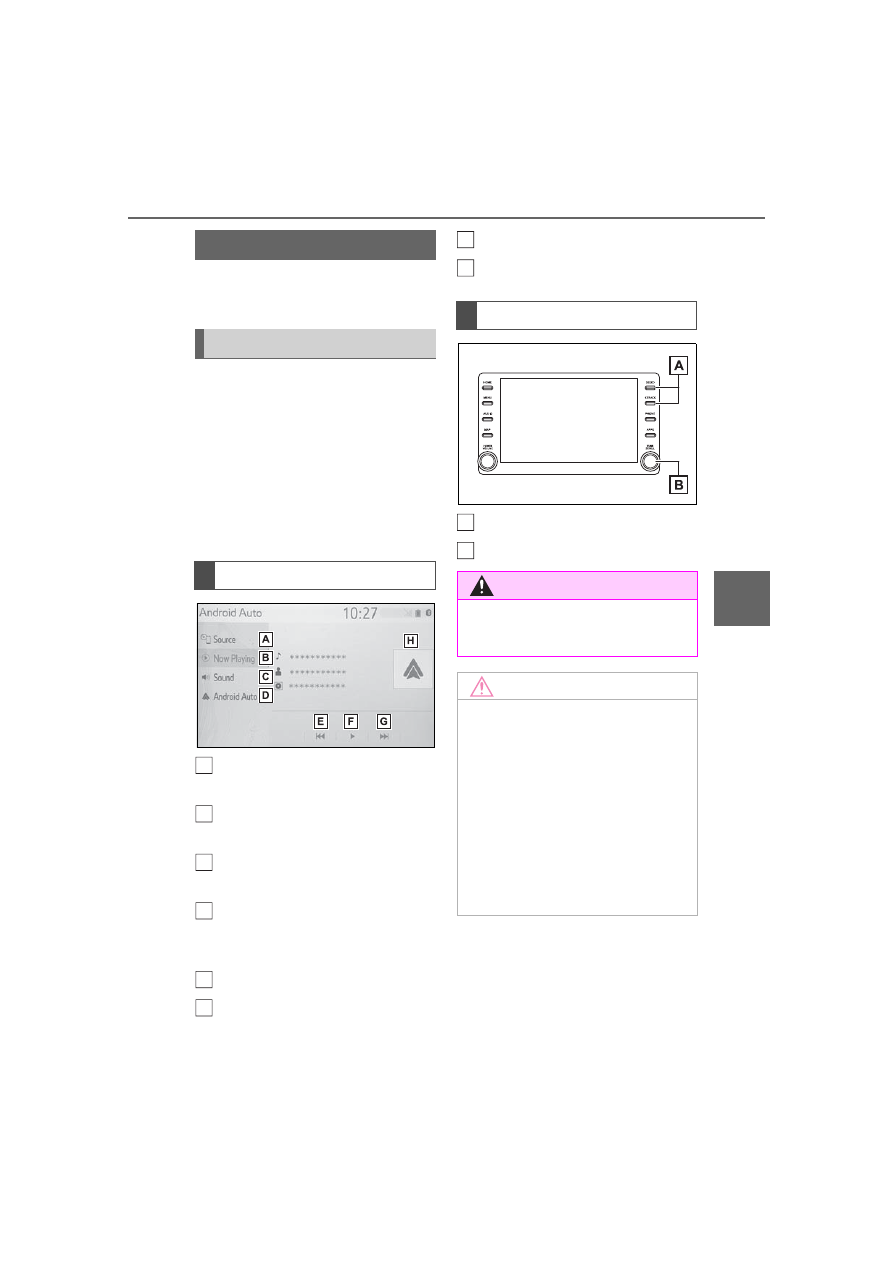
Select to display the audio
source selection screen.
Select to return to the top
screen.
Select to display the sound
setting screen. (
Select to display the audio
control screen of Android
Auto.
Select to change the track.
Select to play/pause.
Select to change the track.
Displays cover art
Press to change the track.
Turn to change the track.
Android Auto
*
Overview
Control screen
A
B
C
D
E
F
Control panel
WARNING
●
Do not connect smartphone or
operate the controls while driv-
ing.
NOTICE
●
Do not leave your smartphone
in the vehicle. In particular, high
temperatures inside the vehicle
may damage the smartphone.
●
Do not push down on or apply
unnecessary pressure to the
smartphone while it is con-
nected as this may damage the
smartphone or its terminal.
●
Do not insert foreign objects into
the port as this may damage the
smartphone or its terminal.
G
H
A
B