Toyota RAV4 (2022 year). Manual in english - page 21
 

  Index      Toyota     Toyota RAV4 (2022 year). Manual in english


Search            copyright infringement  


Content      ..     19      20      21      22     ..


Toyota RAV4 (2022 year). Manual in english - page 21


337

4-5. Using the driving support systems

4

Dr

iv

ing

Estimated course line

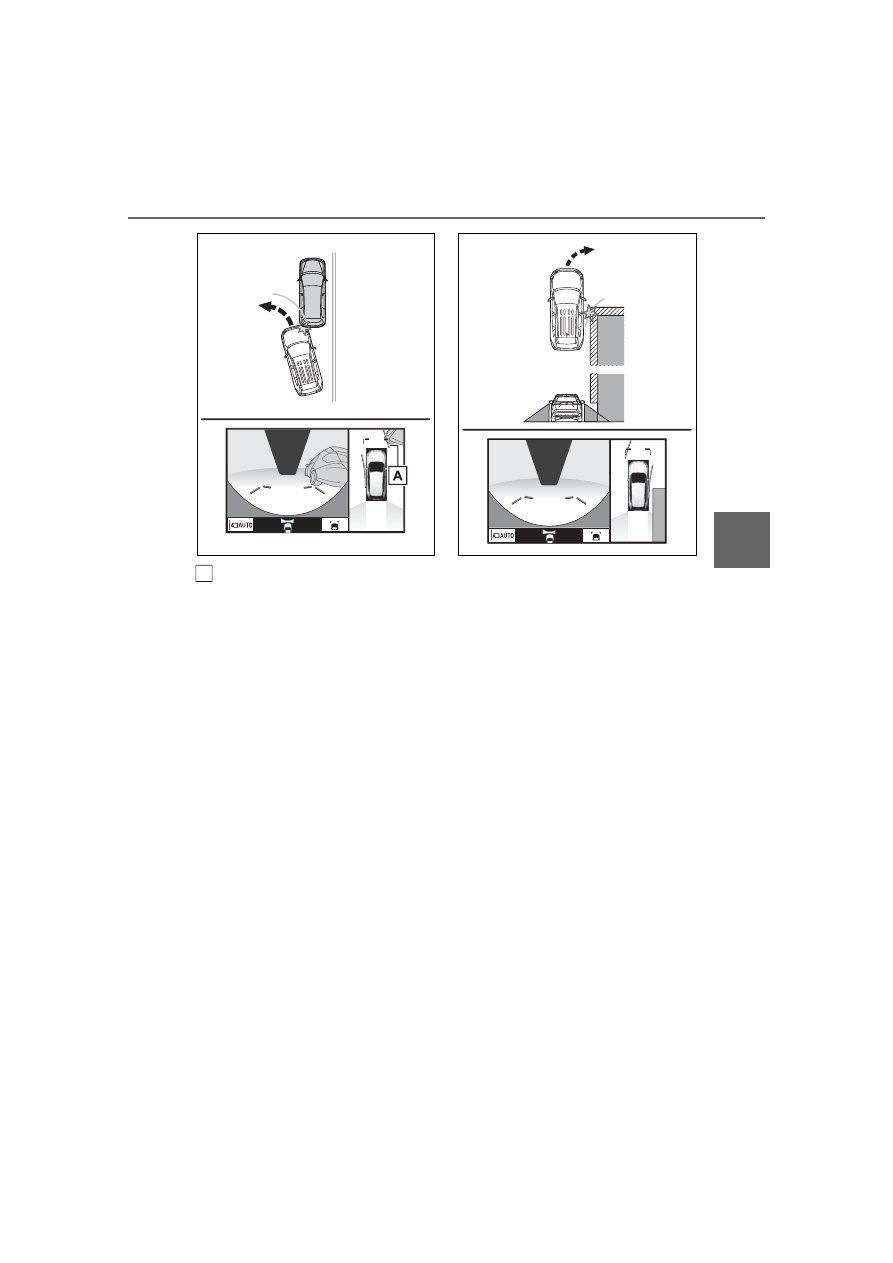
Three-dimensional objects 
(such as the overhang of a wall 
or loading platform of a truck) in 
high positions may not be pro-
jected on the screen. Check the 
safety of the surroundings 
directly.

Visually check the surroundings 
and the area behind the vehicle. 
In the case shown below, the 
truck appears to be outside of 
the estimated course lines and 
the vehicle does not look as if it 
hits the truck. However, the rear 
body of the truck may actually 
cross over the estimated course 
lines. In reality if you back up as 
guided by the estimated course 
lines, the vehicle may hit the 
truck.

A

338

4-5. Using the driving support systems

Estimated course lines

Visually check the surroundings 
and the area behind the vehicle. 
On the screen, it appears that a 
truck is parking at point 

However, in reality if you back 

up to point 

, you will hit the 

truck. On the screen, it appears 
that 

 is closest and 

 is far-

thest away. However, in reality, 
the distance to 

 and 

 is the 

same, and 

 is farther than 


and 

.

If you notice any of the following symptoms, refer to the likely cause 
and the solution, and re-check.
If the symptom is not resolved by the solution, have the vehicle 
inspected by your Toyota dealer.

Distance guide lines

A

B

A

A

C

A

C

B

A

C

Things you should know

If you notice any symptoms

339

4-5. Using the driving support systems

4

Dr

iv

ing

Symptom

Likely cause

Solution

The image is difficult to 
see

The vehicle is in a 
dark area

The temperature 
around the lens is 
either high or low

The outside tempera-
ture is low

There are water drop-
lets on the camera

It is raining or humid

Foreign matter (mud, 
etc.) is adhering to the 
camera

Sunlight or headlights 
are shining directly 
into the camera

The vehicle is under 
fluorescent lights, 
sodium lights, mer-
cury lights, etc.

Back up while visually 
checking the vehicle’s 
surroundings. (Use the 
monitor again once con-
ditions have been 
improved.)
The procedure for 
adjusting the picture 
quality of the pan-
oramic view monitor 
system is the same as 
the procedure for 
adjusting the screen dis-
play. (

P.384)

The image is blurry

Dirt or foreign matter 
(such as water drop-
lets, snow, mud, etc.) is 
adhering to the camera.

Flush the camera with a 
large quantity of water 
and wipe the camera 
lens clean with a soft 
and wet cloth.

The image is out of 
alignment

The camera or sur-
rounding area has 
received a strong 
impact.

Have the vehicle 
inspected by your 
Toyota dealer.

The guide lines are very 
far out of alignment

The camera position is 
out of alignment.

Have the vehicle 
inspected by your 
Toyota dealer.

The vehicle is tilted. 
(There is a heavy load 
on the vehicle, tire 
pressure is low due to 
a tire puncture, etc.)

The vehicle is used on 
an incline.

If this happens due to 
these causes, it does 
not indicate a malfunc-
tion.
Back up while visually 
checking the vehicle’s 
surroundings.

340

4-5. Using the driving support systems

The estimated course 
lines move even though 
the steering wheel is 
straight

There is a malfunction 
in the signals being out-
put by the steering sen-
sor.

Have the vehicle 
inspected by your 
Toyota dealer.

Guide lines are not dis-
played

The back door is open.

Close the back door.
If this does not resolve 
the symptom, have the 
vehicle inspected by 
your Toyota dealer.

The estimated course 
lines are not displayed

Battery has been rein-
stalled.

The steering wheel 
has been moved while 
the battery was being 
reinstalled.

Battery power is low.

The steering sensor 
has been reinstalled.

There is a malfunction 
in the signals being 
output by the steering 
sensor.

Have the vehicle 
inspected by your 
Toyota dealer.

The panoramic view dis-
play cannot be magni-
fied

The intuitive parking 
assist may be malfunc-
tioning or dirty.

Follow the correction 
procedures for malfunc-
tions of the intuitive 
parking assist. 
(

P.270)

The see-through 
view/moving view can-
not be displayed

Product license

Symptom

Likely cause

Solution

341

4-5. Using the driving support systems

4

Dr

iv

ing

*

: If equipped

Stopping the engine

While driving with the D shift 
position selected, depress the 
brake pedal and stop the vehi-
cle. The engine will stop auto-
matically.

When the engine stops, the Stop & 
Start indicator will illuminate.

Restarting the engine

Release the brake pedal. The 
engine will start automatically.

When the engine starts, the Stop & 
Start indicator will turn off.

When the brake hold sys-
tem is operating

When the engine is stopped 
by the Stop & Start system, if 
the brake pedal is released 
the engine will remain 
stopped.

If the accelerator pedal is 
depressed while the engine is 
stopped by the Stop & Start 
system, the engine will 
restart.

While the engine is stopped 
by the Stop & Start system, if 
the engine is restarted, the 
brake hold system will con-
tinue to apply the brakes, 
unless the operation condi-
tions of the brake hold system 
are no longer met. (

P.204)

When the dynamic radar 
cruise control with full-
speed range is operating

When the vehicle is stopped 
by the dynamic radar cruise 
control with full-speed range, 
the engine will stop automati-
cally even though the brake 
pedal is not depressed.

When the preceding vehicle 
starts off, the engine will 
restart automatically.

If the engine is restarted by 
the Stop & Start system while 
the vehicle is stopped by the 
dynamic radar cruise control 
with full-speed range, the 
vehicle will remain stopped.

Stop & Start system

*

The Stop & Start system 
stops and starts the engine 
according to brake pedal or 
shift lever operation when 
the vehicle is stopped, such 
as at a stoplight, intersec-
tion, etc., in order to 
improve fuel economy and 
reduce noise pollution 
caused by the engine idling.

Stop & Start system oper-
ation

342

4-5. Using the driving support systems

Press the Stop & Start cancel 
switch to disable the Stop & 
Start system. 
The Stop & Start cancel indica-
tor will illuminate.

Pressing the switch again will 
enable the Stop & Start system and 
the Stop & Start cancel indicator 
will turn off.

Automatic enabling of the Stop 

& Start system

If the Stop & Start system is dis-

abled using the Stop & Start cancel 

switch, it will be automatically re-

enabled once the engine switch is 

turned off and then the engine is 

started.

When the engine is stopped by 
the Stop & Start system when 
the vehicle is on an incline, 
when the brake pedal is 
released, brake force is tempo-
rarily maintained to prevent the 
vehicle from rolling backwards 
before the engine is restarted 
and drive force is generated. 
When drive force is generated, 

the maintained brake force is 
automatically canceled.

This function operates on flat 
surfaces as well as steep 
inclines.

Sound may be generated 
from the brake system, but 
this does not indicate a mal-
function.

Brake pedal response may 
change and vibration may 
occur, but this does not indi-
cate a malfunction.

Points for use

If the engine switch is pressed 

when the engine is stopped by the 

Stop & Start system, the engine 

will not be able to be restarted by 

the automatic engine start func-

tion. In this case, restart the 

engine using the normal engine 

starting procedure. (

P.191, 192)

When the engine is being 

restarted by the Stop & Start sys-

tem, the power outlets may be 

temporarily unusable, but this 

does not indicate a malfunction.

Installation and removal of electri-

cal components and wireless 

devices may affect the Stop & 

Start system. Contact your Toyota 

dealer for details.

When stopping the vehicle for a 

longer period of time, turn the 

engine switch to OFF to stop the 

engine completely.

Operating conditions

The Stop & Start system is opera-

tional when all of the following 

conditions are met:

• The vehicle has been driven a cer-

tain amount of time.

• The brake pedal is being 

depressed firmly. (except when 

Disabling the Stop & Start 
system

Hill-start assist control

343

4-5. Using the driving support systems

4

Dr

iv

ing

the vehicle is stopped by the 

dynamic radar cruise control with 

full-speed range when in vehicle-

to-vehicle distance control mode)

• The D shift position is selected.

• The driver’s seat belt is fastened.

• The driver’s door is closed.

• The selected driving mode is not 

snow mode (AWD models).

• Mud & Sand or Rock & Dirt mode 

is not selected for Multi-terrain 

Select (AWD models).

• The windshield defogger is off. 

(vehicles without a manual air 

conditioning system)

• The accelerator pedal is not being 

depressed.

• The engine is adequately warmed 

up.

• The outside temperature is 23°F (-

5°C) or higher.

• The hood is closed. (

P.344)

In the following situations, the 

engine may not be stopped by the 

Stop & Start system. This is not a 

malfunction of the Stop & Start 

system.

• When the air conditioning system 

is being used.

• When the battery is undergoing a 

periodic recharge.

• When the battery is not sufficiently 

charged, such as if the vehicle 

has been parked for a long time 

and the battery charge has 

decreased, the electric load is 

large, the battery fluid tempera-

ture is excessively low or the bat-

tery has deteriorated.

• When the brake booster vacuum 

is low.

• When the elapsed time since the 

engine was restarted is short.

• When the vehicle is stopped fre-

quently, such as when in a traffic 

jam.

• When the engine coolant tem-

perature or transmission fluid tem-

perature is extremely low or high.

• When the vehicle is stopped on a 

steep incline.

• When the steering wheel is being 

operated.

• When the vehicle is being driven 

in a high altitude area.

• When the battery fluid tempera-

ture is extremely low or high.

• For a while after the battery termi-

nals have been disconnected and 

reconnected.

When the engine is stopped by 

the Stop & Start system, the 

engine will be restarted automati-

cally if any of the following condi-

tions are met:

(To enable the engine to be 

stopped by the Stop & Start sys-

tem again, drive the vehicle.)

• The air conditioning system is 

turned on. (vehicles without a 

manual air conditioning system)

• The windshield defogger is turned 

on. (vehicles without a manual air 

conditioning system)

• The shift lever is shifted from D or 

P.

• The shift lever is shifted from P. 

(When the engine is stopped by 

the Stop & Start system when the 

shift lever is in P.)

• The driver’s seat belt is unfas-

tened.

• The driver’s door is opened.

• The driving mode is changed to 

snow mode (AWD models).

• Mud & Sand or Rock & Dirt mode 

is selected for Multi-terrain Select 

(AWD models).

• The Stop & Start cancel switch is 

pressed.

• The steering wheel is operated.

• The accelerator pedal is 

depressed.

• The vehicle starts to roll on an 

incline.

When the engine is stopped by 

the Stop & Start system, the 

engine may restart automatically 

in the following situations: (To 

enable the engine to be stopped 

by the Stop & Start system again, 

drive the vehicle.)

• When the brake pedal is pumped 

or strongly depressed.

• When the air conditioning system 

is being used.

• When a switch of the air condition-

344

4-5. Using the driving support systems

ing system is operated (windshield 

defogger switch, etc.).

• If the battery charge becomes low.

When the hood is opened

If the hood is opened while the 

engine is stopped by the Stop & 

Start system, the engine will stall 

and will not be able to be restarted 

by the automatic engine start 

function. In this case, restart the 

engine using the normal engine 

starting procedure. (

P.191, 192)

If the hood is closed after the 

engine is started with the hood 

open, the Stop & Start system will 

not operate. Close the hood, turn 

the engine switch to OFF, wait 30 

seconds or more, and then start 

the engine.

Air conditioning system opera-

tion while the engine is stopped 

by the Stop & Start system

Vehicles with an automatic air con-

ditioning system: When the air con-

ditioning is in automatic mode and 

the engine is stopped by the Stop & 

Start system, the fan may operate at 

a low speed in order to prevent the 

temperature in the cabin from 

increasing or decreasing or may be 

stopped.
To prioritize air conditioning system 

performance when the vehicle is 

stopped, disable the Stop & Start 

system by pressing the Stop & Start 

cancel switch.

If the windshield is fogged up

Turn the windshield defogger on. 
(

P.509, 516)

If the windshield fogs up frequently, 
press the Stop & Start cancel switch 
to disable the Stop & Start system.

If an odor is emitted from the air 

conditioning system

• Vehicles with a manual air condi-

tioning system:

If the idling stop time setting is set 

to “Extended”, change it to “Stan-

dard”. If an odor is emitted when 

the idling stop time setting is set to 

“Standard”, press the Stop & Start 

cancel switch to deactivate the 

Stop & Start system.

• Vehicles with an automatic air 

conditioning system:

Press the Stop & Start cancel 

switch to deactivate the Stop & 

Start system.

Changing the idling stop time 

with the air conditioning system 

on

The length of time the Stop & Start 

system will operate when the air 

conditioning system is on can be 
changed in 

 of the multi-informa-

tion display (

P.94). (The length of 

time the Stop & Start system will 

operate when the air conditioning 

system is off cannot be changed.)

Displaying the Stop & Start sys-

tem status

After Start:
Displays the cumulative time that 

the engine is stopped by the Stop & 

Start system from when the engine 

is started until the engine is 

stopped.

This item is reset each time the 

engine stops.

Multi-information display mes-

sages

If the following situations, 


and a message may be displayed 

on the multi-information display.

When the engine cannot be 

stopped by the Stop & Start sys-

tem

 “Press Brake More to Acti-

vate”
• The brake pedal is not sufficiently 

depressed.

 If the brake pedal is depressed 

further, the system will operate.

345

4-5. Using the driving support systems

4

Dr

iv

ing

 “Non-Dedicated Battery”

• A battery not designed for use 

with a Stop & Start system may 

have been installed.

 Have the vehicle inspected by 

your Toyota dealer.

 “Battery Charging”

• The battery charge may be low.

 Stopping of the engine is tempo-

rarily prohibited to prioritize charging 
of the battery. After the engine runs 
for a certain amount of time, the 
system will be enabled.
• A refresh charge may be occur-

ring (Examples: For a while after 

the battery terminals have been 

disconnected and reconnected. 

For a while after the battery has 

been replaced. etc.)

 After a refresh charge for up to 

an hour completes, the system can 
be operated.
• If displayed continuously for a 

long time (more than an hour)

 The battery may be deteriorated. 

Contact your Toyota dealer for 
details.

 “Stop & Start System 

Unavailable”
• The Stop & Start system is tempo-

rarily disabled.

 Allow the engine to run for some 

time.
• The engine may have been 

started with the hood open.

 Close the hood, turn the engine 

switch to OFF, wait for 30 seconds 
or more, and then start the engine.

 “In Preparation”

• The vehicle is being driven in a 

high altitude area.

• The brake booster vacuum is low.

 When the brake booster vacuum 

reaches a predetermined level, the 
system will be enabled.

 “For Climate Control”

• The air conditioning system is 

being used when the ambient 

temperature is high or low.

If the difference between the set 

temperature and cabin temperature 
becomes small, the system will be 
enabled.
• The windshield defogger is on.

When the engine automatically 

restarts while stopped by the Stop 

& Start system

 “In Preparation”

• The brake pedal has been 

depressed further or pumped.

 The system will be enabled after 

the engine runs and the brake 
booster vacuum reaches a predeter-
mined level.

 “For Climate Control”

• The air conditioning system has 

been turned on or is being used.

• The windshield defogger has 

been turned on.

 “Battery Charging”

• The battery charge may be low.

The system will be enabled after 

the engine runs to sufficiently 
charge the battery.

When the buzzer sounds

If the driver’s door is opened when 

the engine is stopped by the Stop & 

346

4-5. Using the driving support systems

Start system and the shift lever is in 

D, a buzzer will sound and the Stop 

& Start system indicator will flash. 

To stop the buzzer, close the 

driver’s door.

The Stop & Start system protec-

tion function

When the volume of the audio 

system is excessively high, sound 

output from the audio system may 

suddenly be cut off in order to 

reduce battery consumption. To 

prevent the audio system from 

being cut off, keep the volume of 

audio system at a moderate level. 

If the audio system has been cut 

off, turn the engine switch to OFF, 

wait for 3 seconds or more and 

then turn it to ACC or ON to re-

enable the audio system.

The audio system may not be acti-

vated if the battery terminals are 

disconnected and then recon-

nected. If this occurs, turn the 

engine switch to OFF and then 

repeat the following operation 

twice to activate the audio system 

normally.

• Turn the engine switch to ON and 

then to off.

Replacing the battery

P.652

If the Stop & Start cancel indica-

tor flashes continuously

The system may be malfunctioning. 

Have the vehicle inspected by your 

Toyota dealer.

If “Stop & Start System Mal-

function Visit Your Dealer” is 

displayed on the multi-informa-

tion display

The system may be malfunctioning. 

Have the vehicle inspected by your 

Toyota dealer.

WARNING

When the Stop & Start system 

is operating

Make sure to disable the Stop & 

Start system while the vehicle is 

in a poorly ventilated area.

If not disabled, the engine may be 

automatically restarted unexpect-

edly, causing exhaust gases to 

collect and enter the vehicle, pos-

sibly resulting in death or a seri-

ous health hazard.

Do not leave the vehicle while 

the engine is stopped by the 

Stop & Start system (while the 

Stop & Start indicator is on). An 

accident may occur due to the 

automatic engine start function.

Depress the brake pedal and 

apply the parking brake when 

necessary while the engine is 

stopped by the Stop & Start sys-

tem (while the Stop & Start indi-

cator is on).

NOTICE

To ensure the system oper-

ates correctly

If any of the following situations 

occur, the Stop & Start system 

may not operate correctly. Have 

your vehicle inspected by your 

Toyota dealer.

While the driver’s seat belt is 

fastened, the driver’s and front 

passenger’s seat belt reminder 

light flashes.

Even though the driver’s seat 

belt is not fastened, the driver’s 

and front passenger’s seat belt 

reminder light does not illumi-

nate.

347

4-5. Using the driving support systems

4

Dr

iv

ing

FF vehicles/Dynamic 
Torque Control AWD vehi-
cles

1

Eco drive mode

Suitable for driving to improve fuel 
economy by more smoothly gener-
ating torque in response to acceler-
ator pedal operations compared to 
normal mode and restraining air 
conditioning system operations 
(heating/cooling).
When the switch is pressed while 
not in Eco drive mode, the system 
switches to Eco drive mode and the 

NOTICE

Even though the driver’s door is 

closed, the open door warning 

light is illuminated or the interior 

light is illuminated when the 

interior light switch is in the door 

position.

Even though the driver’s door is 

open, the open door warning 

light does not illuminate or the 

interior light does not illuminate 

when the interior light switch is 

in the door position.

Driving mode select 

switch

The driving modes can be 
selected to suit the driving 
and usage conditions.

Selecting a driving mode

348

4-5. Using the driving support systems

Eco drive mode indicator illumi-
nates on the multi-information dis-
play.

2

Normal mode

Suitable for normal driving.
The driving mode returns to normal 
mode if the switch is pressed while 
in Eco drive mode or sport mode.

3

Sport mode

Controls the steering feeling and 
engine to create an acceleration 
response that is suitable for sporty 
driving. Suitable for when crisp 
handling is desired, such as when 
driving on mountainous roads.
When the switch is pressed while 
not in sport mode, the system 
switches to sport mode and the 
sport mode indicator illuminates on 
the multi-information display.

Dynamic Torque Vectoring 
AWD vehicles

1

Eco drive mode

Suitable for driving to improve fuel 

economy by more smoothly gener-
ating torque in response to acceler-
ator pedal operations compared to 
normal mode and restraining air 
conditioning system operations 
(heating/cooling).
When the switch is pressed while 
not in Eco drive mode, the system 
switches to Eco drive mode and the 
Eco drive mode indicator illumi-
nates on the multi-information dis-
play.

2

Normal mode

Suitable for normal driving.
The driving mode returns to normal 
mode if the switch is pressed while 
in Eco drive mode or sport mode.

3

Sport mode

Controls the steering feeling and 
engine to create an acceleration 
response that is suitable for sporty 
driving. Suitable for when crisp 
handling is desired, such as when 
driving on mountainous roads.
When the switch is pressed while 
not in sport mode, the system 
switches to sport mode and the 
sport mode indicator illuminates on 
the multi-information display.

When changing to a driving 

mode other than normal mode

The background color of the multi-

information display changes 

according to the selected driving 

mode.

When the speedometer is set to 

analog display, the speedometer 

display color also changes. (For 

vehicles with the 7-inch multi-

information display only)

Switches to AWD control suitable 

for the selected mode. (For 

Dynamic Torque Vectoring AWD 

vehicles only)

349

4-5. Using the driving support systems

4

Dr

iv

ing

Air conditioning system opera-

tion in Eco drive mode

In Eco drive mode, heating/cooling 

operations and the fan speed is con-

trolled to improve fuel efficiency. 

Perform the following procedures to 

increase the air conditioning perfor-

mance.

Vehicles with automatic air condi-

tioning system: Turn eco air condi-

tioning mode off (

P.515)

Adjust the fan speed (

P.508, 

515)

Cancel Eco drive mode

Canceling a driving mode

Sport mode is automatically can-

celed and the driving mode 

returns to normal mode when the 

engine switch is turned off.

Normal mode and Eco drive mode 

are not canceled until another 

driving mode is selected. (Even if 

the engine switch is turned off, 

normal mode and Eco drive mode 

will not be automatically can-

celed.)

Select a mode that is appropri-
ate for the road condition.

Mud & Sand mode

Suitable for driving on roads 
with increased driving resis-
tance in which tires could 
become stuck, such as sandy 
roads, muddy roads, etc.

Multi-terrain Select 

(AWD vehicles)

Multi-terrain Select is 
designed to control AWD, 
brake and driving force sys-
tems in accordance with the 
road condition. Use the sys-
tem when driving over 
muddy, sandy or rough road 
surfaces.

WARNING

Before using Multi-terrain 

Select

Make sure to observe the follow-

ing precautions. Failure to 

observe these precautions may 

result in an unexpected accident.

Check that the Mud & Sand and 

Rock & Dirt indicators are illumi-

nated before driving.

Multi-terrain Select is not 

intended to expand the limit per-

formance of the vehicle. Thor-

oughly check the road 

conditions and driving route 

before driving, and drive with 

caution.

Control in each mode

350

4-5. Using the driving support systems

Rock & Dirt mode

Suitable for driving on bumpy 
roads, such as on unpaved for-
est roads.

Normal mode

Suitable for normal driving. Use 
Normal mode when not driving 
off-road.

Dynamic Torque Control 
AWD vehicles (if equipped)

Pressing the switch switches the 
mode as follows:

1

Switches to Mud & Sand 
mode

2

Switches to Normal mode

3

Switches to Rock & Dirt 
mode

When the mode is switched, the 
state of the indicator/warning light 

will change as follows:
• Mud & Sand mode
Mud & Sand mode indicator, VSC 
OFF indicator (

P.79) and PCS 

warning light (

P.77) illuminate.

• Rock & Dirt mode
Rock & Dirt mode indicator illumi-
nates.
• Normal mode
The indicators and/or warning lights 
above turn off.

Dynamic Torque Vectoring 
AWD vehicles (if equipped)

Operating the dial switch 
switches the mode as follows:

1

Switches to Mud & Sand 
mode

2

Switches to Normal mode

3

Switches to Rock & Dirt 
mode

When the mode is switched, the 
state of the indicator/warning light 
will change as follows:

Changing the mode

351

4-5. Using the driving support systems

4

Dr

iv

ing

• Mud & Sand mode
Mud & Sand mode indicator, VSC 
OFF indicator (

P.79) and PCS 

warning light (

P.77) illuminate.

• Rock & Dirt mode
Rock & Dirt mode indicator illumi-
nates.
• Normal mode
The indicators and/or warning lights 
above turn off.

Multi-terrain Select

Multi-terrain Select is intended for 

use when driving on rough roads. 

Drive in Normal mode during nor-

mal driving.

The Mud & Sand and Rock & Dirt 

modes control the vehicle so that 

it can maximize the drive force 

and improve the drive force on 

rough roads. As a result, fuel effi-

ciency may diminish when com-

pared to driving in Normal mode.

When Multi-terrain Select brake 

control is operating

The slip indicator flashes when 

Multi-terrain Select brake control is 

operating.

AWD control for Mud & Sand 

and Rock & Dirt modes

If the vehicle speed exceeds the 

speeds listed below, the same level 

of AWD control for Normal mode is 

performed, even if Mud & Sand or 

Rock & Dirt mode is selected.

Mud & Sand mode: Vehicle speed 

is approximately 25 mph (40 

km/h) or more

Rock & Dirt mode: Vehicle speed 

is approximately 16 mph (25 

km/h) or more

If the vehicle speed drops below the 

above speeds, the system automati-

cally returns to the AWD control for 

each mode.

When “Traction Control Turned 

OFF” is displayed on the multi-

information display

Multi-terrain Select brake control is 

temporarily stopped due to overheat 

of the brakes.
Stop the vehicle in a safe location 

as soon as possible and wait until 

the message disappears from the 

multi-information display.

When the system switches to 

Normal mode automatically

In the following situations, the sys-

tem switches to Normal mode auto-

matically:

When the driving mode is 

changed (

P.347)

When the engine switch is turned 

off

Sounds and vibrations when 

driving in Mud & Sand or Rock 

& Dirt mode

Any of the following conditions may 

occur when Multi-terrain Select is 

operating. None of these indicates 

that a malfunction has occurred:

Vibrations may be felt throughout 

the vehicle or steering wheel

Sounds may be heard from the 

engine compartment

When the slip indicator illumi-

nates

The system may be malfunctioning. 

Have the vehicle inspected by your 

Toyota dealer immediately.

When the indicator for each 

mode does not illuminate

The system may be malfunctioning 

if the indicator does not illuminate 

when selecting the mode other than 

Normal mode. Have the vehicle 

inspected by your Toyota dealer 

immediately.

352

4-5. Using the driving support systems

Dynamic Torque Control 
AWD vehicles

Press the snow mode switch.

When the switch is pressed, the 
system switches to snow mode and 
the snow mode indicator illuminates 
on the multi-information display.
When the switch is pressed again, 
the snow mode indicator turns off.

Dynamic Torque Vectoring 
AWD vehicles

Press the snow mode switch.

When the switch is pressed, the 
system switches to snow mode and 
the snow mode indicator illuminates 
on the multi-information display.

NOTICE

In order to ensure that Multi-

terrain Select operates prop-

erly

Do not continuously use Multi-ter-

rain Select for a long period of 

time. Depending on the driving 

conditions, the load on related 

parts increases and the system 

may not operate properly

Snow mode switch 

(AWD vehicles)

Snow mode can be selected 
to suit the conditions when 
driving on slippery road sur-
faces, such as on snow.

System operation


Content      ..     19      20      21      22     ..