Subaru Ascent (2023 year). Manual in english - page 5
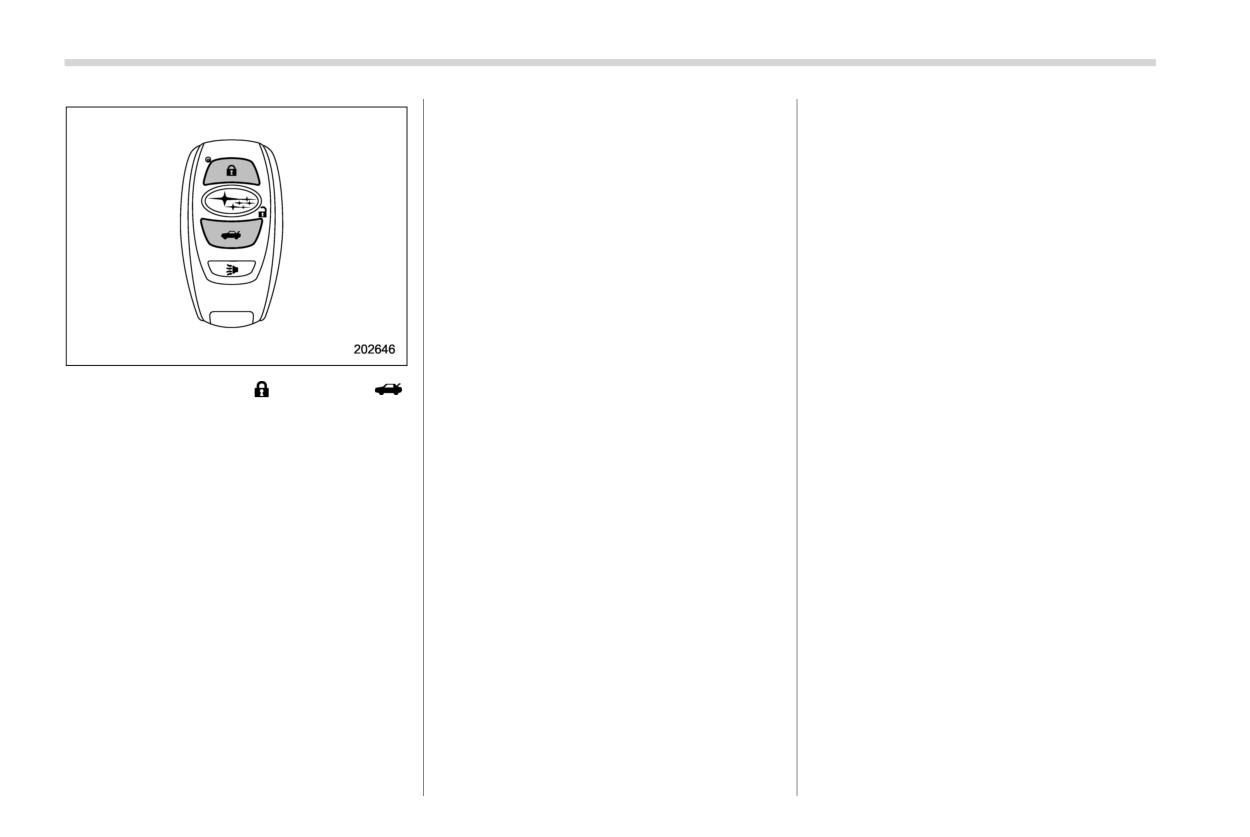
Keyless access with push-button start system
123
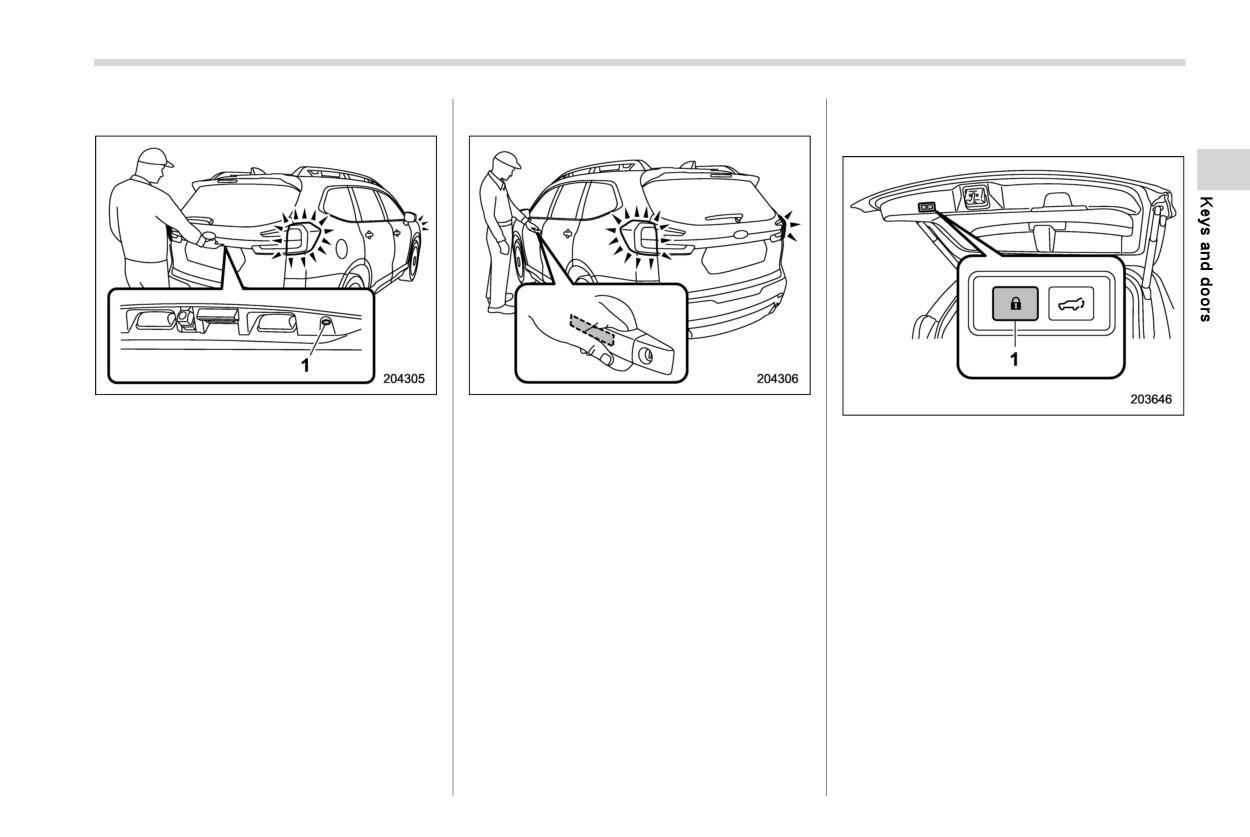
! Locking with the rear lock button
! Unlocking
! Locking with the power rear gate
lock button
1
Rear lock button
Carry the access key fob, and grip the
following door handle.
1
Power rear gate lock button
Carry the access key fob, close all doors
including the rear gate and fuel filler lid,
. The driver’s door handle:
Carry the access key fob, and press the
and press the rear lock button. The rear
Either only the driver’s door and the fuel
power rear gate lock button. It will close
gate, all doors and fuel filler lid will be
filler lid will unlock, or all doors, the rear
automatically, and the rear gate, all doors
locked. Also, an electronic chirp will sound
gate and the fuel filler lid will unlock.
and the fuel filler lid will be locked. Also, the
once and the hazard warning flashers will
. The front passenger’s door handle:
hazard warning flashers will flash once,
flash once.
All doors, rear gate and fuel filler lid will be
and an electronic chirp will sound once.
unlocked.
Also, an electronic chirp will sound twice
and the hazard warning flashers will flash
twice.
- CONTINUED -
124 Keyless access with push-button start system
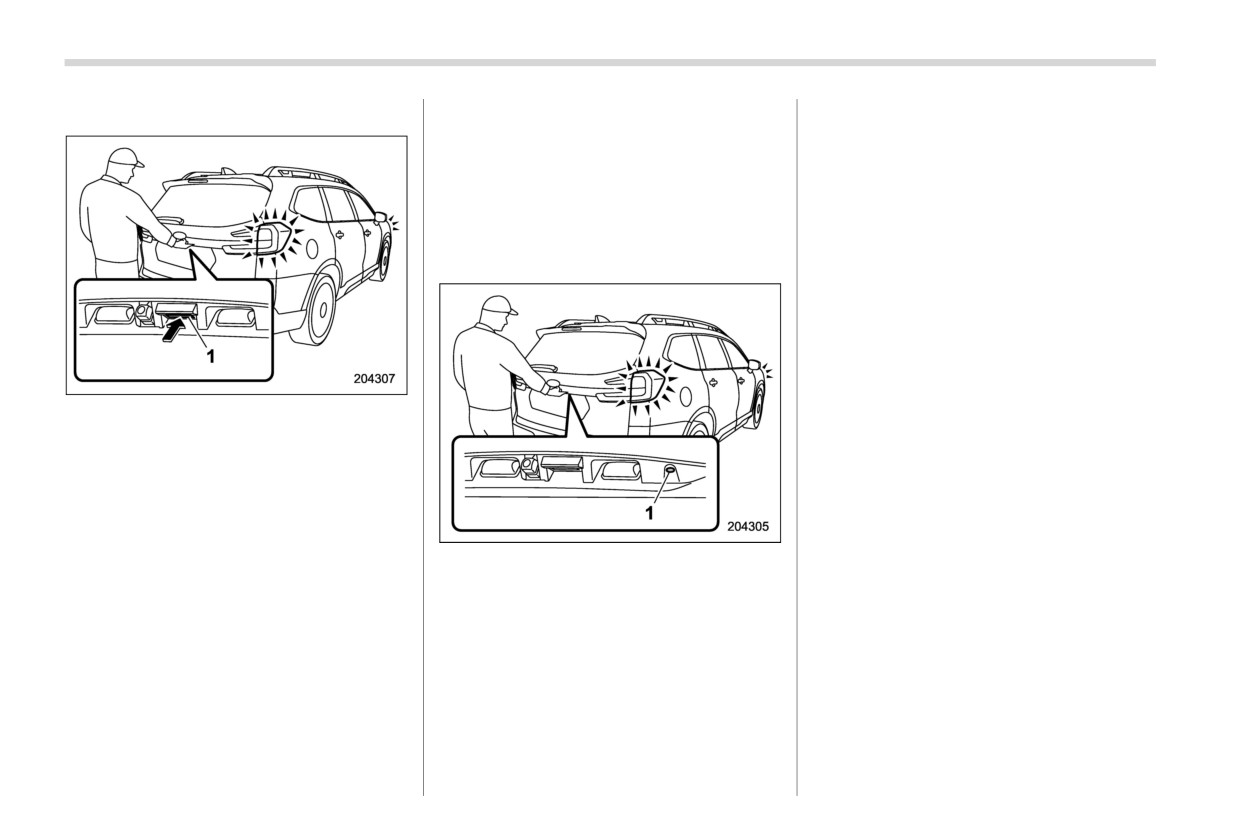
! Unlocking rear gate
SUBARU dealer.
& Unlock using PIN Code Ac-
cess
When all doors including the rear gate are
locked, you can unlock the driver’s door
without a key by pressing the rear lock
button.
1
Rear gate opener button
Carry the access key fob, and press the
rear gate opener button. Either only the
rear gate will unlock, or all doors and fuel
filler lid will unlock. Also, an electronic chirp
will sound twice and the hazard warning
flashers will flash twice.
1
Rear lock button
! Door unlock selection function
When the door is unlocked using the
NOTE
keyless access function, only the doors
PIN Code Access will be helpful if the
that were set can be unlocked.
key fob is accidentally left in the
The settings can be changed with the
vehicle. It is recommended that a 5-
following methods.
digit security code (PIN code) be regis-
. The setting can be changed by operat-
tered.
ing the center information display. For
details, refer to “Car settings” FP215.
. The setting can be changed by a
Keyless access with push-button start system
125
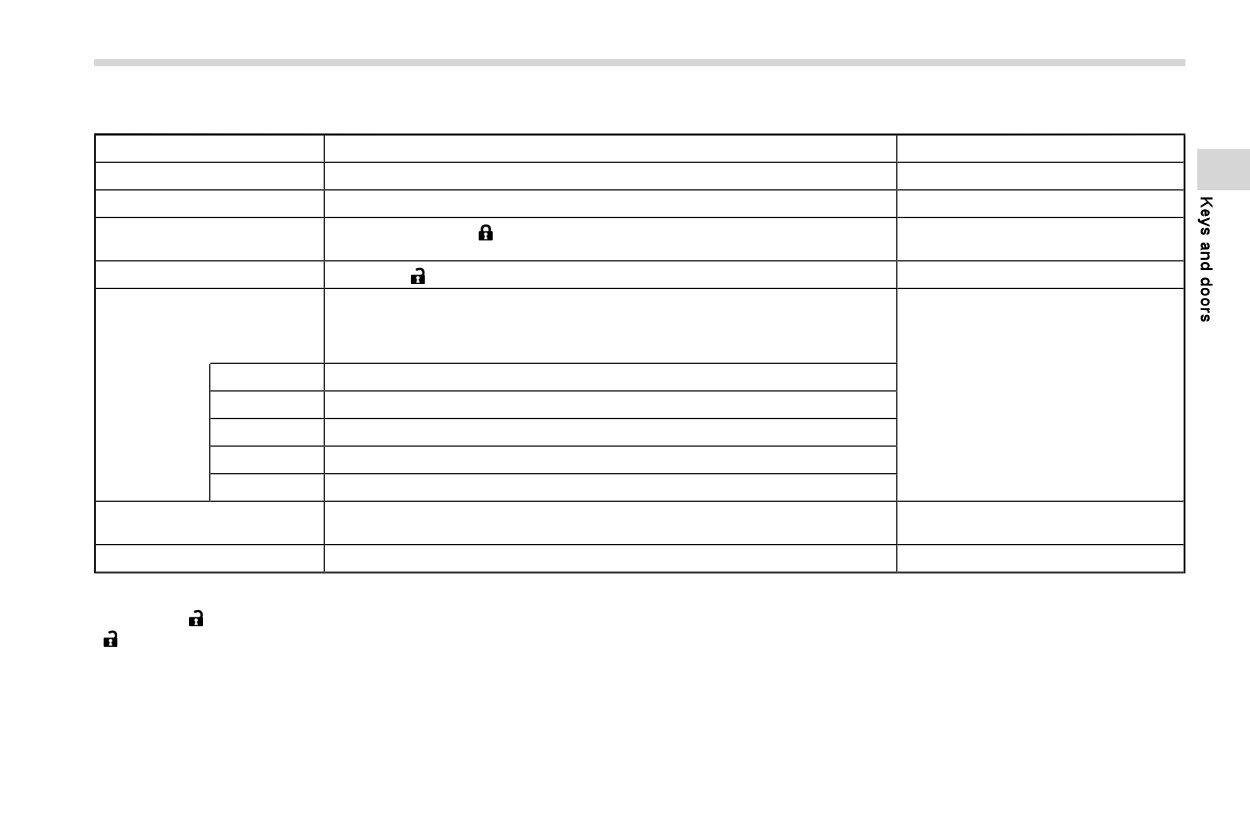
! Registration for a PIN code
Steps
Operation
Time from the previous step
1
Turn off the ignition switch.
—
2
Close all doors (including rear gate).
—
Press and hold the “
” button on the access key fob, and press and hold the
3
—
rear lock button until a chirp sounds intermittently.
4
Press the “
” button on the access key fob.
Within 30 seconds
The PIN code is inputted by using the rear lock button within 30 seconds after
the chirp sound of step 4.
For example, to register “32468” as the PIN code, perform the following
procedure.
(1)
Press the button three times.
5
Within 30 seconds
(2)
After a chirp sounds once, press the button twice.
(3)
After a chirp sounds once, press the button four times.
(4)
After a chirp sounds once, press the button six times.
(5)
After a chirp sounds once, press the button eight times.
Perform step 5 again within approximately 30 seconds after the chirp starts
6
—
sounding intermittently.
7
All doors will be unlocked and locked. Then the PIN code will be registered.
—
NOTE
Press the “
” button within 30 seconds of step 6 to end the preparation mode and move on to the registration stage. Unless the
“
” button is pressed within 30 seconds after step 6, the PIN code registration will be canceled.
- CONTINUED -
126 Keyless access with push-button start system
NOTE
. After registering a new PIN code,
cannot unlock the doors by PIN
make sure that you can unlock the
Code Access for 5 minutes.
Press the rear lock button ten times
doors using the PIN code.
to enter “0”.
. The PIN code cannot be deleted
Change the PIN code frequently to
& Power saving function
while the keyless access function
protect your vehicle from theft.
To protect the access key fob battery and
is disabled by operating the access
If you have lent your vehicle to
key fob.
the vehicle battery, the keyless access
another person, confirm that the
. Reregister the PIN code in the fol-
function will be disabled as follows.
PIN code has not been changed or
lowing cases.
. When the keyless access function and
deleted. If the PIN code has been
- When you forget the PIN code.
the remote keyless entry system have
changed or deleted, reregister a new
not been used for 2 weeks or longer
PIN code.
- When you want to change the PIN
code.
while all doors are locked.
If you make an error during the
. When the access key fob has been left
registration procedure, press the
! Unlocking
in the operating range for 10 minutes or
“
” or “
” button on the access
Perform steps (1) to (5) of step 5 described
longer while all doors are locked.
key fob. Then, start over from the
procedure described in “Prepara-
in “Registration for a PIN code”.
! Recovery from power saving mode
tion for registering a PIN code”.
NOTE
To protect your vehicle from theft,
When one of the following operations is
. You cannot unlock by PIN Code
you cannot register a string of the
performed, the keyless access function
Access in the following cases.
same five numbers together, such as
will be recovered.
- When the access key fob is within
“00000”, nor “12345” as a PIN code.
. Unlock by gripping the door handle
Do not register your vehicle license
the operating ranges.
(only when the sensors on the front
plate number or simple numbers
- When the ignition switch is in the
passenger’s door are not disabled) or
such as “11122” or “12121” as a
“ACC” or “ON” position.
pressing the rear gate opener button on
PIN code. Doing so will increase the
. If you make an operation error dur-
the rear gate.
risk of vehicle theft.
ing the unlocking procedure, start
. Lock or unlock by the remote keyless
When you try to register “22222”, the
over with the unlocking procedure
entry system.
registered PIN code will be deleted.
after waiting for 5 seconds or longer.
. Open a door and then close it.
You cannot unlock the doors by PIN
. To protect your vehicle from theft, an
. Turn the push-button ignition switch to
Code Access until a new code is
electrical chirp will sound if incor-
the “ON” position.
registered.
rect PIN codes are entered five times
continuously. If this occurs, you
Keyless access with push-button start system
127
& Power saving function of ac-
& Disabling keyless access
! Disabling functions
cess key fob
function
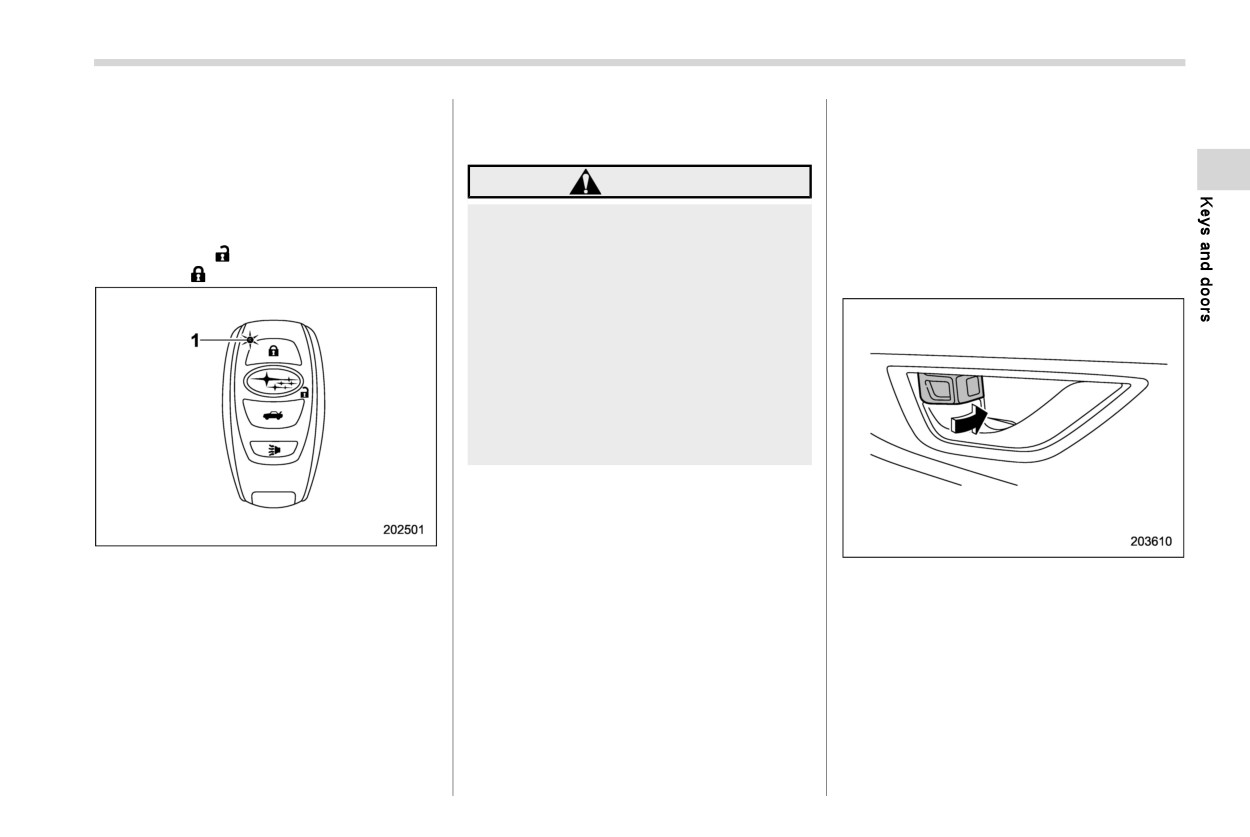
! By operating the access key fob
This function stops the access key fob
To disable the keyless access function by
from receiving signals and helps minimize
WARNING
operating the access key fob, register a
the battery consumption of the access key
If you wear an implanted pacemaker
PIN code for PIN Code Access. For details
fob.
or an implanted defibrillator, per-
about registering a PIN code, refer to
1.
Press the “
” button twice while hold-
form the procedure described in
“Unlock using PIN Code Access” FP124.
ing the “
” button.
“By operating the driver’s door”
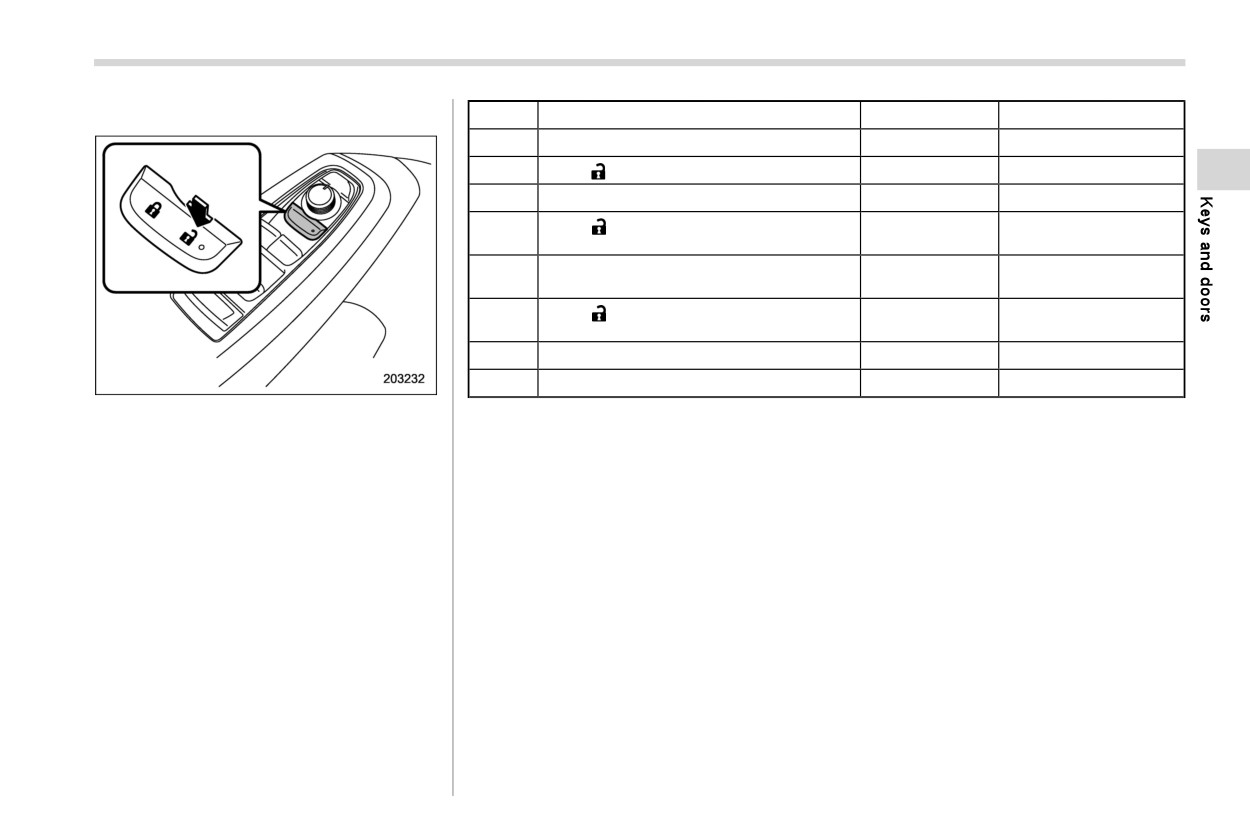
1.
Open the driver’s door.
FP129 to disable the keyless access
function. If you perform the proce-
dure described in “By operating the
access key fob” FP127, the opera-
tion of an implanted pacemaker or
implanted defibrillator may be af-
fected by the radio waves from the
transmitter antenna.
When the vehicle is not going to be used
for a long time or when you choose not to
use the keyless access function, the key-
less access function can be disabled.
1
LED indicator
2.
Rotate the lock lever forward.
NOTE
2.
Confirm that the LED indicator blinks
4
. The locking and unlocking function
times to notify that the setting is
by the remote keyless entry system
complete.
is not disabled.
When the access key fob is in the power
. To start the engine while the func-
save mode, the keyless access function
tions are disabled, perform the pro-
and push-button start system will not be
cedure described in “Starting en-
available.
gine” FP465.
To cancel the power save mode, press one
of the buttons on the access key fob.
- CONTINUED -
128 Keyless access with push-button start system
3. Press and hold the “
” button and “
”
button on the access key fob simulta-
neously for more than 5 seconds.
A chirp sound will be heard, and the
function will be disabled.
Keyless access with push-button start system
129
! By operating the driver’s door
Steps
Operation
Time
Status
1
Sit in the driver’s seat, and close the door.
—
Close
2
Push “
” on the power door locking switch.
—
Close
3
Open the driver’s door.
Within 5 sec.
Close?Open
Push “
” on the power door locking switch
4
Within 5 sec.
Open
twice.
Open?Close?
5
Close and open the driver’s door twice.
Within 10 sec.
Open?Close?Open
Push “
” on the power door locking switch
6
Within 10 sec.
Open
twice while the door is open.
7
Close and open the driver’s door once.
Within 10 sec.
Open?Close?Open
8
Close the door.
Within 5 sec.
Open?Close
To disable the keyless access function by
A chirp will sound and the functions will be disabled.
operating the driver’s door, perform the
following procedures.
NOTE
In steps 4 and 6, press the power door locking switch firmly. If the switch is not
pressed firmly, the functions may not be disabled.
- CONTINUED -
130 Keyless access with push-button start system
! Enabling functions
refer to “Car settings” FP215.
& When access key fob does
When the procedure to disable the func-
not operate properly
Furthermore, the volume setting of the
tions is performed again, a chirp will
audible signal can also be changed by a
Refer to “Access key fob - if access key
sound, and the functions are enabled.
SUBARU dealer. Consult your SUBARU
fob does not operate properly” FP464.
dealer for details.
NOTE
& Replacing battery of access
The keyless access function will be
& Selecting hazard warning
key fob
enabled only if you perform the
flasher operation
procedure in the same manner used
Refer to “Replacing battery of access key
to disable the function (for example,
Using the hazard warning flasher, the
fob” FP517.
when disabling by operating the
system will give you a visible signal when
driver’s door, the function will not
the doors are locked or unlocked. If
& Replacing access key fob
be enabled even if you operate the
desired, you can turn the hazard warning
Access key fobs can be replaced by a
flashers off by operating the center infor-
access key fob).
SUBARU dealer. For more details, contact
Press the push-button ignition
mation display. For details, refer to “Car
a SUBARU dealer.
switch if you do not know the
settings” FP215. The setting can also be
procedure in which the keyless
changed by a SUBARU dealer. Consult
& Certification for keyless ac-
access function was disabled.
your SUBARU dealer for details.
cess with push-button start
- When disabling by operating the
system
& Warning chimes and warning
driver’s door: A chirp will not
sound.
indicator
. U.S.-spec. models
- When disabling by operating the
The keyless access with push-button start
FCC ID: HYQ14AKB
access key fob: A chirp will
system sounds a warning chime and
FCC ID: Y8PSU19S-3
sound.
flashes the access key warning indicator
FCC ID: Y8PSSPIMB02
on the combination meter in order to
& Selecting audible signal op-
minimize improper operations and help
CAUTION
eration
protect your vehicle from theft.
Using an electronic chirp, the system will
For details, refer to “Warning chimes and
FCC WARNING
give you an audible signal when the doors
warning indicator of the keyless access
Changes or modifications not ex-
are locked or unlocked. If desired, you can
with push-button start system” FP186.
pressly approved by the party re-
turn the audible signal off by operating the
sponsible for compliance could void
center information display. For details,
Keyless access with push-button start system
131
the user’s authority to operate the
. Canada-spec. models
- Type 2
equipment.
- Type 1
NOTE
This device complies with part 15 of the
FCC Rules. Operation is subject to the
following two conditions: (1) This de-
vice may not cause harmful interfer-
ence, and (2) this device must accept
any interference received, including
interference that may cause undesired
operation.
132 Immobilizer
2-3. Immobilizer
NOTE
One key that has already been registered
is required in order to register a new key.
To protect your vehicle from theft,
The immobilizer system is designed to
please pay close attention to the
NOTE
prevent an unauthorized person from
following security precautions:
If you lose a key, the lost key’s ID code
starting the engine. Only keys registered
- Never leave your vehicle unat-
still remains in the memory of the
with your vehicle’s immobilizer system can
tended with its keys inside.
vehicle’s immobilizer system. For se-
be used to operate your vehicle. If engine
- Before leaving your vehicle,
curity reasons, the lost key’s ID code
start is attempted with an unregistered
close all windows and the moon-
should be erased from the memory. To
access key fob or key, the engine will not
roof, and lock the doors and rear
erase the lost key’s ID code, all keys
start. Even if the engine does start, it will
gate.
that will be used are required.
stop after a few seconds. This system,
- Do not leave spare keys or any
however, is not a 100% anti-theft guaran-
record of your key number in the
For details about new key registration
tee.
vehicle.
and erasing the lost key’s ID code,
The vehicle has a maintenance-free
contact your SUBARU dealer.
CAUTION
type immobilizer system.
Do not place the key under direct
& Certification for immobilizer
sunlight or anywhere it may be-
& Security indicator light
system
come hot.
Refer to “Security indicator light” FP190.
. For models with “keyless access
Do not get the key wet. If the key
with push-button start system”:
gets wet, wipe it dry with a cloth
& Key replacement
Refer to “Certification for keyless ac-
immediately.
cess with push-button start system”
Your key number plate will be required if
FP130.
Do not modify or remove the
you ever need a replacement key made.
system. If modified or removed,
Any new key must be registered for use
. For models without “keyless access
the proper operation of the sys-
with your vehicle’s immobilizer system
with push-button start system”:
tem cannot be guaranteed.
before it can be used. The maximum
- U.S.-spec. models
number of keys that can be registered for
use with one vehicle is as follows.
FCC ID: Y8PFJ16-2
. Four (models without “keyless access
with push-button start system”)
CAUTION
. Seven (models with “keyless access
FCC WARNING
with push-button start system”)
Remote keyless entry system
133
Changes or modifications not ex-
–
Canada-spec. models
2-4. Remote keyless entry
pressly approved by the party re-
system
sponsible for compliance could void
the user’s authority to operate the
equipment.
CAUTION
Do not expose the remote trans-
NOTE
mitter to severe shocks, such as
This device complies with part 15 of the
those experienced as a result of
FCC Rules. Operation is subject to the
dropping or throwing.
following two conditions: (1) This de-
Do not take the remote transmit-
vice may not cause harmful interfer-
ter apart except when replacing
ence, and (2) this device must accept
the battery.
any interference received,
including
Do not get the remote transmitter
interference that may cause undesired
wet. If it gets wet, wipe it dry with
operation.
a cloth immediately.
When you carry the remote trans-
mitter on an airplane, do not
press the button of the remote
transmitter while in the airplane.
When any button of the remote
transmitter is pressed, radio
waves are sent and may affect
the operation of the airplane.
When you carry the remote trans-
mitter in a bag on an airplane,
take measures to prevent the
buttons of the remote transmitter
from being pressed.
- CONTINUED -
134 Remote keyless entry system
tions. The system’s operable distance will
be shorter in areas near a facility or
electronic equipment emitting strong radio
waves such as a power plant, broadcast
station, TV tower, or remote controller of
home electronic appliances.
NOTE
For models with “keyless access
with push-button start system”, the
remote keyless entry system will not
be activated when the push-button
ignition switch is in any position
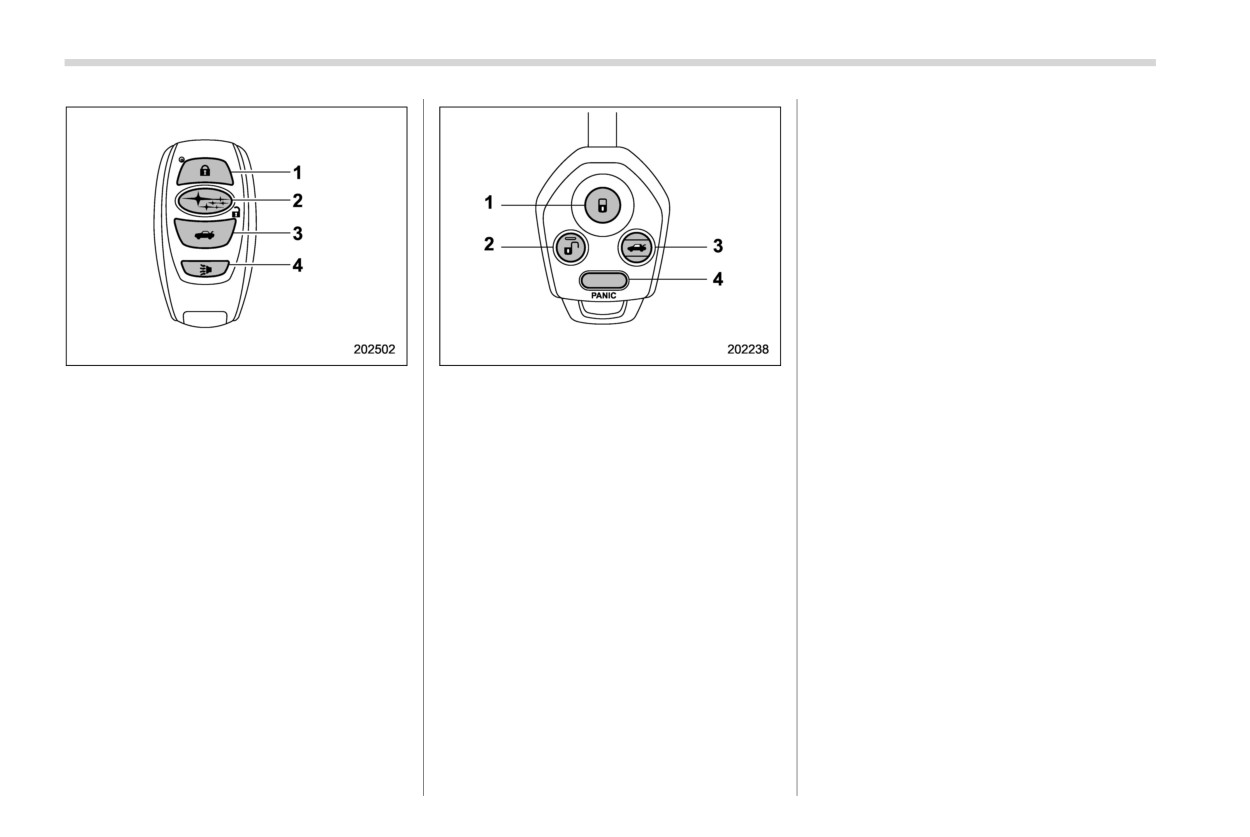
Access key fob
Transmitter
other than the “OFF” position.
1
Lock/arm button
1
Lock/arm button
For models without “keyless access
2
Unlock/disarm button
2
Unlock/disarm button
with push-button start system”, the
3
Rear gate unlock button
3
Rear gate unlock button
remote keyless entry system will not
4
PANIC button
4
PANIC button
be activated when the key is inserted
The remote keyless entry system has the
in the ignition switch.
following functions.
The hazard warning flashers will
flash once or twice when the access
. Locking and unlocking the doors, rear
key fob/transmitter button is
gate and fuel filler lid
pressed in the following cases.
. Unlocking the rear gate
- When locking the doors
. Sounding a panic alarm
- When unlocking the doors
. Arming and disarming the alarm sys-
- When unlocking the rear gate
tem. For detailed information, refer to
“Alarm system” FP142.
If
desired, you can turn the hazard
warning flashers off by operating the
The operable distance of the remote key-
center information display. For details,
less entry system is approximately 30 feet
refer to
“Car settings” FP215. The
(10 meters). However, this distance will
setting can also be changed by a
vary depending on environmental condi-
SUBARU dealer. Consult your SUBARU
Remote keyless entry system
135
dealer for details.
NOTE
lock/arm button three times in a 5-second
period will cause your vehicle’s horn to
If the interval between the first and
sound once and its hazard warning
& Locking the doors
second presses of the unlock/disarm
flashers to flash three times.
Press the lock/arm button to lock all doors,
button (for unlocking of all of the doors
the rear gate and fuel filler lid. An electro-
and the rear gate) is extremely short,
NOTE
nic chirp will sound once and the hazard
the system may not respond.
If the interval between presses is too
warning flashers will flash once.
short when you press the lock/arm
& Unlocking the rear gate
button three times, the system may
If any of the doors (or the rear gate) are not
not respond to the signals from the
fully closed, the following will occur to alert
Press the rear gate unlock button to unlock
remote transmitter.
you that the doors (or the rear gate) are not
the rear gate.
properly closed.
An electronic chirp will sound twice and the
. An electronic chirp sounds five times.
hazard warning flashers will flash twice.
& Sounding a panic alarm
. The hazard warning flashers flash five
To activate the alarm, press the “PANIC”
times.
& Selecting hazard warning
button once.
flasher operation
The horn will sound and the hazard
When you close the door, it will automati-
cally lock and then the following will occur.
Using the hazard warning flasher, the
warning flashers will flash.
system will give you a visible signal when
To deactivate the panic alarm, press any
. An electronic chirp sounds once.
the doors are locked or unlocked. If
button on the remote transmitter. Unless a
. The hazard warning flashers flash
desired, you can turn the hazard warning
button on the remote transmitter is
once.
flashers off by operating the center infor-
pressed, the alarm will be deactivated
mation display. For details, refer to “Car
after approximately 30 seconds.
& Unlocking the doors
settings” FP215. The setting can also be
Press the unlock/disarm button to unlock
changed by a SUBARU dealer. Consult
& Setting audible signal opera-
the driver’s door and the fuel filler lid. An
your SUBARU dealer for details.
tion
electronic chirp will sound twice and the
hazard warning flashers will flash twice. To
Using an electronic chirp, the system will
& Vehicle finder function
give you an audible signal when the doors
unlock all doors, the rear gate, briefly press
Use this function to find your vehicle
lock and unlock.
the unlock/disarm button a second time
parked among many vehicles in a large
within 5 seconds.
parking lot. Provided you are within 30 feet
(10 meters) of the vehicle, pressing the
- CONTINUED -
136 Remote keyless entry system
Models with “keyless access with
Steps
Operation
Time
& Certification for remote key-
push-button start system”:
less entry system
1
Sit in the driver’s seat.
—
If desired, you can turn the audible signal
Close all doors and the
! U.S.-spec. models
off by operating the center information
2
—
rear gate.
display. For details, refer to “Car settings”
FCC ID: CWTB1G077
FP215. Furthermore, the volume setting
Press and hold “
” on
FCC ID: CWTD1G141
(1)
the power locking
of the audible signal can also be changed
switch.
Within
by a SUBARU dealer. Consult your
3
CAUTION
10 sec.
Insert the key into the
SUBARU dealer for details.
(2)
ignition switch and pull it
FCC WARNING
Models without “keyless access with
out at least 6 times.
push-button start system”:
Changes or modifications not ex-
Open and close the dri-
Within
4
Perform the following steps to deactivate
ver’s door.
10 sec.
pressly approved by the party re-
the audible signal. Take the same steps to
sponsible for compliance could void
restore the function.
The hazard warning flashers flash 3 times
the user’s authority to operate the
to indicate completion of the setting.
equipment.
Your SUBARU dealer can perform the
above procedure for you.
NOTE
& Replacing the battery
This device complies with part 15 of the
FCC Rules. Operation is subject to the
Refer to “Replacing key battery” FP516.
following two conditions: (1) This de-
vice may not cause harmful interfer-
& Replacing lost transmitters
ence, and (2) this device must accept
If you lose a transmitter or want to
any interference received, including
purchase additional transmitters
(up to
interference that may cause undesired
four can be programmed), your transmit-
operation.
ters should be reprogrammed for security
reasons. For details, contact your
SUBARU dealer and have the transmitters
programmed into the remote keyless entry
system.
Door locks
137
! Canada-spec. models
charged).
2-5. Door locks
- Insert the key into the ignition
& Locking and unlocking from
switch and turn the ignition
the outside
switch to “ON”.
NOTE
For details about the alarm system,
If you unlock the driver’s door with a
refer to “Alarm system” FP142.
key (including an emergency key) and
! How to lock and unlock the vehicle
open the door while the alarm system is
using the key
armed, the alarm system is triggered
and the vehicle’s horn sounds. In this
case, perform any of the following
operations:
Models with “keyless access with
push-button start system”:
- Press any button on the access
key fob (except when the access
key fob battery is discharged).
- Press the push-button ignition
switch to “ACC”.
- Carry the access key fob and
perform either of the following
procedures.
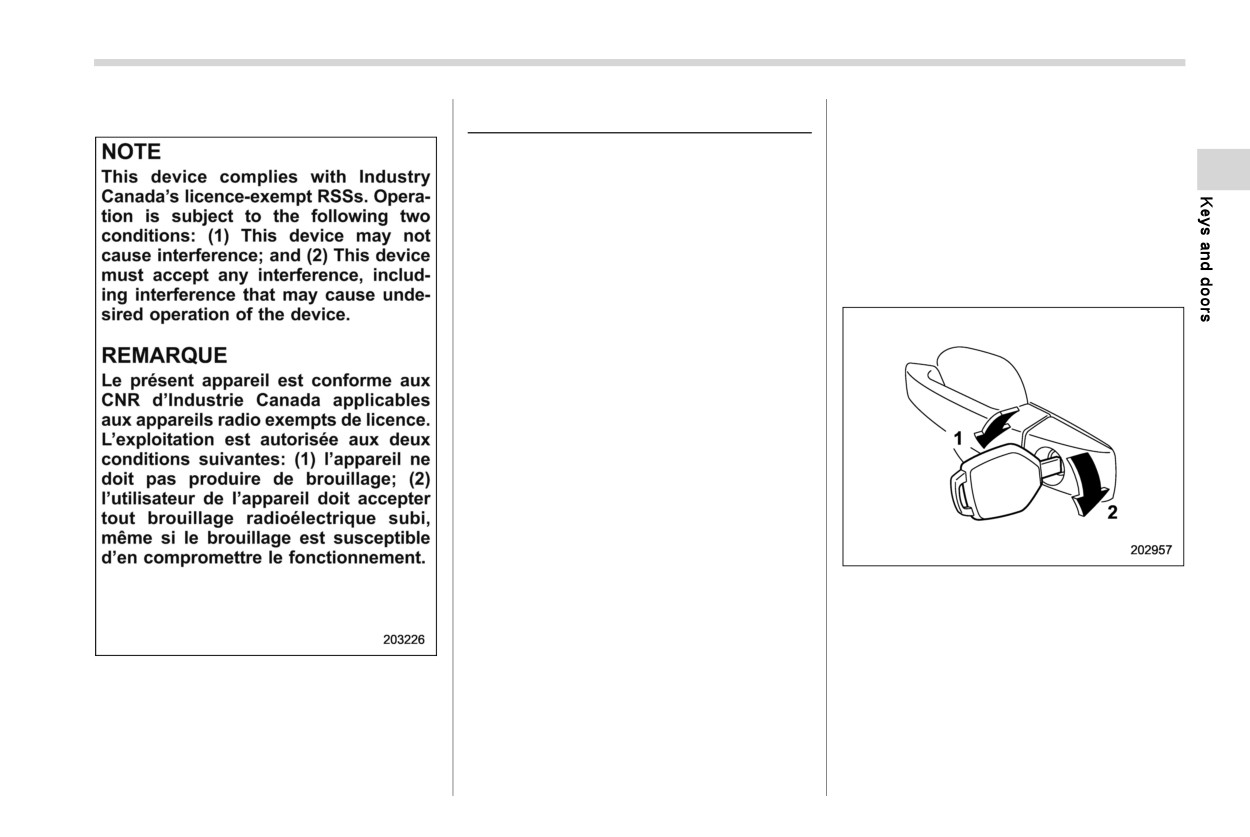
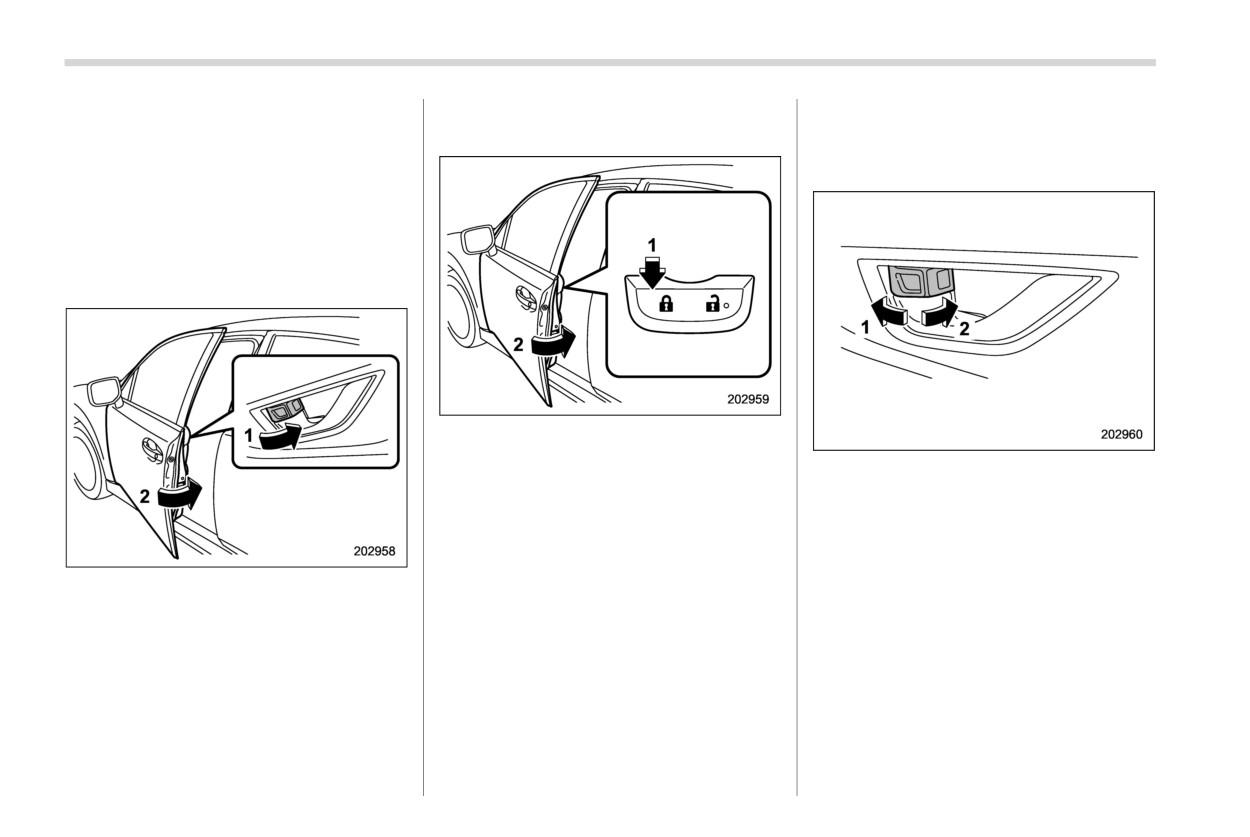
1
Rotate the key toward the front to lock.
- Grip the front door handle.
2
Rotate the key toward the rear to unlock.
- Press the rear gate opener
In this case, only the driver’s side door is
button.
locked or unlocked.
Models without “keyless access
NOTE
with push-button start system”:
Models with “keyless access with
- Press any button on the remote
push-button start system”:
transmitter
(except when the
transmitter battery is dis-
The emergency key is directional. If the
- CONTINUED -
138 Door locks
key cannot be inserted, change the
! Locking using power door lock-
& Locking and unlocking from
direction that the grooved side is facing
ing switch
the inside
and insert it again.
! How to use the lock lever
! How to lock the vehicle without
using the key
To lock the door from outside without the
key, the following methods are available.
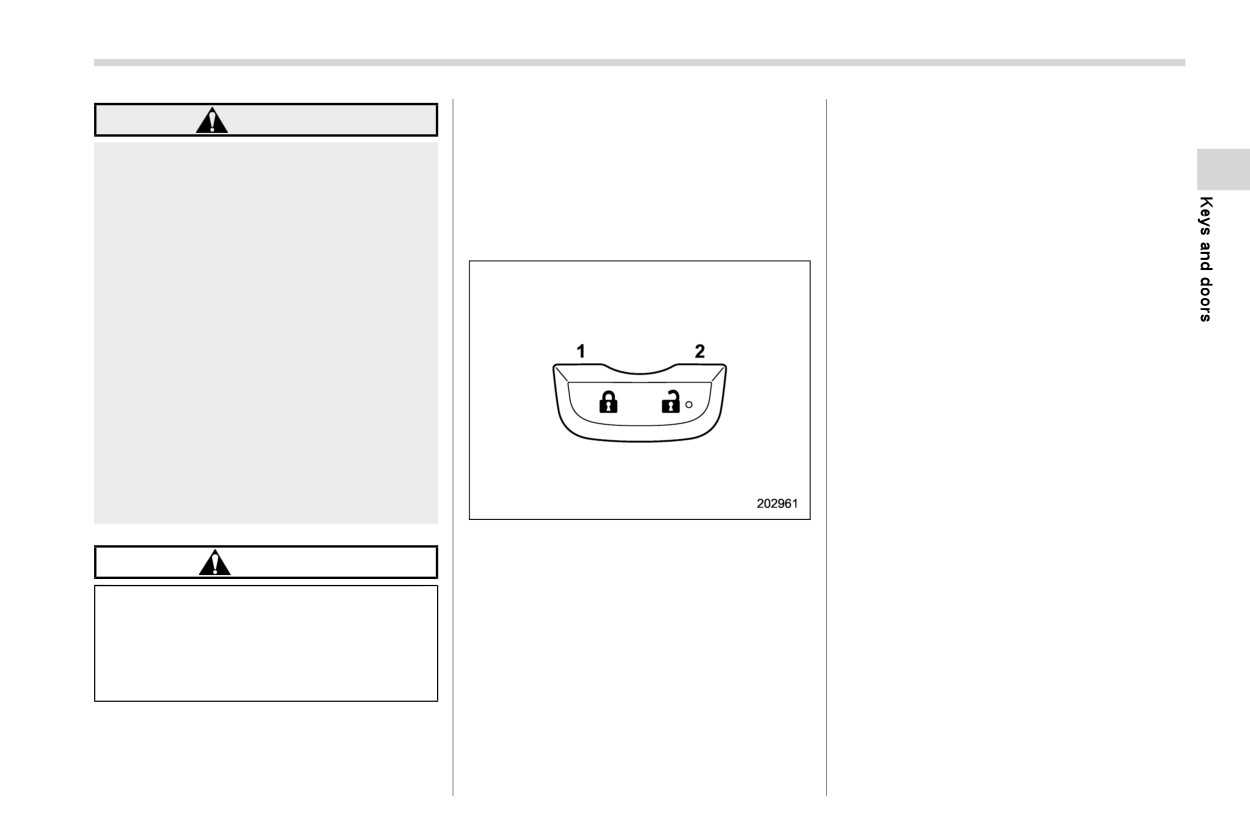
! Locking using lock lever
1
Press the lock side of the power door
locking switch.*
2
Close the door.
1
Rotate the lock lever rearward to unlock.
*: For details about the power door locking
2
Rotate the lock lever forward to lock.
switch, refer to “How to operate the power
door locking switches” FP139.
Always make sure that all doors and the
rear gate are closed before starting to
In this case, all closed doors, the rear gate
drive.
and fuel filler lid are locked at the same
1
Rotate the lock lever forward.
time.
The red mark on the lock lever appears
2
Close the door.
when the door is unlocked.
NOTE
In this way, only the door that was operated
Pull the inside door handle to open an
will be locked.
Make sure that you do not leave the key
unlocked door.
inside the vehicle when locking the
When the door is locked, pulling the inside
doors from the outside without the key.
door handle unlocks the door, allowing it to
be opened (front door only).
Door locks
139
! How to operate the power door
& Automatic door locking/un-
WARNING
locking switches
locking
Keep all doors locked when you
All doors, the rear gate and fuel filler lid can
All doors, the rear gate and the fuel filler lid
drive, especially when small chil-
be locked and unlocked using the power
are automatically locked or unlocked
dren are in your vehicle.
door locking switches located on the
under the following conditions.
Along with the proper use of
driver’s side
and
the
front
passenger’s
. For automatic door locking
seatbelts and child restraints,
side doors.
- When the vehicle speed reaches 12
locking the doors reduces the
mph (20 km/h) or higher (factory
chance of being thrown out of
default setting).
the vehicle in an accident.
- When the select lever is shifted into
It also helps prevent passengers
a position other than the “P” posi-
from falling out if a door is
tion.
accidentally opened, and intru-
. For automatic door unlocking
ders from unexpectedly opening
- When the driver’s door is open
doors and entering your vehicle.
(factory default setting).
Do not pull the front door handle
- When the ignition switch is turned to
from inside while driving. The
the “OFF” position.
door could open even if it is
- When the select lever is shifted into
locked.
the “P” position.
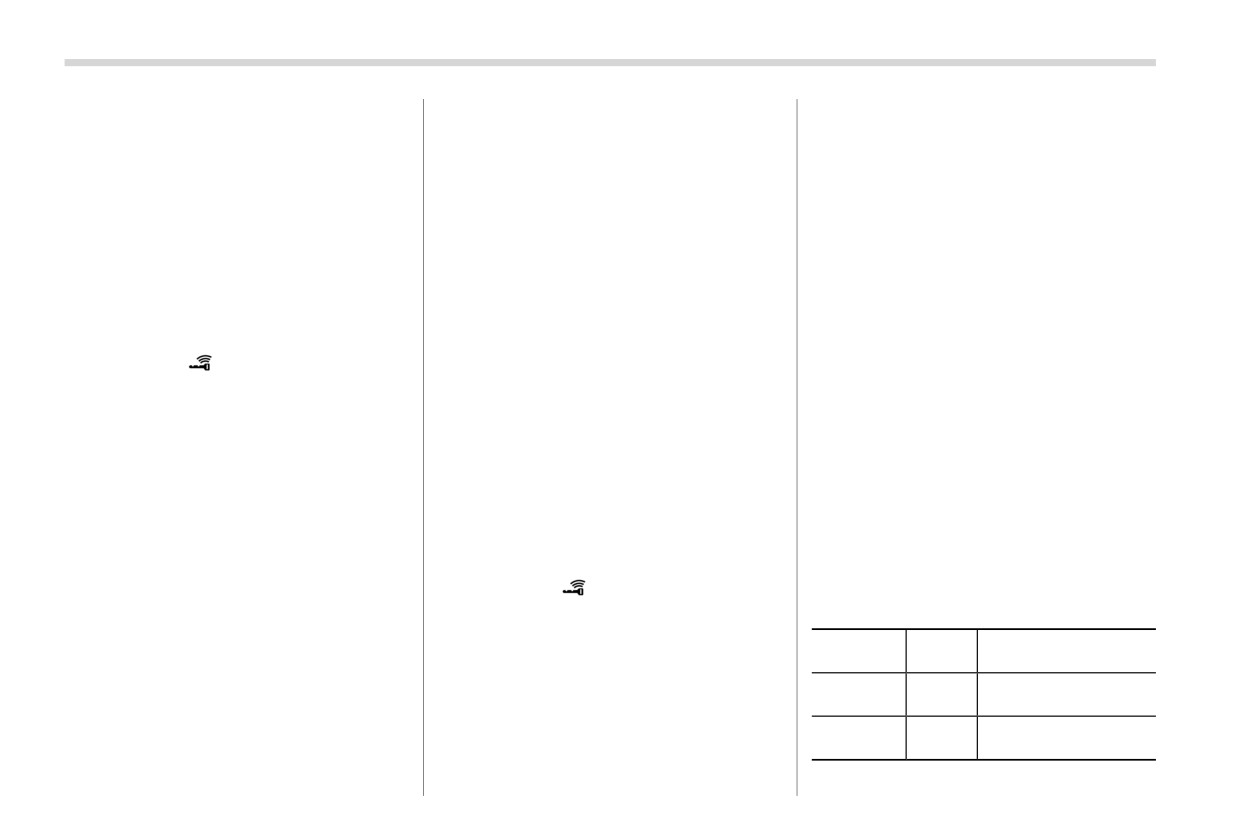
Example
NOTE
1
Press to lock.
CAUTION
. The automatic door lock and unlock
2
Press to unlock.
setting can be changed with the
Do not pull the front inside door
center information display. Refer to
handle while operating the door
NOTE
“Car settings” FP215.
lock. There is a risk that it will not
Make sure that you do not leave the key
. When locking the door by operating
be possible to open or lock the front
inside the vehicle
before locking the
the power door locking switches,
doors.
doors from the outside using the power
automatic door locking will not op-
door locking switches.
erate.
. When unlocking the door by operat-
ing the power door locking switches,
- CONTINUED -
140 Door locks
automatic door unlocking will not
“ON” position
(models with
“keyless
front (“LOCK”) position with the driver’s
operate.
access with push-button start system”).
door open and the driver’s door is then
When getting out of the vehicle from
closed with the lock lever in that
NOTE
a rear door, make sure to unlock all
position, the driver’s door will be
the doors by pushing the unlock
When leaving the vehicle, make sure
locked.
side of the power door locking
you are holding the key before lock-
. When the spare key is used to lock the
switch. If a rear door is unlocked
ing the doors.
driver’s door from the outside of the
from the inside door lever then the
The factory setting (default setting)
vehicle, the door will be locked.
door is opened and closed, the Key
for this function is set as “opera-
lock-in prevention function will be
tional”. This function’s operational/
& Battery drainage prevention
triggered. All doors will be unlocked,
non-operational setting can be
function
the Key lock-in prevention warning
changed by a SUBARU dealer. Con-
Illuminating lights under various conditions
indicator “
” will appear and the
tact a SUBARU dealer for details.
will automatically turn off to prevent the
warning chime will also sound.
When getting out of the vehicle from
battery from discharging.
If the system detects a strong en-
a rear door, make sure to unlock all
ough impact to deploy the airbags,
the doors by pushing the unlock
! Battery drainage prevention func-
all doors will automatically un-
side of the power door locking
tion while doors are open
locked.
switch. If a rear door is unlocked
If a door or the rear gate is not completely
For further details, refer to “Automatic
from the inside door lever then the
closed, the interior lights will remain
door locking/unlocking operation when
door is opened and closed, the Key
illuminated as a result. However, several
involved in an accident” FP469.
lock-in prevention function will be
lights are automatically turned off by the
triggered. All doors will be unlocked,
battery drainage prevention function to
the Key lock-in prevention warning
& Key lock-in prevention func-
prevent the battery from discharging. The
indicator “
” will appear and the
following interior lights are affected by this
tion
warning chime will also sound.
function.
Under the following conditions, all the
! Non-operation of key lock-in pre-
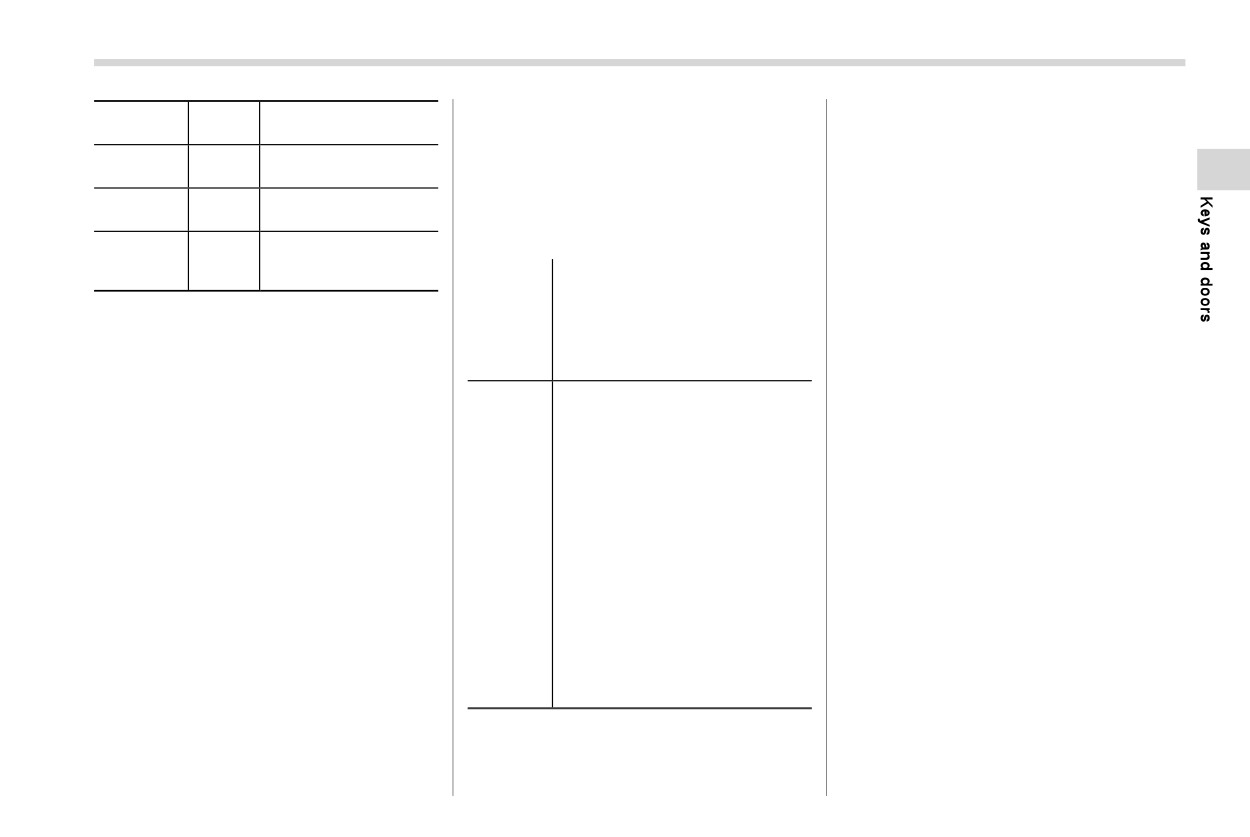
Switch
Automatically turning
doors will not lock when the door lock
Item
vention function
position
off
switch is pushed with the front door open.
When the system is set so that it does not
Approximately 20
. The key is still in the ignition switch
Map lights
DOOR
minutes later
(models without “keyless access with
operate, the doors are locked by the
following operation.
Reading
Approximately 20
push-button start system”).
—
light
minutes later
. The ignition switch is in the “ACC” or
. When the lock lever is turned to the
Door locks
141
Switch
Automatically turning
! Battery drainage prevention func-
*3: Models without “keyless access with push-
Item
button start system”
position
off
tion for other conditions
Take actions to illuminate the lights again
Ignition
Approximately 20
—
Illuminating lights will turn off automatically
when the battery drainage prevention
switch light
minutes later
by the battery drainage prevention func-
function is active.
Cargo area
Approximately 20
DOOR
tion when the following operation is not
light
minutes later
performed 20 minutes after the ignition
NOTE
Ambient
switch is put in the “LOCK”/“OFF” position.
The battery drainage prevention
Approximately 20
lighting (if
—
minutes later
function cannot be turned off.
equipped)
- Map light
- Reading light
If the battery drainage prevention
Turning
- Ignition switch light
function is in operation when a door
NOTE
- Cargo area light
off lights
is open, the target room light will not
- Ambient lighting
The default setting for this function
- Vanity mirror light*1
be illuminated.
is set as “operational”. The opera-
- Door courtesy light*1
To protect the battery from battery
tional/non-operational setting of this
- Turn the ignition switch to the
drainage, make sure that all doors,
function can be changed by a
“ACC” or “ON” position.
including the rear gate, are comple-
SUBARU dealer. Contact your
- Open or close the doors, in-
tely closed when leaving the vehicle.
SUBARU dealer to change the
cluding the rear gate.
- Push the unlock button on the
For models with One-touch Interior
setting.
access key fob or transmitter.
Illumination, the map light and read-
When leaving the vehicle, please
- Hold the front door handle and
ing light will be turned off when they
make sure that all doors and the rear
unlock it while holding the ac-
are pushed.
cess key fob*2.
gate are completely closed.
- Insert the key into the keyhole of
For models without One-touch Inter-
The battery drainage prevention
Actions
the ignition switch*3.
ior Illumination, the map light and
function does not operate under
- Come close to the vehicle that
reading light that is turned on by
the following conditions.
the front door was locked while
holding the access key fob (if
pushing the switch will not be turned
- The key is in the ignition switch
OFF delay timer setting for
off.
(models without “keyless access
period of time is not off)*2.
- Push the panic button on the
with push-button start system”).
access key fob or transmitter.
- The ignition switch is in “ACC” or
- Push the One-touch Interior
“ON” position (models with “key-
Illumination switch*1.
less access with push-button
*1: Models with One-touch Interior Illumination
start system”).
*2: Models with “keyless access with push-
button start system”
142 Alarm system
& Alarm system operation
The notifications regarding the map
2-6. Alarm system
lights, reading lights and cargo area
When the alarm system is armed, it is
light are deactivated as the factory
The alarm system helps to protect your
triggered by opening any of the doors, the
setting. A SUBARU dealer can activate
vehicle and valuables from theft. The horn
rear gate or engine hood.
the system. Contact your SUBARU
sounds and the hazard warning flashers
The alarm system will activate the follow-
dealer for details.
flash if someone attempts to break into
ing alarms when triggered.
your vehicle.
. The vehicle’s horn will sound for 30
seconds.
& Arming the system
For models with “keyless access with
. The hazard warning flashers will flash
The alarm system becomes armed when
push-button start system”:
for 30 seconds.
the following operation is performed.
The system can be armed or disarmed
1.
Close all windows and the moonroof (if
with the keyless access function or access
If any of the doors, the rear gate or engine
equipped) and turn the ignition switch
key fob.
hood remains open after the 30-second
to the “OFF” position.
The system will not be activated when the
period, the horn will continue to sound for a
2.
Carry the key and get out of the
push-button ignition switch is in the “ACC”
maximum of 3 minutes. If the door, rear
vehicle.
or “ON” position.
gate or engine hood is closed while the
3.
Make sure that the engine hood is
horn is sounding, the horn will stop
For models without “keyless access
closed.
sounding with a delay of up to 30 seconds.
with push-button start system”:
4.
Lock the doors using any of the
The system can be armed or disarmed
NOTE
following methods.
with the remote transmitter.
The alarm system can be set to trigger
. Locking using the remote keyless
The system will not be activated when the
the illumination of the following interior
entry system. For details, refer to
key is inserted into the ignition switch.
lights.
“Remote keyless entry system”
FP133.
Your vehicle’s alarm system has been set
. Map lights (illuminates only when
for activation at the time of shipment from
the door interlock switch is in the
. Locking using the keyless access
“DOOR” position)
function (if equipped). For details,
the factory. You can set the system for
. Reading lights
refer to “Locking with the door lock
deactivation yourself or have it done by
. Cargo area light (illuminates only
sensor” FP122.
your SUBARU dealer.
when the cargo area light switch is in
. Locking using the power door lock-
the “DOOR” position)
ing switch. For details, refer to
“Locking using power door locking
switch” FP138.
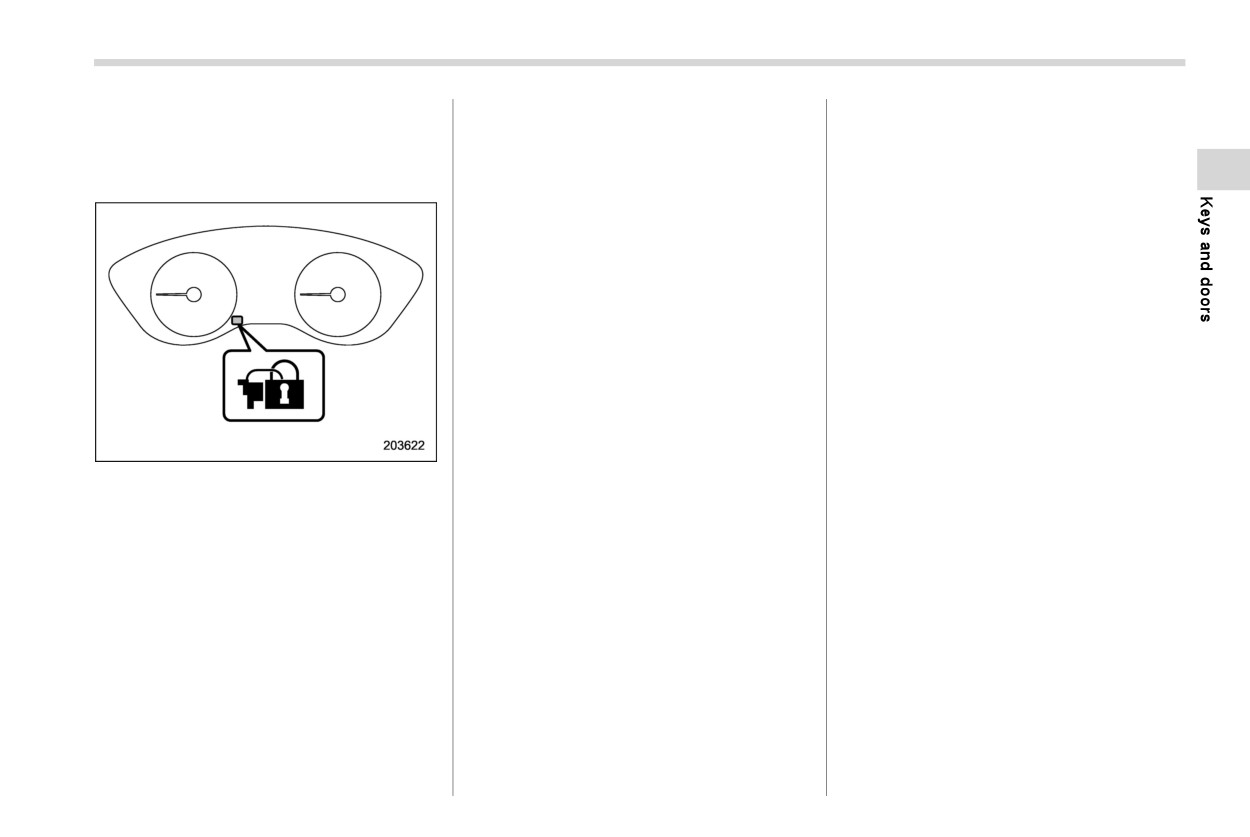
Alarm system
143
. Locking using the power rear gate
armed for surveillance.
- Any door (including the rear gate)
lock button. For details, refer to
is opened.
NOTE
“Locking with the power
rear
gate
- The ignition switch is turned to
lock button” FP123.
The system can be armed even if the
the “ON” position (models with-
windows and/or moonroof are open.
out “keyless access with push-
Always make sure that they are fully
button start system”).
closed before arming the system.
- Push-button ignition switch is
When arming the system, if any of
turned to the
“ACC” position
the doors or the rear gate is not fully
(models with “keyless access
closed, an electronic chirp sounds
with push-button start system”).
five times and the hazard warning
flashers flash five times to alert you
& Disarming the system
that the doors (or the rear gate) are
Perform either of the following procedures.
not properly closed. When you close
. Briefly press a button (for less than 2
the door, doors will automatically
seconds) on the access key fob/remote
lock and the system will automati-
transmitter.
cally arm in 30 seconds.
. Carry the access key fob and perform
The 30-second standby time can be
Security indicator light
either of the following procedures
eliminated if you prefer. Have it
(models with
“keyless access with
NOTE
performed by your SUBARU dealer.
push-button start system”).
If any of the following actions is
All doors and the rear gate will lock, an
done during the standby period, the
- Grip the front door handle.
electronic chirp will sound once, the
system will not switch to the surveil-
- Press the rear gate opener button.
hazard warning flashers will flash once,
lance state.
- Unlock using the PIN code access.
and the security indicator light will start
- Doors (including the rear gate)
flashing rapidly.
The flashing of the security indicator light
are unlocked using the access
5. Approximately 30 seconds later, the
will then change slowly
(once approxi-
key fob/remote transmitter.
system will enter surveillance state.
mately every 3 seconds from twice ap-
- Doors (including the rear gate)
proximately every 2 seconds), indicating
are unlocked using the keyless
When the system is in surveillance state,
that the alarm system has been disarmed.
access function
(models with
the security indicator light will then flash
“keyless access with push-but-
slowly (twice approximately every 2 sec-
ton start system”).
onds), indicating that the system has been
- CONTINUED -
144 Alarm system
! Emergency disarming
4. Hold down “
” of the driver’s power
NOTE
door locking switch, open the driver’s
For models with “keyless access with the
Only registered keys will stop the
door within the following 1 second, and
push-button start system”:
alarm. If the key is not registered, the
wait 10 seconds without releasing the
If you cannot disarm the system using the
alarm will not stop.
switch. The setting will then be chan-
access key fob (i.e., the access key fob
ged as follows.
broken or the access key fob battery is too
& Valet mode
weak), refer to “Switching power status”
Setting
Combination
Horn
When you choose the valet mode, the
FP465.
status
meter display
alarm system does not operate. In valet
For models without “keyless access with
Activate
AL ON
Once
mode, the remote transmitter is used only
the push-button start system”:
Deactivate
AL OFF
Twice
for locking and unlocking the doors and
The system can be disarmed if you turn the
rear gate and panic activation.
ignition switch from the
“LOCK”/“OFF”
NOTE
position to the
“ON” position with a
To enter the valet mode, change the
You may have the above setting change
registered key.
setting of your vehicle’s alarm system to
done by your SUBARU dealer.
deactivation mode. Refer to “Alarm system
NOTE
setting” FP144. The security indicator
& If you have accidentally trig-
If the access key fob or transmitter
light will continue to flash once every 3
gered the alarm system
battery is too weak, replace the battery
seconds, indicating that the system is in
immediately. Refer to “Replacing bat-
the valet mode.
! To stop the alarm
tery of access key fob” FP517.
Do any of the following operations:
To exit valet mode, change the setting of
. Press any button on the access key fob/
your vehicle’s alarm system to activation
& Alarm system setting
mode. Refer to “Alarm system setting”
remote transmitter.
To change the setting of your vehicle’s
FP144.
. Turn the ignition switch to the “ON”
alarm system for activation or deactiva-
position (models without “keyless ac-
tion, do the following.
cess with push-button start system”).
1. Disarm the alarm system. Refer to
. Turn the push-button ignition to the
“Disarming the system” FP143.
“ACC” position (models with “keyless
2. Sit in the driver’s seat and shut all
access with push-button start system”).
doors, the rear gate and engine hood.
3. Turn the ignition switch to the “ON”
position.
Child safety locks
145
further jamming, entrapment or mal-
2-7. Child safety locks
2-8. Windows
function.
- The closing window slides down
WARNING
slightly and stops.
- The opening window stops slid-
To avoid serious personal injury
ing down.
caused by entrapment, always con-
The power window system may
form to the following instructions
detect resistance, an impact or an
without exception.
abnormality in the following cases.
When operating the power win-
- A substantial sized object is
dows, be extremely careful to
caught between the window and
prevent anyone’s body parts or
the window frame.
any other objects from being
- A foreign object is caught be-
caught in the window.
tween the window and the win-
dow frame.
Always lock the passengers’ win-
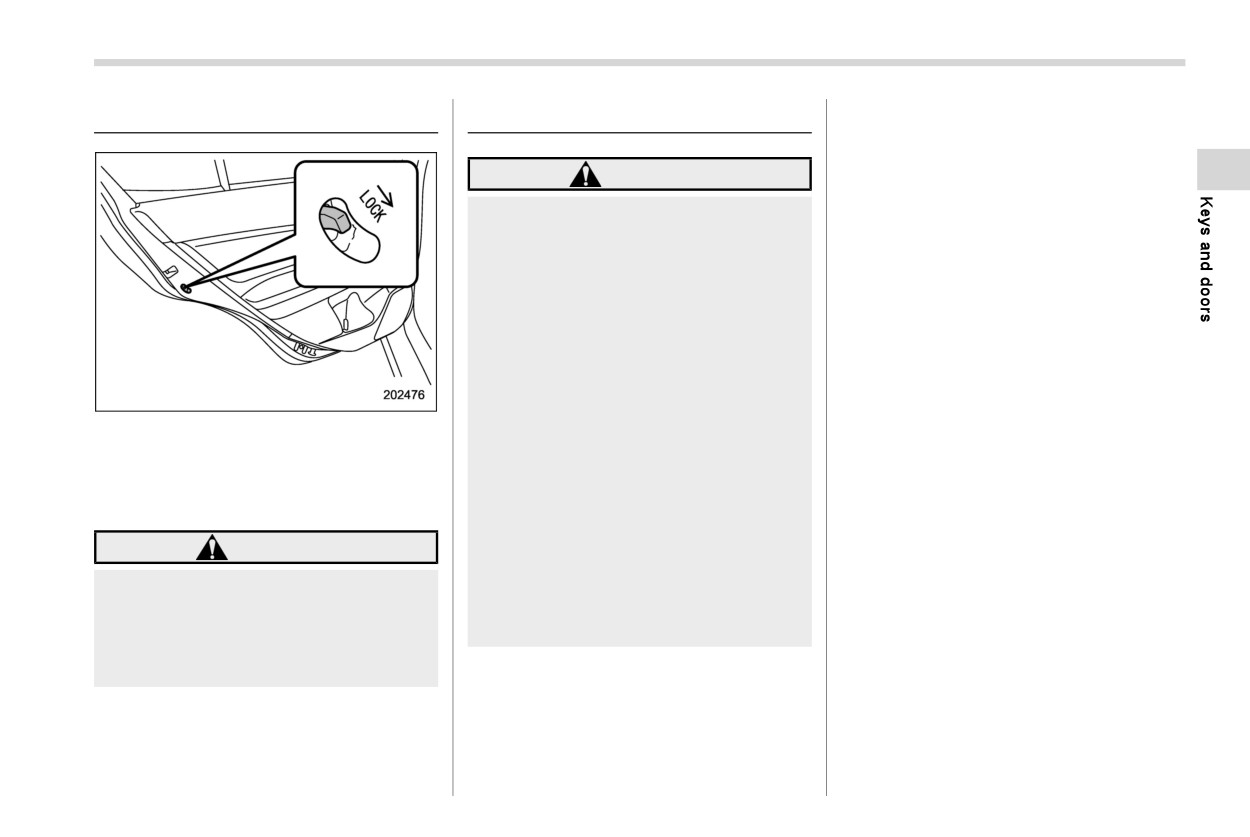
Each rear door has a child safety
lock.
- The vehicle drives over a deep
dows using the lock switch when
When the child safety lock lever is in the
pothole.
children are riding in the vehicle.
lock position, the door cannot be opened
The window cannot be closed for a
from the inside. The door can only be
Always carry the key when you
few seconds after the window is
opened from the outside.
leave the vehicle for safety rea-
automatically stopped by the sys-
sons and never allow an unat-
tem.
WARNING
tended child to remain in the
vehicle. Failure to follow this
Always turn the child safety locks to
procedure could result in injury
the “LOCK” position when children
to a child operating the power
sit in the rear seat. Serious injury
window.
could result if a child accidentally
opens the door and falls out.
NOTE
. If the power window system detects
resistance, an impact or abnormal-
ity, the window operation may be
automatically stopped to prevent
- CONTINUED -
146 Windows
& Power window operation
! Operating the window
! Power window switches
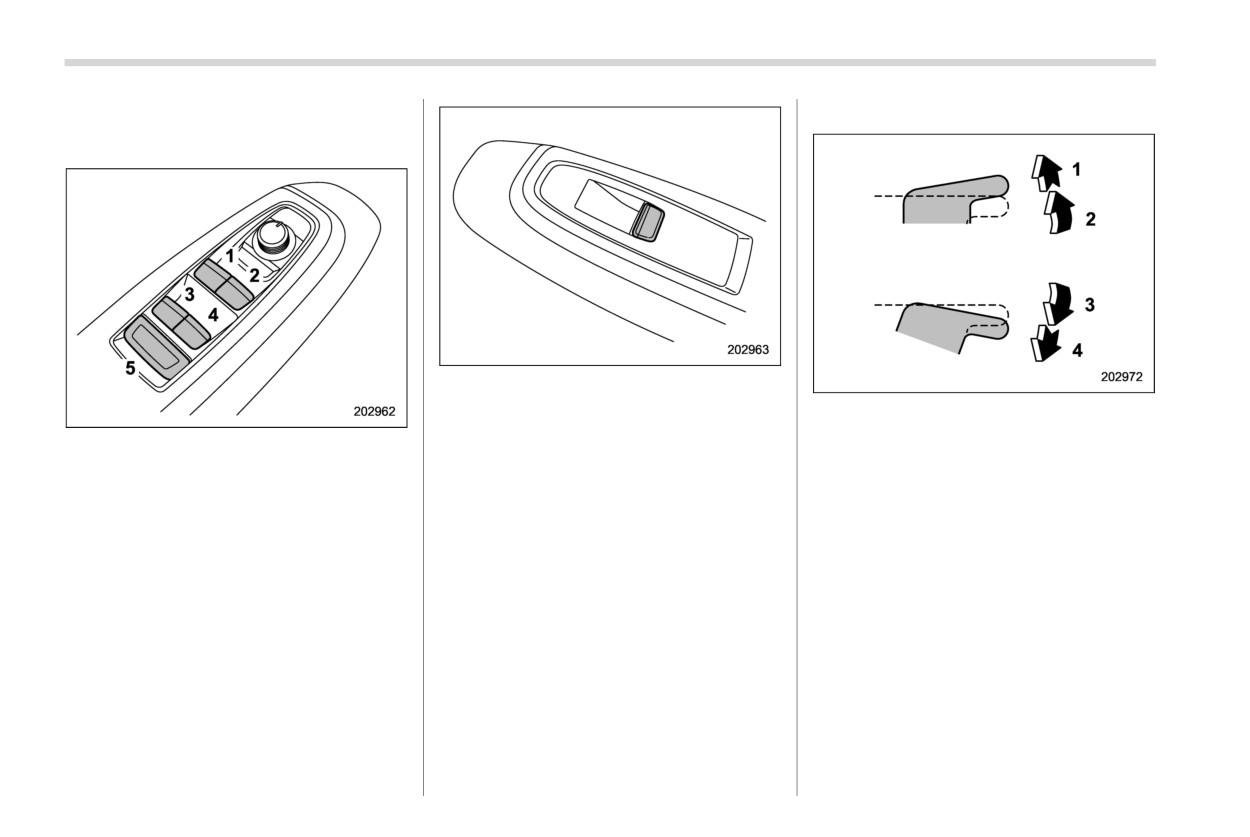
Passenger’s side power window switches
Each passenger’s window can be con-
With one-touch auto up and down feature
trolled by the power window switch located
1
Automatically close*
Driver’s side power window switches
on the door.
2
Close
1
For front left window (with one-touch auto
3
Open
These switches illuminate when activated.
up and down feature)
4
Automatically open*
2
For front right window (with one-touch
*: To stop the window halfway, operate the
auto up and down feature)
switch to the opposite side.
3
For rear left window
4
For rear right window
5
Lock switch
All door windows can be controlled by the
power window switch cluster on the
driver’s side door.
These switches illuminate when activated.
Windows
147
“Initialization of power window (win-
. You cannot close the window for a
dows with off delay function)” FP148.
few seconds after the anti-entrap-
ment function operates.
! Anti-entrapment function (windows
with off delay function)
! Off delay function (if equipped)
While closing the window automatically, if
The windows can be operated for approxi-
the window senses a substantial enough
mately 40 seconds even after the ignition
object trapped between the window and
switch is turned to the “ACC” or “OFF”
the window frame, it automatically moves
position. If a front door is opened within 40
down slightly and stops.
seconds, the off delay function is can-
If a foreign object is caught while window is
celed.
opening automatically, the window will
! Locking the passengers’ windows
stop.
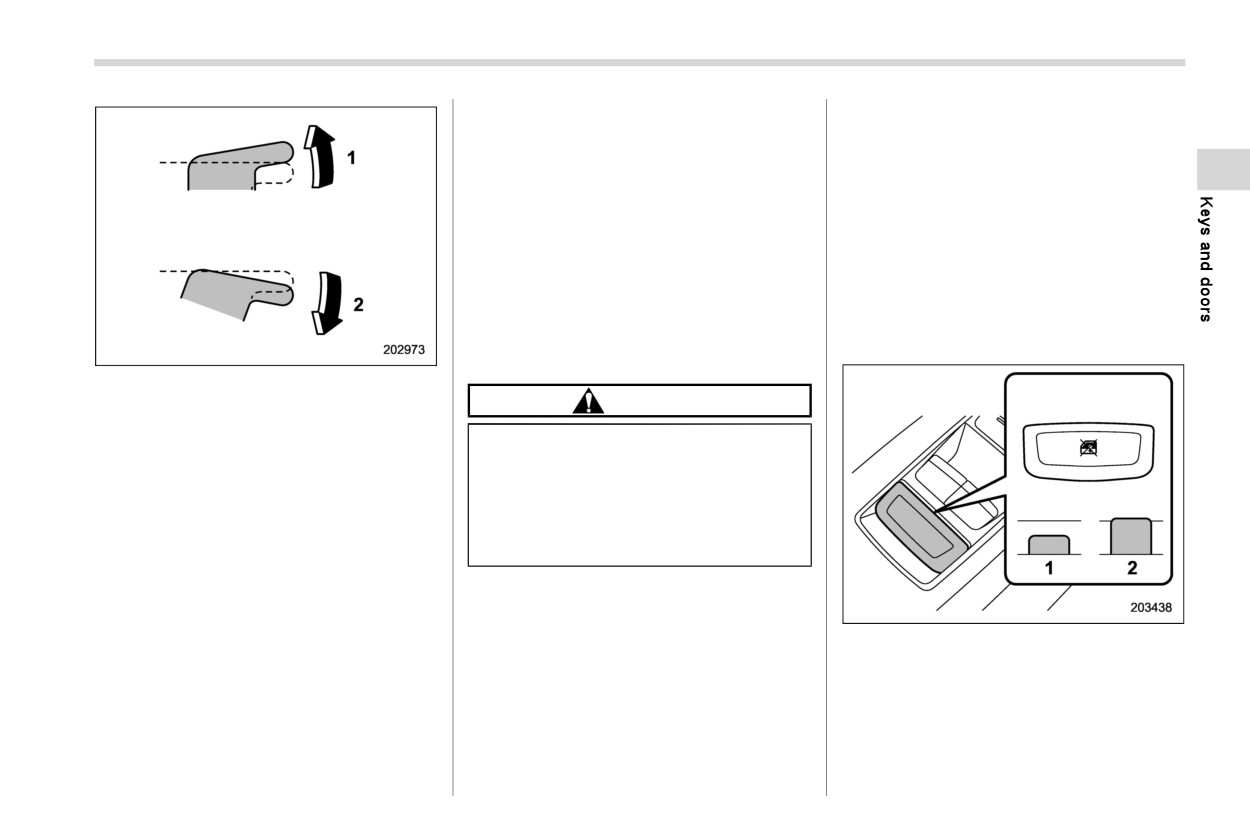
Without one-touch
auto
up
and
down
feature
CAUTION
1
Close
2
Open
. Never attempt to test the power
window operation using body
NOTE
parts.
Avoid the following.
. If an object is caught just before
. Continuously operating a switch in
the window fully closes, the sys-
tem may not operate properly.
the same direction after the window
is fully closed or fully opened.
. Continuously operating three or
NOTE
more switches all at once in the
. If a window detects an impact similar
same direction after the windows
1
Lock
to that caused by trapping an object
are fully closed or fully opened.
2
Unlock
(for example, when the vehicle en-
Either of the operations described
counters a deep pothole), the anti-
The lock switch is in the lock position, the
above may cause the power window
entrapment function may operate.
rear windows cannot be operated by the
breaker to operate making it impossible
driver’s side switches. The passenger’s
to open or close the window. Be sure to
side switches and the rear seat side
initialize the power windows. Refer to
switches are not operational either.
- CONTINUED -
148 Rear gate
When the indicator on the window
To open:
2-9. Rear gate
switches does not illuminate, the window
switch cannot be operated.
CAUTION
& Initialization of power window
(windows with off delay func-
When loading and unloading cargo,
tion)
be careful not to come in contact
with the hot engine exhaust gas or
If the one-touch auto up and down function
the exhaust pipe, because they
or off delay function does not operate
could burn you.
properly, operate each window according
to the following procedure in order to
initialize the power window system.
& Manual rear gate
1.
Close the door.
The rear gate can be locked and unlocked
2.
Turn the ignition switch to the “ON”
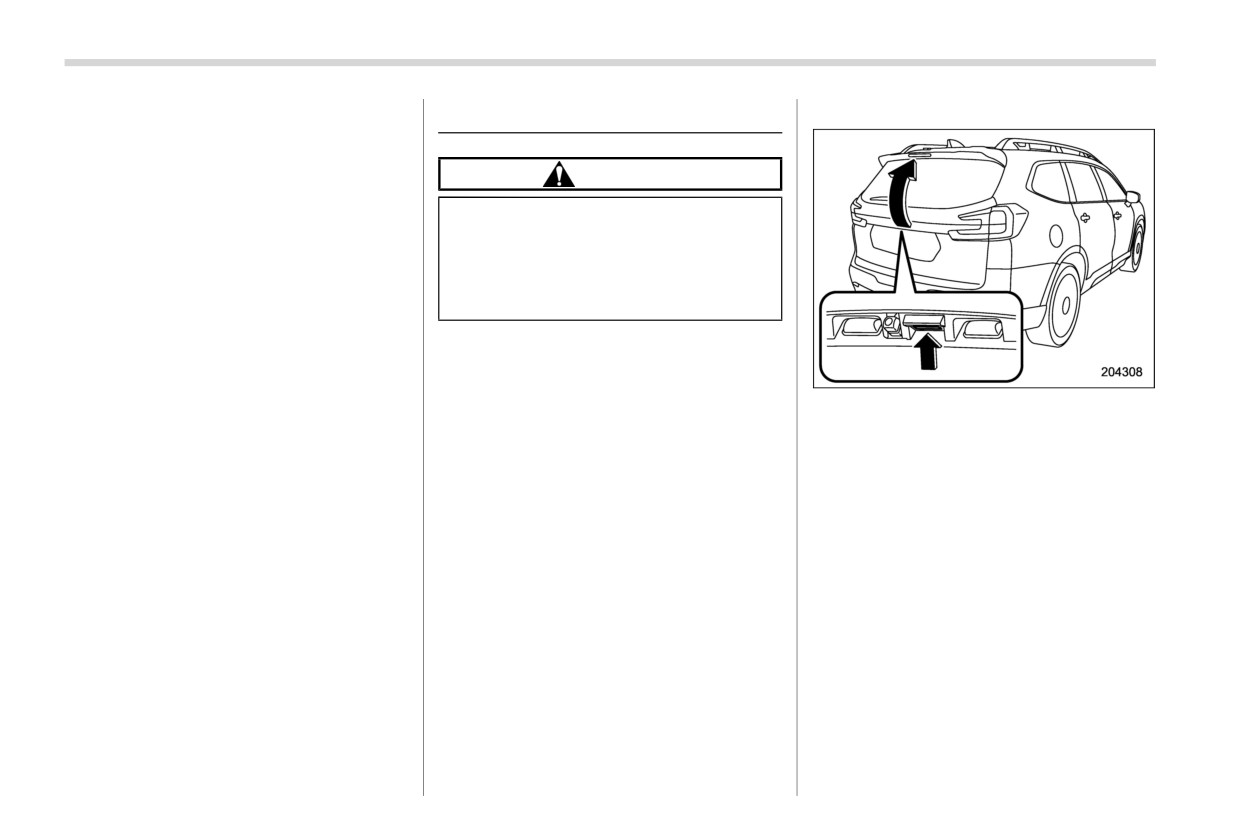
Rear gate opener button
using any of the following systems.
position.
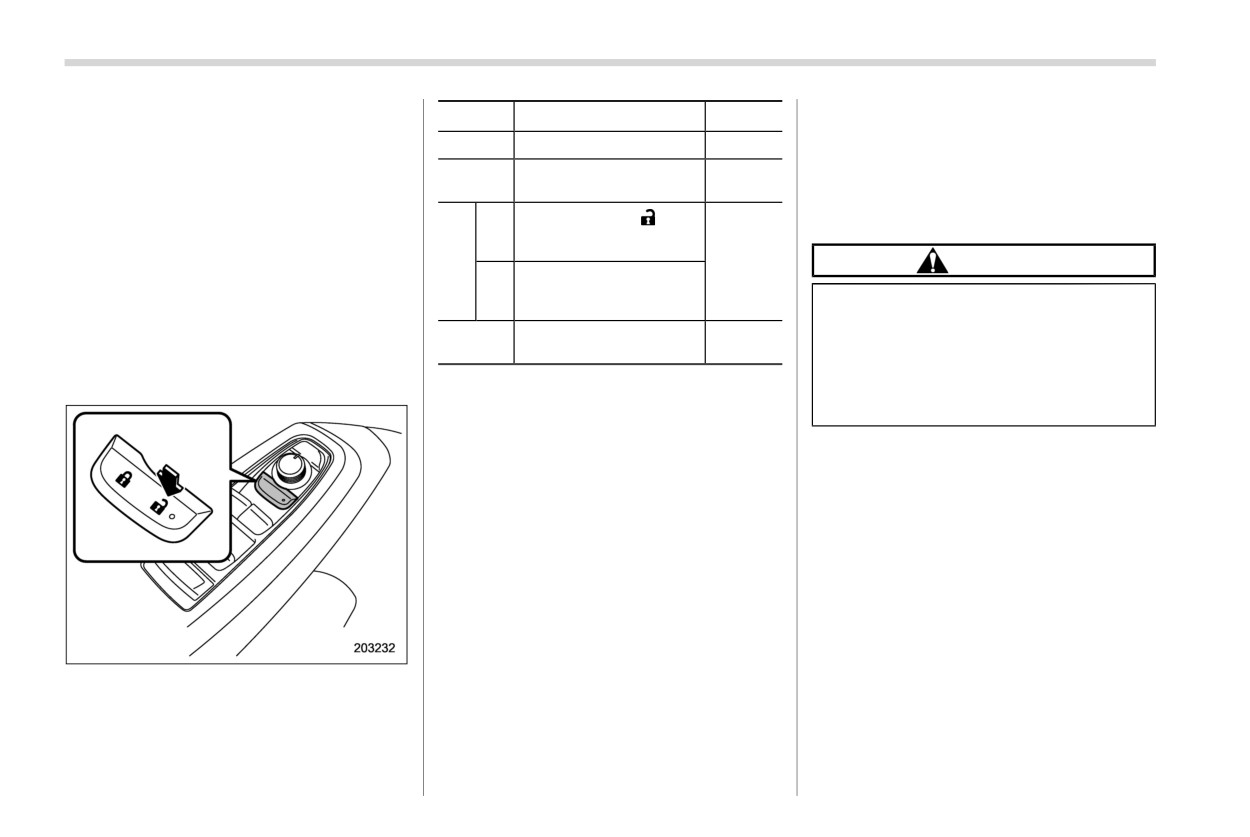
. Power door locking switch: Refer to
1. Unlock the rear gate.
3.
Open the window completely and then
“Locking and unlocking from the inside”
2. Press and hold the rear gate opener
press and hold down the power win-
FP138.
button. The rear gate will open slightly.
dow switch for approximately 1 sec-
. Keyless access with the push-button
3. Hold the rear gate and lift it up slowly.
ond.
start system
(if equipped): Refer to
4.
Close the window completely and then
“Keyless access with push-button start
pull and hold the power window switch
NOTE
system” FP1 17.
for approximately 1 second.
If the rear gate cannot be opened due to
. Remote keyless entry system: Refer to
a discharged vehicle battery, a mal-
“Remote keyless entry system”
function in the door locking/unlocking
FP133.
system or other causes, the rear gate
. Automatic door locking/unlocking: Re-
can be unlocked by manually operating
fer to “Automatic door locking/unlock-
the rear gate lock release lever. For the
ing” FP139.
procedure, refer to “Rear gate - if the
rear gate cannot be opened” FP466.
Rear gate
149
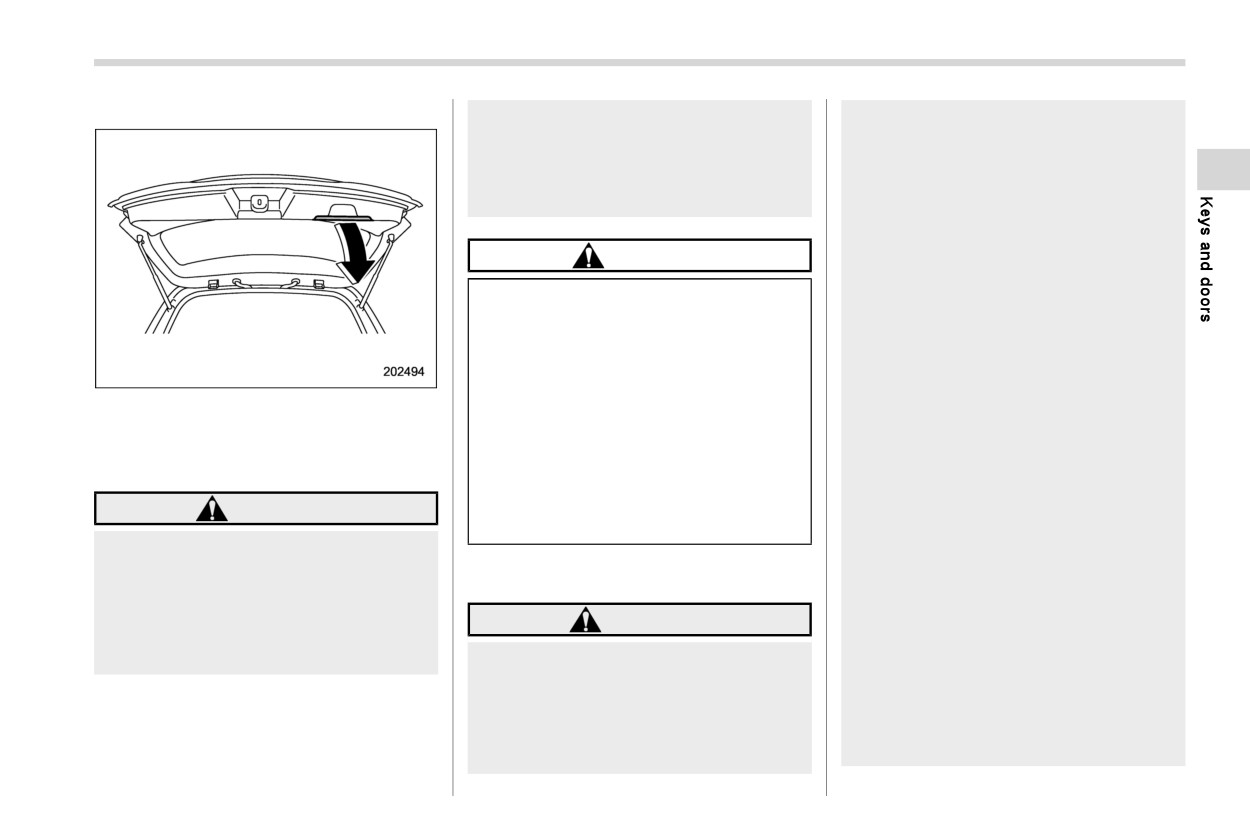
To close:
Do not close the rear gate by
rear gate, etc.).
pulling the handle from inside the
- Make sure there are no people
cargo space. There is a danger of
around the rear gate.
your hand being caught and
- Never let anyone get close to
injured.
the rear gate.
When closing the rear gate, be
CAUTION
sure to prevent anyone’s body
parts or other objects from being
Do not jam a plastic bag into or
caught in the rear gate. Other-
place cellophane tape on the rear
wise, serious personal injury may
gate stays or scratch the stays
be caused by entrapment.
while loading or unloading cargo.
After opening the rear gate on a
Doing so could cause leakage of
slope using the power rear gate
gas from the stays, which may
Lower the rear gate slowly and push down
feature, the rear gate may close.
result in their inability to hold the
firmly until the latch engages.
Make sure that the rear gate has
rear gate open.
The rear gate can be lowered easily with
stopped completely after open-
Be careful not to hit your head or
ing it.
the handle.
face on the rear gate when open-
When leaving the vehicle, always
WARNING
ing or closing the rear gate and
carry the key for safety and never
when loading or unloading cargo.
allow an unattended child to
To prevent dangerous exhaust
remain in the vehicle. Doing so
gas from entering the vehicle,
& Power rear gate (if equipped)
could result in injury to the child
always keep the rear gate closed
operating the power rear gate.
while the engine is running.
WARNING
The driver should be aware of and
Do not attempt to shut the rear
pay careful attention to his/her
gate while holding the handle.
When operating the power rear
responsibilities.
gate, observe the following pre-
Use the power rear gate only
cautions. Ignoring the precau-
when the area around the rear
tions may result in an injury (e.
gate is clearly visible and when
g., anyone’s body is hit against
you have checked that there is no
the rear gate or is caught in the
- CONTINUED -
150 Rear gate
danger of people being caught in
. The ignition switch is in the “LOCK”/
gate via the power rear gate func-
the rear gate.
“OFF” or “ACC” position. Or, the ignition
tion.
switch is in the “ON” position and the
. If either of the operating conditions
select lever is in the “P” position.
has not been satisfied while operat-
CAUTION
ing the power rear gate, an electro-
We recommend using the power rear gate
nic chirp will sound and the power
When closing the rear gate after
function in most circumstances instead of
rear gate will be deactivated. In this
opening it, make sure to use the
manual operation.
case, the rear gate may stop opening
power rear gate. If the rear gate is
or closing suddenly.
NOTE
closed manually with extra force,
the power rear gate may be
. Do not press the power rear gate
! Operation
damaged.
button repeatedly while the power
NOTE
rear gate is operating. Otherwise,
Do not install any accessories
. The rear gate will remain unlocked
the system may ignore the button
other than genuine SUBARU
even after closing it. Always lock the
operation in order to avoid being
parts on the rear gate. If the
rear gate when leaving the vehicle.
damaged.
weight of rear gate increases
. If you cannot open/close the rear
. If the vehicle starts to move while the
excessively, the rear gate stays
gate by performing the operation
power rear gate is operating, the
cannot support the rear gate
described as follows, a short elec-
system sounds a buzzer and closes
sufficiently when opening the
tronic chirp will sound three times
the rear gate automatically. At this
rear gate. Also, the power rear
(beep, beep, beep).
time, if the system detects jamming,
gate may not function properly or
it will deactivate the power rear gate
may malfunction.
function and the rear gate will not be
Do not touch the driving rod.
closed. If this occurs, close the rear
Doing so may result in injury or
gate manually. For details, refer to
damage.
“Manual rear gate” FP148.
. If you try to open the rear gate using
The power rear gate operates only when
the power rear gate function imme-
all of the following conditions are satisfied.
diately after closing the rear gate
. The vehicle is stopped completely.
using the power rear gate function,
. The outside temperature is within a
an electronic chirp will sound and
range of −228F to 1408F (from −308C to
the rear gate will not open. Wait for a
608C).
while before trying to open the rear
Rear gate
151
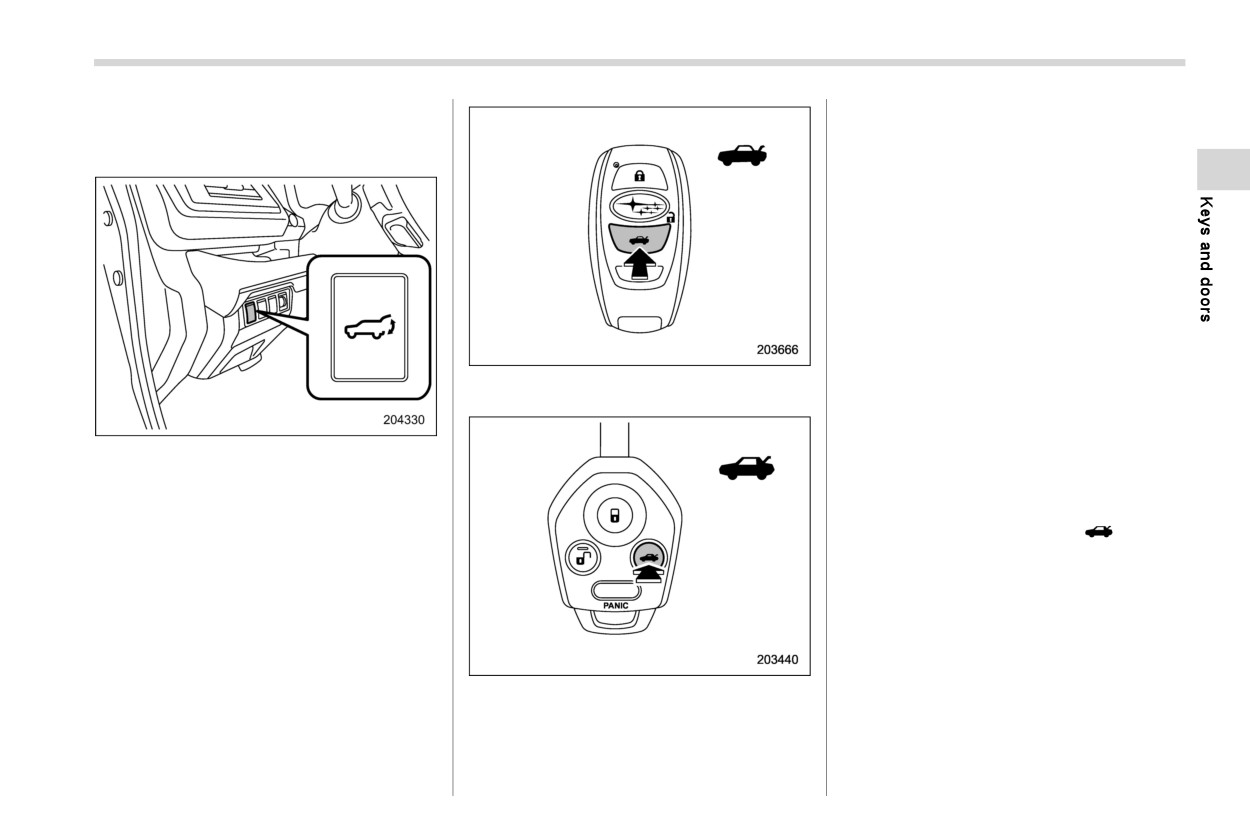
! By the power rear gate button
will open automatically. Then an electronic
(other than the buttons on the
chirp and the hazard warning flashers will
rear gate)
operate as follows:
. When operating the power rear gate
button on the instrument panel: sounds
and flashes twice.
. When operating the power rear gate
button on the access key fob/transmit-
ter: sounds and flashes four times.
NOTE
If the rear gate cannot be opened by
operating the power rear gate button
Power rear gate button on the access key
on the instrument panel, unlock it
fob
with the keyless access function or
the remote keyless entry system.
Power rear gate button on the instrument
Then, it will be possible to open the
panel
power rear gate using the power rear
gate button on the instrument panel.
The factory setting (default setting)
of the operation for the “
” button
on the access key fob is pressing
and holding. This setting can be
changed to non-operation or press-
ing twice at SUBARU dealers. For
more details, contact your SUBARU
dealer.
Power rear gate button on the transmitter
To pause the opening rear gate:
To open the rear gate:
Briefly press the power rear gate button
Press and hold the power rear gate button
while the rear gate is being opened. Then
when the rear gate is closed. The rear gate
an electronic chirp will sound twice and the
- CONTINUED -
152 Rear gate
hazard warning flashers will flash twice.
NOTE
If you press the power rear gate button
The factory setting (default setting) of
again, the rear gate will close.
the operation for the “
” button on
You can open the rear gate by pressing the
the access key fob is pressing and
power rear gate button briefly
while
the
holding. This setting can be changed to
rear gate is being closed.
non-operation or pressing twice at
SUBARU dealers. For more details,
contact your SUBARU dealer.
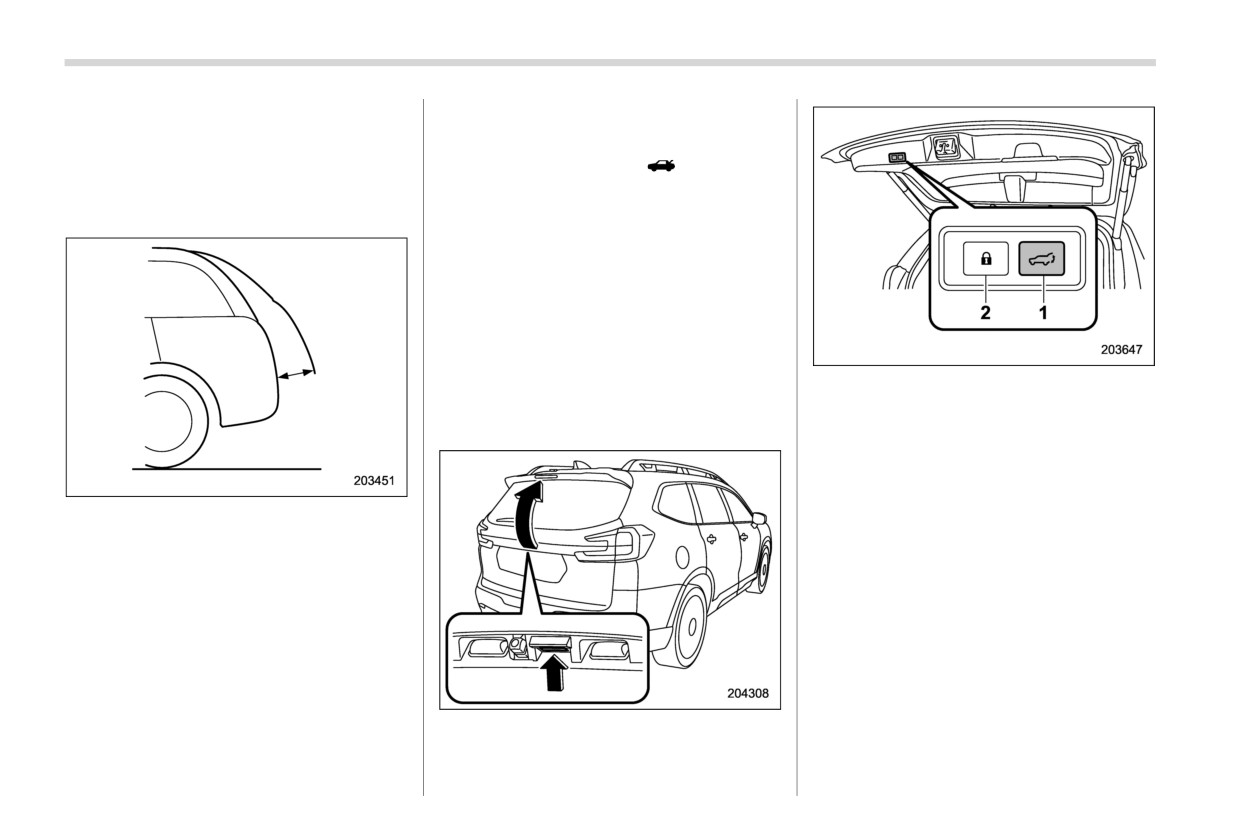
! By the buttons on the rear gate
NOTE
After performing the following proce-
Power rear gate button on the inside edge
dures, an electronic
chirp will sound
of the rear gate
twice and the hazard warning flashers
1
Power rear gate button
will flash twice.
2
Power rear gate lock button
To open the rear gate:
1. For models with “keyless access with
push-button start system”, carry the
NOTE
access key fob. For models without
The rear gate cannot be paused when it
“keyless access with push-button start
is in the approximately 2 in (5 cm) range
system”, unlock the rear gate.
from the fully closed position. The
2. Briefly press the rear gate opener
system will ignore any button operation
button when the rear gate is closed.
and the rear gate will continue to open.
The rear gate will open automatically.
To close the rear gate:
Press and hold the power rear gate button.
Then an electronic chirp will sound twice
Rear gate opener button
and the hazard warning flashers will flash
twice. If you briefly press the power rear
gate button again, the rear gate will open.