Subaru Solterra (2023 year). Manual in english - page 8
 

  Index      Manuals     Subaru Solterra (2023 year). Manual in english


Search            copyright infringement  


Content      ..     6      7      8      9     ..


Subaru Solterra (2023 year). Manual in english - page 8


128

2-2. Charging

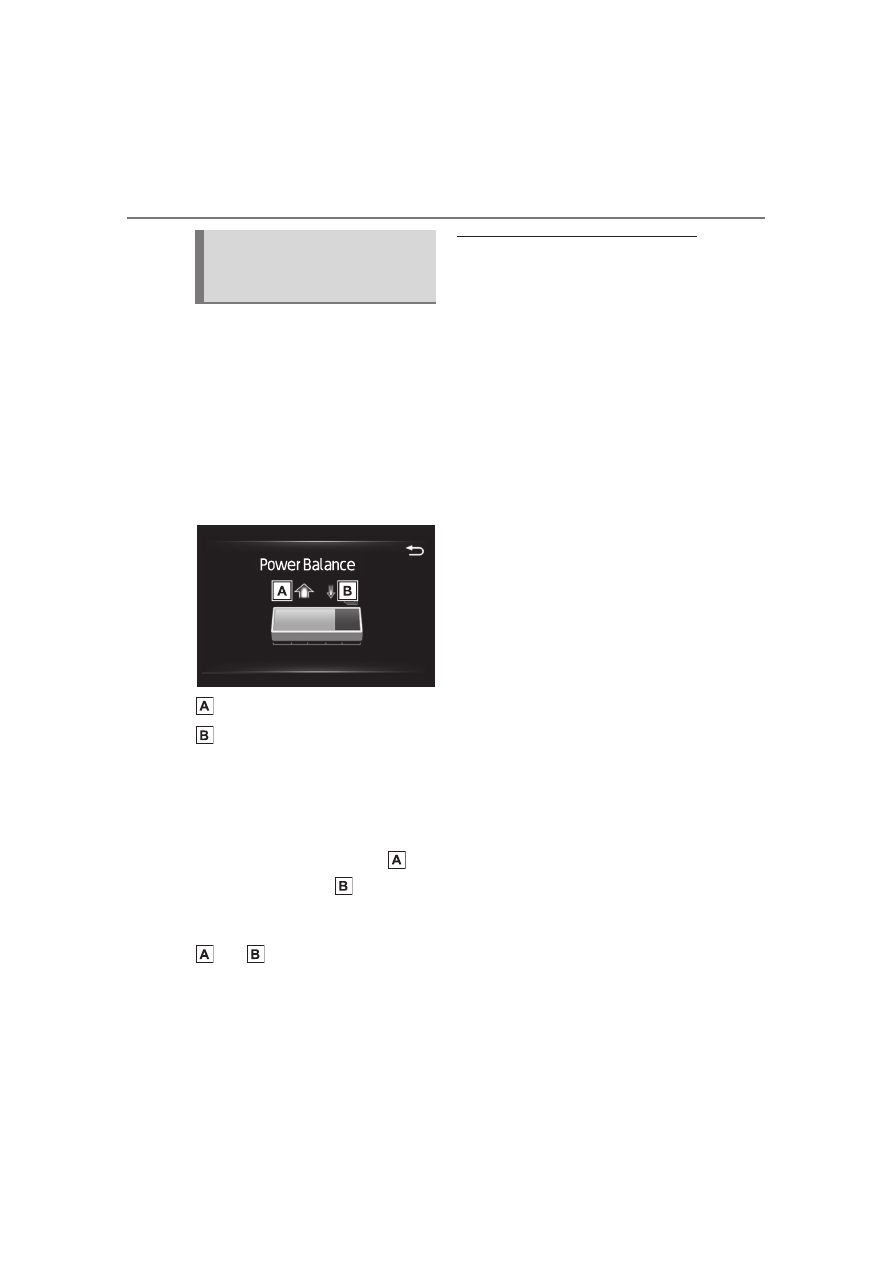
When starting My Room Mode, 
the electric power balance will 
be automatically displayed on 
the multi-information display, 
and an approximation of the 
electricity balance (the balance 
between the amount of electric-
ity provided and electricity con-
sumed) during My Room Mode 
can be checked.

Discharging (-)

Charging (+)

The size of the arrow symbol 
changes depending on the power 
supply and electricity consumption 
amounts.
If the electricity consumption is 
more than the power supply, 

 is 

displayed more than 

.

If the power supply and electricity 
consumption amounts are equal, 

 and 

 are displayed as the 

same size.

Meter display while charging

After turning the power switch to ON 

while charging, the power switch 

automatically turns off if My Room 

Mode is not selected within approxi-

mately 100 seconds.

When using My Room Mode the 

following may occur

When the remaining charge of the 

traction battery drops to the lower 

limit, the air conditioning system 

automatically stops. In that case, 

the air conditioning system can 

not operate until the remaining 

charge of the traction battery 

increases. Turn off the power 

switch once, then use My Room 

Mode after the remaining charge 

of the traction battery increases.

The charging time of the traction 

battery gets longer.

Noise may be heard from the 

radio depending on conditions of 

the radio wave.

The surrounding area of the 

onboard traction battery charger 

in the motor compartment may 

become hot.

The electric power steering sys-

tem warning light (yellow) may 

turn on, but this is not a malfunc-

tion.

Using My Room Mode during 

DC charging

When using My Room mode during 

DC charging, the state of charge 

completion will be lower than when 

not using My Room Mode.

When “My Room Mode” is used 

while the traction battery is fully 

charged

When the power switch is turned on 
while the traction battery is fully 
charged and the charging connector 
that supplies power is connected, 
“Charging Port Lid is Open” is dis-
played on the multi-information dis-

Display information for 
electric power balance 
during My Room Mode

129

2-2. Charging

2

E

le

ctr

ic 

V

ehi
cl

sys
te

m

play. In this case, press 

 on the 

meter control switches to display the 
setting screen of “My Room Mode”, 
and then select “My Room Mode”.

When “My Room Mode” is used 

while the traction battery is fully 

charged, the electric power of the 

traction battery may be consumed. 

In this case, charging may be per-

formed again.

Warning message display

When trying to start My Room Mode or My Room Mode is being used, if a 

message is displayed on the multi-information display, refer to the corre-

sponding table and perform the appropriate correction procedures.

*

: During My Room Mode, the information for electric power balance can be 

checked on the multi-information display.

Message

Correction procedure

“Traction Battery is too 
Low for “My Room 
Mode””

There is no remaining charge of the traction bat-
tery to start My Room Mode. Wait until the 
remaining charge of the traction battery 
increases, start My Room Mode.

““My Room Mode” has 
stopped due to low trac-
tion battery level”

The remaining charge of the traction battery is 
insufficient. Stop using My Room Mode and 
charge the traction battery.

““My Room Mode” will 
stop when traction bat-
tery level is too low 
Reduce power usage to 
continue using “My 
Room Mode””

When My Room mode electricity consumption 
exceeds the charge amount, the traction battery 
charge level becomes too low.

*

• If the electricity consumption of the vehicle can 

not be improved, My Room Mode will be off.

• When My Room Mode continuation is desired, 

turn off the air conditioning system, audio sys-
tem, etc., to increase the remaining charge of 
the traction battery.

130

2-2. Charging

WARNING

Warnings for using My Room 

Mode

Observe the following precau-

tions.
Failure to do so may result in 

death or a serious health hazard.

Do not leave children, people 

who need care, or pets inside 

the vehicle. The temperature 

inside the vehicle may become 

high or low due to features such 

as the automatic shut-off. The 

children, people who need care, 

or pets left inside the vehicle 

may suffer heatstroke dehydra-

tion or hypothermia. Also, since 

the wipers, etc., can be oper-

ated, there may be accidental 

operation, possibly leading to 

an accident.

Use the mode after sufficiently 

checking the vicinity of the vehi-

cle for safety hazards.

131

2-2. Charging

2

E

le

ctr

ic 

V

ehi
cl

sys
te

m

Refer to the following table and carry out the appropriate correction 
procedure.

The error warning indicator on the CCID (Charging Circuit 
Interrupting Device) flashes

Charging indicator of the charging port does not illuminate, 
even though charging connector is connected.

When charging cannot be carried out

When charging does not start, even though the normal proce-
dure is followed, check each of the following items. If a mes-
sage is shown on the multi-information display, also refer to 
P.138.

When charging cannot be carried out

Likely cause

Correction procedure

Electrical leakage detection function 
or self-diagnostic function operates 
and power is cut off

When the voltage is insufficient, the 
error warning indicator may flash 
when there is noise interference. 
Perform a reset and connect to a 
proper power source. (

P.88)

If charging does not start, immedi-
ately stop charging and contact your 
SUBARU dealer.

Likely cause

Correction procedure

Plug is not properly connected to 
outlet

Check that the plug is properly con-
nected to the outlet.

Power is out

After power is restored, carry out the 
charging procedure again.

Remote switch is off

If the remote switch is equipped, turn 
the switch on.

132

2-2. Charging

Building breaker is tripped and 
power is cut off

Check that the breaker is connected 
and if there is no malfunction, check 
if the vehicle can be charged through 
another outlet.
If charging is possible, the first outlet 
may have a malfunction. Contact the 
building or facility manager, or an 
electrician.

Short circuit between CCID 
(Charging Circuit Interrupting 
Device) and plug

Immediately stop charging and con-
tact your SUBARU dealer.

AC charging connector is not 
securely connected to AC charging 
inlet

Check the connection status of the 
AC charging connector.
• When connecting the AC charging 

connector, make sure not to touch 
the latch release button. Insert the 
AC charging connector securely 
until you hear a click. The AC 
charging connector may not be 
connected correctly if the latch 
release button is pressed while 
inserting.

• After connecting the AC charging 

connector, check that the latch 
release button is not pressed and 
the charging indicator of the 
charging port is turned on.

If the charging indicator of the 
charging port does not illuminate, 
even though the AC charging con-
nector is securely connected, there 
may be a malfunction in the system. 
Immediately stop charging and con-
tact your SUBARU dealer.

Traction battery is already fully 
charged

When the traction battery is fully 
charged, charging is not performed.

The AC charger does not operate

Please contact the facility manager 
when there is a problem with AC 
charger.

Likely cause

Correction procedure

133

2-2. Charging

2

E

le

ctr

ic 

V

ehi
cl

sys
te

m

Charging indicator of the charging port flashes and charging 
cannot be carried out.

*

: Refer to P.84 for details regarding charging indicator of the charging port 

illumination and flashing.

DC charging does not start

Likely cause

Correction procedure

When charging indicator of the 
charging port flashes normally

*

Charging schedule is registered

When you wish to charge according 
to the charging schedule, wait until 
the set time.
To start charging, set “Charge Now” 
to on. (

P.122, 126)

When charging indicator of the 
charging port rapidly flashes

*

: Mal-

function occurred in an external 
power source or the vehicle

A message will be displayed on the 
multi-information display when the 
power switch is off. Follow the 
instructions displayed on the multi-
information display.

When DC charging cannot be performed normally

Likely cause

Correction procedure

The DC charging connector is not 
properly connected to the vehicle.

Check the connection status of the 
DC charging connector and be sure 
that it is locked.
If the DC charging does not start, 
even though the DC charging con-
nector is securely connected, there 
may be a malfunction with the DC 
charger or charging system.

The DC charging connector is not 
securely locked.

• If there is a malfunction with the 

DC charger, contact the charging 
station manager.

• If there is not a malfunction with 

the DC charger, there may be a 
malfunction in the system. Contact 
your SUBARU dealer.

134

2-2. Charging

When DC charging is interrupted

Error is detected by the DC charger 
or vehicle’s system check.

There may be a malfunction with the 
DC charger or charging system.
• If there is a malfunction with the 

DC charger, contact the facility 
manager.

• If there is not a malfunction with 

the DC charger, there may be a 
malfunction in the system. Contact 
your SUBARU dealer.

• If the EV system can not be 

started, contact your SUBARU 
dealer.

The DC charger power goes off.

Contact the charging station man-
ager and check the power status.

Traction battery is already fully 
charged

When the traction battery is fully 
charged, DC charging cannot be per-
formed.

AC charging connector is also con-
nected.

DC charging and AC charging can 
not be performed together.

The EV system is started.

When the EV system is started, DC 
charging cannot be started.
Also, if the shift position is not in P, 
DC charging cannot be performed.

Likely cause

Correction procedure

Likely cause

Correction procedure

The timer for the DC charger oper-
ates.

Depending on the type of the DC 
charger, the timer may be set to stop 
charging after a certain time.
Check with the charging station man-
ager.

The power for the DC charger is off.

Check the power status of the DC 
charger. If there are uncertainties 
with the power status, contact the 
charging station manager.

135

2-2. Charging

2

E

le

ctr

ic 

V

ehi
cl

sys
te

m

The temperature of the traction bat-
tery is extremely high or low.

DC charging may not be performed 
in extremely high or extremely low 
temperature environments. Charge 
the traction battery after the tem-
perature has been stabilized.

Error is detected by the DC charger 
or vehicle’s system check.

There may be a malfunction with the 
DC charger or charging system.
• If there is a malfunction with the 

DC charger, contact the facility 
manager.

• If there is not a malfunction with 

the DC charger, there may be a 
malfunction in the system. Contact 
your SUBARU dealer.

• If the EV system can not be 

started, contact your SUBARU 
dealer.

High temperature of charging related 
parts

If the temperature of charging related 
parts is high, DC charging may not 
be possible. Wait for a while and 
then charge again.

The electrical components such as 
the air conditioning system stop 
operating while the traction battery is 
approximately fully charged.

Keep the electrical components such 
as the air conditioning system in the 
OFF state, and then perform the 
charging procedure again.

Likely cause

Correction procedure

136

2-2. Charging

EV system does not start after DC charging

Refer to the following tables and carry out the appropriate correction 
procedures.

Cannot charge at desired time

Likely cause

Correction procedure

System check is not completed prop-
erly after charging.

Do a system check following the pro-
cedures on P.113. If the system 
check can not be completed properly 
even after these procedures are per-
formed, contact your SUBARU 
dealer.

The DC charging connector is still 
connected.

For safety, the EV system can not be 
started when the DC charging con-
nector is connected. (

P.100)

Remove the DC charging connector 
immediately after the charging is 
completed.

The DC charging system is malfunc-
tioning

• Depending on the type of malfunc-

tion, the EV system can be started 
after closing the charging port lid.

• If the EV system can not be 

started, contact your SUBARU 
dealer.

When charging schedule function does not operate nor-
mally

Likely cause

Correction procedure

The vehicle calendar and clock are 
not set correctly.

Check the calendar setting and set it 
to the correct date. (

P.156)

137

2-2. Charging

2

E

le

ctr

ic 

V

ehi
cl

sys
te

m

Charging starts, even though the charging schedule is regis-
tered

AC charging connector is not con-
nected to vehicle

Before using the charging schedule, 
connect the AC charging connector.

AC charging connector was con-
nected after set time

Connect the AC charging connector 
before the time set in “Start”.
When the charging mode is set to 
“Start-Stop”, the traction battery will 
charge even if the start time has 
passed, if the AC charging connector 
is connected before the stop time.

Likely cause

Correction procedure

Likely cause

Correction procedure

“Charge Now” is set to on

When charging according to the 
charging schedule, set “Charge 
Now” to off. (

P.122, 126)

Charging schedule is set to off

Check that charging schedule is not 
set to off. (

P.116)

AC charging connector was removed 
and reinserted while charging indica-
tor of the charging port was flashing

If the AC charging connector is 
removed and reinserted while the 
charging indicator is flashing, the 
charging schedule is canceled. Tem-
porarily remove the AC charging 
connector, and then reconnect it.

138

2-2. Charging

When a door is opened with the power switch off, after charging, a 
message is displayed in the multi-information display.

When this occurs, follow the instructions displayed on the screen.

The Remote Air Conditioning Sys-
tem was operated

When the Remote Air Conditioning 
System is operated, the system will 
start charging, even if the charging 
schedule is registered. To carry out 
charging using the charging sched-
ule, stop the Remote Air Condition-
ing System, and then reconnect the 
AC charging connector.

Outside temperature is low and trac-
tion battery warming control (

P.97) 

operated

• When traction battery warming 

control operates, the charging 
schedules are ignored and 
charging starts. In order to protect 
the traction battery, allow charging 
to continue.

• After removing and installing the 

12-volt battery, the charging 
schedule setting may become 
invalid due to the initial setting of 
the traction battery warming con-
trol system even when the outside 
temperature is not low. In this 
case, after a few runs, the system’s 
initial settings will be completed 
and the charging schedule settings 
will take effect when the outside 
temperature is not low.

When charging related message is displayed

Likely cause

Correction procedure

139

2-2. Charging

2

E

le

ctr

ic 

V

ehi
cl

sys
te

m

If “Charging Stopped Due to Pulled Charging Connector” is 
shown

*

: Electricity is consumed when operating battery heater (

P.97), the 

Remote Air Conditioning System (

P.413).

Likely cause

Correction procedure

AC charging connector is removed 
while AC charging

When the AC charging connector is 
removed while AC charging, 
charging stops. If you want to fully 
charge the traction battery, recon-
nect the AC charging connector.

After the traction battery is fully 
charged, the AC charging connector 
is removed while the traction battery 
is being recharged again because 
electricity-consuming functions

*

 have 

been used and the remaining charge 
is now reduced.

AC charging connector is not 
securely connected

Check the connection status of the 
AC charging connector.
• When connecting the AC charging 

connector, make sure not to touch 
the latch release button. Insert the 
AC charging connector securely 
until you hear a click. The AC 
charging connector may not be 
connected correctly if the latch 
release button is pressed while 
inserting.

• After connecting the AC charging 

connector, check that the latch 
release button is not pressed and 
the charging indicator of the 
charging port is turned on.

If charging cannot be carried out, 
even though the proper procedures 
were followed, have the vehicle 
inspected by your SUBARU dealer.

Latch release button of AC charging 
connector was pressed while AC 
charging

When the latch release button is 
pressed while AC charging, charging 
stops. To continue charging, recon-
nect the AC charging connector.

140

2-2. Charging

If “Charging Complete Limited Charge Due to Battery Temp” 
is shown

Likely cause

Correction procedure

Charging was stopped to protect the 
traction battery as it continued to 
remain hot for a certain period of 
time.

Allow the traction battery to cool 
down and perform charging again if 
the charging amount has not 
reached the desired amount.

141

2-2. Charging

2

E

le

ctr

ic 

V

ehi
cl

sys
te

m

If “Charging Stopped Check Charging Source” is shown

Likely cause

Correction procedure

Problem in power supply 
from external power source

Check the following items.
• The plug is securely inserted.
• Extension cord is not used and electrical 

socket is not overloaded.

• The remote switch is not off.
• Connected to a dedicated power line.
• Power outage has occurred or not.
• The power indicator on the CCID (Charging 

Circuit Interrupting Device) is illuminated.

• The circuit breakers have not tripped.
If all of the above conditions are met, the out-
let may be malfunctioning. Contact an electri-
cian and request an inspection.
Furthermore, if the error warning indicator on 
the CCID (Charging Circuit Interrupting 
Device) is flashing, there may be electrical 
leakage. Contact your SUBARU dealer.
If charging cannot be performed, even though 
there is no problem with the power source 
path, there may be a malfunction in the sys-
tem. Have the vehicle inspected by your SUB-
ARU dealer.

Charging is stopped by AC 
charger

Depending on the specifications of charger, 
charging may be canceled by an interruption 
of power supply. Charging may be stopped by 
the following.
Refer to charger handling methods.
• The charging stop button of charger is 

pressed.

• Charger with off timer function canceled 

charging

• Charger that is not compatible with the 

charging schedule function of the vehicle

• Check if it is possible to charge with the AC 

charging cable equipped with the vehicle. If 
charging cannot be carried out even when 
using the genuine AC charging cable, con-
tact your SUBARU dealer.

142

2-2. Charging

If “Charging Stopped High Energy Use See Owner’s Manual” 
is shown

If “Charging System Malfunction See Owner’s Manual” is 
shown

The AC charger is not com-
patible with the vehicle

Check if it is possible to charge with the AC 
charging cable equipped with the vehicle. If 
charging cannot be carried out even when 
using the genuine AC charging cable, contact 
your SUBARU dealer.

The DC charger is malfunc-
tioning.

If the message above is displayed when DC 
charging has not stopped operations, the DC 
charger may be damaged, so do not use that 
DC charger. Check if it is possible to charge 
with another DC charger.

The DC charger is not com-
patible with the vehicle.

Likely cause

Correction procedure

Likely cause

Correction procedure

Power is being consumed by electri-
cal components of vehicle

Check the following items, and then 
carry out charging again.
• If the headlights and audio are 

turned on, turn them off.

• Turn the power switch off.
If charging cannot be carried out, 
even after performing the above, the 
12-volt battery may not be suffi-
ciently charged. Operate the EV sys-
tem and wait for approximately 15 
minutes or more to charge the 
12-volt battery.

Likely cause

Correction procedure

Malfunction occurred in charging 
system

Have the vehicle inspected by your 
SUBARU dealer.

143

2-2. Charging

2

E

le

ctr

ic 

V

ehi
cl

sys
te

m

If “The Traction Battery Temp is low System put priority on 
charging to preserve battery condition” is shown

If “Check Charging System Close Charging Port Lid See 
Owner’s Manual” is shown

If “Charging Stopped Time Limit Reached” is shown

Likely cause

Correction procedure

The traction battery warming control 
is operated (

P.97)

When the traction battery warming 
control operates, the charging 
schedule is not used and charging is 
performed.
This is a control to protect the trac-
tion battery, and not a malfunction.

Likely cause

Correction procedure

System check is not completed prop-
erly after DC charging.

The EV system can not be started 
until the system check is completed 
properly. Perform a system check 
following the procedures on P.113.

Likely cause

Correction procedure

The DC charging is not completed 
within the restricted time with DC 
charger.

• Depending on the type of DC char-

ger, the timer may be set to stop 
charging after a certain time. 
Check with the charging station 
manager.

Depending on the condition of the 
vehicle, the charging time may 
become longer than normal, and the 
DC charging may not be completed 
within the restricted time.
• When the A/C, headlights, audio 

system, etc., are turned on, the 
electricity consumption of the vehi-
cle will be increased. Perform the 
DC charging after turning off all of 
the above.

• The temperature of the traction 

battery may be low. Perform the 
DC charging after warming up the 
traction battery.


Content      ..     6      7      8      9     ..