Renault Captur (2024 year). Manual in english - page 7
2.77
ENG_UD61070_2
Caméra 360° (HJB - Renault)
11
10
12
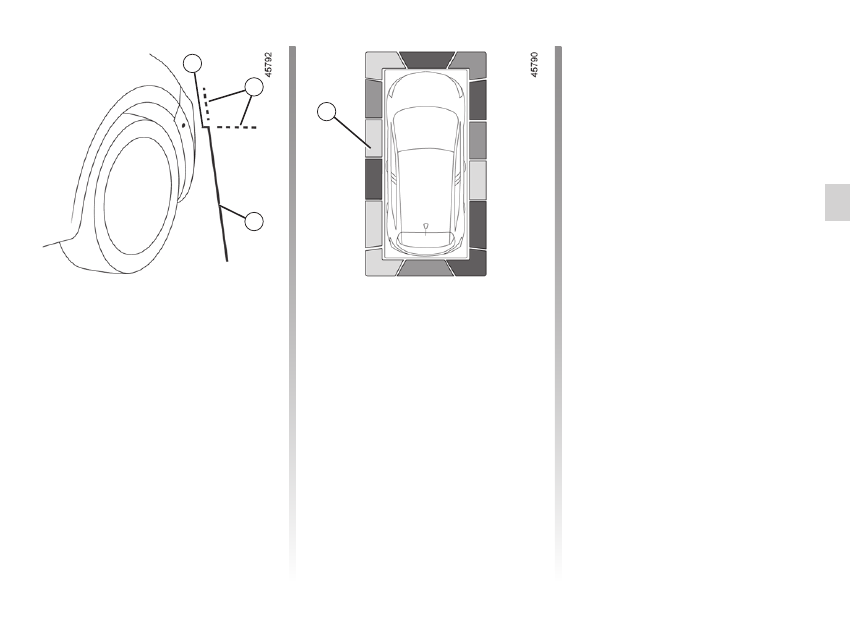
The “Front side view on passenger
side” is transmitted to the multimedia
screen with fixed guidelines to measure
the distances.
Fixed guidelines 10, 11 and 12
Fixed guideline
10
shows the front sec-
tion of the vehicle.
Fixed guideline
12
shows the vehicle
width including door mirrors.
Fixed guidelines
11
are shown in red
and dotted. These are extensions of
fixed guidelines
10
and
12
.
Depending on the vehicle, you can use
the multimedia screen to change the
bird’s eye view to the front side view.
Please refer to the multimedia instruc-
tions for further information.
Obstacle detection
While the system is activated, if the
“Park Assist” function detects one or
more obstacles around the vehicle,
the
13
indicator lines display:
– on the bird’s eye view;
– on the front side view on the passen-
ger side (depending on the vehicle).
In addition to the sound alert, these in-
dicator lines show the proximity of ob-
stacles via different colours:
– Green: obstacle between approxi-
mately 50 and 70 cm;
– Yellow: obstacle between approxi-
mately 30 and 50 cm;
– Red: obstacle within approximately
30 cm.
These indicator lines also show the lo-
cation of the obstacles detected relative
to the “Vehicle” symbol.
For more information
360° CAMERA
(5/9)
13