Peugeot 3008 Dag (2010.5). Instruction - part 3
 

  Index      Peugeot     Peugeot 3008 Dag 2010.5 - instruction in english


Search            


Content   ..  1  2  3  4   ..


Peugeot 3008 Dag (2010.5). Instruction - part 3


34

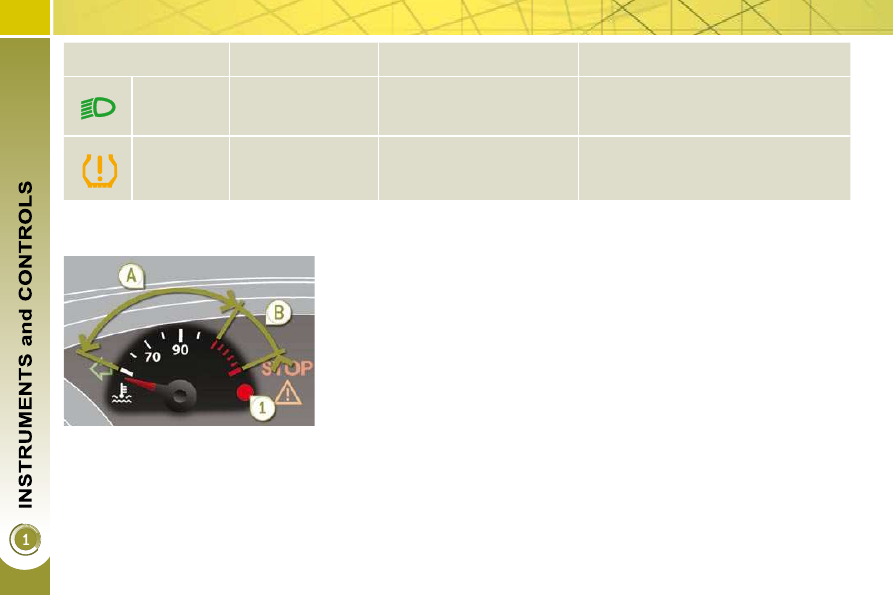
Coolant temperature indicator 

 With  the  engine  running,  when  the 
needle is: 
   -  

in zone  A , the temperature is correct, 

  -  

in  zone   B ,  the  temperature  is  too 
high;  the  max  temperature  warning 
lamp  1  and the central  STOP  warn-
ing lamp come on, accompanied by 
an audible signal and a message in 
the multifunction screen.  

 After driving for a few minutes, the tem-
perature  and  pressure  in  the  cooling 
system increase. 
 To top up the level: 
      wait for the engine to cool, 
     unscrew  the  cap  by  two  turns  to 

allow the pressure to drop, 

     when  the  pressure  has  dropped, 

remove the cap, 

     top up the level to the "MAX" mark.   

  You    must    stop  as  soon  as  it  is  safe 
to do so.
  
 Wait a few minutes before switching off 
the engine. 
 Consult a PEUGEOT dealer. 

   Warning lamp   

   is on   

   Cause   

   Action/Observations   


   Directional 

headlamps   

  fl ashing.  

 The directional headlamps 
system is faulty. 

 Have it checked by a PEUGEOT dealer. 


   Under-

infl ated tyre   

  fi xed.  

 The pressure in one or more 
wheels is too low. 

 Check the pressure of the tyres as soon 
as possible.  
This check should preferably be carried 
out when the tyres are cold. 

Service indicator 

 System  which  informs  the  driver  when 
the  next  service  is  due,  in  accordance 
with 

the 

manufacturer's 

servicing 

schedule. 
 The point at which the service is due is 
calculated  from  the  last  indicator  zero 
reset.  It  is  determined  by  two  para-
meters: 
   -  

the distance travelled, 

  -  

the  time  elapsed  since  the  last 
service.  

  Between 600 miles (1 000 km) and 
1 800 miles (3 000 km) remain before 
the next service is due 
 For  5  seconds  after  the  ignition  is 
switched  on,  the  spanner  symbolising 
the  service  operations  comes  on.  The 
distance recorder display line indicates 
the  distance  remaining  before  the  next 
service is due. 
  Example:   1  700  miles  (2  800  km)  re-
main before the next service is due. 
 For  5  seconds  after  the  ignition  is 
switched on, the screen indicates: 

 5 seconds after the ignition is switched 
on,  the spanner   goes   off ; the distance 
recorder resumes its normal operation. 
The screen then indicates the total and 
trip distances.  

  Less than 600 miles (1 000 km) 
remain before the next service is due 
  Example:   400  miles  (900  km)  remain 
before the next service is due. 
 For  5  seconds  after  the  ignition  is 
switched on, the screen indicates: 

 5 seconds after the ignition is switched 
on,  the  distance  recorder  resumes  its 
normal  operation.   The  spanner  re-
mains  on
   to  indicate  that  a  service 
must be carried out soon.  

  More than 1 800 miles (3 000 km) 
remain before the next service is due 
 When the ignition is switched on, no ser-
vice information appears in the screen.  

36

 Following this operation, if you 
wish to disconnect the battery, 
lock  the  vehicle  and  wait  at 

least  fi ve  minutes  for  the  zero  reset 

to be taken into account.  

        Service indicator zero reset 

 After each service, the service indicator 
must be reset to zero. 
 The procedure for resetting to zero is as 
follows: 
      switch off the ignition, 
     press and hold the trip distance re-

corder zero reset button, 

     switch  on  the  ignition;  the  distance 

recorder  display  begins  a  count-
down, 

     when  the  display  indicates   "=0" , 

release  the  button;  the  spanner 
disappears.  

  The  distance  remaining  may 
be weighted by the time factor, 
depending on the driving condi-
tions. 

 Therefore,  the  spanner  may  also 
come  on  if  you  have  exceeded  the 
two year service interval.   

  Service overdue 
 For  5  seconds  after  the  ignition  is 
switched  on,   

the  spanner  fl ashes   to 

indicate that the service must be carried 
out as soon as possible. 
  Example:   the  service  is  overdue  by
180 miles (300 km). 
 For  5  seconds  after  the  ignition  is 
switched on, the screen indicates: 

 5 seconds after the ignition is switched 
on,  the  distance  recorder  resumes  its 
normal  operation.   The  spanner  re-
mains 
  on . 

  Retrieving the service information 
 You can access the service information 
at any time. 
      Press the trip distance recorder zero 

reset button.  


The service information is displayed 
for a few seconds, then disappears.    

37

  The  level  shown  will  only  be 
correct  if  the  vehicle  is  on 
level  ground  and  the  engine 
has  been  off  for  more  than 
30 minutes. 

Engine oil level indicator 

 System which informs the driver whether 
the engine oil level is correct or not. 

 This  information  is  indicated  for  a  few 
seconds  when  the  ignition  is  switched 
on, after the service information. 

  Oil level correct  

  Oil level low 

  Oil level indicator fault 

  Dipstick 

 This  is  indicated  by  the  fl ashing  of 

 "OIL" ,  linked  with  the  service  warning 
lamp,  accompanied  by  an  audible  sig-
nal and a message in the multifunction 
screen. 
 If  the  low  oil  level  is  confi rmed  by  a 

check using the dipstick, the level must 
be topped up to prevent damage to the 
engine.  

 This  is  indicated  by  the  fl ashing  of  

"OIL --" . Consult a PEUGEOT dealer.  

 Refer to the "Checks" section to locate 

the dipstick and the oil fi ller cap on your 

engine. 

 There  are  2  marks  on  the 
dipstick: 

   -  

 A   =  max;  never  exceed 
this  level  (risk  of  dam-
age to the engine), 

  -  

  = min; top up the level 

via the oil fi ller cap, using 

the grade of oil suited to 
your engine.    

38

Total distance recorder 

 System  which  measures  the  total  dis-
tance travelled by the vehicle during its 
life. 

Lighting dimmer 

 System  for  manual  adjustment  of  the 
brightness  of  the  instrument  panel  in 
relation to the exterior brightness. 

 The  total  and  trip  distances  are 
displayed  for  thirty  seconds  when  the 
ignition is switched off, when the driver's 
door is opened and when the vehicle is 
locked or unlocked.  

  Trip distance recorder 

 System  which  measures  a  distance 
travelled  during  a  day  or  other  period 
since it was reset to zero by the driver. 

      With  the  ignition  on,  press  the  but-

ton until zeros appear.   

  Activation 
 When the vehicle lighting is on: 
      press  the  button  to  change  the 

brightness of the instrument panel, 

     when  the  lighting  reaches  the  mini-

mum  setting,  release  the  button, 
then press again to increase it,  

 or 
      when the lighting reaches the maxi-

mum  setting,  release  the  button, 
then press again to reduce it, 

     when  the  lighting  reaches  the  level 

of  brightness  required,  release  the 
button.   

  When  the  vehicle  lighting  is 
on,  you  cannot  switch  the  in-
strument panel lighting off but 
you can adjust it to minimum.  

  Deactivation 
 When the lighting is off, or in day mode 

on vehicles fi tted with daytime running 

lamps,  pressing  the  button  does  not 
have any effect.   

39

  Displays on the screen 

 This displays the following information: 
   -  

time, 

  -  

date, 

  -   ambient temperature *  (this fl ashes if 

there is a risk of ice), 

  -  

status of the openings (doors, boot, ...), 

  -  

trip computer (refer to the end of the 
section).  

 Warning  messages  (e.g.:  "Emission 
control  system  faulty")  or  information 
messages  (e.g.:  "Boot  open")  may  ap-
pear temporarily. Some can be cleared 
by pressing the  "ESC"  button.  

MONOCHROME SCREEN A 
(WITHOUT AUDIO EQUIPMENT) 

  Controls 

  Main menu 

 There are three display control buttons: 
   -  

 "ESC"   to  abandon  the  operation  in 
progress, 

  -  

 "MENU"  to scroll through the menus 
or sub-menus, 

  -  

 "OK"   to  select  the  menu  or  sub-
menu required.   

      Press  the   "MENU"   button  to  scroll 

through  the  various  menus  of  the 
 main menu : 

   -   vehicle confi guration, 
  -   options, 
  -   display settings, 
  -   languages, 
  -   units.  

     Press the  "OK"  button to select the 

menu required.  

  *   With air conditioning only.  

40

  Vehicle confi guration 

  Options 
 Once the "Options" menu has been se-
lected, you can start diagnostics of the 
status of the equipment (active, not ac-
tive, faulty).  

  Languages 
 Once the "Languages" menu has been 
selected, you can change the language 
used by the display (Français, Italiano, 
Nederlands, 

Portugues, 

Portugues-

Brasil, 

Türkçe, 

Deutsch, 

English, 

Espanol).  

  Display settings 
 Once  the  "Display  settings"  menu  has 
been selected, you  can  gain  access  to 
the following settings: 
   -  

year, 

  -  

month, 

  -  

day, 

  -  

hour, 

  -  

minutes, 

  -  

12 or 24 hour mode.  

  Units 
 Once the "Units" menu has been select-
ed, you can change the units for: 
   -  

temperature (°C or °F), 

  -  

fuel consumption (l/100 km, mpg or 
km/l).  

      Once  you  have  selected  a  setting, 

press the  "OK"  button to change its 
value. 

     Wait  for  approximately  ten  sec-

onds  without  any  action  to  allow 
the changed data to be recorded or 
press the  "ESC"  button to cancel.  

 The  screen  then  returns  to  the  normal 
display.  

 Once the "Vehicle confi guration" menu 

has been selected, you can activate or 
deactivate the following equipment (ac-
cording to country): 
   -  

wiper linked with reverse gear (refer 
to the "Visibility" section), 

  -  

selective  unlocking  (refer  to  the 
"Access" section), 

  -  

"guide-me-home" and welcome light-
ing (refer to the "Visibility" section), 

  -  

interior  mood  lighting  (refer  to  the 
"Visibility" section), 

  -  

daytime running lamps (refer to the 
"Visibility" section), 

  -  

directional  headlamps  (refer  to  the 
"Visibility" section), 

  -  

automatic  or  manual  parking  brake 
(refer to the "Driving" section), 

  -  

...   

  For  safety  reasons,  confi gu-

ration  of  the  multifunction 
screen by the driver must only 
be done when stationary.   

41

MONOCHROME SCREEN A 
(WITH AUDIO EQUIPMENT) 

  Controls 

  Displays on the screen 

 This displays the following information: 
   -  

time, 

  -  

date, 

  -   ambient temperature *  (this fl ashes if 

there is a risk of ice), 

  -  

status of the openings (doors, boot, ...), 

  -  

audio sources (radio, CD, ...), 

  -  

trip computer (refer to the end of the 
section).  

 Warning  messages  (e.g.:  "Emission 
control  system  faulty")  or  information 
messages  (e.g.:  "Boot  open")  may  ap-
pear temporarily. Some can be cleared 
by pressing the  "ESC"  button.  

  Main menu 

      Press the  "MENU"  button for access 

to  the   main  menu ,  then  press  the 
"  " or "  " buttons to scroll through 
the various menus: 

   -   radio-CD, 
  -   vehicle confi guration, 
  -   options, 
  -   display settings, 
  -   languages, 
  -   units.  

     Press the  "OK"  button to select the 

menu required.  

 From  the  audio  equipment  control  panel, 
you can: 
      press  the   "MENU"   button  to  gain 

access to the  main menu , 

     press the "  " or "  " buttons to scroll 

through the items on the screen, 

     press the  "MODE"  button to change 

the permanent application (trip com-
puter, audio source, ...), 

     press  the  "  "  or  "  "  buttons  to 

change a setting value, 

     press the  "OK"

  button to confi rm,  


or 

     press the  "ESC"  button to abandon 

the operation in progress.   

  Radio-CD 
 With the audio equipment switched on, 
once  the  "Radio-CD"  menu  has  been 
selected you can activate or deactivate 
the functions linked with use of the radio 
(RDS, REG), the CD or the CD changer 

(introscan, shuffl e, CD repeat). 

  *   With air conditioning only.  

 For  more  information  on  the 
"Radio-CD"  application,  refer 
to the  "Audio and Telematics" 
section.  

42

  For  safety  reasons,  confi gu-

ration  of  the  multifunction 
screen by the driver must only 
be done when stationary.   

  Display settings 
 Once  the  "Display  settings"  menu  has 
been selected, you  can  gain  access  to 
the following settings: 
   -  

year, 

  -  

month, 

  -  

day, 

  -  

hour, 

  -  

minutes, 

  -  

12 or 24 hour mode.  

  Languages 
 Once  the  "Languages"  menu  has  been 
selected,  you  can  change  the  language 
used  by  the  display  (Français,  Italiano, 
 Nederlands,  Portugues,  Portugues-Brasil, 
Türkçe, Deutsch, English, Espanol).  

  Units 
 Once  the  "Units"  menu  has  been  se-
lected, you can change the units of the 
following parameters: 
   -  

temperature (°C or °F), 

  -  

fuel consumption (l/100 km, mpg or 
km/l).  

      Once  you  have  selected  a  setting, 

press  the  "  "  or  "  "  buttons  to 
change its value. 

     Press  the  "  "  or  "  "  buttons  to 

switch  respectively  to  the  previous 
or next setting. 

     Press  the   "OK"   button  to  record 

the change and return to the normal 
display or press the  "ESC"  button to 
cancel.   

  Vehicle confi guration 

 Once the "Vehicle Confi guration" menu has 

been  selected,  you  can  activate  or  deactivate 
the following equipment (according to country): 
   -  

wiper linked with reverse gear (refer 
to the "Visibility" section), 

  -  

selective  unlocking  (refer  to  the 
"Access" section), 

  -  

guide-me-home  and  welcome  light-
ing (refer to the "Visibility" section), 

  -  

interior  mood  lighting  (refer  to  the 
"Visibility" section), 

  -  

daytime running lamps (refer to the 
"Visibility" section), 

  -  

directional  headlamps  (refer  to  the 
"Visibility" section), 

  -  

automatic  or  manual  parking  brake 
(refer to the "Driving" section), 

  -  

...   

  Options 
 Once the "Options" menu has been select-
ed, you can start diagnostics of the status 
of the equipment (active, not active, faulty).  

43

MONOCHROME SCREEN C (WITH 
PEUGEOT CONNECT SOUND) 

  Main menu 

  Displays on the screen 

 This displays the following information: 
   -  

time, 

  -  

date, 

  -   ambient temperature *  (this fl ashes if 

there is a risk of ice), 

  -  

status  of  the  openings  (doors, 
boot...), 

  -  

audio sources (radio, CD...), 

  -  

trip computer (refer to the end of the 
section).  

 Warning  messages  (e.g.:  "Emission 
control  system  faulty")  or  information 
messages  (e.g.:  "Automatic  headlamp 
lighting  activated")  may  appear  tempo-
rarily. These can be cleared by pressing 
the " ESC " button.  

 With the audio equipment switched on, 
once this menu has been selected you 
can activate or deactivate the functions 
linked with use of the radio (RDS, REG, 
RadioText)  or  the  CD  or  CD  changer 

(introscan, shuffl e, CD repeat). 

  Controls 

 From the audio equipment control pan-
el, you can: 
      press the " MENU " button for access 

to the  main menu , 

     press the "  " or "  " buttons to scroll 

through the items on the screen, 

     press the " MODE " button to change 

the permanent application (trip com-
puter, audio source...), 

     press  the  "  "  or  "  "  buttons  to 

change a setting value, 

     press the " OK

 " button to confi rm,  


or 

     press the " ESC " button to abandon 

the operation in progress.   

      Press  the   "MENU"   button  for  ac-

cess to the  main menu : 

   -   audio functions, 
  -   trip  computer  (refer  to  the  end  of 

the section), 

  -   personalisation-confi guration, 
  -   telephone (Bluetooth system).   

      Press the"  " or "  " button to select 

the menu required, then confi rm by 

pressing the " OK " button.   

  *   With air conditioning only.  

 For  more  information  on  the 
"Audio  functions"  application, 
refer  to  the  Peugeot  Connect 
Sound  part  of  the  "Audio  and 
Telematics" section.  

44

  "Trip computer" menu 

      Press  the   "MENU"   button  to  gain 

access to the general menu. 

     Press the arrows, then the  "OK"  but-

ton  to  select  the   "Trip  computer"  
menu. 

     On  the   "Trip  computer"   menu, 

select  one  of  the  following  applica-
tions:   

  Alert log 
 This  summarises  the  active  warning 
messages,  displaying  them  in  succes-
sion in the multifunction screen  

 Once this menu has been selected, you 
can consult information concerning the 
status of the vehicle (alert log, status of 
the functions...). 

  Defi ne the vehicle parameters 
 Once this menu has been selected, you 
can activate or deactivate the following 
equipment (according to country): 
   -  

wiper linked with reverse gear (refer 
to the "Visibility" section), 

  -  

selective  unlocking  (refer  to  the 
"Access" section), 

  -  

guide-me-home lighting (refer to the 
"Visibility" section), 

  -  

interior  mood  lighting  (refer  to  the 
"Visibility" section), 

  -  

daytime running lamps (refer to the 
"Visibility" section), 

  -  

directional  headlamps  (refer  to  the 
"Visibility" section), 

  -  

automatic  or  manual  parking  brake 
(refer to the "Driving" section), 

  -  

...  

  "Personalisation-

Configuration" menu 

 Once this menu has been selected, you 
can  gain  access  to  the  following  func-
tions: 
   -   defi ne the vehicle parameters, 

  -   display confi guration, 
  -  

choice of language.  

  Status of functions 
 This  summarises  the  active  or  inactive 
status  of  the  functions  present  on  the 
vehicle.  

  Enter the distance to the destination 
 This allows you to enter an approximate 

value for the distance to the fi nal desti-

nation.  

45

  Display confi guration 
 Once this menu has been selected, you 
have access to the following settings: 
   -  

brightness-video setting, 

  -  

date and time setting, 

  -  

selection of the units.   

  Choice of language 
 Once  this  menu  has  been  selected, 
you  can  change  the  screen  display 
language  (Deutsch,  English,  Espanol, 
Français, Italiano, Nederlands, Portugues, 
Portugues-Brasil, Türkçe * ).  

 Example:  setting  of  the  duration  of  the 
guide-me-home lighting.  

       Press the "  " or "  " buttons, then 

the  " OK "  button  to  select  the  menu 
required. 

     Press the "  " or "  " buttons, then 

the " OK " button to select the "Guide-
me-home headlamps" line. 

     Press the "  " or "  " buttons to set 

the value required (15, 30 or 60 sec-
onds), then press the " OK " button to 

confi rm. 

     Press the "  " or "  " buttons, then 

the  " OK "  button  to  select  the  " OK " 

box and confi rm or press the " ESC " 

button to cancel.   

  "Telephone" menu 

 With the audio equipment switched on, 
once this menu has been selected you 

can  confi gure  your  Bluetooth  hands-

free  kit  (pairing),  consult  the  various 
telephone  directories  (calls  log,  ser-
vices...)  and  manage  your  communi-
cations  (pick  up,  hang  up,  call  waiting, 
secret mode...). 

 *  According to country.  

 For  safety  reasons,  confi gu-

ration  of  the  multifunction 
screen by the driver must only 
be done when stationary.  

 For  more  information  on  the 
"Telephone"  application,  re-
fer  to  the  Peugeot  Connect 
Sound  part  of  the  "Audio  and 
Telematics" section.  

46

  Displays on the screen 

 When the screen is unfolded, it displays 
the  following  information  automatically 
and directly: 
   -  

time, 

  -  

date, 

  -  

altitude, 

  -  

ambient temperature (the value dis-

played  fl ashes  if  there  is  a  risk  of 

ice), 

  -  

doors check, 

  -  

warning and vehicle function status 
messages, displayed temporarily, 

  -  

audio functions, 

  -  

trip computer information, 

  -  

satellite navigation system information.   

 From the Peugeot Connect Navigation 
control panel, to select one of the 
applications: 

      press 

the 

dedicated 

 "RADIO" , 

 "MUSIC" , 

 "NAV" , 

 "TRAFFIC" , 

 "SETUP"   or   "PHONE"   button  for 
access to the corresponding menu, 

     turn the navigator to move the selection, 
  

   press  the  navigator  to  confi rm  the 

selection,  


or 

     press the  "ESC"  button to abandon 

the  current  operation  and  return  to 
the previous display.  

16/9 RETRACTABLE COLOUR SCREEN 
(WITH PEUGEOT CONNECT NAVIGATION) 

  Controls 

 For operation of the retractable 
screen  (opening,  closing,  ad-
justment of the position, etc.), 

refer to the paragraph "Access to the 
retractable screen".  

 For more information on these 
applications,  refer  to  the  "Au-
dio and Telematics" section. 

47

  "SETUP" menu 

       Press  the   "SETUP"   button  for  ac-

cess to the  "SETUP"  menu. This al-
lows you to select from the following 
functions: 

   -   "Languages", 
  -   "Date and time", 
  -   "Display", 
  -   "Vehicle parameters", 
  -   "Units", 
  -   "System".    

  Languages 
 This  menu  allows  you  to  select  the 
language  used  by  the  display:  Deutsch, 
English,  Espanol,  Français,  Italiano, 
Nederlands, Polski, Portugues, Türkçe * .  

  Date and time 
 This  menu  allows  you  to  set  the  date 
and time, the format of the date and the 
format  of  the  time  (refer  to  the  "Audio 
and Telematics" section or to the specif-
ic user guide given to you with the other 
owner's documents).  

  *   According to country.  

  Display 
 This menu allows you to set the bright-
ness  of  the  screen,  the  screen  colour 
scheme and the colour of the map (day/
night or auto mode).  

  Vehicle parameters 
 This  menu  allows  you  to  activate  or 
deactivate  certain  driving  and  comfort 
equipment (according to country): 
   -  

wiper linked with reverse gear (refer 
to the "Visibility" section), 

  -  

selective  unlocking  (refer  to  the 
"Access" section), 

  -  

guide-me-home  and  welcome  light-
ing (refer to the "Visibility" section), 

  -  

interior  mood  lighting  (refer  to  the 
"Visibility" section), 

  -  

daytime running lamps (refer to the 
"Visibility" section), 

  -  

directional  headlamps  (refer  to  the 
"Visibility" section), 

  -  

automatic  or  manual  parking  brake 
(refer to the "Driving" section), 

  -  

...   

  Units 
 This  menu  allows  you  to  select  the 
units:  temperature  (°C  or  °F)  and  fuel 
consumption (km/l, l/100 or mpg).  

  For  safety  reasons,  confi gu-

ration  of  the  multifunction 
screen by the driver must only 
be done when stationary.  

  System 
 This menu allows you to restore the fac-

tory confi guration, display the software 

version and activate scrolling text.  

48

16/9 HIGH DEFINITION 
RETRACTABLE COLOUR SCREEN 
(WITH PEUGEOT CONNECT MEDIA) 

  Displays on the screen 

 When the screen is unfolded, it displays 
the  following  information  automatically 
and directly: 
   -  

time, 

  -  

date, 

  -  

altitude, 

  -  

ambient temperature (the value dis-

played  fl ashes  if  there  is  a  risk  of 

ice), 

  -  

audio functions, 

  -  

telephone  and  address  book  infor-
mation, 

  -  

satellite navigation system information.   

  Controls 

 From the Peugeot Connect Media con-
trol panel, to select one of the applica-
tions: 
      press 

the 

dedicated 

 "RADIO" , 

 "MEDIA" ,  "NAV" ,  "TRAFFIC" ,  "ADDR 
BOOK"
  or  "SETUP"  button for access 
to the corresponding menu, 

     turn  the  navigator  to  move  the  se-

lection, 

  

   press  the  navigator  to  confi rm  the 

selection,  


or 

     press the  "ESC"  button to abandon 

the  current  operation  and  return  to 
the previous display.  

 For more information on these 
applications,  refer  to  the  "Au-
dio and Telematics" section or 

to the specifi c user guide given to you 

with the other owner's documents. 

 For operation of the retractable 
screen  (opening,  closing,  ad-
justment of the position, etc.), 

refer to the paragraph "Access to the 
retractable screen".  

49

  *   According to country.  

  "SETUP" menu 

      Press  the   "SETUP"   button  for 

 access to the  "SETUP"  menu. This 
allows you to select from the follow-
ing functions: 

   -   "Languages and voice functions", 
  -   "Date and time", 
  -   "Display", 
  -   "Units", 
  -   "System".   

  Language and voice functions 
 This menu allows you to: 
   -  

select  the  language  used  by  the 
screen  (Deutsch,  English,  Espanol, 
Français, 

Italiano, 

Nederlands, 

Polski, Portugues, Türkçe * ), 

  -  

select the voice recognition parame-
ters  (activation/deactivation,  advice 
on  use,  personal  voice  program-
ming, etc.), 

  -  

set the volume of the voice synthesiser.   

  Date and time 
 This  menu  allows  you  to  set  the  date 
and time, the format of the date and the 
format  of  the  time  (refer  to  the  "Audio 
and Telematics" section or to the specif-
ic user guide given to you with the other 
owner's documents).  

  Display 
 This menu allows you to set the bright-
ness  of  the  screen,  the  screen  colour 
scheme and the colour of the map (day/
night or auto mode).  

  Units 
 This  menu  allows  you  to  select  the 
units:  temperature  (°C  or  °F)  and  dis-
tance (miles or km).  

  System parameters 
 This menu allows you to restore the fac-

tory confi guration, display the software 

version and activate scrolling text.   

  For  safety  reasons,  confi gu-

ration  of  the  multifunction 
screen by the driver must only 
be done when stationary. 


Content   ..  1  2  3  4   ..