Mazda CX-5 (2024 year). Manual in english - page 14
 

  Index      Manuals     Mazda CX-5 (2024 year). Manual in english


Search            copyright infringement  


Content      ..     12      13      14      15     ..


Mazda CX-5 (2024 year). Manual in english - page 14


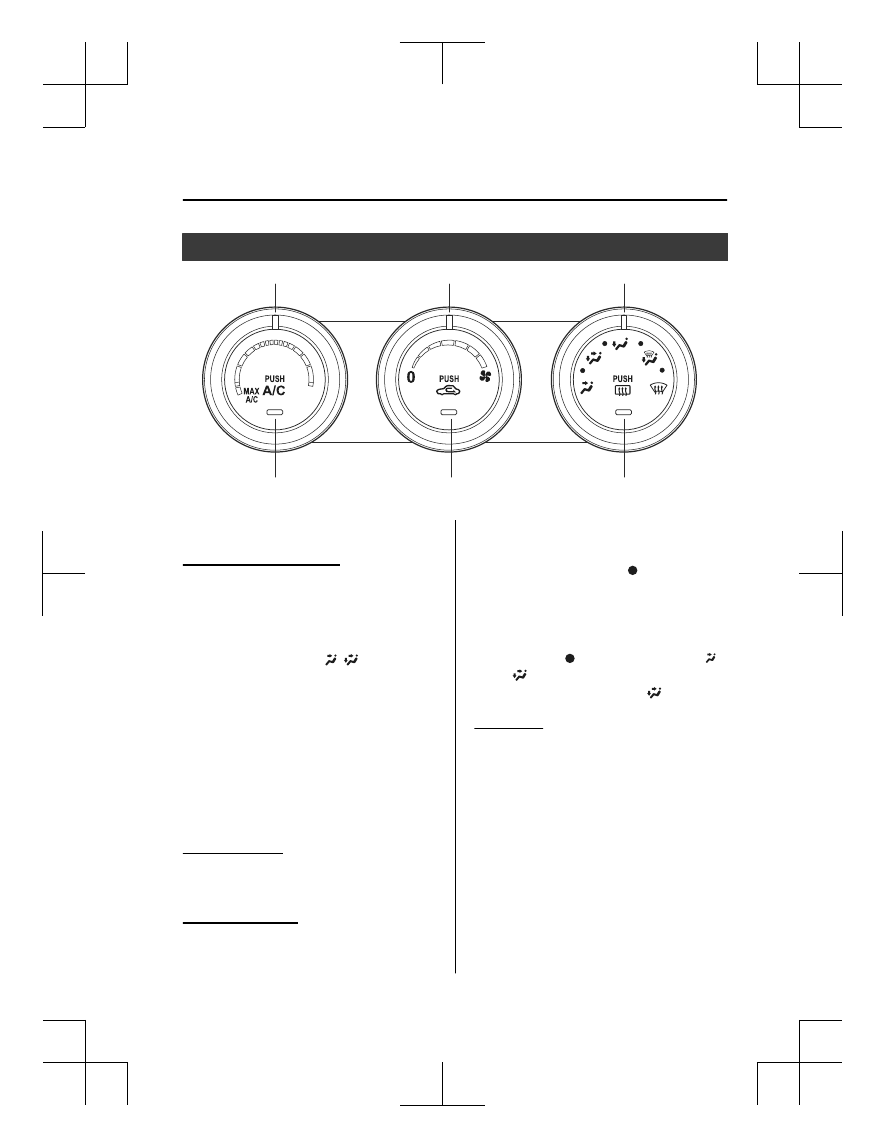
Manual Type

A/C switch

Air intake selector switch

Rear window defogger switch

Mode selector dial 

Fan control dial

Temperature control dial 

Control Switches

Temperature control dial

This dial controls temperature. Turn it
clockwise for hot and counterclockwise
for cold.

NOTE

When the mode is set to  ,   or a
position in between them with the fan
control dial in a position other than 0 and
the temperature control dial in the
maximum cold position, the air intake
selector switches to the recirculated air
position and the A/C turns on
automatically.
If A/C is not desired, press the A/C switch
to turn it off.

Fan control dial

This dial allows variable fan speeds.
The fan has seven speeds.

Mode selector dial

Turn the mode selector dial to select
airflow mode (page 5-4).

NOTE

The mode selector dial can be set at the
intermediate positions ( ) between each
mode. Set the dial to an intermediate
position if you want to split the airflow
between the two modes.

For example, when the mode selector
dial is at the   position between the 
and   positions, airflow from the floor
vent is less than that of the   position.

A/C switch

Press the A/C switch to turn the air
conditioner on. The indicator light on the
switch will illuminate when the fan control
dial is in any position except OFF.
 
Press the switch once again to turn the air
conditioner off.

NOTE

The air conditioner may not function when
the outside temperature approaches 0 °C
(32 °F).

Interior Features

Climate Control System

5-5

CX-5_8MC3-EA-23G_Edition1_old

2023-5-8 11:05:50

Air intake selector

This switch controls the source of air
entering the vehicle.
 
Outside or recirculated air positions can be
selected. Press the switch to select outside/
recirculated air positions.

Recirculated air position (indicator light
illuminated)

Outside air is shut off. Air within the
vehicle is recirculated. Use this position
when going through tunnels, driving in
congested traffic (high engine exhaust
areas), or when quick cooling is desired.

Outside air position (indicator light
turned off)

Outside air is allowed to enter the cabin.
Use this position for ventilation or
windshield defrosting.

WARNING

Do not use the 

 position in cold or rainy

weather:

Using the 

 position in cold or rainy

weather is dangerous as it will cause the
windows to fog up. Your vision will be
hampered, which could lead to a serious
accident.

NOTE

The recirculated air position is the
default position whenever the ignition is
switched ON, the climate control system
is on, and the outside temperature
exceeds about 73°F (23

).

To exit the default recirculated air
position, press the air intake selector
switch to select the outside air position.

When the air intake selector switch is set
to the outside air position and the
outside temperature exceeds about 73°F
(23

), the climate control system may

automatically select the recirculated air
position to improve the efficiency of the
climate control system.

Rear window defogger switch

Press the rear window defogger switch to
defrost the rear window.
Refer to Rear Window Defogger on page
4-87.

Heating

1. Set the mode selector dial to the 

position.

2. Set the air intake selector to the outside

air position (indicator light turns off).

3. Set the temperature control dial to the

hot position.

4. Set the fan control dial to the desired

speed.

5. If dehumidified heating is desired, turn

on the air conditioner.

NOTE

If the windshield fogs up easily, set the
mode selector dial to the   position.

If cooler air is desired at face level, set
the mode selector dial at the   position
and adjust the temperature control dial
to maintain maximum comfort.

The air to the floor is warmer than air
to the face (except when the temperature
control dial is set at the extreme hot or
cold position).

Interior Features

Climate Control System

5-6

CX-5_8MC3-EA-23G_Edition1_old

2023-5-8 11:05:50

Cooling

1. Set the mode selector dial to the 

position.

2. Set the temperature control dial to the

cold position.

3. Set the fan control dial to the desired

speed.

4. Turn on the air conditioner by pressing

the A/C switch.

5. After cooling begins, adjust the fan

control dial and temperature control
dial as needed to maintain maximum
comfort.

CAUTION

If the air conditioner is used while driving
up long hills or in heavy traffic, monitor the
high engine coolant temperature warning
indication/warning light to see if it is
illuminated or flashing (page 7-22).
The air conditioner may cause engine
overheating. If the warning light is
illuminated or flashing, turn the air
conditioner off (page 7-17)
.

NOTE

When maximum cooling is desired, set
the temperature control dial to the
extreme cold position and set the air
intake selector to the recirculated air
position, then turn the fan control dial
fully clockwise.

If warmer air is desired at floor level,
set the mode selector dial at the 
position and adjust the temperature
control dial to maintain maximum
comfort.

The air to the floor is warmer than air
to the face (except when the temperature
control dial is set at the extreme hot or
cold position).

Ventilation

1. Set the mode selector dial to the 

position.

2. Set the air intake selector to the outside

air position (indicator light turns off).

3. Set the temperature control dial to the

desired position.

4. Set the fan control dial to the desired

speed.

Windshield Defrosting and
Defogging

1. Set the mode selector dial to the 

position.

2. Set the temperature control dial to the

desired position.

3. Set the fan control dial to the desired

speed.

4. If dehumidified heating is desired, turn

on the air conditioner.

WARNING

Do not defog the windshield using the 
position with the temperature control set
to the cold position:

Using the 

 position with the temperature

control set to the cold position is
dangerous as it will cause the outside of the
windshield to fog up. Your vision will be
hampered, which could lead to a serious
accident. Set the temperature control to
the hot or warm position when using the

 position.

Interior Features

Climate Control System

5-7

CX-5_8MC3-EA-23G_Edition1_old

2023-5-8 11:05:50

NOTE

For maximum defrosting, turn on the air
conditioner, set the temperature control
dial to the extreme hot position, and turn
the fan control dial fully clockwise.

If warm air is desired at the floor, set the
mode selector dial to the   position.

In the   or 

 position, the air

conditioner is automatically turned on
and the outside air position is
automatically selected to defrost the
windshield. In the   or 

 position, the

outside air position cannot be changed
to the recirculated air position.

Dehumidifying

Operate the air conditioner in cool or cold
weather to help defog the windshield and
side windows.
1. Set the mode selector dial to the

desired position.

2. Set the air intake selector to the outside

air position (indicator light turns off).

3. Set the temperature control dial to the

desired position.

4. Set the fan control dial to the desired

speed.

5. Turn on the air conditioner by pressing

the A/C switch.

NOTE

One of the functions of the air conditioner
is dehumidifying the air and, to use this
function, the temperature does not have to
be set to cold. Therefore, set the
temperature control dial to the desired
position (hot or cold) and turn on the air
conditioner when you want to dehumidify
the cabin air.

Interior Features

Climate Control System

5-8

CX-5_8MC3-EA-23G_Edition1_old

2023-5-8 11:05:50

Fully Automatic Type

Climate control system information is displayed on the display.

AUTO switch

SYNC (synchronized 
temperature) switch

Passenger temperature 
control dial

Driver temperature 
control dial

Rear window defogger switch

Windshield defroster switch

A/C switch

Power switch

Mode selector switch

Fan control 
switch

Air intake selector
(outside air position)

Air intake selector 
(recirculated air position)

Airflow display

Temperature setting display 
(driver’s side)

Temperature setting display 
(Passenger’s side)

A/C mode display

Mode selector 
display

Control Switches

AUTO switch

By pressing the AUTO switch the
following functions will be automatically
controlled in accordance with the selected
set temperature:

Airflow temperature

Amount of airflow

Selection of airflow mode

Outside/Recirculated air selection

Air conditioner operation

NOTE

AUTO switch indicator light

When on, it indicates auto operation,
and the system will function
automatically.

If any of the following switches are
operated while in auto control, the
AUTO switch indicator turns off.

Mode selector switch

Fan control switch

Windshield defroster switch
The functions for switches other than
those operated continue to operate in
auto control.

Power switch (Fan On/Off)

The climate control system turns on or off
by pressing the power switch.

Temperature control dial

This dial controls temperature. Turn it
clockwise for hot and counterclockwise
for cold.

Interior Features

Climate Control System

5-9

CX-5_8MC3-EA-23G_Edition1_old

2023-5-8 11:05:50

Turn the temperature control dial to adjust
the temperature between 15 °C (60 °F) and
29 °C (84 °F).

When the SYNC switch is on:
Turn the driver temperature control dial
to control the temperature throughout
the entire cabin.

When the SYNC switch is off:
Turn the driver or front passenger
temperature control dial to
independently control the temperature
on each side of the cabin.

NOTE

The climate control system changes to
the individual operation mode (SYNC
switch indicator light turns off) by
turning the front passenger temperature
control dial even when the SYNC switch
is on, which allows individual control of
the set temperature for the driver and
front passenger.

When you set the temperature to the
lower or upper limit, “Lo” or “Hi” is
displayed.

The temperature units for the
temperature setting display can be
changed in conjunction with the
temperature units for the outside
temperature display.
(Instrument cluster Type A)
Refer to Outside Temperature Display
on page 4-25.
(Instrument cluster Type B)
Refer to Outside Temperature Display
on page 4-42.
(Instrument cluster Type C)
Refer to Outside Temperature Display
on page 4-56.

Fan control switch

The fan has 7 speeds. The selected speed
will be displayed.

Mode selector switch

The desired airflow mode can be selected
(page 5-4).

NOTE

With the airflow mode set to the 
position and the temperature control
dial set at a medium temperature,
heated air is directed to the feet and air
at a comparably lower temperature will
flow through the central, left and right
vents.

To set the air vent to 

, press the

windshield defroster switch.

In the   or 

 position, the air

conditioner is automatically turned on
and the outside air position is
automatically selected to defrost the
windshield. In the   or 

 position, the

outside air position cannot be changed
to the recirculated air position.

A/C switch

Pressing the A/C switch while the AUTO
switch is turned on will turn off the air
conditioner (cooling/dehumidifying
functions).
The on/off of the air conditioner switches
each time the A/C switch is pressed.

NOTE

The air conditioner operates when the
A/C switch is pressed while the air
conditioner is turned off.

The air conditioner may not function
when the outside temperature
approaches 0 °C (32 °F).

Interior Features

Climate Control System

5-10

CX-5_8MC3-EA-23G_Edition1_old

2023-5-8 11:05:50

Air intake selector

Outside or recirculated air positions can be
selected. Press the switch to select outside/
recirculated air positions.

Recirculated air position (

)

Outside air is shut off. Air within the
vehicle is recirculated. Use this position
when going through tunnels, driving in
congested traffic (high engine exhaust
areas), or when quick cooling is desired.

Outside air position (

)

Outside air is allowed to enter the cabin.
Use this position for ventilation or
windshield defrosting.

WARNING

Do not use the 

 position in cold or rainy

weather:

Using the 

 position in cold or rainy

weather is dangerous as it will cause the
windows to fog up. Your vision will be
hampered, which could lead to a serious
accident.

NOTE

The recirculated air position is the
default position whenever the ignition is
switched ON, the climate control system
is on, and the outside temperature
exceeds about 73°F (23

).

To exit the default recirculated air
position, press the air intake selector
switch to select the outside air position.

When the air intake selector switch is set
to the outside air position and the
outside temperature exceeds about 73°F
(23

), the climate control system may

automatically select the recirculated air
position to improve the efficiency of the
climate control system.

SYNC (Synchronized Temperature)
switch

Use the SYNC switch to change the mode
between the individual operation (driver
and passenger) and interconnection
(simultaneous) modes.

Interconnection mode (indicator light
turns on)

The set temperature for the driver and
front passenger is controlled
simultaneously.

Individual operation mode (indicator
light turns off)

The set temperature can be controlled
individually for the driver and front
passenger.

Windshield defroster switch

Press the switch to defrost the windshield
and front door windows.
Refer to Windshield Defrosting and
Defogging on page 5-12.

Rear window defogger switch

Press the rear window defogger switch to
defrost the rear window.
Refer to Rear Window Defogger on page
4-87.

Interior Features

Climate Control System

5-11

CX-5_8MC3-EA-23G_Edition1_old

2023-5-8 11:05:50

Operation of Automatic Air
Conditioner

1. Press the AUTO switch. Selection of

the airflow mode, air intake selector
and amount of airflow will be
automatically controlled.

2. Use the temperature control dial to

select a desired temperature.
If you want to set the temperature on
the front passenger's side separately
from the driver's side, turn the front
passenger temperature control dial to
switch the mode automatically to the
individual operation mode and set the
temperature for the front passenger's
side.

To turn off the system, press the power
switch.

NOTE

Set the control dial to the recommended
temperature of 22 °C (72 °F), and then
adjust it as desired.

Setting the temperature to maximum hot
or cold will not provide the desired
temperature at a faster rate.

When selecting heat, the system will
restrict airflow until the engine has
warmed to prevent cold air from
blowing out of the vents.

Windshield Defrosting and
Defogging

Press the windshield defroster switch.
In this position, the outside air position is
automatically selected, and the air
conditioner automatically turns on. The air
conditioner will directly dehumidify the
air to the front windshield and side
windows on page 5-4.
Airflow amount will be increased.

WARNING

Set the temperature control to the hot or
warm position when defogging (
position):

Using the 

 position with the temperature

control set to the cold position is
dangerous as it will cause the outside of the
windshield to fog up. Your vision will be
hampered, which could lead to a serious
accident.

NOTE

Use the temperature control dial to
increase the air flow temperature and
defog the windshield more quickly.

Sunlight/Interior Temperature
Sensor

Sunlight sensor

Do not place objects on the sunlight
sensor. Otherwise, the interior temperature
may not adjust correctly.

Sunlight sensor

Interior Features

Climate Control System

5-12

CX-5_8MC3-EA-23G_Edition1_old

2023-5-8 11:05:50

Interior temperature sensor

Do not cover the interior temperature
sensor. Otherwise, the interior temperature
may not adjust correctly.

Interior temperature sensor

Interior Features

Climate Control System

5-13

CX-5_8MC3-EA-23G_Edition1_old

2023-5-8 11:05:50

What is Mazda Connect ?

What is Mazda Connect ?

This manual only indicates a part of the information for Mazda Connect. For details, check
the Web owner's manual at the Mazda site for each country and region.
 

1. Radio
2. Bluetooth

®

 Audio/Hands-Free Call/SMS (Short Message Service)

3. USB Audio/USB Video
4. USB port

*1

/SD card slot

*2

5. SD card (Navigation system)

*

*

1 The position and the type of the USB port differ depending on the specification.

*

2 The SD card slot is for the navigation system only. For vehicles with the navigation

system, the SD card (Mazda genuine) with stored map data is inserted into the SD card
slot.

Interior Features

Mazda Connect

5-14

*Some models.

CX-5_8MC3-EA-23G_Edition1_old

2023-5-8 11:05:50

No.

Menu

Explanation

(1)

Information

Fuel Efficiency Monitor:

Monitor fuel efficiency in real time and view fuel efficiency history.

SiriusXM Travel Link

*

:

Access traffic information, weather, parking information and sports scores.

Vehicle Status Monitor:

View important vehicle maintenance messages, information, and intervals.

(2)

Entertainment

FM
AM
SiriusXM

*

Pandora

*

Bluetooth
USB1 Audio/USB2 Audio
USB1 Video/USB2 Video
Audio Off

(3)

Notifications

Displays text messages received by the mobile device paired to Mazda Con‐
nect and notifications from the vehicle.

(4)

Communication

By connecting your mobile device, such as a Smartphone, to Mazda Connect
via Bluetooth

®

, you can use the hands-free call and short message functions.

(5)

Navigation

The navigation system (vehicles with navigation system) can be used when
the SD card for the navigation system is inserted.
 
If the SD card for the navigation system is not inserted, the compass indicat‐
ing the direction in which the vehicle is moving is displayed. The compass
may not indicate the correct bearing when the vehicle is stopped or traveling
at a slow speed.
For the navigation system operation, refer to the navigation system manual.

Interior Features

Mazda Connect

*Some models.

5-15

CX-5_8MC3-EA-23G_Edition1_old

2023-5-8 11:05:50

No.

Menu

Explanation

(6)

Settings

You can change the settings for the Mazda Connect screen, sound settings,
and the vehicle functions.
 

In-Vehicle Displays:

Configures settings and content for all in-vehicle displays.

Sound Settings:

Configures the in-vehicle listening experience.

Safety Settings:

Configures safety and driver assistance features.

Vehicle Settings:

Configures vehicle convenience features.

Connectivity Settings:

Configures Bluetooth and other device connectivity settings.

System Settings:

Configures language, time, and other general settings.

(7)

Apple CarPlay

You can use Apple CarPlay™ by connecting an iPhone

®

 compatible with

Apple CarPlay™.

(8)

Android Auto

You can use Android Auto™ by connecting an Android™ Smartphone com‐
patible with Android Auto™.

WARNING

Always adjust Mazda Connect while the vehicle is stopped:

Do not adjust Mazda Connect with the Commander switch while driving the vehicle.
Adjusting Mazda Connect with the Commander switch while driving the vehicle is dangerous
as it could distract your attention from the vehicle operation which could lead to a serious
accident.
Even if the audio remote control switches are equipped on the steering wheel, learn to use the
switches without looking down at them so that you can keep your maximum attention on the
road while driving the vehicle.

Do not allow the connection plug cord to get tangled with the selector lever:

Allowing the plug cord to become tangled with the selector lever is dangerous as it could
interfere with driving, resulting in an accident.

Interior Features

Mazda Connect

5-16

CX-5_8MC3-EA-23G_Edition1_old

2023-5-8 11:05:50

Do not adjust a mobile device or a similar product while driving the vehicle:

Adjusting a mobile device or a similar product while driving the vehicle is dangerous as it
could distract your attention from the vehicle operation which could lead to a serious
accident. Always adjust a mobile device or a similar product while the vehicle is stopped.

CAUTION

For the purposes of safe driving, adjust the audio volume to a level that allows you to hear
sounds outside of the vehicle including car horns and particularly emergency vehicle sirens.

NOTE

Do not use Mazda Connect for a long time with the engine stopped. Otherwise, the battery
power could be depleted.

If a mobile phone or CB radio is used in or near the vehicle, it could cause noise to occur
from the audio system. However, this does not indicate a problem.

Interior Features

Mazda Connect

5-17

CX-5_8MC3-EA-23G_Edition1_old

2023-5-8 11:05:50

Mazda Connect Basic Operations

Mazda Connect Basic Operations

NOTE

The explanation of functions described in this manual may differ from the actual operation,
and the shapes of screens and buttons and the letters and characters displayed may also
differ from the actual appearance.
Additionally, depending on future software updates, the content may successively change
without notice.

Commander Switch Operation

The commander switch can be used to switch to each function and to operate each function.
Set the palm of your hand on the commander knob so that your fingers can touch each of the
switches.
You can switch the screens without having to look down at your hand.

NOTE

For safety reasons, some operations are disabled while driving the vehicle.

Interior Features

Mazda Connect

5-18

CX-5_8MC3-EA-23G_Edition1_old

2023-5-8 11:05:50

The shape of the switches varies depending on the vehicle specifications.


No.

Item

Explanation

1

Entertainment button:

The audio source screen last used is displayed.
 

(During Apple CarPlay™ or Android Auto™ music playback)

Displays the Apple CarPlay™ or Android Auto™ now playing screen.

2

Home button:

Displays the home screen.
 

(While Apple CarPlay™ or Android Auto™ is displayed)

Displays the Apple CarPlay™ or Android Auto™ home screen.
 

(While Apple CarPlay™ or Android Auto™ is connected)

Press and hold while the Mazda Connect screen is displayed to switch the
screen from Mazda Connect to Apple CarPlay™ or Mazda Connect to
Android Auto™. In addition, press and hold while the Apple CarPlay™ or
Android Auto™ screen is displayed to switch to the Mazda Connect screen.

3

Map button:

Displays the navigation screen (vehicles with navigation system).
In order for the navigation system to function, the SD card for the navigation
system is required.
If the SD card for the navigation system is not inserted, the compass indicat‐
ing the direction in which the vehicle is moving is displayed.
For the navigation system operation, refer to the navigation system manual.
 

(During Apple CarPlay™ or Android Auto™ route guidance)

Displays the Apple CarPlay™ or Android Auto™ map screen.

NOTE

With an active Mazda Navigation route, pressing the Map button will repeat
the navigation voice guidance.

Interior Features

Mazda Connect

5-19

CX-5_8MC3-EA-23G_Edition1_old

2023-5-8 11:05:50

No.

Item

Explanation

4

Volume knob:

Volume adjustment

Adjust the volume by turning the volume knob.
If you adjust the volume during voice guidance, the volume of the voice guid‐
ance will change.
If you adjust the volume during a hands-free call, the conversation volume
will change.
Press the volume knob to mute/pause the audio. Press the knob again to re‐
sume.
 

Power off/on

Press and hold to turn off the Mazda Connect power and turn off the screen.
Press again to turn on the Mazda Connect power.

NOTE

If you press the volume knob to mute an audio source which can be paused,
such as Apple CarPlay™, USB audio, or Bluetooth

®

 audio, while it is

playing, the song playback pauses. Press the volume knob again to cancel
the mute and the pause at the same time.

When the Mazda Connect power is turned off and the commander switch is
pressed, the Mazda Connect power turns on.

5

Favorites button:

Displays the favorites screen.
Press and hold to register AM/FM/SiriusXM

®

 stations, contacts, navigation

destinations, or any highlighted menu items to create easily accessible short‐
cuts.

6

Commander knob (selection):

Rotate or slide the commander knob to highlight/select the on-screen func‐
tions you want to use.

7

Commander knob (select):

Depress the commander knob to select the desired on-screen function you
want to use.

8

Back button:

Returns to previous screen.

Interior Features

Mazda Connect

5-20

CX-5_8MC3-EA-23G_Edition1_old

2023-5-8 11:05:50

Audio Remote Control Switch Operation

The audio remote control switch is on the left side of the steering wheel. You can operate
basic audio functions, pick up/hang up the phone, or activate voice control using the switch.

The shape of the switches may differ depending on the vehicle specifications.
 

No.

Item

Explanation

1

Volume adjustment button:

Press the (+) or (-) button to adjust the volume.
If you adjust the volume during voice guidance, the volume of the voice guid‐
ance will change.
If you adjust the volume during a hands-free call, the conversation volume
will change.

2

(SEEK UP)

Seek Switch:

Selecting a radio station

Radio stations saved to your Favorites can be selected by pressing the seek
switch while listening to FM/AM radio. The station will change to the previ‐
ous or next favorite station each time you press the seek switch. If you want
to manually tune to the next available station before or after the currently se‐
lected station, press and hold the seek switch until it beeps and the tuner will
select the next available station.
 

Playback Control

Music and video files can be cued when listening to stored content via USB,
Bluetooth

®

, and SiriusXM

®

, audio, or video.

Slide the volume knob right to skip to the next track or slide it to the left to go
back to the previous track. You can also slide and hold the volume knob to
fast forward or rewind the track.

(SEEK DOWN)

Interior Features

Mazda Connect

5-21

CX-5_8MC3-EA-23G_Edition1_old

2023-5-8 11:05:50

No.

Item

Explanation

3

Hang-up button:

(During a call)

Press the button to end the call.
 

(While receiving a call)

Press the button to refuse a call.

4

Talk/Pick-up button:

(While receiving a call)

Press the button to answer the call.

5

Mute button:

Press the button to mute.
Press it again to cancel the mute.

NOTE

If you press the mute button to mute an audio source which can be paused,
such as Apple CarPlay™, USB audio, or Bluetooth

®

 audio, while it is

playing, the song playback pauses. Press the mute button again to cancel the
mute and the pause at the same time.

Interior Features

Mazda Connect

5-22

CX-5_8MC3-EA-23G_Edition1_old

2023-5-8 11:05:50

Operation Using Voice Recognition Function

The shape of the switches may differ depending on the vehicle specifications.

No.

Item

Explanation

1

Talk/Pick-up button:

When the button is pressed, the voice recognition top screen is displayed and
the voice recognition is activated.
 

(While voice guidance is being announced)

Press the button to skip the voice guidance.

2

Hang-up button:

Press the button to end the voice recognition.

Voice recognition activation

When the talk/pick-up button on the audio remote control switch is pressed, top screen of
the voice recognition will be displayed.

NOTE

When an Apple CarPlay™ or Android Auto™ compatible device is connected, the Mazda
Connect voice recognition system is disabled to allow the use of Siri

®

 or Android Auto™

voice recognition at any time with the talk/pick-up button.

Commands usable at any time

“Help” - Can be used to check for usable voice commands.
“Back” - Returns to the previous screen. When a voice command is spoken while on the
telephone number input screen, the content that was previously input is deleted.
“Cancel”- The voice recognition is ended.

Ending voice recognition

Do any one of the following operations:

Press the hang-up button.

Interior Features

Mazda Connect

5-23

CX-5_8MC3-EA-23G_Edition1_old

2023-5-8 11:05:50

Press and hold the talk/Pick-up button.

Say the word, “Cancel”.

Convenient operating tips for using the voice recognition function

Examples of effective voice commands in various categories are displayed on the voice
recognition screen.

NOTE

The voice command examples shown in this manual are only a partial list of the available
commands. Some commands may be unusable depending on the vehicle specifications.

Some commands cannot be used depending on the device connection conditions and the
use conditions.

When the Barge-In setting is on, voice commands can be made even while the voice
guidance is being announced. For details on Barge-In, refer to the System Settings section
in the Mazda Connect Owner's Manual.

For details on voice commands which can be used on the navigation screen, refer to the
navigation system manual.

To prevent misunderstood voice commands, be aware of the following points:

Connect your mobile phone to Bluetooth

®

 before operating the mobile phone using voice

recognition.

After pressing the talk/pick-up button, wait for the beep before speaking a command.

Speaking in a slightly louder voice will improve voice recognition, but an excessively
loud voice is unnecessary. Try to speak in a slightly louder voice than when talking to
other passengers in the vehicle.

You do not need to speak slowly. Speak at a normal speed.

When calling a person in the device's phonebook, the recognition rate increases the longer
the name is. Errors may occur with names that are short such as “Mama”, “Home”, or
“wife”.

Speak clearly, without pausing between words or numbers.

Voice commands other than those specified, cannot be recognized. Speak in the wording
specified by the voice commands.

Interior Features

Mazda Connect

5-24

CX-5_8MC3-EA-23G_Edition1_old

2023-5-8 11:05:50

It is not necessary to face the microphone or be near it. Speak the voice commands while
maintaining a safe driving position.

Close the windows and the moonroof

*

 to reduce loud noises from outside the vehicle and

to prevent the airflow of the air-conditioning system from being a disturbance when using
Bluetooth

®

 Hands-Free.

Make sure that the air flow from the air conditioner is not blowing on the microphone.

If the voice recognition is poor with the guidance volume set to high, set the Barge-In to
OFF.

Examples of available voice commands

The specified name and number are put into the {}.

Common

Back

Help (You can listen to help guidance at each screen.)

{Line Number} (You can select the line number on the screen.)

Next Page

Previous Page

Cancel

Menu

All

Navigation

Entertainment

Communication

Setting

Voice Recognition Settings

Display Off

Music

Play Artist (You can also use “Play Artist {Artist name}”.)

Play Album (You can also use “Play Album {Album Name}”.)

Play Playlist (You can also use “Play Playlist {Playlist Name}”.)

Play Song (You can also use “Play Song {Song Name}”.)

Play Audiobook (You can also use “Play Audiobook {Audiobook Name}”.)

Play Podcast (You can also use “Play Podcast {Podcast Name}”.)

Radio

Tune to {Frequency} AM

Tune to {Frequency} FM

Tune to {Frequency} HD {Sub Channel}

Interior Features

Mazda Connect

*Some models.

5-25

CX-5_8MC3-EA-23G_Edition1_old

2023-5-8 11:05:50

SiriusXM Channel {Channel Number}

SiriusXM {Station Name}

SiriusXM Genre (You can also use “SiriusXM {Genre Name}”.)

Source

Change Source (You can also use “Change Source to USB”

*1

 and “USB”

*1

.)

Audio OFF (You can also use “Change Source to Audio OFF”.)

Phone

Dial Phone Number (You can also use “Dial {Phone Number}”.)

Call History

Call a Contact (You can also use “Call {Contact Name}” and “Call {Contact Name} at
{Number Type}”.)

Redial

*

1 : Audio source names other than “USB” can also be used as follows:

Bluetooth/AM/FM/SiriusXM/Pandora/USB1 Audio/USB2 Audio/USB1 Video/USB2
Video

Appendix

Gracenote

®

 Database

When connecting a USB audio device or Bluetooth

®

 audio device to this unit and playing

audio, the unit searches the database stored in the vehicle for the album art. If there is a
match in the vehicle's database compilation to the music being played, the album art is
displayed. The database information stored in this device uses database information in the
Gracenote

®

 music recognitions service.

SiriusXM Travel Link

®*

CAUTION

ADVISORY ONLY
The weather information is subject to service interruptions and may contain errors or
inaccuracies and consequently should not be relied upon exclusively. You are urged to check
alternate weather information sources prior to making safety related decisions. You
acknowledge and agree that you shall be solely responsible for use of the information and all
decisions taken with respect thereto. By using this weather service, you release and waive any
claims against Sirius XM Radio Inc. and Mazda Motor Corporation and all of their respective
affiliates with regard to this service.

Interior Features

Mazda Connect

5-26

*Some models.

CX-5_8MC3-EA-23G_Edition1_old

2023-5-8 11:05:50

SiriusXM

®

 Satellite Radio

*

Products/applications shall display “Call [Appropriate Phone Number] to Enable Services”
for any unsubscribed SiriusXM Data Service(s).
This shall be shown on the same screen as the Radio ID and the service subscription status:
Contact your SiriusXM Representative for the appropriate call center phone number.

U.S.A.: 1-877-447-0011

Canada: 1-877-438-9677

SiriusXM

®

 All Access Subscription

Hopefully, you're already loving SiriusXM in your new Mazda. But don't stop there — you
can also listen on the app and online. All Access is the very best subscription package –
with the most channels and the most flexibility. With All Access, you get every channel
available on your vehicle, plus you can listen on the app, online, and in your home on a
variety of connected devices. — so you can enjoy SiriusXM wherever you are. Here's what's
included:

Over 150 satellite channels to enjoy in your car, coast-to-coast, 24/7.

All kinds of commercial-free music, plus every major sport, world-class news and the
biggest names in talk & entertainment.

All of our premium programming, including Howard Stern, every NFL, MLB

®

, and NBA

game, NHL

®

 games, every NASCAR

®

 race, 24/7 talk channels dedicated to the biggest

leagues, and much more.

All SiriusXM services require a subscription, sold separately or as a package by SiriusXM
Radio Inc. (or, in Canada, SiriusXM Canada Inc.), after any trial subscription which may be
included with your vehicle purchase or lease. To subscribe after your trial subscription, call
1-877-447-0011 (U.S.A.) or 1-877-438-9677 (Canada).

Interior Features

Mazda Connect

*Some models.

5-27

CX-5_8MC3-EA-23G_Edition1_old

2023-5-8 11:05:50

CAUTION

It is prohibited to copy, decompile, disassemble, reverse engineer, hack, manipulate, or
otherwise make available any technology or software incorporated in receivers compatible
with the SiriusXM satellite radio service or that support the SiriusXM website, the online
service or any of its content. Furthermore, the AMBE

®

 voice compression software included in

this product is protected by intellectual property rights including patent rights, copyrights,
and trade secrets of Digital Voice Systems, Inc. The SiriusXM Service may include traffic,
weather and other content and emergency alert information and data. Such information and
data is not for “safety for life”, but is merely supplemental and advisory in nature and,
therefore, cannot be relied upon as safety critical. Neither SiriusXM nor Mazda is responsible
for any errors in accuracies in the SiriusXM data services or its use in applications. The
SiriusXM content is subject to change without notice.

NOTE

SiriusXM Satellite Radio Service is available in the 48 contiguous United States and the
District of Columbia. The service is not available in Alaska, Hawaii or Puerto Rico.

HD Radio™

What is HD Radio™ Technology and how does it work?

HD Radio™ Technology is the digital evolution of analog AM/FM radio.
Your radio product has a special receiver which allows it to receive digital broadcasts
(where available) in addition to the analog broadcasts it already receives.
Digital broadcasts have better sound quality than analog broadcasts as digital broadcasts
provide free, crystal clear audio.
For more information, and a guide to available radio stations and programming, please visit
www.hdradio.com.

Benefits of HD Radio™ Technology

(Information)

The song title, artist name, album name will appear on the screen when available by the
radio station.

(Multicast)

On the FM radio frequency most digital stations have “multiple” or supplemental programs
on each FM station.
HD Radio Technology manufactured under license from iBiquity Digital Corporation. U.S.
and Foreign Patents.
For patents see http://dts.com/patents.

Interior Features

Mazda Connect

5-28

CX-5_8MC3-EA-23G_Edition1_old

2023-5-8 11:05:50

Apple CarPlay™

CAUTION

YOU EXPRESSLY ACKNOWLEDGE AND AGREE THAT USE OF APPLE CARPLAY™ (“THE
APPLICATION”) IS AT YOUR SOLE RISK AND THAT THE ENTIRE RISK AS TO SATISFACTORY
QUALITY, PERFORMANCE, ACCURACY AND EFFORT IS WITH YOU TO THE MAXIMUM EXTENT
PERMITTED BY APPLICABLE LAW, AND THAT THE APPLICATION AND INFORMATION ON THE
APPLICATION IS PROVIDED “AS IS” AND “AS AVAILABLE”, WITH ALL FAULTS AND WITHOUT
WARRANTY OF ANY KIND, AND MAZDA HEREBY DISCLAIMS ALL WARRANTIES AND
CONDITIONS WITH RESPECT TO THE APPLICATION AND INFORMATION ON THE
APPLICATION, EITHER EXPRESS, IMPLIED OR STATUTORY, INCLUDING, BUT NOT LIMITED TO,
THE IMPLIED WARRANTIES AND/OR CONDITIONS OF MERCHANTABILITY, SATISFACTORY
QUALITY, FITNESS FOR A PARTICULAR PURPOSE, ACCURACY, QUIET ENJOYMENT, AND
NONINFRINGEMENT OF THIRD PARTY RIGHTS.
AS EXAMPLES, AND WITHOUT LIMITATION, MAZDA DISCLAIMS ANY WARRANTY
REGARDING THE ACCURACY OF DATA PROVIDED BY THE APPLICATION, SUCH AS THE
ACCURACY OF DIRECTIONS, ESTIMATED TRAVEL TIME, SPEED LIMITS, ROAD CONDITIONS,
NEWS, WEATHER, TRAFFIC, OR OTHER CONTENT PROVIDED BY APPLE, ITS AFFILIATES, OR
THIRD PARTY PROVIDERS; MAZDA DOES NOT GUARANTEE AGAINST LOSS OF APPLICATION
DATA, WHICH MAY BE LOST AT ANY TIME; MAZDA DOES NOT GUARANTEE THAT THE
APPLICATION OR ANY SERVICES PROVIDED THROUGH THEM WILL BE PROVIDED AT ALL
TIMES OR THAT ANY OR ALL SERVICES WILL BE AVAILABLE AT ANY PARTICULAR TIME OR
LOCATION. FOR EXAMPLE, SERVICES MAY BE SUSPENDED OR INTERRUPTED WITHOUT
NOTICE FOR REPAIR, MAINTENANCE, SECURITY FIXES, UPDATES, ETC., SERVICES MAY BE
UNAVAILABLE IN YOUR AREA OR LOCATION, ETC.
IN ADDITION, YOU UNDERSTAND THAT CHANGES IN THIRD PARTY TECHNOLOGY OR
GOVERNMENT REGULATION MAY RENDER THE SERVICES AND/OR APPLICATIONS
OBSOLETE AND/OR UNUSABLE. TO THE EXTENT NOT PROHIBITED BY LAW, IN NO EVENT
SHALL MAZDA OR ITS AFFILIATES BE LIABLE FOR PERSONAL INJURY, OR ANY INCIDENTAL,
SPECIAL, INDIRECT OR CONSEQUENTIAL DAMAGES WHATSOEVER, INCLUDING, WITHOUT
LIMITATION, DAMAGES FOR LOSS OF PROFITS, CORRUPTION OR LOSS OF DATA, FAILURE
TO TRANSMIT OR RECEIVE ANY DATA, BUSINESS INTERRUPTION OR ANY OTHER
COMMERCIAL DAMAGES OR LOSSES, ARISING OUT OF OR RELATED TO THE APPLICATION
OR YOUR USE OF OR INABILITY TO USE THE APPLICATION OR INFORMATION ON THE
APPLICATION.

When using Apple CarPlay™, please avoid distraction and use Apple CarPlay™ responsibly.
Stay fully aware of driving conditions and always obey applicable laws.

Interior Features

Mazda Connect

5-29

CX-5_8MC3-EA-23G_Edition1_old

2023-5-8 11:05:50

NOTE

Apple CarPlay™ is provided by Apple

®

 and its use is subject to your agreement to the

Apple CarPlay™ terms of use, which are included as part of the Apple iOS terms of use.

When using Apple CarPlay™, location, speed, and other vehicle data is transferred to
your iPhone

®

. For further details, refer to Apple

®

’s Privacy Policy.

Android Auto™

CAUTION

YOU EXPRESSLY ACKNOWLEDGE AND AGREE THAT USE OF ANDROID AUTO™ (“THE
APPLICATION”) IS AT YOUR SOLE RISK AND THAT THE ENTIRE RISK AS TO SATISFACTORY
QUALITY, PERFORMANCE, ACCURACY AND EFFORT IS WITH YOU TO THE MAXIMUM EXTENT
PERMITTED BY APPLICABLE LAW, AND THAT THE APPLICATION AND INFORMATION ON THE
APPLICATION IS PROVIDED “AS IS” AND “AS AVAILABLE,” WITH ALL FAULTS AND WITHOUT
WARRANTY OF ANY KIND, AND MAZDA HEREBY DISCLAIMS ALL WARRANTIES AND
CONDITIONS WITH RESPECT TO THE APPLICATION AND INFORMATION ON THE
APPLICATION, EITHER EXPRESS, IMPLIED OR STATUTORY, INCLUDING, BUT NOT LIMITED TO,
THE IMPLIED WARRANTIES AND/OR CONDITIONS OF MERCHANTABILITY, SATISFACTORY
QUALITY, FITNESS FOR A PARTICULAR PURPOSE, ACCURACY, QUIET ENJOYMENT, AND
NONINFRINGEMENT OF THIRD PARTY RIGHTS.
AS EXAMPLES, AND WITHOUT LIMITATION, MAZDA DISCLAIMS ANY WARRANTY
REGARDING THE ACCURACY OF DATA PROVIDED BY THE APPLICATION, SUCH AS THE
ACCURACY OF DIRECTIONS, ESTIMATED TRAVEL TIME, SPEED LIMITS, ROAD CONDITIONS,
NEWS, WEATHER, TRAFFIC, OR OTHER CONTENT PROVIDED BY GOOGLE, ITS AFFILIATES, OR
THIRD PARTY PROVIDERS; MAZDA DOES NOT GUARANTEE AGAINST LOSS OF APPLICATION
DATA, WHICH MAY BE LOST AT ANY TIME; MAZDA DOES NOT GUARANTEE THAT THE
APPLICATION OR ANY SERVICES PROVIDED THROUGH THEM WILL BE PROVIDED AT ALL
TIMES OR THAT ANY OR ALL SERVICES WILL BE AVAILABLE AT ANY PARTICULAR TIME OR
LOCATION. FOR EXAMPLE, SERVICES MAY BE SUSPENDED OR INTERRUPTED WITHOUT
NOTICE FOR REPAIR, MAINTENANCE, SECURITY FIXES, UPDATES, ETC., SERVICES MAY BE
UNAVAILABLE IN YOUR AREA OR LOCATION, ETC.

Interior Features

Mazda Connect

5-30

CX-5_8MC3-EA-23G_Edition1_old

2023-5-8 11:05:50

IN ADDITION, YOU UNDERSTAND THAT CHANGES IN THIRD PARTY TECHNOLOGY OR
GOVERNMENT REGULATION MAY RENDER THE SERVICES AND/OR APPLICATIONS
OBSOLETE AND/OR UNUSABLE. TO THE EXTENT NOT PROHIBITED BY LAW, IN NO EVENT
SHALL MAZDA OR ITS AFFILIATES BE LIABLE FOR PERSONAL INJURY, OR ANY INCIDENTAL,
SPECIAL, INDIRECT OR CONSEQUENTIAL DAMAGES WHATSOEVER, INCLUDING, WITHOUT
LIMITATION, DAMAGES FOR LOSS OF PROFITS, CORRUPTION OR LOSS OF DATA, FAILURE
TO TRANSMIT OR RECEIVE ANY DATA, BUSINESS INTERRUPTION OR ANY OTHER
COMMERCIAL DAMAGES OR LOSSES, ARISING OUT OF OR RELATED TO THE APPLICATION
OR YOUR USE OF OR INABILITY TO USE THE APPLICATION OR INFORMATION ON THE
APPLICATION.

When using Android Auto™, please avoid distraction and use Android Auto™ responsibly.
Stay fully aware of driving conditions and always obey applicable laws.

NOTE

Android Auto™ is provided by Google and its use is subject to your agreement to the
Android Auto™ terms of use.

When using Android Auto™, location, speed, and other vehicle data is transferred to your
smart phone. For further details, refer to Google Privacy Policy.

Trademark

Pandora

®

, the Pandora

®

 logo, and the Pandora

®

 trade dress are trademarks or registered

trademarks of Pandora Media, Inc., used with permission.

HD Radio Technology manufactured under license from iBiquity Digital Corporation.
U.S. and Foreign Patents. For patents see http://dts.com/patents. HD Radio, Artist
Experience, and the HD, HD Radio, and “ARC” logos are registered trademarks or
trademarks of iBiquity Digital Corporation in the United States and/or other countries.

iPhone, iPod touch, iPod nano, Siri and Lightning are trademarks of Apple Inc., registered
in the U.S. and other countries.

Apple CarPlay is a trademark of Apple Inc.

Use of the Apple CarPlay logo means that a vehicle user interface meets Apple
performance standards. Apple is not responsible for the operation of this vehicle or its
compliance with safety and regulatory standards. Please note that the use of this product
with iPhone, iPod may affect wireless performance.

iOS is a trademark or registered trademark of Cisco in the U.S. and other countries and is
used under license.

“Made for iPhone” and “Made for iPod” mean that an accessory has been designed to
connect specifically to iPhone or iPod, and has been certified by the developer to meet

Interior Features

Mazda Connect

5-31

CX-5_8MC3-EA-23G_Edition1_old

2023-5-8 11:05:50

Apple performance standards. Apple is not responsible for the operation of this device or
its compliance with safety and regulatory standards.
Please note that the use of this accessory with iPhone or iPod may affect wireless
performance.
 
Made for
iPhone 11 Pro Max
iPhone 11 Pro
iPhone 11
iPhone XS Max
iPhone XS
iPhone XR
iPhone X
iPhone 8 Plus
iPhone 8
iPhone 7 Plus
iPhone 7
iPhone SE
iPhone 6s Plus
iPhone 6s
iPhone 6 Plus
iPhone 6
iPhone 5s
iPod touch (7th generation)
iPod touch (6th generation)

Google, Android, Android Auto and other related marks are trademarks of Google LLC.

AudioPilot is a registered trademark of Bose Corporation.

Centerpoint is a registered trademark of Bose Corporation.

This product is protected by certain intellectual property rights of Microsoft. Use or
distribution of such technology outside of this product is prohibited without a license from
Microsoft.

This product is licensed under the MPEG-4 patent portfolio license, AVC patent portfolio
license and VC-1 patent portfolio license for the personal use of a consumer or other uses
in which it does not receive remuneration to (i) encode video in compliance with the
MPEG-4 Visual Standard, AVC Standard and VC-1 Standard (“MPEG-4/AVC/VC-1
Video”) and (ii) decode MPEG-4/AVC/VC-1 Video that was encoded by a consumer

Interior Features

Mazda Connect

5-32

CX-5_8MC3-EA-23G_Edition1_old

2023-5-8 11:05:50

engaged in a personal activity and/or was obtained from a video provider licensed to
provide MPEG-4/AVC/VC-1 Video. No license is granted or shall be implied for any
other use.
Additional information may be obtained from MPEG LA, L.L.C. See http://
www.mpegla.com.

The Bluetooth

®

 word mark and logos are registered trademarks owned by Bluetooth SIG,

Inc. and any use of such marks by Panasonic Corporation is under license. Other
trademarks and trade names are those of their respective owners.

SDHC Logo is a trademark of SD-3C, LLC.

Gracenote, the Gracenote logo and logotype, “Powered by Gracenote” and Gracenote
MusicID are either registered trademarks or trademarks of Gracenote, Inc. in the United
States and/or other countries.

Interior Features

Mazda Connect

5-33

CX-5_8MC3-EA-23G_Edition1_old

2023-5-8 11:05:50

Connected Service (If applicable)

Connected Service Overview

Connected Service Overview (U.S.A.)

There are several types of connected services available via Mazda Connect. Some services
may require you to download the MyMazda app to your smartphone and subscribe to the
services, while others may require you to pair your smartphone to the vehicle via
Bluetooth

®

. In addition, on a regular basis and unless you opt-out, your vehicle will

automatically transmit certain geo-location, driving behavior data, and vehicle health
information to Mazda for product quality, data analysis, research, and product development.
Using the QR codes or URLs below, refer to the Connected Service Owner's Manual and
Privacy Policy for more details and opt-out options.

Connected Service Owner's Manual
https://www.mazdausa.com/static/manuals/mazda-connected-service/index.html

Connected Service Overview (Canada)

If your vehicle is equipped for connected services, there may be several types of connected
services available to you. The availability, terms and capability of connected services vary
by vehicle and other factors. Some services may require you to download the MyMazda app
to your compatible smartphone, purchase a subscription or be in a supported area with
wireless coverage, while others may require you to pair your smartphone to the vehicle via
Bluetooth

®

. If your vehicle is equipped for connected services, certain data may be

collected and transmitted through the connected vehicle system, including, without
limitation, geo-location, driving behaviour data and vehicle health information. Please refer
to connected services terms and privacy policy available on the Mazda Canada website for
more details.
Connected Services owner’s manual:

Interior Features

Mazda Connect

5-34

CX-5_8MC3-EA-23G_Edition1_old

2023-5-8 11:05:50

https://www.mazda.ca/en/digital-owners-manual/2021/connected-services/

(U.S.A. and Canada)
Privacy Policy

Mazda maintains a Privacy Statement which describes how we collect, use, share, store and
secure data from your vehicle equipped with connected services.
We provide you with connected services by collecting and using your personal information
and vehicle location, health and driving data.
To learn more about our Privacy Statement, please visit:

(U.S.A.)

https://www.mazdausa.com/site/privacy-connectedservices

(Canada)

https://www.mazda.ca/en/cv-privacy/

Interior Features

Mazda Connect

5-35

CX-5_8MC3-EA-23G_Edition1_old

2023-5-8 11:05:50

Sunvisors

When you need a sunvisor, lower it for use
in front or swing it to the side.

Sunvisor

Side Extension Sunvisors

*

The visor extender extends the sunvisor's
range of sun shading.
To use, pull it out.

CAUTION

When moving the sunvisor, retract the visor
extender to its original position. Otherwise,
the visor extender could hit the rearview
mirror.

Vanity Mirrors

To use the vanity mirror, lower the
sunvisor.
If your vehicle is equipped with a vanity
mirror light, it will illuminate when you
open the cover.
To prevent the lead-acid battery from
being discharged, the vanity mirror will

only illuminate in the tilt range shown in
the figure.
 

off

off

on

Interior Features

Interior Equipment

5-36

*Some models.

CX-5_8MC3-EA-23G_Edition1_old

2023-5-8 11:05:50


Content      ..     12      13      14      15     ..