Mazda CX-5 (2024 year). Manual in english - page 12
 

  Index      Manuals     Mazda CX-5 (2024 year). Manual in english


Search            copyright infringement  


Content      ..     10      11      12      13     ..


Mazda CX-5 (2024 year). Manual in english - page 12


The selector lever is in a position other than R.


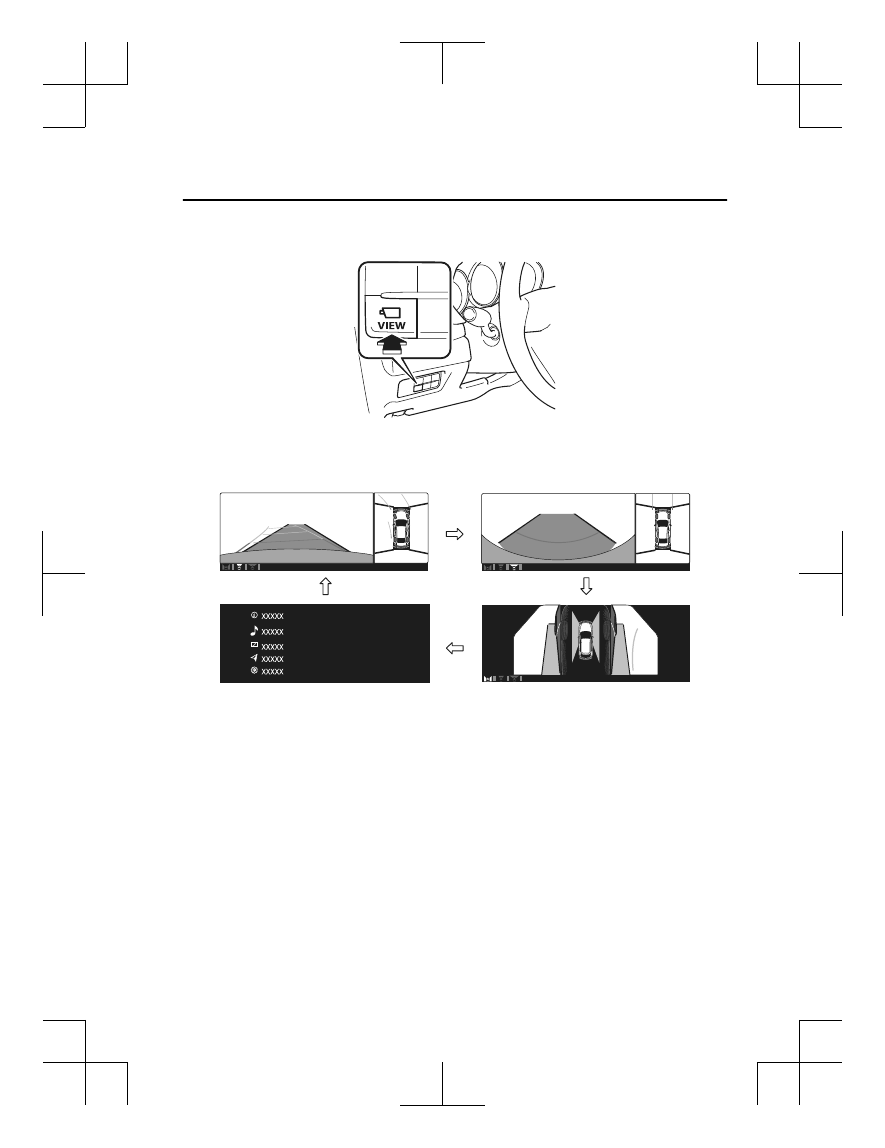
Display switching

The displayed screen can be changed each time the 360°view monitor switch is pressed.

Top view/Front view

Top view/Front wide view

Home screen

Side view

NOTE

When the selector lever is in R position, the displayed screen does not switch to the top
view/front view, top view/front wide view, or the side view.

Display of the top view/front view, top view/front wide view, or the side view stops even
with the display conditions met if any of the following conditions occurs.

When a switch around the commander knob is pressed.

The selector lever is shifted to P position (displayed when the selector lever is in a
position other than P).

(Displayed when vehicle speed is less than 15 km/h (9.3 mph))

4 minutes and 30 seconds have passed.

The vehicle speed is about 15 km/h (9.3 mph) or faster.

(Displayed when the vehicle speed is about 15 km/h (9.3 mph) or faster)

When Driving

i-ACTIVSENSE

4-213

CX-5_8MC3-EA-23G_Edition1_old

2023-5-8 11:05:50

The vehicle speed is about 15 km/h (9.3 mph) or faster after 8 seconds have passed
since pressing the 360°View Monitor switch.

4 minutes and 22 seconds have passed from the point when the vehicle speed was less
than 15 km/h (9.3 mph) after 8 seconds have passed since pressing the 360°View
Monitor switch.

The 360°View Monitor settings can be changed as follows.
Refer to the Settings section in the Mazda Connect Owner's Manual.

Automatic display of the 360°View Monitor when the ultrasonic sensor detects an
obstruction.

Automatic display of the 360°View Monitor when the ignition is switched ON.

Screen priority level when the system launches.

Top view/Rear view, Top view/Rear wide view

The top view/rear view, top view/rear wide view displays when all of the following
conditions are met.

The ignition is switched ON.

Selector lever is in R position.

Display switching

The displayed screen can be changed each time the 360°view monitor switch is pressed.

Top view/Rear view

Top view/Rear wide view

NOTE

The top view/rear view and top view/rear wide view automatically display whether or not
the 360°View Monitor switch is turned on or off when shifting the selector lever to R
position.

The top view/rear view and top view/rear wide view displays the previously displayed
screen.

The setting can be changed to display the top view/front view when shifting from reverse
to a forward gear without operating the 360°View Monitor switch to check the front of the
vehicle while parallel parking.
Refer to the Settings section in the Mazda Connect Owner's Manual.

When Driving

i-ACTIVSENSE

4-214

CX-5_8MC3-EA-23G_Edition1_old

2023-5-8 11:05:50

Screen operation/icon

WARNING

Always stop the vehicle when adjusting the 360°View Monitor image quality.

Do not adjust the 360°View Monitor image quality while driving. If you adjust the 360°View
Monitor image quality (such as brightness, contrast, tone, and color density) while driving, it
could lead to an unexpected accident.

Display/Icon

Content

(1)

View status icon

Indicates which image is displayed among the front view/front
wide view/side view/rear view/rear wide view.

(2)

Parking sensor status icon

Indicates that the parking sensor has a problem or it is switch‐
ed off.

Top View/Front View

Use the top view/front view to assist in checking the safety of the surrounding area when
accelerating from a stop, parking, or stopping the vehicle.

When Driving

i-ACTIVSENSE

4-215

CX-5_8MC3-EA-23G_Edition1_old

2023-5-8 11:05:50

Display range

Target object

NOTE

In the top view screen, the areas in black at the front and rear of the vehicle image and the
seams where each of the camera images merge are blind spots.

Because images displayed in the top view screen are processed from each camera, the top
view screen may display in the following ways.

If an image containing an object with a conspicuous color is picked up by any of the
cameras, the screen area for each camera may be affected and it may display in that
color.

Obstructions displayed in the front view may not display on the top view screen.

If the position or angle of each camera changes due to tilting of the vehicle, the image
may appear distorted.

Lines on the road may appear distorted at the seams where each of the camera images
merge.

The screen area for each camera may appear bright/dark depending on the illumination
level around any of the cameras.

When Driving

i-ACTIVSENSE

4-216

CX-5_8MC3-EA-23G_Edition1_old

2023-5-8 11:05:50

Viewing the screen


Display/Icon

Content

(1)

Tire icon

Indicates the tire direction. Moves in conjunction with the
steering wheel operation.

(2)

Projected vehicle path lines (yellow &
red)

Indicates the approximate projected path of the vehicle.
Moves in conjunction with the steering wheel operation.
a) Indicates the path where the edge of the front bumper is ex‐
pected to travel.
b) Indicates the path where the inner side of the vehicle is ex‐
pected to travel.

(3)

Extended vehicle width lines (blue)

Indicates the approximate width of the vehicle.

(4)

Projected vehicle path distance guide
lines (yellow & red)

Indicates the distance (from front end of bumper) in front of
the vehicle.

The red line indicates the point about 0.5 m (20 in) from the
front end of the bumper.

The yellow lines indicate the points about 1.0 m (39 in) and
2.0 m (79 in) from the front end of the bumper.

CAUTION

The parking sensor detection range has limitations. For example, obstructions closing in from
the side and objects short in height may not be detected. Always confirm the safety around
the vehicle visually when driving.
For details, refer to the parking sensor obstruction detection indication and warning sound.
Refer to Parking Sensor System on page 4-263.

NOTE

The setting can be changed so that the projected vehicle path lines are not displayed.
Refer to the Settings section in the Mazda Connect Owner's Manual.

When Driving

i-ACTIVSENSE

4-217

CX-5_8MC3-EA-23G_Edition1_old

2023-5-8 11:05:50

How to use the projected vehicle path line function

(Screen display)

(Actual condition)

 
Make sure that there are no obstructions within the projected vehicle path lines.
Drive the vehicle forward while turning the steering wheel so that no obstructions come
within the projected vehicle path lines.

Top View/Front Wide View

Use the top view/front wide view to assist in checking the safety of the surrounding area
when accelerating from a stop or entering a T-shaped intersection and intersection.

When Driving

i-ACTIVSENSE

4-218

CX-5_8MC3-EA-23G_Edition1_old

2023-5-8 11:05:50

Display range

Target object

NOTE

In the top view screen, the areas in black at the front and rear of the vehicle image and the
seams where each of the camera images merge are blind spots.

Because images displayed in the top view screen are processed from each camera, the top
view screen may display in the following ways.

If an image containing an object with a conspicuous color is picked up by any of the
cameras, the screen area for each camera may be affected and it may display in that
color.

Obstructions displayed in the front view may not display on the top view screen.

If the position or angle of each camera changes due to tilting of the vehicle, the image
may appear distorted.

Lines on the road may appear distorted at the seams where each of the camera images
merge.

The screen area for each camera may appear bright/dark depending on the illumination
level around any of the cameras.

When Driving

i-ACTIVSENSE

4-219

CX-5_8MC3-EA-23G_Edition1_old

2023-5-8 11:05:50

Viewing the screen


Display/Icon

Content

(1)

Extended vehicle width lines and dis‐
tance guide lines (blue & red)

Indicates the approximate width of the vehicle and the distance
(from front end of bumper) in front of the vehicle.

The red lines indicate the points up to about 0.5 m (20 in)
from the front end of the bumper.

NOTE

The front wide view screen displays the image in front of the vehicle at a wide angle and
corrects the image to help detect approaching obstructions from the side. Therefore, it
differs from the actual view.

Side View

Use the side view to assist in checking the safety of the surrounding area when accelerating
from a stop, parking, or stopping the vehicle.

When Driving

i-ACTIVSENSE

4-220

CX-5_8MC3-EA-23G_Edition1_old

2023-5-8 11:05:50

Display range

Target object

Viewing the screen


Display/Icon

Content

(1)

Projected vehicle path lines (yellow)

Indicates the approximate projected path of the vehicle.
Moves in conjunction with the steering wheel operation.
The projected vehicle path lines (yellow) indicate the path the
inner side of the vehicle is expected to travel.

(2)

Vehicle parallel guide lines (blue)

Indicates the approximate vehicle width including the door
mirrors.

When Driving

i-ACTIVSENSE

4-221

CX-5_8MC3-EA-23G_Edition1_old

2023-5-8 11:05:50

Display/Icon

Content

(3)

Vehicle front end guide lines (blue)

Indicates the point about 0.25 m (9.8 in) from the front edge
of the vehicle (front edge of the bumper).

NOTE

The setting can be changed so that the projected vehicle path lines are not displayed.
Refer to the Settings section in the Mazda Connect Owner's Manual.

How to use the projected vehicle path line function

(Screen display)

(Actual condition)

 
Make sure that there are no obstructions within the projected vehicle path lines.
Turn the steering wheel so that the projected vehicle path lines travel inside of the
obstruction (A), and drive the vehicle forward until it passes the obstruction.
If the projected vehicle path lines are on an obstruction (B) or outside of the obstruction (C),
the vehicle may contact the obstruction when turning the vehicle sharply.

CAUTION

The parking sensor detection range has limitations. For example, obstructions closing in
from the side and objects short in height may not be detected. Always confirm the safety
around the vehicle visually when driving.
For details, refer to the parking sensor obstruction detection indication and warning sound.

When Driving

i-ACTIVSENSE

4-222

CX-5_8MC3-EA-23G_Edition1_old

2023-5-8 11:05:50

Refer to Parking Sensor System on page 4-263.

Do not turn the steering wheel any more until the vehicle has passed the obstruction, even
if the obstruction is not visible on the side view image. If the steering wheel is turned even
more, the vehicle may contact the obstruction if it is turned sharply.

NOTE

Because there might be a difference between the image displayed on the screen and the
actual conditions, always check the safety of the surrounding area using the mirrors and
directly with your eyes when driving.

Even though the object displayed on the screen, such as a road curb or a division line of a
parking space, and the vehicle parallel guide lines appear parallel, they may not actually
be parallel.

Top View/Rear View

Use the top view/rear view to assist in checking the safety of the surrounding area when
accelerating from a stop, parking, or stopping the vehicle.

Range of displayed screen image

Target object

NOTE

In the top view screen, the areas in black at the front and rear of the vehicle image and the
seams where each of the camera images merge are blind spots.

Because images displayed in the top view screen are processed from each camera, the top
view screen may display in the following ways.

When Driving

i-ACTIVSENSE

4-223

CX-5_8MC3-EA-23G_Edition1_old

2023-5-8 11:05:50

If an image containing an object with a conspicuous color is picked up by any of the
cameras, the screen area for each camera may be affected and it may display in that
color.

Obstructions displayed in the rear view may not display on the top view screen.

If the position or angle of each camera changes due to tilting of the vehicle, the image
may appear distorted.

Lines on the road may appear distorted at the seams where each of the camera images
merge.

The screen area for each camera may appear bright/dark depending on the illumination
level around any of the cameras.

Viewing the screen


Display/Icon

Content

(1)

Tire icon

Indicates the tire direction. Moves in conjunction with the
steering wheel operation.

(2)

Projected vehicle path lines (yellow &
red)

Indicates the approximate projected path of the vehicle.
Moves in conjunction with the steering wheel operation.
a) Indicates the path where the edge of the rear bumper is ex‐
pected to travel.
b) Indicates the path where the outer side of the vehicle is ex‐
pected to travel.

(3)

Extended vehicle width lines (blue)

These guide lines indicate the approximate width of the vehi‐
cle.

(4)

Projected vehicle path distance guide
lines (yellow & red)

These guide lines indicate the approximate distance to a point
measured from the rear of the vehicle (from the end of the
bumper).

The red line indicates the point about 0.5 m (20 in) from the
rear end of the bumper.

The yellow lines indicate the points about 1.0 m (39 in) and
2.0 m (79 in) from the rear end of the bumper.

When Driving

i-ACTIVSENSE

4-224

CX-5_8MC3-EA-23G_Edition1_old

2023-5-8 11:05:50

NOTE

The setting can be changed so that the projected vehicle path lines are not displayed.
Refer to the Settings section in the Mazda Connect Owner's Manual.

How to use the projected vehicle path line function

CAUTION

The front of the vehicle swings out wide when turning the steering wheel while reversing.
Maintain sufficient distance between the vehicle and an obstruction.

The parking sensor detection range has limitations. For example, obstructions closing in
from the side and objects short in height may not be detected. Always confirm the safety
around the vehicle visually when driving.
For details, refer to the parking sensor obstruction detection indication and warning sound.
Refer to Parking Sensor System on page 4-263.

NOTE

Because there might be a difference between the image displayed on the screen, such as
indicated in the following, and the actual conditions when parking, always check the
safety at the rear of the vehicle and the surrounding area directly with your eyes.

Even though the back end of the parking space (or garage) displayed on the screen and
distance guide lines appear parallel, they may not actually be parallel.

When parking in a space with a division line on only one side of the parking space, even
though the division line and the vehicle width guide line appear parallel, they may not
actually be parallel.

The following shows an example of vehicle parking with the steering wheel turned to the
left while backing up the vehicle. When backing into a parking space from the opposite
direction, the steering operation is reversed.

When Driving

i-ACTIVSENSE

4-225

CX-5_8MC3-EA-23G_Edition1_old

2023-5-8 11:05:50

1. Back the vehicle into the parking space by turning the steering wheel so that the vehicle

enters the center of the parking space.
 

(Screen display)

(Actual condition)

2. After the vehicle starts entering the parking space, stop and adjust the steering wheel so

that the distance between the vehicle width lines and the sides of the parking space on
the left and right are roughly equal, and then continue backing up slowly.

When Driving

i-ACTIVSENSE

4-226

CX-5_8MC3-EA-23G_Edition1_old

2023-5-8 11:05:50

3. Once the vehicle width lines and the sides of the parking space on the left and right are

parallel, straighten the wheels and back the vehicle slowly into the parking space.
Continue checking the vehicle's surroundings and then stop the vehicle in the best
possible position. (If the parking space has division lines, check whether the vehicle
width guide lines are parallel to them.)
 

(Screen display)

(Actual condition)

When Driving

i-ACTIVSENSE

4-227

CX-5_8MC3-EA-23G_Edition1_old

2023-5-8 11:05:50

Top View/Rear Wide View

Use the top view/rear wide view to assist in checking the safety of the surrounding area
when accelerating from a stop, parking, or stopping the vehicle.

Range of displayed screen image

Target object

NOTE

In the top view screen, the areas in black at the front and rear of the vehicle image and the
seams where each of the camera images merge are blind spots.

Because images displayed in the top view screen are processed from each camera, the top
view screen may display in the following ways.

If an image containing an object with a conspicuous color is picked up by any of the
cameras, the screen area for each camera may be affected and it may display in that
color.

Obstructions displayed in the front view may not display on the top view screen.

If the position or angle of each camera changes due to tilting of the vehicle, the image
may appear distorted.

Lines on the road may appear distorted at the seams where each of the camera images
merge.

The screen area for each camera may appear bright/dark depending on the illumination
level around any of the cameras.

When Driving

i-ACTIVSENSE

4-228

CX-5_8MC3-EA-23G_Edition1_old

2023-5-8 11:05:50

Viewing the screen


Display/Icon

Content

(1)

Extended vehicle width lines and dis‐
tance guide lines (blue & red)

These guide lines indicate the approximate width of the vehi‐
cle and distance to a point measured from the rear of the vehi‐
cle (from the end of the bumper).

The red lines indicate the points up to about 0.5 m (20 in)
from the rear end of the bumper.

NOTE

The top view/rear wide view screen displays the image at the rear of the vehicle at a wide
angle and corrects the image to help detect approaching obstructions from the side.
Therefore, it differs from the actual view.

Margin of Error Between Road Surface on Screen and Actual Road Surface

There might be some margin of error between the road surface appearing on the screen and
the actual road surface. A margin of error in the perceived distance could lead to an
accident, therefore be aware of the following conditions which can more easily produce
errors in the perceived distance.
 

The vehicle tilts due to weight of passengers and cargo.

If the vehicle is tilted, obstructions picked up by a camera can appear farther or closer than
the actual distance from the vehicle.

When Driving

i-ACTIVSENSE

4-229

CX-5_8MC3-EA-23G_Edition1_old

2023-5-8 11:05:50

Front camera

Obstruction

Margin of error

Side camera

Obstruction

Margin of error

Rear camera

Obstruction

Margin of error


There is a steep up or down grade in the road at the front or rear of the vehicle

If there is a steep up or down grade in the road at the front or rear of the vehicle,
obstructions picked up by the camera can appear farther or closer than the actual distance
from the vehicle.

When Driving

i-ACTIVSENSE

4-230

CX-5_8MC3-EA-23G_Edition1_old

2023-5-8 11:05:50

Front camera

 Actual obstruction

 Actual obstruction

A: Distance of obstruction being viewed on screen 
B: Actual distance of obstruction from vehicle

Obstruction appearing 
on screen

Obstruction appearing 
on screen

Appears further than 
actual distance

Appears closer than 
actual distance

A

A

B

B

Side camera

 Actual obstruction

 Actual obstruction

A: Distance of obstruction being viewed on screen 
B: Actual distance of obstruction from vehicle

Obstruction appearing 
on screen

Obstruction appearing 
on screen

Appears further than 
actual distance

Appears closer than 
actual distance

A

A

B

B

Rear camera

 Actual obstruction

 Actual obstruction

A: Distance of obstruction being viewed on screen 
B: Actual distance of obstruction from vehicle

Obstruction appearing on screen

Obstruction appearing 
on screen

Appears further than 
actual distance

Appears closer than 
actual distance

A

A

B

B

When Driving

i-ACTIVSENSE

4-231

CX-5_8MC3-EA-23G_Edition1_old

2023-5-8 11:05:50

NOTE

If the vehicle is on a slope, obstructions taken by the camera can appear farther or closer
than the actual distance from the vehicle.


Three-dimensional object at vehicle front or rear

Because the vehicle front end guide lines (side camera) or the distance guide lines (rear
camera) are displayed based on a flat surface, the distance to the three-dimensional object
displayed on the screen is different from the actual distance.

Side camera

(Actual condition)

(Screen display)

When Driving

i-ACTIVSENSE

4-232

CX-5_8MC3-EA-23G_Edition1_old

2023-5-8 11:05:50

Rear camera

(Actual condition)

Sensed distance on screen A > B > C

Actual distance B > C = A

(Screen display)

System Problem Indication

Center display indication

Cause

Action to be taken

“No camera signal.” is displayed

The control unit might be damaged.

Have your vehicle inspected
by an Authorized Mazda
Dealer.

Screen is pitch-black and blank

The camera might be damaged.

When Driving

i-ACTIVSENSE

4-233

CX-5_8MC3-EA-23G_Edition1_old

2023-5-8 11:05:50

Forward Sensing Camera (FSC)

*

Your vehicle is equipped with a Forward Sensing Camera (FSC). The Forward Sensing
Camera (FSC) is positioned near the rearview mirror and used by the following systems.

High Beam Control System (HBC)

Driver Attention Alert (DAA)

Lane-keep Assist System (LAS) & Lane Departure Warning System (LDWS)

Traffic Sign Recognition System (TSR)

Advanced Smart City Brake Support (Advanced SCBS)

Smart City Brake Support [Forward] (SCBS F)

Mazda Radar Cruise Control with Stop & Go function (MRCC with Stop & Go function)

Cruising & Traffic Support (CTS)

Smart Brake Support (SBS)

Forward Sensing Camera (FSC)

The Forward Sensing Camera (FSC) determines the conditions ahead of the vehicle while
traveling at night and detects traffic lanes. The distance in which the Forward Sensing
Camera (FSC) can detect objects varies depending on the surrounding conditions.

WARNING

Do not modify the suspension:

If the vehicle height or inclination is changed, the system will not be able to correctly detect
vehicles ahead. This will result in the system not operating normally or mistakenly operating,
which could cause a serious accident.

CAUTION

Do not apply accessories, stickers or film to the windshield near the Forward Sensing
Camera (FSC).

When Driving

i-ACTIVSENSE

4-234

*Some models.

CX-5_8MC3-EA-23G_Edition1_old

2023-5-8 11:05:50

If the area in front of the Forward Sensing Camera (FSC) lens is obstructed, it will cause the
system to not operate correctly. Consequently, each system may not operate normally
which could lead to an unexpected accident.

Do not disassemble or modify the Forward Sensing Camera (FSC).
Disassembly or modification of the Forward Sensing Camera (FSC) will cause a malfunction
or mistaken operation. Consequently, each system may not operate normally which could
lead to an unexpected accident.

Heed the following cautions to assure the correct operation of the Forward Sensing Camera
(FSC).

Be careful not to scratch the Forward Sensing Camera (FSC) lens or allow it to get dirty.

Do not remove the Forward Sensing Camera (FSC) cover.

Do not place objects on the dashboard which reflect light.

Always keep the windshield glass around the camera clean by removing dirt or fogging.
Use the windshield defroster to remove fogging on the windshield.

Consult an Authorized Mazda Dealer regarding cleaning the interior side of the
windshield around the Forward Sensing Camera (FSC).

Consult an Authorized Mazda Dealer before performing repairs around the Forward
Sensing Camera (FSC).

The Forward Sensing Camera (FSC) is installed to the windshield. Consult an Authorized
Mazda Dealer for windshield repair and replacement.

When cleaning the windshield, do not allow glass cleaners or similar cleaning fluids to
get on the Forward Sensing Camera (FSC) lens. In addition, do not touch the Forward
Sensing Camera (FSC) lens.

When performing repairs around the rearview mirror, consult an Authorized Mazda
Dealer.

Consult an Authorized Mazda Dealer regarding cleaning of the camera lens.

Do not hit or apply strong force to the Forward Sensing Camera (FSC) or the area around
it. If the Forward Sensing Camera (FSC) is severely hit or if there are cracks or damage
caused by flying gravel or debris in the area around it, stop using the following systems
and consult an Authorized Mazda Dealer.

High Beam Control System (HBC)

Driver Attention Alert (DAA)

Lane-keep Assist System (LAS) & Lane Departure Warning System (LDWS)

Traffic Sign Recognition System (TSR)

Advanced Smart City Brake Support (Advanced SCBS)

Smart City Brake Support [Forward] (SCBS F)

Mazda Radar Cruise Control with Stop & Go function (MRCC with Stop & Go function)

Cruising & Traffic Support (CTS)

Smart Brake Support (SBS)

When Driving

i-ACTIVSENSE

4-235

CX-5_8MC3-EA-23G_Edition1_old

2023-5-8 11:05:50

The direction in which the Forward Sensing Camera (FSC) is pointed has been finely
adjusted. Do not change the installation position of the Forward Sensing Camera (FSC) or
remove it. Otherwise, it could result in damage or malfunction.

Always use tires for all wheels that are of the specified size, and the same manufacturer,
brand, and tread pattern. In addition, do not use tires with significantly different wear
patterns on the same vehicle as the system may not operate normally.

The Forward Sensing Camera (FSC) includes a function for detecting a soiled windshield
and informing the driver, however, depending on the conditions, it may not detect plastic
shopping bags, ice or snow on the windshield. In such cases, the system cannot accurately
determine a vehicle ahead and may not be able to operate normally. Always drive carefully
and pay attention to the road ahead.

NOTE

In the following cases, the Forward Sensing Camera (FSC) cannot detect target objects
correctly, and each system may be unable to operate normally.

The height of the vehicle ahead is low.

You drive your vehicle at the same speed as the vehicle ahead.

Headlights are not turned on during the night or when going through a tunnel.

In the following cases, the Forward Sensing Camera (FSC) may not be able to detect
target objects correctly.

Under bad weather condition, such as rain, fog and snow.

The window washer is being used or the windshield wipers are not used when it's
raining.

Ice, fog, snow, frost, rainfall, dirt, or foreign matter such as a plastic bag is stuck on the
windshield.

Trucks with low loading platforms and vehicles with an extremely low or high profile.

When driving next to walls with no patterning (including fences and longitudinally
striped walls).

The taillights of the vehicle ahead are turned off.

A vehicle is outside the illumination range of the headlights.

The vehicle is making a sharp turn, or ascending or descending a steep slope.

Entering or exiting a tunnel.

Heavy luggage is loaded causing the vehicle to tilt.

Strong light is shone at the front of the vehicle (back light or high-beam light from
on-coming vehicles).

There are many light emitters on the vehicle ahead.

When the vehicle ahead is not equipped with taillights or the taillights are turned off at
nighttime.

Elongated luggage or cargo is loaded onto installed roof rails and covers the Forward
Sensing Camera (FSC).

When Driving

i-ACTIVSENSE

4-236

CX-5_8MC3-EA-23G_Edition1_old

2023-5-8 11:05:50

Exhaust gas from the vehicle in front, sand, snow, and water vapor rising from
manholes and grating, and water splashed into the air.

When towing a malfunctioning vehicle.

The vehicle is driven with tires having significantly different wear.

The vehicle is driven on down slopes or bumpy roads.

There are water puddles on the road.

The surroundings are dark such as during the night, early evening, or early morning, or
in a tunnel or indoor parking lot.

The illumination brightness of the headlights is reduced or the headlight illumination is
weakened due to dirt or a deviated optical axis.

The target object enters the blind spot of the Forward Sensing Camera (FSC).

A person or object bursts onto the road from the shoulder or cuts right in front of you.

You change lanes and approach a vehicle ahead.

When driving extremely close to the target object.

Tire chains or a temporary spare tire is installed.

The vehicle ahead has a special shape. For example, a vehicle towing a trailer house or
a boat, or a vehicle carrier carrying a vehicle with its front pointed rearward.

If the Forward Sensing Camera (FSC) cannot operate normally due to backlight or fog,
the system functions related to the Forward Sensing Camera (FSC) are temporarily
stopped and the following warning lights turn on. However, this does not indicate a
malfunction.

High Beam Control System (HBC) warning light (amber)

Lane-keep Assist System (LAS) & Lane Departure Warning System (LDWS) warning
indication

Mazda Radar Cruise Control with Stop & Go function (MRCC with Stop & Go
function) warning indication

Cruising & Traffic Support (CTS) warning indication

Smart Brake Support/Smart City Brake Support (SBS/SCBS) warning indication/
warning light (amber)

If the Forward Sensing Camera (FSC) cannot operate normally due to high temperatures,
the system functions related to the Forward Sensing Camera (FSC) are temporarily
stopped and the following warning lights turn on. However, this does not indicate a
malfunction. Cool down the area around the Forward Sensing Camera (FSC) such as by
turning on the air conditioner.

High Beam Control System (HBC) warning light (amber)

Lane-keep Assist System (LAS) & Lane Departure Warning System (LDWS) warning
indication

When Driving

i-ACTIVSENSE

4-237

CX-5_8MC3-EA-23G_Edition1_old

2023-5-8 11:05:50

Mazda Radar Cruise Control with Stop & Go function (MRCC with Stop & Go
function) warning indication

Cruising & Traffic Support (CTS) warning indication

Smart Brake Support/Smart City Brake Support (SBS/SCBS) warning indication/
warning light (amber)

If the Forward Sensing Camera (FSC) detects that the windshield is dirty or foggy, the
system functions related to the Forward Sensing Camera (FSC) are temporarily stopped
and the following warning lights turn on. However, this does not indicate a problem.
Remove the dirt from the windshield or press the defroster switch and defog the
windshield.

High Beam Control System (HBC) warning light (amber)

Lane-keep Assist System (LAS) & Lane Departure Warning System (LDWS) warning
indication

Mazda Radar Cruise Control with Stop & Go function (MRCC with Stop & Go
function) warning indication

Cruising & Traffic Support (CTS) warning indication

Smart Brake Support/Smart City Brake Support (SBS/SCBS) warning indication/
warning light (amber)

If there are recognizable cracks or damage caused by flying gravel or debris on the
windshield, always have the windshield replaced. Consult an Authorized Mazda Dealer
for replacement.

(With Advanced Smart City Brake Support (Advanced SCBS))

The Forward Sensing Camera (FSC) recognizes pedestrians when all of the following
conditions are met:

The height of a pedestrian is about 1 to 2 meters.

An outline such as the head, both shoulders, or the legs can be determined.

In the following cases, the Forward Sensing Camera (FSC) may not be able to detect
target objects correctly:

Multiple pedestrians are walking, or there are groups of people.

A pedestrian is close to a separate object.

A pedestrian is crouching, lying, or slouching.

A pedestrian suddenly jumps into the road right in front of the vehicle.

A pedestrian opens an umbrella, or is carrying large baggage or articles.

A pedestrian is in a dark location such as during the night, or blends into the
background by wearing clothes matching the background color.

When Driving

i-ACTIVSENSE

4-238

CX-5_8MC3-EA-23G_Edition1_old

2023-5-8 11:05:50

Radar Sensor (Front)

*

Your vehicle is equipped with a radar sensor (front).
The following systems also use the radar sensor (front).

Distance Recognition Support System (DRSS)

Mazda Radar Cruise Control with Stop & Go function (MRCC with Stop & Go function)

Smart Brake Support (SBS)

Cruising & Traffic Support (CTS)

The radar sensor (front) functions by detecting the radio waves reflected off a vehicle ahead
or an obstruction sent from the radar sensor.
The radar sensor (front) is mounted behind the front emblem.

Radar sensor (front)

If “Front Radar Sensor Blocked” is displayed in the multi-information display of the
instrument cluster, clean the area around the radar sensor (front).

CAUTION

Heed the following precautions to assure correct operation of each system.

Do not adhere stickers (including transparent stickers) to the surface of the radiator grille
and front emblem in and around the radar sensor (front), and do not replace the radiator
grille and front emblem with any product that is not a genuine product designed for use
with the radar sensor (front).

The radar sensor (front) includes a function for detecting soiling of the radar sensor's front
surface and informing the driver, however, depending on the conditions, it may require
time to detect or it may not detect plastic shopping bags, ice or snow. If this occurs, the
system may not operate correctly, therefore always keep the radar sensor (front) clean.

Do not install a grille guard.

If the front part of the vehicle has been damaged in a vehicle accident, the position of the
radar sensor (front) may have moved. Stop the system immediately and always have the
vehicle inspected at an Authorized Mazda Dealer.

When Driving

i-ACTIVSENSE

*Some models.

4-239

CX-5_8MC3-EA-23G_Edition1_old

2023-5-8 11:05:50

Do not use the front bumper to push other vehicles or obstructions such as when pulling
out of a parking space. Otherwise, the radar sensor (front) could be hit and its position
deviated.

Do not remove, disassemble, or modify the radar sensor (front).

For repairs, replacement or paint work around the radar sensor (front), consult an
Authorized Mazda Dealer.

Do not modify the suspension. If the suspension are modified, the vehicle's posture could
change and the radar sensor (front) may not be able to correctly detect a vehicle ahead or
an obstruction.

NOTE

Under the following conditions, the radar sensor (front) may not be able to detect vehicles
ahead or obstructions correctly and each system may not operate normally.

The rear surface of a vehicle ahead does not reflect radio waves effectively, such as an
unloaded trailer or an automobile with a loading platform covered by a soft top,
vehicles with a hard plastic tailgate, and round-shaped vehicles.

Vehicles ahead with low vehicle height and thus less area for reflecting radio waves.

Visibility is reduced due to a vehicle ahead casting off water, snow, or sand from its tires
and onto your windshield.

The luggage compartment is loaded with heavy objects or the rear passenger seats are
occupied.

Ice, snow, or soiling is on the front surface of the front emblem.

During inclement weather such as rain, snow, or sand storms.

When driving near facilities or objects emitting strong radio waves.

Under the following conditions, the radar sensor (front) may not be able to detect vehicles
ahead or obstructions.

The beginning and end of a curve.

Roads with continuous curves.

Narrow lane roads due to road construction or lane closures.

The vehicle ahead enters the radar sensor's blind spot.

The vehicle ahead is running abnormally due to accident or vehicle damage.

Roads with repeated up and down slopes

Driving on poor roads or unpaved roads.

The distance between your vehicle and the vehicle ahead is extremely short.

A vehicle suddenly comes close such as by cutting into the lane.

To prevent incorrect operation of the system, use tires of the same specified size,
manufacturer, brand, and tread pattern on all four wheels. In addition, do not use tires
with significantly different wear patterns or tire pressures on the same vehicle (Including
the temporary spare tire).

If the battery power is weak, the system may not operate correctly.

When Driving

i-ACTIVSENSE

4-240

CX-5_8MC3-EA-23G_Edition1_old

2023-5-8 11:05:50

When driving on roads with little traffic and few vehicles ahead or obstructions for the
radar sensor (front) to detect, “Front Radar Sensor Blocked” may be temporarily
displayed, however, this does not indicate a problem.

The radar sensors are regulated by the relevant radio wave laws of the country in which
the vehicle is driven. If the vehicle is driven abroad, authorization from the country in
which the vehicle is driven may be required.

When Driving

i-ACTIVSENSE

4-241

CX-5_8MC3-EA-23G_Edition1_old

2023-5-8 11:05:50

Radar Sensors (Rear)

*

Your vehicle is equipped with radar sensors (rear). The following systems also use the radar
sensors (rear).

Blind Spot Monitoring system (BSM)

Rear Cross Traffic Alert (RCTA)

The radar sensors (rear) function by detecting the radio waves reflected off a vehicle
approaching from the rear or an obstruction sent from the radar sensor.

Radar sensors (rear)

The radar sensors (rear) are installed inside the rear bumper, one each on the left and right
sides.
Always keep the surface of the rear bumper near the radar sensors (rear) clean so that the
radar sensors (rear) operate normally. Also, do not apply items such as stickers.
Refer to Exterior Care on page 6-49.

CAUTION

If the rear bumper receives a severe impact, the system may no longer operate normally. Stop
the system immediately and have the vehicle inspected at an Authorized Mazda Dealer.

NOTE

The detection ability of the radar sensors (rear) has limitations. In the following cases,
the detection ability may lower and the system may not operate normally.

The rear bumper near the radar sensors (rear) has become deformed.

Snow, ice or mud adheres to the radar sensors (rear) on the rear bumper.

Under bad weather conditions such as rain, snow and fog.

Under the following conditions, the radar sensors (rear) cannot detect target objects or it
may be difficult to detect them.

Stationary objects on a road or a road side such as small, two-wheeled vehicles,
bicycles, pedestrians, animals, and shopping carts.

When Driving

i-ACTIVSENSE

4-242

*Some models.

CX-5_8MC3-EA-23G_Edition1_old

2023-5-8 11:05:50

Vehicle shapes which do not reflect radar waves well such as empty trailers with a low
vehicle height and sports cars.

Vehicles are shipped with the direction of the radar sensors (rear) adjusted for each
vehicle to a loaded vehicle condition so that the radar sensors (rear) detect approaching
vehicles correctly. If the direction of the radar sensors (rear) has deviated for some
reason, have the vehicle inspected at an Authorized Mazda Dealer.

For repairs or replacement of the radar sensors (rear), or bumper repairs, paintwork, and
replacement near the radar sensors, consult an Authorized Mazda Dealer.

Turn off the system while pulling a trailer or while an accessory such as a bicycle carrier
is installed to the rear of the vehicle. Otherwise, the radio waves emitted by the radar will
be blocked causing the system to not operate normally.

The radar sensors are regulated by the relevant radio wave laws of the country in which
the vehicle is driven. If the vehicle is driven abroad, authorization from the country in
which the vehicle is driven may be required.

When Driving

i-ACTIVSENSE

4-243

CX-5_8MC3-EA-23G_Edition1_old

2023-5-8 11:05:50

Ultrasonic Sensor (Rear)

*

The ultrasonic sensors (rear) function by emitting ultrasonic waves which are reflected off
obstructions at the rear and the returning ultrasonic waves are picked up by the ultrasonic
sensors (rear).

Ultrasonic sensor (rear)

The ultrasonic sensors (rear) are mounted in the rear bumper.

When Driving

i-ACTIVSENSE

4-244

*Some models.

CX-5_8MC3-EA-23G_Edition1_old

2023-5-8 11:05:50


Content      ..     10      11      12      13     ..