Mazda CX-5 (2024 year). Manual in english - page 8
 

  Index      Manuals     Mazda CX-5 (2024 year). Manual in english


Search            copyright infringement  


Content      ..     6      7      8      9     ..


Mazda CX-5 (2024 year). Manual in english - page 8


Auto-wiper control

*

When the wiper lever is in the AUTO
position, the rain sensor senses the amount
of rainfall on the windshield and turns the
wipers on or off automatically
(off―intermittent―low speed―high
speed).
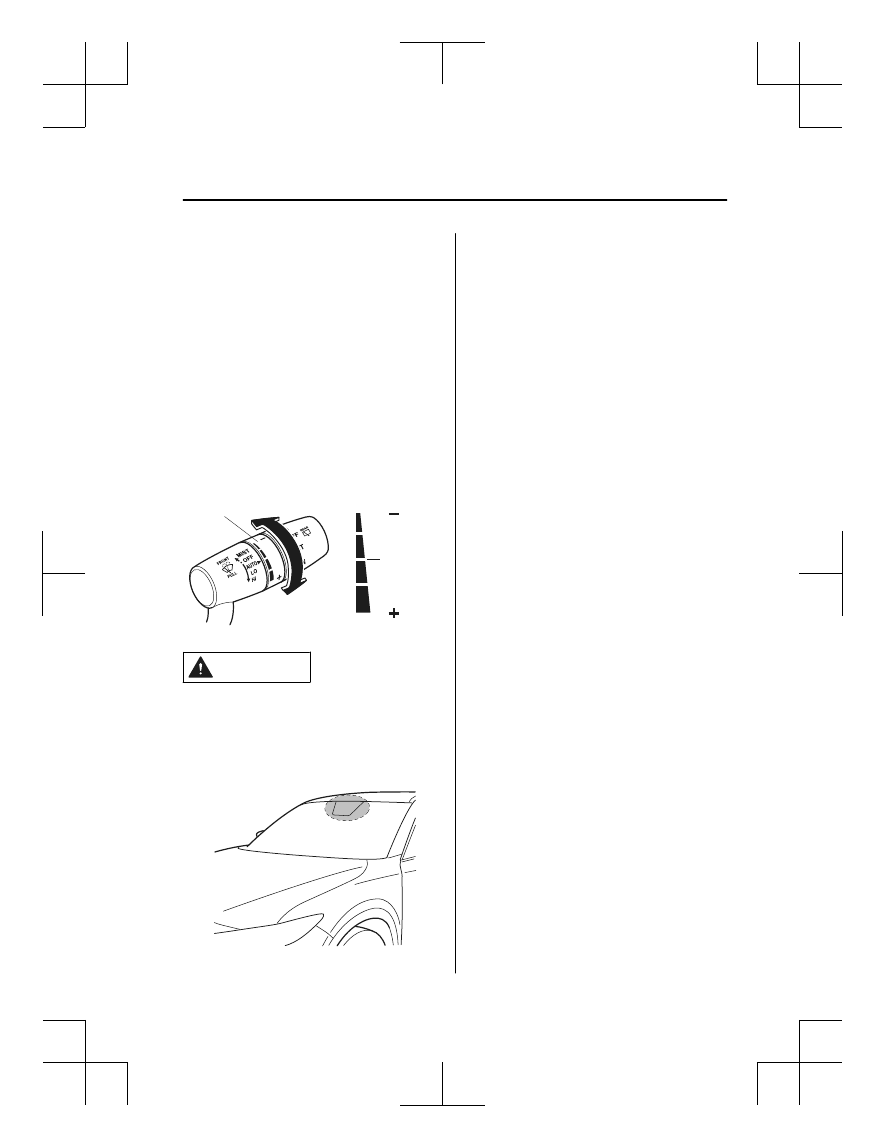
The sensitivity of the rain sensor can be
adjusted by turning the switch on the
wiper lever.
From the center position (normal), rotate
the switch upward for higher sensitivity
(faster response) or rotate it downward for
less sensitivity (slower response).

Higher sensitivity

Less sensitivity

Switch

Center 
position

CAUTION

Do not shade the rain sensor by adhering
a sticker or a label on the windshield.
Otherwise the rain sensor will not
operate correctly.

When the ignition is switched ON and
the wiper lever is in the AUTO position,
the windshield wipers may operate
automatically in the following cases:

The area of the windshield above the
rain sensor is touched or wiped with a
cloth.

The windshield or the rain sensor area
in the cabin is hit.

When the ignition is switched ON and
the wiper lever is in the AUTO position,
do not touch the windshield or the
windshield wipers Otherwise, the
windshield wipers will operate
automatically which could catch your
fingers or damage the windshield wipers.
When removing ice or snow, or cleaning
the windshield, always make sure the
wiper lever is in the OFF position.

NOTE

Switching the auto-wiper lever from the
OFF to the AUTO position while driving
activates the windshield wipers once,
after which they operate according to
the rainfall amount.

The auto-wiper control may not operate
when the rain sensor temperature is
about 

10 °C (14 °F) or lower, or

about 85 °C (185 °F) or higher.

If the windshield is coated with water
repellent, the rain sensor may not be
able to sense the amount of rainfall
correctly and the auto-wiper control
may not operate properly.

When Driving

Switches and Controls

*Some models.

4-85

CX-5_8MC3-EA-23G_Edition1_old

2023-5-8 11:05:50

If dirt or foreign matter (such as ice or
matter containing salt water) adheres to
the windshield above the rain sensor, or
if the windshield is iced, it could cause
the wipers to move automatically.
However, if the wipers cannot remove
this ice, dirt or foreign matter, the
auto-wiper control will stop operation.
In this case, set the wiper lever to the
low speed position or high speed
position for manual operation, or
remove the ice, dirt or foreign matter by
hand to restore the auto-wiper
operation.

If the auto-wiper lever is left in the
AUTO position, the wipers could
operate automatically from the effect of
strong light sources, electromagnetic
waves, or infrared light because the rain
sensor uses an optical sensor. It is
recommended that the auto-wiper lever
be switched to the OFF position other
than when driving the vehicle under
rainy conditions.

(With auto-wiper control (Except
Canada))

If the headlight switch and the
windshield wiper switch are in AUTO,
and the wipers are operated at low or
high speed by the auto wiper control for
several seconds, bad weather conditions
are determined and the headlights may
be turned on.

The auto-wiper control functions can be
turned off. Refer to the Settings section
in the Mazda Connect Owner's Manual
or consult an Authorized Mazda Dealer.

Windshield Washer

Pull the lever toward you and hold it to
spray washer fluid.
 

Washer

OFF

NOTE

If the windshield washer is turned on when
the windshield wipers are not operating,
the windshield wipers operate a few times.

If the washer does not work, inspect the
fluid level (page 6-24). If the fluid level
is normal, consult an Authorized Mazda
Dealer.

When Driving

Switches and Controls

4-86

CX-5_8MC3-EA-23G_Edition1_old

2023-5-8 11:05:50

Rear Window Wiper and

Washer

The ignition must be switched ON to use
the wiper.

Rear Window Wiper

Turn the wiper on by turning the rear
wiper/washer switch.

Switch Posi‐

tion

Wiper operation

OFF

Stop

INT

Intermittent

ON

Normal

Rear Window Washer

To spray washer fluid, turn the rear wiper/
washer switch to either of the   position.
After the switch is released, the washer
will stop.
If the washer does not work, inspect the
fluid level (page 6-24). If the fluid level
is normal and the washer still does not
work, consult an Authorized Mazda
Dealer.

Rear Window Defogger

The rear window defogger clears fog from
the rear window.
 
The ignition must be switched ON to use
the defogger.
 
Press the switch to turn on the rear
window defogger. The rear window
defogger operates for about 15 minutes
and then turns off automatically.
The indicator light illuminates when the
defogger is operating.
 
To turn off the rear window defogger
before the 15 minutes has elapsed, press
the switch again.

Manual Climate Control System

Indicator light

When Driving

Switches and Controls

4-87

CX-5_8MC3-EA-23G_Edition1_old

2023-5-8 11:05:50

Fully Automatic Climate Control
System

Indicator light

CAUTION

Do not use sharp instruments or window
cleaners with abrasives to clean the
inside of the rear window surface. They
may damage the defogger grid inside the
window.

NOTE

This defogger is not designed for
melting snow. If there is an
accumulation of snow on the rear
window, remove it before using the
defogger.

The rear window defogger setting can
be changed. After changing the setting,
the rear window defogger stops
automatically after 15 minutes have
elapsed and when the ambient
temperature is high. When the ambient
temperature is low, it continues to
operate until the switch is pressed
again.
Refer to the Mazda Connect Owner's
Manual or consult an Authorized Mazda
Dealer.

Windshield Wiper De-icer

*

The thermal filaments at the following
positions heat up and facilitate the removal
of snow accumulated on the windshield.

The windshield wiper de-icer operates in
conjunction with the rear window
defogger.
To turn on the windshield wiper de-icer,
switch the ignition ON and press the rear
window defogger switch (page 4-87).

Manual Climate Control System

Indicator light

When Driving

Switches and Controls

4-88

*Some models.

CX-5_8MC3-EA-23G_Edition1_old

2023-5-8 11:05:50

Fully Automatic Climate Control
System

Indicator light

Mirror Defogger

*

The mirror defoggers defrost the outside
mirrors.
 
The mirror defoggers operate in
conjunction with the rear window
defogger.
To turn on the mirror defoggers, switch the
ignition ON and press the rear window
defogger switch (page 4-87).

Manual Climate Control System

Indicator light

Fully Automatic Climate Control
System

Indicator light

When Driving

Switches and Controls

*Some models.

4-89

CX-5_8MC3-EA-23G_Edition1_old

2023-5-8 11:05:50

Horn

To sound the horn, press the   mark on
the steering wheel.

Hazard Warning Flasher

The hazard warning lights should always
be used when you stop on or near a
roadway in an emergency.
 

The hazard warning lights warn other
drivers that your vehicle is a traffic hazard
and that they must take extreme caution
when near it.
 

Depress the hazard warning flasher and all
the turn signals will flash. The hazard
warning indicator lights in the instrument
cluster flash simultaneously.

NOTE

The turn signals do not work when the
hazard warning lights are on.

Check local regulations about the use of
hazard warning lights while the vehicle
is being towed to verify that it is not in
violation of the law.

When Driving

Switches and Controls

4-90

CX-5_8MC3-EA-23G_Edition1_old

2023-5-8 11:05:50

HomeLink Wireless

Control System (Type A)

*

NOTE

HomeLink and HomeLink house icon are
registered trademarks of Gentex
Corporation.

The HomeLink system replaces up to 3
hand-held transmitters with a single
built-in component in the auto-dimming
mirror. Pressing the HomeLink button on
the auto-dimming mirror activates garage
doors, gates and other devices surrounding
your home.
 

HomeLink button

Indicator light

WARNING

Do not use the HomeLink system with any
garage door opener that lacks the safety
stop and reverse feature:

Using the HomeLink system with any
garage door opener that lacks the safety
stop and reverse feature as required by
federal safety standards is dangerous. (This
includes garage doors manufactured
before April 1, 1982.)

Using these garage door openers can
increase the risk of serious injury or death.
For further information, contact HomeLink
at 1-800-355-3515 or www.homelink.com
or an Authorized Mazda Dealer.

Always check the areas surrounding
garage doors and gates for people or
obstructions before programming or
during operation of the HomeLink system:

Programming or operating the HomeLink
system without verifying the safety of areas
surrounding garage doors and gates is
dangerous and could result in an
unexpected accident and serious injury if
someone were to be hit.

NOTE

The programming will not be erased even
if the battery is disconnected.

Pre-programming the HomeLink
System

NOTE

It is recommended that a new battery be
placed in the hand-held transmitter of the
device being programmed to HomeLink
for quicker training and accurate
transmission of the radio-frequency signal.

Verify that there is a remote control
transmitter available for the device you
would like to program.

Disconnect the power to the device.

When Driving

Switches and Controls

*Some models.

4-91

CX-5_8MC3-EA-23G_Edition1_old

2023-5-8 11:05:50

Programming the HomeLink
System

CAUTION

When programming a garage door opener
or a gate, disconnect the power to these
devices before performing programming.
Continuous operation of the devices could
damage the motor.

The HomeLink system provides 3 buttons
which can be individually selected and
programmed using the transmitters for
current, on-market devices as follows:
1. Disconnect the power to the garage

door opener or gate programmed to the
hand-held transmitter.

2. Position the end of your hand-held

transmitter 2.5―7.5 cm (1―3 inches)
away from the HomeLink button you
wish to program while keeping the
indicator light in view.

3. Simultaneously press and hold both the

chosen HomeLink and hand-held
transmitter buttons. 

Do not release the

buttons until step 3 has been
completed.

NOTE

Some gate operators and garage door
openers may require you to replace
this Programming Step 2 with
procedures noted in the “Gate
Operator/Canadian Programming”
section.

4. After the HomeLink indicator light

changes from a slow to a rapidly
blinking light, release both the
HomeLink and hand-held transmitter
buttons.

NOTE

If the HomeLink indicator light does
not change to a rapidly blinking light,
contact HomeLink at

www.homelink.com

 or call

1-800-355-3515

 for assistance.

5. Connect the power to the garage door

opener or gate programmed to the
hand-held transmitter.

6. Firmly press and hold the programmed

HomeLink button for five seconds, and
then release it. Perform this operation
two times to activate the door or gate.
If the door or gate does not activate,
press and hold the just-trained
HomeLink button and observe the
indicator light.
If the indicator light stays on
constantly, programming is complete
and your device should activate when
the HomeLink button is pressed and
released.

NOTE

To program the remaining two
HomeLink buttons, begin with
“Programming”

 step 1

If the indicator light blinks 

rapidly for

two seconds and then turns to a
constant light, continue with
“Programming” steps 7―9

 to

complete the programming of a rolling
code equipped device (most commonly
a garage door opener).

7. At the garage door opener receiver

(motor-head unit) in the garage, locate
the “learn” or “smart” button. This can
usually be found where the hanging
antenna wire is attached to the
motor-head unit.

When Driving

Switches and Controls

4-92

CX-5_8MC3-EA-23G_Edition1_old

2023-5-8 11:05:50

8. Firmly press and release the “learn” or

“smart” button. (The name and color
of the button may vary by
manufacturer.)

NOTE

Complete the programming within 30
seconds.

9. Return to the vehicle and firmly 

press,

hold for two seconds and release

 the

programmed HomeLink button. Repeat
the “

press/hold/release

” sequence a

second time, and, depending on the
brand of the garage door opener (or
other rolling code equipped device),
repeat this sequence a third time to
complete the programming process.

HomeLink should now activate your
rolling code equipped device.

NOTE

To program the remaining two HomeLink
buttons, begin with “Programming”

step 1

For questions or comments, please contact
HomeLink at 

www.homelink.com

 or

1-800-355-3515

.

Gate operator/Canadian
Programming

Canadian radio-frequency laws require
transmitter signals to “time-out” (or quit)
after several seconds of transmission ―
which may not be long enough for
HomeLink to pick up the signal during
programming. Similar to this Canadian
law, some U.S. gate operators are designed
to “time-out” in the same manner.
 

If you live in Canada or you are having
difficulties programming a gate operator
by using the “Programming” procedures
(regardless of where you live), 

replace

“Programming HomeLink” step 3

 with

the following:

NOTE

If programming a garage door opener or
gate operator, it is advised to unplug the
device during the “cycling” process to
prevent possible overheating.

Continue to press and hold the HomeLink
button while you 

press and release ―

every two seconds

 (“cycle”) your

hand-held transmitter until the frequency
signal has successfully been accepted by
HomeLink. (The indicator light will flash
slowly and then rapidly.)
Proceed with “Programming” step 4 to
complete.

Operating the HomeLink System

Press the programmed HomeLink button
to operate a programmed device. The code
will continue being transmitted for a
maximum of 20 seconds.

Reprogramming the HomeLink
system

To program a device to HomeLink using a
HomeLink button previously trained,
follow these steps:
1. Press and hold the desired HomeLink

button. 

DO NOT

 release the button.

2. The indicator light will begin to flash

after 20 seconds. Without releasing the
HomeLink button, proceed with
“Programming” - step 1.

When Driving

Switches and Controls

4-93

CX-5_8MC3-EA-23G_Edition1_old

2023-5-8 11:05:50

Erasing Programmed HomeLink
Buttons

To erase the existing programming from
all three operating channels, press and
hold the two outside buttons (

) on

the auto-dimming mirror until the
HomeLink indicator light begins to flash
after approximately 10 seconds.
Verify that the programming has been
erased when you resell the vehicle.

HomeLink Wireless

Control System (Type B)

*

NOTE

HomeLink and HomeLink house are
registered trademarks of Gentex
Corporation.

The HomeLink system replaces up to 3
hand-held transmitters with a single
built-in component in the auto-dimming
mirror. Pressing the HomeLink button on
the auto-dimming mirror activates garage
doors, gates and other devices surrounding
your home.
 

HomeLink button

Indicator Light

WARNING

Do not use the HomeLink system with any
garage door opener that lacks the safety
stop and reverse feature:

Using the HomeLink system with any
garage door opener that lacks the safety
stop and reverse feature as required by
federal safety standards is dangerous. (This
includes garage doors manufactured
before April 1, 1982.)
Using these garage door openers can
increase the risk of serious injury or death.
For further information, contact 

HomeLink

at www.homelink.com

 or

www.youtube.com/HomeLinkGentex

 or an

Authorized Mazda Dealer.

When Driving

Switches and Controls

4-94

*Some models.

CX-5_8MC3-EA-23G_Edition1_old

2023-5-8 11:05:50

Always check the areas surrounding
garage doors and gates for people or
obstructions before programming or
during operation of the HomeLink system:

Programming or operating the HomeLink
system without verifying the safety of areas
surrounding garage doors and gates is
dangerous and could result in an
unexpected accident and serious injury if
someone were to be hit.

NOTE

The programming will not be erased even
if the battery is disconnected.

Pre-programming the HomeLink
System

NOTE

It is recommended that a new battery be
placed in the hand-held transmitter of the
device being programmed to HomeLink
for quicker training and accurate
transmission of the radio-frequency signal.

Verify that there is a remote control
transmitter available for the device you
would like to program.

Programming the HomeLink
System

The HomeLink system provides 3 buttons
which can be individually selected and
programmed using the transmitters for
current, on-market devices as follows:

1. Press and release the HomeLink button

you would like to program. The
indicator light flashes slowly in amber
when the button is pressed.

HomeLink button

Indicator Light

2. Hold the hand-held transmitter 2.5 to

7.5 cm (1 to 3 in) away from the
HomeLink button you would like to
program while keeping the indicator
light in view.

NOTE

Depending on the hand-held
transmitter, it may be easier to do the
programming by holding it 15 to 20 cm
(6 to 7.8 in) away from the HomeLink
button.

3. Press the hand-held transmitter button

continuously until the indicator light
changes from amber (flashing) to
green (on/flashing).

NOTE

Some gate operators and garage door
openers may require you to replace
this Programming Step 3 with
procedures noted in the “Gate
Operator/Canadian Programming”
section.

4. Press the HomeLink button again to

check if the programming has been
completed.

If the indicator light remains on in
green, the programming is complete
and the device becomes operational.

When Driving

Switches and Controls

4-95

CX-5_8MC3-EA-23G_Edition1_old

2023-5-8 11:05:50

If the indicator light flashes rapidly
in green, firmly press and hold the
Homelink button and release it after
two seconds have passed. Repeat
this process up to three times to
complete the programming. The
device becomes operational and
programming is complete. If the
device does not operate, go to the
next step.

5. At the garage door opener receiver

(motor-head unit) in the garage, locate
the “learn” or “smart” button. This can
usually be found where the hanging
antenna wire is attached to the
motor-head unit.

6. Firmly press and release the “learn” or

“smart” button. (The name and color
of the button may vary by
manufacturer.)

NOTE

Complete the programming within 30
seconds.

7. Return to the vehicle and firmly 

press

and 

hold

 the Homelink button, and

then 

release

 it after two seconds have

passed. Repeat the “

press/hold/

release

” sequence a second time, and,

depending on the brand of the garage
door opener (or other rolling code
equipped device), repeat this sequence
a third time to complete the
programming process.
Press the programmed HomeLink
button and make sure that the
HomeLink System operates.

8. If the status indicator arrows are

flashing, refer to Garage Door
Two-Way Communication.

Indicator Light

NOTE

To program the remaining two HomeLink
buttons, go back to 

Step 1

 of

Programming the HomeLink System and
repeat the procedure.

For questions or comments, please contact

HomeLink at www.homelink.com

 or

www.youtube.com/HomeLinkGentex

, or

the HomeLink toll-free hotline at
1-800-355-3515 (for calls placed outside
of the USA, Canada, and Puerto Rico,
international rates will apply and may
differ based on landline or mobile phone).

Gate operator/Canadian
Programming

Canadian radio-frequency laws require
transmitter signals to “time-out” (or quit)
after several seconds of transmission ―
which may not be long enough for
HomeLink to pick up the signal during
programming. Similar to this Canadian
law, some U.S. gate operators are designed
to “time-out” in the same manner.
 
If you live in Canada or are having
difficulties programming a gate operator
by using the programming procedures
(regardless of where you live), 

replace

Step 3 of Programming the HomeLink
System

 with the following:

When Driving

Switches and Controls

4-96

CX-5_8MC3-EA-23G_Edition1_old

2023-5-8 11:05:50

NOTE

If programming a garage door opener or
gate operator, it is advised to unplug the
device during the “cycling” process to
prevent possible overheating.

While the indicator light is flashing in
amber, press the button on the hand-held
transmitter for 2 seconds and release it
repeatedly until the indicator light changes
from amber to green.
Go back to Step 4 of Programming the
HomeLink System to complete the
procedure.

Operating the HomeLink System

Press the programmed HomeLink button
to operate a programmed device.

Reprogramming the HomeLink
system

To program a device to HomeLink using a
HomeLink button previously trained,
follow these steps:
1. Press and hold the desired HomeLink

button. 

DO NOT

 release the button.

2. After 20 seconds, the indicator light

flashes in amber. After the indicator
light flashes, release the HomeLink
button.

3. Go back to Step 2 of Programming the

HomeLink System to complete the
procedure.

NOTE

If the programming has not been
completed, the system returns to the
previous programming.

Erasing Programmed HomeLink
Buttons

NOTE

All of the programmed HomeLink
buttons are reset. Individual buttons
cannot be reset, however, individual
buttons can be reprogrammed. For
individual button reprogramming, refer
to Reprogramming the HomeLink
System (page 4-97).

Verify that the programming has been
erased if you resell the vehicle.

1. Press the two outer HomeLink buttons

continuously at the same time until the
indicator light flashes.

HomeLink button 1

HomeLink button 3

2. Stop pressing the HomeLink buttons.

When Driving

Switches and Controls

4-97

CX-5_8MC3-EA-23G_Edition1_old

2023-5-8 11:05:50

Garage Door Two-Way
Communication

The garage door two-way communication
is a function that communicates with the
garage door opener and indicates whether
the garages door is open or closed using
the indicator lights in the rear view mirror.
It can indicate the status of the garage door
within a range up-to 250 m (820 ft).

NOTE

The communication range may shorten
depending on obstructions.

Programming two-way communication

Within five seconds after programming a
new HomeLink button, both of the garage
door status indicator lights will flash
rapidly in green indicating that the garage
door two-way communication has been
established. If the garage door status
indicator lights flash, the two-way
communication programming is complete.
 
If the garage door status indicator lights do
not flash, the two-way communication
programming is not completed. For
additional HomeLink information and
programming videos, refer to the
following Websites:

www.HomeLink.com

www.youtube.com/HomeLinkGentex

Operating the garage door two-way
communication

By pressing HomeLink buttons 1 and 2 at
the same time for two seconds, the status
of the garage door is indicated for about 3
seconds as follows:

HomeLink button 1

HomeLink button 2

Garage door

status

Indicator light

Closing

Amber flashes

Opening

Amber flashes

Closed

Green turns on

Opened

Green turns on

NOTE

The programming will not be erased even
if the battery is disconnected.

When Driving

Switches and Controls

4-98

CX-5_8MC3-EA-23G_Edition1_old

2023-5-8 11:05:50

Brake System

Foot Brake

This vehicle has power-assisted brakes
that adjust automatically through normal
use.
Should power-assist fail, you can stop by
applying greater force than normal to the
brake pedal. But the distance required to
stop will be greater than usual.

WARNING

Do not coast with the engine stalled or
turned off, find a safe place to stop:

Coasting with the engine stalled or turned
off is dangerous. Braking will require more
effort, and the brake's power-assist could
be depleted if you pump the brake. This will
cause longer stopping distances or even an
accident.

Shift to a lower gear when going down
steep hills:

Driving with your foot continuously on the
brake pedal or steadily applying the brakes
for long distances is dangerous. This causes
overheated brakes, resulting in longer
stopping distances or even total brake
failure. This could cause loss of vehicle
control and a serious accident. Avoid
continuous application of the brakes.

Dry off brakes that have become wet by
driving slowly, releasing the accelerator
pedal and lightly applying the brakes
several times until the brake performance
returns to normal:

Driving with wet brakes is dangerous.
Increased stopping distance or the vehicle
pulling to one side when braking could
result in a serious accident. Light braking
will indicate whether the brakes have been
affected.

CAUTION

Do not drive with your foot held on the
brake pedal. Doing so could result in the
following:

The brake parts will wear out more
quickly.

The brakes can overheat and adversely
affect brake performance.

Always depress the brake pedal with the
right foot. Applying the brakes with the
unaccustomed left foot could slow your
reaction time to an emergency situation
resulting in insufficient braking
operation.

Wear shoes appropriate for driving in
order to avoid your shoe contacting the
brake pedal when depressing the
accelerator pedal.

When Driving

Brake

4-99

CX-5_8MC3-EA-23G_Edition1_old

2023-5-8 11:05:50

Electric Parking Brake (EPB)

The EPB equipment applies the parking
brake using an electric motor. When the
parking brake is applied, the EPB switch
indicator light turns on.

Indicator light

WARNING

Do not drive the vehicle with the parking
brake applied:

If the vehicle is driven with the parking
brake applied, the brake parts may
generate heat and the brake system may
not operate, leading to an accident.
Before driving, release the parking brake
and verify that the EPB indicator light is
turned off.

NOTE

The parking brake cannot be applied or
released while the lead-acid battery is
dead.

If the EPB is repeatedly applied and
released it may stop operating to
prevent overheating of the motor. If this
occurs, wait approx. 1 minute before
operating the EPB switch again.

An operation sound occurs when
applying or releasing the parking brake,
however, this does not indicate a
malfunction.

If the EPB is not used for long periods,
an automatic inspection of the system is
performed while the vehicle is parked.
An operation sound can be heard,
however, this does not indicate a
problem.

When the parking brake is applied and
the ignition is switched OFF, an
operation sound can be heard, however,
this does not indicate a problem.

The brake pedal may move while the
parking brake is being applied or
released, however, this does not indicate
a problem.

If the EPB switch is continually pulled
while driving the vehicle, the parking
brake will be applied and the EPB
warning beep will be activated. When
the switch is released, the parking brake
is released and the beep stops.

If the parking brake is applied with the
ignition switched off or in ACC, the EPB
indicator light in the instrument cluster
and the indicator light in the switch may
turn on for 15 seconds.

When running the vehicle through an
automatic car wash, it may be necessary
to switch the ignition off with the
parking brake released depending on
the type of automatic car wash.

When applying the parking brake

The parking brake can be applied
regardless of the ignition switch position.
Securely depress the brake pedal and pull
up the EPB switch.

When Driving

Brake

4-100

CX-5_8MC3-EA-23G_Edition1_old

2023-5-8 11:05:50

The parking brake is applied and the EPB
indicator light and the EPB switch
indicator light turn on.
Refer to If a Warning Light Turns On or
Flashes on page 7-22.

When releasing the parking brake

The parking brake can be released while
the ignition is switched ON or the engine
is running. When the parking brake is
released, the EPB indicator light and the
EPB switch indicator light turn off.

Parking brake manual release

Firmly depress the brake pedal and press
the EPB switch.

If the EPB switch is pressed without
depressing the brake pedal, the display or
indicator light in the instrument cluster

notifies the driver that the brake is not
depressed.

(Type A/B instrument cluster)

A message is displayed on the
multi-information display in the
instrument cluster.
Refer to Message Indicated in
Multi-information Display on page 7-37.

(Type C instrument cluster)

The brake pedal operation demand
indicator light (green) in the instrument
cluster turns on.

(Green)

Parking brake automatic release

If the accelerator pedal is depressed with
the parking brake applied and all of the
following conditions met, the parking
brake is released automatically.

The engine is running.

The driver's door is closed.

The driver's seat belt is fastened.

Selector lever is in the D, M, or R
position

NOTE

If something such as the driver's foot
contacts the accelerator pedal with the
engine running and the parking brake
applied, the parking brake may be
released automatically. If you do not
intend to drive immediately, shift the
selector lever to the P or N position.

When Driving

Brake

4-101

CX-5_8MC3-EA-23G_Edition1_old

2023-5-8 11:05:50

Warning Light

The warning light turns on when the
system has a malfunction.
Contact an Authorized Mazda Dealer and
Have Vehicle Inspected on page 7-25.

Brake Pad Wear Indicator

When the disc brake pads become worn,
the built-in wear indicators contact the
disc plates. This causes a screeching noise
to warn that the pads should be replaced.

When you hear this noise, consult an
Authorized Mazda Dealer as soon as
possible.

WARNING

Do not drive with worn disc pads:

Driving with worn disc pads is dangerous.
The brakes could fail and cause a serious
accident. As soon as you hear a screeching
noise consult an Authorized Mazda Dealer.

NOTE

In high humidity weather conditions,
brake noises, such as brake squeak or
brake squeal can be heard. It does not
indicate a malfunction.

Brake Assist

During emergency braking situations
when it is necessary to depress the brake
pedal with greater force, the brake assist
system provides braking assistance, thus
enhancing braking performance.
 
When the brake pedal is depressed hard or
depressed more quickly, the brakes apply
more firmly.

NOTE

When the brake pedal is depressed hard
or depressed more quickly, the pedal
will feel softer but the brakes will apply
more firmly. This is a normal effect of
the brake assist operation and does not
indicate a malfunction.

When the brake pedal is depressed hard
or depressed more quickly, a motor/
pump operation noise may be heard.
This is a normal effect of the brake
assist and does not indicate a
malfunction.

The brake assist equipment does not
supersede the functionality of the
vehicle's main braking system.

When Driving

Brake

4-102

CX-5_8MC3-EA-23G_Edition1_old

2023-5-8 11:05:50

AUTOHOLD

The AUTOHOLD function automatically holds the vehicle stopped, even if you take your
foot off the brake pedal. This function can be best used while stopped in traffic or at a traffic
light. The brakes are released when you start driving the vehicle.

WARNING

Do not rely completely on the AUTOHOLD function:

The AUTOHOLD function is only designed to assist the brake operation while the vehicle is
stopped. Neglecting to operate the brakes and relying only on the AUTOHOLD system is
dangerous and could result in an unexpected accident if the vehicle were to suddenly move.
Operate the brakes appropriately in accordance with the road and surrounding conditions.
Note that the vehicle may move suddenly depending on the vehicle's load or if it is towing
something.

Do not release your foot from the brake pedal while the vehicle is stopped on a steep grade:

Because there is a possibility of the vehicle not being held in the stopped position by the
AUTOHOLD function, the vehicle may move unexpectedly and result in an accident.

Do not use the AUTOHOLD function on slippery roads such as icy or snow-covered roads, or
unpaved roads:

Even if the vehicle is held in the stopped position by the AUTOHOLD function, the vehicle may
move unexpectedly and result in an accident. Operate the accelerator pedal, brakes, or
steering wheel appropriately as necessary.

Immediately depress the brake pedal in the following cases:

Because the AUTOHOLD function is canceled forcibly, the vehicle may move unexpectedly
and result in an accident.

The brake pedal operation demand warning light (red) flashes and the warning sound is
activated at the same time.

(Red)

[Brake Hold Unavailable Depress Brake to Hold Position] is displayed in the
multi-information display and the warning sound is activated at the same time.

When Driving

Brake

4-103

CX-5_8MC3-EA-23G_Edition1_old

2023-5-8 11:05:50

Always apply the parking brake when parking the vehicle:

Not applying the parking brake when parking the vehicle is dangerous as the vehicle may
move unexpectedly and result in an accident. When parking the vehicle, shift the selector
lever to the P position and apply the parking brake.

CAUTION

If you stop operating the accelerator pedal before the vehicle starts moving, the force holding
the vehicle in the stopped position may weaken. Firmly depress the brake pedal or depress the
accelerator pedal to accelerate the vehicle.

NOTE

Under the following conditions, a problem with the AUTOHOLD is occurring. Have your
vehicle inspected at an Authorized Mazda Dealer as soon as possible.

The brake pedal operation demand warning light (red) in the instrument cluster flashes
and the warning sound is activated for about 5 seconds while the AUTOHOLD is
operating or when you press the AUTOHOLD switch.

A message is indicated on the multi-information display and a warning sound is
activated for about 5 seconds while the AUTOHOLD is operating or when your press
the AUTOHOLD switch.

If you switch the ignition OFF while the AUTOHOLD is operating, the parking brake is
applied automatically to assist you with parking the vehicle.

The AUTOHOLD is canceled when the selector lever is shifted to R position while the
vehicle is on level ground, or facing up a hill or grade (as shown below).

Level ground

: Driving in reverse (selector lever in R)

Vehicle tilts forward

Vehicle tilts rearward

AUTOHOLD : 
Operates

AUTOHOLD : 
Does not operate, 
canceled 

AUTOHOLD : 
Does not operate, 
canceled 

When Driving

Brake

4-104

CX-5_8MC3-EA-23G_Edition1_old

2023-5-8 11:05:50

The brake pedal response may change, sound may occur from the brakes, or the brake
pedal could vibrate from the operation of the AUTOHOLD function. However, this does
not indicate a malfunction.

To Turn On AUTOHOLD System

Press the AUTOHOLD switch and when
the AUTOHOLD standby indicator light
turns on, the AUTOHOLD function turns
on.

AUTOHOLD standby 
indicator light

NOTE

When all of the following conditions are
met, the AUTOHOLD standby indicator
light turns on when the AUTOHOLD
switch is pressed and the AUTOHOLD
function turns on.

The ignition is switched ON (engine is
running or stopped by i-stop).

The driver's seat belt is fastened.

The driver's door is closed.

There is no problem with the
AUTOHOLD function.

To operate AUTOHOLD and hold the
brakes

1. Depress the brake pedal and bring the

vehicle to a complete stop.

2. The AUTOHOLD active indicator

light in the instrument cluster turns on
and the brakes are held.

3. The vehicle is held in its stopped

position even with the brake pedal
released.

NOTE

When all of the following conditions are
met, the AUTOHOLD operates and the
brakes are held.

The ignition is switched ON (engine is
running or stopped by i-stop).

The vehicle is stopped.

The brake pedal is being depressed.

The AUTOHOLD active indicator light
turns on.

The accelerator pedal is not depressed.

The driver's seat belt is fastened.

The driver's door is closed.

There is no problem with the
AUTOHOLD function.

The parking brake is released.

There is no problem with the Electric
Parking Brake (EPB) function.

The selector lever is in a position other
than R position or the vehicle tilts
forward with the selector lever in the R
position.

When Driving

Brake

4-105

CX-5_8MC3-EA-23G_Edition1_old

2023-5-8 11:05:50

To release AUTOHOLD and start
driving the vehicle

If you try to resume driving the vehicle,
the brakes release automatically and the
AUTOHOLD active indicator light turns
off.

NOTE

If the Electric Parking Brake (EPB)
switch is pulled while the AUTOHOLD
is operating, the parking brake is
applied and the AUTOHOLD is
released. In addition, if the parking
brake is released under this condition,
the AUTOHOLD operates to hold the
brakes.

Under the following conditions, the
parking brake is automatically applied
and the AUTOHOLD is released. The
AUTOHOLD is re-enabled when the
conditions before the AUTOHOLD is
released are restored.

The driver’s seat belt is unfastened.

The driver’s door is opened.

When about 10 minutes or longer have
passed since the AUTOHOLD operation
started, the parking brake is
automatically applied. Because the
AUTOHOLD is restored when releasing
the parking brake, the hold on the
brakes by AUTOHOLD function
resumes.

To Turn Off AUTOHOLD System

Depress the brake pedal and press the
AUTOHOLD switch. The AUTOHOLD is
turned off and the AUTOHOLD standby
indicator light turns off.

AUTOHOLD standby 
indicator light

NOTE

When the brakes are not held such as
while driving the vehicle, the
AUTOHOLD can be turned off only by
pressing the AUTOHOLD switch.

(Type A/B instrument cluster)

If the AUTOHOLD switch is pressed
without depressing the brake pedal
while AUTOHOLD is operating
(AUTOHOLD active indicator light in
instrument cluster is turned on), the
message Brake Pedal Must Be
Depressed to Deactivate Auto Hold
System is indicated on the
multi-information display to notify the
driver to depress the brake pedal.

When Driving

Brake

4-106

CX-5_8MC3-EA-23G_Edition1_old

2023-5-8 11:05:50

(Type C instrument cluster)

If the AUTOHOLD switch is pressed
without depressing the brake pedal
while the AUTOHOLD is operating
(AUTOHOLD active indicator light is
turned on), the brake pedal operation
demand indicator light (green) in the
instrument cluster turns on to notify the
driver that it is necessary to depress the
brake pedal.

(Green)

If any of the following conditions occurs
while the AUTOHOLD function is
operating (AUTOHOLD active indicator
light is turned on), the parking brake is
applied automatically and the
AUTOHOLD function turns off. For the
Electric Parking Brake (EPB)
operation, refer to the Electric Parking
Brake (EPB) on page 4-100.

The ignition is switched OFF.

There is a problem with the
AUTOHOLD function.

Hill Launch Assist (HLA)

HLA is a function which assists the driver
in accelerating from a stop while on a
slope. When the driver releases the brake
pedal and depresses the accelerator pedal
while on a slope, the function prevents the
vehicle from rolling. The braking force is
maintained automatically after the brake
pedal is released on a steep grade.
HLA operates on a downward slope when
the selector lever is in the reverse (R)
position, and on an upward slope when the
selector lever is in a forward gear.

WARNING

Do not rely completely on HLA :

HLA is an auxiliary device for accelerating
from a stop on a slope. The system only
operates for about 2 seconds and
therefore, relying only on the system, when
accelerating from a stop is dangerous
because the vehicle may move (roll)
unexpectedly and cause an accident.
The vehicle could roll depending on the
vehicle's load or if it is towing something.
Always confirm the safety around the
vehicle before starting to drive the vehicle.

NOTE

HLA does not operate on a gentle slope.
In addition, the gradient of the slope on
which the system will operate changes
depending on the vehicle's load.

HLA does not operate if the parking
brake is applied, or if the vehicle has not
stopped completely.

HLA is operating, the brake pedal may
feel stiff and vibrate, however, this does
not indicate a malfunction.

When Driving

Brake

4-107

CX-5_8MC3-EA-23G_Edition1_old

2023-5-8 11:05:50

HLA does not operate while the
TCS/DSC indicator light is illuminated.
Refer to Contact an Authorized Mazda
Dealer and Have Vehicle Inspected on
page 7-25.

HLA does not turn off even if the TCS
OFF switch is pressed to turn off the
TCS.

When Driving

Brake

4-108

CX-5_8MC3-EA-23G_Edition1_old

2023-5-8 11:05:50

Antilock Brake System

(ABS)

The ABS control unit continuously
monitors the speed of each wheel. If one
wheel is about to lock up, the ABS
responds by automatically releasing and
reapplying that wheel's brake.
 
The driver will feel a slight vibration in
the brake pedal and may hear a chattering
noise from the brake system. This is
normal ABS system operation. Continue
to depress the brake pedal without
pumping the brakes.
 
The warning light turns on when the
system has a malfunction.
Contact an Authorized Mazda Dealer and
Have Vehicle Inspected on page 7-25.

WARNING

Do not rely on ABS as a substitute for safe
driving:

The ABS cannot compensate for unsafe
and reckless driving, excessive speed,
tailgating (following another vehicle too
closely), driving on ice and snow, and
hydroplaning (reduced tire friction and
road contact because of water on the road
surface). You can still have an accident.

NOTE

Braking distances may be longer on
loose surfaces (snow or gravel, for
example) which usually have a hard
foundation. A vehicle with a normal
braking system may require less
distance to stop under these conditions
because the tires will build up a wedge
of surface layer when the wheels skid.

The sound of the ABS operating may be
heard when starting the engine or
immediately after starting the vehicle,
however, it does not indicate a
malfunction.

When Driving

ABS/TCS/DSC/Off-Road Traction Assist

4-109

CX-5_8MC3-EA-23G_Edition1_old

2023-5-8 11:05:50

Traction Control System

(TCS)

The Traction Control System (TCS)
enhances traction and safety by controlling
engine torque and braking. When the TCS
detects driving wheel slippage, it lowers
engine torque and operates the brakes to
prevent loss of traction.
This means that on a slick surface, the
engine adjusts automatically to provide
optimum power to the drive wheels,
limiting wheel spin and loss of traction.
The warning light turns on when the
system has a malfunction.
Contact an Authorized Mazda Dealer and
Have Vehicle Inspected on page 7-25.

WARNING

Do not rely on the Traction Control System
(TCS) as a substitute for safe driving:

The Traction Control System (TCS) cannot
compensate for unsafe and reckless
driving, excessive speed, tailgating
(following another vehicle too closely), and
hydroplaning (reduced tire friction and
road contact because of water on the road
surface). You can still have an accident.

Use snow tires or tire chains and drive at
reduced speeds when roads are covered
with ice and/or snow:

Driving without proper traction devices on
snow and/or ice-covered roads is
dangerous. The Traction Control System
(TCS) alone cannot provide adequate
traction and you could still have an
accident.

NOTE

To turn off the TCS, press the TCS OFF
switch (page 4-111)
.

TCS/DSC Indicator Light

This indicator light stays on for a few
seconds when the ignition is switched ON.
If the TCS or DSC is operating, the
indicator light flashes.
 
If the light stays on, the TCS, DSC or the
brake assist system may have a
malfunction and they may not operate
correctly. Take your vehicle to an
Authorized Mazda Dealer.

NOTE

In addition to the indicator light
flashing, a slight lugging sound will
come from the engine. This indicates
that the TCS/DSC is operating properly.

On slippery surfaces, such as fresh
snow, it will be impossible to achieve
high rpm when the TCS is on.

TCS OFF Indicator Light

*

This indicator light stays on for a few
seconds when the ignition is switched ON.
It also illuminates when the TCS OFF
switch is pressed and TCS is switched off.

When Driving

ABS/TCS/DSC/Off-Road Traction Assist

4-110

*Some models.

CX-5_8MC3-EA-23G_Edition1_old

2023-5-8 11:05:50

Refer to TCS OFF Switch on page 4-111.
 
If the light remains illuminated and the
TCS is not switched off, take your vehicle
to an Authorized Mazda Dealer. The DSC
may have a malfunction.

TCS OFF Switch

*

Press the TCS OFF switch to turn off the
TCS. The TCS OFF indicator light in the
instrument cluster will illuminate.

Press the switch again to turn the TCS
back on. The TCS OFF indicator light will
turn off.

NOTE

When the TCS is on and you attempt to
free the vehicle from being stuck, the
TCS will activate. Depressing the
accelerator will not increase engine
power and freeing the vehicle from
being stuck might be difficult. When this
happens, turn off the TCS.

If the TCS is off when the engine is
turned off, it automatically activates
when the ignition is switched ON.

Leaving the TCS on will provide the best
traction.

If the TCS OFF switch is pressed and
held for 10 seconds or more, the TCS
OFF switch malfunction detection
function operates and the TCS system
activates automatically. The TCS OFF
indicator light turns off while the TCS
system is operative.

When Driving

ABS/TCS/DSC/Off-Road Traction Assist

*Some models.

4-111

CX-5_8MC3-EA-23G_Edition1_old

2023-5-8 11:05:50

Dynamic Stability Control

(DSC)

The Dynamic Stability Control (DSC)
automatically controls braking and engine
torque in conjunction with systems such as
ABS and TCS to help control side slip
when driving on slippery surfaces, or
during sudden or evasive maneuvering,
enhancing vehicle safety.
 
Refer to ABS (page 4-109) and TCS (page
4-110).
 
DSC operation is possible at speeds
greater than 20 km/h (12 mph).
 
The warning light turns on when the
system has a malfunction.
Contact an Authorized Mazda Dealer and
Have Vehicle Inspected on page 7-25.

WARNING

Do not rely on the Dynamic Stability
Control as a substitute for safe driving:

The Dynamic Stability Control (DSC)
cannot compensate for unsafe and reckless
driving, excessive speed, tailgating
(following another vehicle too closely), and
hydroplaning (reduced tire friction and
road contact because of water on the road
surface). You can still have an accident.

CAUTION

The DSC may not operate correctly
unless the following are observed:

Use tires of the correct size specified for
your Mazda on all 4 wheels.

Use tires of the same manufacturer,
brand and tread pattern on all 4
wheels.

Do not mix worn tires.

The DSC may not operate correctly when
tire chains are used or a temporary spare
tire is installed because the tire diameter
changes.

TCS/DSC Indicator Light

This indicator light stays on for a few
seconds when the ignition is switched ON.
If the TCS or DSC is operating, the
indicator light flashes.
 
If the light stays on, the TCS, DSC or the
brake assist system may have a
malfunction and they may not operate
correctly. Take your vehicle to an
Authorized Mazda Dealer.

When Driving

ABS/TCS/DSC/Off-Road Traction Assist

4-112

CX-5_8MC3-EA-23G_Edition1_old

2023-5-8 11:05:50

Off-Road Traction Assist

*

When the vehicle tires become embedded
in mud, sand, or deep snow, the Off-Road
Traction Assist functions to prevent
drive-wheel spinning and to assist in
freeing tires that are stuck.
Do not drive over rough rocky roads and
river beds.

WARNING

Do not rely completely on the Off-Road
Traction Assist.

The Off-Road Traction Assist has
limitations. Always drive the vehicle safely
according to the road conditions. Do not
drive the vehicle recklessly, otherwise it
may result in an accident. In addition, do
not drive the vehicle under the following
conditions while the Off-Road Traction
Assist is operating. Otherwise, it could
negatively affect the drivetrain parts which
could result in an accident.

Vehicle is driven on paved roads.

Temporary spare tire or tires of a
different specified size are used.

Tire chains are used.

CAUTION

The Off-Road Traction Assist is a function
to assist in freeing tires that are stuck.
When it is not necessary to use this
function, avoid driving the vehicle
continuously with the Off-Road Traction
Assist on.

(Vehicle equipped with Type A/B
instrument cluster)

If the vehicle is driven continuously with
the Off-Road Traction Assist on, the AWD
warning indication may be displayed.

(Vehicle equipped with Type C instrument
cluster)

If the vehicle is driven continuously with
the Off-Road Traction Assist on, the AWD
warning light may flash.
Refer to If a Warning Light Turns On or
Flashes on page 7-22.

NOTE

The vehicle may vibrate or you might hear
an operation sound while the Off-Road
Traction Assist is operating or is
operational, however, this does not
indicate a problem.

Off-Road Traction Assist Indicator
Light

When the ignition is switched ON, the
indicator light turns on and then turns
off after a few seconds.

When pressing the Off-Road Traction
Assist switch to operate the Off-Road
Traction Assist, the indicator light turns
on.

A problem in the system might be
indicated under the following
conditions. Have your vehicle inspected
by an Authorized Mazda Dealer.

The indicator light does not turn on
when the ignition is switched ON or it
remains on.

The indicator light turns on even
though the Off-Road Traction Assist
was not operated.

When Driving

ABS/TCS/DSC/Off-Road Traction Assist

*Some models.

4-113

CX-5_8MC3-EA-23G_Edition1_old

2023-5-8 11:05:50

Off-Road Traction Assist Switch

When the switch is pressed after stopping
the vehicle, the Off-Road Traction Assist
becomes operational.
The Off-Road Traction Assist indicator
light in the instrument cluster turn on.

If the switch is pressed again, the
Off-Road Traction Assist is stopped and
the Off-Road Traction Assist indicator
light turn off.
 

NOTE

If the engine is stopped with the Off-Road
Traction Assist operational, the Off-Road
Traction Assist is stopped when the engine
is started the next time.

When Driving

ABS/TCS/DSC/Off-Road Traction Assist

4-114

CX-5_8MC3-EA-23G_Edition1_old

2023-5-8 11:05:50

Mazda intelligent Drive

Select (Mi-Drive)

Mazda intelligent Drive Select
(Mi-Drive)

Mi-drive is a system that switches the
drive modes depending on the driving
conditions, road conditions and vehicle
conditions.
The mode can be switched from normal to
sport or off-road.

Sport mode

This mode enhances vehicle
responsiveness when the accelerator pedal
is depressed.
This provides additional quick
acceleration which may be needed to
safely make maneuvers such as lane
changes, merging onto freeways, or
passing other vehicles.

Off-road mode

*

This mode helps prevent drive-wheel
spinning during off-road driving and
improves driving performance.
And this mode also assists in freeing tires
that are stuck.
Use this mode to drive the vehicle on
slippery roads such as muddy, sandy, or
deep-snowy roads.

Warnings and cautions when using
Mi-Drive

WARNING

Do not rely completely on the Mi-Drive
system.

Vehicle stability is limited even when
Mi-drive is activated.

Always drive the vehicle safely. Do not
drive the vehicle recklessly, otherwise it
may result in an accident.

Use Off-road mode when driving on
slippery roads such as muddy, sandy, or
deep-snowy roads. During normal
driving, use normal mode.

CAUTION

Do not use the sport mode when driving
on slippery roads such as wet or
snow-covered roads. It may cause tire
slipping.

Heed the following cautions so that the
system can operate normally.

Always use tires of the specified size,
same manufacturer, brand, and
pattern (tread pattern) for the front
and rear wheels.

Do not use tires with significantly
different wear patterns on the same
vehicle.

Drive carefully when using tire chains.
Because the diameter of the tires differs,
the system may not operate normally.

When Driving

Mazda intelligent Drive Select (Mi-Drive)

*Some models.

4-115

CX-5_8MC3-EA-23G_Edition1_old

2023-5-8 11:05:50

How to use Mi-Drive

Type A

1. Push the Mi-Drive switch forward or

pull it toward you.

ᵫᶇᵋᵢᶐᶇᶔᶃ

2. While checking the list displayed in

the instrument cluster, push the
Mi-Drive switch forward or pull it
toward you to select a drive mode.

When the drive mode is set, the display
in the instrument cluster changes.
Refer to Mazda intelligent Drive Select
(Mi-Drive) Display on page 4-27.

Type B

1. Press the Mi-Drive switch forward

(SPORT) to select the sport mode.

2.

Instrument Cluster (Type A)

When the drive mode is set, the display
in the instrument cluster changes.
Refer to Mazda intelligent Drive Select
(Mi-Drive) Display on page 4-27.

Instrument Cluster (Type B/C)

When the sport mode is selected, the
select mode indication turns on in the
instrument cluster.

3. Pull the Mi-Drive switch back (OFF)

to cancel the sport mode.

NOTE

Depending on the driving conditions
when sport mode is selected, the vehicle
may perform shift-down or slightly
accelerate.

When the sport mode is selected, driving
at higher engine speeds increases and it
may increase fuel consumption. Mazda
recommends that you cancel the sport
mode on normal driving.

Instrument Cluster (Type A)

The driving mode in which the display in
the instrument cluster is grayed out
cannot be selected.

When Driving

Mazda intelligent Drive Select (Mi-Drive)

4-116

CX-5_8MC3-EA-23G_Edition1_old

2023-5-8 11:05:50


Content      ..     6      7      8      9     ..