Mazda CX-5 (2024 year). Manual in english - page 6
 

  Index      Manuals     Mazda CX-5 (2024 year). Manual in english


Search            copyright infringement  


Content      ..     4      5      6      7     ..


Mazda CX-5 (2024 year). Manual in english - page 6


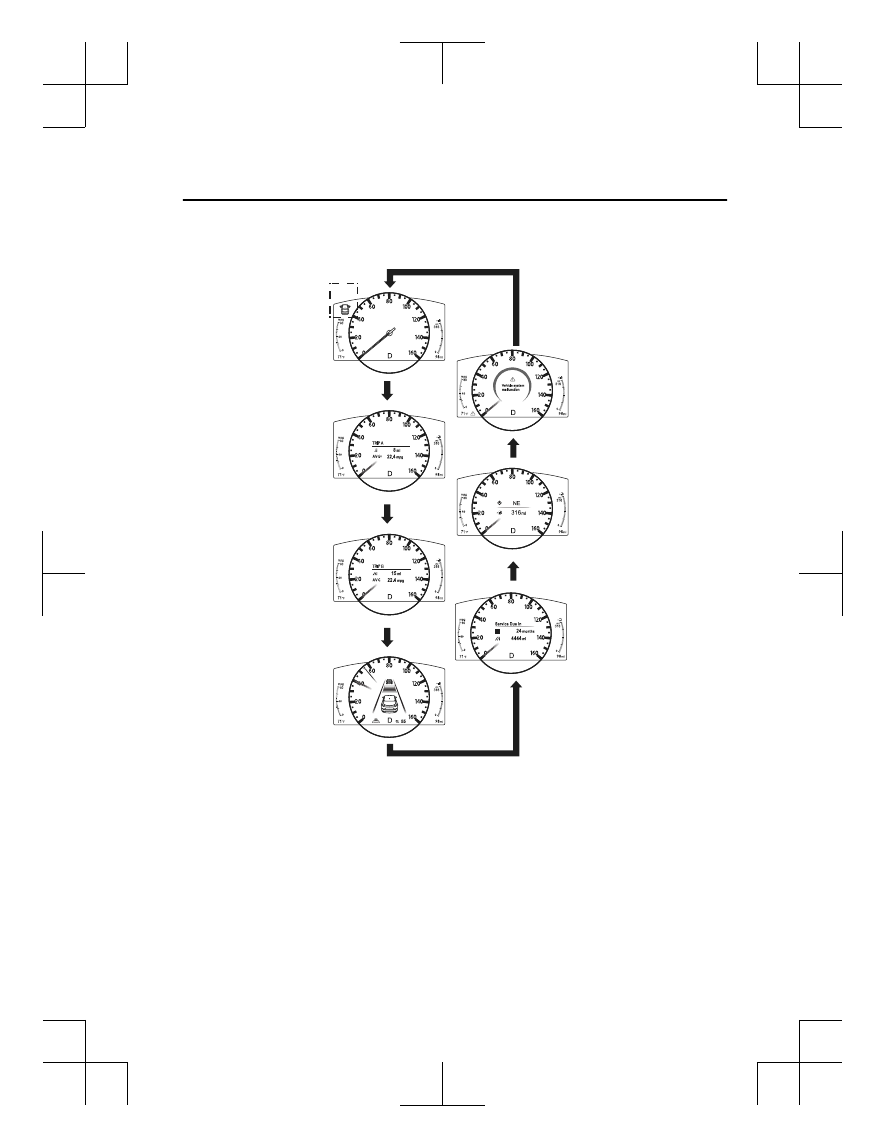
The screen content changes each time the INFO switch is pressed.

Press the INFO switch

Press the INFO switch

Press the INFO switch

*2

*1

*2: Displayed only when a warning occurs.

*1: Displayed when opening/closing door/trunk lid.

Press the INFO switch

Press the INFO switch

Basic display

Warning message 
display

Trip Meter A display

Trip Meter B display

Press the INFO switch

Press the INFO switch

i-ACTIVSENSE display

Maintenance Monitor


display

Compass display

When Driving

Instrument Cluster and Display

4-21

CX-5_8MC3-EA-23G_Edition1_old

2023-5-8 11:05:50

The screen content changes each time the dashboard illumination knob is pressed and held.

Gauge indication

Display off

Numerical indication

Press and hold 
dashboard illumination 
knob

Press and hold dashboard 
illumination knob

Press and hold dashboard 
illumination knob

When Driving

Instrument Cluster and Display

4-22

CX-5_8MC3-EA-23G_Edition1_old

2023-5-8 11:05:50

Odometer, Trip Meter and Trip
Meter Selector

The odometer is constantly displayed on
the screen when the ignition is switched
ON, and the TRIP A or TRIP B screen can
be displayed by operating the INFO
switch.
 

INFO switch

Press the INFO switch

Trip Meter A 
display

Trip Meter B 
display

Odometer

The odometer records the total distance
the vehicle has been driven.

Trip meter

The driving distance for a specified
interval is indicated. Two types (TRIP A,
TRIP B) of interval distance and the
average fuel economy for each can be
measured.
 

For instance, trip meter A can record the
distance from the point of origin, and trip
meter B can record the distance from
where the fuel tank is filled.
 
When trip meter A is selected, TRIP A
will be displayed. When trip meter B is
selected, TRIP B will be displayed.
 
The trip meter and average fuel economy
can be reset by pressing the INFO switch
for 1.5 seconds or more while in each
mode.

NOTE

Only the trip meters record tenths of
kilometers (miles).

The trip record will be erased when:

The power supply is interrupted
(blown fuse or the battery is
disconnected).

The vehicle is driven over 9999.9 km
(mile).

Engine Coolant Temperature Gauge

Displays the engine coolant temperature.
The blue range of the gauge indicates that
the engine coolant temperature is low, and
the red range of the gauge indicates that
the engine coolant temperature is high and
overheating.
 

When Driving

Instrument Cluster and Display

4-23

CX-5_8MC3-EA-23G_Edition1_old

2023-5-8 11:05:50

CAUTION

If the engine coolant temperature gauge needle is
in the red range, there is the possibility of
overheating. Drive slowly to reduce engine load
until you can find a safe place to stop the vehicle
and wait for the engine to cool down.
Refer to Overheating on page 7-17.

NOTE

(SKYACTIV-G 2.5T)

If the engine coolant temperature is high
or the engine is hot, the engine output
may be limited.

Fuel Gauge

The fuel gauge shows approximately how
much fuel is remaining in the tank when
the ignition is switched ON. We
recommend keeping the tank over 1/4 full.
 

Full

1/4 Full

Empty

If the low fuel warning light illuminates or
the fuel level is very low, refuel as soon as
possible.
If inconsistency in engine performance or
stalling occurs due to low fuel level
conditions, refuel the vehicle as soon as
possible and add at least 10 L (2.7 US gal,
2.2 Imp gal) of fuel.
Refer to Taking Action on page 7-31.

NOTE

After refueling, it may require some time
for the indicator to stabilize. In addition,
the indicator may deviate while driving
on a slope or curve since the fuel moves
in the tank.

The direction of the arrow ( ) indicates
that the fuel-filler lid is on the left side
of the vehicle.

Dashboard Illumination

When the lights are turned on with the
ignition switched ON, the brightness of
the dashboard illumination is dimmed.
However, when the light sensor detects
that the surrounding area is bright such as
when the lights are turned on in the
daytime, the dashboard illumination does
not dim.

NOTE

When the ignition is switched ON in the
early evening or at dusk, the dashboard
illumination is dimmed for several
seconds until the light sensor detects the
brightness of the surrounding area,
however, the dimming may cancel after
the brightness is detected.

When the lights are turned on, the
lights-on indicator light in the
instrument cluster turns on.
Refer to Headlights on page 4-76
.

When Driving

Instrument Cluster and Display

4-24

CX-5_8MC3-EA-23G_Edition1_old

2023-5-8 11:05:50

The brightness of the instrument cluster
and dashboard illuminations can be
adjusted by rotating the knob.

The brightness decreases by rotating the
knob to the left. A beep sound will be
heard when the knob has been rotated to
the maximum dim position.

The brightness increases by rotating the
knob to the right.

Dim

Bright

Function for canceling illumination
dimmer

The illumination dimmer can be canceled
by rotating the dashboard illumination
knob to the right until a beep sound is
heard while the instrument cluster is
dimmed with the ignition switched ON. If
the instrument cluster's visibility is
reduced due to glare from surrounding
brightness, cancel the illumination
dimmer.

NOTE

When the illumination dimmer is
canceled, the instrument cluster cannot
be dimmed even if the lights are turned
on.

When the illumination dimmer is
canceled, the screen in the center
display switches to constant display of
the daytime screen.

Speed Unit Selector

In some countries, you may have to
change the speed units between km/h and
mph.
When pressing the dashboard illumination
knob, the speed units in the instrument
cluster will change.
 

Dashboard illumination knob

Outside Temperature Display

When the ignition is switched ON, the
outside temperature is displayed.
 

NOTE

Under the following conditions, the
outside temperature display may differ
from the actual outside temperature
depending on the surroundings and
vehicle conditions:

Significantly cold or hot temperatures.

Sudden changes in outside
temperature.

The vehicle is parked.

The vehicle is driven at low speeds.

Changing the Temperature Unit of the
Outside Temperature Display

The outside temperature unit can be
switched between Celsius and Fahrenheit.

When Driving

Instrument Cluster and Display

4-25

CX-5_8MC3-EA-23G_Edition1_old

2023-5-8 11:05:50

Settings can be changed by operating the
center display screen.
Refer to the Settings section in the Mazda
Connect Owner's Manual.

Distance-to-empty

This displays the approximate distance
you can travel on the remaining fuel based
on the fuel economy.
The distance-to-empty will be calculated
and displayed every second.
 

NOTE

Even though the distance-to-empty
display may indicate a sufficient amount
of remaining driving distance before
refueling is required, refuel as soon as
possible if the fuel level is very low or
the low fuel warning light illuminates.

The display will not change unless you
add more than approximately 9 L (2.3
US gal, 1.9 Imp gal) of fuel.

The distance-to-empty is the
approximate remaining distance the
vehicle can be driven until all the
graduation marks in the fuel gauge
indicating the remaining fuel supply
disappear.

If there is no past fuel economy
information such as after first
purchasing your vehicle or the
information is deleted when the battery
cables are disconnected, the actual
distance-to empty/range may differ from
the amount indicated.

Average Fuel Economy

The average fuel economy is calculated
every minute from the total traveled
distance on the trip meter and the total fuel
consumption, and the average fuel
economy for either TRIP A or TRIP B is
displayed.
 

The average fuel economy and trip meters
can be reset by pressing the INFO switch
for 1.5 seconds or more while in each
mode. After the data is cleared, the fuel
consumption is recalculated and the - - -
km/L (- - - mpg) for the 1 minute prior to
it being displayed is indicated.

When Driving

Instrument Cluster and Display

4-26

CX-5_8MC3-EA-23G_Edition1_old

2023-5-8 11:05:50

Current Fuel Economy

This displays the current fuel economy by
calculating the amount of fuel
consumption and the distance traveled.
 

NOTE

Indicates the 0 position when the vehicle
speed is about 5 km/h (3 mph) or slower.

The arrow on the scale indicates the
average fuel economy.

Maintenance Monitor

The following maintenance period
notifications can be displayed by turning
the Maintenance Monitor on.

Scheduled Maintenance

Tire Rotation

Oil Change

When the remaining days to the
maintenance period is 15 days or less, or
the remaining distance is 1,000 km (600
miles) or shorter, a message is indicated
when the ignition is switched ON.

For the setting method and indications for
the maintenance monitor, refer to the
Maintenance Monitor.

Refer to the Information section in the
Mazda Connect Owner's Manual.

Mazda intelligent Drive Select
(Mi-Drive) Display

The display changes depending on the
driving mode.
 

Sport mode

Off-road mode

*

Blind Spot Monitoring (BSM)
Display

Displays the system status.
 

Refer to Blind Spot Monitoring (BSM) on
page 4-128.

When Driving

Instrument Cluster and Display

*Some models.

4-27

CX-5_8MC3-EA-23G_Edition1_old

2023-5-8 11:05:50

Lane-keep Assist System (LAS) &
Lane Departure Warning System
(LDWS) Display

*

Displays the system status.
 

Refer to Lane-keep Assist System (LAS)
& Lane Departure Warning System
(LDWS) on page 4-180.

Mazda Radar Cruise Control with
Stop & Go function (MRCC with
Stop & Go function) Display

*

Displays the currently set system status.
 

Refer to Mazda Radar Cruise Control with
Stop & Go function (MRCC with Stop &
Go function) on page 4-149.

Cruising & Traffic Support (CTS)
Display

*

Displays the currently set system status.
 

Refer to Cruising & Traffic Support (CTS)
on page 4-164.

Distance Recognition Support
System (DRSS) Display

*

Displays the distance between your
vehicle and the vehicle ahead.
 

Refer to Distance Recognition Support
System (DRSS) on page 4-139.

When Driving

Instrument Cluster and Display

4-28

*Some models.

CX-5_8MC3-EA-23G_Edition1_old

2023-5-8 11:05:50

Cruise Control Set Vehicle Speed
Display

*

The vehicle speed preset using the cruise
control is displayed.
 

Refer to Cruise Control on page 4-246.

Compass Display

The direction the vehicle is moving is
displayed in one of eight directions while
the vehicle is being driven.
 

Display

Direction

N

North

S

South

E

East

W

West

NE

Northeast

NW

Northwest

SE

Southeast

SW

Southwest

Message Display

A message such as the system operation
status, a malfunction, or an abnormality is
indicated.

Warning/indicator light in instrument
cluster turns on/flashes or symbol is
indicated on display at same time as
message

Check the information regarding the
warning/indicator light or indicated
symbol.
Refer to If a Warning Indication/Warning
Lights on page 4-30.
Refer to If a Indication/Indicator Lights on
page 4-32.

Message only is indicated on display

Follow the instructions indicated on the
display. For the display content, refer to
the next page.
Refer to If a Message Indicated on
Multi-information Display on page 7-37.

When Driving

Instrument Cluster and Display

*Some models.

4-29

CX-5_8MC3-EA-23G_Edition1_old

2023-5-8 11:05:50

Warning/Indicator Lights

Instrument Cluster varies depending on model and specifications.

Center of Dashboard

Warning lights will appear in any of the highlighted areas

Instrument Cluster

Warning Indication/Warning Lights

These lights turn on or flash to notify the user of the system operation status or a system
malfunction.

Signal

Warning

Page

Brake System Warning Indication/Warning Light

*1*2

7-22

ABS Warning Light

*1

Electronic Brake

Force Distribu‐

tion System

Warning

7-22

ABS warning

7-25

Charging System Warning Indication/Warning Light

*1

7-22

Engine Oil Warning Light

*1

7-22

High Engine Coolant Temperature Warning Indication

7-22

Power Steering Malfunction Indication

7-22

Master Warning Indication/Warning Light

7-25

When Driving

Instrument Cluster and Display

4-30

CX-5_8MC3-EA-23G_Edition1_old

2023-5-8 11:05:50

Signal

Warning

Page

Electric Parking Brake (EPB) Warning Indication/Warning Light

*1

7-25

Check Engine Light

*1

7-25

(Amber)

*

i-stop Warning Light

*1

7-25

Automatic Transaxle Warning Indication

7-25

*

AWD Warning Indication

7-25

Air Bag/Seat Belt Pretensioner System Warning Light

*1

7-25

Tire Pressure Monitoring System Warning Light

*1

Flashing

7-25

Turns on

7-31

(Amber/White)

KEY Warning Indication

Amber

7-25

White

7-31

(Amber)

*

High Beam Control System (HBC) Warning Indication/Warning Light

*1

7-25

*

Blind Spot Monitoring (BSM) Warning Indication

7-25

(Amber)

*

Driver Attention Alert (DAA) Warning Indication

7-25

(Amber)

*

Mazda Radar Cruise Control with Stop & Go function (MRCC with Stop

& Go function) Warning Indication

7-25

*

Cruising & Traffic Support (CTS) Warning Indication

7-25

*

Lane-keep Assist System (LAS) & Lane Departure Warning System

(LDWS) Warning Indication

7-25

LED Headlight Warning Light

*1

7-25

*

Smart Brake Support/Smart City Brake Support (SBS/SCBS) Warning In‐

dication

7-31

Low Fuel Warning Indication/Warning Light

7-31

When Driving

Instrument Cluster and Display

*Some models.

4-31

CX-5_8MC3-EA-23G_Edition1_old

2023-5-8 11:05:50

Signal

Warning

Page

Check Fuel Cap Warning Indication/Warning Light

*1

7-31

Engine Oil Level Warning Light

*1

7-31

Seat Belt Warning Light (Front seat)

7-31

(Red)

Seat Belt Warning Light (Rear seat)

7-31

*

Low Washer Fluid Level Warning Indication

7-31

Door-Ajar Warning Indication

7-31

Liftgate-Ajar Warning Indication

7-31

Hood-Ajar Warning Indication (With i-stop)

7-31

Door-Ajar Warning Light

7-31

*

1 The light turns on when the ignition is switched on for an operation check, and turns off a few seconds later or

when the engine is started. If the light does not turn on or remains turned on, have the vehicle inspected at an
Authorized Mazda Dealer.

*

2 The light turns on continuously when the parking brake is applied.

Indication/Indicator Lights

These lights turn on or flash to notify the user of the system operation status or a system
malfunction.

Signal

Indicator

Page

(Green)

Seat Belt Indicator Light (Rear seat)

2-30

*

Front Passenger Air Bag Deactivation Indicator Light

*1

2-72

Security Indicator Light

*1

3-43

(Green)

*

i-stop Indicator Light

4-16

Wrench Indication

4-35

When Driving

Instrument Cluster and Display

4-32

*Some models.

CX-5_8MC3-EA-23G_Edition1_old

2023-5-8 11:05:50

Signal

Indicator

Page

Shift Position Indication

4-68

Lights-On Indication/Indicator Light

4-76

Headlight High-Beam Indicator Light

Headlight

High-Low Beam

4-80

Flashing the

Headlights

4-80

Turn Signal/Hazard Warning Indicator Lights

Turn and

Lane-Change

Signals

4-82

Hazard Warning

Flasher

4-90

AUTOHOLD Active Indicator Light

*1

4-105

*

Mazda Radar Cruise Control with Stop & Go function (MRCC with Stop

& Go function) indicator Light

4-160

*

Cruising & Traffic Support (CTS) indicator Light

4-179

TCS/DSC Indicator Light

*1

Traction Control

System (TCS)

4-110

Dynamic Stabil‐

ity Control

(DSC)

4-112

Turns on

7-25

*

TCS OFF Indicator Light

*1

4-110

*

Off-Road Traction Assist Indicator Light

*1

4-113

Select Mode Indication

4-115

(Green)

*

High Beam Control System (HBC) Indicator Light

4-126

When Driving

Instrument Cluster and Display

*Some models.

4-33

CX-5_8MC3-EA-23G_Edition1_old

2023-5-8 11:05:50

Signal

Indicator

Page

*

Blind Spot Monitoring (BSM) OFF Indicator Light

*1

Malfunction

7-25

Except malfunc‐

tion

4-132

(White)

*

Driver Attention Alert (DAA) Indication

4-144

(White)

*

Mazda Radar Cruise Control with Stop & Go function (MRCC with Stop

& Go function) Main Indication

4-154

*

Cruising & Traffic Support (CTS) Main Indication

4-172

(Green)

*

Mazda Radar Cruise Control with Stop & Go function (MRCC with Stop

& Go function) Set Indication

4-154

*

Cruising & Traffic Support (CTS) Set Indication

4-172

*

Lane-keep Assist System (LAS) & Lane Departure Warning System

(LDWS) Indication

4-182

*

Lane-keep Assist System (LAS) & Lane Departure Warning System

(LDWS) OFF Indicator Light

*1

4-192

*

Smart City Brake Support (SCBS) Indication

Advanced Smart

City Brake Sup‐

port (Advanced

SCBS)

4-195

Smart City

Brake Support

[Forward]

(SCBS F)

4-198

Smart City

Brake Support

[Reverse]

(SCBS R)

4-203

When Driving

Instrument Cluster and Display

4-34

*Some models.

CX-5_8MC3-EA-23G_Edition1_old

2023-5-8 11:05:50

Signal

Indicator

Page

*

Smart Brake Support/Smart City Brake Support (SBS/SCBS) OFF Indica‐

tor Light

*1

Advanced Smart

City Brake Sup‐

port (Advanced

SCBS)

4-195

Smart City

Brake Support

[Forward]

(SCBS F)

4-198

Smart City

Brake Support

[Reverse]

(SCBS R)

4-203

Smart Brake

Support (SBS)

System

4-205

(White)

*

Cruise Main Indication

4-247

(Green)

*

Cruise Set Indication

4-247

*

1 The light turns on when the ignition is switched on for an operation check, and turns off

a few seconds later or when the engine is started. If the light does not turn on or remains
turned on, have the vehicle inspected at an Authorized Mazda Dealer.

Wrench Indication

The wrench indication is displayed under
the following conditions.

When the preset maintenance period has
arrived.
Refer to the Information section in the
Mazda Connect Owner's Manual.

When the engine oil replacement period
has arrived.

NOTE

The wrench indication may display
earlier than the preset period depending
on vehicle usage conditions.

Whenever the engine oil is replaced, a
reset of the vehicle engine control unit is
necessary.
Refer to the Information section in the
Mazda Connect Owner's Manual.


When Driving

Instrument Cluster and Display

*Some models.

4-35

CX-5_8MC3-EA-23G_Edition1_old

2023-5-8 11:05:50

Instrument Cluster (Type B)


Speedometer..........................................................................................................page 4-36
Tachometer............................................................................................................ page 4-36
Multi-information Display (Type B)..................................................................... page 4-37
Dashboard Illumination.........................................................................................page 4-41

Speedometer

The speedometer indicates the speed of the
vehicle.

Tachometer

The tachometer shows engine speed in
thousands of revolutions per minute (rpm).

CAUTION

Do not run the engine with the tachometer
needle in the RED ZONE.
This may cause severe engine damage.
 

STRIPED 
ZONE

RED ZONE

*

1

The range varies depending on the type 
of gauge.

*

1

*

1

NOTE

When the tachometer needle enters the
STRIPED ZONE, this indicates to the
driver that the gears should be shifted
before entering the RED ZONE.

When Driving

Instrument Cluster and Display

4-36

CX-5_8MC3-EA-23G_Edition1_old

2023-5-8 11:05:50

Multi-information Display (Type B)

INFO switch

Multi-information Display (Type B)

The multi-information display indicates the following information.

Odometer

Trip meter

Engine coolant temperature gauge

Fuel gauge

Outside temperature

Distance-to-empty

Average fuel economy

Current fuel economy

Maintenance Monitor

Blind Spot Monitoring (BSM) Display

Distance Recognition Support System (DRSS) Display

Mazda Radar Cruise Control with Stop & Go function (MRCC with Stop & Go function)
System Display

Cruising & Traffic Support (CTS) Display

Lane-keep Assist System (LAS) & Lane Departure Warning System (LDWS) Display

Cruise Control Display

Compass Display

Message Display

When Driving

Instrument Cluster and Display

4-37

CX-5_8MC3-EA-23G_Edition1_old

2023-5-8 11:05:50

The screen content changes each time the INFO switch is pressed.

Press the INFO switch

Press the INFO switch

Press the INFO switch

Press the INFO switch

Press the INFO switch

Press the INFO switch

Current Fuel Economy, 
Trip Meter A, Average 
Fuel Economy, Outside 
Temperature, 
Odometer, Fuel Gauge

Current Fuel Economy, 
Trip Meter B, Average 
Fuel Economy, Outside 
Temperature, 
Odometer, Fuel Gauge

Engine Coolant 
Temperature Gauge, 
Maintenance Monitor, 
Outside Temperature, 
Odometer, Fuel Gauge

i-ACTIVSENSE display, 
Outside Temperature, 
Odometer, Fuel Gauge

Warning message, 
Outside Temperature, 
Odometer, Fuel Gauge

*1

*1: Displayed only when a warning occurs.

Engine Coolant 
Temperature Gauge, 
Compass, 
Distance-to-empty, 
Outside Temperature, 
Odometer, Fuel Gauge

When Driving

Instrument Cluster and Display

4-38

CX-5_8MC3-EA-23G_Edition1_old

2023-5-8 11:05:50

Odometer, Trip Meter and Trip
Meter Selector

The odometer is constantly displayed on
the screen when the ignition is switched
ON, and the TRIP A or TRIP B screen can
be displayed by operating the INFO
switch.
 

Press the INFO switch

INFO switch

Odometer, 
Trip meter A

Odometer, 
Trip meter B

Odometer

The odometer records the total distance
the vehicle has been driven.

Trip meter

The driving distance for a specified
interval is indicated. Two types (TRIP A,
TRIP B) of interval distance and the
average fuel economy for each can be
measured.
 
For instance, trip meter A can record the
distance from the point of origin, and trip

meter B can record the distance from
where the fuel tank is filled.
 
When trip meter A is selected, TRIP A
will be displayed. When trip meter B is
selected, TRIP B will be displayed.
 
The trip meter and average fuel economy
can be reset by pressing the INFO switch
for 1.5 seconds or more while in each
mode.

NOTE

Only the trip meters record tenths of
kilometers (miles).

The trip record will be erased when:

The power supply is interrupted
(blown fuse or the battery is
disconnected).

The vehicle is driven over 9999.9 km
(mile).

Engine Coolant Temperature Gauge

Displays the engine coolant temperature.
The blue range of the gauge indicates that
the engine coolant temperature is low, and
the red range of the gauge indicates that
the engine coolant temperature is high and
overheating.
 

When Driving

Instrument Cluster and Display

4-39

CX-5_8MC3-EA-23G_Edition1_old

2023-5-8 11:05:50

CAUTION

If the high engine coolant temperature
warning light (red) flashes, there is a
possibility of overheating. Drive slowly to
reduce engine load until you can find a safe
place to stop the vehicle and wait for the
engine to cool down.
Refer to Overheating on page 7-17.

NOTE

(SKYACTIV-G 2.5T)

If the engine coolant temperature is high
or the engine is hot, the engine output
may be limited.

The temperature unit (Centigrade/
Fahrenheit) of the engine coolant gauge
display changes in conjunction with the
temperature unit of the outside
temperature display.
Refer to the Settings section in the
Mazda Connect Owner's Manual.

Fuel Gauge

The fuel gauge shows approximately how
much fuel is remaining in the tank when

the ignition is switched ON. We
recommend keeping the tank over 1/4 full.
 

Full

1/4 Full

Empty

If the fuel level is low, ( ) and ( ) turn an
amber color. Refuel as soon as possible.
If inconsistency in engine performance or
stalling occurs due to low fuel level
conditions, refuel the vehicle as soon as
possible and add at least 10 L (2.7 US gal,
2.2 Imp gal) of fuel.
Refer to Taking Action on page 7-31.

NOTE

After refueling, it may require some time
for the indicator to stabilize. In addition,
the indicator may deviate while driving
on a slope or curve since the fuel moves
in the tank.

The direction of the arrow ( ) indicates
that the fuel-filler lid is on the left side
of the vehicle.

When Driving

Instrument Cluster and Display

4-40

CX-5_8MC3-EA-23G_Edition1_old

2023-5-8 11:05:50

Dashboard Illumination

(Without auto-light control)

When the lights are turned on with the
ignition switched ON, the brightness of
the dashboard illumination is dimmed.

(With auto-light control)

When the lights are turned on with the
ignition switched ON, the brightness of
the dashboard illumination is dimmed.
However, when the light sensor detects
that the surrounding area is bright such as
when the lights are turned on in the
daytime, the dashboard illumination does
not dim.

NOTE

(With auto-light control)

When the ignition is switched ON in the
early evening or at dusk, the dashboard
illumination is dimmed for several
seconds until the light sensor detects the
brightness of the surrounding area,
however, the dimming may cancel after
the brightness is detected.

When the lights are turned on, the
lights-on indicator light in the
instrument cluster turns on.
Refer to Headlights on page 4-76.

The brightness of the instrument cluster
and dashboard illuminations can be
adjusted by rotating the knob.

The brightness decreases by rotating the
knob to the left. A beep sound will be
heard when the knob has been rotated to
the maximum dim position.

The brightness increases by rotating the
knob to the right.

Dim

Bright

Function for canceling illumination
dimmer

The illumination dimmer can be canceled
by rotating the dashboard illumination
knob to the right until a beep sound is
heard while the instrument cluster is
dimmed with the ignition switched ON. If
the instrument cluster's visibility is
reduced due to glare from surrounding
brightness, cancel the illumination
dimmer.

NOTE

The illumination dimmer can be
canceled by pressing the dashboard
illumination knob.

When the illumination dimmer is
canceled, the instrument cluster cannot
be dimmed even if the lights are turned
on.

When the illumination dimmer is
canceled, the screen in the center
display switches to constant display of
the daytime screen.

When Driving

Instrument Cluster and Display

4-41

CX-5_8MC3-EA-23G_Edition1_old

2023-5-8 11:05:50

Outside Temperature Display

When the ignition is switched ON, the
outside temperature is displayed.
 

NOTE

Under the following conditions, the
outside temperature display may differ
from the actual outside temperature
depending on the surroundings and
vehicle conditions:

Significantly cold or hot temperatures.

Sudden changes in outside
temperature.

The vehicle is parked.

The vehicle is driven at low speeds.

Changing the Temperature Unit of the
Outside Temperature Display

The outside temperature unit can be
switched between Celsius and Fahrenheit.
Settings can be changed by operating the
center display screen.
Refer to the Settings section in the Mazda
Connect Owner's Manual.

NOTE

When the temperature unit indicated in the
outside temperature display is changed,
the temperature unit indicated in the
engine coolant gauge display changes in
conjunction with it.

Distance-to-empty

This displays the approximate distance
you can travel on the remaining fuel based
on the fuel economy.
The distance-to-empty will be calculated
and displayed every second.
 

NOTE

Even though the distance-to-empty
display may indicate a sufficient amount
of remaining driving distance before
refueling is required, refuel as soon as
possible if the fuel level is very low or
the low fuel warning light illuminates.

The display will not change unless you
add more than approximately 9 L (2.3
US gal, 1.9 Imp gal) of fuel.

The distance-to-empty is the
approximate remaining distance the
vehicle can be driven until all the
graduation marks in the fuel gauge
indicating the remaining fuel supply
disappear.

If there is no past fuel economy
information such as after first
purchasing your vehicle or the
information is deleted when the battery
cables are disconnected, the actual
distance-to empty/range may differ from
the amount indicated.

When Driving

Instrument Cluster and Display

4-42

CX-5_8MC3-EA-23G_Edition1_old

2023-5-8 11:05:50

Average Fuel Economy

The average fuel economy is calculated
every minute from the total traveled
distance on the trip meter and the total fuel
consumption, and the average fuel
economy for either TRIP A or TRIP B is
displayed.
 

The average fuel economy and trip meters
can be reset by pressing the INFO switch
for 1.5 seconds or more while in each
mode. After the data is cleared, the fuel
consumption is recalculated and the - - -
km/L (- - - mpg) for the 1 minute prior to
it being displayed is indicated.

Current Fuel Economy

This displays the current fuel economy by
calculating the amount of fuel
consumption and the distance traveled.
 

NOTE

Indicates the 0 position when the vehicle
speed is about 5 km/h (3 mph) or slower.

Maintenance Monitor

The following maintenance period
notifications can be displayed by turning
the Maintenance Monitor on.

Scheduled Maintenance

Tire Rotation

Oil Change

When the remaining days to the
maintenance period is 15 days or less, or
the remaining distance is 1,000 km (600
miles) or shorter, a message is indicated
when the ignition is switched ON.

For the setting method and indications for
the maintenance monitor, refer to the
Maintenance Monitor.
Refer to the Information section in the
Mazda Connect Owner's Manual.

Blind Spot Monitoring (BSM)
Display

*

Displays the system status.
 

Refer to Blind Spot Monitoring (BSM) on
page 4-128.

When Driving

Instrument Cluster and Display

*Some models.

4-43

CX-5_8MC3-EA-23G_Edition1_old

2023-5-8 11:05:50

Lane-keep Assist System (LAS) &
Lane Departure Warning System
(LDWS) Display

*

Displays the system status.
 

Refer to Lane-keep Assist System (LAS)
& Lane Departure Warning System
(LDWS) on page 4-180.

Mazda Radar Cruise Control with
Stop & Go function (MRCC with
Stop & Go function) Display

*

Displays the currently set system status.
 

Refer to Mazda Radar Cruise Control with
Stop & Go function (MRCC with Stop &
Go function) on page 4-149.

Cruising & Traffic Support (CTS)
Display

*

Displays the currently set system status.
 

Refer to Cruising & Traffic Support (CTS)
on page 4-164.

Distance Recognition Support
System (DRSS) Display

*

Displays the distance between your
vehicle and the vehicle ahead.
 

Refer to Distance Recognition Support
System (DRSS) on page 4-139.

Cruise Control Set Vehicle Speed
Display

*

The vehicle speed preset using the cruise
control is displayed.
 

Refer to Cruise Control on page 4-246.

When Driving

Instrument Cluster and Display

4-44

*Some models.

CX-5_8MC3-EA-23G_Edition1_old

2023-5-8 11:05:50

Compass Display

The direction the vehicle is moving is
displayed in one of eight directions while
the vehicle is being driven.
 

Display

Direction

N

North

S

South

E

East

W

West

NE

Northeast

NW

Northwest

SE

Southeast

SW

Southwest

Message Display

A message such as the system operation
status, a malfunction, or an abnormality is
indicated.

Warning/indicator light in instrument
cluster turns on/flashes or symbol is
indicated on display at same time as
message

Check the information regarding the
warning/indicator light or indicated
symbol.
Refer to If a Warning Indication/Warning
Lights on page 4-46.
Refer to If a Indication/Indicator Lights on
page 4-48.

Message only is indicated on display

Follow the instructions indicated on the
display. For the display content, refer to
the next page.

Refer to If a Message Indicated on
Multi-information Display on page 7-37.

When Driving

Instrument Cluster and Display

4-45

CX-5_8MC3-EA-23G_Edition1_old

2023-5-8 11:05:50

Warning/Indicator Lights

Instrument Cluster varies depending on model and specifications.

Instrument Cluster

Center of Dashboard

Warning lights will appear in any of the highlighted areas

Warning Indication/Warning Lights

These lights turn on or flash to notify the user of the system operation status or a system
malfunction.

Signal

Warning

Page

Brake System Warning Indication/Warning Light

*1*2

7-22

ABS Warning Light

*1

Electronic Brake

Force Distribu‐

tion System

Warning

7-22

ABS warning

7-25

Charging System Warning Indication/Warning Light

*1

7-22

Engine Oil Warning Light

*1

7-22

(Red)

High Engine Coolant Temperature Warning Light

*1

7-22

Power Steering Malfunction Indication

7-22

When Driving

Instrument Cluster and Display

4-46

CX-5_8MC3-EA-23G_Edition1_old

2023-5-8 11:05:50

Signal

Warning

Page

Master Warning Indication/Warning Light

7-25

Electric Parking Brake (EPB) Warning Indication/Warning Light

*1

7-25

Check Engine Light

*1

7-25

(Amber)

*

i-stop Warning Light

*1

7-25

Automatic Transaxle Warning Indication

7-25

*

AWD Warning Indication

7-25

Air Bag/Seat Belt Pretensioner System Warning Light

*1

7-25

Tire Pressure Monitoring System Warning Light

*1

Flashing

7-25

Turns on

7-31

(Amber/White)

KEY Warning Indication

Amber

7-25

White

7-31

(Amber)

*

High Beam Control System (HBC) Warning Indication/Warning Light

*1

7-25

*

Blind Spot Monitoring (BSM) Warning Indication

7-25

(Amber)

*

Mazda Radar Cruise Control with Stop & Go function (MRCC with Stop

& Go function) Warning Indication

7-25

*

Cruising & Traffic Support (CTS) Warning Indication

7-25

*

Lane-keep Assist System (LAS) & Lane Departure Warning System

(LDWS) Warning Indication

7-25

LED Headlight Warning Light

*1

7-25

*

Smart Brake Support/Smart City Brake Support (SBS/SCBS) Warning In‐

dication

7-31

Low Fuel Warning Indication

7-31

When Driving

Instrument Cluster and Display

*Some models.

4-47

CX-5_8MC3-EA-23G_Edition1_old

2023-5-8 11:05:50

Signal

Warning

Page

Check Fuel Cap Warning Indication/Warning Light

*1

7-31

Engine Oil Level Warning Light

*1

7-31

Seat Belt Warning Light (Front seat)

7-31

(Red)

Seat Belt Warning Light (Rear seat)

7-31

*

Low Washer Fluid Level Warning Indication

7-31

Door-Ajar Warning Indication

7-31

Liftgate-Ajar Warning Indication

7-31

Hood-Ajar Warning Indication (With i-stop)

7-31

*

1 The light turns on when the ignition is switched on for an operation check, and turns off a few seconds later or

when the engine is started. If the light does not turn on or remains turned on, have the vehicle inspected at an
Authorized Mazda Dealer.

*

2 The light turns on continuously when the parking brake is applied.

Indication/Indicator Lights

These lights turn on or flash to notify the user of the system operation status or a system
malfunction.

Signal

Indicator

Page

(Green)

Seat Belt Indicator Light (Rear seat)

2-30

*

Front Passenger Air Bag Deactivation Indicator Light

*1

2-72

Security Indicator Light

*1

3-43

(Green)

*

i-stop Indicator Light

4-16

Wrench Indication

4-51

(Blue)

Low Engine Coolant Temperature Indicator Light

4-51

When Driving

Instrument Cluster and Display

4-48

*Some models.

CX-5_8MC3-EA-23G_Edition1_old

2023-5-8 11:05:50

Signal

Indicator

Page

Shift Position Indication

4-68

Lights-On Indication/Indicator Light

4-76

Headlight High-Beam Indicator Light

Headlight

High-Low Beam

4-80

Flashing the

Headlights

4-80

Turn Signal/Hazard Warning Indicator Lights

Turn and

Lane-Change

Signals

4-82

Hazard Warning

Flasher

4-90

AUTOHOLD Active Indicator Light

*1

4-105

*

Mazda Radar Cruise Control with Stop & Go function (MRCC with Stop

& Go function) indicator Light

4-160

*

Cruising & Traffic Support (CTS) indicator Light

4-179

TCS/DSC Indicator Light

*1

Traction Control

System (TCS)

4-110

Dynamic Stabili‐

ty Control

(DSC)

4-112

Turns on

7-25

*

TCS OFF Indicator Light

*1

4-110

*

Off-Road Traction Assist Indicator Light

*1

4-113

Select Mode Indication

4-115

(Green)

*

High Beam Control System (HBC) Indicator Light

4-126

When Driving

Instrument Cluster and Display

*Some models.

4-49

CX-5_8MC3-EA-23G_Edition1_old

2023-5-8 11:05:50

Signal

Indicator

Page

*

Blind Spot Monitoring (BSM) OFF Indicator Light

*1

Malfunction

7-25

Except malfunc‐

tion

4-132

(White)

*

Mazda Radar Cruise Control with Stop & Go function (MRCC with Stop

& Go function) Main Indication

4-154

*

Cruising & Traffic Support (CTS) Main Indication

4-172

(Green)

*

Mazda Radar Cruise Control with Stop & Go function (MRCC with Stop

& Go function) Set Indication

4-154

*

Cruising & Traffic Support (CTS) Set Indication

4-172

*

Lane-keep Assist System (LAS) & Lane Departure Warning System

(LDWS) Indication

4-182

*

Lane-keep Assist System (LAS) & Lane Departure Warning System

(LDWS) OFF Indicator Light

*1

4-192

*

Smart City Brake Support (SCBS) Indication

Advanced Smart

City Brake Sup‐

port (Advanced

SCBS)

4-195

Smart City

Brake Support

(SCBS)

4-198

*

Smart Brake Support/Smart City Brake Support (SBS/SCBS) OFF Indica‐

tor Light

*1

Advanced Smart

City Brake Sup‐

port (Advanced

SCBS)

4-195

Smart City

Brake Support

(SCBS)

4-198

Smart Brake

Support (SBS)

System

4-205

(White)

*

Cruise Main Indication

4-247

When Driving

Instrument Cluster and Display

4-50

*Some models.

CX-5_8MC3-EA-23G_Edition1_old

2023-5-8 11:05:50

Signal

Indicator

Page

(Green)

*

Cruise Set Indication

4-247

*

1 The light turns on when the ignition is switched on for an operation check, and turns off

a few seconds later or when the engine is started. If the light does not turn on or remains
turned on, have the vehicle inspected at an Authorized Mazda Dealer.

Wrench Indication

The wrench indication is displayed under
the following conditions.

When the preset maintenance period has
arrived.
Refer to the Information section in the
Mazda Connect Owner's Manual.

When the engine oil replacement period
has arrived.

NOTE

The wrench indication may display
earlier than the preset period depending
on vehicle usage conditions.

Whenever the engine oil is replaced, a
reset of the vehicle engine control unit is
necessary.
Refer to the Information section in the
Mazda Connect Owner's Manual.


Low Engine Coolant Temperature
Indicator Light (Blue)

The light illuminates continuously when
the engine coolant temperature is low and
turns off after the engine is warm.

When Driving

Instrument Cluster and Display

*Some models.

4-51

CX-5_8MC3-EA-23G_Edition1_old

2023-5-8 11:05:50

Instrument Cluster (Type C)


Speedometer..........................................................................................................page 4-52
Tachometer............................................................................................................ page 4-52
Multi-information Display (Type C)..................................................................... page 4-53
Dashboard Illumination.........................................................................................page 4-55

Speedometer

The speedometer indicates the speed of the
vehicle.

Tachometer

The tachometer shows engine speed in
thousands of revolutions per minute (rpm).

CAUTION

Do not run the engine with the tachometer
needle in the RED ZONE.
This may cause severe engine damage.
 

STRIPED 
ZONE

RED ZONE

*

1

The range varies depending on the type 
of gauge.

*

1

*

1

NOTE

When the tachometer needle enters the
STRIPED ZONE, this indicates to the
driver that the gears should be shifted
before entering the RED ZONE.

When Driving

Instrument Cluster and Display

4-52

CX-5_8MC3-EA-23G_Edition1_old

2023-5-8 11:05:50


Content      ..     4      5      6      7     ..