Mazda 3 (2024 year). Manual in english - page 6
 

  Index      Manuals     Mazda 3 (2024 year). Manual in english


Search            copyright infringement  


Content      ..     4      5      6      7     ..


Mazda 3 (2024 year). Manual in english - page 6


Canceling Manual Shift Mode

Shift the selector lever from the M to the D position.

Manual shift mode is canceled.

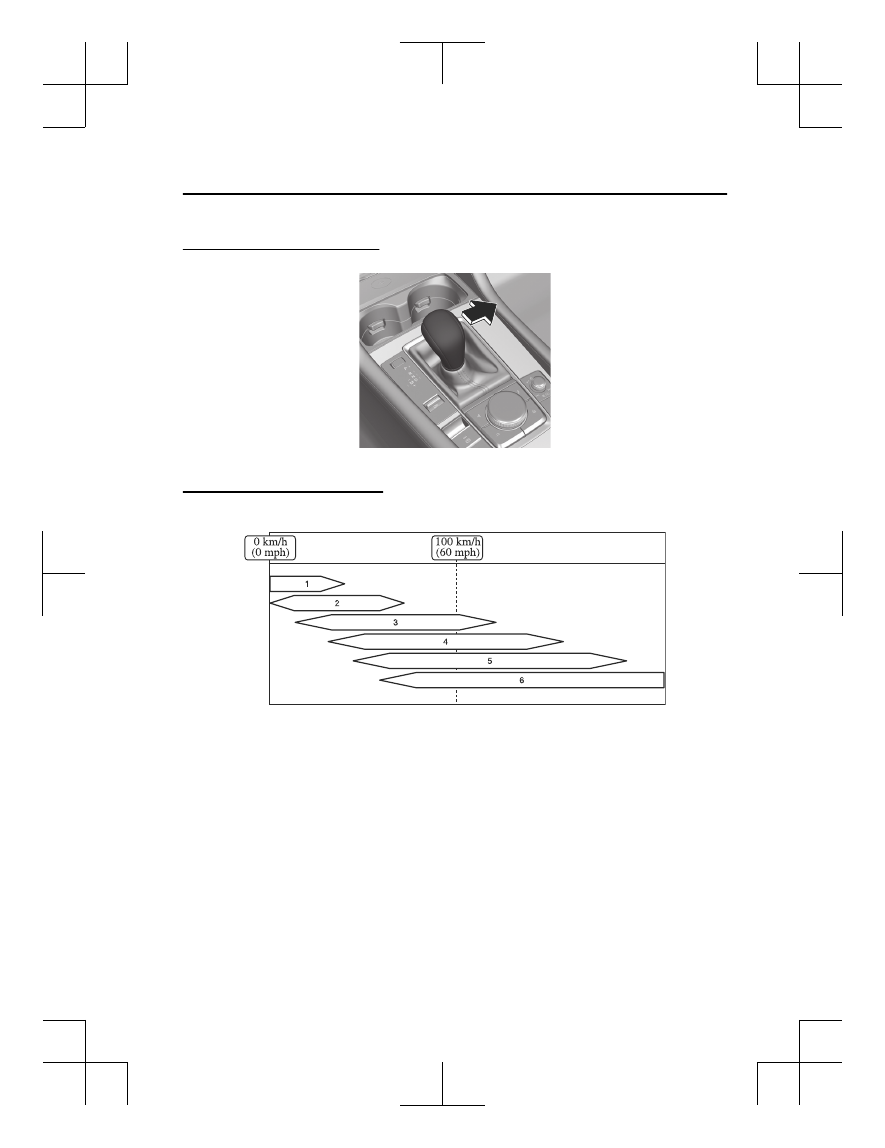
Shift gear (shifting) speed limit

The gear is shifted when the steering shift switches are operated within the speed
limit ranges.

1. 1st gear
2. 2nd gear
3. 3rd gear
4. 4th gear
5. 5th gear
6. 6th gear
When shifting down is not possible depending on the vehicle speed, the gear
position indication displayed in the instrument cluster flashes 2 times.

Driving

Selector Lever

5-47

Mazda3_8LX5-EA-23E_Edition2_new

2023-4-17 20:22:43

Using Second Gear Fixed Mode

1. Shift the selector lever from the D to the M position.

2. Drive the vehicle at a speed of 10 km/h (6.2 mph) or slower.
3. Operate the selector lever to the (+) side and shift to 2nd gear.

Second gear fixed mode is activated.

NOTE

When using second gear fixed mode, the vehicle stops at the 2 gear position.

Canceling Second Gear Fixed Mode

Operate the selector lever to a gear other than 2nd gear.
Second gear fixed mode is canceled.

Driving

Selector Lever

5-48

Mazda3_8LX5-EA-23E_Edition2_new

2023-4-17 20:22:43

Warnings and Cautions

for Using the Steering

Shift Switches

WARNING

Avoid using sudden engine braking
(shift-down).

If you apply sudden engine braking
(shift-down) while driving at high
speed or on wet roads, snow-covered
roads, or icy roads, the tires may slip
and cause an unexpected accident.

Driving

Steering Shift Switches

5-49

Mazda3_8LX5-EA-23E_Edition2_new

2023-4-17 20:22:43

How to Use the Steering Shift Switches

*

Using Direct Mode

Pull the up switch (+/OFF) or the down switch (-) of the steering shift switches
toward you when the selector lever is in the D position.

1. Down switch (-)
2. Up switch (+/OFF)
The gear position can be temporarily switched manually in direct mode.
The direct mode indication and the gear position are displayed in the instrument
cluster.

Shifting up/down

Pull the up switch (+/OFF) or the down switch (-) of the steering shift switches
toward you.

1. Down switch (-)
2. Up switch (+/OFF)
Shifts up or down.

Driving

Steering Shift Switches

5-50

*Some models.

Mazda3_8LX5-EA-23E_Edition2_new

2023-4-17 20:22:43

NOTE

If the automatic transmission fluid (ATF) temperature becomes too high, the mode
will not switch to direct mode. In addition, if the ATF temperature becomes too
high while in direct mode, the mode may be canceled. If the mode is switched to
direct mode again, it is necessary to operate the steering shift switches.

While the vehicle is stopped, direct mode cannot be set even if the DOWN switch
(-) is pulled.

When fully depressing the accelerator pedal even while in direct mode, the
transmission kicks down, but it does not kick down while the Traction Control
System (TCS) is turned off. However, if the vehicle is continuously driven at a high
rpm, the gears may automatically shift up to protect the engine.

Canceling Direct Mode

Direct mode can be canceled by performing the following operations.

The UP switch (+/OFF) is pulled toward you for a certain period of time or longer.

The vehicle is driven for a certain period of time or longer (time differs depending
on the driving conditions while operating).

The vehicle is stopped.

The vehicle is driven at a low speed.

Using Manual Shift Mode

1. Shift the selector lever from the D to the M position.

2. Pull the up switch (+/OFF) or the down switch (-) of the steering shift switches

toward you.

1. Down switch (-)

Driving

Steering Shift Switches

5-51

Mazda3_8LX5-EA-23E_Edition2_new

2023-4-17 20:22:43

2. Up switch (+/OFF)
The gear position can be switched manually in manual shift mode.
The manual shift mode indication and the gear position are displayed in the
instrument cluster.

Shifting up/down

Pull the up switch (+/OFF) or the down switch (-) of the steering shift switches
toward you.

1. Down switch (-)
2. Up switch (+/OFF)
Shifts up or down.

NOTE

If the automatic transmission fluid (ATF) temperature becomes too high, the mode
will not switch to manual shift mode. In addition, if the ATF temperature becomes
too high while in manual shift mode, the mode may be canceled. If the mode is
switched to manual shift mode again, it is necessary to operate the steering shift
switches.

When fully depressing the accelerator pedal even while in manual mode, the
transmission kicks down, but it does not kick down while the Traction Control
System (TCS) is turned off. However, if the vehicle is continuously driven at a high
rpm, the gears may automatically shift up to protect the engine.

Driving

Steering Shift Switches

5-52

Mazda3_8LX5-EA-23E_Edition2_new

2023-4-17 20:22:43

Canceling Manual Shift Mode

Shift the selector lever from the M to the D position.

Manual shift mode is canceled.

Shift gear (shifting) speed limit

Refer to How to Use the Selector Lever on page 5-44.

Driving

Steering Shift Switches

5-53

Mazda3_8LX5-EA-23E_Edition2_new

2023-4-17 20:22:43

Gear Shift Indicator (GSI)

*

The GSI supports you to obtain
optimum fuel economy and smooth
driving. The current gear position and
the recommended gear position
corresponding to the driving condition
is displayed in the instrument cluster.

NOTE

The GSI does not display under the
following conditions.

The vehicle is stopped.

The vehicle is put in neutral.

The vehicle is driven in reverse.

The clutch is not fully engaged when
accelerating from a stop.

The clutch pedal remains depressed
for 2 seconds or longer while driving.

Warning and Cautions for

Using the Gear Shift

Indicator (GSI)

CAUTION

Do not rely completely on the GSI. The
actual driving situation might require
shift operations different from the
indication. To avoid the risk of
accidents, the road and traffic
conditions have to be determined
correctly by the driver before shifting.

Driving

Gear Shift Indicator (GSI)

5-54

*Some models.

Mazda3_8LX5-EA-23E_Edition2_new

2023-4-17 20:22:43

Warning and Cautions for

Using the Foot Brake

WARNING

Do not coast with the engine turned
off, find a safe place to stop.

Coasting with the engine turned off is
dangerous. Braking will require more
effort, and the brake's power-assist
could be depleted if you pump the
brake. This will cause longer stopping
distances or even an accident.

Shift to a lower gear when going
down steep hills.

Driving with your foot continuously on
the brake pedal or steadily applying
the brakes for long distances is
dangerous. This causes overheated
brakes, resulting in longer stopping
distances or even total brake failure.
This could cause loss of vehicle control
and a serious accident. Avoid
continuous application of the brakes.

Dry off brakes that have become wet
by driving slowly, releasing the
accelerator pedal and lightly applying
the brakes several times until the
brake performance returns to normal.

Driving with wet brakes is dangerous.
Increased stopping distance or the
vehicle pulling to one side when
braking could result in a serious
accident. Light braking will indicate
whether the brakes have been
affected.

Do not drive with worn disc pads.

Driving with worn disc pads is
dangerous. The brakes could fail and
cause a serious accident. As soon as
you hear a screeching noise consult an
Authorized Mazda Dealer.

CAUTION

Do not drive with your foot held on
the clutch pedal or brake pedal, or
hold the clutch pedal depressed
halfway unnecessarily. Doing so
could result in the following:

The clutch and brake parts will
wear out more quickly.

The brakes can overheat and
adversely affect brake
performance.

Always depress the brake pedal with
the right foot. Applying the brakes
with the unaccustomed left foot
could slow your reaction time to an
emergency situation resulting in
insufficient braking operation.

Wear shoes appropriate for driving in
order to avoid your shoe contacting
the brake pedal when depressing the
accelerator pedal.

Driving

Foot Brake

5-55

Mazda3_8LX5-EA-23E_Edition2_new

2023-4-17 20:22:43

Electric Parking Brake

(EPB)

The EPB system applies the parking
brake using a motor.

NOTE

If the parking brake is applied with the
vehicle power switched to OFF or

ACC, the EPB indicator light 

 in the

instrument cluster and the indicator
light in the switch may turn on for a
certain period of time.

Warning and Cautions for

Using the Electric Parking

Brake (EPB)

WARNING

Do not drive the vehicle with the
parking brake applied.

If the vehicle is driven with the parking
brake applied, the brake parts may
generate heat and the brake system
may not operate, leading to an
accident. Before driving the vehicle,
release the parking brake and make

sure that the EPB indicator light 

 in

the instrument cluster turns off.

Apply the parking brake when leaving
the vehicle.

Not applying the parking brake when
parking the vehicle is dangerous as the
vehicle may move unexpectedly and
result in an accident. Before leaving the
vehicle, apply the parking brake and
make sure that the EPB indicator light

 in the instrument cluster turns on.

CAUTION

Depress the brake pedal firmly
before doing a shift operation as the
vehicle may start moving
unexpectedly.

Driving

Electric Parking Brake (EPB)

5-56

Mazda3_8LX5-EA-23E_Edition2_new

2023-4-17 20:22:43

If something such as the driver's foot
contacts the accelerator pedal while
the engine is operating and the
parking brake is applied, the parking
brake may be released automatically
and the vehicle may move
unexpectedly. If you do not intend to
start driving the vehicle immediately,
shift the shift lever to the neutral
position for a manual transmission,
or shift the selector lever to the P or
N position for an automatic
transmission.

How to Use the Electric

Parking Brake (EPB)

Applying the Parking Brake Manually

1. Depress the brake pedal.
2.

The parking brake is applied and

the EPB indicator light 

 in the

instrument cluster and the EPB
switch indicator light turn on.

Releasing the Parking Brake Manually

1. Depress the brake pedal with the

vehicle power switched ON or the
engine operating.

2.

When the parking brake is released,

the EPB indicator light 

 in the

instrument cluster and the EPB
switch indicator light turn off.

Driving

Electric Parking Brake (EPB)

5-57

Mazda3_8LX5-EA-23E_Edition2_new

2023-4-17 20:22:43

NOTE

To release the parking brake when
the vehicle power is switched OFF, it
is necessary to cancel the parking
brake auto operation. If the parking
brake is likely to freeze such as
during cold weather conditions,
cancel the parking brake auto
operation.

When the charging system warning
light in the instrument cluster turns
on, the parking brake cannot be
applied after the vehicle power is
switched OFF. Before switching the
vehicle power OFF, apply the parking
brake manually.

Applying the Parking Brake
Automatically

Switch the vehicle power from ON to
ACC or OFF.
The parking brake is applied and the

EPB indicator light 

 in the instrument

cluster and the EPB switch indicator
light turn on.

Releasing the Parking Brake
Automatically

Shift-linked release (Automatic
transmission)

Shift the selector lever from the P
position to a position other than P
when all of the following conditions
are met.

Engine is operating.

Driver’s door is closed.

Brake pedal is firmly depressed.

When the parking brake is released,

the EPB indicator light 

 in the

instrument cluster and the EPB switch
indicator light turn off.

Accelerator-linked release

Depress the accelerator pedal when all
of the following conditions are met.

Engine is operating.

Driver’s door is closed.

Driver's seat belt is fastened.

(Automatic transmission)

The selector lever is in the D, M, or R
position.

(Manual transmission)

The shift lever is in a position other
than neutral.

The clutch pedal is depressed
halfway.

When the parking brake is released,

the EPB indicator light 

 in the

instrument cluster and the EPB switch
indicator light turn off.

Driving

Electric Parking Brake (EPB)

5-58

Mazda3_8LX5-EA-23E_Edition2_new

2023-4-17 20:22:43

Convenient Ways to Use

the Electric Parking Brake

(EPB)

Enabling/Disabling Shift-Linked
Release (Automatic transmission)

1. Switch the vehicle power ON.
2. Make sure that the parking brake is

applied (EPB indicator light 

 is

turned on).

3. Continue pulling the EPB switch for

4 seconds or longer.

4. Release the EPB switch once.
5. Immediately continue pulling the

EPB switch for 4 seconds or longer.

When the shift-linked release is
enabled, a sound is activated 2
times, the EPB switch indicator light
switches to fast flashing, and then
flashes for a certain period of time.
When the shift-linked release is
disabled, a sound is activated 1

time, the EPB switch indicator light
switches to slow flashing, and then
flashes for a certain period of time.

Canceling the Parking Brake
Automatic Operation

The parking brake automatic operation
returns to automatic operation when
the vehicle power is switched ON.
When canceling the parking brake auto
operation and parking the vehicle, shift
the shift lever to the 1st gear or the R
position for a manual transmission, or
shift the selector lever to the P position
for an automatic transmission and use
wheel blocks on the tires. If one of the
following operations is performed, the
parking brake automatic operation can
be canceled when the vehicle power is
switched from ON to OFF.

Operation method 1

1. Switch the vehicle power ON.
2. Release the parking brake manually.
3. Turn off the AUTOHOLD.
4. Press the EPB switch continuously

until a sound is activated.

5. Release the EPB switch.
6. Switch the vehicle power OFF

immediately after a sound is
activated.
After the parking brake auto
operation is canceled, a warning
sound is activated one time, and
the EPB switch indicator light

Driving

Electric Parking Brake (EPB)

5-59

Mazda3_8LX5-EA-23E_Edition2_new

2023-4-17 20:22:43

switches from illumination to
flashing, and then turns off after a
certain period of time has passed.

Operation method 2

1. Switch the vehicle power ON.
2. Release the parking brake manually.
3. Turn off the AUTOHOLD.
4. With the EPB switch pressed, switch

the vehicle power OFF without
depressing the brake pedal.

After the parking brake auto
operation is canceled, a warning
sound is activated one time, and
the EPB switch indicator light
switches from illumination to
flashing, and then turns off after a
certain period of time has passed.

NOTE

The auto operation may not cancel if
the vehicle is parked on a steep
slope.

When using an automatic car wash
which moves the vehicle with the
front tires mounted, it is necessary to
cancel the parking brake automatic
operation.

Driving

Electric Parking Brake (EPB)

5-60

Mazda3_8LX5-EA-23E_Edition2_new

2023-4-17 20:22:43

Brake Override System

The brake override system applies the
brake first for safety if the brake pedal
and the accelerator pedal are
depressed at the same time.

Warning and Cautions for

Using the Brake Override

System

CAUTION

Do not drive with your foot held on
the brake pedal. The brake override
system may not operate normally.

Driving

Brake Override System

5-61

Mazda3_8LX5-EA-23E_Edition2_new

2023-4-17 20:22:43

How to Use the Brake

Override System

You can use the Mazda Connect
setting to disable the brake override
system warning.
Refer to the Mazda Connect Owner's
Manual or consult an Authorized
Mazda Dealer.

Driving

Brake Override System

5-62

Mazda3_8LX5-EA-23E_Edition2_new

2023-4-17 20:22:43

AUTOHOLD

AUTOHOLD is a function to keep the
vehicle stopped by applying the brakes
even if you take your foot off the brake
pedal while the vehicle is stopped. This
function reduces the burden on the
driver while the vehicle is stopped,
such as at traffic lights.

Warning and Cautions for

Using the AUTOHOLD

WARNING

Do not rely completely on the
AUTOHOLD function.

The AUTOHOLD function is only
designed to assist the brake operation
while the vehicle is stopped.
Neglecting to operate the brakes and
relying only on the AUTOHOLD system
is dangerous and could result in an
unexpected accident if the vehicle
were to suddenly move. Operate the
brakes appropriately in accordance
with the road and surrounding
conditions. Note that the vehicle may
move suddenly depending on the
vehicle’s load or if it is towing
something.

Do not release your foot from the
brake pedal while the vehicle is
stopped on a steep grade.

Because there is a possibility of the
vehicle not being held in the stopped
position by the AUTOHOLD function,
the vehicle may move unexpectedly
and result in an accident.

Refrain from using the AUTOHOLD
function on slippery roads such as icy
or snow-covered roads, or unpaved
roads.

Even if the vehicle is held in the
stopped position by the AUTOHOLD
function, the vehicle may move
unexpectedly and result in an accident.
Operate the accelerator pedal, brakes,
or steering wheel appropriately as
necessary.

Driving

AUTOHOLD

5-63

Mazda3_8LX5-EA-23E_Edition2_new

2023-4-17 20:22:43

Immediately depress the brake pedal
in the following case.

Because the AUTOHOLD function is
canceled forcibly, the vehicle may
move unexpectedly and result in an
accident.

The message “Depress Brake Pedal.
Brake Hold Disabled” is displayed on
the instrument cluster and the
warning sound is activated at the
same time.

When parking and before leaving the
vehicle, apply the parking brake.

Otherwise, the vehicle may move
unexpectedly and result in an accident.
When parking and before leaving the
vehicle, shift the selector lever to the P
position (automatic transmission) and
apply the parking brake.

CAUTION

If you stop operating the accelerator
pedal before the vehicle starts moving,
the brake may be released. Firmly
depress the brake pedal or depress the
accelerator pedal to start driving the
vehicle.

How to Use the

AUTOHOLD

Operating the AUTOHOLD

The AUTOHOLD becomes operational
and the AUTOHOLD standby indicator
light turns on.

Using the AUTOHOLD

1. Stop the vehicle.

When all of the following
conditions are met, the
AUTOHOLD operates and the
AUTOHOLD active indicator light

 in the instrument cluster

turns on.

The engine is operating.

The driver’s seat belt is fastened.

The driver’s door is closed.

The parking brake is released.

2. Start driving the vehicle.

The brakes are released and the
AUTOHOLD active indicator light

 in the instrument cluster

turns off.

NOTE

When about 10 minutes or longer
have passed since the AUTOHOLD
operated, the parking brake is
applied automatically. When the
parking brake is released, the
AUTOHOLD operates again.

Driving

AUTOHOLD

5-64

Mazda3_8LX5-EA-23E_Edition2_new

2023-4-17 20:22:43

When the vehicle power is switched
OFF while the AUTOHOLD is
operating, the parking brake is
applied automatically.

If the shift lever/selector lever is
shifted to the R position with the
vehicle tilted rearward or on level
ground, the AUTOHOLD is canceled.
Operate the brakes if necessary.

Under the following conditions, the
parking brake is automatically
applied and the AUTOHOLD is
released. The AUTOHOLD is
re-enabled when the conditions
before the AUTOHOLD is released
are restored.

The driver’s seat belt is unfastened.

The driver’s door is opened.

Canceling the AUTOHOLD Operation

1. Depress the brake pedal with the

AUTOHOLD operating.

2.

The AUTOHOLD operation is
canceled and the AUTOHOLD
standby indicator light turns off.

NOTE

The AUTOHOLD can be turned off
by pressing the AUTOHOLD switch
while driving.

When the vehicle power is switched
OFF while the AUTOHOLD is
operating, the parking brake is
applied automatically and the
AUTOHOLD is turned off.

Driving

AUTOHOLD

5-65

Mazda3_8LX5-EA-23E_Edition2_new

2023-4-17 20:22:43

Hill Launch Assist (HLA)

The HLA prevents the vehicle from
rolling backward or forward, such as
when releasing the brake pedal while
on a slope.

NOTE

The HLA may not operate on a gentle
slope or depending on the vehicle’s
load.

The HLA does not operate if the
parking brake is applied or the
vehicle has not stopped completely.

When the TCS/DSC operation

indicator light 

 turns on, the HLA

may not operate.

The HLA does not turn off even if the
TCS/DSC is turned off.

Warning and Cautions for

Using the Hill Launch

Assist (HLA)

WARNING

Do not rely completely on the HLA.

The HLA is designed only to assist the
driver in accelerating from a stop on a
slope. The HLA only operates for about
2 seconds and therefore, if the
accelerator and brake pedals are not
operated correctly the vehicle may
move (roll) unexpectedly and cause an
accident. Always confirm the safety
around the vehicle before starting to
drive the vehicle. Note that the vehicle
may move suddenly depending on the
vehicle’s load or if it is towing
something. In addition, for vehicles
with a manual transmission, the
vehicle could still roll depending on
how the clutch pedal or the accelerator
pedal is operated.

Driving

Hill Launch Assist (HLA)

5-66

Mazda3_8LX5-EA-23E_Edition2_new

2023-4-17 20:22:43

Light Switch

Each light turns on/off when the switch
is operated.

With Auto Light

Without Auto Light

Warnings and Cautions

for Using the Light Switch

CAUTION

Do not cover the light sensor by
applying stickers or labels to the
windshield. Otherwise the sensor
cannot detect the surrounding light
correctly.

Driving

Light Switch

5-67

Mazda3_8LX5-EA-23E_Edition2_new

2023-4-17 20:22:43

How to Use the Light

Switch

NOTE

Headlights which do not blind drivers
approaching in the opposite direction
have been adopted. Therefore, it is not
necessary to adjust the optical axis of
the headlights even when traveling
temporarily in a country where vehicles
are driven on the right-hand side of the
road.

Using the Lights Automatically

Using the Auto Light

*

Make sure that the light switch is in the

AUTO

 position.

The daytime running lights turn on
automatically when it is bright, and the
headlights, parking lights, taillights,
side-marker lights, and the license
plate lights turn on automatically when
it is dark.
When the parking lights, taillights,
side-marker lights, and the license
plate lights are turned on, the parking

lights indicator light 

 in the

instrument cluster turns on.

NOTE

If the surroundings remain dark for
several minutes even during daytime,
the light sensor determines that it is
nighttime, and the lights may not
turn off immediately even if the
surroundings become bright.

The illumination timing for the
headlights can be changed.
Refer to the Mazda Connect
Owner's Manual or consult an
Authorized Mazda Dealer.

Using the Daytime Running Lights

The daytime running lights turn on
while driving in bright surroundings
such as during the day.

NOTE

(Only in regions where daytime
running lights are not mandatory)

The daytime running lights can be set
so that they do not to turn on.
Refer to the Mazda Connect Owner's
Manual or consult an Authorized
Mazda Dealer.

Using the Lights Manually

Using the Parking lights, Taillights,
Side-Marker Lights, and License Plate
Lights

(The vehicle power is switched to ON)

The parking lights, taillights,
side-marker lights, and license plate
lights turn on, and the parking lights

Driving

Light Switch

5-68

*Some models.

Mazda3_8LX5-EA-23E_Edition2_new

2023-4-17 20:22:43

indicator light 

 in the instrument

cluster turns on.
When the vehicle power is switched
from ON to OFF, the parking lights,
taillights, side-marker lights, and the
license plate lights are turned on by the
auto headlight off function for a certain
period of time.

(The vehicle power is switched to ACC
or OFF)

The parking lights, taillights,
side-marker lights, and license plate
lights turn on, and the parking lights

indicator light 

 in the instrument

cluster turns on.
The parking lights, taillights,
side-marker lights, and the license
plate lights are turned on by the auto
headlight off function for a certain
period of time.

NOTE

Do not leave the lights on while the
engine is turned off. Otherwise, the
lead-acid battery power could be
depleted.

Using the Headlights

The headlights, parking lights, taillights,
side-marker lights, and the license
plate lights turn on, and the parking

lights indicator light 

 in the

instrument cluster turns on.

Switching the Headlights to High
Beams

The headlights are switched to high
beams and the headlight high-beam

indicator light 

 in the instrument

cluster turns on.
When the lever is returned to its
original position, the headlights are
switched to low beams.

Flash-to-pass

While the lever is being operated, the
headlight high beams turn on and the
headlight high-beam indicator light

 in the instrument cluster turns on.

Driving

Light Switch

5-69

Mazda3_8LX5-EA-23E_Edition2_new

2023-4-17 20:22:43

Turning off the Lights

Turn the light switch to the 

OFF

position when the vehicle is stopped.

(With Auto Light)

The light switch returns to the 

AUTO

position automatically.
 
All the lights that are turned on turn
off, and the parking lights indicator

light 

 in the instrument cluster

turns off.

Headlight Leveling

The number of passengers and weight
of cargo in the luggage compartment
change the angle of the headlights. The
angle of the headlights will be
automatically adjusted when turning
on the headlights. A system
malfunction or operation conditions
are indicated by a warning.
Refer to Exterior Lights Warning Light
on page 8-50.

Convenient Ways to Use

the Light Switch

Coming Home Light

After the vehicle power is switched
OFF, the headlights can be turned on
for a while.

Using the coming home light

1. Switch the vehicle power to ACC or

OFF.

2.

The headlights turn on, and then turn
off when any of the following
conditions is met.

A certain amount of time has passed
since occupants got out of the
vehicle and all the doors closed.

Three minutes have passed since the
headlights turned on.

The light switch was operated after
the headlights turned on.

NOTE

The time until the headlights turn off
can be changed.
Refer to the Mazda Connect Owner's
Manual or consult an Authorized
Mazda Dealer.

Leaving Home Light

The lights of your vehicle parked at a
distance can be turned on by operating
the key.

Driving

Light Switch

5-70

Mazda3_8LX5-EA-23E_Edition2_new

2023-4-17 20:22:43

Using the leaving home light

Press the unlock button on the key
while the vehicle power is switched
OFF.

When the vehicle receives a key
operation signal, the headlights,
parking lights, taillights, side-marker
lights, and the license plate lights turn
on.
The lights turn off when any of the
following conditions is met.

Thirty seconds have passed since the
lights turned on.

The light switch is set to the 

OFF

position.

The lock button on the key is
pressed.

NOTE

The leaving home light can be set so
that it does not operate.
Refer to the Mazda Connect Owner's
Manual or consult an Authorized
Mazda Dealer.

Driving

Light Switch

5-71

Mazda3_8LX5-EA-23E_Edition2_new

2023-4-17 20:22:43

How to Use the Turn

Signal Lever

When the lever is operated, the turn
signal lights flash/turn off.

Using the Turn Signal Lever

Turning left or right

Operate the lever to the 1 or 4
position.

Each turn signal light flashes and the

turn signal light 

 in the

instrument cluster flashes.
The lever returns to its original position
in conjunction with the steering wheel
operation. If it does not return, return
it by hand.

Changing lanes

Operate the lever to the 2 or 3
position.

While the lever is in the 2 or 3
position, each turn signal light flashes

and the turn signal light 

 in the

instrument cluster flashes.
If you move the lever to the 2 or 3
position and release it immediately,
the three-flash turn signal operates and
the turn signal light flashes 3 times.

NOTE

The volume of the turn signal lever
sound can be changed.
Refer to the Mazda Connect
Owner's Manual or consult an
Authorized Mazda Dealer.

The three-flash turn signal can be
turned on/off.
Refer to the Mazda Connect
Owner's Manual or consult an
Authorized Mazda Dealer.

Driving

Turn Signal Lever

5-72

Mazda3_8LX5-EA-23E_Edition2_new

2023-4-17 20:22:43

Windshield Wiper/

Washer Switch

When the switch or lever is operated,
the windshield wiper/washer
operates.

With Auto-Wiper Control

With Intermittent Wiper

Warning and Cautions for

Using the Windshield

Wiper/Washer Switch

WARNING

In cold regions, use washer fluid
containing anti-freeze. In addition,
warm the windshield glass before
spraying washer fluid during cold
temperatures.

If washer fluid not containing
anti-freeze is used during cold
temperatures, it will freeze on the
windshield causing reduced visibility
which may lead to an accident. Before
spraying washer fluid, use the defroster
to make sure that the windshield is
sufficiently warmed up.

CAUTION

When the windshield wipers are not
used during freezing temperatures or
for a long time, the wiper rubber
may freeze to the glass. If the wipers
are operated while frozen to the
glass, it could damage the wiper
rubber and motor.

If the windshield wipers are operated
while the windshield glass is dry, the
glass could be scratched and the
wiper rubber damaged. When the
window glass is dry, spray washer
fluid before operating the wipers.

If the amount of washer fluid spray is
insufficient, do not use the
windshield washer switch. If the
washer switch continues to be
operated with no washer fluid being
sprayed, it could lead to pump
damage.

Driving

Windshield Wiper/Washer Switch

5-73

Mazda3_8LX5-EA-23E_Edition2_new

2023-4-17 20:22:43

Do not cover the rain sensor by
applying stickers or labels to the
windshield. Otherwise, the sensor
cannot detect the amount of rainfall.

When the vehicle power is switched
ON and the wiper lever is in the
AUTO position, the windshield
wipers may operate automatically in
the following cases:

The area of the windshield above
the rain sensor is touched or wiped
with a cloth.

The windshield or the rain sensor
area in the cabin is hit.

When the vehicle power is switched
ON and the wiper lever is in the
AUTO position, do not touch the
windshield or the windshield wipers
Otherwise, the windshield wipers
will operate automatically which
could catch your fingers or damage
the windshield wipers. When
removing ice or snow, or cleaning
the windshield, always make sure the
wiper lever is in the OFF position.

How to Use the

Windshield Wiper/

Washer Switch

Using the Auto Wipers

*

1. Indicator light
The indicator light of the lever turns
on.
The windshield wipers operate
automatically according to the rainfall
amount.

CAUTION

Even if it is not raining, the windshield
wipers may operate automatically in
the following cases.

The area of the windshield above the
rain sensor is touched or wiped with
a cloth.

The windshield or the rain sensor
area in the cabin is hit.

NOTE

If a water repellent coating other
than a genuine product is used, the
rain sensor may not detect the
rainfall amount correctly and the
auto wipers may not operate
normally. Do not use a water
repellent coating other than a
genuine product.

Driving

Windshield Wiper/Washer Switch

5-74

*Some models.

Mazda3_8LX5-EA-23E_Edition2_new

2023-4-17 20:22:43

If dirt or ice is adheres to the top of
the rain sensor on the windshield
and the windshield wipers cannot
remove the dirt or ice even after the
wipers operate several times, the
auto wipers will stop operating. If
the auto wipers stopped, remove the
dirt and ice from the windshield.

The auto wipers could operate from
the effect of strong light sources,
electromagnetic waves, or infrared
light because the rain sensor uses an
optical sensor. It is recommended
that the auto-wiper lever be
switched to the 

OFF

 position other

than when driving the vehicle under
rainy conditions.

Changing sensitivity of auto wipers

The rain sensitivity level can be
adjusted by rotating the switch.

1. Higher sensitivity
2. Normal
3. Less sensitivity

Using the Intermittent Wiper

*

The wipers operate intermittently.

Changing the intermittent operation
time

The intermittent operation time can be
adjusted by turning the switch.

1. Fast
2. Normal
3. Slow

Using the Windshield Wipers

Using continuously

In the LO position, the windshield
wipers operate at low speed. In the HI
position, the wipers operate at high
speed.

Using temporarily

The windshield wipers operate while
the lever is in the MIST position.
Set the lever to the MIST position and
immediately release it to operate the
windshield wipers only once.

Driving

Windshield Wiper/Washer Switch

*Some models.

5-75

Mazda3_8LX5-EA-23E_Edition2_new

2023-4-17 20:22:43

Stopping the Windshield Wipers

The windshield wipers stop.

Using the Windshield Washer

While the windshield wipers move out
of their stowed positions to the point
where they start reversing back, the
washer fluid is sprayed and the wipers
operate several times.

NOTE

If you pull the wiper lever while the
windshield wipers are reversing back to
their stowed positions, the next time
the washer fluid is sprayed is during the
next cycle.

How to Use the Rear

Wiper/Washer Switch

*

Using the Rear Wiper

Using intermittent operation

The wiper operates at regular intervals.

Using continuous operation

The wiper operates continuously.

Stopping the Rear Wiper

The rear wiper stops.

Driving

Windshield Wiper/Washer Switch

5-76

*Some models.

Mazda3_8LX5-EA-23E_Edition2_new

2023-4-17 20:22:43

Using the Rear Washer

While the switch is in the 

 position,

the washer fluid is sprayed and the
wiper operates.

NOTE

When the windshield washer fluid is
being sprayed, the rear washer fluid
will not be sprayed even if the switch is
operated.

Driving

Windshield Wiper/Washer Switch

5-77

Mazda3_8LX5-EA-23E_Edition2_new

2023-4-17 20:22:43

Rear Window Defogger

Switch

The rear window defogger warms the
rear window and removes fog.
When the rear window defogger is
operated, the following equipment
operates in conjunction with it.

Mirror defogger

*

Refer to How to Use the Mirror
Defogger on page 5-80.

Windshield wiper de-icer

*

Refer to How to Use the Windshield
Wiper De-icer on page 5-81.

Warnings and Cautions

for Using the Rear

Window Defogger Switch

CAUTION

Be careful not to scratch the
filaments when washing the rear
window. The filaments are installed
inside the rear window.

Use the rear window defogger while
the engine is running. In addition, do
not use the rear window defogger for
a long time. Otherwise, the
lead-acid battery power could be
depleted.

Driving

Rear Window Defogger Switch

5-78

*Some models.

Mazda3_8LX5-EA-23E_Edition2_new

2023-4-17 20:22:43


Content      ..     4      5      6      7     ..