Mazda 3 (2024 year). Manual in english - page 5
 

  Index      Manuals     Mazda 3 (2024 year). Manual in english


Search            copyright infringement  


Content      ..     3      4      5      6     ..


Mazda 3 (2024 year). Manual in english - page 5


Stopping The Engine

1. Stop the vehicle.
2.

(Manual transmission)

Shift into neutral.

(Automatic transmission)

Shift the selector lever to the P
position.

3.

The engine stops and the vehicle
power is switched OFF.

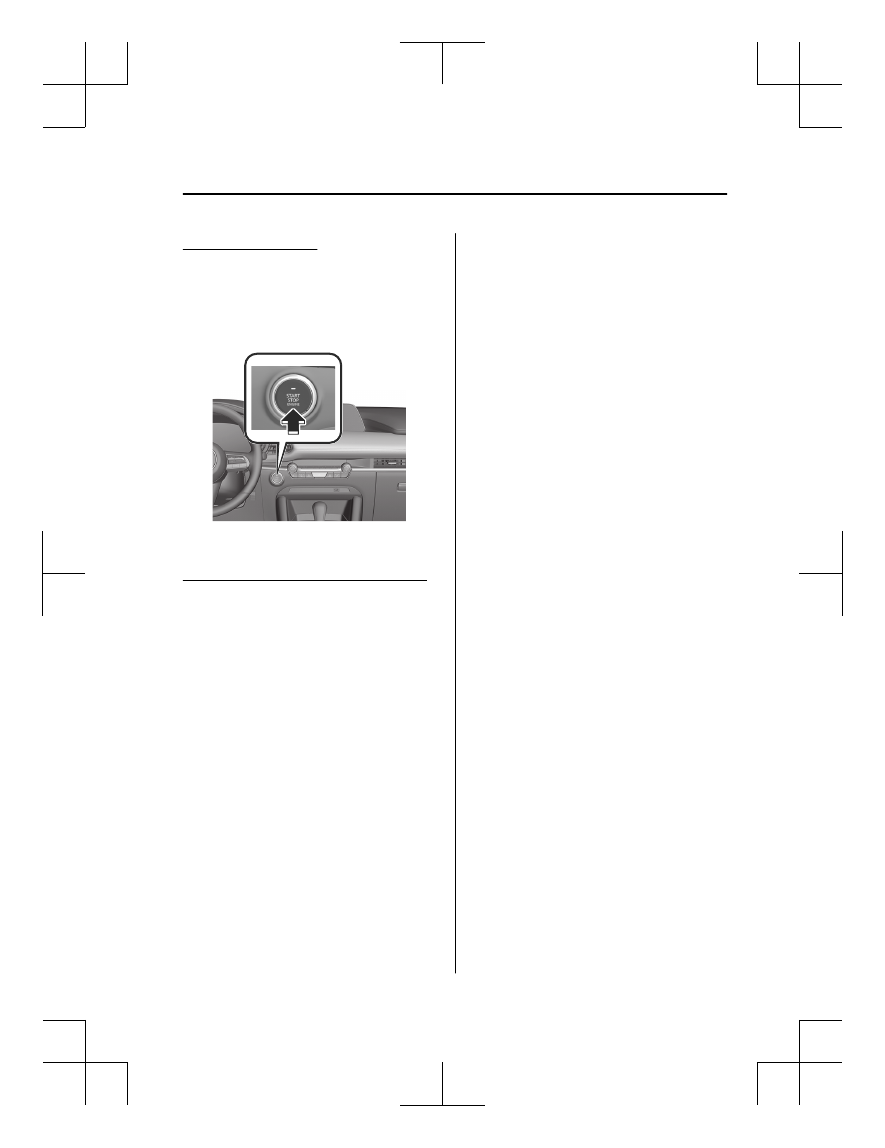
Switching the Vehicle power Position

Press the push button start without
depressing the clutch pedal (manual
transmission) or brake pedal
(automatic transmission).
Each time the push button start is
pressed, the vehicle power position is
switched in the order of ACC, ON, and
OFF.
When the vehicle power is switched to
ACC, the push button start indicator
light (amber) turns on.
When the vehicle power is switched
OFF and a door is opened/closed or
locked, the push button start indicator
light (amber) turns off.

NOTE

(Automatic transmission)

If you leave the vehicle power switched
to ACC while the selector lever is in
the P position, the vehicle power is
switched OFF in about 25 minutes.

Driving

Push Button Start

5-15

Mazda3_8LX5-EA-23E_Edition2_new

2023-4-17 20:22:43

M Hybrid (e-SKYACTIV

G)

M Hybrid is a system that improves
driving performance and fuel economy
by assisting the engine with the
Integrated Starter-Generator (ISG) and
charging with regenerative braking
according to the driving conditions of
the vehicle. Because the M Hybrid
Battery charges the vehicle while
driving, charging from outside of the
vehicle is not necessary.

Driving

M Hybrid

5-16

Mazda3_8LX5-EA-23E_Edition2_new

2023-4-17 20:22:43

Warning and Cautions for Using the M Hybrid

WARNING

Do not touch the high temperature or high current areas.

The following areas are high temperature and high current and may cause serious
burns and electrical shock if touched.

1. Integrated Starter-Generator (ISG)
2. DC-DC Converter
3. M Hybrid Battery

To reduce the risk of burns or electrical shock, always heed the following
precautions.

Never remove and disassemble the brackets and connectors securing the terminal
part, wiring harness, and the M Hybrid Battery.

Never touch the M Hybrid Battery because it becomes extremely hot under direct
sunlight or after driving.

Never touch the M Hybrid Battery when it is wet because it is especially
dangerous.

To ensure safe and correct handling of the M Hybrid Battery, always heed the
following.

Do not remove the M Hybrid Battery.

Do not resell, transfer, or modify the M Hybrid Battery.

Do not make secondary use of the M Hybrid Battery.

Driving

M Hybrid

5-17

Mazda3_8LX5-EA-23E_Edition2_new

2023-4-17 20:22:43

If the M Hybrid Battery is not handled properly, the following may occur which
could lead to serious injury or death.

Touching an unattended or illegally abandoned M Hybrid Battery may cause
electrocution.

If the M Hybrid Battery is used on a vehicle other than the one it came equipped
on (including modified vehicles), accidents such as electric shock, heat generation,
smoking, combustion, and explosions, or an electrolyte leakage may occur.

Appropriate disposal of the M Hybrid Battery.

If the M Hybrid Battery is not collected and disposed of appropriately, such as by
leaving it unattended or illegally abandoning, some other person may touch it which
could cause electrocution leading to serious injury.

Never touch the areas where high current is flowing.

Never touch an M Hybrid system related part. Otherwise, it could result in serious
injury such as burns and electrical shock.

Never touch electrical wiring that may be protruding into or outside of the cabin.

Otherwise, it could result in serious injury such as burns and electrical shock.

Never touch any area where electrolyte is visible or electrolyte is leaking from the
area.

If electrolyte from the M Hybrid Battery gets in the eyes or on the skin, it could cause
loss of vision or skin reactions. If electrolyte comes into contact with the eyes, do not
rub them, and after flushing with water for 15 minutes or longer, seek medical
attention immediately. In addition, if electrolyte comes into contact with the skin,
wash the areas with soap and water thoroughly. If you feel any abnormality in your
body, seek medical attention immediately.

Do not come near the vehicle if electrolyte is leaking from the M Hybrid Battery.

Even if the M Hybrid Battery is damaged, large quantities of electrolyte will not flow
out due to the internal structure of the M Hybrid Battery, however, in the unlikely
event that it does, it will produce steam. The steam contains properties that can
irritate the eyes and skin, and could cause acute poisoning if absorbed.

Never approach objects that are on fire or extremely hot.

Electrolyte in the M Hybrid Battery may cause a fire. If the vehicle catches fire,
extinguish the fire using a fire extinguisher (type ABC, BC, or C). Only extinguish a
fire with water when a large amount of water is available such as from a fire hydrant.
Using a small amount of water may cause the fire to spread.

Driving

M Hybrid

5-18

Mazda3_8LX5-EA-23E_Edition2_new

2023-4-17 20:22:43

CAUTION

If the driver's door is opened under the following conditions, the vehicle
determines that the driver is trying to leave the vehicle, a warning sound notifying
the driver of possible danger is activated, and the warning indication is displayed.

The engine is running.

The selector lever is in a position other than P or N.

If there is a problem with the M Hybrid system, a warning is displayed.

Driving

M Hybrid

5-19

Mazda3_8LX5-EA-23E_Edition2_new

2023-4-17 20:22:43

How to Use the M Hybrid

M Hybrid automatically switches
between engine assist by the
Integrated Starter-Generator (ISG) and
charging by regenerative braking
according to the driving conditions of
the vehicle.
The M Hybrid power generating status
is displayed on the system operation
status display of the fuel economy
monitor.
Refer to the Mazda Connect Owner's
Manual or consult an Authorized
Mazda Dealer.

NOTE

Drive the vehicle for about 30 minutes
once every 2 to 3 months because
self-discharge occurs gradually if the
vehicle is not driven for a long period
of time. If the M Hybrid Battery
discharges completely and the M
Hybrid system cannot be activated,
contact an Authorized Mazda Dealer.

Replacement and Disposal of M
Hybrid Battery

Technical knowledge and skill are
necessary in handling the M Hybrid
Battery. The M Hybrid Battery is
collected and recycled to prevent
accidents involving it. When scrapping
your vehicle, replacing the M Hybrid
Battery, or disposing of the M Hybrid
Battery, consult an Authorized Mazda
Dealer. Please cooperate in ensuring
that the vehicle's M Hybrid Battery is
collected and recycled.

M Hybrid Malfunction

If the vehicle receives an impact of a
certain level or greater in a collision,
the M Hybrid system stops. In this
case, the charging system warning light
turns on and the M Hybrid system may
not activate. Park the vehicle in a safe

place immediately and contact an
Authorized Mazda Dealer.

Driving

M Hybrid

5-20

Mazda3_8LX5-EA-23E_Edition2_new

2023-4-17 20:22:43

i-stop

*

i-stop is a function that automatically
stops and restarts the engine to
improve fuel economy, reduce exhaust
emissions, and idling noise.

How to Use the i-stop

Enabling Operation of the i-stop
Function

The i-stop function becomes
operational when all of the following
conditions are met.

After engine warm-up.

After starting the engine and driving
once.

All doors, liftgate, and hood are
closed.

The driver's seat belt is fastened.

The air conditioner is not operated

with the airflow mode in the 
position.

The temperature control dial of the
air conditioner is in a position other
than maximum heating or maximum
cooling (A/C ON) position.

(Automatic climate control system)

The vehicle's interior temperature
and the set temperature for the air
conditioner are nearly the same.

The ambient temperature is not too
low or too high.

The atmospheric pressure is not low
(when not driving at high altitudes).

The steering wheel is almost in the
straight-ahead position (the i-stop
function may not operate even with
the steering wheel in the
straight-ahead position if force is
applied to the steering wheel).

The vehicle is not on a steep slope.

The vehicle is not stopped suddenly.

The vehicle is not driven in sport
mode.

The selector lever is in the D or M
position (not in second gear fixed
mode).

The automatic transmission fluid has
warmed up sufficiently.

The automatic transmission fluid
temperature is not abnormally high.

Driving

i-stop

*Some models.

5-21

Mazda3_8LX5-EA-23E_Edition2_new

2023-4-17 20:22:43

The temperature and the state of
charge of the M Hybrid Battery are
good.

The Integrated Starter-Generator
(ISG) and regenerative braking are in
good condition.

Operating the i-stop Function

Mazda Radar Cruise Control with
Stop & Go function (MRCC with Stop
& Go function)/Cruising & Traffic
Support (CTS) is not in use

1. Decelerate the vehicle

When the vehicle speed decreases
to a certain speed or slower, the
i-stop function operates and the
i-stop indicator light (green) 
turns on.

2. Start driving the vehicle.

The engine restarts.

MRCC with Stop & Go function/CTS
is in use

1. When the vehicle speed decreases

to a certain speed or slower by the
MRCC with Stop & Go function/
CTS, the i-stop indicator light
(green) 

 turns on.

2. Start driving the vehicle or press the

RES switch on the steering switch.
The engine restarts.

NOTE

If the lead-acid battery terminals are
disconnected, the i-stop function may
not operate right after connecting the
lead-acid battery terminals. In
addition, if the lead-acid battery is
replaced, the i-stop functions require
checking. Consult an Authorized
Mazda Dealer.

Stopping the Operation of the i-stop
Function

The i-stop function stops and the
i-stop OFF switch indicator light turns
on.

NOTE

When the i-stop function is stopped
and the engine is stopped, the i-stop
function becomes operational again
the next time the engine is started.

Driving

i-stop

5-22

Mazda3_8LX5-EA-23E_Edition2_new

2023-4-17 20:22:43

Cylinder Deactivation

*

The cylinder deactivation is a function
designed to improve fuel economy by
deactivating 2 of the 4 cylinders while
driving.

How to Use the Cylinder

Deactivation

The cylinder deactivation function
automatically switches to 4 cylinders or
2 cylinders. The cylinder deactivation
function does not operate under the
following conditions.

(Manual transmission)

The selector lever is in the N/R
position.

(Automatic transmission)

The selector lever is in the P/N/R
position.

The gear is in 1st gear.

The engine oil temperature or engine
coolant temperature is low.

After disconnecting the battery
terminals for some reason, such as
for battery replacement.

Driving

Cylinder Deactivation

*Some models.

5-23

Mazda3_8LX5-EA-23E_Edition2_new

2023-4-17 20:22:43

Instrument Cluster

Tachometer
Multi-information Display
Engine Coolant Temperature Gauge
Fuel Gauge
Dashboard Illumination Switch
Speedometer
TRIP Switch

Speedometer

The speedometer indicates the speed
of the vehicle.

Driving

Instrument Cluster

5-24

Mazda3_8LX5-EA-23E_Edition2_new

2023-4-17 20:22:43

Tachometer

The tachometer shows engine speed in
thousands of revolutions per minute
(rpm).

CAUTION

Do not run the engine with the
tachometer needle in the RED ZONE.
This may cause severe engine damage.
 

1. STRIPED ZONE

*1

2. RED ZONE

*1

*

1

The range varies depending on the type of
gauge.

NOTE

When the tachometer needle enters
the STRIPED ZONE, this indicates to
the driver that the gears should be
shifted before entering the RED ZONE.

Driving

Instrument Cluster

5-25

Mazda3_8LX5-EA-23E_Edition2_new

2023-4-17 20:22:43

Multi-information Display

The screen display informs you of the vehicle information.
 

The multi-information display indicates the following information.

Speedometer

Odometer

Trip meter

Outside temperature

Maximum driving distance

Average fuel economy

Current fuel economy

Deceleration regeneration charge display (e-SKYACTIV G)

i-ACTIVSENSE display

Compass display

Door-ajar/trunk lid-open/liftgate-open/hood-open warning indication

*1

Message display

*

1

Displayed when opening door/trunk lid/liftgate/hood.

Driving

Instrument Cluster

5-26

Mazda3_8LX5-EA-23E_Edition2_new

2023-4-17 20:22:43

How to Use the Multi-information Display

The screen content changes each time the INFO switch is pressed.

1. Basic display
2. Drive information display
3. i-ACTIVSENSE display
4. Message display

*1

*

1

Displayed only when a warning occurs.

Driving

Instrument Cluster

5-27

Mazda3_8LX5-EA-23E_Edition2_new

2023-4-17 20:22:43

Convenient Ways to Use

the Multi-information

Display

The type of display for the fuel
economy and the maximum driving
distance can be changed.
Refer to the Settings section in the
Mazda Connect Owner's Manual.

Odometer/Trip Meter

Odometer

The odometer records the total
distance the vehicle has been driven.

Trip meter

The driving distance for a specified
interval is indicated. Two types (TRIP A,
TRIP B) of interval distance can be
measured.

Driving

Instrument Cluster

5-28

Mazda3_8LX5-EA-23E_Edition2_new

2023-4-17 20:22:43

How to Use the

Odometer/Trip Meter

 
The display changes each time the TRIP
switch is pressed.

1. Odometer display
2. Trip meter A display
3. Trip meter B display
 
When returning the trip meter to “0”,
press the TRIP switch for 2 seconds or
longer while the trip meter is
displayed.

NOTE

If the lead-acid battery is disconnected
for vehicle maintenance or other
reasons, the trip meter display returns
to “0”.

Engine Coolant

Temperature Gauge

Displays the engine coolant
temperature. The blue range of the
gauge indicates that the engine coolant
temperature is low, and the red range
of the gauge indicates that the engine
coolant temperature is high and
overheating.
 

CAUTION

If the engine coolant temperature
gauge needle is in the red range, there
is the possibility of overheating. Drive
slowly to reduce engine load.
Refer to Taking Action with
Overheating on page 8-21.

Driving

Instrument Cluster

5-29

Mazda3_8LX5-EA-23E_Edition2_new

2023-4-17 20:22:43

Fuel Gauge

The fuel gauge shows approximately
how much fuel is remaining in the tank
when the vehicle power is switched
ON.
When the fuel tank is full, F (Full) is
indicated, and as the level lowers the
needle approaches E (Empty).
 

NOTE

After refueling, it may require some
time for the indicator to stabilize. In
addition, the indicator may deviate
while driving on a slope or curve
since the fuel moves in the tank.

The direction of the arrow 
indicates that the fuel-filler lid is on
the left side of the vehicle.

Dashboard Illumination

(Without auto-light control)

When the lights are turned on with the
vehicle power switched ON, the
brightness of the dashboard
illumination is dimmed.

(With auto-light control)

When the lights are turned on with the
vehicle power switched ON, the
brightness of the dashboard
illumination is dimmed. However,
when the light sensor detects that the
surrounding area is bright such as
when the lights are turned on in the
daytime, the dashboard illumination
does not dim.

NOTE

(With auto-light control)

When the vehicle power is switched
ON in the early evening or at dusk, the
dashboard illumination is dimmed for
several seconds until the light sensor
detects the brightness of the
surrounding area, however, the
dimming may cancel after the
brightness is detected.

Driving

Instrument Cluster

5-30

Mazda3_8LX5-EA-23E_Edition2_new

2023-4-17 20:22:43

How to Use the

Dashboard Illumination

Brightening the dashboard
illumination

Dimming the dashboard illumination

If you press the - switch again while
the dashboard illumination is at
maximum dimness, a sound is
activated to notify you that the dimmer
setting is at maximum dimness.

Function for canceling illumination
dimmer

The illumination dimmer can be
canceled by pressing the + switch
while the instrument cluster is at
maximum dimness and while the
vehicle power is switched ON. If you
press the + switch again while the
illumination dimmer is canceled, a
sound is activated to notify you that it

is canceled. If the instrument cluster's
visibility is reduced due to glare from
surrounding brightness, cancel the
illumination dimmer.

Driving

Instrument Cluster

5-31

Mazda3_8LX5-EA-23E_Edition2_new

2023-4-17 20:22:43

Outside Temperature

Display

When the vehicle power is switched
ON, the outside temperature is
displayed.
 

NOTE

The outside temperature display may
differ from the actual outside
temperature depending on the
surroundings and vehicle conditions.

Maximum Driving

Distance Display

The maximum driving distance is
calculated and displayed based on the
current remaining fuel tank level and
the fuel economy. When the maximum
driving distance is 50 km (30 miles) or
farther, the maximum driving distance
indication decreases in 10 km (10
mile) increments, and when the
maximum driving distance is shorter
than 50 km (30 miles), it decreases in
1 km (1 mile) increments.

NOTE

The maximum driving distance is just
an approximate numerical value and
differs from the actual driving distance.
Drive the vehicle while checking the
fuel gauge.

Driving

Instrument Cluster

5-32

Mazda3_8LX5-EA-23E_Edition2_new

2023-4-17 20:22:43

Average Fuel Economy

Display

This mode displays the average fuel
economy by calculating the total
traveled distance and the total fuel
consumption since the vehicle was
purchased or the past data was reset.
The average fuel economy is calculated
and displayed every 30 seconds.

How to Use the Average

Fuel Economy Display

To reset the displayed average fuel
economy data, press the INFO switch
for 2 seconds or longer.

After resetting the data, - - - L/100 km
(- - - mpg) is displayed until the
average fuel economy is recalculated
and displayed.

Driving

Instrument Cluster

5-33

Mazda3_8LX5-EA-23E_Edition2_new

2023-4-17 20:22:43

Instantaneous Fuel

Economy Display

This displays the current fuel economy
by calculating the amount of fuel
consumption and the distance
traveled.
 

(e-SKYACTIV G)


(SKYACTIV-G)

NOTE

Displays the 0 position when the
vehicle speed decreases to a
constant speed or slower.

The arrow on the scale indicates the
average fuel economy.

Deceleration

Regeneration Charge

Display (e-SKYACTIV G)

This displays the status of the charging
produced by deceleration
regeneration.

Driving

Instrument Cluster

5-34

Mazda3_8LX5-EA-23E_Edition2_new

2023-4-17 20:22:43

i-ACTIVSENSE Display

*

Displays the system status.
 

Compass Display

The direction the vehicle is moving is
displayed in one of eight directions
while the vehicle is being driven.
 

Driving

Instrument Cluster

*Some models.

5-35

Mazda3_8LX5-EA-23E_Edition2_new

2023-4-17 20:22:43

Message Display

Displays a message to notify the user
of the system operation status and
malfunctions or abnormalities.
Follow the instructions indicated on
the display.
Refer to How to Use the
Multi-information Display on page
5-27.

Driving

Instrument Cluster

5-36

Mazda3_8LX5-EA-23E_Edition2_new

2023-4-17 20:22:43

Active Driving Display

*

The active driving display indicates vehicle information and navigation information.

1. Front Cross Traffic Alert (FCTA) warning display area
2. i-ACTIVSENSE information display area and warning guidance display area
3. Blind Spot Monitoring (BSM) warning display area
4. Vehicle speed display area and setting speed display area
5. Navigation information display area

NOTE

Wearing polarized sunglasses will reduce the visibility of the active driving display
due to the characteristics of the display.

If the lead-acid battery has been removed and re-installed or the lead-acid battery
voltage is low, the adjusted position may deviate.

The display may be difficult to view or temporarily affected by weather conditions
such as rain, snow, light, and temperature.

Driving

Active Driving Display

*Some models.

5-37

Mazda3_8LX5-EA-23E_Edition2_new

2023-4-17 20:22:43

Warnings and Cautions for Using the Active Driving

Display

WARNING

Always adjust the display brightness and position with the vehicle stopped.

Adjusting the display brightness and position while driving the vehicle is dangerous
as doing so could distract your attention from the road ahead and lead to an
accident.

CAUTION

Do not place beverages near the dust-proof sheet of the active driving display. If
water or other liquids are splashed on the dust-proof sheet, it could cause
damage.

Do not place objects or apply stickers to the dust-proof sheet as they will cause
interference.

1. Dust-proof sheet

Driving

Active Driving Display

5-38

Mazda3_8LX5-EA-23E_Edition2_new

2023-4-17 20:22:43

Convenient Ways to Use

the Active Driving

Display

The active driving display settings can
be changed or adjusted.
Refer to the Settings section in the
Mazda Connect Owner's Manual.

NOTE

The desired driving position (display
position, brightness level, display
information) can be called up after
programming the position.
Refer to How to Use the Driving
Position Memory on page 3-37.

Driving

Active Driving Display

5-39

Mazda3_8LX5-EA-23E_Edition2_new

2023-4-17 20:22:43

Warning and Cautions for

Using the Shift Lever

WARNING

Do not use sudden engine braking on
slippery road surfaces or at high
speeds.

Shifting down while driving on wet,
snowy, or frozen roads, or while
driving at high speeds causes sudden
engine braking, which is dangerous.
The sudden change in tire speed could
cause the tires to skid. This could lead
to loss of vehicle control and an
accident.

Always leave the shift lever in 1 or R
position and set the parking brake
when leaving the vehicle unattended.

Otherwise the vehicle could move and
cause an accident.

CAUTION

Keep your foot off the clutch pedal
except when shifting gears. Also, do
not use the clutch to hold the vehicle
on an upgrade. Riding the clutch will
cause needless clutch wear and
damage.

Do not apply any excessive lateral
force to the shift lever when
changing from 5th to 4th gear. This
could lead to the accidental
selection of 2nd gear, which could
result in damage to the transmission.

Make sure the vehicle comes to a
complete stop before shifting to R.
Shifting to R while the vehicle is still
moving may damage the
transmission.

How to Use the Shift

Lever (Manual

transmission)

Operating the Shift Lever

1. Depress the clutch pedal.
2.

(Position other than R)

Operate the shift lever.

1. Neutral position

(R position)

Operate the shift lever while
pushing it down.

3. Release the clutch pedal.

The Gear Shift Indicator (GSI) is
displayed in the instrument cluster.
Refer to Gear Shift Indicator (GSI)
on page 5-54.

Recommendations for Shifting

Upshifting

For normal acceleration, Mazda
recommends these shift points:

Driving

Shift Lever

5-40

Mazda3_8LX5-EA-23E_Edition2_new

2023-4-17 20:22:43

(U.S.A. and Canada)

Gear

Vehicle speed

1 to 2

24 km/h (15 mph)

2 to 3

42 km/h (26 mph)

3 to 4

60 km/h (37 mph)

4 to 5

75 km/h (46 mph)

5 to 6

79 km/h (49 mph)

For cruising, Mazda recommends these
shift points:

(U.S.A. and Canada)

Gear

Vehicle speed

1 to 2

13 km/h (8 mph)

2 to 3

29 km/h (18 mph)

3 to 4

49 km/h (30 mph)

4 to 5

63 km/h (39 mph)

5 to 6

70 km/h (43 mph)

Downshifting

When you must slow down in heavy
traffic or on a steep upgrade,
downshift before the engine starts to
overwork. This reduces the chance of
stalling and gives better acceleration
when you need more speed. On a
steep downgrade, downshifting helps
maintain safe speed and prolongs
brake life.

Driving

Shift Lever

5-41

Mazda3_8LX5-EA-23E_Edition2_new

2023-4-17 20:22:43

Warning and Cautions for

Using the Selector Lever

WARNING

Always apply the parking brake when
the selector lever is in the P position.

When parking the vehicle, only shifting
the selector lever to the P position is
dangerous as the vehicle may move
unexpectedly and result in an accident.

Do not move the selector lever from
the N or P position while the engine
speed is high.

Otherwise, the vehicle will move
suddenly which could lead to an
unexpected accident.

When operating the selector lever,
shift the selector lever with the brake
pedal firmly depressed and the
vehicle completely stopped.

Operating the selector lever while the
vehicle is moving could lead to an
unexpected accident.

Do not shift the selector lever with the
accelerator pedal depressed when the
selector lever is in the P or N position.

Always operate the selector lever with
the brake pedal depressed when the
selector lever is in the P or N position.
Otherwise, the vehicle will suddenly
accelerate which could lead to an
accident.

Do not shift the selector lever to the N
position while driving.

Otherwise, it could result in the loss of
the engine braking power and cause
an accident.

Do not depress the accelerator pedal
unnecessarily while the vehicle is
stopped.

If the accelerator pedal is mistakenly
depressed when the selector lever is in
a position other than the P or N
position, the vehicle could suddenly
accelerate resulting in an accident.

After stopping the vehicle, check the
shift position indication in the
instrument cluster before
re-accelerating.

If the vehicle were to move
unexpectedly, it could lead to an
accident.

Do not allow the vehicle to move in
reverse on an upslope while the
selector lever is in forward drive, or
move forward on a downslope while
the selector lever is in reverse drive.

Otherwise, the engine could stop,
making the steering wheel difficult to
control, which could result in an
accident.

CAUTION

When visually checking at the rear of
the vehicle while reversing the
vehicle, your body twists around to
the rear. Be careful and make sure
that the brake pedal can be firmly
depressed.

Completely stop the vehicle before
shifting the selector lever to the P
position. If the selector lever is
shifted to P position before the
vehicle is completely stopped,
unnecessary force will be applied to
the transmission which could cause
damage.

Driving

Selector Lever

5-42

Mazda3_8LX5-EA-23E_Edition2_new

2023-4-17 20:22:43

On roads with high driving resistance
such as deep-snowy or sandy roads,
or on steep slopes, a high load is
applied to the transmission, causing
excessive heat generation. Under
these driving conditions, pay
attention to the following points.

Stop and hold the vehicle on a
steep slope with the brake pedal,
not the accelerator pedal. Do not
use the accelerator pedal to
prevent the vehicle from rolling.

Avoid using the accelerator pedal
and the brake pedal at the same
time.

Start driving the vehicle in the D or
R position according to the
direction of travel (avoid starting in
manual mode).

If you do not follow the above
precautions, the transmission may
overheat. If a message, such as
transmission cooling, is displayed, it
is necessary to temporarily stop the
vehicle to cool the transmission.

Driving

Selector Lever

5-43

Mazda3_8LX5-EA-23E_Edition2_new

2023-4-17 20:22:43

How to Use the Selector Lever (Automatic

Transmission)

Operating the Selector Lever

1. Start the engine.
2. Operate the selector lever.

Selector lever operation

Operation condition

Shift from P position to R position

Depress the brake pedal and press the selector lever but-
ton to operate.

Shift from R position to N position

Shift the lever without pressing the selector lever button.

Shift from N position to D position

Shift from D position to M position

Shift from M position to D position

Shift from D position to N position

Shift from N position to R position

Press the selector lever button to shift the lever.

Shift from R position to P position

The shift indicator turns on at the same position as the shift position displayed in
the instrument cluster.

1. Selector lever button
2. Shift indicator

Driving

Selector Lever

5-44

Mazda3_8LX5-EA-23E_Edition2_new

2023-4-17 20:22:43

The shift position is displayed in the instrument cluster.

Shift position restrictions

If the selector lever is shifted from the N position to the R or D position under the
following conditions while the selector lever is in the N position and the vehicle is
stopped, the parking brake is operated while the shift position remains in the N
position.

The brake pedal is not depressed.

The accelerator pedal is depressed.

Release the accelerator pedal and depress the brake pedal. The shift position
changes from the N position to the R or D position.

Using Manual Shift Mode

Shift the selector lever from the D to the M position.

The gear position can be switched manually in manual shift mode.
The manual shift mode indication and the gear position are displayed in the
instrument cluster.

Driving

Selector Lever

5-45

Mazda3_8LX5-EA-23E_Edition2_new

2023-4-17 20:22:43

Shifting up

Shifting down

NOTE

If the automatic transmission fluid (ATF) temperature becomes too high, the mode
will not switch to manual shift mode. In addition, if the ATF temperature becomes
too high while in manual shift mode, the mode may be canceled. If the mode is
switched to manual shift mode again, it is necessary to operate the steering shift
switches.

When fully depressing the accelerator pedal even while in manual mode, the
transmission kicks down, but it does not kick down while the Traction Control
System (TCS)/Dynamic Stability Control (DSC) is turned off. However, if the
vehicle is continuously driven at a high rpm, the gears may automatically shift up
to protect the engine.

Driving

Selector Lever

5-46

Mazda3_8LX5-EA-23E_Edition2_new

2023-4-17 20:22:43


Content      ..     3      4      5      6     ..