Mazda 3 (2024 year). Manual in english - page 4
 

  Index      Manuals     Mazda 3 (2024 year). Manual in english


Search            copyright infringement  


Content      ..     2      3      4      5     ..


Mazda 3 (2024 year). Manual in english - page 4


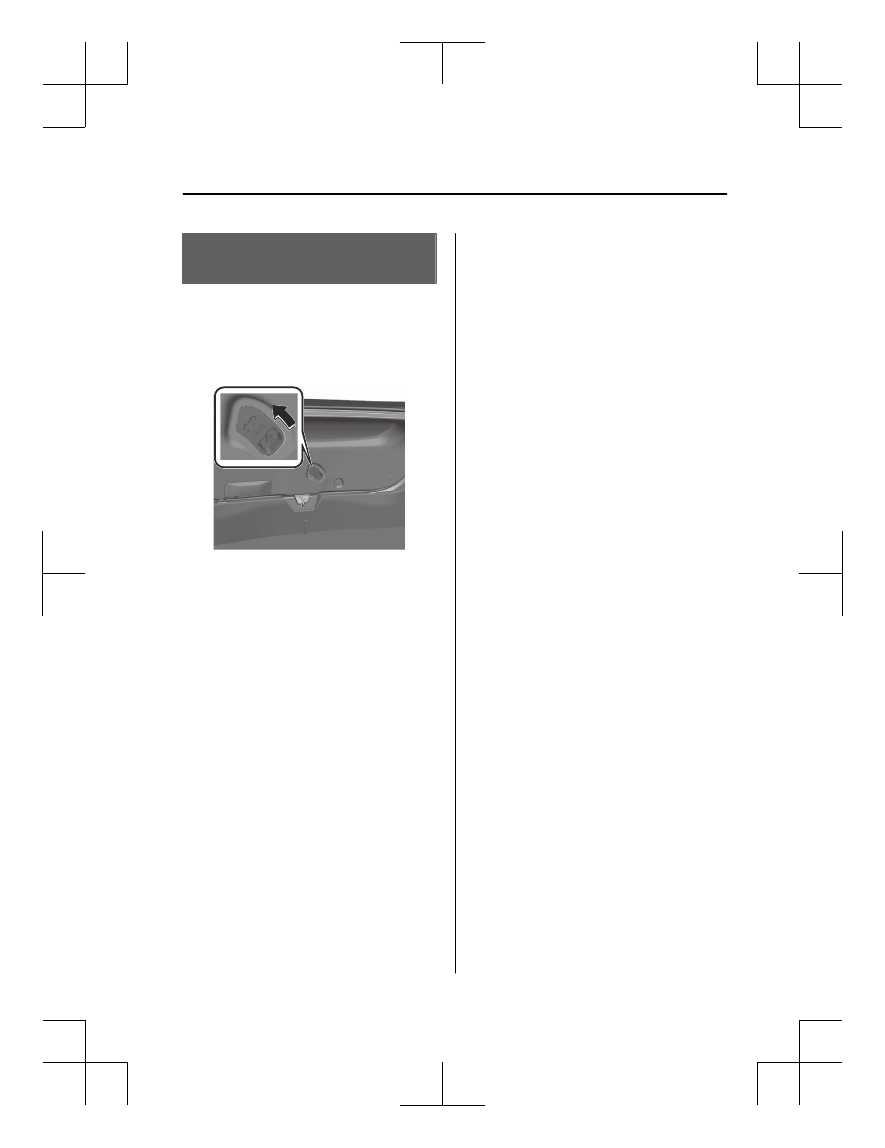
How to Use the Inside

Trunk Release Lever

The inside trunk release lever is located
on the inside of the trunk lid.
The lever is made of material that will
glow for hours in the darkness of the
trunk following a brief exposure to
ambient light.
1.

Opening/closing

Inside Trunk Release Lever (4-door)

4-21

Mazda3_8LX5-EA-23E_Edition2_new

2023-4-17 20:22:43

Warnings and Cautions

for Using the Hood

WARNING

Always check that the hood is closed
and securely locked

A hood that is not closed and securely
locked is dangerous as it could fly open
while the vehicle is moving and block
the driver's vision which could result in
a serious accident.

CAUTION

When closing the hood, do not push
it excessively such as by applying
your weight. Otherwise, the hood
could be deformed.

Be careful not to pinch your hand
when closing the hood. It may result
in an injury if your hand is caught.

When inspecting the engine
compartment, do not misplace any
tools or cloth. Misplacing any tools
or cloth may result in engine
damage, cause a fire, or cause an
unexpected accident.

How to Use the Hood

Opening the Hood

1. With the vehicle parked, pull the

release handle to unlock the hood.
 

2. Insert your hand into the hood

opening, slide the latch lever in the
direction of the arrow as shown in
the illustration, and lift up the
hood.
 

3. Grasp the support rod in the

padded area and secure it in the
support rod hole indicated by the
arrow to hold the hood open.
 

Opening/closing

Hood

4-22

Mazda3_8LX5-EA-23E_Edition2_new

2023-4-17 20:22:43

Closing the Hood

1. Check under the hood area to

make certain all filler caps are in
place and all loose items (e.g.
tools, oil containers, etc.) have
been removed.

2. Lift the hood, grasp the padded

area on the support rod, and secure
the support rod in the clip. Verify
that the support rod is secured in
the clip before closing the hood.
 

3. Lower the hood slowly to a height

of about 20 cm (7.9 in) above its
closed position and then let it drop.

Opening/closing

Hood

4-23

Mazda3_8LX5-EA-23E_Edition2_new

2023-4-17 20:22:43

Power Windows

The power window has two functions.

Auto-opening/Closing Function

The windows can be fully opened and
closed without having to continue
operating the power window switch.

Jam-Safe Function

If a foreign object is detected between
the window and the window frame
while the window is closing, the
window stops closing and opens
slightly.

NOTE

The power windows cannot be
opened from the outside of the
vehicle if the power window
initialization has not been
completed.
Refer to Initializing the Power
Window on page 8-34.

(A window cannot be closed)

If the jam-safe function has operated
and the window cannot be closed,
check around the window frame for
a foreign object.
If there is no foreign object around
the window frame, forcibly close a
window using the following
procedure.
1. After switching the vehicle power

OFF, wait for 45 seconds or
longer.

2. Switch the vehicle power ON.
3. Operate the switch in the

direction to close the window
until the jam-safe function
operates and the window stops.
Repeat this operation a total of 5
times.

4. Continue pulling up the switch to

fully close the window.

Warnings and Cautions

for Using the Power

Windows

WARNING

When closing the windows, be careful
that a passenger’s hand or head does
not get pinched.

Be especially careful with children. If a
hand or head becomes pinched, it
could cause serious injury.

Do not let a child operate the power
window switches.

If a hand or head becomes pinched, it
could cause serious injury.

Keep the power window lock switch
in the lock position when carrying a
child.

If the child operates the power
window switch incorrectly and a hand
or head becomes pinched, it could
cause serious injury.

Make sure that there is nothing
blocking the window just before it
closes completely or while the power
window switch is being pulled.

The jam-safe function may not be able
to prevent the window from closing
completely. If a finger gets pinched, it
could cause serious injury.

Do not let a child put a hand or head
out of the window.

Be careful not to let a child put a hand
or head out of the window while
driving the vehicle. If the child's hand
or head hits something outside the
vehicle or sudden braking is applied, it
could result in serious injury or death.

Opening/closing

Windows

4-24

Mazda3_8LX5-EA-23E_Edition2_new

2023-4-17 20:22:43

How to Use the Power

Windows

Opening/Closing the Windows

1. Switch the vehicle power ON.
2. Operate the power window switch.

To fully open the window
automatically, press the power
window switch all the way down
and then release it.
To fully close the window
automatically, pull the power
window switch all the way up and
then release it.

Driver's Seat

Front passenger/rear passenger seat

1. Close
2. Open
3. Front passenger's window
4. Right rear window
5. Left rear window
6. Driver's window

Locking the Front Passenger/Rear Seat
Windows

Switch the power window lock switch
on the driver's door to the lock
position.
The driver’s switch can be operated,
however, the front passenger/rear
passenger switches are no longer
operable.
The passenger windows may be
opened or closed using the master
control switches on the driver's door.
Press the power window lock switch
again to the unlock position to cancel
it.

1. Power window lock switch
2. Lock position
3. Unlock position

Opening/closing

Windows

4-25

Mazda3_8LX5-EA-23E_Edition2_new

2023-4-17 20:22:43

Convenient Ways to Use

the Power Windows

Operation Function After Vehicle
power is Switched OFF

All the windows can be opened and
closed for approximately 40 seconds
after the vehicle power is switched to
ACC or OFF with all doors closed. If
any door is opened, the power
window will stop operating.

Remote Power Window Operation

All power windows can be opened
from outside the vehicle after the
doors are closed.
The power windows can be operated
remotely when the power window lock
button on the driver's door is in the
lock or unlocked position.
Remote power window operation is
activated under the following
conditions.

All the doors and liftgate/trunk lid
are closed.

The vehicle power is switched OFF.

NOTE

The power windows cannot be
opened from the outside of the vehicle
if the power window initialization has
not been completed.

Opening

The windows can be opened for
ventilating the cabin before getting in
the vehicle.
Press the unlock button on the key
quickly and briefly 3 times and then
immediately afterwards, press and

hold the unlock button to open the
windows.

To stop the windows from opening,
release the button. If the operation is
performed from the beginning again,
the windows open.

Opening/closing

Windows

4-26

Mazda3_8LX5-EA-23E_Edition2_new

2023-4-17 20:22:43

Moonroof

*

The moonroof can be opened or
closed when operating the overhead
tilt/slide switch at the front seats.

1. Tilt/slide switch

Jam-safe function

If foreign matter caught between the
moonroof and the window frame is
detected while it is closing
automatically, the moonroof stops and
opens partway.

NOTE

Before leaving the vehicle or washing
your Mazda, make sure the
moonroof is completely closed so
that water does not get inside the
cabin area.

After washing your Mazda or after it
rains, wipe the water off the
moonroof before operating it to
avoid water penetration which could
cause rust and water damage to your
headliner.

The jam-safe function may operate
under the following conditions.

A strong impact is detected while
the moonroof is closing
automatically.

The moonroof is closing
automatically during very low
temperatures.

In the event the jam-safe function
activates and the moonroof cannot
be closed automatically, press the
tilt/slide switch and the moonroof
will close.

When the jam-safe function is
inoperable, the moonroof initial
setting is not performed.
Refer to Initializing the moonroof on
page 8-35.

Opening/closing

Moonroof

*Some models.

4-27

Mazda3_8LX5-EA-23E_Edition2_new

2023-4-17 20:22:43

Warnings and Cautions

for Using the Moonroof

WARNING

Do not let passengers stand up or
extend part of the body through the
open moonroof while the vehicle is
moving.

Extending the head, arms, or other
parts of the body through the
moonroof is dangerous. The head or
arms could hit something while the
vehicle is moving. This could cause
serious injury or death.

Never allow children to play with the
tilt/slide switch.

The tilt/slide switch would allow
children to operate the moonroof
unintentionally, which could result in
serious injury if a child's hands, head
or neck becomes caught by the
moonroof.

Make sure the opening is clear before
closing the moonroof.

A closing moonroof is dangerous. The
hands, head, or even neck of a person,
especially a child, could be caught in it
as it closes, causing serious injury or
even death.

Make sure nothing blocks the
moonroof just before it reaches the
fully closed position.

Blocking the moonroof just before it
reaches the closed position is
dangerous.
In this case, the jam-safe function
cannot prevent the moonroof from
closing. If fingers are caught, serious
injuries could occur.

CAUTION

Do not sit on or put heavy items on
the area where the moonroof opens
and closes. Otherwise, the
moonroof could be damaged.

Do not open or close the moonroof
forcefully during freezing
temperatures or snowfall. Otherwise,
the moonroof could be damaged.

The sunshade does not tilt. To avoid
damaging the sunshade, do not push
it up.

Do not close the sunshade while the
moonroof is opening. Trying to force
the sunshade closed could damage
it.

Opening/closing

Moonroof

4-28

Mazda3_8LX5-EA-23E_Edition2_new

2023-4-17 20:22:43

How to Use the

Moonroof

Operating the Sunshade

The sunshade can be opened and
closed by hand.
The sunshade opens at the same time
as the moonroof slides open, but it
must be closed by hand.

Tilt Operation

The rear of the moonroof can be tilted
open to provide more ventilation.
When the moonroof is already slid
open and you want to tilt it open, first
close the moonroof and then do a tilt
operation.
1. Switch the vehicle power ON.
2. Press the tilt/slide switch.

The rear side of the front glass
panel of the moonroof opens
upwards.

3. Press the tilt/slide switch forward.

The moonroof closes.

To stop it partway, press the tilt/slide
switch.

Slide Operation

When the moonroof is already tilted
open and you want to slide it open,
first close the moonroof and then do a
slide operation.
1. Switch the vehicle power ON.
2. Press the tilt/slide switch rearward.

The moonroof opens.

3. Press the tilt/slide switch forward.

The moonroof closes.

To stop it partway, press the tilt/slide
switch.

Opening/closing

Moonroof

4-29

Mazda3_8LX5-EA-23E_Edition2_new

2023-4-17 20:22:43

Security System

Mazda cannot guarantee the
immobilizer and the theft-deterrent
system's operation if the system has
been modified or if any add-on
equipment has been installed.

Warnings and Cautions

for Using the Security

System

CAUTION

To avoid damage to the vehicle, do not
modify the system or install any add-on
equipment to the immobilizer and the
theft-deterrent systems or the vehicle.

Opening/closing

Security System

4-30

Mazda3_8LX5-EA-23E_Edition2_new

2023-4-17 20:22:43

Immobilizer System

The immobilizer system allows the
engine to start only with a key the
system recognizes.

NOTE

The keys carry a unique electronic
code. For this reason, and to assure
your safety, obtaining a replacement
key requires security validation, this
will add some delays in supplying a
replacement key. They are only
available through an Authorized
Mazda Dealer.

Always keep a spare key in case one
is lost. If a key is lost, consult an
Authorized Mazda Dealer as soon as
possible.

If you lose a key, an Authorized
Mazda Dealer will reset the
electronic codes of your remaining
keys and immobilizer system. Bring
all the remaining keys to an
Authorized Mazda Dealer to reset.

Warnings and Cautions

for Using the Immobilizer

System

CAUTION

Radio equipment like this is
governed by laws in the United
States.
Changes or modifications not
expressly approved by the party
responsible for compliance could
void the user's authority to operate
the equipment.

To avoid damage to the key, do not:

Drop the key.

Get the key wet.

Expose the key to any kind of
magnetic field.

Expose the key to high
temperatures on places such as the
dashboard, under direct sunlight.

If the engine does not start with the
correct key, and the security indicator
light keeps illuminating or flashing,
the system may have a malfunction.
Consult an Authorized Mazda
Dealer.

Opening/closing

Security System

4-31

Mazda3_8LX5-EA-23E_Edition2_new

2023-4-17 20:22:43

How to Use the

Immobilizer System

NOTE

The engine may not start and security
indicator light may illuminate or flash
if the key is placed in an area where
it is difficult for the system to detect
the signal, such as on the dashboard
or in the glove compartment. Move
the key to a location within the signal
range, switch the vehicle power off,
and then restart the engine.

Signals from a TV or radio station, or
from a transceiver or mobile
telephone could interfere with your
immobilizer system. If you are using
the proper key and the engine fails to
start, check the security indicator
light.

Arming

The system is armed when the vehicle
power is switched from ON to off.

The security indicator light 

 in the

instrument cluster flashes every 2
seconds until the system is disarmed.

Disarming

The system is disarmed when the
vehicle power is switched ON with the
correct programmed key. The security

indicator light 

 illuminates for

about 3 seconds and then turns off.
If the engine does not start with the
correct key, and the security indicator
light remains illuminated or flashing,
try the following:
Make sure the key is within the
operational range for signal
transmission. Switch the vehicle power
off, and then restart the engine. If the
engine does not start after 3 or more

tries, contact an Authorized Mazda
Dealer.

Opening/closing

Security System

4-32

Mazda3_8LX5-EA-23E_Edition2_new

2023-4-17 20:22:43

Theft-Deterrent System

*

If the theft-deterrent system detects an
inappropriate entry into the vehicle,
which could result in the vehicle or its
contents being stolen, the alarm alerts
the surrounding area of an abnormality
by sounding the horn and flashing the
hazard warning lights.
 
The system will not function unless it's
properly armed. So when you leave the
vehicle, follow the arming procedure
correctly.

How to Use the

Theft-Deterrent System

How to Arm the System

1. Close the windows and the

moonroof

*

 securely.

2. Switch the vehicle power OFF.
3. Make sure the hood, the doors,

and the liftgate/trunk lid are
closed.

4. Press the lock button on the

transmitter. The hazard warning
lights will flash once.
The following method will also arm
the theft-deterrent system:
Press the door-lock switch   while
any door is open and then close all
of the doors.
(

With the advanced keyless

function)

Touch the sensing area of the door
lock touch sensor.

The security indicator light 

 in

the instrument cluster flashes twice
per second for 20 seconds.

5. After 20 seconds, the system is fully

armed.

NOTE

The theft-deterrent system can also
be armed by activating the auto
relock function with all the doors,
the liftgate/trunk lid and the hood
closed.
Refer to Transmitter on page 4-5.

The system will disarm if one of the
following operations takes place
within 20 seconds after pressing the
lock button:

Unlocking any door.

Opening any door.

Opening the hood.

Switching the vehicle power ON.

Opening/closing

Security System

*Some models.

4-33

Mazda3_8LX5-EA-23E_Edition2_new

2023-4-17 20:22:43

To rearm the system, do the arming
procedure again.

When the doors are locked by
pressing the lock button on the
transmitter while the theft-deterrent
system is armed, the hazard warning
lights will flash once to indicate that
the system is armed.

Operation

Horn triggering conditions

The horn sounds intermittently and the
hazard warning lights flash for about
30 seconds when the system is
triggered by any one of the following:

Unlocking a door with the auxiliary
key, door lock switch, or an inside
door-lock knob.

Forcing open a door, the hood or the
liftgate/trunk lid.

Opening the hood by operating the
hood release handle.

Switching the vehicle power ON
without using the push button start.

If the system is triggered again, the
lights and horn will activate until the
driver's door or the liftgate/trunk lid is
unlocked with the transmitter.

(With the advanced keyless function)

The lights and horn can also be
deactivated by touching the sensing
area of the door release touch sensor.

NOTE

The liftgate/trunk lid does not open
while the theft-deterrent system is
operating.

If the lead-acid battery goes dead
while the theft-deterrent system is
armed, the horn will activate and the
hazard warning lights will flash when
the lead-acid battery is charged or
replaced.

To Stop the Alarm

A triggered alarm can be turned off
using any one of the following
methods:

Pressing the unlock button or the
trunk button (4–door) on the
transmitter.

Starting the engine with the push
button start.

(With the advanced keyless
function)

Touching the sensing area of the
door release touch sensor.

Pressing the electric liftgate/trunk
lid opener while the key is being
carried.

The hazard warning lights will flash
twice.

To Turn Off an Armed System

An armed system can be turned off
using any one of the following
methods:

Pressing the unlock button on the
transmitter.

Starting the engine with the push
button start.

(With the advanced keyless
function)

Touching the sensing area of the
door release touch sensor.

The hazard warning lights will flash
twice.

NOTE

When the doors are unlocked by
pressing the unlock button on the
transmitter while the theft-deterrent
system is turned off, the hazard
warning lights will flash twice to
indicate that the system is turned off.

Opening/closing

Security System

4-34

Mazda3_8LX5-EA-23E_Edition2_new

2023-4-17 20:22:43

Rear Seat Alert

*

The Rear Seat Alert is a system that
reminds the driver to check if any
occupants or luggage have been left
behind on the rear seats.
The Rear Seat Alert determines if there
is the possibility that occupants or
luggage are on rear based on the
opening and closing history of the rear
doors. For this reason, the system may
operate differently from the actual
conditions, such as it is not activated
even if occupants or luggage are
occupying a rear seat.

Warnings and Cautions

for Using the Rear Seat

Alert

WARNING

Do not rely completely on the system.

The Rear Seat Alert is not a system that
detects occupants and luggage using
sensors. Over reliance on the system
could lead to an accident.
When leaving the vehicle, always
visually check the conditions of the
rear seats.

Opening/closing

Rear Seat Alert

*Some models.

4-35

Mazda3_8LX5-EA-23E_Edition2_new

2023-4-17 20:22:43

How to Use the Rear Seat

Alert

If any of the following operations is
performed, a message appears in the
instrument cluster to notify that the
system is active. Make sure that a
message appears. The message
disappears after a short period of time.
When the Rear Seat Alert is not
needed, temporarily deactivate the
system according to the message.

A rear door is opened and the
engine is started.

The engine is started within about 10
minutes after a rear door is opened
and closed.

A rear door is opened after the
engine is started.

The vehicle power is switched ON
while the system is active.

If the vehicle power is switched OFF
while the system is active, a message in
the instrument cluster and a warning
sound indicate the possibility of
occupants or luggage on a rear seat.
The message disappears after a short
period of time.
If the driver's door is opened/closed
after the message in the instrument
cluster disappears, notification is made
again.
 
When deactivating the system, perform
any of the following operations.

Switch the vehicle power to ACC or
OFF and open a rear door.

Switch the vehicle power ON again
and open a rear door before starting
the engine.

Open a rear door and switch the
vehicle power to ACC or OFF.

Temporarily deactivate the system
according to the message in the
instrument cluster.

NOTE

The Rear Seat Alert determines if there
is the possibility that occupants or
luggage are on a rear seat based on the
opening and closing history of the rear
doors. For this reason, depending on
the usage, it may not be activated even
if occupants or luggage are on the rear
seats, or it may activate even if no
occupants or luggage are on the rear
seats. The system will continue to be
active until it is canceled.

Examples of when the system does
not activate even if occupants or
luggage are on the rear seats.

A rear door is opened and closed in
a very short period of time.

Remote engine starting via
Connected Service is used

*

.

The lead-acid battery charge is low.

The lead-acid battery connection
was disconnected/connected.

Examples of when the system
activates even if no occupants or
luggage are on the rear seats.

A rear door is opened and closed,
but no occupant or luggage is in the
vehicle.

Occupants and luggage are
unloaded while the engine is
running.

A rear door is opened and closed in
a very short period of time.

Temporarily Deactivating the Rear
Seat Alert

When the instrument cluster displays a
message concerning the Rear Seat
Alert, the driver can temporarily
deactivate the system.

Opening/closing

Rear Seat Alert

4-36

*Some models.

Mazda3_8LX5-EA-23E_Edition2_new

2023-4-17 20:22:43

Operate according to the message
displayed in the instrument cluster.
When the message "Press and Hold
INFO Switch to Deactivate Rear Seat
Alert" is displayed in the instrument
cluster, press and hold the INFO switch
for 2 seconds or longer.
When the system is temporarily
deactivated, a chime sounds and a
message to notify that the operation
was completed appears in the
instrument cluster. The message
disappears after a short period of time.

NOTE

When the vehicle power is switched
OFF, the temporary deactivation is
canceled.

Turning the Rear Seat Alert Off

The Rear Seat Alert can be set to off
using Mazda Connect.
Refer to Mazda Connect Owner's
Manual or consult an Authorized
Mazda Dealer.

NOTE

Under the following conditions, the

warning light 

 turns on 2 times to

indicate the system has been stopped
when the vehicle power is switched
ON, and then turns off after a short
period of time.

The Rear Seat Alert is turned off.

The Rear Seat Alert is temporarily
deactivated.

Remote engine starting via
Connected Service is used

*

.

The lead-acid battery charge is low.

Opening/closing

Rear Seat Alert

*Some models.

4-37

Mazda3_8LX5-EA-23E_Edition2_new

2023-4-17 20:22:43

MEMO

4-38

Mazda3_8LX5-EA-23E_Edition2_new

2023-4-17 20:22:43

5

Driving

Mirrors.................................... 5-8

Mirrors..................................5-8
Warnings and Cautions for Using
the Mirrors............................ 5-8
How to Use the Outside
Mirrors..................................5-9
Convenient Ways to Use the
Outside Mirrors................... 5-10
Warnings and Cautions for the
Rearview Mirror...................5-11
How to Use the Rearview
Mirror................................. 5-11
Convenient Ways to Use the
Rearview Mirror...................5-12

Push Button Start.................... 5-13

Push Button Start................. 5-13
Warning and Cautions for Using
the Push Button Start............5-13
How to Use the Push Button
Start....................................5-14

M Hybrid............................... 5-16

M Hybrid (e-SKYACTIV G) ...........
.......................................... 5-16
Warning and Cautions for Using
the M Hybrid.......................5-17
How to Use the M Hybrid.....5-20

i-stop.................................... 5-21

i-stop

*

.................................5-21

How to Use the i-stop.......... 5-21

Cylinder Deactivation.............. 5-23

Cylinder Deactivation

*

..........5-23

How to Use the Cylinder
Deactivation........................5-23

Instrument Cluster.................. 5-24

Instrument Cluster............... 5-24
Speedometer.......................5-24
Tachometer......................... 5-25
Multi-information Display.... 5-26
How to Use the Multi-
information Display............. 5-27
Convenient Ways to Use the
Multi-information Display.... 5-28
Odometer/Trip Meter..........5-28
How to Use the Odometer/Trip
Meter................................. 5-29
Engine Coolant Temperature
Gauge.................................5-29
Fuel Gauge.......................... 5-30
Dashboard Illumination........5-30
How to Use the Dashboard
Illumination.........................5-31
Outside Temperature
Display................................5-32
Maximum Driving Distance
Display................................5-32
Average Fuel Economy
Display................................5-33
How to Use the Average Fuel
Economy Display................. 5-33
Instantaneous Fuel Economy
Display................................5-34
Deceleration Regeneration
Charge Display (e-SKYACTIV
G).......................................5-34
i-ACTIVSENSE Display

*

......... 5-35

Compass Display................. 5-35

*Some models.

5-1

Mazda3_8LX5-EA-23E_Edition2_new

2023-4-17 20:22:43

Message Display.................. 5-36

Active Driving Display............. 5-37

Active Driving Display

*

......... 5-37

Warnings and Cautions for Using
the Active Driving Display.....5-38
Convenient Ways to Use the
Active Driving Display.......... 5-39

Shift Lever.............................. 5-40

Warning and Cautions for Using
the Shift Lever......................5-40
How to Use the Shift Lever
(Manual transmission)..........5-40

Selector Lever......................... 5-42

Warning and Cautions for Using
the Selector Lever................ 5-42
How to Use the Selector Lever
(Automatic Transmission)..... 5-44

Steering Shift Switches............. 5-49

Warnings and Cautions for Using
the Steering Shift Switches ...........
.......................................... 5-49
How to Use the Steering Shift
Switches

*

.............................5-50

Gear Shift Indicator (GSI)......... 5-54

Gear Shift Indicator (GSI)

*

.... 5-54

Warning and Cautions for Using
the Gear Shift Indicator
(GSI)...................................5-54

Foot Brake..............................5-55

Warning and Cautions for Using
the Foot Brake..................... 5-55

Electric Parking Brake (EPB)...... 5-56

Electric Parking Brake (EPB) ..........
.......................................... 5-56
Warning and Cautions for Using
the Electric Parking Brake
(EPB).................................. 5-56
How to Use the Electric Parking
Brake (EPB)..........................5-57
Convenient Ways to Use the
Electric Parking Brake (EPB) ..........
.......................................... 5-59

Brake Override System.............5-61

Brake Override System......... 5-61
Warning and Cautions for Using
the Brake Override System ...........
.......................................... 5-61
How to Use the Brake Override
System................................ 5-62

AUTOHOLD........................... 5-63

AUTOHOLD........................ 5-63
Warning and Cautions for Using
the AUTOHOLD.................. 5-63
How to Use the
AUTOHOLD........................ 5-64

Hill Launch Assist (HLA)........... 5-66

Hill Launch Assist (HLA)........5-66
Warning and Cautions for Using
the Hill Launch Assist
(HLA)..................................5-66

Light Switch............................5-67

Light Switch......................... 5-67
Warnings and Cautions for Using
the Light Switch................... 5-67
How to Use the Light
Switch.................................5-68

5-2

*Some models.

Mazda3_8LX5-EA-23E_Edition2_new

2023-4-17 20:22:43

Convenient Ways to Use the Light
Switch.................................5-70

Turn Signal Lever.....................5-72

How to Use the Turn Signal
Lever...................................5-72

Windshield Wiper/Washer
Switch................................... 5-73

Windshield Wiper/Washer
Switch.................................5-73
Warning and Cautions for Using
the Windshield Wiper/Washer
Switch.................................5-73
How to Use the Windshield
Wiper/Washer Switch.......... 5-74
How to Use the Rear Wiper/
Washer Switch

*

.................... 5-76

Rear Window Defogger
Switch................................... 5-78

Rear Window Defogger
Switch.................................5-78
Warnings and Cautions for Using
the Rear Window Defogger
Switch.................................5-78
How to Use the Rear Window
Defogger Switch.................. 5-79
Mirror Defogger

*

..................5-79

How to Use the Mirror
Defogger.............................5-80
Windshield Wiper De-icer

*

..........

.......................................... 5-80
How to Use the Windshield
Wiper De-icer......................5-81

Hazard Warning Lights.............5-82

Hazard Warning Lights......... 5-82

How to Use the Hazard Warning
Lights.................................. 5-82

Horn..................................... 5-83

How to Use the Horn........... 5-83

Antilock Brake System (ABS)..... 5-84

Antilock Brake System
(ABS).................................. 5-84
Warning and Cautions for Using
the Antilock Brake System
(ABS).................................. 5-84

Traction Control System (TCS) ..........
............................................ 5-85

Traction Control System
(TCS).................................. 5-85
Warning and Cautions for Using
the Traction Control System
(TCS).................................. 5-85
How to Use the Traction Control
System (TCS)....................... 5-86

Dynamic Stability Control
(DSC).................................... 5-87

Dynamic Stability Control
(DSC)................................. 5-87
Warning and Cautions for Using
the Dynamic Stability Control
(DSC)................................. 5-87
How to Use the Dynamic Stability
Control (DSC)..................... 5-88

Drive Selection....................... 5-89

Drive Selection (Automatic
Transmission).......................5-89
Warning and Cautions for Using
the Drive Selection...............5-89

*Some models.

5-3

Mazda3_8LX5-EA-23E_Edition2_new

2023-4-17 20:22:43

How to Use the Drive
Selection.............................5-90

i-ACTIV AWD......................... 5-91

i-ACTIV AWD...................... 5-91
Warnings and Cautions for Using
the i-ACTIV AWD................ 5-91

Power Steering....................... 5-92

Power Steering.....................5-92

Tire Pressure Monitoring System
(TPMS).................................. 5-93

Tire Pressure Monitoring System
(TPMS)................................5-93
Warning and Cautions for Using
the Tire Pressure Monitoring
System (TPMS).....................5-93
How to Use the Tire Pressure
Monitoring System (TPMS) ..........
.......................................... 5-95

Refueling............................... 5-97

Warnings and Cautions for When
the Refueling....................... 5-97
Refueling.............................5-98
Fuel Requirements............. 5-100
Warnings and Cautions for Using
the Fuel Requirements....... 5-101
Emission Control System.... 5-101
Warnings and Cautions for Using
the Emission Control
System.............................. 5-102
Warnings and Cautions for Engine
Exhaust (Carbon
monoxide)........................ 5-102

i-ACTIVSENSE....................... 5-104

i-ACTIVSENSE....................5-104

Warnings and Cautions for Using
the i-ACTIVSENSE.............. 5-104
Active Safety Technology.... 5-105
Pre-crash Safety
Technology........................5-106
i-ACTIVSENSE Status Symbol
(Warning/Risk Avoidance
Support System)................ 5-106
How to Use the i-ACTIVSENSE
mute switch

*

..................... 5-107

Forward Sensing Camera
(FSC)................................... 5-108

Forward Sensing Camera
(FSC)

*

............................... 5-108

Radar Sensors.......................5-112

Radar Sensors

*

...................5-112

Ultrasonic Sensors.................5-116

Ultrasonic Sensors

*

............ 5-116

Cameras.............................. 5-118

Cameras

*

.......................... 5-118

Driver Monitoring Camera..... 5-120

Driver Monitoring Camera

*

..........

........................................ 5-120

Adaptive Front Lighting System
(AFS)................................... 5-121

Adaptive Front Lighting System
(AFS)

*

................................5-121

How to Use the High Adaptive
Front Lighting System (AFS) ..........
........................................ 5-121

5-4

*Some models.

Mazda3_8LX5-EA-23E_Edition2_new

2023-4-17 20:22:43

High Beam Control System
(HBC).................................. 5-122

High Beam Control System
(HBC)

*

.............................. 5-122

Warnings and Cautions for Using
the High Beam Control System
(HBC)............................... 5-123
How to Use the High Beam
Control System (HBC)........ 5-124

Lane Departure Warning System
(LDWS)................................ 5-125

Lane Departure Warning System
(LDWS)

*

............................ 5-125

Warnings and Cautions for Using
the Lane Departure Warning
System (LDWS)..................5-125
How to Use the Lane Departure
Warning System (LDWS).....5-126

Blind Spot Monitoring (BSM).. 5-127

Blind Spot Monitoring (BSM)

*

......

........................................ 5-127
Warnings and Cautions for Using
the Blind Spot Monitoring
(BSM)............................... 5-127
How to Use the Blind Spot
Monitoring (BSM)..............5-128

Traffic Sign Recognition System
(TSR)................................... 5-130

Traffic Sign Recognition System
(TSR)

*

................................5-130

Warnings and Cautions for Using
the Traffic Sign Recognition
System (TSR)..................... 5-130
How to Use the Traffic Sign
Recognition System (TSR)... 5-131

Convenient Ways to Use the
Traffic Sign Recognition
System (TSR)..................... 5-132

Distance & Speed Alert (DSA) ..........
.......................................... 5-133

Distance & Speed Alert (DSA)

*

.....

........................................ 5-133
Warnings and Cautions for Using
the Distance & Speed Alert
(DSA)............................... 5-133
How to Use the Distance &
Speed Alert (DSA)............. 5-134

Driver Attention Alert (DAA)...5-135

Driver Attention Alert (DAA)

*

.......

........................................ 5-135
Warnings and Cautions for Using
the Driver Attention Alert
(DAA)............................... 5-135
How to Use the Driver Attention
Alert (DAA)....................... 5-136

Driver Monitoring (DM).........5-137

Driver Monitoring (DM)

*

.... 5-137

Warnings and Cautions for Using
the Driver Monitoring
(DM)................................ 5-138
How to Use the Driver
Monitoring (DM)...............5-138

Front Cross Traffic Alert (FCTA) .........
.......................................... 5-141

Front Cross Traffic Alert
(FCTA)

*

............................. 5-141

Warnings and Cautions for Using
the Front Cross Traffic
Alert (FCTA)...................... 5-141

*Some models.

5-5

Mazda3_8LX5-EA-23E_Edition2_new

2023-4-17 20:22:43

How to Use the Front Cross Traffic
Alert (FCTA)...................... 5-142

Rear Cross Traffic Alert (RCTA) .........
.......................................... 5-144

Rear Cross Traffic Alert (RCTA)

*

....

........................................ 5-144
Warnings and Cautions for Using
the Rear Cross Traffic Alert
(RCTA).............................. 5-144
How to Use the Rear Cross Traffic
Alert (RCTA)......................5-145

Mazda Radar Cruise Control
(MRCC)............................... 5-146

Mazda Radar Cruise Control
(MRCC)

*

........................... 5-146

Warnings and Cautions for Using
the Mazda Radar Cruise Control
(MRCC)............................ 5-146
How to Use the Mazda Radar
Cruise Control (MRCC)......5-148

Cruising & Traffic Support
(CTS)................................... 5-156

Cruising & Traffic Support
(CTS)

*

............................... 5-156

Warnings and Cautions for Using
Cruising & Traffic Support
(CTS)................................ 5-156
How to Use the Cruising & Traffic
Support (CTS)................... 5-158

Lane-keep Assist System (LAS)..........
.......................................... 5-169

Lane-keep Assist System (LAS)

*

.....

........................................ 5-169

Warnings and Cautions for Using
the Lane-keep Assist System
(LAS).................................5-169
How to Use the Lane-keep Assist
System (LAS)..................... 5-170

Smart Brake Support (SBS)..... 5-172

Smart Brake Support (SBS)

*

..........

........................................ 5-172
Warnings and Cautions for Using
the Smart Brake Support
(SBS).................................5-173
How to Use the Smart Brake
Support (SBS).................... 5-174

360° View Monitor...............5-178

360° View Monitor

*

...........5-178

Warnings and Cautions for Using
the 360° View Monitor...... 5-181
How to Use the 360° View
Monitor............................ 5-183
Convenient Ways to Use the 360°
View Monitor.................... 5-191

Secondary Collision
Reduction............................ 5-192

Secondary Collision
Reduction

*

........................ 5-192

Warnings and Cautions for Using
the Secondary Collision
Reduction......................... 5-192
How to Use the Secondary
Collision Reduction........... 5-193

Cruise Control......................5-194

Cruise Control

*

..................5-194

Warnings and Cautions for Using
the Cruise Control............. 5-194

5-6

*Some models.

Mazda3_8LX5-EA-23E_Edition2_new

2023-4-17 20:22:43

How to Use the Cruise
Control............................. 5-195

Rear View Monitor................5-198

Rear View Monitor

*

........... 5-198

Warnings and Cautions for Using
the Rear View Monitor....... 5-199
How to Use the Rear View
Monitor............................ 5-200

Parking Sensor......................5-203

Parking Sensor

*

.................. 5-203

Warnings and Cautions for Using
the Parking Sensor............. 5-203
How to Use the Parking
Sensor...............................5-204

Winter Driving......................5-209

Winter Driving................... 5-209
Snow Tires........................ 5-210
Tire Chains........................ 5-211

Turbocharger........................ 5-212

Turbocharger (SKYACTIV-G
2.5T).................................5-212
Warnings and Cautions for Using
the Turbocharger............... 5-212
How to Use the
Turbocharger..................... 5-213

*Some models.

5-7

Mazda3_8LX5-EA-23E_Edition2_new

2023-4-17 20:22:43

Mirrors

Before driving, adjust the inside and
outside mirrors.

Warnings and Cautions

for Using the Mirrors

WARNING

Be sure to look over your shoulder
before changing lanes.

Changing lanes without taking into
account the actual distance of a vehicle
in the convex mirror is dangerous. You
could have a serious accident. What
you see in the convex mirror is closer
than it appears.

Always return the outside mirrors to
the driving position before you start
driving.

Driving with the outside mirrors folded
in is dangerous. Your rear view will be
restricted, which could lead to an
unexpected accident.

Do not adjust the outside mirrors
while driving the vehicle.

Adjusting the outside mirrors while
driving the vehicle is dangerous as
doing so could distract your attention
from the road ahead and lead to an
accident.

Driving

Mirrors

5-8

Mazda3_8LX5-EA-23E_Edition2_new

2023-4-17 20:22:43

How to Use the Outside

Mirrors

Folding in and out the outside mirrors

Fold the outside mirror rearward until
it is flush with the vehicle.

Adjusting the Outside Mirror Angle

1. Switch the vehicle power ACC or

ON.

2. Press the select button on the side

of the outside mirror to be
adjusted.
The indicator light turns on.

3. Press the adjustment switch to

adjust the angle of the outside
mirror.

4. Press the select button on the side

of the outside mirror that has been
adjusted.
The indicator light turns off.

Driving

Mirrors

5-9

Mazda3_8LX5-EA-23E_Edition2_new

2023-4-17 20:22:43

Convenient Ways to Use

the Outside Mirrors

Driving Position Memory

*

The angle of the outside mirrors can be
programmed to the Driving Position
Memory.
Refer to Driving Position Memory on
page 3-37.

Operation function after engine is
stopped

The angle of the outside mirrors can be
adjusted and they can be folded in and
out for about 40 seconds after the
vehicle power is switched from ON to
OFF.

Auto tilt-down outside mirror
function for reversing

*

The outside mirrors can be set to tilt
downwards automatically when
reversing the vehicle. When the vehicle
is finished reversing, the outside
mirrors return to their original angle.
1. Press the select switch on the side

of the door mirror to be tilted
down.
Turn on the indicator light of the
select switch.

2. Shift the shift lever/selector lever to

the R position.
The outside mirror on the side
where you pressed the select switch
will tilt downward.

NOTE

When any of the following condition is
met, the outer mirrors return to their
normal positions.

The vehicle power is switched to a
position other than ON.

The shift lever/selector lever is
shifted to a position other than R.

The select switch is pressed again.

Automatic glare prevention function

*

In conjunction with the glare
prevention function of the auto-type
rearview mirror, only the driver's side
outside mirror reduces the light from
the headlights of on-coming vehicles.

Driving

Mirrors

5-10

*Some models.

Mazda3_8LX5-EA-23E_Edition2_new

2023-4-17 20:22:43

Warnings and Cautions

for the Rearview Mirror

WARNING

Do not stack luggage higher than the
seatback.

Loading luggage higher than the
seatback is dangerous. The rearview
mirror visibility may be obstructed,
which may result in a collision with
another vehicle when changing lanes.

How to Use the Rearview

Mirror

Move and adjust the rearview mirror
body.

Driving

Mirrors

5-11

Mazda3_8LX5-EA-23E_Edition2_new

2023-4-17 20:22:43

Convenient Ways to Use

the Rearview Mirror

Glare prevention function

Prevents glare from the headlights of
rear on-coming vehicles.

Manual type

Push the day/night lever forward for
day driving. Pull it back to reduce glare
of headlights from vehicles at the rear.

Automatic type

Automatically operates when the
vehicle power is switched ON and the
shift lever/selector lever is in a position
other than R.

Driving

Mirrors

5-12

Mazda3_8LX5-EA-23E_Edition2_new

2023-4-17 20:22:43

Push Button Start

Press the push button start to start/
stop the engine or to switch the vehicle
power position (OFF/ACC/ON).

Vehicle power position

OFF

All electrical accessories cannot be
used.

ACC

Some electrical accessories such as
audio can be used.

ON

All electrical accessories can be used.

Warning and Cautions for

Using the Push Button

Start

WARNING

Before leaving the driver's seat,
always switch the vehicle power off,
set the parking brake, and make sure
the selector lever is in the P position.

Leaving the driver's seat without
switching the vehicle power off, setting
the parking brake, and shifting the
selector lever to the P position is
dangerous. Unexpected vehicle
movement could occur which could
result in an accident. In addition, if
your intention is to leave the vehicle for
even a short period, it is important to
switch the vehicle power position to
OFF, as leaving it in another position
will disable some of the vehicle's
security systems and run the lead-acid
battery down.

Radio waves from the key may affect
medical devices such as pacemakers.

Before using the key near people who
use medical devices, ask the medical
device manufacturer or your physician
if radio waves from the key will affect
the device.

Other than for an emergency
situation, do not attempt to stop the
engine while driving the vehicle.

If the engine is stopped while driving
the vehicle, loss of brake power and
power steering functions could occur,
making it difficult to control the vehicle
which could result in an accident.

Driving

Push Button Start

5-13

Mazda3_8LX5-EA-23E_Edition2_new

2023-4-17 20:22:43

CAUTION

If the KEY warning light (red) 

 is

displayed, or the push button start
indicator light (amber) flashes, this
could indicate a problem with the
engine starting system. This may
prevent the engine from starting or
from switching the vehicle power
position to ACC or ON. Have your
vehicle inspected at an Authorized
Mazda Dealer as soon as possible.
Refer to KEY Warning Light (Red) on
page 8-48.

Before leaving the vehicle, make sure
that the vehicle power is switched
OFF.

How to Use the Push

Button Start

The push button start starts/stops the
engine and switches the vehicle power
position depending on the vehicle
status and the driver's operation.

Starting the Engine

1. Make sure that the parking brake is

applied.

2.

(Automatic transmission)

Make sure that the selector lever is
in the P position.

3. Depress the clutch pedal (manual

transmission) or brake pedal
(automatic transmission).
The push button start indicator light
(green) and the KEY indicator light
(green) 

 in the instrument

cluster turn on.

4.

The engine starts and the KEY
indicator light (green) 

 in the

instrument cluster turns off.

NOTE

Do not use high engine speeds until
reaching the operating temperature.

Driving

Push Button Start

5-14

Mazda3_8LX5-EA-23E_Edition2_new

2023-4-17 20:22:43


Content      ..     2      3      4      5     ..