Mazda 3 (2024 year). Manual in english - page 7
 

  Index      Manuals     Mazda 3 (2024 year). Manual in english


Search            copyright infringement  


Content      ..     5      6      7      8     ..


Mazda 3 (2024 year). Manual in english - page 7


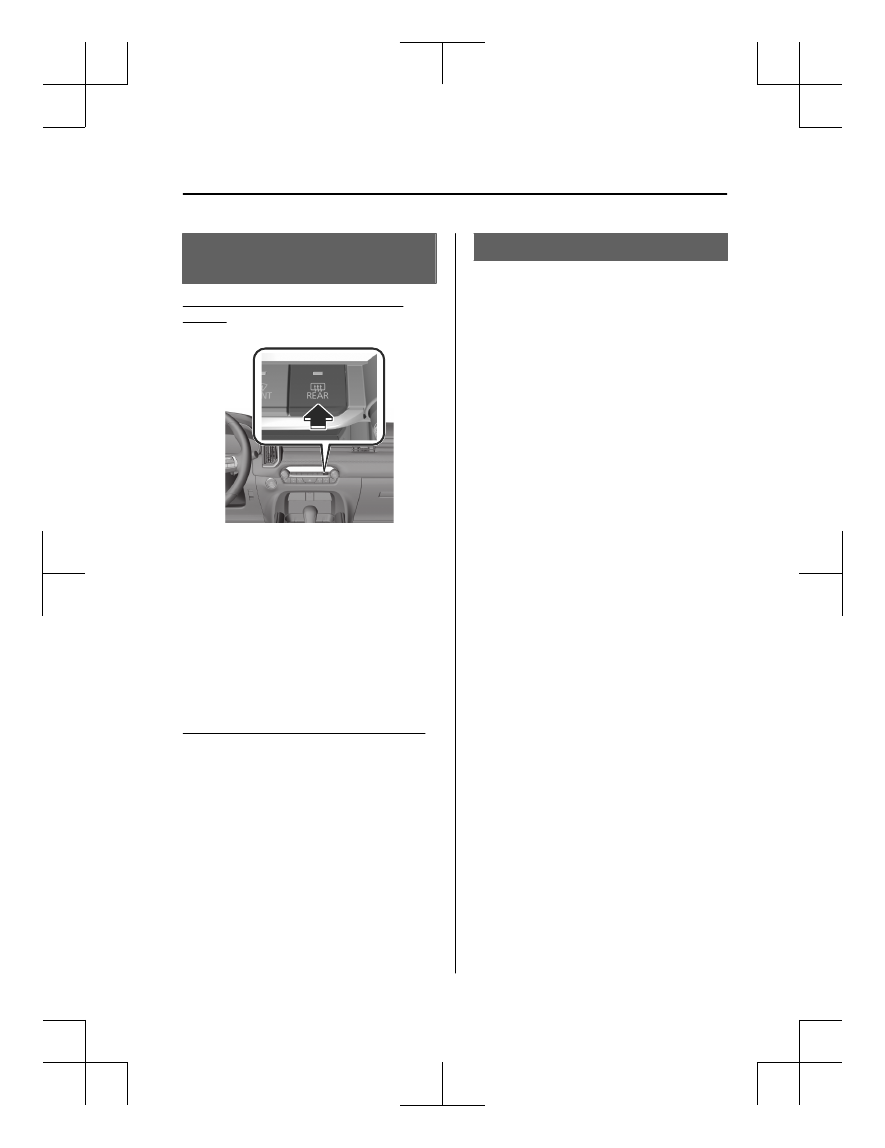
How to Use the Rear

Window Defogger Switch

Using the Rear Window Defogger
Switch

1. Start the engine.
2.

The rear window defogger operates
and the switch indicator light turns on.
The rear window defogger stops
automatically after it operates for
about 15 minutes.

NOTE

The rear window defogger operation
time can be changed.
Refer to the Mazda Connect Owner's
Manual or consult an Authorized
Mazda Dealer.

Stopping the Rear Window Defogger

Press the rear window defogger switch
while the rear window defogger is
operating.
The rear window defogger stops and
the switch indicator light turns off.

Mirror Defogger

*

The mirrors are heated using heat
filaments to remove fog.

Driving

Rear Window Defogger Switch

*Some models.

5-79

Mazda3_8LX5-EA-23E_Edition2_new

2023-4-17 20:22:43

How to Use the Mirror

Defogger

The mirror defoggers operate in
conjunction with the rear window
defogger.
For the operation method, refer to
How to Use the Rear Window
Defogger on page 5-79.

Windshield Wiper

De-icer

*

A part of the windshield is heated
using heat filaments to melt the ice on
the glass and wipers.

Driving

Rear Window Defogger Switch

5-80

*Some models.

Mazda3_8LX5-EA-23E_Edition2_new

2023-4-17 20:22:43

How to Use the

Windshield Wiper

De-icer

The windshield wiper de-icers operate
in conjunction with the rear window
defogger.
For the operation method, refer to
How to Use the Rear Window
Defogger on page 5-79.

Driving

Rear Window Defogger Switch

5-81

Mazda3_8LX5-EA-23E_Edition2_new

2023-4-17 20:22:43

Hazard Warning Lights

The hazard warning light switch is used
when it is necessary to park the vehicle
on a roadside due to a vehicle
breakdown or other emergency.

How to Use the Hazard

Warning Lights

All the turn signal lights flash and the

turn signal light 

 in the

instrument cluster flashes.
Press the switch again to turn off the
lights.

Driving

Hazard Warning Lights

5-82

Mazda3_8LX5-EA-23E_Edition2_new

2023-4-17 20:22:43

How to Use the Horn

Press the area around the 

 mark

on the steering wheel.
The horn sounds while it is pressed.

Driving

Horn

5-83

Mazda3_8LX5-EA-23E_Edition2_new

2023-4-17 20:22:43

Antilock Brake System

(ABS)

The ABS prevents the wheels from
locking, caused by braking on slippery
roads, and maintains driving
directional stability and ensures
steerability.

NOTE

When depressing the brake pedal,
slight vibration might be felt from the
pedal. This vibration is a normal
occurrence when the ABS operates.

ABS does not operate at low speeds
(about 10 km/h (6.2 mph) or
slower).

Warning and Cautions for

Using the Antilock Brake

System (ABS)

WARNING

Do not rely on the ABS as a substitute
for safe driving.

The ABS cannot compensate for unsafe
and reckless driving, excessive speed,
tailgating (following another vehicle
too closely), driving on ice and snow,
and hydroplaning (reduced tire friction
and road contact because of water on
the road surface). You can still have an
accident.

CAUTION

Always use tires of the specified size
and type for the front and rear wheels.
If a tire other than the specified size or
type is installed, the ABS system may
not operate normally.

Driving

Antilock Brake System (ABS)

5-84

Mazda3_8LX5-EA-23E_Edition2_new

2023-4-17 20:22:43

Traction Control System

(TCS)

The TCS prevents drive-wheel spinning
which occurs during acceleration from
a stop or acceleration during cornering
on slippery roads, such as wet or
snow-covered roads, and assures
optimum drive force and steerability.

Warning and Cautions for

Using the Traction

Control System (TCS)

WARNING

Do not rely on the Traction Control
System (TCS) as a substitute for safe
driving.

The Traction Control System (TCS)
cannot compensate for unsafe and
reckless driving, excessive speed,
tailgating (following another vehicle
too closely), and hydroplaning
(reduced tire friction and road contact
because of water on the road surface).
You can still have an accident.

Use snow tires or tire chains and drive
at reduced speeds when roads are
covered with ice and/or snow.

Driving without proper traction devices
on snow and/or ice-covered roads is
dangerous. The Traction Control
System (TCS) alone cannot provide
adequate traction and you could still
have an accident.

Driving

Traction Control System (TCS)

5-85

Mazda3_8LX5-EA-23E_Edition2_new

2023-4-17 20:22:43

How to Use the Traction

Control System (TCS)

Switch the vehicle power ON.
The TCS is operable.
When the TCS operates, the TCS/DSC

operation indicator light 

 flashes.

Driving

Traction Control System (TCS)

5-86

Mazda3_8LX5-EA-23E_Edition2_new

2023-4-17 20:22:43

Dynamic Stability Control

(DSC)

The DSC automatically controls
braking and engine power output in
conjunction with systems such as the
ABS and TCS to help control side slip
when driving on slippery surfaces, or
during sudden or evasive steering,
which enhances vehicle stability.
Also refer to Antilock Brake System
(ABS) 5-84, Traction Control System
(TCS) 5-85.

Warning and Cautions for

Using the Dynamic

Stability Control (DSC)

WARNING

Do not rely on the Dynamic Stability
Control as a substitute for safe
driving.

The Dynamic Stability Control (DSC)
cannot compensate for unsafe and
reckless driving, excessive speed,
tailgating (following another vehicle
too closely), and hydroplaning
(reduced tire friction and road contact
because of water on the road surface).
You can still have an accident.

CAUTION

Heed the following cautions so that
the DSC can operate normally.

Always use tires of the specified
size, same manufacturer, brand,
and pattern (tread pattern) for the
front and rear wheels.

Do not use tires with sizes other
than the specified size, different
type, and significantly different
wear patterns on the same vehicle.

When using tires where the tire
diameter is changed due to the
installation of tire chains, or when
installing an emergency spare tire,
the DSC may not operate normally.

Driving

Dynamic Stability Control (DSC)

5-87

Mazda3_8LX5-EA-23E_Edition2_new

2023-4-17 20:22:43

How to Use the Dynamic

Stability Control (DSC)

Drive the vehicle at a speed of about
20 km/h (13 mph) or faster.
The DSC is operable.
When the DSC operates, the TCS/DSC

operation indicator light 

 flashes.

Stopping the Traction Control System
(TCS)/DSC Operation

The TCS/DSC operation is canceled

and the DSC OFF indicator light   in
the instrument cluster and the DSC
OFF switch indicator light turn on.
Press the DSC OFF switch again to
enable the TCS/DSC operation.

NOTE

If the engine is stopped while the
TCS/DSC operation is canceled, the
TCS/DSC becomes operational
when the engine is started the next
time.

When the TCS/DSC is on and you
attempt to free the vehicle from
being stuck, the TCS/DSC will
activate. Depressing the accelerator
will not increase engine power and
freeing the vehicle from being stuck
might be difficult. When this
happens, turn off the TCS/DSC.

If the TCS/DSC is canceled and the
following systems are operated, the
TCS/DSC becomes operational.

Smart Brake Support (SBS)

Mazda Radar Cruise Control
(MRCC)

Cruising & Traffic Support (CTS)

If the DSC OFF switch is pressed and
held for 10 seconds or longer, the
TCS/DSC operation can no longer
be turned off even if the DSC OFF
switch is pressed. In this case, the
DSC OFF switch will operate
normally when the vehicle power is
switched ON again after being
switched OFF.

Driving

Dynamic Stability Control (DSC)

5-88

Mazda3_8LX5-EA-23E_Edition2_new

2023-4-17 20:22:43

Drive Selection

(Automatic Transmission)

Drive selection is a system which
switches the vehicle’s drive mode to
SPORT mode. When SPORT mode is
selected, the vehicle response is
enhanced when the accelerator pedal
is depressed, resulting in powerful
acceleration.

Warning and Cautions for

Using the Drive Selection

CAUTION

Do not use the SPORT mode when
driving on slippery roads such as wet
or snow-covered roads. It may cause
tire slipping.

Driving

Drive Selection

5-89

Mazda3_8LX5-EA-23E_Edition2_new

2023-4-17 20:22:43

How to Use the Drive

Selection

1.

When the sport mode is selected,
the select mode indicator light

 turns on in the

instrument cluster.

2.

When SPORT mode is canceled,
the select mode indicator light

 in the instrument

cluster turns off.

NOTE

Depending on driving conditions
when selecting SPORT mode, the
vehicle may perform shift-down or
accelerate slightly.

When SPORT mode is selected,
driving the vehicle at higher engine
speeds increases and fuel economy
may worsen. Canceling SPORT mode
during normal driving is
recommended.

SPORT mode cannot be switched in
the following cases. If the mode
cannot be switched to SPORT mode,
the select mode indicator light

 flashes.

The Antilock Brake System (ABS) is
operating.

The Traction Control System (TCS)
is operating.

The Dynamic Stability Control
(DSC) is operating.

The steering wheel is being
operated abruptly.

Mazda Radar Cruise Control
(MRCC) is operating.

SPORT mode is canceled in the
following cases.

The vehicle power is switched off.

Mazda Radar Cruise Control
(MRCC) is set.

Driving

Drive Selection

5-90

Mazda3_8LX5-EA-23E_Edition2_new

2023-4-17 20:22:43

i-ACTIV AWD

AWD demonstrates superior driving
performance on slippery surfaces such
as snow-covered roads, sandy areas,
mud, and steep slopes.

Warnings and Cautions

for Using the i-ACTIV

AWD

WARNING

Do not rotate wheels that have left
the ground due to the vehicle being
stuck or in a ditch.

The drive component can be seriously
damaged, resulting in an accident. It
can also lead to overheating, oil
leakage, and fire.

CAUTION

This vehicle is not designed for
off-road and rally driving. Do not
drive over rough rocky roads and
river beds.

Unevenly worn tires, mismatched
manufacturers, models, or brands
can be different in size even if the
printed size on the tire is the same.
AWD functionality may be limited or
potential damage to the AWD
system may occur with tires of
different sizes.

Driving

i-ACTIV AWD

5-91

Mazda3_8LX5-EA-23E_Edition2_new

2023-4-17 20:22:43

Power Steering

The power steering operates while the
engine is operating.
Even when the engine is stopped or
the power steering system does not
operate, steering is possible but the
operation may feel heavier compared
to normal.

Driving

Power Steering

5-92

Mazda3_8LX5-EA-23E_Edition2_new

2023-4-17 20:22:43

Tire Pressure Monitoring

System (TPMS)

The TPMS monitors the air pressure of
each tire and informs the driver of a
decrease in the tire air pressure when it
becomes lower than the specified air
pressure.
For the TPMS, the air pressure data
sent from the tire pressure sensors
installed on each wheel via radio signal
is received by the receiver unit in the
vehicle to monitor the tire pressures.

1. Tire pressure sensor

Warning and Cautions for

Using the Tire Pressure

Monitoring System

(TPMS)

WARNING

Do not drive the vehicle at high

speeds if the TPMS warning light 

 is

turned on or flashing.

Driving the vehicle at high speeds
while the TPMS warning light is turned
on or flashing is dangerous because
the brake performance and the
steering wheel operability will be
reduced. If the vehicle is driven at high
speeds or the brakes are suddenly
applied, it could lead to an accident.
Gradually apply the brake and reduce
the vehicle speed.

Do not ignore the TPMS warning light

 when it is turned on or flashing.

Continuing to drive the vehicle while
ignoring the illumination/flashing of
the TPMS warning light is dangerous
because a tire may burst which could
lead to an accident. Take appropriate
measures as soon as possible.

Driving

Tire Pressure Monitoring System (TPMS)

5-93

Mazda3_8LX5-EA-23E_Edition2_new

2023-4-17 20:22:43

CAUTION

Each tire, including the spare (if
provided), should be checked
monthly when cold and inflated to
the inflation pressure recommended
by the vehicle manufacturer on the
vehicle placard or tire inflation
pressure label. (If your vehicle has
tires of a different size than the size
indicated on the vehicle placard or
tire inflation pressure label, you
should determine the proper tire
inflation pressure for those tires.)
As an added safety feature, your
vehicle has been equipped with a
tire pressure monitoring system
(TPMS) that illuminates a low tire
pressure telltale when one or more
of your tires is significantly
under-inflated. Accordingly, when
the low tire pressure telltale
illuminates, you should stop and
check your tires as soon as possible,
and inflate them to the proper
pressure. Driving on a significantly
under-inflated tire causes the tire to
overheat and can lead to tire failure.
Under-inflation also reduces fuel
efficiency and tire tread life, and may
affect the vehicle's handling and
stopping ability.
Please note that the TPMS is not a
substitute for proper tire
maintenance, and it is the driver's
responsibility to maintain correct tire
pressure, even if under-inflation has
not reached the level to trigger
illumination of the TPMS low tire
pressure telltale.
Your vehicle has also been equipped
with a TPMS malfunction indicator to
indicate when the system is not
operating properly.

The TPMS malfunction indicator is
combined with the low tire pressure
telltale. When the system detects a
malfunction, the telltale will flash for
approximately one minute and then
remain continuously illuminated.
This sequence will continue upon
subsequent vehicle start-ups as long
as the malfunction exists. When the
malfunction indicator is illuminated,
the system may not be able to detect
or signal low tire pressure as
intended. TPMS malfunctions may
occur for a variety of reasons,
including the installation of
replacement or alternate tires or
wheels on the vehicle that prevent
the TPMS from functioning properly.
Always check the TPMS malfunction
telltale after replacing one or more
tires or wheels on your vehicle to
ensure that the replacement or
alternate tires and wheels allow the
TPMS to continue to function
properly.

To avoid false readings, the system
samples for a little while before
indicating a problem. As a result it
will not instantaneously register a
rapid tire deflation or blow out.

Driving

Tire Pressure Monitoring System (TPMS)

5-94

Mazda3_8LX5-EA-23E_Edition2_new

2023-4-17 20:22:43

How to Use the Tire

Pressure Monitoring

System (TPMS)

Check the tire pressure

The current tire pressure can be
checked on the center display.
Refer to the Mazda Connect Owner's
Manual or consult an Authorized
Mazda Dealer.

Low tire pressure warning

When a tire pressure of the specified
air pressure or lower is detected, the

TPMS warning light 

 turns on and a

warning indication is displayed in the
instrument cluster.

Action

1. Adjust the tire pressure to the

appropriate pressure.
Refer to the Tires on page 10-69.

CAUTION

If the tire pressure is adjusted when
the tire is warm, the tire pressure
may lower below the specified
pressure after cooling and the
warning light may turn on. Adjust
the air pressure of the tires when
they are cold.

2. Make sure that the TPMS warning

light 

 is turned off.

3. If the TPMS warning light 

 does

not turn off, drive the vehicle for 3
minutes or longer at a speed of 25
km/h (16 mph) or faster.

4. Make sure that the TPMS warning

light 

 is turned off.

If the TPMS warning light remains on
even after adjusting the tire pressure,
there is a possibility that the tire is flat.

CAUTION

When inspecting/adjusting the tire
pressures, do not apply excessive force
to the air valve of the tire pressure
sensor. Otherwise, the tire pressure
sensor could be damaged.

When changing tires and wheels

When changing the tires or wheels
(such as installing winter tires), it will
be necessary to register the ID signal
code of the tire pressure sensor to the
TPMS.
Have an Authorized Mazda Dealer do
the registration or register the ID signal
codes of the tire pressure sensors using
the following procedure.

NOTE

The tire pressure sensors on each
wheel have a unique ID signal code.
For the TPMS to operate correctly, the
ID signal codes of the tire pressure
sensors need to be registered to the
system.

1. Wait more than 19 minutes after

changing a tire or wheel.

2. After more than 19 minutes have

passed, drive the vehicle at a speed
of 25 km/h (16 mph) or faster for 3
minutes or longer. While driving,
the ID signal codes of the tire
pressure sensors are automatically
registered.

Driving

Tire Pressure Monitoring System (TPMS)

5-95

Mazda3_8LX5-EA-23E_Edition2_new

2023-4-17 20:22:43

NOTE

If you drive the vehicle within 19
minutes of changing a tire or wheel,

the TPMS warning light 

 will flash

because the ID signal codes for the tire
pressure sensors were not registered.
In this case, stop the vehicle and
register the ID signal codes of the tire
pressure sensors following the
procedure.

When replacing tires and wheels

CAUTION

When replacing the tires and wheels,
consult an Authorized Mazda Dealer
Otherwise, the tire pressure sensors
could be damaged when replacing
them.

Do not install non-genuine wheels. If
wheels other than genuine ones are
installed, it may not be possible to
install the tire pressure sensors.

When replacing a tire or wheel, always
install the tire pressure sensor. The
following combinations of tires,
wheels, or tires and wheels are
possible.

The tire pressure sensor from the old
wheel is removed and it is installed
to the new wheel.

Only a tire is replaced without
replacing the tire pressure sensor and
wheel.

A new tire pressure sensor is installed
to a new wheel.

NOTE

When installing a new tire pressure
sensor, the ID signal code for the tire
pressure sensor needs to be registered.
For details on purchasing a tire
pressure sensor and registering the ID
signal of the tire pressure sensor,
consult an Authorized Mazda Dealer.

Driving

Tire Pressure Monitoring System (TPMS)

5-96

Mazda3_8LX5-EA-23E_Edition2_new

2023-4-17 20:22:43

Warnings and Cautions

for When the Refueling

WARNING

Always heed the following when
refueling.

Turn off the engine.

Keep sparks and flames away from
the fuel-filler port.

Wipe off any spilled fuel as soon as
possible.

Otherwise, it could cause a fire or
explosion because fuel or fuel vapor
could ignite easily.

Before refueling, make sure to
discharge the static electricity in your
body by touching a metal object on
the vehicle body.

An electrical discharge could ignite the
fuel or cause serious burns.

Always heed the following while
refueling.

Always refuel the vehicle by yourself
and do not allow other people to
come close to the fuel-filler port.

Do not go back inside the cabin or
touch a person or object charged
with static electricity.

Do not use any electronic devices
such as a mobile phone or
Smartphone.

It could ignite the fuel or cause serious
burns caused by the charged static
electricity in your body again.

When opening/closing the fuel-filler
cap, always turn the fuel-filler cap by
holding the knob of the fuel-filler cap.

An electrical discharge could ignite the
fuel or cause serious burns.

Slowly open the fuel-filler cap, wait
for any hissing to stop, then open the
cap.

If the fuel-filler cap is opened quickly,
fuel may spray out and cause a fire.
Spraying fuel can also be harmful if it
gets in the eyes or on the skin.

Do not breath fuel vapors.

Toxic substances might be included in
the fuel.

Insert the refueling nozzle into the
fuel-filler port securely.

If the nozzle is not inserted sufficiently,
it may delay the auto stop when the
tank is full, resulting in the fuel spilling
over and a possible fire.

Do not continue fueling after it is
stopped automatically.

If you continue fueling, fuel may spill
over causing a fire.

Do not pull out the refueling nozzle
immediately after the fuel is stopped
automatically.

The fuel remaining in the refueling
nozzle may spill out and cause a fire.

Securely close the fuel-filler cap.

If the fuel-filler cap is not closed
securely, fuel may leak while driving
the vehicle which could cause a fire.

CAUTION

Follow the fueling instructions
indicated at the gas station when
refueling.

Driving

Refueling

5-97

Mazda3_8LX5-EA-23E_Edition2_new

2023-4-17 20:22:43

Always close the door and windows
when refueling. If a fire occurs with
the doors or windows open, the
flames may spread into cabin.

Do not spill fuel on the vehicle while
refueling. It may cause discoloration,
stains, or paint damage.

Do not use any non-genuine
fuel-filler cap. Use of a non-genuine
fuel-filler cap may lead to a
malfunction in the fuel system or
emission system.

(U.S.A. and Canada)

It may also cause the check engine
light in the instrument cluster to
illuminate.

When using an automatic car wash
or a high water pressure car wash,
make sure that the fuel-filler lid is
closed and lock the doors.
Otherwise, the fuel-filler lid may
open unexpectedly and become
damaged.

(U.S.A. and Canada)

If the check fuel-filler cap warning
light illuminates, the fuel-filler cap
may not be properly installed. If the
warning light illuminates, park your
vehicle safely off the right-of-way,
remove the fuel-filler cap and
reinstall it correctly. After the cap has
been correctly installed, the fuel-filler
cap warning light may continue to
illuminate until a number of driving
cycles have been completed. A drive
cycle consists of starting the engine
(after four or more hours with the
engine off) and driving the vehicle on
city and highway roads. Continuing
to drive with the check fuel-filler cap
warning light illuminated could cause
the check engine light to illuminate
as well.

Refueling

1. Close all the doors, windows, and

the liftgate/trunk lid.

2. Switch the vehicle power OFF.
3. Unlock the driver's door.
4. Press the fuel-filler lid.

The fuel-filler lid opens.

5. Slowly turn the fuel-filler cap.

The fuel-filler cap opens.

6. Place the fuel-filler cap on the

fuel-filler lid holder.

4–door

Driving

Refueling

5-98

Mazda3_8LX5-EA-23E_Edition2_new

2023-4-17 20:22:43

5–door

7. Insert the refueling nozzle all the

way and begin refueling.

8. Turn the fuel-filler cap until a click

sound is heard.

9. Close the fuel-filler lid.

NOTE

If the fuel-filler lid is closed after
locking the doors, the fuel-filler lid
will not be locked.

If the doors are locked by any of the
following functions, the fuel-filler lid
is also locked at the same time.

Vehicle speed sensing auto door
lock function

Auto re-lock function

When locking the driver's door, the
fuel lid is locked after 90 seconds.

Driving

Refueling

5-99

Mazda3_8LX5-EA-23E_Edition2_new

2023-4-17 20:22:43

Fuel Requirements

Vehicles with catalytic converters or oxygen sensors must use ONLY UNLEADED
FUEL, which will reduce exhaust emissions and keep spark plug fouling to a
minimum.
 
To achieve maximum engine performance, use the specified fuel.

Fuel

Octane Rating

*1

 (Anti-knock index)

Regular unleaded fuel

87 [(R+M)/2 method] or above (91 RON or above)

Fuel with a rating lower than 87 octane (91 RON) will negatively affect the emission
control system performance and could also cause engine knocking and serious
engine damage.

*

1

U.S. federal law requires that octane ratings be posted on gas station pumps.

CAUTION

USE ONLY UNLEADED FUEL.
Leaded fuel is harmful to the catalytic converter and oxygen sensors and will lead
to deterioration of the emission control system and or failures.

This vehicle can only use oxygenated fuels containing no more than 10 % ethanol
by volume. Damage to the vehicle may occur when ethanol exceeds this
recommendation, or if the gasoline contains any methanol. Stop using gasohol of
any kind if your vehicle engine is performing poorly.

Never add fuel system additives other than a Mazda genuine product, otherwise
the emission control system could be damaged. Consult an Authorized Mazda
Dealer for details.

Gasoline blended with oxygenates such as alcohol or ether compounds are generally
referred to as oxygenated fuels. The common gasoline blend that can be used with
your vehicle is ethanol blended at no more than 10 %. Gasoline containing alcohol,
such as ethanol or methanol, may be marketed under the name "Gasohol".
 
Vehicle damage and drivability problems resulting from the use of the following may
not be covered by the warranty.

Gasohol containing more than 10 % ethanol.

Gasoline or gasohol containing methanol.

Leaded fuel or leaded gasohol.

Driving

Refueling

5-100

Mazda3_8LX5-EA-23E_Edition2_new

2023-4-17 20:22:43

Warnings and Cautions

for Using the Fuel

Requirements

CAUTION

USE ONLY UNLEADED FUEL.
Leaded fuel is harmful to the catalytic
converter and oxygen sensors and
will lead to deterioration of the
emission control system and or
failures.

This vehicle can only use oxygenated
fuels containing no more than 10 %
ethanol by volume. Damage to the
vehicle may occur when ethanol
exceeds this recommendation, or if
the gasoline contains any methanol.
Stop using gasohol of any kind if your
vehicle engine is performing poorly.

Never add fuel system additives
other than a Mazda genuine
product, otherwise the emission
control system could be damaged.
Consult an Authorized Mazda Dealer
for details.

Emission Control System

This vehicle is equipped with an
emission control system (the catalytic
converter is part of this system) that
enables the vehicle to comply with
existing exhaust emissions
requirements.

NOTE

Under U.S. federal law, any
modification to the
original-equipment emission control
system before the first sale and
registration of a vehicle is subject to
penalties. In some states, such
modification made on a used vehicle
is also subject to penalties.

While the engine is off, the sound of
a valve opening and closing can be
heard at the rear of the vehicle,
however this does not indicate an
abnormality. The vehicle has a
self-checking device and it operates
while the engine is off.

Driving

Refueling

5-101

Mazda3_8LX5-EA-23E_Edition2_new

2023-4-17 20:22:43

Warnings and Cautions

for Using the Emission

Control System

WARNING

Never park over or near anything
flammable.

Parking over or near anything
flammable, such as dry grass, is
dangerous. Even with the engine
turned off, the exhaust system remains
very hot after normal use and could
ignite anything flammable. A resulting
fire could cause serious injury or death.

CAUTION

Ignoring the following precautions
could cause lead to accumulate on the
catalyst inside the converter or cause
the converter to get very hot. Either
condition will damage the converter
and cause poor performance.

USE ONLY UNLEADED FUEL.

Do not drive your Mazda with any
sign of engine malfunction.

Do not coast if the vehicle power is
switched OFF.

Do not descend steep grades in gear
if the vehicle power is switched OFF.

Do not operate the engine at high
idle for more than 2 minutes.

Do not tamper with the emission
control system. All inspections and
adjustments must be made by a
qualified technician.

Do not push-start or pull-start this
vehicle.

Warnings and Cautions

for Engine Exhaust

(Carbon monoxide)

WARNING

Do not drive your vehicle if you smell
exhaust gas inside the vehicle:

Engine exhaust gas is dangerous. This
gas contains carbon monoxide (CO),
which is colorless, odorless, and
poisonous. When inhaled, it can cause
loss of consciousness and death. If you
smell exhaust gas inside the vehicle,
keep all windows fully open and
contact an Authorized Mazda Dealer
immediately.

Do not run the engine when inside an
enclosed area:

Running the engine inside an enclosed
area, such as a garage, is dangerous.
Exhaust gas, which contains poisonous
carbon monoxide, could easily enter
the cabin. Loss of consciousness or
even death could occur.

Open the windows or adjust the
heating or cooling system to draw
fresh air when idling the engine:

Exhaust gas is dangerous. When the
vehicle is stopped with the windows
closed and the engine running for a
long time even in an open area,
exhaust gas, which contains poisonous
carbon monoxide, could enter the
cabin. Loss of consciousness or even
death could occur.

Driving

Refueling

5-102

Mazda3_8LX5-EA-23E_Edition2_new

2023-4-17 20:22:43

Clear snow from underneath and
around your vehicle, particularly the
tail pipe, before starting the engine:

Running the engine when a vehicle is
stopped in deep snow is dangerous.
The exhaust pipe could be blocked by
the snow, allowing exhaust gas to
enter the cabin. Because exhaust gas
contains poisonous carbon monoxide,
it could cause loss of consciousness or
even death to occupants in the cabin.

Driving

Refueling

5-103

Mazda3_8LX5-EA-23E_Edition2_new

2023-4-17 20:22:43

i-ACTIVSENSE

i-ACTIVSENSE is a collective term
covering a series of advanced safety
and driver support systems.
i-ACTIVSENSE consists of two
technologies, active safety and
pre-crash safety technologies.

Warnings and Cautions

for Using the

i-ACTIVSENSE

WARNING

Do not rely completely on the
i-ACTIVSENSE system.

The i-ACTIVSENSE system is designed
to assist the driver in safe driving by
reducing the load on the driver and
helping to avert collisions or reduce
their severity.
Because each i-ACTIVSENSE system
has its limitations, always drive
carefully.

Driving

i-ACTIVSENSE

5-104

Mazda3_8LX5-EA-23E_Edition2_new

2023-4-17 20:22:43

Active Safety Technology

Active safety technology supports
driver's safe driving and helps to
prevent accidents from occurring.
Active safety technology includes
driver awareness support systems and
driving support systems.

Driver Awareness Support Systems

Driver awareness support systems
assist in the recognition of roads, signs,
vehicle surroundings, and driver
fatigue.
Driver awareness support systems
include the following systems.

Nighttime visibility

Adaptive Front Lighting System
(AFS)................................page 5-121
High Beam Control System
(HBC).............................. page 5-122

Left/right side and rear detection

Lane Departure Warning System
(LDWS)............................ page 5-125
Blind Spot Monitoring (BSM)...............
........................................ page 5-127

Road sign recognition

Traffic Sign Recognition System
(TSR)................................ page 5-130

Inter-vehicle distance recognition

Distance & Speed Alert (DSA) .............
........................................ page 5-133

Forward obstruction detection when
accelerating at an intersection

Front Cross Traffic Alert (FCTA) ............
........................................ page 5-141

Rear obstruction detection when
leaving a parking space

Rear Cross Traffic Alert (RCTA).............
........................................ page 5-144

Full-surround recognition

360° View Monitor........... page 5-178

Driver fatigue detection

Driver Attention Alert (DAA) ...............
........................................ page 5-135
Driver Monitoring (DM).... page 5-137

Driver Support Systems

Driver support systems assist in
acceleration, deceleration, and
steering operations while driving.
Driver support systems include the
following systems.

Inter-vehicle distance

Mazda Radar Cruise Control
(MRCC)........................... page 5-146

Inter-vehicle distance and lane
keeping

Cruising & Traffic Support (CTS)...........
........................................ page 5-156

Lane departure

Lane Keep Assist System (LAS) .............
........................................ page 5-169

Driving

i-ACTIVSENSE

5-105

Mazda3_8LX5-EA-23E_Edition2_new

2023-4-17 20:22:43

Pre-crash Safety

Technology

Pre-crash safety technology is designed
to assist in collision avoidance in
situations where it is difficult for the
driver to avert it, and to reduce
damage from a collision if it occurs.
Pre-crash safety technology includes
the following systems.

Collision avoidance support and
damage reduction

Smart Brake Support (SBS) ..................
........................................ page 5-172

Collision damage reduction

Secondary Collision Reduction ............
........................................ page 5-192

i-ACTIVSENSE Status

Symbol (Warning/Risk

Avoidance Support

System)

The i-ACTIVSENSE status symbol
(Warning/risk avoidance support
system) indicates the operation status.

Lane Departure Warning System
(LDWS)

Blind Spot Monitoring (BSM)

Traffic Sign Recognition System (TSR)

Distance & Speed Alert (DSA)

Front Cross Traffic Alert (FCTA)

Rear Cross Traffic Alert (RCTA)

Lane-keep Assist System (LAS)

Smart Brake Support (SBS) forward
detection function

Smart Brake Support (SBS) rearward
detection function

Smart Brake Support (SBS) Rear
Crossing

i-ACTIVSENSE status symbol
(Warning/risk avoidance support

system) (white) 

/

 (system

standby status)

If all systems do not meet the
operation conditions, or if any system
has stopped functioning, the
i-ACTIVSENSE status symbol
(Warning/risk avoidance support

system) (white) 

*1

/

 is

displayed.

i-ACTIVSENSE status symbol
(Warning/risk avoidance support

system) (green) 

/

 (system

operation status)

If any system meets the operation
conditions, the i-ACTIVSENSE status
symbol (Warning/risk avoidance

Driving

i-ACTIVSENSE

5-106

Mazda3_8LX5-EA-23E_Edition2_new

2023-4-17 20:22:43

support system) (green) 

*1

/

 is

displayed.

NOTE

Even if the i-ACTIVSENSE status symbol
(Warning/risk avoidance support
system) (green) is displayed, systems
which do not meet the operation
conditions will not operate.

i-ACTIVSENSE status symbol
(Warning/risk avoidance support

system) (amber) 

/

 (system

malfunction status)

If any system has a malfunction, the
i-ACTIVSENSE status symbol
(Warning/risk avoidance support

system) (amber) 

*1

/

 is

displayed.

i-ACTIVSENSE OFF symbol (Warning/

risk avoidance support system) 

/

 (system stop status)

If all systems are turned off using
Mazda Connect, the i-ACTIVSENSE
OFF symbol (Warning/risk avoidance

support system) 

*1

/

 is

displayed.
 

*

1

Displays when i-ACTIVSENSE warning sound
is switched off.
Refer to How to Use the i-ACTIVSENSE mute
switch on page 5-107.

How to Use the

i-ACTIVSENSE mute

switch

*

When the i-ACTIVSENSE mute switch
is pressed while the following systems
are operating, the warning sound
deactivates.

Lane Departure Warning System
(LDWS)

Blind Spot Monitoring (BSM)

Traffic Sign Recognition System (TSR)

Front Cross Traffic Alert (FCTA)

Rear Cross Traffic Alert (RCTA)

Press the i-ACTIVSENSE mute switch
again to return to the previous
operation status.

NOTE

If the vehicle power is switched OFF
with each system warning sound
turned off using the i-ACTIVSENSE
mute switch, each system
automatically turns on the next time
the vehicle power is switched ON.

Driving

i-ACTIVSENSE

*Some models.

5-107

Mazda3_8LX5-EA-23E_Edition2_new

2023-4-17 20:22:43

Forward Sensing Camera

(FSC)

*

The Forward Sensing Camera (FSC)
determines the conditions ahead of
the vehicle and detects the white
(yellow) lines on the traffic lane.

1. Forward Sensing Camera (FSC)
 
The following systems utilize the
Forward Sensing Camera (FSC).

High Beam Control System (HBC)

Lane Departure Warning System
(LDWS)

Traffic Sign Recognition System (TSR)

Distance & Speed Alert (DSA)

Driver Attention Alert (DAA)

Mazda Radar Cruise Control
(MRCC)

Cruising & Traffic Support (CTS)

Lane-keep Assist System (LAS)

Smart Brake Support (SBS) forward
drive detection

WARNING

Do not modify the suspension:

If the vehicle height or inclination is
changed, the system will not be able to
correctly detect vehicles ahead. This
will result in the system not operating
normally or mistakenly operating,
which could cause a serious accident.

CAUTION

Heed the following cautions to operate
the system correctly.

Do not hit or apply strong force to
the Forward Sensing Camera (FSC)
or the area around it. If the Forward
Sensing Camera (FSC) received a
strong impact, stop using the
following systems and consult an
Authorized Mazda Dealer.

High Beam Control System (HBC)

Lane Departure Warning System
(LDWS)

Traffic Sign Recognition System
(TSR)

Distance & Speed Alert (DSA)

Driver Attention Alert (DAA)

Mazda Radar Cruise Control
(MRCC)

Cruising & Traffic Support (CTS)

Lane-keep Assist System (LAS)

Smart Brake Support (SBS) forward
drive detection

Do not remove the Forward Sensing
Camera (FSC) cover.

Be careful not to scratch the Forward
Sensing Camera (FSC) lens or allow
it to get dirty. Also, do not take the
camera apart. Otherwise, it may
cause a malfunction or
mis-operation.

The direction of the Forward Sensing
Camera (FSC) has been finely
adjusted, therefore do not change
the installation position or remove
the Forward Sensing Camera (FSC).
Otherwise, it may cause a
malfunction or mis-operation.

Consult an Authorized Mazda Dealer
regarding cleaning of the camera
lens.

Do not place objects on the
dashboard which reflect light.

Driving

Forward Sensing Camera (FSC)

5-108

*Some models.

Mazda3_8LX5-EA-23E_Edition2_new

2023-4-17 20:22:43

Do not apply accessories, stickers, or
film to the windshield near the
Forward Sensing Camera (FSC). If the
area in front of the Forward Sensing
Camera (FSC) lens is obstructed, it
will cause the system to not operate
correctly even if it is transparent.

Always keep the windshield glass
around the Forward Sensing Camera
(FSC) clean by removing dirt or
fogging. If the windshield is fogged,
press the windshield defroster
switch.

The Forward Sensing Camera (FSC)
includes a function for detecting a
soiled windshield and informing the
driver, however, depending on the
conditions, it may not detect plastic
shopping bags, water or snow on the
windshield. In such cases, the system
cannot accurately determine a
vehicle or obstruction in front and
may not be able to operate normally.
Always drive carefully and pay
attention to the road ahead.

When cleaning the windshield, do
not allow glass cleaners or similar
cleaning fluids to get on the Forward
Sensing Camera (FSC) lens. In
addition, do not touch the Forward
Sensing Camera (FSC) lens.

Consult an Authorized Mazda Dealer
regarding cleaning the interior side of
the windshield around the Forward
Sensing Camera (FSC).

If there are cracks or damage caused
by flying gravel or debris on the
windshield, always have the
windshield replaced. Consult an
Authorized Mazda Dealer before
replacing the windshield.

Consult an Authorized Mazda Dealer
before doing repairs around the
Forward Sensing Camera (FSC).

When doing repairs around the
rearview mirror, consult an
Authorized Mazda Dealer.

Always use tires of the specified size
and the same manufacturer, brand,
and tread pattern on all 4 wheels. In
addition, do not use tires with
significantly different wear patterns
or tire pressures on the same vehicle
(including temporary spare tire).

NOTE

If the Forward Sensing Camera (FSC)
does not function normally due to
fog or the vehicle being driven
towards the sun, the functions
related to the Forward Sensing
Camera (FSC) are temporarily
stopped. In this case, the following
warning indications turn on.
However, this does not indicate a
problem.

HBC warning indication

i-ACTIVSENSE warning indication

SBS OFF indication

If the Forward Sensing Camera (FSC)
does not function normally due to
high temperatures, the functions
related to the Forward Sensing
Camera (FSC) are temporarily
stopped. In this case, the following
warning indications turn on.
However, this does not indicate a
problem. Cool down the area
around the Forward Sensing Camera
(FSC) such as by turning on the air
conditioner.

HBC warning indication

i-ACTIVSENSE warning indication

SBS OFF indication

Driving

Forward Sensing Camera (FSC)

5-109

Mazda3_8LX5-EA-23E_Edition2_new

2023-4-17 20:22:43

When the Forward Sensing Camera
(FSC) detects that the windshield is
dirty or foggy, the functions related
to the Forward Sensing Camera
(FSC) are temporarily stopped. In
this case, the following warning
indications turn on. However, this
does not indicate a problem.
Remove the dirt from the windshield
or press the windshield defroster
switch.

HBC warning indication

i-ACTIVSENSE warning indication

SBS OFF indication

Detection of pedestrians

The Forward Sensing Camera (FSC)
detects pedestrians when all of the
following conditions are met.

The height of a pedestrian is about 1
to 2 meters.

The outline of a pedestrian is
recognized such as the head, both
shoulders, or the feet.

The Forward Sensing Camera (FSC)
may not be able to detect pedestrians
when any of the following conditions is
met.

There are multiple pedestrians.

A pedestrian is close to a separate
object.

A pedestrian is crouching, lying, or
slouching.

A pedestrian suddenly jumps into
the road.

A pedestrian is holding something
(such as an open umbrella or large
baggage).

A pedestrian blends into the
background (such as in a dark
location at night or by wearing
clothes matching the background
color).

Detection of objects

When any of the following conditions
is met, the Forward Sensing Camera
(FSC) may not be able to detect target
objects correctly, and each system may
not operate normally.

You are driving your vehicle at the
same speed as the vehicle ahead.

The headlights of your vehicle are not
turned on during the night or in a
tunnel.

The target object is in the blind spot
of the Forward Sensing Camera
(FSC).

A person or object bursts onto the
road from the shoulder or cuts right
in front of you.

The distance between your vehicle
and the target object is extremely
close or extremely far.

You change the course and approach
a target object.

The target object (vehicle ahead,
white line (yellow line), sign) is dirty
or worn.

A vehicle ahead has a special shape
(such as a vehicle carrier).

A vehicle ahead is a truck with a low
loading platform.

A vehicle ahead has an extremely
low or high profile.

A vehicle ahead is outside the
illumination range of the headlights.

The illumination area of the taillights
of the vehicle ahead is small.

The taillights of a vehicle ahead are
dim or turned off.

The headlights of an on-coming
vehicle are dim or turned off.

Under bad weather conditions (rain,
fog, and snow).

Front visibility is reduced (due to a
vehicle ahead casting off water,
snow, or sand).

Driving

Forward Sensing Camera (FSC)

5-110

Mazda3_8LX5-EA-23E_Edition2_new

2023-4-17 20:22:43


Content      ..     5      6      7      8     ..