Lexus LX600 (2022 year). Manual in english - page 21
 

  Index      Manuals     Lexus LX600 (2022 year). Manual in english


Search            copyright infringement  


Content      ..     19      20      21      22     ..


Lexus LX600 (2022 year). Manual in english - page 21


347

4-5. Using the driving support systems

4

D

riv

ing

Front Multi Operation Panel

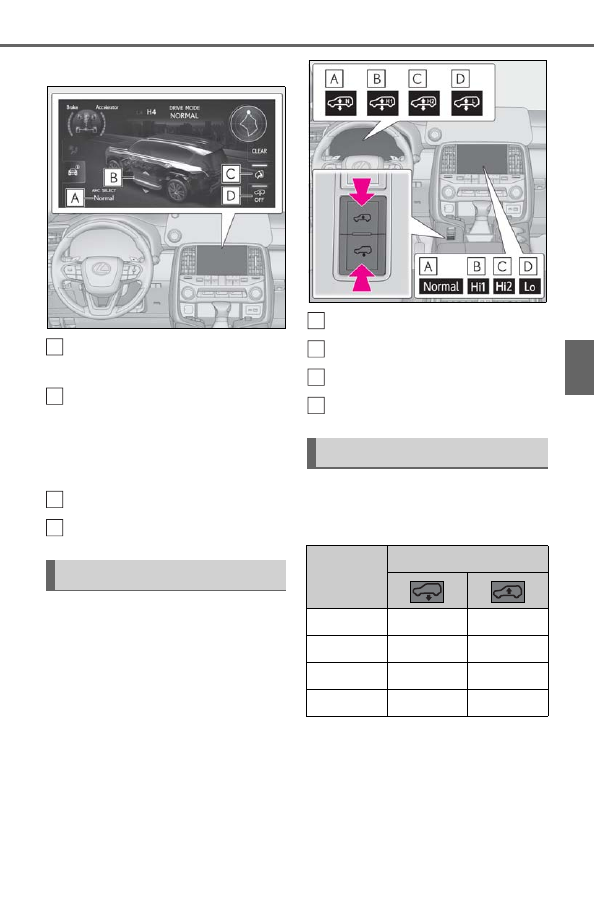
Vehicle height mode

Selected vehicle height mode is displayed.

AHC display

When the vehicle is stopped, selected 
vehicle height mode is displayed. When 
driving, current vehicle height mode is dis-
played.

Easy access mode switch

Height control OFF switch

Press the height select switch.

Selected vehicle height mode is displayed 
on the AHC display and Front Multi Oper-
ation Panel. At this time, a part of the AHC 
display will flash. After the vehicle height is 
changed, the display will stop flashing, and 
come on.

N (Normal) mode

H1 (Hi1) mode

H2 (Hi2) mode

L (Lo) mode

The vehicle height modes will change 
as the following table by operating the 
height select switch.

N mode

The standard vehicle height. This mode 
is suitable for ordinary driving.

Selecting vehicle height

A

B

C
D

Vehicle height modes

Vehicle 

height 

modes

Height select switch

H2

H1

H2

H1

N

H2

N

L

H1

L

L

N

A
B
C
D

348

4-5. Using the driving support systems

H1 mode

Four-wheel drive control switch is in 
H4

This mode is suitable for dirt roads 
driving.
H1 mode is only available when the 
vehicle speed is under 62 mph (100 
km/h). Vehicle height is approximately 
1.0 in. (25 mm) higher than N mode 
height.

Four-wheel drive control switch is in 
L4

This mode is suitable for extremely 
rough roads driving.
H1 mode is only available when the 
vehicle speed is under 50 mph (80 
km/h). Vehicle height is approximately 
2.2 in. (55 mm) higher than N mode 
height.

H2 mode

Four-wheel drive control switch is in 
H4

This mode is suitable for rough roads 
driving.

H2 mode is only available when the 
vehicle speed is under 19 mph (30 
km/h). Vehicle height is approxi-
mately 3.0 in. (75 mm) higher than 
N mode height.

H2 mode is only available when the 
vehicle speed is 19 mph (30 km/h) 
to 37 mph (60 km/h). Vehicle 
height is approximately 2.2 in. (55 
mm) higher than N mode height.

Four-wheel drive control switch is in 
L4

This mode is suitable for extremely 
rough roads driving.

H2 mode is only available when the 
vehicle speed is under 9 mph (15 
km/h). Vehicle height is approxi-
mately 3.3 in. (85 mm) higher than 
N mode height.

H2 mode is only available when the 
vehicle speed is 9 mph (15 km/h) to 
31 mph (50 km/h). Vehicle height is 
approximately 3.0 in. (75 mm) 
higher than N mode height.

L mode

This mode allows easy access to the 
vehicle.
L mode is only available when the vehi-
cle is traveling at 7 mph (12 km/h) or 
less. Vehicle height is approximately 
1.0 in. (25 mm) lower than N mode 
height.

Some modes may not be selectable 
depending on the vehicle speed. Refer 
to the following table.

Conditions for changing the 
vehicle height mode

349

4-5. Using the driving support systems

4

D

riv

ing

Four-wheel drive control switch is in 
H4

Four-wheel drive control switch is in 
L4

You can select this mode for easy 
access and easy loading of the vehicle.
To turn easy access mode on, turn the 
four-wheel drive control switch to H4 
and press the easy access mode switch 

on the Front Multi Operation Panel.

When the easy access mode is in on, the 
indicator 

 on the switch and the easy 

access mode indicator on the meter 
comes on.

If the engine switch is turned off within 
approximately 30 seconds after the vehi-
cle is stopped while easy access mode is 
on, the vehicle height is lowered automati-
cally.
When the vehicle begins to lower, a 
buzzer will sound twice. The easy access 
mode indicator display will come on while 
the vehicle is lowering to indicate that the 
vehicle is lowering.
When the operation is complete, the easy 
access mode indicator will turns off.

Operation conditions of the easy access 

mode

The easy access mode is operational 

when all of the following conditions are 

met:

• The vehicle height mode is in N mode.

• The vehicle is stopped on a flat surface.

• The shift lever is in P.

• The side doors and back door are not 

opened after the vehicle is stopped.

The following method will cancel the 

vehicle lowering operation and raise the 

Vehicle speed

Vehicle height modes

L

N

H1

H2

Under 7 mph 

(12 km/h)

Yes Yes Yes Yes

7 mph (12 km/h) 

to 37 mph (60 

km/h)

No Yes Yes Yes

37 mph (60 

km/h) to 62 

mph (100 km/h)

No Yes Yes No

62 mph (100 

km/h) or over

No Yes No

No

Vehicle speed

Vehicle height modes

L

N

H1

H2

Under 7 mph 

(12 km/h)

Yes Yes Yes Yes

7 mph (12 km/h) 

to 31 mph (50 

km/h)

No Yes Yes Yes

31 mph (50 

km/h) to 50 

mph (80 km/h)

No Yes Yes No

50 mph (80 

km/h) or over

No Yes No

No

Easy access mode

A

350

4-5. Using the driving support systems

vehicle again:

• Press the height select switch 

.

In the following cases the easy access 

mode will not operate

The easy access mode does not operate 

when the suspension fluid temperature 

drops below 5°F (-15°C).

Press the height control OFF switch on 
the Front Multi Operation Panel while 
the vehicle is stopped.

The indicator 

 on the switch will 

come on and the OFF indicator will 
display on the AHC display.
When the height control OFF indicator 
is displayed, the vehicle height will not 
change even if the height select switch 
is operated.
Press the switch again to turn the sys-
tem back on.

Operating conditions of the AHC

The engine must be running.

Vehicle height control must be turned off.

All side doors and the back door must be 

closed.

Vehicle height control speed

The vehicle height control speed will 

change depending on the operating state of 

the AHC.

Switching vehicle height mode while the 

engine is stopped

If the engine is stopped while the vehicle 

height is being lowered, lowering will 

continue.

If any luggage is removed from the vehi-

cle or if any occupants leave the vehicle 

within approximately 30 seconds of the 

engine switch being turned off, the vehi-

cle height may be lowered by the auto 

leveling function.

Operating the height select switch will 

have no effect while the engine is 

stopped.

Automatic change in vehicle height 

modes

N mode is automatically selected when 

all of the following conditions are met:

• The four-wheel drive control switch is 

shifted to H4

• The Multi-terrain Select is turned off

In the following situations, H2 mode is 

automatically selected.

• When the four-wheel drive control 

switch is shifted to L4

• When the Multi-terrain Select is turned 

on

*

*

: The vehicle height mode will change 

depending on the selected mode.

Automatic change in vehicle height 

when in H1 mode

Four-wheel drive control switch is in H4

If the vehicle speed exceeds 62 mph 

(100 km/h), N mode is automatically 

selected.

If the vehicle speed drops to 50 mph (80 

km/h) or less, H1 mode is automatically 

resumed.

Four-wheel drive control switch is in L4

If the vehicle speed exceeds 50 mph (80 

km/h), the vehicle height is lowered to 1.0 

in. (25 mm) higher than N mode height.

If the vehicle speed drops to 37 mph (60 

Disabling the height control

A

351

4-5. Using the driving support systems

4

D

riv

ing

km/h) or less, H1 mode is automatically 

resumed.

Automatic change in vehicle height 

when in H2 mode

Four-wheel drive control switch is in H4

If the vehicle speed exceeds 19 mph (30 

km/h), the vehicle height is lowered to 

2.2 in. (55 mm) higher than N mode 

height.

If the vehicle speed exceeds 37 mph (60 

km/h), H1 mode is automatically 

selected.

If the vehicle speed exceeds 62 mph 

(100 km/h), N mode is automatically 

selected.

If the vehicle speed drops to 50 mph (80 

km/h) or less, H1 mode is automatically 

resumed.

If the vehicle speed drops to 25 mph (40 

km/h) or less, the vehicle height is auto-

matically set to 2.2 in. (55 mm) higher 

than the N mode height.

If the vehicle speed drops to 6 mph (10 

km/h) or less, the vehicle height is auto-

matically set to 3.0 in. (75 mm) higher 

than the N mode height.

Four-wheel drive control switch is in L4

If the vehicle speed exceeds 9 mph (15 

km/h), the vehicle height is lowered to 

3.0 in. (75 mm) higher than N mode 

height.

If the vehicle speed exceeds 31 mph (50 

km/h), H1 mode is automatically 

selected.

If the vehicle speed exceeds 50 mph (80 

km/h), the vehicle height is lowered to 1.0 

in. (25 mm) higher than N mode height.

If the vehicle speed drops to 37 mph (60 

km/h) or less, H1 mode is automatically 

resumed.

If the vehicle speed drops to 19 mph (30 

km/h) or less, the vehicle height is auto-

matically set to 3.0 in. (75 mm) higher 

than the N mode height.

If the vehicle speed drops to 3 mph (5 

km/h) or less, the vehicle height is auto-

matically set to 3.3 in. (85 mm) higher 

than the N mode height.

Automatic change in vehicle height 

when in L mode

If the vehicle speed drops to 7 mph (12 

km/h) or less, N mode is automatically 

resumed.

Extra high mode

If the vehicle becomes stuck, extra high 

mode may be automatically selected when 

the vehicle height is in H2 mode with the 

four-wheel drive control switch in the L4 

position.
The vehicle height is raised to 0.8 in. (20 

mm) higher than the H2 mode height, or 

slightly higher.

Extra high mode will change back to H2 

mode when:

• The vehicle speed exceeds 6 mph (10 

km/h)

• The four-wheel drive control switch is 

shifted to H4.

If you press the height select switch 

 when in extra high mode, H1 mode 

is selected.

Extra high mode cannot be manually 

selected.

352

4-5. Using the driving support systems

Turning off the height control

The system will remain off until the height 

control OFF switch is pressed again, 

even if the engine switch is turned off.

Even if the system is turned off, the sys-

tem will intervene automatically if the 

vehicle speed exceeds the following.

• 18 mph (30 km/h) with H2 or L mode

• 62 mph (100 km/h) with N or H1 mode

Automatic leveling function

The vehicle is adjusted to a fixed height for 

each mode, regardless of the number of 

occupants and the luggage load.

When the vehicle is stopped during 

driving

The activation of the automatic leveling 

function may cause the vehicle height to 

change. This is not a malfunction.

If the vehicle height does not change

If the vehicle is loaded too heavily, or the 

undercarriage has come into contact with 

the road surface, the vehicle height cannot 

be raised/lowered.
In the following situations, the vehicle is 

loaded too heavily. Take extra care when 

driving in this condition.
• If the vehicle height cannot be raised 

when in N mode, and “L” appears on the 

multi-information display

• If the vehicle height cannot be raised 

when in H1 mode, and “L” or “N” appears 

on the multi-information display

• If the vehicle height cannot be raised 

when in H2 mode, and “L” or “N” or “H1” 

appears on the multi-information display

If the vehicle height cannot be raised even 

after unloading the vehicle, press the height 
select switch 

 then press to 

.

In the following cases the AHC will not 

operate

The AHC display on the meter will flash.

Vehicle height control has not been fre-

quently used.

The suspension fluid temperature is 

lower than -22°F (-30°C).

There is ice on the suspension.

Driving on bumpy roads which may 

cause the suspension to fully elongate.

If the steering wheel is abruptly turned 

more than 3/4 of a revolution with the 

center differential lock system activated 

(

P.354).

Cold weather operation

It may take longer for the vehicle height 

to change if the suspension fluid tem-

perature drops below 5°F (-15°C).

The AHC does not operate when the 

suspension fluid temperature drops 

below -22°F (-30°C). In this case, even if 

the height select switch is pressed, the 

vehicle height will not change. Once the 

vehicle has been driven for a short time 

and the suspension fluid has been 

warmed to within normal operating limits, 

the AHC will begin operating and the 

vehicle height will automatically change 

to the selected mode.

Parking and stopping tips

If you immediately stop the engine after 

off-road driving, the vehicle height may 

gradually lower. When parking, make 

sure there is nothing under the vehicle 

that may come in contact with the under-

body. The vehicle will return to the set 

height when the engine is started.

The vehicle height may change as the 

temperature changes when the engine is 

stopped. The vehicle will return to the set 

height when the engine is started.

Propeller shaft noise

If the vehicle height is adjusted on a slope, 

or with the shift lever in a position other than 

P or N while the vehicle is stopped, you may 

hear a sound caused by the expansion and 

contraction of the propeller shaft. This does 

not indicate a malfunction.

AHC failure warning

If a malfunction occurs in the AHC, N 

mode is automatically selected. How-

ever, the system may not switch to N 

mode depending on the location of the 

malfunction. The warning message is dis-

played on the multi-information display, 

and the AHC cannot be activated until 

the malfunction is corrected.

353

4-5. Using the driving support systems

4

D

riv

ing

Stop the engine and start it again. If the 

warning message turns off, the system is 

operating correctly. If the warning mes-

sage continues to be displayed, have the 

vehicle checked at your Lexus dealer as 

soon as possible.

WARNING

When switching the vehicle height 

mode

Before lowering the vehicle height, 

check that there are no people under or 

around the vehicle, and check for obsta-

cles.
If you do not do this, body parts may be 

caught in the vehicle, possibly leading to 

an accident.

Using H2 mode

H2 mode should only be used when driv-

ing on rough roads, for example when 

driving off-road. Because the vehicle’s 

center of gravity will become higher 

when in the mode, the vehicle may 

become unstable when turning abruptly, 

resulting in an accident.

When jacking up the vehicle or 

installing tire chains

Turn off the height control and stop the 

engine, otherwise the vehicle height may 

change due to the automatic leveling 

function and you may catch part of your 

body in the vehicle, resulting in an acci-

dent.

When crossing rivers

Select H2 mode and turn off the height 

control. Drive at 18 mph (30 km/h) or 

lower. Otherwise the vehicle height may 

change due to the automatic leveling 

function, resulting in an accident.

If your vehicle must be towed

Put the vehicle height in N mode and 

turn off the height control, otherwise the 

vehicle height may change due to the 

automatic leveling function and you may 

catch part of your body in the vehicle, 

resulting in an accident.

If your vehicle becomes stuck in a 

ditch

Turn off the height control, otherwise the 

vehicle height may change due to the 

automatic leveling function, resulting in 

an accident.

NOTICE

When parking in areas with limited 

overhead height

After leaving the vehicle or unloading the 

luggage, the vehicle height may be 

slightly higher than normal. Take care 

when overhead height is limited.

To avoid damage to the vehicle

N mode will be switched to automati-

cally even if the vehicle is started off in 

L mode. Take care when overhead 

height is limited.

Do not select L mode when driving on 

bumpy roads, as the underbody of the 

vehicle may contact the road surface.

When traveling on bumpy roads or 

through water, or when towing, turn off 

easy access mode.

Avoid rapid changes to the vehicle 

height

As the pump may overheat. Leave a few 

seconds between selections when 

changing the vehicle height mode.

354

4-5. Using the driving support systems

H4 (high speed position)

Normal driving on all types of roads.

L4 (low speed position)

Driving requiring maximum power and 
traction such as climbing or descending 
steep hills, off-road driving, and hard pull-
ing in sand or mud, etc.
The low speed four-wheel drive indicator 
will come on.

Shifting from H4 to L4

1

Stop the vehicle completely.

2

Shift the shift lever to N.

3

Push and turn the four-wheel drive 
control switch counterclockwise.

Maintain this condition until the low speed 

four-wheel drive indicator turns on.

Shifting from L4 to H4

1

Stop the vehicle completely.

2

Shift the shift lever to N.

3

Push and turn the four-wheel drive 
control switch clockwise.

Maintain this condition until the low speed 

four-wheel drive indicator turns off.

Lock the center differential when your 
vehicle’s wheels get stuck in a ditch or 
when driving on a slippery or bumpy 
surface.

The center differential lock indicator will 
come on.
To unlock the center differential, push the 
switch again.
Unlock the center differential after the 
wheels have been freed, or after moving to 
a flat, non-slippery surface.

The four-wheel drive control switch can 

be operated when

The engine switch is in ON.

The shift lever is in N.

The vehicle is stopped completely.

The low speed four-wheel drive indica-

tor light

The indicator light blinks while shifting 

Four-wheel drive system

Use the four-wheel drive control 
switch and center differential lock 
switch to select the following trans-
fer and center differential modes.

Four-wheel drive control switch

Shifting between H4 and L4

A

B

Center differential lock switch

355

4-5. Using the driving support systems

4

D

riv

ing

between “H4” and “L4”.

Advice for driving on slippery roads

If you shift the four-wheel drive control 

switch to L4 and the shift lever to the 2 

range of M while driving in steep off-road 

areas, the output of the brake can be 

controlled effectively by the Active 

TRAC, which assists the driver to control 

the driving power of 4 wheels.

Use the 1 range of M for maximum power 

and traction when your wheels get stuck 

or when driving down a steep incline.

The center differential lock indicator

The indicator blinks while locking/unlock-

ing the center differential.

The center differential lock switch can 

be operated when

The engine switch is in ON.

The vehicle speed is less than 62 mph 

(100 km/h).

Locking/unlocking the center differen-

tial

When the four-wheel drive control 

switch is in L4 with the center differential 

locked, VSC is automatically turned off. 

(The center differential lock and VSC 

OFF indicator lights come on.)

If the operation is not completed, the 

center differential lock indicator blinks. If 

the indicator light does not turn off when 

unlocking the center differential, drive 

straight ahead while accelerating or 

decelerating, or drive in reverse.

If the center differential lock/unlock is not 

completed within 5 seconds while the 

cruise control system is on, cancel the 

cruise control system.

If the low speed four-wheel drive indica-

tor light or the center differential lock 

indicator blinks

If the low speed four-wheel drive indica-

tor light continues to blink when using the 

four-wheel drive control switch, stop the 

vehicle completely, move the shift lever 

to N and then operate the switch again.

If the shift lever is moved before the low 

speed four-wheel drive indicator turns 

on/off, the transfer mode may not be 

shifted completely. The transfer mode 

disengages both the front and rear drive-

shafts from the powertrain and allows the 

vehicle to move regardless of the shift 

position. (At this time, the indicator blinks 

and the buzzer sounds.)

Therefore, the vehicle is free to roll even if 
the shift lever is in P. You or someone else 
could be seriously injured. You must com-
plete the shifting of the transfer mode.
To complete the shifting, stop the vehicle 
completely, return the shift lever to N, and 
confirm that the shift was completed (the 
indicator turns on/off).

If the engine coolant temperature is too 

low, the four-wheel drive control system 

may not be able to shift. When the engine 

is warmer operate the switch again.

If the low speed four-wheel drive indicator 
light or the center differential lock indicator 
continues to blink even after attempting the 
above, there may be a malfunction in the 
engine, the brake system or the four-wheel 
drive system. In this case, you may not be 
able to shift between H4 and L4, and the 
center differential lock may not be opera-
ble. Have the vehicle inspected by your 
Lexus dealer immediately.

WARNING

While driving

Never move the four-wheel drive control 

switch if the wheels have lost traction. 

Doing so may cause an accident result-

ing in death or serious injury.

356

4-5. Using the driving support systems

WARNING

When the vehicle is parked

If the shift lever is moved before the low 

speed four-wheel drive indicator turns 

on/off, the transfer mode may not be 

shifted completely. The transfer mode 

disengages both the front and rear drive-

shafts from the powertrain and allows the 

vehicle to move regardless of the shift 

position. (At this time, the indicator blinks 

and the buzzer sounds.)
Therefore, the vehicle is free to roll even 

if the shift lever is in P. You or someone 

else could be seriously injured. You must 

complete the shifting of the transfer 

mode.

NOTICE

To prevent damage to the center dif-

ferential

For normal driving on dry and hard 

surface roads, unlock the center differ-

ential.

Unlock the center differential after the 

wheels are out of the ditch or off the 

slippery or bumpy surface.

Do not push the center differential 

lock switch when the vehicle is turning 

or when its wheels are spinning freely 

off the ground.

Crawl Control (with Turn 
Assist function)

Allows travel on extremely rough 
off-road surfaces at a fixed low 
speed without pressing the accel-
erator or brake pedal. Minimizes 
loss of traction or vehicle slip when 
driving on slippery road surfaces, 
allowing for stable driving.

WARNING

When using Crawl Control (with Turn 

Assist function)

Do not rely solely on the Crawl Control 

(with Turn Assist function). This function 

does not extend the vehicle’s perfor-

mance limitations. Always thoroughly 

check the road conditions, and drive 

safely.

These conditions may cause the sys-

tem not to operate properly

When driving on the following surfaces, 

the system may not be able to maintain a 

fixed low speed, which may result in an 

accident:

Extremely steep inclines.

Extremely uneven surfaces.

Snow-covered roads, or other slippery 

surfaces.

NOTICE

When using Turn Assist function

The Turn Assist function is a function to 

assist turning performance when driving 

off-road. The function may be less effec-

tive on paved road surfaces.

357

4-5. Using the driving support systems

4

D

riv

ing

Meter (

P.72, 81)

Front Multi Operation Panel 
(

P.378)

MODE SELECT switch

DAC/CRAWL switch

1

Press the DAC/CRAWL switch.

The indicator light 

 and the Crawl Con-

trol indicator on the meter will come on, 

and the slip indicator light will flash.

2

Turn the MODE SELECT switch 
left or right to select a mode on the 
meter.

A mode which matches the road con-
ditions can be selected from among 
the following 5 modes.

1

Lo

Suitable for driving on rocky roads or 
decline

2

Lo-Mid

Suitable for driving on rocky roads, decline 
or bumpy incline

System components

Turning Crawl Control on

A
B

C
D

A

Selectable modes

358

4-5. Using the driving support systems

3

Mid

Suitable for driving on bumpy inclines

4

Mid-Hi

Suitable for driving on bumpy inclines, 
debris roads, snow-covered roads, muddy 
roads, gravel roads and grass roads

5

Hi

Suitable for driving on bumpy inclines, 
debris roads, snow-covered roads, muddy 
roads, gravel roads and grass roads

When the DAC/CRAWL switch 
indicator illuminates

Press the DAC/CRAWL switch again.

When the DAC/CRAWL switch 
indicator does not illuminate

Press the DAC/CRAWL switch to 
turn the indicator on. Press the 
DAC/CRAWL switch again with the 
indicator turned on.

If Crawl Control is turned off, the Crawl 
Control indicator, slip indicator light and 
the Turn Assist indicator (when the Turn 
Assist function is in use) will go off and a 
message stating that Crawl Control has 
been turned off will be displayed on the 
multi-information display for several sec-
onds.

When turning off Crawl Control while 
driving, drive extremely carefully.

Operation conditions of the Crawl 

Control

The engine is running.

The shift lever is in any gear other than P 

or N.

The four-wheel drive control switch is in 

L4.

The driver’s door is closed.

Automatic system cancelation of Crawl 

Control

In the following situations, the buzzer will 

sound intermittently and Crawl Control will 

be canceled automatically. In this event, the 

Crawl Control indicator will flash and then 

go off, the Turn Assist indicator will go off (if 

the Turn Assist function is in use), and a 

message stating that Crawl Control has 

been turned off will be displayed on the 

multi-information display for several sec-

onds.

When the shift lever is moved to P or N.

When the four-wheel drive control 

switch is in H4.

When the driver’s door is opened.

Function limitations of Crawl Control

In the following situations, brake control 

can be used to drive downhill at a con-

stant speed. However, engine control is 

not available when driving uphill at a con-

stant speed.

• When the vehicle speed exceeds 

approximately 6 mph (10 km/h).

In the following situation, engine control 

and brake control will stop temporarily. In 

this event, the Crawl Control indicator 

will flash.

• When the vehicle speed exceeds 

approximately 15 mph (25 km/h).

When the Crawl Control system is 

operated continuously

If Crawl Control is used continuously for 

a long time, the brake system may over-

heat. In this case, a buzzer will sound, a 

message stating a malfunction will be dis-

played on the multi-information display, 

and the Crawl Control indicator will flash 

and then go off. In this event, as Crawl 

Control will be temporarily inoperable, 

stop the vehicle immediately in a safe 

place, and allow the brake system to cool 

down sufficiently until the message goes 

off. (In the meantime, normal driving is 

possible.)

If Crawl Control is used continuously for 

a long time, the automatic transmission 

may overheat. In this case, a buzzer will 

Turning Crawl Control off

359

4-5. Using the driving support systems

4

D

riv

ing

sound, the system will be temporarily 

canceled, and a message stating a mal-

function may be displayed on the multi-

information display. In this event, stop the 

vehicle in a safe place until the message 

goes off.

Sounds and vibrations caused by the 

Crawl Control system

A sound may be heard from the engine 

compartment when the engine is started 

or just after the vehicle begins to move. 

This sound does not indicate that a mal-

function has occurred in Crawl Control 

system.

Either of the following conditions may 

occur when the Crawl Control system is 

operating. None of these are indicators 

that a malfunction has occurred.

• Vibrations  may  be  felt through the vehi-

cle body and steering. 

• A motor sound may be heard after the 

vehicle comes to a stop.

When there is a malfunction in the sys-

tem

Warning lights and/or warning messages 

will turn on. (

P.501, 506)

This function assists cornering perfor-
mance in accordance with steering 
operation when driving through a tight 
corner. It maintains vehicle speed 
while driving and implements control 
that improves turning performance 
according to the driver’s steering 
wheel operation, to reduce the number 
of turns.

1

While Crawl Control is operating, 
press the 

 on Front Multi Oper-

ation Panel to display the off-road 

driving information display screen. 
(

P.378)

2

Press the Turn Assist switch

The indicator light 

 and Turn Assist 

indicator on the meter will come on.
To turn the system off, press the switch 

again.

1

While the Turn Assist function is 
operating, press the 

 on Front 

Multi Operation Panel to display 
the off-road driving information dis-
play screen. (

P.378)

2

Press the Turn Assist switch

The indicator light on the Turn Assist 

switch and Turn Assist indicator on the 

meter will go off, and a message stating 

that the Turn Assist function has been 

turned off will be displayed on the multi-

information display for several seconds.

Operation conditions of the Turn Assist 

function

The vehicle speed is approximately 6 

mph (10 km/h) or less.

Crawl Control is operating.

Turn Assist function

Turning the Turn Assist function 
on

Turning the Turn Assist function 
off

A

360

4-5. Using the driving support systems

The brake pedal is not depressed

The shift lever is in any gear other than P, 

R or N.

The steering wheel is turned very far.

Function limitations of the Turn Assist 

function

In the following situations, the Turn Assist 

function will stop temporarily. In this event, 

the Turn Assist indicator will flash.

When the vehicle speed exceeds 

approximately 6 mph (10 km/h).

When the shift lever is moved to R.

When the battery is disconnected

The Turn Assist indicator will flash and the 

system needs to be initialized. Drive the 

vehicle straight ahead for a while at a speed 

of approximately 22 mph (35 km/h) or 

more. If the Turn Assist indicator still flashes 

even after initializing the system, have the 

vehicle inspected by your Lexus dealer.

Multi-terrain Select

Multi-terrain Select is a system that 
improves drivability in off-road situ-
ations.

Select a mode that most closely 
matches the type of terrain on which 
you are driving from several modes. 
Brake control, drive force control 
and suspension control can be opti-
mized in accordance with the 
selected mode.

When AUTO mode is selected, 
brake control, drive force control 
and suspension control are opti-
mized automatically according to 
the road conditions.

WARNING

When using the Multi-terrain Select

Observe the following precautions to 

avoid an accident that could result in 

death or serious injuries:

Check that the selected mode indica-

tors are illuminated before driving. 

Multi-terrain Select will not operate 

when the indicators are off.

The road conditions listed (

P.361) 

are for reference only. There is a 

chance that the function may not be 

the most appropriate in terms of road 

conditions such as pitch, slipperiness, 

undulation, etc. Thoroughly check the 

road conditions before driving.

Multi-terrain Select is not intended to 

expand the limits of the vehicle. Check 

the road conditions thoroughly 

beforehand, and drive safely and care-

fully.

361

4-5. Using the driving support systems

4

D

riv

ing

MTS switch

MODE SELECT switch

Multi-information display

Selected mode is displayed.

1

Press the MTS switch.

The indicator 

 on the switch will turn on.

2

Select the driving modes on the 
multi-information display while 
turning the MODE SELECT switch 
left and right.

Depending on the positions of the four-

wheel drive control switch, a mode can be 

selected from among the following modes.

Four-wheel drive control switch is in 
L4

If the brake control has activated, the slip 
indicator light will flash.

Four-wheel drive control switch is in 
H4

NOTICE

Precaution for use

The Multi-terrain Select is intended for 

use during off-road driving. Do not use 

the system at any other time.

System components

Switching modes

A

B

C

A

Mode

Road Conditions

AUTO

Suitable for the road 
conditions

SAND Suitable for sandy roads

MUD

Suitable for muddy 
roads

ROCK

Suitable for rocky ter-
rain

Mode

Road Conditions

AUTO

Suitable for the road 
conditions

DIRT

Suitable for dirt roads

SAND Suitable for sandy roads

362

4-5. Using the driving support systems

If the brake control has activated, the slip 
indicator light will flash.
When the vehicle is in SAND, MUD or 
DEEP SNOW mode, VSC is automatically 
turned off. (VSC OFF indicator light come 
on.)

Multi-terrain Select

Multi-terrain Select controls the vehicle so 

that it can maximize the drive force and 

improve drivability on rough roads. As a 

result, fuel efficiency may diminish when 

compared to driving in normal mode.

Automatic system cancelation

In the following situations, Multi-terrain 

Select will be canceled automatically.

When the DRIVE MODE switch is 

pressed while the four-wheel drive con-

trol switch is in H4.

When the engine switch is turned off

AUTO mode

Estimates the road conditions where the 

vehicle is being driven and optimizes brake 

control, drive force control and suspension 

control.

The capability to estimate the road condi-

tions is limited and there is a chance that the 

Multi-terrain Select may not be the most 

appropriate for road conditions such as 

pitch, slipperiness, undulation, etc.

In these cases, select the mode that 

matches the road conditions before driving.

Turning off Multi-terrain Select

Performing the following turns Multi-terrain 

Select off, and then the display on the multi-

information display will disappear.

When the MTS switch indicator is illumi-

nated

Press the MTS switch while the system is in 
operation.

When the MTS switch indicator is not illu-

minated

Press the MTS switch to turn the indicator 
on.
Press the MTS switch again with the Multi-
terrain Select indicator illuminated.

When the vehicle is stuck

Switching the transfer and differential 

For the operation of the following functions, 

refer to the following pages.

Four-wheel drive system (

P.354)

Center differential lock (

P.354)

Driving in Multi-terrain Select

The following types of situations may occur, 

but they are not malfunctions.

Vibrations may be felt throughout the 

vehicle or steering wheel.

Operating noise may be heard from the 

engine compartment.

When an inspection at your Lexus 

dealer is necessary

In the following situations, the system may 

be malfunctioning. Have the vehicle 

inspected by your Lexus dealer immedi-

ately.

When the slip indicator light illuminates.

When the indicator for each mode does 

not illuminate on the multi-information 

display even though Multi-terrain Select 

is selected.

MUD

Suitable for muddy 
roads

DEEP 
SNO
W

Suitable for deep snow 
roads

Mode

Road Conditions


Content      ..     19      20      21      22     ..