Hyundai Tucson Plug-in Hybrid (2024 year). Manual in english - page 13
 

  Index      Manuals     Hyundai Tucson Plug-in Hybrid (2024 year). Manual in english


Search            copyright infringement  


Content      ..     11      12      13      14     ..


Hyundai Tucson Plug-in Hybrid (2024 year). Manual in english - page 13


Driving Your Vehicle

6-24

ONX4060009

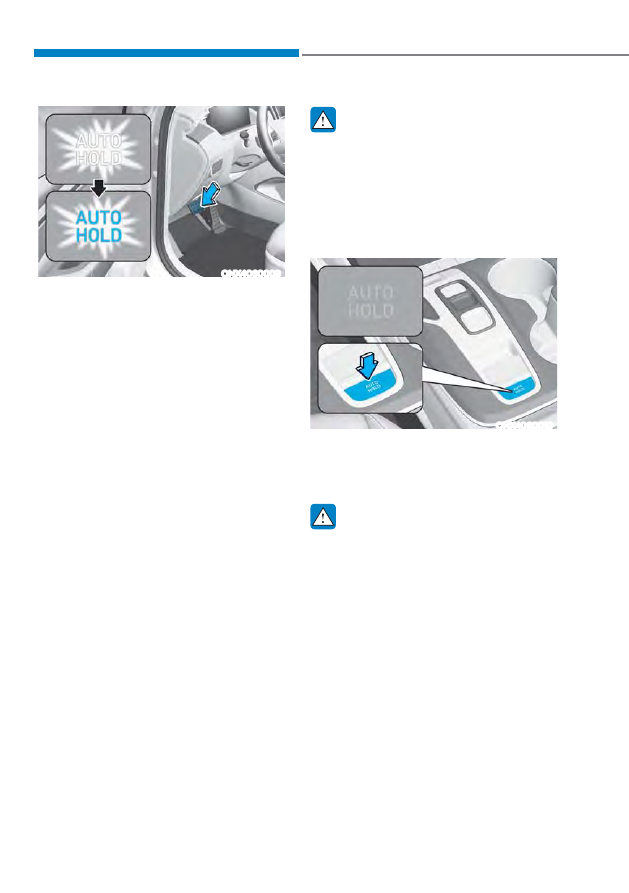
2.  When you stop the vehicle 

completely by depressing the brake 

pedal, the Auto Hold maintains the 

brake pressure to hold the vehicle 

stationary. The indicator changes from 

white to green.

3.  The vehicle will remain stationary 

even if you release the brake pedal.

4.  If EPB is applied, Auto Hold will be 

released.

To release:

If you depress the accelerator pedal 

with the shift button in D (Drive) or R 

(Reverse) or Manual shift mode, the 

Auto Hold will be released automatically 

and the vehicle will start to move. The 

indicator changes from green to white.

 WARNING

When the AUTO HOLD is automatically 

released by depressing the accelerator 

pedal, always take a look around your 

vehicle.
Slowly depress the accelerator pedal 

for a smooth start.

To cancel:

ONX4060010

1.  Depress the brake pedal.
2.  Press the [AUTO HOLD] switch.
The AUTO HOLD indicator will turn off.

 WARNING

To prevent, unexpected and sudden 

vehicle movement, ALWAYS press your 

foot on the brake pedal to cancel the 

Auto Hold before you:


-

Drive downhill.


-

Drive the vehicle in R (Reverse).


-

Park the vehicle.

06

6-25

 Information

ś

The Auto Hold does not operate when:


-

The driver's door is opened


-

The engine hood is opened


-

The shift button is in P (Park)


-

EPB is applied


-

The shift button is in R (Reverse) 
when liftgate is opened


-

The liftgate is opened(vehicle 
equipped with shift button)

ś

For your safety, the Auto Hold 
automatically switches to EPB when:


-

The driver's door is opened


-

The engine hood is opened


-

The vehicle is in a standstill for more 
than 10 minutes


-

The vehicle is standing on a steep 
slope


-

The vehicle moved several times


-

The shift button is in R (Reverse) 
when liftgate is opened

In these cases, the parking brake 
warning light comes on, the AUTO 
HOLD indicator changes from green 
to white, and a warning sound and a 
message will appear to inform you that 
EPB has been automatically engaged. 
Before driving off again, depress the 
brake pedal, check the surrounding 
area near your vehicle and release the 
parking brake manually with the EPB 
switch.

ś

While operating Auto Hold, you may 
hear mechanical noise. However, it is 
normal operating noise.

NOTICE

If the AUTO HOLD indicator changes 

to yellow, the Auto Hold is not working 

properly. Contact an authorized 

HYUNDAI dealer.

 WARNING

ś

Depress the accelerator pedal slowly 

when you start the vehicle.

ś

For your safety, cancel the Auto Hold 

when you drive downhill, back up the 

vehicle or park the vehicle.

NOTICE

If there is a malfunction with the 

driver's door or engine hood open 

detection system, the Auto Hold may 

not work properly.
Contact an authorized HYUNDAI dealer.

Driving Your Vehicle

6-26

Warning messages

OJX1069028L

Parking brake automatically engaged

When the EPB is applied from Auto Hold, 

a warning will sound and a message will 

appear.

OJX1069034L

AUTO HOLD turning off! Press brake 
pedal

When the conversion from Auto Hold to 

EPB is not working properly a warning 

will sound and a message will appear.
When this message is displayed, the Auto 

Hold and EPB may not operate. For your 

safety, depress the brake pedal.

OJX1069035L

Press brake pedal to deactivate  
AUTO HOLD

If you did not apply the brake pedal when 

you release the Auto Hold by pressing 

the [AUTO HOLD] switch, a warning will 

sound and a message will appear.

OTMH060008N

AUTO HOLD conditions not met.  
Close door, hood, and liftgate

When you press the [AUTO HOLD] 

switch, if the driver's door and engine 

hood are not closed, a warning will 

sound and a message will appear on the 

cluster LCD display.
Press the [AUTO HOLD] switch after 

closing the driver's door and hood.

06

6-27

Anti-lock Brake System (ABS)

 WARNING

An Anti-Lock Braking System (ABS) or 

an Electronic Stability Control (ESC) 

system will not prevent accidents 

due to improper or dangerous driving 

maneuvers. Even though vehicle 

control is improved during emergency 

braking, always maintain a safe 

distance between you and objects 

ahead of you. Vehicle speeds should 

always be reduced during extreme 

road conditions. The braking distance 

for vehicles equipped with ABS or ESC 

may be longer than for those without 

these systems in the following road 

conditions.
Drive your vehicle at reduced speeds 

during the following conditions:

ś

Rough, gravel or snow-covered 

roads.

ś

On roads where the road surface is 

pitted or has different surface height.

ś

Tire chains are installed on your 

vehicle.

The safety features of an ABS or ESC 

equipped vehicle should not be tested 

by high speed driving or cornering. This 

could endanger the safety of yourself or 

others.

ABS is an electronic braking system that 

helps prevent a braking skid. ABS allows 

the driver to steer and brake at the same 

time.

Using ABS

To obtain the maximum benefit from 

your ABS in an emergency situation, 

do not attempt to modulate your brake 

pressure and do not try to pump your 

brakes. Depress your brake pedal as hard 

as possible.
When you apply your brakes under 

conditions which may lock the wheels, 

you may hear sounds from the brakes, 

or feel a corresponding sensation in the 

brake pedal. This is normal and it means 

your ABS is active.
ABS does not reduce the time or distance 

it takes to stop the vehicle.
Always maintain a safe distance from the 

vehicle in front of you.
ABS will not prevent a skid that results 

from sudden changes in direction, such 

as trying to take a corner too fast or 

making a sudden lane change. Always 

drive at a safe speed for the road and 

weather conditions.
ABS cannot prevent a loss of stability. 

Always steer moderately when braking 

hard. Severe or sharp steering wheel 

movement can still cause your vehicle to 

veer into oncoming traffic or off the road.
On loose or uneven road surfaces, 

operation of the anti-lock brake system 

may result in a longer stopping distance 

than for vehicles equipped with a 

conventional brake system.
The ABS warning light (

) will stay 

on for several seconds after the Engine 

Start/Stop button is in the ON position.
During that time, the ABS will go through 

self-diagnosis and the light will go off if 

everything is normal. If the light stays on, 

you may have a problem with your ABS. 

Contact an authorized HYUNDAI dealer 

as soon as possible.

Driving Your Vehicle

6-28

 WARNING

If the ABS warning light (

) is on and 

stays on, you may have a problem with 

the ABS. Your power brakes will work 

normally. To reduce the risk of serious 

injury or death, contact your HYUNDAI 

dealer as soon as possible.

NOTICE

When you drive on a road having poor 

traction, such as an icy road, and apply 

your brakes continuously, the ABS will 

be active continuously and the ABS 

warning light (

) may illuminate. Pull 

your vehicle over to a safe place and 

turn the vehicle off.
Restart the vehicle. If the ABS warning 

light is off, then your ABS system is 

normal.
Otherwise, you may have a problem 

with your ABS system. Contact an 

authorized HYUNDAI dealer as soon as 

possible.

 Information

When you jump start your vehicle because 
of a drained battery, the ABS warning 
light (

) may turn on at the same 

time. This happens because of the low 
battery voltage. It does not mean your 
ABS is malfunctioning. Have the battery 
recharged before driving the vehicle.

Electronic Stability Control (ESC)

ONX4060011

Electronic Stability Control system helps 

to stabilize the vehicle during cornering 

maneuvers.
ESC checks where you are steering and 

where the vehicle is actually going. ESC 

applies braking pressure to any one of 

the vehicle's brakes and intervenes in the 

engine management system to assist the 

driver with keeping the vehicle on the 

intended path. It is not a substitute for 

safe driving practices. Always adjust your 

speed and driving to the road conditions.

 WARNING

Never drive too fast for the road 

conditions when cornering. The ESC 

system will not prevent accidents.
Excessive speed in turns, abrupt 

maneuvers, and hydroplaning on wet 

surfaces can result in severe accidents.

06

6-29

ESC operation

ESC ON condition

When the Engine Start/Stop button is 

in the ON position, the ESC and the 

ESC OFF indicator lights illuminate for 

approximately three seconds. After both 

lights go off, the ESC is enabled.

When operating

When the ESC is in operation, 

the ESC indicator light blinks:

ś

When you apply your brakes under 

conditions which may lock the wheels, 

you may hear sounds from the brakes, 

or feel a corresponding sensation in 

the brake pedal. This is normal and it 

means your ESC is active.

ś

When ESC activates, the engine may 

not respond to the accelerator as it 

does under routine conditions.

ś

If Cruise Control was in use when 

the ESC activates, Cruise Control 

automatically disengages. Cruise 

Control can be reengaged when the 

road conditions allow. 

See “Cruise 

Control (CC)” section in chapter 7 (if 

equipped).

ś

When moving out of the mud or 

driving on a slippery road, the engine 

RPM (revolutions per minute) may 

not increase even if you press the 

accelerator pedal deeply. This is to 

maintain the stability and traction of 

the vehicle and does not indicate a 

problem.

ESC OFF condition

To cancel ESC operation:

ś

State 1

Press the ESC OFF button briefly. 

The ESC OFF indicator light and/or 

message “Traction Control disabled” 

will illuminate. In this state, the traction 

control function of ESC (engine 

management) is disabled, but the 

brake control function of ESC (braking 

management) still operates.

ś

State 2

Press and hold the ESC OFF button 

continuously for more than 3 seconds. 

The ESC OFF indicator light and/or 

message “Traction & Stability Control 

disabled” illuminates and a warning 

chime sounds. In this state, both the 

traction control function of ESC (engine 

management) and the brake control 

function of ESC (braking management) 

are disabled.
If the ignition switch is placed in the 

LOCK/OFF position when ESC is off, ESC 

remains off. Upon restarting the vehicle, 

ESC will automatically turn on again.

Driving Your Vehicle

6-30

Indicator lights

Ŷ

 ESC indicator light (blinks)

Ŷ

 ESC OFF indicator light (comes on)

When the Engine Start/Stop button 

is placed to the ON position, the ESC 

indicator light illuminates, then goes off 

if the ESC system is operating normally.
The ESC indicator light blinks whenever 

the ESC is operating.
If the ESC indicator light stays on, your 

vehicle may have a malfunction with 

the ESC system. When this warning light 

illuminates, have the vehicle checked by 

an authorized HYUNDAI dealer as soon 

as possible.
The ESC OFF indicator light comes on 

when ESC is turned off.

 WARNING

When ESC is blinking, this indicates ESC 

is active:
Drive slowly and NEVER attempt to 

accelerate. NEVER turn ESC off while 

ESC indicator light is blinking or you 

may lose control of the vehicle resulting 

in an accident.

NOTICE

Driving with wheels and tires with 

different sizes may cause the ESC 

system to malfunction. Before replacing 

tires, make sure all four tires and wheels 

are the same size. Never drive the 

vehicle with different sized wheels and 

tires installed.

ESC OFF usage

When Driving

The ESC OFF mode should only be used 

briefly to help free the vehicle if stuck in 

snow or mud, by temporarily stopping 

operation of ESC, to maintain wheel 

torque.
To turn ESC off while driving, press the 

ESC OFF button while driving on a flat 

road surface.

NOTICE

To prevent damage to the transmission:

ś

Do not allow wheel(s) of one axle to 

spin excessively while the ESC, ABS, 

and parking brake warning lights 

are displayed. The repairs would not 

be covered by the vehicle warranty. 

Reduce engine power and do not 

spin the wheel(s) excessively while 

these lights are displayed.

ś

When operating the vehicle on 

a dynamometer, make sure the 

ESC is turned off (ESC OFF light 

illuminated).

 Information

Turning the ESC off does not affect ABS 
or standard brake system operation.

06

6-31

Vehicle Stability Management 

(VSM) 

Vehicle Stability Management is a 

function of the Electronic Stability 

Control (ESC) system. It helps the vehicle 

stay stable when accelerating or braking 

suddenly on wet, slippery and rough 

roads where traction over the four tires 

can suddenly become uneven.

 WARNING

Take the following precautions when 

using Vehicle Stability Management :

ś

ALWAYS check the speed and the 

distance to the vehicle ahead. VSM 

is not a substitute for safe driving 

practices.

ś

Never drive too fast for the road 

conditions. VSM system will not 

prevent accidents. Excessive speed 

in bad weather, on slippery and 

uneven roads can result in severe 

accidents.

VSM operation

VSM ON condition

VSM operates when: 
Electronic Stability Control (ESC) is on. 

When operating

When you apply your brakes under 

conditions which may activate ESC, you 

may hear sounds from the brakes, or feel 

a corresponding sensation in the brake 

pedal. This is normal and it means your 

VSM is active.

 Information

The VSM does not operate when:

ś

Driving on a banked road such as 
gradient or incline.

ś

Driving in reverse.

ś

The ESC OFF indicator light is on.

ś

The MDPS (Motor Driven Power 
Steering) warning light (

) is on or 

blinks.

Driving Your Vehicle

6-32

VSM OFF condition

To cancel VSM operation, press the ESC 

OFF button. ESC OFF indicator light ( ) 

will illuminate.
To turn on VSM, press the ESC OFF 

button again. The ESC OFF indicator light 

will go out.

 WARNING

If the ESC indicator light ( ) or MDPS 

warning light (

) stays illuminated 

or blinks, your vehicle may have a 

malfunction with the VSM system. 

When the warning light illuminates 

have the vehicle checked by an 

authorized HYUNDAI dealer as soon as 

possible.

NOTICE

Driving with wheels and tires with 

different sizes may cause the VSM 

system to malfunction. Before replacing 

tires, make sure all four tires and wheels 

are the same size. Never drive the 

vehicle with different sized tires and 

wheels installed.

Hill-Start Assist Control (HAC) 

Hill-Start Assist Control helps prevent 

the vehicle from rolling backwards 

when starting a vehicle from a stop 

on a hill. The system operates the 

brakes automatically for approximately 

2 seconds (maximum of 5 seconds 

when the accelerator pedal is slightly 

depressed during HAC operation) and 

releases the brake after 2 seconds or 

when the accelerator pedal is depressed.

 WARNING

Always be ready to depress the 

accelerator pedal when starting off 

an incline. Hill-Start Assist Control 

activates only for approximately 2 

seconds (maximum of 5 seconds 

when the accelerator pedal is slightly 

depressed during HAC operation).

 Information

ś

Hill-Start Assist Control does not 
operate when the gear is shifted to P 
(Park) or N (Neutral).

ś

Hill-Start Assist Control activates even 
when the ESC (Electronic Stability 
Control) is off. However, it does not 
activate, when ESC does not operate 
normally. 

06

6-33

Trailer Stability Assist (TSA) 

Trailer stability assist is operated as a 

vehicle stability control system. The 

Trailer stability assist system stabilizes 

the vehicle and trailer when the trailer 

sways or oscillates. There are various 

reasons making vehicle sway and 

oscillate. In most cases it happens at 

high speed however, if the trailer is 

affected by crosswinds, buffeting, and 

improper overloading, it may also  be at 

risk for sway.

Factors of swaying such as:


- High speed


- Strong crosswinds


- Improper overloading


- Sudden controlling of steering wheel


- Uneven road
Trailer stability assist system 

continuously analyzes the vehicle 

and trailer instability. When the 

Trailer stability assist system detects 

some sway, the brakes are applied 

automatically to help stabilize the vehicle 

on the front wheel. However, if it is 

not enough to stabilize, the brakes are 

applied on all wheels automatically and 

engine power is properly reduced. When 

the vehicle is stable from swaying, trailer 

stability assist system does not operate.

Downhill Brake Control (DBC) 

ONX4060012

Downhill Brake Control assists the driver 

to descend down a steep hill without 

having to depress the brake pedal.
The system automatically applies the 

brakes to maintain vehicle speed below 

a certain speed and allows the driver 

to concentrate on steering the vehicle 

down hill.
The system is turned off whenever the 

engine is turned off.
Press the button to turn on the system 

and press the button again to turn it off.

Driving Your Vehicle

6-34

System operation

Mode

Indicator

Description

Standby

Green light on

Press the Downhill Brake Control button when vehicle 

speed is under 37 mph (60 km/h). Downhill Brake 

Control will turn on and enter the standby mode. The 

system does not turn on if vehicle speed is over 37 mph 

(60 km/h). 

Activated

Green light blink

In the standby mode, Downhill Brake Control will 

activate under the following conditions:

ś

The hill is steep enough.

ś

The brake pedal or accelerator pedal is not depressed.

ś

Vehicle speed is within 0~25 mph (0~40km/h) range.

Within the activation speed range 2~25 mph (4~40 

km/h), the driver can control the vehicle speed by 

depressing the brake pedal or accelerator pedal.

Deactivated

Green light off

Downhill Brake Control will turn off under the following 

conditions:

ś

The Downhill Brake Control button is pressed again.

ś

Vehicle speed is over 37 mph (60 km/h). 

Green light on

Downhill Brake Control will be deactivated but maintain 

the standby mode under the following conditions:

ś

The hill is not steep enough.

ś

Vehicle speed is between 25~37 mph (40~60 km/h).

System 

malfunction

Yellow light on

The yellow warning light illuminates when the system 

may have malfunctioned or may not work properly 

during activation. If this occurs, Downhill Brake Control 

is deactivated. Have the system inspected by an 

authorized HYUNDAI dealer as soon as possible.

06

6-35

OJX1069039L

Downhill Brake Control disabled. Control 
vehicle speed (manually)

When Downhill Brake Control is not 

working properly this warning message 

will appear on the cluster LCD display 

and you will hear a warning sound. If 

this occurs, control vehicle speed by 

depressing the brake pedal.

 WARNING

Always turn off Downhill Brake Control 

on normal roads. The system might 

activate inadvertently from the standby 

mode when driving through speed 

bumps or making sharp curves.

 Information

ś

Downhill Brake Control may not 
deactivate on steep inclines even though 
the brake pedal or accelerator pedal is 
depressed.

ś

Downhill Brake Control may not 
always maintain vehicle speed at a 
certain speed.

ś

Downhill Brake Control does not 
operate when:


-

The gear is in P (Park).


-

ESC is activated.

ś

Noise or vibration may occur from the 
brakes when Downhill Brake Control is 
activated.

ś

The rear stop light comes on when 
Downhill Brake Control is activated.

Driving Your Vehicle

6-36

Good Braking Practices

 WARNING

Whenever leaving the vehicle or 

parking, always come to a complete 

stop and continue to depress the brake 

pedal. Move the shift button into the P 

(Park) position, then apply the parking 

brake, and set the Engine Start/Stop 

button in the OFF position.
Vehicles parked with the parking brake 

not applied or not fully engaged may 

roll inadvertently and may cause injury 

to the driver and others. ALWAYS apply 

the parking brake before exiting the 

vehicle.

Wet brakes can be dangerous! The 

brakes may get wet if the vehicle is 

driven through standing water or if it 

is washed. Your vehicle will not stop as 

quickly if the brakes are wet. Wet brakes 

may cause the vehicle to pull to one side.
To dry the brakes, apply the brakes 

lightly until the braking action returns to 

normal. If the braking action does not 

return to normal, stop as soon as it is safe 

to do so and call an authorized HYUNDAI 

dealer for assistance.
DO NOT drive with your foot resting on 

the brake pedal. Even light, but constant 

pedal pressure can result in the brakes 

overheating, brake wear, and possibly 

even brake failure.
If a tire goes flat while you are driving, 

apply the brakes gently and keep the 

vehicle pointed straight ahead while you 

slow down. When you are moving slowly 

enough for it to be safe to do so, pull off 

the road and stop in a safe location.
Keep your foot firmly on the brake pedal 

when the vehicle is stopped to prevent 

the vehicle from rolling forward.

06

6-37

ONX4060013

All Wheel Drive (AWD) delivers engine 

power to front and rear wheels for 

maximum traction. AWD is useful when 

extra traction is required, such as when 

driving on, muddy, wet, or snow-covered 

roads.
Occasional off-road use such as 

established unpaved roads and trails are 

OK. It is always important that the driver 

carefully reduces the speed to a level 

that does not exceed the safe operating 

speed for those conditions. 

 WARNING

To reduce the risk of SERIOUS INJURY 

or DEATH:

ś

Do not drive in conditions that 

exceed the vehicles intended 

design such as challenging off-road 

conditions.

ś

Avoid high speeds when cornering or 

turning.

ś

Do not make quick steering wheel 

movements, such as sharp lane 

changes or fast, sharp turns.

ś

The risk of a rollover is greatly 

increased if you lose control of your 

vehicle at highway speeds.

ś

Loss of control often occurs if two or 

more wheels drop off the roadway 

and the driver over steers to reenter 

the roadway.

ś

In the event your vehicle leaves 

the roadway, do not steer sharply. 

Instead, slow down before pulling 

back into the travel lanes.

NOTICE

ś

Do not drive in water if the level 

is higher than the bottom of the 

vehicle.

ś

Check your brake condition once 

you are out of mud or water. Depress 

the brake pedal several times as you 

move slowly until you feel normal 

braking return.

ś

Shorten your scheduled 

maintenance interval if you drive in 

off-road conditions such as sand, 

mud or water (see "Maintenance 

Under Severe Usage Conditions" 

section in chapter 9).

ś

Always wash your vehicle thoroughly 

after off road use, especially the 

bottom of the vehicle.

ś

Be sure to equip the vehicle with four 

tires of the same size and type.

ś

Make sure that a full time AWD 

vehicle is towed by a flat bed tow 

truck.

$//:+((/'5,9(ǣ$:'Ǥ

Driving Your Vehicle

6-38

All Wheel Drive (AWD) Operation

All Wheel Drive (AWD) mode selection

Transfer 

mode

Selection 

mode

Indicator 

light

Description

AWD AUTO

(AWD LOCK is 

deactivated)

(not 

illuminated)

ś

AWD Auto is used when driving on roads 

in normal conditions, roads in urban 

areas, and on highways.

ś

All wheels are in operation when a 

vehicle travels at a constant speed. 

Required tractions applying on front 

and rear wheels vary depending on 

road driving conditions and driving 

conditions, which will be automatically 

controlled by the computing system.

ś

When the cluster's AWD Auto display 

mode is selected, the cluster displays 

the status of how four wheels’ traction 

forces are distributed.

AWD LOCK

(illuminated)

ś

The main goal of AWD Lock mode 

is to allow a driver to maximize the 

vehicle’s traction under extreme driving 

conditions such as unpaved off-road, 

sandy roads, and muddy roads.

ś

AWD Lock mode is in operation only 

when a vehicle travels at 60 km/h or 

less. When traveling at 60 km/h or 

faster, the mode will switch to AWD 

Auto.

ś

When AWD Lock mode illuminates, the 

cluster does not display the front/rear 

wheel traction force distribution status.

ś

Press the AWD Lock mode switch again 

to switch back to AWD Auto.

06

6-39

 WARNING

If AWD warning light ( ) stays on the 

instrument cluster, your vehicle may 

have a malfunction with the AWD 

system. When the AWD warning light 

( ) illuminates have vehicle checked by 

an authorized HYUNDAI dealer as soon 

as possible.

NOTICE

ś

Maintain AWD Auto mode when 

driving on roads in normal 

conditions.

ś

When driving under normal road 

conditions (especially when 

cornering) in AWD Lock mode, a 

driver may find minor mechanical 

vibration or noise, which is extremely 

normal phenomenon, not a 

malfunction. When AWD Lock mode 

is released, such noise or vibration 

will be immediately gone.

 CAUTION

When driving on normal roads, 

deactivate the AWD LOCK mode by 

pushing the AWD LOCK button (AWD 

LOCK indicator light goes off). Driving 

on normal roads with the AWD LOCK 

mode, especially, when cornering 

may cause mechanical noise or 

vibration. The noise and vibration will 

disappear when the AWD LOCK mode is 

deactivated. Prolonged driving with the 

noise and vibration may damage some 

parts of the power train.

NOTICE

When the AWD LOCK mode is 

deactivated, a sensation may be felt as 

the driving power is delivered entirely 

to the front wheels.

Auto All Wheel Drive mode  

(normal driving)

If the AWD system determines there is a 

need for four wheel drive, the engine's 

driving power is distributed to all four 

wheels automatically.

For safe AWD operation

Before driving

ś

Make sure all passengers are wearing 

seat belts.

ś

Sit upright and closer to the steering 

wheel than usual. Adjust the steering 

wheel to a position comfortable for 

you to drive.

Driving Your Vehicle

6-40

Driving on snow-covered or icy roads

ś

Start off slowly by applying the 

accelerator pedal gently.

ś

Use snow tires or tire chains.

ś

Keep sufficient distance between your 

vehicle and the vehicle in front of you.

ś

Apply engine braking during 

deceleration by using the paddle 

shifter (manual shift mode) and 

manually selecting a lower gear.

ś

Avoid speeding, rapid acceleration, 

sudden brake applications, and sharp 

turns to prevent skids.

 Information

When using Snow Tires, mount them on 
all four wheels.

If a full set of chains is not available for 
an AWD vehicle when using tire chains, 
chains may be installed on the front wheels 
only.

For more details on Snow Tires and Tire 
Chains, refer to "Winter Driving" section 
later in this chapter.

Driving in sand or mud

ś

Maintain slow and constant speed.

ś

Use tire chains driving in mud if 

necessary.

ś

Keep sufficient distance between your 

vehicle and the vehicle in front of you.

ś

Reduce vehicle speed and always 

check the road condition.

ś

Avoid speeding, rapid acceleration, 

sudden brake applications, and sharp 

turns to prevent getting stuck.

NOTICE

When the vehicle is stuck in snow, sand 

or mud, place a nonslip material under 

the drive wheels to provide traction 

OR slowly spin the wheels in forward 

and reverse directions which causes 

a rocking motion that may free the 

vehicle.
However, avoid running the engine 

continuously at high RPM, doing so may 

damage the AWD system.

06

6-41

OLMB053017

Driving up or down hills

ś

Driving uphill


- Before starting off, check if it is 

possible to drive uphill.


- Drive as straight as possible.

ś

Driving downhill


- Do not change gear while driving 

downhill. Select gear before driving 

downhill.


- Drive as slowly using engine braking 

while driving downhill.


- Drive straight as possible.

 WARNING

Exercise extreme caution driving up or 

down steep hills. The vehicle may flip 

over depending on the grade, terrain, 

water and mud conditions.

OLMB053018

 WARNING

Do not drive across the contour of steep 

hills. A slight change in the wheel angle 

can destabilize the vehicle, or a stable 

vehicle may lose stability if the vehicle 

stops its forward motion. Your vehicle 

may roll over and lead to a serious injury 

or death.

Driving through water

ś

Try to avoid driving in deep standing 

water. It may stall your engine and 

clog your exhaust pipes.

ś

If you need to drive in water, stop 

your vehicle, set the vehicle in Multi 

Terrain mode and drive under 5 mph 

(8 km/h).

ś

Do not change gear while driving in 

water.

 CAUTION

Always drive slowly in water. If you 

drive too fast, water may get into the 

engine compartment and wet the 

ignition system causing your vehicle to 

suddenly stop.

Driving Your Vehicle

6-42

Additional driving conditions

ś

Become familiar with the off-road 

conditions before driving.

ś

Always pay attention when driving off-

road and avoid dangerous areas.

ś

Drive slowly when driving in heavy 

wind.

ś

Reduce vehicle speed when 

cornering. The center of gravity 

of AWD vehicles is higher than 

conventional 2WD vehicles, making 

them more likely to roll over when you 

rapidly turn corners.

ś

Always hold the steering wheel firmly 

when you are driving off-road.

 WARNING

Do hold the steering wheel tightly 

when you are driving off-road. You may 

hurt your arm by a sudden steering 

maneuver or from steering wheel 

rebound due to an impact with objects 

on the ground. You could lose control 

of the steering wheel which may lead to 

serious injury or death.

Emergency Precautions

Tires

When replacing tires, be sure to equip 

all four tires with the same size, type, 

tread patterns, brand and load-carrying 

capacity.

 WARNING

Do not use tire and wheel with different 

size and type from the one originally 

installed on your vehicle. It can affect 

the safety and performance of your 

vehicle, which could lead to steering 

failure or rollover causing serious injury.

In an emergency situation, a compact 

spare tire (if equipped) or Tire Mobility 

Kit (if equipped) may be used. But, 

do not use the compact spare tire 

continuously. Repair or replace the 

original tire as soon as possible to avoid 

failure of the differential or AWD system.

 WARNING

Never start or run the engine while 

an AWD vehicle is raised on a jack. 

The vehicle can slip or roll off of a jack 

causing serious injury or death to you or 

those nearby.

06

6-43

Towing

AWD vehicles must be towed with 

a wheel lift and dollies or flatbed 

equipment with all the wheels off the 

ground. 

For more details, refer to 

"Towing" section in chapter 8.

Vehicle inspection

ś

If the vehicle needs to be operated on 

a vehicle lift do not attempt to stop 

any of the four wheels from turning. 

This could damage the AWD system.

ś

Never engage the parking brake while 

running the engine on a car lift. This 

may damage the AWD system.

Dynamometer testing

A AWD vehicle must be tested on a 

special four wheel chassis dynamometer.

ONX4PH082001C

[A] : Roll tester (Speedometer), 
[B] : Temporary free roller

A AWD vehicle should not be tested on 

a 2WD roll tester. If a 2WD roll tester 

must be used, perform the following 

procedure:
1.  Check the tire pressures 

recommended for your vehicle.

2.  Place the rear wheels on the roll tester 

for a speedometer test as shown in 

the illustration.

3.  Release the parking brake.
4.  Place the front wheels on the 

temporary free roller as shown in the 

illustration.

 CAUTION

ś

Never engage the parking brake 

while performing the test. 

ś

When the vehicle is lifted up, do not 

operate the front and rear wheel 

separately. All four wheels should be 

operated.

 WARNING

Keep away from the front of the vehicle 

while the vehicle is in gear on the 

dynamometer. The vehicle can jump 

forward and cause serious injury or 

death.

Driving Your Vehicle

6-44

Reducing the Risk of a Rollover

Your multi-purpose passenger vehicle is 

defined as a Sports Utility Vehicle (SUV). 

SUV’s have higher ground clearance 

and a narrower track to make them 

capable of performing in a wide variety 

of off-road applications. The specific 

design characteristics give them a higher 

center of gravity than ordinary vehicles 

making them more likely to roll over if 

you make abrupt turns. Utility vehicles 

have a significantly higher rollover rate 

than other types of vehicles. Due to this 

risk, driver and passengers are strongly 

recommended to buckle their seat belts. 

In a rollover crash, an unbelted person 

is significantly more likely to die than a 

person wearing a seat belt.

 WARNING

Rollover
As with other Sports Utility Vehicle 

(SUV), failure to operate this vehicle 

correctly may result in loss of control, 

an accident or vehicle rollover.

ś

Utility vehicles have a significantly 

higher rollover rate than other types 

of vehicles.

ś

Specific design characteristics 

(higher ground clearance, narrower 

track, etc.) give this vehicle a higher 

center of gravity than ordinary 

vehicles.

ś

A SUV is not designed for cornering 

at the same speeds as conventional 

vehicles.

ś

Avoid sharp turns or abrupt 

maneuvers.

ś

In a rollover crash, an unbelted 

person is significantly more likely to 

die than a person wearing a seat belt. 

Make sure everyone in the vehicle is 

properly buckled up.

 WARNING

Your vehicle is equipped with tires 

designed to provide safe ride and 

handling capability. Do not use a size 

and type of tire and wheel that is 

different from the one that is originally 

installed on your vehicle. It can affect 

the safety and performance of your 

vehicle, which could lead to steering 

failure or rollover and serious injury. 

When replacing the tires, be sure to 

equip all four tires with the tire and 

wheel of the same size, type, tread, 

brand and load-carrying capacity. 

If you nevertheless decide to equip 

your vehicle with any tire/wheel 

combination not recommended by 

HYUNDAI for off road driving, you 

should not use these tires for highway 

driving.

 WARNING

Jacked vehicle
While a full-time AWD vehicle is being 

raised on a jack, never start the engine 

or cause the tires to rotate.
There is a danger that rotating tires 

touching the ground could cause the 

vehicle to fall off the jack and to jump 

forward or rearward.

06

6-45

Electronic Control Suspension controls 

the vehicle suspension automatically 

using vehicle sensors to maximize 

driving comfort by taking into account 

the driving conditions such as speed, 

surface of the road, cornering, stopping 

requirements and acceleration.

System Malfunction

OIK060073L

Check Electronic Suspension

When Electronic Control Suspension 

is not working properly, this warning 

message will appear on the cluster LCD 

display. If this occurs, have the system 

be inspected by an authorized HYUNDAI 

dealer.

NOTICE

If the battery level is high or low, 

Electronically Controlled Suspension 

may not work temporarily to protect the 

system. If this occurs, ‘Check Eletronic 

Suspension’ warning message will 

appear.

(/(&7521,&&21752/6863(16,21ǣ,)(48,33('Ǥ

Driving Your Vehicle

6-46

'5,9(02'(,17(*5$7('&21752/6<67(0ǣ$:'Ǥ


ǣ,)(48,33('Ǥ

Drive Mode

ONX4060019

The drive mode may be selected 

according to the driver’s preference or 

road condition. 
The system resets to be in the ECO 

mode, when the engine is restarted. 

 Information

If there is a problem with the instrument 
cluster, the drive mode will be in ECO 
mode and may not change to SPORT 
mode. 

The mode changes, as below, whenever 

the DRIVE MODE button is pressed or 

toggled. 
ECO 

ļ

 SPORT 

ļ

 SMART 

ļ

 SNOW

ECO mode

ECO mode helps improve fuel 

efficiency for eco-friendly 

driving.
Fuel efficiency varies according 

to the driver's driving habit and 

road condition.

ś

When ECO mode is selected, the 

ECO indicator will illuminate on the 

instrument cluster.

ś

When ECO mode is activated:


- The acceleration response may be 

slightly reduced if the accelerator 

pedal is depressed moderately.


- The air conditioner performance 

may be limited.


- The shift pattern of the automatic 

transmission may change.


- Engine noise may be louder at some 

automatic transmission shifts as 

down-shift requires pressing down 

more on the accelerator.
The above situations are normal 

conditions when ECO mode is 

activated to help improve fuel 

efficiency.

Limitations of ECO mode

If the following conditions occur while 

ECO mode is operating, the system 

operation is limited even though there is 

no change in the ECO indicator.

ś

When coolant temperature is low:
The system will be limited until engine 

performance becomes normal.

ś

When driving up a hill:
The system will be limited to gain 

power when driving uphill because 

engine torque is restricted.

ś

When driving the vehicle in manual 

shift mode using the paddle shifter.
The system will be limited according 

to the shift location.

06

6-47

SPORT mode

SPORT mode provides sporty 

but firm riding.
In SPORT mode, the fuel 

efficiency may decrease.

ś

When SPORT mode is selected, the 

SPORT indicator will illuminate on the 

instrument cluster.

ś

Whenever the engine is restarted, the 

drive mode will revert back to ECO 

mode. If SPORT mode is desired, re-

select SPORT mode.

ś

When SPORT mode is activated:


- The engine RPM will tend to remain 

raised over a certain length of time 

even after releasing the accelerator


- Upshifts are delayed when 

accelerating

SNOW Mode (if equipped) 

SNOW mode offers special traction 

tuning for snow optimizing available 

traction in adverse conditions. Snow 

mode adjusts left and right wheel slip 

control, engine torque and shift patterns 

according to available traction levels.

SMART mode

SMART mode selects the 

proper driving mode between 

ECO and SPORT by judging 

the driver's driving habits (for 

example, mild or dynamic) from 

the brake pedal depression or 

the steering wheel operation.

ś

Press the DRIVE MODE button to 

activate SMART mode. When SMART 

mode is activated, the indicator 

illuminates on the instrument cluster.

ś

The vehicle starts in SMART mode, 

when the engine was turned OFF in 

SMART mode.

ś

SMART mode automatically controls 

gear shifting patterns, engine torque, 

in accordance with the driver's driving 

habits.

 Information

ś

When your vehicle drive mode 
is selected to SMART mode, the 
driving mode varies according to 
your acceleration pedal input.  When 
your vehicle is in SMART mode and 
your driving style is such that your 
acceleration pedal input is gradual, 
the drive mode will maximize fuel 
efficiency. Note, however, the actual 
fuel efficiency may vary according 
to certain driving conditions (uphill/
downhill grade) and vehicle speed.

ś

When your vehicle is in SMART 
mode and your driving style is more 
aggressive such that your acceleration 
pedal input is more abrupt, the drive 
mode will change to reflect a more 
SPORT driving characteristic. Note 
that while you are driving this way, fuel 
economy may be adversely affected.

Driving Your Vehicle

6-48

Various driving situations, which you may 
encounter in SMART mode

ś

The driving mode automatically 

changes to ECO mode after a certain 

period of time, when you gently 

depress the accelerator pedal (Your 

driving is categorized to be mild.).

ś

The driving mode automatically 

returns to SMART ECO mode, when 

the vehicle enters a leveled road.

ś

The driving mode automatically 

changes to SMART SPORT, when 

you abruptly accelerate the vehicle 

or repetitively operate the steering 

wheel (Your driving is categorized 

to be sporty.). In this mode, your 

vehicle drives in a lower gear for 

abrupt accelerating/decelerating 

and increases the engine brake 

performance.

ś

You may still sense the engine brake 

performance, even when you release 

the accelerator pedal in SMART 

SPORT mode. It is because your 

vehicle remains to be in a lower gear 

over a certain period of time for next 

acceleration. Thus, it is a normal 

driving situation, not indicating any 

malfunction.

ś

The driving mode automatically 

changes to SMART SPORT mode only 

in harsh driving situations. In most 

of the normal driving situations, the 

driving mode sets to be either in 

SMART ECO mode.

Limitation of SMART mode

The SMART mode may be limited in 

following situations. (The OFF indicator 

illuminates in those situations.)

ś

The vehicle is driven using the paddle 

shifter (manual shift mode) : SMART 

mode is deactivated determining that 

the driver wants to drive the vehicle 

manually.

ś

Cruise Control and Smart Cruise 

Control is activated : Cruise Control 

and Smart Cruise Control may 

deactivate SMART mode when 

the vehicle is controlled by the set 

speed of Cruise Control and Smart 

Cruise Control. (SMART mode is not 

deactivated just by turning on Cruise 

Control and Smart Cruise Control)

ś

The transmission oil temperature is either 

extremely low or extremely high : The 

SMART mode can be active in most of 

the normal driving situations. However, 

an extremely high/ low transmission oil 

temperature may temporarily deactivate 

the SMART mode, because the 

transmission condition is out of normal 

operation condition.

06

6-49

Hazardous Driving Conditions

When hazardous driving elements 

are encountered such as water, snow, 

ice, mud and sand, take the following 

precautions:

ś

Drive cautiously and maintain a longer 

braking distance.

ś

Avoid abrupt braking or steering.

ś

When your vehicle is stuck in 

snow, mud, or sand, use second 

gear. Accelerate slowly to avoid 

unnecessary wheel spin.

ś

Put sand, rock salt, tire chains or other 

non-slip materials under the wheels to 

provide additional traction while the 

vehicle becomes stuck in ice, snow, 

or mud.

 WARNING

Downshifting with an automatic 

transmission while driving on slippery 

surfaces can cause an accident. The 

sudden change in tire speed could 

cause the tires to skid. Be careful when 

downshifting on slippery surfaces.

Rocking the Vehicle

If it is necessary to rock the vehicle to 

free it from snow, sand, or mud, first turn 

the steering wheel right and left to clear 

the area around your front wheels. Then, 

shift back and forth between R (Reverse) 

and a forward gear.
Try to avoid spinning the wheels, and do 

not race the engine.
To prevent transmission wear, wait until 

the wheels stop spinning before shifting 

gears. Release the accelerator pedal 

while shifting, and press lightly on the 

accelerator pedal while the transmission 

is in gear. Slowly spinning the wheels in 

forward and reverse directions causes a 

rocking motion that may free the vehicle.

 WARNING

If the vehicle is stuck and excessive 

wheel spin occurs, the temperature 

in the tires can increase very quickly. 

If the tires become damaged, a tire 

blow out or tire explosion can occur. 

This condition is dangerous - you and 

others may be injured. Do not attempt 

this procedure if people or objects are 

anywhere near the vehicle.
If you attempt to free the vehicle, the 

vehicle can overheat quickly, possibly 

causing an engine compartment fire 

or other damage. Try to avoid spinning 

the wheels as much as possible to 

prevent overheating of either the tires 

or the engine. DO NOT allow the vehicle 

to spin the wheels above 35 mph (56 

km/h).

63(&,$/'5,9,1*&21',7,216

Driving Your Vehicle

6-50

 Information

The ESC system must be turned OFF 
before rocking the vehicle.

NOTICE

If you are still stuck after rocking the 

vehicle a few times, have the vehicle 

pulled out by a tow vehicle to avoid 

engine overheating, possible damage to 

the transmission, and tire damage. See 

“Towing” section in chapter 8.

Smooth Cornering

Avoid braking or gear changing in 

corners, especially when roads are wet. 

Ideally, corners should always be taken 

under gentle acceleration.

Driving at Night

Night driving presents more hazards than 

driving in the daylight. Here are some 

important tips to remember:

ś

Slow down and keep more distance 

between you and other vehicles, as it 

may be more difficult to see at night, 

especially in areas where there may 

not be any street lights.

ś

Adjust your mirrors to reduce the glare 

from other drivers’ headlights.

ś

Keep your headlights clean and 

properly aimed. Dirty or improperly 

aimed headlights will make it much 

more difficult to see at night.

ś

Avoid staring directly at the headlights 

of oncoming vehicles. You could be 

temporarily blinded, and it will take 

several seconds for your eyes to 

readjust to the darkness.

Driving in the Rain

Rain and wet roads can make driving 

dangerous. Here are a few things to 

consider when driving in the rain or on 

slick pavement:

ś

Slow down and allow extra following 

distance. A heavy rainfall makes 

it harder to see and increases the 

distance needed to stop your vehicle.

ś

Turn OFF your Cruise Control. (if 

equipped)

ś

Replace your windshield wiper blades 

when they show signs of streaking or 

missing areas on the windshield.

ś

Be sure your tires have enough tread. 

If your tires do not have enough tread, 

making a quick stop on wet pavement 

can cause a skid and possibly lead to 

an accident. 

See “Tire Tread” section 

in chapter 9

.

ś

Turn on your headlights to make it 

easier for others to see you.

ś

Driving too fast through large puddles 

can affect your brakes. If you must go 

through puddles, try to drive through 

them slowly.

ś

If you believe your brakes may be wet, 

apply them lightly while driving until 

normal braking operation returns.

Hydroplaning

If the road is wet enough and you are 

going fast enough, your vehicle may 

have little or no contact with the road 

surface and actually ride on the water. 

The best advice is SLOW DOWN when 

the road is wet.

The risk of hydroplaning increases as 

the depth of tire tread decreases, refer 

to “Tire Tread” section in chapter 9.

06

6-51

Driving in Flooded Areas

Avoid driving through flooded areas 

unless you are sure the water is no 

higher than the bottom of the wheel hub. 

Drive through any water slowly. Allow 

adequate stopping distance because 

brake performance may be reduced.
After driving through water, dry the 

brakes by gently applying them several 

times while the vehicle is moving slowly.

Highway Driving

Tires

Adjust the tire inflation, as specified. 

Under-inflation may overheat or damage 

the tires.
Do not install worn-out or damaged tires, 

which may reduce traction or fail the 

braking operation.

 Information

Never over-inflate your tires above the 
maximum inflation pressure, as specified 
on your tires.

Fuel, engine coolant and engine oil

Driving at higher speeds on the highway 

consumes more fuel and is less efficient 

than driving at a slower, more moderate 

speed. Maintain a moderate speed in 

order to conserve fuel when driving on 

the highway.
Be sure to check both the engine coolant 

level and the engine oil before driving.

Drive belt

A loose or damaged drive belt may 

overheat the engine.

Reducing the Risk of a Rollover

Your multi-purpose passenger vehicle is 

defined as a Sports Utility Vehicle (SUV). 

SUV’s have higher ground clearance 

and a narrower track to make them 

capable of performing in a wide variety 

of off-road applications. The specific 

design characteristics give them a higher 

center of gravity than ordinary vehicles 

making them more likely to roll over if 

you make abrupt turns. Utility vehicles 

have a significantly higher rollover rate 

than other types of vehicles. Due to this 

risk, driver and passengers are strongly 

recommended to buckle their seat belts. 

In a rollover crash, an unbelted person 

is significantly more likely to die than a 

person wearing a seat belt.
There are steps that a driver can make 

to reduce the risk of a rollover. If at all 

possible, avoid sharp turns or abrupt 

maneuvers, do not load your vehicle 

with heavy cargo on the roof, and never 

modify your vehicle in any way.

 WARNING

Utility vehicles have a significantly 

higher rollover rate than other types of 

vehicles. To prevent rollovers or loss of 

control:

ś

Take corners at slower speeds than 

you would with a passenger vehicle.

ś

Avoid sharp turns and abrupt 

maneuvers.

ś

Do not modify your vehicle in any 

way that you would raise the center 

of gravity.

ś

Keep tires properly inflated.

ś

Do not carry heavy cargo on the roof.

 WARNING

In a rollover crash, an unbelted person 

is significantly more likely to die than a 

person wearing a seat belt. Make sure 

all passengers are wearing their seat 

belts.

Driving Your Vehicle

6-52

WINTER DRIVING

The severe weather conditions of winter 

quickly wear out tires and cause other 

problems. To minimize winter driving 

problems, you should take the following 

suggestions:

Snow or Icy Conditions

You need to keep sufficient distance 

between your vehicle and the vehicle in 

front of you.
Apply the brakes gently. Speeding, rapid 

acceleration, sudden brake applications, 

and sharp turns are potentially 

very hazardous practices. During 

deceleration, use engine braking to the 

fullest extent. Sudden brake applications 

on snowy or icy roads may cause the 

vehicle to skid.
To drive your vehicle in deep snow, it 

may be necessary to use snow tires or to 

install tire chains on your tires.
Always carry emergency equipment. 

Some of the items you may want to carry 

include tire chains, tow straps or chains, 

a flashlight, emergency flares, sand, a 

shovel, jumper cables, a window scraper, 

gloves, ground cloth, coveralls, a blanket, 

etc.

Snow tires

 WARNING

Snow tires should be equivalent in size 

and type to the vehicle’s standard tires. 

Otherwise, the safety and handling of 

your vehicle may be adversely affected.

Use snow tires when road temperature is 

below 45°F (7°C). 
If you mount snow tires on your vehicle, 

make sure to use the same Inflation 

pressure as the original tires. Mount 

snow tires on all four wheels to balance 

your vehicle’s handling in all weather 

conditions. The traction provided by 

snow tires on dry roads may not be as 

high as your vehicle’s original equipment 

tires. Check with the tire dealer for 

maximum speed recommendations.

06

6-53

Tire chains

„

Type A

ONX4060020

„

Type B

ONX4080023

Since the sidewalls of radial tires are 

thinner than other types of tires, they 

may be damaged by mounting some 

types of tire chains on them. Therefore, 

the use of snow tires is recommended 

instead of tire chains. If tire chains must 

be used, use genuine HYUNDAI parts if 

available and install the tire chain after 

reviewing the instructions provided with 

the tire chains. Damage to your vehicle 

caused by improper tire chain use is not 

covered by your vehicle manufacturer’s 

warranty.

When using tire chains, attach them to 

the drive wheels as follows.
AWD : All four wheels
If a full set of chains is not available for 

an AWD vehicle, chains may be installed 

on the front wheels only.

 WARNING

The use of tire chains may adversely 

affect vehicle handling:

ś

Drive less than 20 mph (30 km/h) 

or the chain manufacturer’s 

recommended speed limit, 

whichever is lower.

ś

Drive carefully and avoid bumps, 

holes, sharp turns, and other road 

hazards, which may cause the 

vehicle to bounce.

ś

Avoid sharp turns or locked wheel 

braking.

 Information

ś

Install tire chains only in pairs and on 
the front tires. It should be noted that 
installing tire chains on the tires will 
provide a greater driving force, but will 
not prevent side skids.

ś

Do not install studded tires without 
first checking local and municipal 
regulations for possible restrictions 
against their use.

Driving Your Vehicle

6-54

Chain Installation

When installing tire chains, follow the 

manufacturer’s instructions and mount 

them as tightly possible. Drive slowly 

(less than 20 mph (30 km/h)) with 

chains installed. If you hear the chains 

contacting the body or chassis, stop and 

tighten them. If they still make contact, 

slow down until the noise stops. Remove 

the tire chains as soon as you begin 

driving on cleared roads.
When mounting snow chains, park the 

vehicle on level ground away from traffic. 

Turn on the vehicle Hazard Warning 

Flasher and place a triangular emergency 

warning device behind the vehicle (if 

available). Always place the vehicle in P 

(Park), apply the parking brake and turn 

off the engine before installing snow 

chains.

NOTICE

When using tire chains:
If snow chains must be used, see the 

below table.

235/65 R17

Wire-type chains with a 

thickness of less than  

0.47 in. (12mm)

235/55 R19

Fabric-type chains

ś

Wrong size chains or improperly 

installed chains can damage your 

vehicle’s brake lines, suspension, 

body and wheels.

ś

Use SAE “S” class or wire chains.

ś

If you hear noise caused by chains 

contacting the body, retighten the 

chain to prevent contact with the 

vehicle body.

ś

To prevent body damage, retighten 

the chains after driving 0.3~0.6 miles 

(0.5~1.0 km).

ś

Do not use tire chains on vehicles 

equipped with aluminum wheels. If 

unavoidable, use a wire type chain.

ś

Use wire chains less than 0.47 in. 

(12 mm) thick or fabric-type chain 

to prevent damage to the chain’s 

connection.

ś

Fabric-type chains must be used on 

vehicles equipped with 19/20” tires.

06

6-55

Winter Precautions

Use high quality ethylene glycol coolant

Your vehicle is delivered with high 

quality ethylene glycol coolant in the 

cooling system. It is the only type of 

coolant that should be used because it 

helps prevent corrosion in the cooling 

system, lubricates the water pump and 

prevents freezing. Be sure to replace or 

replenish your coolant in accordance 

with the maintenance schedule in 

chapter 9. Before winter, have your 

coolant tested to assure that its freezing 

point is sufficient for the temperatures 

anticipated during the winter.

Check battery and cables

Winter temperatures affect battery 

performance. 

Inspect the battery and 

cables, as specified in chapter 9.

 The 

battery charging level can be checked 

by an authorized HYUNDAI dealer or in a 

service station.
If the vehicle is not used for a long time, 

park the vehicle indoors if possible.

Change to “winter weight” oil if 

necessary

In some regions during winter, it is 

recommended to use the “winter 

weight” oil with lower viscosity In 

addition, replace the engine oil and filter 

if it is close to the next maintenance 

interval. Fresh engine oil ensures 

optimum engine operation during the 

winter months. For further information, 

refer to chapter 2. When you are not sure 

about a type of winter weight oil, consult 

an authorized HYUNDAI dealer.

Check spark plugs and ignition system
Inspect the spark plugs, as specified in 

chapter 9.

 If necessary, replace them. 

Also check all ignition wirings and 

components for any cracks, wear-out, 

and damage.

To prevent locks from freezing

To prevent the locks from being frozen, 

spray approved de-icing fluid or glycerin 

into key holes. When a lock opening is 

already covered with ice, spray approved 

de-icing fluid over the ice to remove it. 

When an internal part of a lock freezes, 

try to thaw it with a heated key. Carefully 

use the heated key to avoid an injury.

Use approved window washer anti-

freeze solution in system

To prevent the window washer from 

being frozen, add authorized window 

washer anti-freeze solution, as specified 

on the window washer container. 

Window washer anti-freeze solution is 

available from an authorized HYUNDAI 

dealer, and most vehicle accessory 

outlets. Do not use engine coolant or 

other types of anti-freeze solution, to 

prevent any damage to the vehicle paint.


Content      ..     11      12      13      14     ..