Hyundai Tucson Plug-in Hybrid (2024 year). Manual in english - page 12
 

  Index      Manuals     Hyundai Tucson Plug-in Hybrid (2024 year). Manual in english


Search            copyright infringement  


Content      ..     10      11      12      13     ..


Hyundai Tucson Plug-in Hybrid (2024 year). Manual in english - page 12


Convenience Features

5-126

 Information

This device complies with part 15 of the 
FCC Rules.

Operation is subject to the following two 
conditions:

1. 

This device may not cause harmful 
interference, and

2. 

This device must accept any 
interference received, including 
interference that may cause undesired 
operation.

Clock

The clock can be set from the 

infotainment system.

For detailed information, refer to the 

separately supplied infotainment 

system manual.

 WARNING

Do not attempt to adjust the clock 

while driving. Doing so may result in 

distracted driving which may lead to 

an accident involving personal injury or 

death.

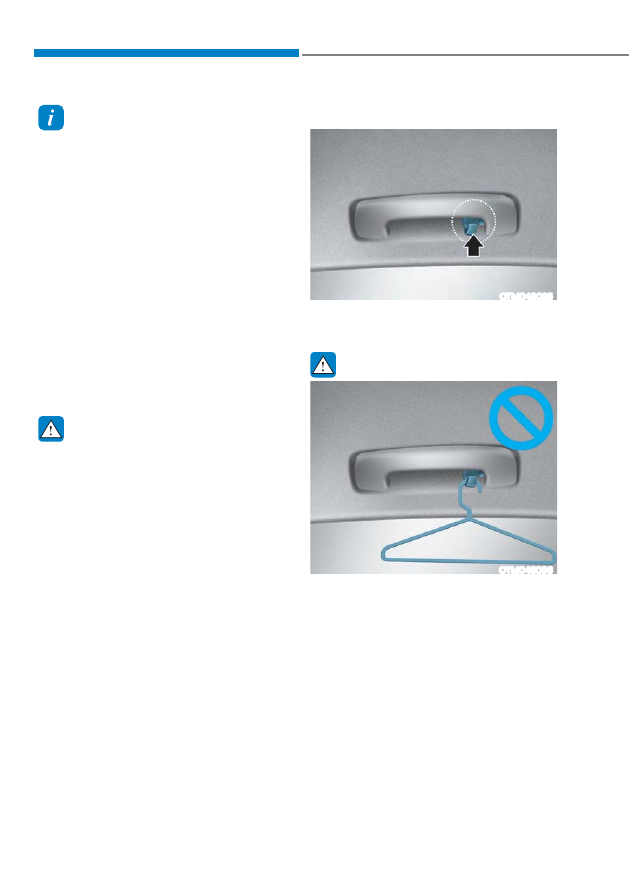
Coat Hook

OTM048095

These hooks are not designed to hold 

large or heavy items.

 WARNING

OTM048096

Do not hang other objects such 

as hangers or hard objects except 

clothes. Also, do not put heavy, sharp 

or breakable objects in the clothes 

pockets. In an accident or when the 

curtain air bag is inflated, it may cause 

vehicle damage or personal injury.

05

5-127

Floor Mat Anchor(s)

ALWAYS use the Floor Mat Anchors to 

attach the front floor mats to the vehicle. 

The anchors on the front floor carpet 

keep the floor mats from sliding forward.

 WARNING

Do not overlay additional mats or liners 

over the floor mats. If using All Weather 

mats, remove the carpeted floor mats 

before installing them. Only use floor 

mats designed to connect to the 

anchors.

 WARNING

The following must be observed when 

installing ANY floor mat to the vehicle.

ś

Ensure to remove a protective 

film attached on the carpet 

before attaching a floor mat on 

the front floor carpet. Otherwise, 

the floor mat may move freely on 

the protective film and it could 

result in unintentional braking or 

accelerating.

ś

Ensure that the floor mats are 

securely attached to the vehicle’s 

floor mat anchor(s) before driving 

the vehicle.

ś

Do not use ANY floor mat that cannot 

be firmly attached to the vehicle’s 

floor mat anchors.

ś

Do not stack floor mats on top of one 

another (for example, all-weather 

rubber mat on top of a carpeted floor 

mat). Only a single floor mat should 

be installed in each position.

IMPORTANT - Your vehicle was 

manufactured with driver’s side floor 

mat anchors that are designed to 

securely hold the floor mat in place. 

To avoid any interference with pedal 

operation, HYUNDAI recommends that 

the HYUNDAI floor mat designed for use 

in your vehicle be installed.

Luggage Net Holder (if 

equipped)

ONX4E050080

To keep items from shifting in the 

luggage compartment, you can use the 4 

holders located in the luggage side trim 

to attach the luggage net.
Make sure the luggage net is securely 

attached to the holders in the luggage 

board.
If necessary, contact your authorized 

HYUNDAI dealer to obtain a luggage net.

 WARNING

Avoid eye injury. DO NOT overstretch 

the luggage net. ALWAYS keep your 

face and body out of the luggage net’s 

recoil path. DO NOT use the luggage net 

when the strap has visible signs of wear 

or damage.
Use the luggage net to keep only light 

items from shifting in the luggage 

compartment.

Convenience Features

5-128

Cargo Security Screen (if 

equipped)

ONX4E050170

Use the cargo security screen to cover 

items stored in the cargo area.

Using the cargo security screen

ONX4E050171

1.  Pull the cargo security screen towards 

the rear of the vehicle by the handle 

(1).

2.  Insert the guide pin (2) into the guide 

(3).

 Information

Pull out the cargo security screen with the 
handle in the center to prevent the guide 
pin from falling out of the guide.

05

5-129

When the cargo security screen is not in 
use:

1.  Pull the cargo security screen 

backward and up to release it from 

the guides.

2.  The cargo security screen will 

automatically slide back in.

 Information

The cargo security screen may not 
automatically slide back in if the cargo 
security screen is not fully pulled out. Pull 
the cargo screen out all the way and then 
slowly allow the screen to retract back in.

NOTICE

Since the cargo security screen may 

be damaged or malformed, do not put 

luggage on it when it is used.

 WARNING

ś

Do not place objects on the cargo 

security screen. Such objects may be 

thrown about inside the vehicle and 

possibly injure vehicle occupants 

during an accident or when braking.

ś

Never allow anyone to ride in the 

luggage compartment. It is designed 

for luggage only.

ś

Maintain the balance of the vehicle 

and locate the weight as forward as 

possible.

Removing the cargo security screen

ONX4E050172

1.  Push one side of the cargo screen 

inward to compress the spring and 

release the screen from the vehicle.

2.  While the spring is compressed, pull 

out the cargo security screen.

3.  Open the luggage tray and keep the 

cargo security screen in the tray.

Convenience Features

5-130

EXTERIOR FEATURES

Roof Side Rails

ONX4050057

If your vehicle comes with roof side rails, 

then roof side rails crossbars can be 

installed on top of your vehicle.
The roof side rails crossbars are an 

accessory and are available at your 

HYUNDAI dealer.

NOTICE

If the vehicle is equipped with a 

sunroof, be sure not to position cargo 

onto the roof side rails in such a way 

that it could interfere with sunroof 

operation.

NOTICE

ś

When carrying cargo on the roof side 

rails, take the necessary precautions 

to make sure the cargo does not 

damage the roof of the vehicle.

ś

When carrying large objects on the 

roof side rails, make sure they do 

not exceed the overall roof length or 

width.

 WARNING

ś

The following specification is the 

maximum weight that can be loaded 

onto the roof side rails. Distribute the 

load as evenly as possible onto the 

roof side rails and secure the load 

firmly.
Loading cargo or luggage in excess 

of the specified weight limit on the 

roof side rails may damage your 

vehicle.

ROOF SIDE 

RAILS

220 lbs. (100 kg)

EVENLY DISTRIBUTED

ś

The vehicle center of gravity will be 

higher when items are loaded onto 

the roof side rails. Avoid sudden 

starts, braking, sharp turns, abrupt 

maneuvers or high speeds that may 

result in loss of vehicle control or 

rollover resulting in an accident.

ś

Always drive slowly and turn corners 

carefully when carrying items on the 

roof side rails. Severe wind updrafts, 

caused by passing vehicles or natural 

causes, can cause sudden upward 

pressure on items loaded on the 

roof side rails. This is especially true 

when carrying large, flat items such 

as wood panels or mattresses. This 

could cause the items to fall off the 

roof side rails and cause damage to 

your vehicle or others around you.

ś

To prevent damage or loss of cargo 

while driving, check frequently 

before or while driving to make sure 

the items on the roof side rails are 

securely fastened.

05

5-131

,1)27$,10(176<67(0

NOTICE

ś

If you install an aftermarket HID 

head lamp, your vehicle’s audio and 

electronic devices may not function 

properly.

ś

Prevent chemicals such as perfume, 

cosmetic oil, sun cream, hand 

cleaner, and air freshener from 

contacting the interior parts 

because they may cause damage or 

discoloration.

USB Port

ONX4050061

You can use an USB cable to connect 

audio devices to the vehicle USB port.

 Information

When using a portable audio device 
connected to the power outlet, noise may 
occur during playback. If this happens, 
use the portable audio device’s power 
source.

Convenience Features

5-132

Antenna

Shark fin antenna

ONX4050058

The shark fin antenna receives 

transmitted data. (for example: AM/FM, 

GPS)

Steering Wheel Remote Controls

OCN7050073

NOTICE

Do not operate multiple audio remote 

control buttons simultaneously.

VOLUME (VOL + / VOL -) (1)

ś

Rotate the VOLUME scroll up to 

increase volume.

ś

Rotate the VOLUME scroll down to 

decrease volume.

 Information

You can set the volume level of each 
source (FM, AM, SXM, USB, BT, etc.) 
individually by adjusting the VOLUME 
scroll.

Then the infotainment system saves the 
last volume level of each source in the 
system sound settings.

If you change the source, the volume will 
revert to the previously set volume for that 
source.

05

5-133

SEEK/PRESET (

 / 

) (2)

If the SEEK/PRESET switch is pressed up 

or down and held for 0.8 second or more, 

it will function in the following modes:

ś

RADIO mode

It will function as the AUTO SEEK 

select button. It will SEEK until you 

release the button.

ś

MEDIA mode

It will function as the FF/RW button.

If the SEEK/PRESET switch is pressed up 

or down, it will function in the following 

modes:

ś

RADIO mode

It will function as the PRESET STATION 

UP/DOWN button.

ś

MEDIA mode

It will function as the TRACK UP/ 

DOWN button.

MODE (3)

Press the MODE button to toggle 

through Radio or Media modes.

MUTE ( ) (4)

ś

Press the MUTE button to mute the 

sound.

ś

Press the MUTE button again to 

activate the sound.

 Information

See additional information in supplied 
Infotainment Manual.

Infotainment System

For detailed information, refer to the 

separately supplied infotainment system 

manual.

Voice Recognition

OCN7050081

For detailed information, refer to the 

separately supplied infotainment 

system manual.

Convenience Features

5-134

Bluetooth® Wireless Technology

ONX4050062

ONX4E050174

(1)  Call / Answer button
(2)  Call end button
(3) Microphone

For detailed information, refer to the 

separately supplied infotainment 

system manual.

 CAUTION

To avoid driver distractions, do not 

excessively operate the device while 

driving the vehicle which may lead to 

an accident.

6

6. Driving Your Vehicle

Before Driving ...................................................................................................6-4

Before Entering the Vehicle ........................................................................................ 6-4

Before Starting ............................................................................................................ 6-4

Ignition Switch .................................................................................................. 6-5

Engine Start/Stop Button ............................................................................................6-5

Remote Start ................................................................................................................ 6-9

Automatic Transmission ..................................................................................6-10

Automatic Transmission Operation ........................................................................... 6-10

Parking ........................................................................................................................ 6-13

LCD Display Message ................................................................................................. 6-14

Paddle Shifter ............................................................................................................. 6-15

Good Driving Practices .............................................................................................. 6-15

Coasting Guide ................................................................................................. 6-17
Braking System ................................................................................................6-18

Power Brakes .............................................................................................................. 6-18

Disc Brakes Wear Indicator........................................................................................ 6-19

Electronic Parking Brake (EPB) .................................................................................. 6-19

Auto Hold ....................................................................................................................6-23

Anti-lock Brake System (ABS) ....................................................................................6-27

Electronic Stability Control (ESC) .............................................................................6-28

Vehicle Stability Management (VSM) ....................................................................... 6-31

Hill-Start Assist Control (HAC) ...................................................................................6-32

Trailer Stability Assist (TSA) .......................................................................................6-33

Downhill Brake Control (DBC) ...................................................................................6-33

Good Braking Practices ............................................................................................ 6-36

All Wheel Drive (AWD) .................................................................................... 6-37

All Wheel Drive (AWD) Operation ............................................................................. 6-38

Emergency Precautions ............................................................................................ 6-42

Reducing the Risk of a Rollover ............................................................................... 6-44

Electronic Control Suspension .......................................................................6-45

System Malfunction .................................................................................................. 6-45

6

Drive Mode Integrated Control System (AWD) .............................................6-46

Drive Mode ................................................................................................................ 6-46

Special Driving Conditions .............................................................................6-49

Hazardous Driving Conditions ................................................................................. 6-49

Rocking the Vehicle .................................................................................................. 6-49

Smooth Cornering ..................................................................................................... 6-50

Driving at Night ......................................................................................................... 6-50

Driving in the Rain ..................................................................................................... 6-50

Driving in Flooded Areas ............................................................................................ 6-51

Highway Driving ......................................................................................................... 6-51

Reducing the Risk of a Rollover ................................................................................ 6-51

Winter Driving ................................................................................................. 6-52

Snow or Icy Conditions ..............................................................................................6-52

Winter Precautions .....................................................................................................6-55

Trailer Towing .................................................................................................. 6-57

If you Decide to Pull a Trailer .................................................................................... 6-58

Trailer Towing Equipment ..........................................................................................6-61

Driving with a Trailer ................................................................................................. 6-62

Maintenance when Towing a Trailer ........................................................................ 6-65

Vehicle Weight ................................................................................................6-66

The Loading Information Label .................................................................................6-67

06

6-3

 WARNING

Carbon monoxide (CO) gas is toxic. Breathing CO can cause unconsciousness and 

death.

Engine exhaust contains carbon monoxide which cannot be seen or smelled.

Do not inhale engine exhaust.

If at any time you smell engine exhaust inside the vehicle, open the windows 

immediately. Exposure to CO can cause unconsciousness and death by asphyxiation.

Be sure the exhaust system does not leak.

The exhaust system should be checked whenever the vehicle is raised to change the 

oil or for any other purpose. If you hear a change in the sound of the exhaust or if you 

drive over something that strikes the underneath side of the vehicle, have the exhaust 

system checked as soon as possible by an authorized HYUNDAI dealer.

Do not run the engine in an enclosed area.

Letting the engine idle in your garage, even with the garage door open, is a hazardous 

practice. Run the engine only long enough to start the engine and to move the vehicle 

out of the garage.

Avoid idling the engine for prolonged periods with people inside the vehicle.

If it is necessary to idle the engine for a prolonged period with people inside the 

vehicle, be sure to do so only in an open area with the air intake set at “Fresh” and fan 

control set to high so fresh air is drawn into the interior.

Keep the air intakes clear.

To assure proper operation of the ventilation system, keep the ventilation air intakes 

located in front of the windshield clear of snow, ice, leaves, or other obstructions.

If you must drive with the liftgate open:

Close all windows.
Open instrument panel air vents.
Set the air intake control at “Fresh”, the air flow control at “Floor” or “Face”, and the fan 

control set to high.

 WARNING

CALIFORNIA PROPOSITION 65 WARNING
Engine exhaust and a wide variety of automobile components including 

components found in the interior furnishings in a vehicle, contain or emit harmful 

chemicals known to the State of California to cause cancer and birth defects and 

reproductive harm. In addition, certain fluids contained in vehicles and certain 

products of components contain or emit chemicals known to the State of California 

to cause cancer and birth defects or other reproductive harm.

Driving Your Vehicle

6-4

Before Entering the Vehicle

ś

Be sure all windows, outside mirror(s), 

and outside lights are clean and 

unobstructed.

ś

Remove frost, snow, or ice.

ś

Visually check the tires for uneven 

wear and damage.

ś

Check under the vehicle for any sign 

of leaks.

ś

Be sure there are no obstacles behind 

you if you intend to back up.

Before Starting

ś

Make sure the hood, the liftgate, and 

the doors are securely closed and 

locked.

ś

Adjust the position of the seat and 

steering wheel.

ś

Adjust the inside and side view 

mirrors.

ś

Verify all the lights work.

ś

Fasten your seat belt. Check that all 

passengers have fastened their seat 

belts.

ś

Check the gauges and indicators 

in the instrument panel and the 

messages on the instrument display 

when the ignition switch is in the ON 

position.

ś

Check that any items you are carrying 

are stored properly or fastened down 

securely.

 WARNING

To reduce the risk of SERIOUS INJURY or 

DEATH, take the following precautions:

ś

ALWAYS wear your seat belt. All 

passengers must be properly belted 

whenever the vehicle is moving. 

For more information, refer to “Seat 

Belts” section in chapter 3.

ś

Always drive defensively. Assume 

other drivers or pedestrians may be 

careless and make mistakes.

ś

Stay focused on the task of driving. 

Driver distraction can cause 

accidents.

ś

Leave plenty of space between you 

and the vehicle in front of you.

 WARNING

NEVER drink or take drugs and drive.
Drinking or taking drugs and driving 

is dangerous and may result in an 

accident and SERIOUS INJURY or 

DEATH.
Drunk driving is the number one 

contributor to the highway death 

toll each year. Even a small amount 

of alcohol will affect your reflexes, 

perceptions and judgment. Just 

one drink can reduce your ability to 

respond to changing conditions and 

emergencies and your reaction time 

gets worse with each additional drink.
Driving while under the influence 

of drugs is as dangerous or more 

dangerous than driving under the 

influence of alcohol.
You are much more likely to have a 

serious accident if you drink or take 

drugs and drive. If you are drinking or 

taking drugs, don’t drive. Do not ride 

with a driver who has been drinking 

or taking drugs. Choose a designated 

driver or call a taxi.

BEFORE DRIVING

06

6-5

IGNITION SWITCH

 WARNING

To reduce the risk of SERIOUS INJURY or 

DEATH, take the following precautions:

ś

NEVER allow children or any person 

who is unfamiliar with the vehicle to 

touch the ignition switch or related 

parts. Unexpected and sudden 

vehicle movement can occur.

ś

NEVER reach through the steering 

wheel for the ignition switch, or any 

other control, while the vehicle is in 

motion. The presence of your hand 

or arm in this area may cause a loss 

of vehicle control resulting in an 

accident.

Engine Start/Stop Button  

(if equipped)

ONX4060001

Whenever the front door is opened, the 

Engine Start/Stop button will illuminate 

and will go off 30 seconds after the door 

is closed (if equipped).

 WARNING

To turn the vehicle off in an emergency:
Press and hold the Engine Start/Stop 

button for more than two seconds OR 

Rapidly press and release the Engine 

Start/ Stop button three times (within 

three seconds).
If the vehicle is still moving, you can 

restart the vehicle without depressing 

the brake pedal by pressing the Engine 

Start/Stop button with the shift button 

in the N (Neutral) position.

 WARNING

ś

NEVER press the Engine Start/Stop 

button while the vehicle is in motion 

except in an emergency. This will 

result in the vehicle turning off and 

loss of power assist for the steering 

and brake systems. This may lead 

to loss of directional control and 

braking function, which could cause 

an accident.

ś

Before leaving the driver’s seat, 

always make sure the shift button 

is in the P (Park) position, set the 

parking brake, press the Engine 

Start/Stop button to the OFF 

position, and take the Smart Key with 

you. Unexpected vehicle movement 

may occur if these precautions are 

not followed.

ś

NEVER reach through the steering 

wheel for the Engine Start/Stop 

button or any other control while the 

vehicle is in motion. The presence 

of your hand or arm in this area 

may cause a loss of vehicle control 

resulting in an accident.

Driving Your Vehicle

6-6

Engine Stop/Start button positions

Button Position

Action

Notice

OFF

To turn off the engine, press the 

Engine Start/Stop button with 

shift button in P (Park).

If the Engine Start/Stop button is 

pressed with the vehicle shifted 

to D (Drive), R (Reverse), or N 

(Neutral), the gear automatically 

shifts to P (Park).

The steering wheel locks to 

protect the vehicle from theft.

If the steering wheel is not locked 

properly when you open the 

driver’s door, the warning chime 

will sound.

ACC

Press the Engine Start/Stop button 

when the button is in the OFF 

position without depressing the 

brake pedal.

Some electrical accessories are 

usable.

The steering wheel unlocks.

If you leave the Engine Start/ Stop 

button in the ACC position for 

more than one hour, the battery 

power will turn off automatically 

to prevent the battery from 

discharging.

If the steering wheel doesn’t 

unlock properly, the Engine Start/ 

Stop button will not work. Press 

the Engine Start/Stop button while 

turning the steering wheel right 

and left to release tension.

ON

Press the Engine Start/Stop button 

while it is in the ACC position 

without depressing the brake 

pedal.

The warning lights can be checked 

before the engine is started.

Do not leave the Engine Start/ Stop 

button in the ON position when the 

engine is not running to prevent 

the battery from discharging.

START

To start the engine, depress the 

brake pedal and press the Engine 

Start/Stop button with the shift 

button in the P (Park).

For your safety, start the engine 

with the shift button in the P (Park) 

position.

If you press the Engine Start/ Stop 

button without depressing the 

brake pedal, the engine does not 

start and the Engine Start/ Stop 

button changes as follows:

2))Ɵ$&&Ɵ21Ɵ2))RU$&&

06

6-7

Starting the engine

 WARNING

ś

Always wear appropriate shoes when 

operating your vehicle. Unsuitable 

shoes, such as high heels, ski boots, 

sandals, flipflops, etc., may interfere 

with your ability to use the brake and 

accelerator pedals.

ś

Do not start the vehicle with the 

accelerator pedal depressed.
The vehicle can move which can lead 

to an accident.

 Information

ś

The vehicle will start by pressing the 
Engine Start/Stop button, only when 
the smart key is in the vehicle.

ś

Even if the smart key is in the vehicle, 
and when it is far away from the driver, 
the hybrid system may not start.

ś

When the Engine Start/Stop button is 
in the ACC or ON position, any door 
is open, the system checks for the 
smart key. When the smart key is not 
in the vehicle, the “

” indicator 

will blink and the warning “Key not in 
vehicle” will come on. When all doors 
are closed, the chime will also sound for 
about 5 seconds. Keep the smart key in 
the vehicle when in the ACC position or 
if the hybrid system is ON.

1.  Always carry the smart key with you.
2.  Make sure the parking brake is 

applied.

3.  Make sure the shift button is in P 

(Park).

4.  Depress the brake pedal.
5.  Press the Engine Start/Stop button. If 

the vehicle starts, the “

” indicator 

will come on.

 Information

ś

Do not wait for the engine to warm up 
while the vehicle remains stationary.

Start driving at moderate engine 
speeds. Steep accelerating and 
decelerating should be avoided.

ś

Always start the vehicle with your foot 
on the brake pedal. Do not depress the 
accelerator while starting the vehicle. 
Do not race the engine while warming 
it up.

ś

If ambient temperature is low, 
the “

” indicator may remain 

illuminated longer than the normal 
amount of time.

NOTICE

To prevent damage to the vehicle:

ś

If the “

” indicator turns off while 

you are in motion, do not attempt to 

move the shift button to the P (Park) 

position.

ś

Do not push or tow your vehicle to 

start the vehicle.

Driving Your Vehicle

6-8

NOTICE

To prevent damage to the vehicle:
Do not press the Engine Start/Stop 

button for more than 10 seconds except 

when the stop lamp fuse is blown.
When the stop lamp fuse is blown, 

you cannot normally start the hybrid 

system. Replace the fuse with a new 

one. If you are not able to replace 

the fuse, you can start the vehicle by 

pressing and holding the Engine Start/

Stop button for 10 seconds with the 

Engine Start/Stop button in the ACC 

position.
For your safety always depress the 

brake pedal before starting the vehicle.

Emergency starting

ONX4060002

If the smart key battery is weak or the 

smart key does not work correctly, you 

can start the vehicle by pressing the 

Engine Start/Stop button with the smart 

key in the direction of the picture above.

Turning off the engine

1.  Stop the vehicle and depress the 

brake pedal fully.

2.  Make sure the shift button is in 

P(Park).

3.  Press the Engine Start/Stop button 

to the OFF position and apply the 

parking brake.

Auto shut-off system (if equipped)

To prevent accidents caused by carbon 

dioxide poisoning, the engine is turned 

off automatically 60 minutes later when 

the following conditions are satisfied. 

The timer appears on the instrument 

cluster 30 minutes before it turns off 

automatically.

Operating conditions

ś

The driver does not fasten a seat belt

ś

No one in the passenger's seat

ś

Stop the vehicle and the speed is 

under 1.86mph and the gear shift is 

in P

ś

While the brake or accelerator is not 

working 

ś

When Infotainment system update is 

not performing 

Cluster timer reset conditions

ś

Release the accelerator or brake after 

completing operation

ś

Press the OK button on the steering 

wheel while the timer appears on the 

instrument cluster

Off conditions

ś

The driver fastened the seat belt

ś

A passenger is in the pasenger's seat

ś

Driving over 1.86mph 

ś

Shifting the gear in R, N or D

 CAUTION

Please do not leave a passenger or a pet 

in the vehicle since the air conditioning 

system stops when the engine is off. 

06

6-9

Remote Start (if equipped)

„

Type A

OTM060003

„

Type B

OTM060004

You can start the vehicle using the 

Remote Start button of the smart key.

To start the vehicle remotely:
1.  Press the door lock button within 32 

feet (10 m) from the vehicle.

2.  Press and hold the remote start button 

( ) within 4 seconds after pressing 

the Door Lock button on the remote.

3.  To turn off the remote start function, 

press the remote start ( ) button 

once.

ś

The remote start ( ) button may not 

operate if the smart key is not within 

32 feet (10 m).

ś

The vehicle will not remotely start if 

the engine hood or liftgate is opened.

ś

The vehicle must be in P (Park) for the 

remote start function to start.

ś

The engine turns off if you get in the 

vehicle without a registered smart key. 

ś

The engine turns off if you do not get 

in the vehicle within 10 minutes after 

remotely starting the vehicle.

ś

Do not idle the engine for a long 

period. 

Driving Your Vehicle

6-10

ONX4060003

Automatic Transmission Operation

The automatic transmission has six forward speeds and one reverse speed. The 

individual speeds are selected automatically in the D (Drive) position. The indicator in 

the instrument cluster displays the shift button position when the ignition switch is in 

the ON position.

 WARNING

The automatic transmission shift button or interior parts might get hot when a 

vehicle is parked outside during hot weather. Always be careful when the vehicle is 

hot.

AUTOMATIC TRANSMISSION

06

6-11

 WARNING

To reduce the risk of serious injury or 

death:

ś

ALWAYS check the surrounding 

areas near your vehicle for people, 

especially children, before shifting a 

vehicle into D (Drive) or R (Reverse).

ś

Before leaving the driver’s seat, 

always make sure the shift button 

is in the P (Park) position, then set 

the parking brake, and place the 

ignition switch in the LOCK/OFF 

position. Unexpected and sudden 

vehicle movement can occur if these 

precautions are not followed.

ś

When using the paddle shifters to 

change gears, do not shift from a 

high gear to lower gear on slippery 

roads. The vehicle may slip causing 

an accident.

P (Park)

Always come to a complete stop before 

shifting into P (Park).
To shift from P (Park), you must depress 

firmly on the brake pedal and make sure 

your foot is off the accelerator pedal.
The shift button must be in P (Park) 

before turning the engine off.

 WARNING

ś

Shifting into P (Park) while the 

vehicle is in motion may cause you to 

lose control of the vehicle.

ś

After the vehicle has stopped, always 

make sure the shift button is in P 

(Park), apply the parking brake, and 

turn the engine off.

ś

When parking on an incline with the 

vehicle facing down the hill, turn 

the steering wheel fully to the right 

to prevent the vehicle from rolling 

downhill. When parking with the 

vehicle facing up the hill, turn the 

steering wheel fully to the left. 

ś

Do not use the P (Park) position in 

place of the parking brake.

R (Reverse)

Use this position to drive the vehicle 

backward.

NOTICE

Always come to a complete stop before 

shifting into or out of R (Reverse); you 

may damage the transmission if you 

shift into R (Reverse) while the vehicle is 

in motion.

When the vehicle is stopped in 

R (Reverse) position, if you open 

the driver’s door with the seat belt 

unfastened, the gear is shifted to P (Park) 

position automatically.
However when the vehicle moves 

in R (Reverse) position, if you open 

the driver’s door with the seat belt 

unfastened, the gear may be not shifted 

to P (Park) position automatically for 

protecting the automatic transmission.

N (Neutral)

The wheels and transmission are not 

engaged.
Use N (Neutral) if you need to restart a 

stalled engine, or if it is necessary to stop 

with the engine ON. Shift into P (Park) 

if you need to leave your vehicle for any 

reason.
Always depress the brake pedal when 

you are shifting from N (Neutral) to 

another gear.

 WARNING

Do not shift into gear unless your foot is 

firmly on the brake pedal. Shifting into 

gear when the engine is running at high 

speed can cause the vehicle to move 

very rapidly. You could lose control of 

the vehicle and hit people or objects.

Driving Your Vehicle

6-12

D (Drive)

This is the normal driving position. The 

transmission will automatically shift 

through a 6-gear sequence, providing 

the best fuel economy and power.
To start the vehicle forward, push the D 

(Drive) button by depressing the brake 

pedal with the engine ON. Then depress 

the accelerator pedal smoothly.
For extra power when passing another 

vehicle or driving uphill, depress the 

accelerator. The transmission will 

automatically downshift to the next 

lower gear (or gears, as appropriate).
When the vehicle is stopped in D (Drive) 

position, if you open the driver’s door 

with the seat belt unfastened, the gear is 

shifted to P (Park) position automatically.
However when the vehicle moves in D 

(Drive) position, if you open the driver’s 

door with the seat belt unfastened, 

the gear may be not shifted to P (Park) 

position automatically for protecting the 

automatic transmission.
The DRIVE MODE switch, located on the 

shift button console, allows the driver to 

switch from NORMAL mode to SPORT or 

ECO mode. (if equipped)

For more details, refer to “Drive Mode 

Integrated Control System” later in this 

chapter.

Shift-lock system

For your safety, the automatic 

transmission has a shift-lock system 

which prevents shifting the transmission 

from P (Park) or N (Neutral) to R 

(Reverse) or D (Drive) unless the brake 

pedal is depressed.
To shift the transmission from P (Park) 

into R (Reverse):
1.  Depress and hold the brake pedal.
2.  Start the engine or place the ignition 

switch in the ON position.

3.  Depress the brake pedal and push the 

R(Reverse) button.

To stay in N (Neutral) position when 

vehicle is Off

ONX4060004

ONX4E060021

If you want to keep the N (Neutral) 

position after the vehicle is OFF, do the 

following.
1.  Release the parking brake when the 

engine is running or the Engine Start/

Stop button is ON position. If Auto 

Hold is activated, please turn off Auto 

Hold.

2.  Push the N (neutral) button while 

depressing the brake pedal.

3.  When you take your foot off the brake 

pedal, the message ‘Press and hold 

OK button to stay in Neutral when 

vehicle is Off’ (or 'Hold OK button to 

stay in neutral gear position when 

vehicle is Off') will appear on the 

cluster LCD display.

4.  Press and hold the OK button on 

the steering wheel for more than 1 

second.

06

6-13

5.  When the message ‘Vehicle will stay in 

(N). Change gear to cancel’ (or ‘N will 

stay engaged when the vehicle is Off’) 

appears on the cluster LCD display, 

press the Engine Start/Stop button 

while depressing the brake pedal. 

However, if you open the driver’s or 

front passenger’s door, the gear will 

automatically shift to P (Park) and the 

Engine Start/ Stop button will change to 

the OFF position.

When the battery is discharged:

You cannot shift the shift button, when 

the battery is discharged.
In emergencies, do the following to 

move the shift button to N (Neutral) on a 

level ground.
1.  Connect the battery cables from 

another vehicle or from another 

battery.

For more details, refer to “Jump 

Starting” in chapter 8.

2.  Release the parking brake with the 

Engine Start/Stop button in the ON 

position.

3.  Shift the gear to the N(Neutral) 

position refer to the “Stay in Neutral 

when vehicle is Off” in this chapter.

Parking

Always come to a complete stop and 

continue to depress the brake pedal. 

Move the shift button into the P (Park) 

position, apply the parking brake, and 

place the ignition switch in the LOCK/ 

OFF position. Take the Key with you 

when exiting the vehicle.

ś

The gear is shifted to P (Park) position 

automatically for safety under the 

following conditions.


- When the driver unfasten the seat 

belt and open the driver’s door in 

the “Stay in Neutral when vehicle is 

Off” condition or in the ignition ON


- When turn off the engine with R 

(Reverse) / D (Drive) or N (Neutral) 

position

This is supplemental function for safety. 

Always check the P (Park) position is 

shifted.

 WARNING

When you stay in the vehicle with 

the engine running, be careful not to 

depress the accelerator pedal for a long 

period of time. The engine or exhaust 

system may overheat and start a fire.
The exhaust gas and the exhaust system 

are very hot. Keep away from the 

exhaust system components.
Do not stop or park over flammable 

materials, such as dry grass, paper or 

leaves. They may ignite and cause a fire.

Driving Your Vehicle

6-14

LCD Display Message


Ã

The actual message may differ from 

the following LCD display message.


Ã

The application of the following 

message may vary according to the 

vehicle model.

Shifting conditions not met. Reduce 

speed, then shift

The warning message appears on the 

LCD display, when engine RPM is too 

high, or when driving speed is too fast to 

shift the gear.
Decrease the engine speed or slow down 

before shifting the gear.

Press brake pedal to change gear

The warning message appears on the 

LCD display, when the brake pedal is not 

depressed while shifting the gear.
Depress the brake pedal and then shift 

the gear.

Shift to P after stopping

The warning message appears on the 

LCD display, when the gear is shifted to P 

(Park) while the vehicle is moving.
Stop the vehicle before shifting to P 

(Park).

PARK engaged

Make sure that the vehicle is completely 

stopped before shifting to P (Park).

Push-button gear selector

If the gear selector is shifted to P (Park) 

while the vehicle is still moving, a 

warning message will appear in the LCD 

display.

Press and hold the OK button on the

steering wheel to stay in Neutral

The warning message appears on 

the LCD display, when pushing the 

N(Neutral) button. If you want to stay 

N(Neutral) after turning off the engine, 

press and hold the “OK” button on the 

steering wheel more than 1 second.

Vehicle will stay in (N). Change gear 

to cancel

The warning message appears on the 

LCD display, when pushing the “OK” 

button on the steering wheel after the 

message (“Press and hold OK button 

to stay in Neutral when vehicle is Off”) 

appears on the cluster LCD display. The 

gear stays in N(Neutral) position after 

turning off the engine.

NEUTRAL engaged

The message appears on the LCD 

display, when the N (Neutral) position is 

engaged.

Gear already selected

The message appears on the LCD 

display, when pushing the current shift 

button again.

Shift button held down

The warning message appears on the 

LCD display, when the shift button is 

pressed continuously or the shift button 

does not properly operate. Clean the 

surroundings of gear shift button.
If this message appears again, have 

the vehicle inspected by an authorized 

HYUNDAI dealer.

06

6-15

Shifter system malfunction! Service 

immediately

The warning message appears on the 

LCD display, when the transmission 

or the shift button does not properly 

operate in the P (Park) position.
In this case, immediately have the 

vehicle inspected by an authorized 

HYUNDAI dealer.

Check shift controls

The warning message appears on the 

LCD display, when there is a malfunction 

with transmission shift button.
In this case, immediately have the 

vehicle inspected by an authorized 

HYUNDAI dealer.

Paddle Shifter

ONX4060005

The paddle shifter is available when the 

shift button is in the D (Drive) position.

With the shift button in the D position

The paddle shift will operate in all speed 

areas.
Pull the [+] or [-] paddle shifter once 

to shift up or down one gear and the 

system changes from automatic mode to 

manual mode.
In the manual shift mode, pull the [+] 

or [-] paddle shifter once to shift up or 

down one gear.
To change back to automatic shift mode 

from manual shift mode, do one of the 

followings :


- Pull the [+] paddle shifter for more 

than one second


- Press the D button.
The manual shift mode also changes 

back to automatic shift mode in one of 

following situations


- When the accelerator pedal is gently 

depressed for more than 6 seconds 

while driving


- When the vehicle speed is less than 

1mph

 Information

If the [+] and [-] paddle shifters are pulled 
at the same time, gear shift may not occur.

Good Driving Practices

ś

Never move the shift button from 

P (Park) or N (Neutral) to any other 

position with the accelerator pedal 

depressed.

ś

Never move the shift button into P 

(Park) when the vehicle is in motion.
Be sure the vehicle is completely 

stopped before you attempt to shift 

into R (Reverse) or D (Drive).

ś

Do not move the shift button to N 

(Neutral) when driving. Doing so 

may result in an accident because 

of a loss of engine braking and the 

transmission could be damaged.

Driving Your Vehicle

6-16

ś

When driving uphill or downhill, 

always shift to D (Drive) for driving 

forward or shift to R (Reverse) for 

driving rearwards. After selecting 

D (Drive) or R (Reverse), check the 

gear position indicated on the cluster 

before driving. If the vehicle moves  in 

the opposite direction of the selected 

gear, the engine may turn off and a 

serious accident might occur due 

to degraded brake performance.

Never attempt to select a gear that 

is opposite to the direction of the 

vehicle motion.
Stop the vehicle before changing to 

the desired gear.

ś

Do not drive with your foot resting 

on the brake pedal. Even light, but 

consistent pedal pressure can result 

in the brakes overheating, brake wear 

and possibly even brake failure.

ś

Always apply the parking brake when 

leaving the vehicle. Do not depend on 

placing the transmission in P (Park) to 

keep the vehicle from moving.

ś

Exercise extreme caution when 

driving on a slippery surface. Be 

especially careful when braking, 

accelerating or shifting gears. On a 

slippery surface, an abrupt change 

in vehicle speed can cause the drive 

wheels to lose traction and may cause 

loss of vehicle control resulting in an 

accident

ś

Optimum vehicle performance and 

economy is obtained by smoothly 

depressing and releasing the 

accelerator.

 WARNING

To reduce the risk of SERIOUS INJURY 

or DEATH:

ś

ALWAYS wear your seat belt. In a 

collision, an unbelted occupant 

is significantly more likely to be 

seriously injured or killed than a 

properly belted occupant.

ś

Avoid high speeds when cornering or 

turning.

ś

Do not make quick steering wheel 

movements, such as sharp lane 

changes or fast, sharp turns.

ś

The risk of rollover is greatly 

increased if you lose control of your 

vehicle at highway speeds.

ś

Loss of control often occurs if two or 

more wheels drop off the roadway 

and the driver over steers to reenter 

the roadway.

ś

In the event your vehicle leaves 

the roadway, do not steer sharply. 

Instead, slow down before pulling 

back into the travel lanes.

ś

HYUNDAI recommends you follow all 

posted speed limits.

 WARNING

ś

Before leaving the driver's seat, 

always make sure the shift button 

is in the P (Park) position, set the 

parking brake, press the Engine 

Start/Stop button to the OFF 

position, and take the Smart Key with 

you.
Unexpected and sudden vehicle 

movement can occur if these 

precautions are not followed.

ś

Do not drive with the shift button in 

N (Neutral). The engine brake will not 

work and may lead to an accident.

ś

Driving uphill or downhill, always 

shift to D (Drive) when driving 

forward or to R (Reverse) when 

driving backwards, and check the 

gear position indicated on the 

cluster before driving. If you drive 

in the opposite direction of the 

selected gear, the engine will turn 

off and a serious accident might be 

occurred due to the degraded brake 

performance.

06

6-17

OOSH069019L

The coasting guide function informs the 

driver when to take the foot off from the 

accelerator by anticipating a decelerating 

event* based on the analysis of driving 

routes and road conditions of the 

navigation. It encourages the driver to 

remove foot from the pedal and allow 

coasting down the road with EV motor 

only. This helps prevent unnecessary 

fuel consumption and increases fuel 

efficiency.

 Information

Example of a deceleration event is making 
a right/left turn, driving through a rotary, 
entering or exiting a highway (freeway), 
etc.

Setting Coasting Guide function

Coasting Guide can be selected from the 

User Settings mode in the cluster LCD 

display or infotainment system display by 

following the procedure below.
1.  Set the ignition switch in the ON 

position.

2. 

6HOHFWœ8VHU6HWWLQJVƟ(FR9HKLFOH
Ɵ&RDVWLQJ*XLGHŔLQWKHFOXVWHU

LCD display or infotainment system 

display.

Operation conditions

After selecting the function from the 

User Settings mode, the system enters 

the ready status by following the 

procedure below.
1.  Enter your destination information in 

the navigation system and select the 

driving route.

2.  Check that the vehicle is in ECO mode 

by driving the vehicle in D (Drive).

3.  Drive the vehicle between 25 mph(40 

km/h)~100 mph(160 km/h).

 Information

The operating speed may vary due to 
difference between instrument cluster and 
navigation effected by tire inflation level.

 Information

Coasting guide is only a supplemental 
function to assist with fuel-efficient 
driving. Thus, the operating conditions 
may be different in accordance with 
traffic/road conditions (for example, 
driving in a traffic jam, driving on a 
slope, driving on a curve). Take the actual 
driving conditions into consideration, 
such as distances from the vehicles ahead/
behind, while referring to the coasting 
guide function as guidance.

&2$67,1**8,'(ǣ,)(48,33('Ǥ

Driving Your Vehicle

6-18

Power Brakes

Your vehicle has power-assisted brakes 

that adjust automatically through normal 

usage.
In the event of a vehicle power failure, 

the power assist for the brakes will not 

work. You can still stop your vehicle, but 

it will require greater force and increased 

pedal travel than normal. The stopping 

distance, however, will be longer than 

with power brakes.

 Information

ś

When the brake pedal is depressed 
under certain driving conditions 
or weather conditions, you may 
temporarily hear a noise. This is 
normal and does not indicate a problem 
with your brakes.

ś

While driving on a road with deicing 
chemicals, brake noise or abnormal 
tire wear may occur due to deicing 
chemicals. In a safe traffic condition, 
additionally apply the brakes to remove 
deicing chemicals on the brake discs 
and pads.

 WARNING

Take the following precautions:

ś

Do not drive with your foot resting 

on the brake pedal. This will create 

abnormal high brake temperatures, 

excessive brake lining and pad wear, 

and increased stopping distances.

ś

When descending down a long 

or steep hill, downshift to a lower 

gear in order to control your 

speed without using the brake 

pedal excessively. Applying the 

brakes continuously will cause 

the brakes to overheat and could 

result in a temporary loss of braking 

performance.

ś

Wet brakes may impair the vehicle's 

ability to safely slow down; the 

vehicle may also pull to one side 

when the brakes are applied. 

Applying the brakes lightly will 

indicate whether they have been 

affected in this way. Always test your 

brakes in this fashion after driving 

through deep water. To dry the 

brakes, lightly tap the brake pedal to 

heat up the brakes while maintaining 

a safe forward speed until brake 

performance returns to normal. 

Avoid driving at high speeds until the 

brakes function correctly.

NOTICE

ś

Do not continue depressing the 

brake pedal if the "

" indicator is 

OFF. The battery may be discharged.

ś

Noise and vibration generated 

during braking is normal.

ś

Under normal operation, electric 

brake pump noise and motor 

vibration may occur temporarily in 

below cases.


-

When the pedal is depressed 

suddenly.


-

When the pedal is repeatedly 

depressed in short intervals.


-

When the ABS function is activated 

while braking.

BRAKING SYSTEM

06

6-19

Disc Brakes Wear Indicator

When your brake pads are worn and new 

pads are required, you will hear a high 

pitched warning sound from your front 

or rear brakes. You may hear this sound 

come and go or it may occur whenever 

you depress the brake pedal.

NOTICE

To avoid costly brake repairs, do not 

continue to drive with worn brake pads.

 Information

Always replace brake pads as complete 
front or rear axle sets.

Electronic Parking Brake (EPB)

Applying the parking brake

ONX4060006

To apply EPB (Electronic Parking Brake):

1.  Depress and hold the brake pedal.
2.  Pull up the EPB switch.
Make sure the Parking Brake Warning 

Light comes on.

EPB (Electronic Parking Brake) may be 
automatically applied when:

ś

Requested by other systems

ś

The driver turns the vehicle off while 

Auto Hold is operating.

Emergency braking

If there is a problem with the brake 

pedal while driving, emergency braking 

is possible by pulling up and holding 

the EPB switch. Braking is possible only 

while you are holding the EPB switch. 

However, braking distance will be longer 

than normal.

 WARNING

To reduce the risk of SERIOUS INJURY 

or DEATH, do not operate the EPB 

while the vehicle is moving except 

in an emergency situation. It could 

damage the brake system and lead to 

an accident.

 Information

During emergency braking, the Parking 
Brake warning light will illuminate to 
indicate that the system is operating.

NOTICE

If you continuously notice a noise or 

burning smell when the EPB is used for 

emergency braking, have the system 

checked by an authorized HYUNDAI 

dealer.

Driving Your Vehicle

6-20

Releasing the parking brake

ONX4E060026

To release EPB (Electronic Parking 
Brake):

ś

Place the ignition switch in the ON 

position.

ś

Depress the brake pedal.

ś

Press the EPB switch.

Make sure the Parking Brake Warning 

Light goes off.

To release EPB (Electronic Parking Brake) 
automatically:  

ś

Gear in P (Park) 

With the engine running depress the 

brake pedal and shift out of P (Park) to R 

(Reverse) or D (Drive). 

ś

Gear in N (Neutral) 

With the engine running depress the 

brake pedal and shift out of N (Neutral) 

to R (Reverse) or D (Drive). 

ś

Satisfy the following conditions

1.  Ensure seat belts are fastened and the 

doors, hood and liftgate are closed.

2.  With the engine running, depress the 

brake pedal and shift out of P (Park) to 

R (Reverse), D (Drive) or Manual shift 

mode.

3.  Depress the accelerator pedal.

Make sure the Parking Brake warning 

light goes off.

 Information

ś

For your safety, you can engage EPB 
even though the ignition switch is in the 
OFF position (only if battery power is 
available), but you cannot release it.

ś

For your safety, depress the brake 
pedal and release the parking brake 
manually with the EPB switch when 
you drive downhill or when backing up 
the vehicle.

NOTICE

ś

If the parking brake warning light is 

still on even though the EPB has been 

released, have the system checked 

by an authorized HYUNDAI dealer.

ś

Do not drive your vehicle with EPB 

applied. It may cause excessive brake 

pad and brake rotor wear.

06

6-21

Warning messages

OTMH060006N

To release EPB, fasten seatbelt, close door, 
hood and liftgate

ś

When you try to drive with the EPB 

applied, a warning will sound and a 

message will appear.

ś

If the driver’s seat belt is unfastened 

and the engine hood or liftgate is 

opened, a warning will sound and a 

message will appear.

ś

When there is a problem with the 

vehicle, a warning may sound and a 

message may appear.

If the situation occurs, depress the brake 

pedal and release EPB by pressing the 

EPB switch.

 WARNING

ś

Whenever leaving the vehicle or 

parking, always come to a complete 

stop and continue to depress the 

brake pedal.
Move the shift button into the P 

(Park) position, pull up the EPB 

switch, and set the ignition switch to 

the OFF position.
Take the key with you when exiting 

the vehicle.
Vehicles not fully engaged in P (Park) 

with the parking brake set are at risk 

for moving inadvertently and causing 

injury to yourself or others.

ś

NEVER allow anyone who is 

unfamiliar with the vehicle to touch 

the EPB switch. If the EPB is released 

unintentionally, serious injury may 

occur.

ś

Only release the EPB when you are 

seated inside the vehicle with your 

foot firmly on the brake pedal.

NOTICE

ś

Do not apply the accelerator pedal 

while the parking brake is engaged. 

If you depress the accelerator pedal 

with the EPB engaged, a warning will 

sound and a message will appear. 

Damage to the parking brake may 

occur.

ś

Driving with the parking brake on 

can overheat the braking system and 

cause premature wear or damage 

to brake parts. Make sure the EPB 

is released and the Parking Brake 

Warning Light is off before driving.

Driving Your Vehicle

6-22

 Information

ś

A clicking sound may be heard while 
operating or releasing the EPB. These 
conditions are normal and indicate that 
the EPB is functioning properly.

ś

When leaving your keys with a parking 
attendant or assistant, make sure to 
inform him/her how to operate the 
EPB.

OTMH060007N

AUTO HOLD turning Off!  
Press brake pedal

When the conversion from Auto Hold to 

EPB is not working properly a warning 

will sound and a message will appear.

OJX1069028L

Parking brake automatically engaged

If EPB is applied while Auto Hold is 

activated, a warning will sound and a 

message will appear.

EPB malfunction

Electronic Parking Brake (EPB) warning 

light illuminates if the Engine Start/Stop 

button is pressed to the ON position and 

goes off in approximately 3 seconds if 

the system is operating normally.
If the EPB warning light remains on, 

comes on while driving, or does not 

come on when the Engine Start/Stop 

button is pressed to the ON position, 

this indicates that the EPB may have 

malfunctioned.
If this occurs, we recommend that 

you have the system checked by an 

authorized HYUNDAI dealer.
The EPB warning light may illuminate 

when the ESC indicator comes on to 

indicate that ESC is not working properly, 

but it does not indicate a malfunction of 

EPB.

NOTICE

ś

If the EPB warning light is still on, 

have the system checked by an 

authorized HYUNDAI dealer.

ś

If the parking brake warning light 

does not illuminate or blinks even 

though the EPB switch was pulled 

up, EPB may not be applied.

ś

If the parking brake warning light 

blinks when the EPB warning light is 

on, press the switch, and then pull it 

up. Repeat this one more time. If the 

EPB warning does not go off, have 

the system checked by an authorized 

HYUNDAI dealer.

06

6-23

Parking brake warning light

Check the Parking Brake 

warning light by pressing the 

Engine Stop/Start button to the 

ON position (

 indicator off).

This light will be illuminated when the 

parking brake is applied with the Engine 

Stop/Start button in the START or ON 

position.
Before driving, be sure the parking brake 

is released and the Brake Warning Light 

is OFF.
If the Parking Brake Warning Light 

remains on after the parking brake is 

released while the vehicle is in the ready 

(

) mode, there may be a malfunction 

in the brake system. Immediate attention 

is necessary.
If at all possible, cease driving the vehicle 

immediately. If that is not possible, 

use extreme caution while operating 

the vehicle and only continue to drive 

the vehicle until you can reach a safe 

location.

Electronic Parking Brake (EPB) 

Malfunction

If the Electronic Parking Brake (EPB) does 

not release normally, DO NOT DRIVE THE 

VEHICLE.  Have your vehicle inspected at 

an authorized HYUNDAI dealer.  
It is recommended to have your vehicle 

towed on a flatbed tow truck if the EPB 

malfunction occurs.

Auto Hold

The Auto Hold maintains the vehicle in a 

standstill even though the brake pedal is 

not depressed after the driver brings the 

vehicle to a complete stop by depressing 

the brake pedal.

 Information

The Auto Hold On or Off setting is 
maintained when the vehicle is turned 
off.  When the vehicle is restarted the last 
setting for Auto Hold is applied.

To apply:

ONX4060008

1.  With the driver's door, engine hood 

and liftgate closed, then press the 

[AUTO HOLD] switch. The white AUTO 

HOLD indicator will come on and the 

system will be in the standby position.


Content      ..     10      11      12      13     ..