Honda Accord (2024 year). Manual in english - page 11
 

  Index      Manuals     Honda Accord (2024 year). Manual in english (Хонда Аккорд - руководство на английском, 2024 год)


Search            copyright infringement  


Content      ..     9      10      11      12     ..


Honda Accord (2024 year). Manual in english - page 11


Continued

355

uu

Honda Sensing

®

u

Adaptive Cruise Control (ACC) with Low Speed Follow

Driving

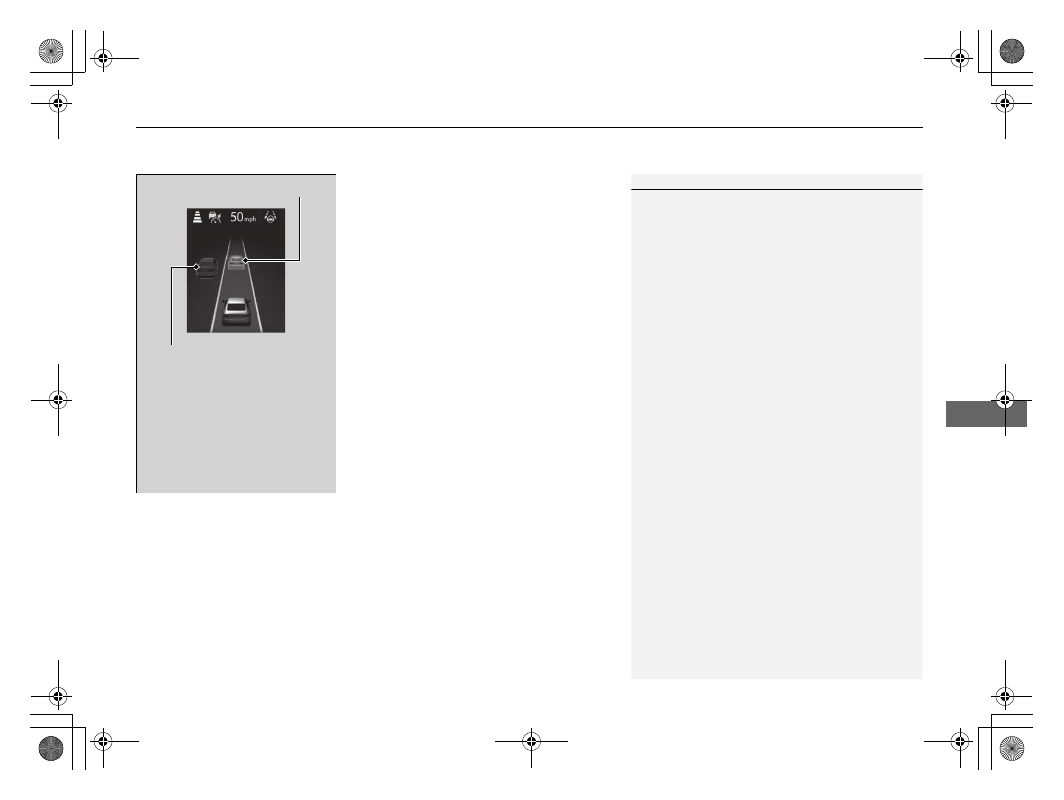
When a vehicle whose speed is slower than 
your set speed comes in or cuts in front of you 
and is detected by the radar and the camera, 
your vehicle starts to slow down.

Outside of control target vehicle

Control target vehicle

A vehicle icon appears on the 

gauge.

Control target vehicle: White 

and outlined in green

Outside of control target vehicle: 

Gray

1

When in Operation

Even if the interval between your vehicle and the 
vehicle detected ahead is short, ACC with Low Speed 
Follow may start accelerating your vehicle under the 
following circumstances:

The vehicle ahead of you is going at almost the 
same speed as, or faster than, your vehicle.

A vehicle that cuts in front of you is going faster 
than your vehicle, gradually increasing the interval 
between the vehicles.

You can also set the system to beep when a vehicle in 
front of you comes in and goes out of the ACC with 
Low Speed Follow detecting range. A vehicle detect 
beep on and off can be selected.

2

Vehicle Settings

 P. 126

Limitations

You may need to use the brake to maintain a safe 
interval when using ACC with Low Speed Follow. 
Additionally, ACC with Low Speed Follow may not 
work properly under certain conditions.

2

ACC with Low Speed Follow Conditions 
and Limitations

 P. 358

uu

Honda Sensing

®

u

Adaptive Cruise Control (ACC) with Low Speed Follow

356

Driving

There is no vehicle ahead

Your vehicle maintains the set speed without 
having to keep your foot on the brake or 
accelerator pedal.
If there previously was a vehicle detected 
ahead that kept your vehicle from traveling at 
the set speed, ACC with Low Speed Follow 
accelerates your vehicle to the set speed, and 
then maintains it.

While driving down steep hills, ACC with Low 
Speed Follow brakes to inhibit excessive 
acceleration for maintaining the set speed. 
However, the vehicle speed may become 
faster than the set speed.

When you depress the accelerator pedal

You can temporarily increase the vehicle speed. In this case, there is no audible or 
visual alert even if a vehicle is in the ACC with Low Speed Follow range.
ACC with Low Speed Follow stays on unless you cancel it. Once you release the 
accelerator pedal, the system resumes an appropriate speed for keeping the 
following-interval while a vehicle ahead is within the ACC with Low Speed Follow 
range.

1

When in Operation

ACC with Low Speed Follow may temporarily 
control the interval between your vehicle and the 
vehicle in adjacent lane or surroundings of your 
vehicle depending on the road conditions (e.g., 
curves) or vehicle conditions (e.g., operating the 
steering wheel or the vehicle location in the lane).

When the vehicle ahead of you moves away, such 
as when entering an interchange or rest area, ACC 
with Low Speed Follow may continue to maintain 
the set following-interval for a short time.

357

uu

Honda Sensing

®

u

Adaptive Cruise Control (ACC) with Low Speed Follow

Continued

Driving

A vehicle detected ahead is within ACC with Low Speed Follow range and 
slows to a stop

Your vehicle also stops, automatically. The 

Stopped

 message appears on the gauge.

When the vehicle ahead of you starts again, if 
you press the 

RES/+

/

SET/−

 switch up or 

down, or depress the accelerator pedal, ACC 
with Low Speed Follow will operate again 
within the previously set speed.

If no vehicle is ahead of you before you 
resume driving, depress the accelerator pedal 
and ACC with Low Speed Follow will operate 
again within the prior set speed.

 (green)

 (white/green)

uu

Honda Sensing

®

u

Adaptive Cruise Control (ACC) with Low Speed Follow

358

Driving

The system may automatically shut off under certain conditions. Some examples of 
these conditions are listed below. Other conditions may reduce some of the ACC 
with Low Speed Follow functions.

2

Front Sensor Camera

 P. 396

2

Radar Sensor

 P. 398

Environmental conditions

Driving in bad weather (rain, fog, snow, etc.).

Roadway conditions

Driving on a snowy or wet roadway (obscured lane marking, vehicle tracks, 
reflected lights, road spray, high contrast).

Vehicle conditions

The outside of the windshield is blocked by dirt, mud, leaves, wet snow, etc.

An abnormal tire or wheel condition (incorrect sizes, varied sizes or construction, 
improperly inflated, compact spare tire, etc.).

The camera temperature gets too high.

The electric parking brake is applied.

When the front grille is dirty.

The vehicle is tilted due to a heavy load or suspension modifications.

When tire chains are installed.

ACC with Low Speed Follow Conditions and Limitations

1

ACC with Low Speed Follow Conditions and Limitations

If you need the radar sensor to be repaired, or 
removed, or the radar sensor cover is strongly 
impacted, turn off the system by pressing the 


button and take your vehicle to a dealer.

Have your vehicle checked by a dealer if you find any 
unusual behavior of the system (e.g., the warning 
message appears too frequently).

Continued

359

uu

Honda Sensing

®

u

Adaptive Cruise Control (ACC) with Low Speed Follow

Driving

Detection limitations

A vehicle suddenly crosses in front of you.

The interval between your vehicle and the vehicle ahead of you is too short.

A vehicle cuts in front of you at a slow speed, and it brakes suddenly.

You accelerate rapidly and approach the vehicle ahead of you at high speed.

The vehicle ahead of you is a motorcycle, bicycle, mobility scooter, or other small 
vehicle.

There are animals in front of your vehicle.

You drive on a curved or winding or undulating road that makes it difficult for the 
sensor to properly detect a vehicle in front of you.

A vehicle ahead of you stops and the speed difference between your vehicle and 
the vehicle ahead of you is significantly large.

An oncoming vehicle suddenly comes in front of you.

Your vehicle abruptly crosses over in front of an oncoming vehicle.

1

ACC with Low Speed Follow Conditions and Limitations

If the front of the vehicle is impacted in any of the 
following situations, the radar sensor may not work 
properly. Have your vehicle checked by a dealer:

The vehicle mounted onto a bump, curb, chock, 
embankment, etc.

You drive the vehicle where water is deep.

Your vehicle has a frontal collision.

360

uu

Honda Sensing

®

u

Adaptive Cruise Control (ACC) with Low Speed Follow

Driving

Driving through a narrow metal bridge.

The vehicle ahead of you brakes suddenly.

The vehicle ahead of you has a unique shape.

Your vehicle or the vehicle ahead of you is driving on one edge of the lane.

Sensor detects upper section of 

an empty carrier truck.

Panel truck, 

tanker truck, 

etc.

361

uu

Honda Sensing

®

u

Adaptive Cruise Control (ACC) with Low Speed Follow

Continued

Driving

When the minimum ground clearance of a vehicle ahead of you is extremely high.

uu

Honda Sensing

®

u

Adaptive Cruise Control (ACC) with Low Speed Follow

362

Driving

Increase or decrease the vehicle speed using the 

RES/+

/

SET/− 

switch on the steering 

wheel.

Each time you press the 

RES/+

/

SET/− 

switch up or down, the vehicle speed is 

increased or decreased by about 1 mph or 1 km/h accordingly.

If you keep the 

RES/+

/

SET/− 

switch pressed up or down, the vehicle speed 

increases or decreases by about 5 mph or 5 km/h accordingly.

To Adjust the Vehicle Speed

1

To Adjust the Vehicle Speed

If a vehicle detected ahead is going at a speed slower 
than your increased set speed, ACC with Low Speed 
Follow may not accelerate your vehicle. This is to 
maintain the set interval between your vehicle and 
the vehicle ahead.

When you depress the accelerator pedal and then 
press down and release the 

RES/+

/

SET/− 

switch, the 

current speed of the vehicle is set.

To increase speed

To decrease speed

363

uu

Honda Sensing

®

u

Adaptive Cruise Control (ACC) with Low Speed Follow

Continued

Driving

Press the Interval button to change the ACC 
with Low Speed Follow following-interval.
Each time you press the button, the following-
interval (the interval behind a vehicle detected 
ahead of you) setting cycles through furthest, 
far, mid, and nearest following-intervals.

Determine the most appropriate following-
interval setting based on your specific driving 
conditions. Be sure to adhere to any 
following-interval requirements set by local 
regulation.

To Set or Change Following-interval

Interval Button

364

uu

Honda Sensing

®

u

Adaptive Cruise Control (ACC) with Low Speed Follow

Driving

The higher your vehicle’s following-speed is, the longer the nearest, mid, far or 
furthest following-interval becomes. See the following examples for your reference.

When your vehicle stops automatically because a vehicle detected ahead of you has 
stopped, the interval between the two vehicles will vary based on the ACC with Low 
Speed Follow interval setting.

 Following-interval

When the Set Speed is:

50 mph (80 km/h)

65 mph (104 km/h)

Nearest

82 feet

25 meters

1.1 sec

102 feet

31 meters

1.1 sec

Mid

108 feet

33 meters

1.5 sec

138 feet

42 meters

1.5 sec

Far

154 feet

47 meters

2.1 sec

200 feet

61 meters

2.1 sec

Furthest

213 feet

65 meters

2.9 sec

282 feet

86 meters

2.9 sec

Continued

365

uu

Honda Sensing

®

u

Adaptive Cruise Control (ACC) with Low Speed Follow

Driving

To cancel ACC with Low Speed Follow, do any 
of the following:

Press the 

CANCEL

 button.

u

The 

 indicator (green) on the gauge 

changes to the 

 indicator (white).

Press the 

 button.

u

 indicator (green) goes off.

Depress the brake pedal while the vehicle is 
moving forward.

u

The 

 indicator (green) on the gauge 

changes to the 

 indicator (white).

To Cancel

1

To Cancel

Resuming the prior set speed: After you have 
canceled ACC with Low Speed Follow, you can 
activate the ACC with Low Speed Follow with the 
prior set speed displayed on the gauge (in gray) by 
pressing the 

RES/+

/

SET/−

 switch up even if the 

vehicle is stopped.
When you turn the ACC with Low Speed Follow off 
by pressing the 

CANCEL

 button or depressing the 

brake pedal, the prior set speed is displayed on the 
gauge in gray.
When pressing the 

RES/+

/

SET/−

 switch up, the ACC 

with Low Speed Follow is activated with displayed 
speed.
If the 

 indicator (white) is displayed and you press 

the 

RES/+

/

SET/−

 switch up, but no prior set speed (in 

gray) is displayed, the speed will be set to your 
vehicle's current speed.

Prior Set Speed (gray)

 (white)

CANCEL

 Button

 Button

uu

Honda Sensing

®

u

Adaptive Cruise Control (ACC) with Low Speed Follow

366

Driving

Automatic cancellation

The beeper sounds and a message appears on the driver information interface when 
ACC with Low Speed Follow is automatically canceled. Any of these conditions may 
cause the ACC with Low Speed Follow to automatically cancel:

Bad weather (rain, fog, snow, etc.)

When the radar sensor behind the Honda emblem on the front grille gets dirty.

The vehicle ahead of you cannot be detected.

An abnormal tire condition is detected, or the tires are skidding.

Driving on a mountainous road for extended periods, or driving off road.

Abrupt steering wheel movement.

When the ABS, VSA

®

, or CMBS

TM

 is activated.

When the ABS or VSA

®

 system indicator comes on.

When the vehicle is stopped on a very steep slope.

When you manually apply the parking brake.

When the detected vehicle within the ACC with Low Speed Follow range is too 
close to your vehicle.

When accelerating rapidly.

The camera behind the rearview mirror, or the area around the camera, including 
the windshield, gets dirty.

The vehicle has repeatedly applied the brakes to maintain the set speed (for 
example, you are descending a long slope).

When the system doesn’t detect any driving actions from the driver for a certain 
amount of time while the LKAS is also activated.

When the Maximum Load Limit is exceeded.

When passing through an enclosed space, such as tunnel.

When the parking brake and brake system indicator (amber) comes on.

1

To Cancel

The set speed cannot be set or resumed when ACC 
with Low Speed Follow has been turned off using the 

 button. Press the 

 button to activate the 

system, then set the desired speed.

367

uu

Honda Sensing

®

u

Adaptive Cruise Control (ACC) with Low Speed Follow

Continued

Driving

The ACC with Low Speed Follow automatic cancellation can be also triggered by the 
following causes. In these cases, the parking brake will be automatically applied.

The driver’s seat belt is unfastened when the vehicle is stationary.

The vehicle stops for more than 10 minutes.

The engine is turned off.

uu

Honda Sensing

®

u

Adaptive Cruise Control (ACC) with Low Speed Follow

368

Driving

Press and hold the Interval button for one 
second. 

Cruise mode selected

 appears on 

the driver information interface for two 
seconds, and then the mode switches to 
Cruise.
The 

 indicator comes on.

Green: The system is on.

White: The system is standby.

To switch back to ACC with Low Speed 
Follow, press and hold the Interval button 
again for one second.

When to use

Desired speed in a range above roughly 25 mph (40 km/h).

Take your foot off the pedal and press the 

RES/+

/

SET/−

 switch up or down when 

you reach the desired speed.
The moment you release the 

RES/+

/

SET/−

 switch, the set speed is fixed, and cruise 

control begins. The color of 

 indicator changes from white to green and set 

speed appears on the gauge.

When you use cruise control, Straight Driving Assist (a feature of the Electric Power 
Steering system) is activated.
By enabling the steering system to automatically compensate for natural steering 
pull, Straight Driving Assist makes it easier for you to keep your vehicle in a straight 
line.

To Switch ACC with Low Speed Follow to Cruise Control

1

To Switch ACC with Low Speed Follow to Cruise Control

Always be aware which mode you are in. When you 
are driving in Cruise mode, the system will not assist 
you to maintain a following-interval from a vehicle 
ahead of you.

You cannot switch ACC with Low Speed Follow to 
Cruise Control in the following situations:

When the vehicle speed is set.

When ACC with Low Speed Follow is not activated.

You can switch the displayed set speed 
measurements on the driver information interface 
between mph and km/h.

2

Speed/distance units

 P. 123

2

Vehicle Settings

 P. 126

ACC with 

Low Speed 

Follow ON

Cruise 

Control ON

Interval 

Button

 (white)

 (white)

To Set the Vehicle Speed

369

uu

Honda Sensing

®

u

Adaptive Cruise Control (ACC) with Low Speed Follow

Driving

Each time you press the 

RES/+

/

SET/−

 switch up or down, the vehicle speed is 

increased or decreased by about 1 mph or 1 km/h accordingly.

If you keep the 

RES/+

/

SET/−

 switch pressed up or down, the vehicle speed 

increases or decreases by about 5 mph or 5 km/h accordingly.

To cancel cruise control, do any of the following:

Press the 

CANCEL

 button.

u

The 

 indicator (green) on the gauge changes to the 

 indicator (white).

Press the 

 button.

u

The 

 indicator (green) goes off.

Depress the brake pedal.

u

The 

 indicator (green) on the gauge changes to the 

 indicator (white).

To Adjust the Vehicle Speed

To Cancel

1

To Cancel

Resuming the prior set speed: After you have canceled 
cruise control, you can activate the cruise control with 
the prior set speed displayed on the gauge (in gray) by 
pressing the 

RES/+

/

SET/−

 switch up while driving at a 

speed of at least 25 mph (40 km/h) or more.
When you turn the cruise control off by pressing the 

CANCEL

 button or depressing the brake pedal, the 

prior set speed is displayed on the gauge in gray.
When pressing the 

RES/+

/

SET/−

 switch up, the 

cruise control is activated with displayed speed.
If the 

 indicator (white) is displayed and you press 

the 

RES/+

/

SET/−

 switch up, but no prior set speed (in 

gray) is displayed, the speed will be set to your 
vehicle's current speed.

You cannot set or resume in the following situations:

When vehicle speed is less than 25 mph (40 km/h)

When cruise control is canceled by pressing the 


button.

At vehicle speeds of 22 mph (35 km/h) or less, cruise 
control is canceled automatically.

Prior Set Speed (gray)

 (white)

370

uu

Honda Sensing

®

u

Lane Keeping Assist System (LKAS)

Driving

Lane Keeping Assist System (LKAS)

Provides steering input to help keep the vehicle in the middle of a detected lane and 
provides tactile and visual alerts if the vehicle is detected drifting out of its lane.

1

Lane Keeping Assist System (LKAS)

Important Safety Reminders

The LKAS is for your convenience only. It is not an 
autonomous driving system and always requires 
driver attention and control. The system does not 
work if you take your hands off the steering wheel or 
fail to steer the vehicle.

The LKAS is convenient when it is used on 
expressways or freeways.

Do not place objects on the instrument panel. 
Objects may reflect on the windshield and prevent 
correct detection of the traffic lanes.

The LKAS only alerts you when lane drift is detected 
without a turn signal in use. The LKAS may not detect 
all lane markings or lane departures; accuracy will 
vary based on weather, speed, and lane marker 
condition.
It is always your responsibility to safely operate the 
vehicle and avoid collisions.

You can read about handling information for the 
camera equipped with this system.

2

Front Sensor Camera

 P. 396

The LKAS may not work properly or may work 
improperly under the certain conditions:

2

LKAS Conditions and Limitations

 P. 377

When you operate the turn signals to change lanes, the system is suspended, and 

resumes after the signals are off.

If you make a lane change without operating the turn signals, the LKAS alerts 

activate, and torque is applied to the steering.

Front Sensor 

Camera

Monitors the 

lane lines

Tactile and visual alerts

Rapid vibrations on the steering wheel 

and a warning display alert you that 

the vehicle is drifting out of a detected 

lane.

Steering input assist

The system applies torque to the steering to keep the vehicle between the left 

and right lane lines. The applied torque becomes stronger as the vehicle gets 

closer to either of the lane lines.

Amber Line

Continued

371

uu

Honda Sensing

®

u

Lane Keeping Assist System (LKAS)

Driving

Provides assistance to keep the vehicle in the center of the lane. When the vehicle 
nears a white or yellow line, steering force of the electric power steering will become 
stronger.

Lane Keep Support Function

1

Lane Keeping Assist System (LKAS)

When it fails to detect lanes, the system will 
temporarily be canceled. When a lane is detected, the 
system will recover automatically.

The LKAS may not function as designed while driving 
in frequent stop and go traffic, or on roads with 
sharp curves.

372

uu

Honda Sensing

®

u

Lane Keeping Assist System (LKAS)

Driving

When the vehicle enters the warning area, the LKAS alerts you with slight steering 
wheel vibration as well as a warning display.

Lane Departure Warning Function

Warning Area

Warning Area

Continued

373

uu

Honda Sensing

®

u

Lane Keeping Assist System (LKAS)

Driving

The system can be used when the following conditions are met.

The lane in which you are driving has detectable lane markers on both sides, and 
your vehicle is in the center of the lane.

The vehicle is traveling between about 45 and 90 mph (72 and 145 km/h).

You are driving on a straight or slightly curved road.

The turn signals are off.

The brake pedal is not depressed.

How to activate the system

1.

Press the LKAS button.

u

LKAS indicator (white) appears on the 
gauge.
The system is standby.

u

If traffic lane lines are detected, white 
lines appear on the gauge.

When the System can be Used

1

When the System can be Used

If the vehicle drifts toward either left or right lane line 
due to the system applying torque, turn off the LKAS 
and have your vehicle checked by a dealer.

Follow the points below to properly activate the 
system:

Always keep the windshield around the camera 
clean.

When cleaning the windshield, be careful not to 
apply windshield cleanser to the camera lens.

Do not touch the camera lens.

Do not attach a sticker to the area around the 
camera.

If LKAS button is pressed when the system can be 
used, LKAS is on without standby.

LKAS Indicator 

(white)

White Lines

LKAS Button

374

uu

Honda Sensing

®

u

Lane Keeping Assist System (LKAS)

Driving

2.

Keep your vehicle near the center of the 
lane while driving.

u

The LKAS indicator changes from white 
to green, and white lines change to 
green once the system starts operating 
after detecting the left and right lane 
markings.

Press the LKAS button.

The LKAS is turned off every time you stop the 
engine, even if you turned it on the last time 
you drove the vehicle.

Green Lines

LKAS Indicator (green)

To Cancel

LKAS Button

Continued

375

uu

Honda Sensing

®

u

Lane Keeping Assist System (LKAS)

Driving

The system operation is suspended if 
you:

Decrease the vehicle speed to about 40 mph 
(64 km/h) or less.

u

Increasing the vehicle speed to about 45 
mph (72 km/h) or more resumes the 
LKAS.

Depress the brake pedal.

u

The LKAS resumes and starts detecting 
the lane lines again once you release the 
brake pedal.

Your vehicle is driving to the right or the left 
of the lane.

1

The system operation is suspended if you:

You can change the setting for the LKAS.
LKAS suspended beep on and off can be selected.

2

Vehicle Settings

 P. 126

White Lines

LKAS Indicator (white)

When the LKAS is suspended, 

green lines on the gauge change 

to white lines or disappear, and 

the beeper sounds (if activated).

376

uu

Honda Sensing

®

u

Lane Keeping Assist System (LKAS)

Driving

The LKAS may be automatically suspended when:

The system fails to detect lane lines.

The steering wheel is turned quickly.

You fail to steer the vehicle.

Driving through a sharp curve.

Driving at a speed in excess of approximately 94 mph (150 km/h).

The ABS or VSA

®

 system engages.

Once these conditions no longer exist, the LKAS automatically resumes.

The LKAS may be automatically canceled when:

In the following cases, traffic lane lines may disappear on the gauge, the beeper may 
sound, and the LKAS may be automatically canceled:

The camera temperature gets extremely high.

The camera behind the rearview mirror, or the area around the camera, including 
the windshield, gets dirty.

377

uu

Honda Sensing

®

u

Lane Keeping Assist System (LKAS)

Continued

Driving

The system may not detect lane markings and therefore may not keep the vehicle in 
the middle of the lane under certain conditions, including the following:

Environmental conditions

There is little contrast between lane lines and the roadway surface.

Driving in bad weather (rain, fog, snow, etc.).

Driving on a snowy or wet roadway.

Driving into low sunlight (e.g., at dawn or dusk).

Shadows of adjacent objects (trees, buildings, guard rails, vehicles, etc.) are 
parallel to white (or yellow) lines.

Sudden changes between light and dark, such as the entrance or exit of a tunnel 
or the shadows of trees, buildings, etc.

Driving at night or in a dark place such as a tunnel (due to low-light conditions, 
lane lines or the road surface may not be illuminated).

The distance between your vehicle and the vehicle ahead of you is too short, and 
lane lines and the road surface are not visible.

Strong light is reflected onto the roadway.

LKAS Conditions and Limitations

378

uu

Honda Sensing

®

u

Lane Keeping Assist System (LKAS)

Driving

Roadway conditions

Driving on a road with temporary lane markings.

Faint, multiple, or varied lane markings are visible on the roadway due to road 
repairs or old lane markings.

The roadway has merging, split, or crossing lines, such as at an intersection or 
crosswalk.

The lane markings are extremely narrow, wide, or changing.

Part of the lane markings are hidden by an object, such as a vehicle.

The road is hilly or the vehicle is approaching the crest of a hill.

Your vehicle is strongly shaken on uneven road surfaces.

Faded lines

Duplicate lines

Tire tracks

Very wide or narrow traffic lane

379

uu

Honda Sensing

®

u

Lane Keeping Assist System (LKAS)

Continued

Driving

When objects on the road (curb, guard rail, pylons, etc.) are recognized as white 
(or yellow) lines.

Driving on rough or unpaved roads, or over bumpy surfaces.

Driving on roads with double lane lines.

Driving on snowy or slippery roads.

The pavement is only partially visible due to snow or puddles on the road.

There is a film of water or puddles on the road surface.

White (or yellow) lines are not recognized correctly due to road conditions such as 
curves, twists, or hills.

Driving on unpaved or rutted roads.

Passing through an exit or an interchange.

Lane void of lines at exit or 

interchange

380

uu

Honda Sensing

®

u

Lane Keeping Assist System (LKAS)

Driving

Vehicle conditions

When lighting is weak due to dirt covering the headlight lenses, or there is poor 
visibility in a dark place due to the headlights being improperly adjusted.

The front of the camera is covered by dirt, fog, rain, mud, wet snow, seals, 
accessories, stickers, or film on the windshield.

Driving at night or in a dark place (e.g., a tunnel) with the headlights off.

There is residue on the windshield from the windshield wipers.

An abnormal tire or wheel condition (incorrect sizes, varied sizes or construction, 
improperly inflated, compact spare tire, etc.).

The vehicle is tilted due to a heavy load in the trunk or rear seats.

The suspension has been modified.

Tire chains are installed.

381

uu

Honda Sensing

®

u

Traffic Jam Assist

Continued

Driving

Traffic Jam Assist

The Traffic Jam Assist system uses a camera mounted to the upper portion of the 
windshield to detect and monitor left and right white (or yellow) traffic lane lines. 
Based on inputs from the camera, the system can apply steering torque to keep your 
vehicle in the center of the detected lane.

How Traffic Jam Assist works

When you are in heavy traffic and Lane Keeping Assist System (LKAS) is active, the 
Traffic Jam Assist system, upon detecting the traffic lane lines, will apply steering 
torque to help keep your vehicle in the center of the lane.

When the driver takes full control of the steering, the steering assist function is 
temporarily canceled.
The torque applied to the steering may not be noticeable when the driver has full 
control of the steering, or when the surface of the road is rough or uneven.

1

Traffic Jam Assist

Important Safety Reminders

Traffic Jam Assist is for your convenience only. It is 
not an autonomous driving system and always 
requires driver attention and control. The system 
does not work if you take your hands off the steering 
wheel or fail to steer the vehicle.

Traffic Jam Assist is convenient when it is used on 
expressways or freeways.

You can read about handling information for the 
camera equipped with this system.

2

Front Sensor Camera

 P. 396

The Traffic Jam Assist only alerts you when lane drift 
is detected without a turn signal in use. The Traffic 
Jam Assist may not detect all lane markings or lane 
departures; accuracy will vary based on weather, 
speed, and lane marker condition.
It is always your responsibility to safely operate the 
vehicle and avoid collisions.

Traffic Jam Assist may not work properly under 
certain conditions:

2

Traffic Jam Assist: Conditions and 
Limitations

 P. 386

Front Sensor Camera

When you use the turn signal to indicate a lane change, Traffic Jam Assist is 

temporarily deactivated. It is reactivated once the vehicle is traveling in the 

center of the lane and the system has detected the traffic lane lines.

Detects left and right white 

(or yellow) traffic lane lines

382

uu

Honda Sensing

®

u

Traffic Jam Assist

Driving

When the vehicle enters the warning area, Traffic Jam Assist alerts you with an 
audible alert as well as a warning display.

Lane Departure Warning Function

Warning Area

Warning Area

Continued

383

uu

Honda Sensing

®

u

Traffic Jam Assist

Driving

Traffic Jam Assist is activated when all of the following conditions exist:

LKAS is activated.

The lane in which you are driving has detectable lane markers on both sides, and 
your vehicle is in the center of the lane.

The vehicle is traveling between about 0 and 45mph (0 and 72km/h).

You are driving on a straight or slightly curved road.

The driver is gripping the steering wheel.

The shift position is in 

(

D

(

S

, or 

(

L

.

Do not use Traffic Jam Assist in any of the following situations:

You are traveling on a road with sharp curves.

u

The system may not allow your vehicle to respond in a manner best suited for 
the road conditions.

You are entering a toll booth, interchange, service area, or parking area.

You are driving in adverse weather (rain, fog, snow, etc.).

The surface of the road is slippery; for example, it is icy or covered with snow.

u

The tires may slip, causing you to lose control of the vehicle.

Traffic Jam Assist Activation

1

Traffic Jam Assist Activation

Refer to the following page for proper handling of 
the Lane Keeping Assist System (LKAS):

2

Lane Keeping Assist System (LKAS)

 P. 370

Refer to the following page for steering buttons and 
displays:

2

Operation Switches for the Adaptive 
Cruise Control (ACC) with Low Speed 
Follow/Lane Keeping Assist System 
(LKAS)/Traffic Jam Assist

 P. 328

2

Gauge Content

 P. 329

uu

Honda Sensing

®

u

Traffic Jam Assist

384

Driving

Keep your vehicle near the center of the lane 
while driving.

u

The LKAS indicator changes from white 
to green, and white lines change to 
green once the system starts operating 
after detecting the left and right lane 
markings.

How Traffic Jam Assist Works

1

How Traffic Jam Assist Works

If your vehicle veers too far to the right or the left of 
the white (or yellow) traffic lane lines while Traffic 
Jam Assist is active, deactivate Traffic Jam Assist and 
have your vehicle checked by a dealer.

In some cases the system cannot properly detect the 
traffic lane lines and, as a result, will not provide 
steering assistance.

2

Traffic Jam Assist: Conditions and 
Limitations

 P. 386

If the driver takes their hands off the steering wheel 
or does not adequately maintain control of steering, 
the warning below will appear.

If the driver does not grip the steering wheel after the 
warning above has repeatedly appeared, a warning 
buzzer will sound and Traffic Jam Assist will be 
canceled.

Green Lines

LKAS Indicator (green)

Continued

385

uu

Honda Sensing

®

u

Traffic Jam Assist

Driving

Press the LKAS button to cancel Traffic Jam Assist.

Traffic Jam Assist may be automatically suspended when:

The system is automatically temporarily canceled under the following circumstances.

The system fails to detect lane lines.

The steering wheel is turned sharply.

You fail to steer the vehicle.

You are driving through a sharp curve.

The brake pedal is depressed.

Once these conditions no longer exist, Traffic Jam Assist automatically resumes.

Traffic Jam Assist may be automatically canceled when:

The traffic lane lines will disappear from the screen, the beeper may sound, and 
Traffic Jam Assist will be canceled under the following circumstances:

The temperature of the camera is too high.

The camera behind the rearview mirror, or the area around the camera, including 
the windshield, is dirty.

Canceling Traffic Jam Assist

1

Traffic Jam Assist may be automatically suspended when:

You are traveling over 45 mph (72 km/h).

u

When the speed of the vehicle reaches 45 mph (72 

km/h), Traffic Jam Assist is deactivated. Once the 
speed of the vehicle drops to under 40 mph (64 km/
h), Traffic Jam Assist is reactivated.

You can change the setting for the Traffic Jam Assist.
Traffic Jam Assist suspended beep on and off when 
you select the 

Lane keeping assist suspend beep


on the driver information interface.

2

Vehicle Settings

 P. 126

386

uu

Honda Sensing

®

u

Traffic Jam Assist

Driving

The system may not detect lane markings and therefore may not keep the vehicle in 
the middle of the lane under certain conditions, including the following:

Environmental conditions

There is little contrast between lane lines and the roadway surface.

Driving in bad weather (rain, fog, snow, etc.).

Driving on a snowy or wet roadway.

Driving into low sunlight (e.g., at dawn or dusk).

Shadows of adjacent objects (trees, buildings, guard rails, vehicles, etc.) are 
parallel to white (or yellow) lines.

Sudden changes between light and dark, such as the entrance or exit of a tunnel 
or the shadows of trees, buildings, etc.

Driving at night or in a dark place such as a tunnel (due to low-light conditions, 
lane lines or the road surface may not be illuminated).

When the lane lines or road surface are not visible, such as when the distance to 
the vehicle in front of you is extremely short or when at an intersection.

Strong light is reflected onto the roadway.

Traffic Jam Assist: Conditions and Limitations


Content      ..     9      10      11      12     ..