Honda HR-V (2023 year). Manual in english - page 6
 

  Index      Manuals     Honda HR-V (2023 year). Manual in english


Search            copyright infringement  


Content      ..     4      5      6      7     ..


Honda HR-V (2023 year). Manual in english - page 6


115

uu

Gauges and Driver Information Interface

u

Driver Information Interface

Continued

In

strum

e

nt Pa

nel

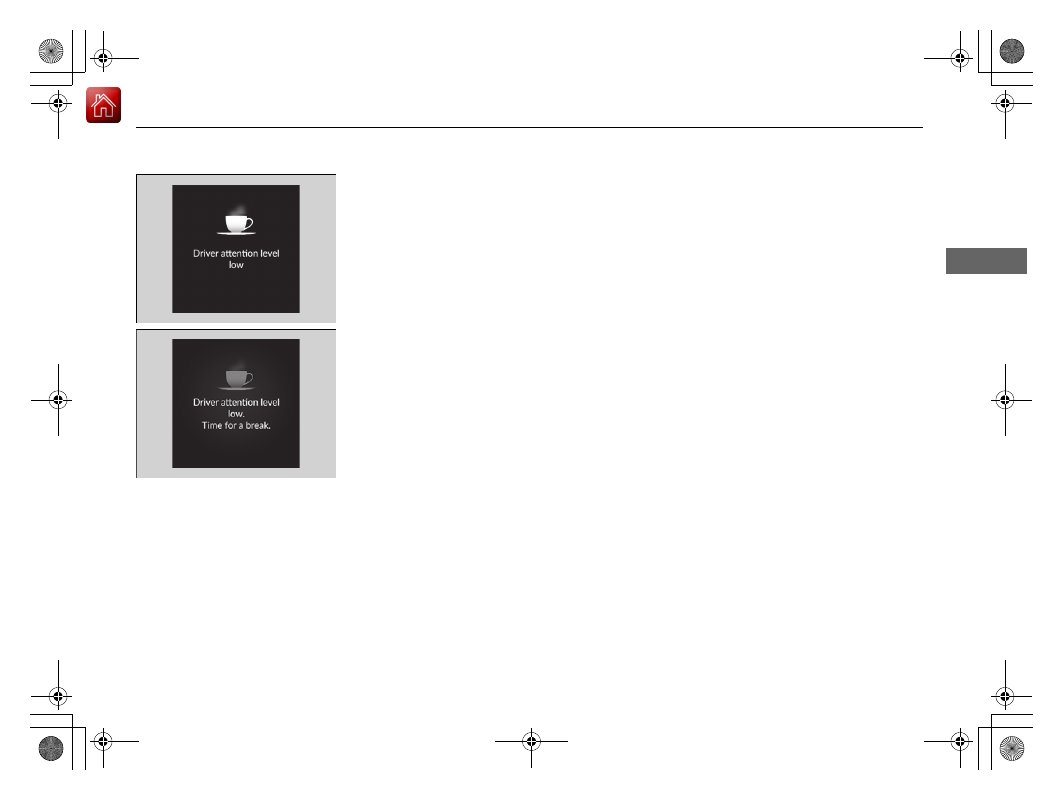
If two bars light up, the 

Driver attention 

level low

 message will appear.

If one bar lights up, the 

Driver attention 

level low. Time for a break.

 message will 

appear, a beep will sound, and the steering 
wheel will vibrate.
If this message appears, stop in a safe location 
and rest for as long as needed.
The message will disappear when the left 
selector wheel is pressed or when the system 
has determined that the driver is driving 
normally.
If the driver does not take a break and the 
monitor continues to detect that the driver is 
very tired, the message will appear again after 
approximately 15 minutes, accompanied by a 
beep and steering wheel vibrations.
The message does not appear when the 
traveling time is 30 minutes or less.

uu

Gauges and Driver Information Interface

u

Driver Information Interface

116

In

strum

e

nt Pa

nel

The Driver Attention Monitor resets when:

The engine is turned off.

The driver unfastens the seat belt and opens the door while the vehicle is stopped.

For the Driver Attention Monitor to function:

The vehicle must be traveling above 25 mph (40 km/h).

The electric power steering (EPS) system indicator must be off.

Depending on driving conditions or other factors, the Driver Attention 
Monitor may not function in the following circumstances:

The steering assist function of the Lane Keeping Assist System (LKAS) is active.

2

Lane Keeping Assist System (LKAS)

 P. 491

The condition of the road is poor, e.g. the surface is unpaved or bumpy.

It is windy.

The driver is frequently operating the vehicle in an assertive manner such as 
changing lanes or accelerating.

Customizing

You can change the Driver Attention Monitor settings. Select 

Tactile and audible 

alert

*1

/

Tactile And Audible Alert

*2

Tactile alert

*1

/

Tactile Alert

*2

, or 

OFF

.

2

Settings

*

 P. 123

2

Customized Features

 P. 345

*1 : Models with 7-in. Color Touchscreen
*2 : Models with 9-in. Color Touchscreen

1

For the Driver Attention Monitor to function:

The bars on the driver information interface remain 
grayed out unless the Driver Attention Monitor is 
functioning.

* Not available on all models

117

uu

Gauges and Driver Information Interface

u

Driver Information Interface

Continued

In

strum

e

nt Pa

nel

The indicators on the display show the 
amount of torque being transferred to the 
right front, left front, right rear, and left rear 
wheels.

2

Real Time AWD with Intelligent Control 
System

TM

*

 P. 437

AWD Torque Distribution Monitor

*

* Not available on all models

uu

Gauges and Driver Information Interface

u

Driver Information Interface

118

In

strum

e

nt Pa

nel

Appears, under specified conditions, when seat belts are latched or unlatched.

2

Seat Belt Reminder

 P. 41

Shows the remaining oil life and Maintenance Minder

TM

.

2

Maintenance Minder

TM

 P. 555

Indicates the status of the Road Departure Mitigation system, CMBS

TM

, Low Speed 

Braking Control

*

, Parking Sensor System

*

, and blind spot information system

*

, such 

as On, Off, or Failure, by color and letters.

The following colors indicate the status of any of the above mentioned systems:

Green: The system is on.

Gray: The system is off.

Amber: There is a problem with the system.

Seat Belts

Maintenance

Safety Support

1

Safety Support

If a system is indicated by the color amber, have your 
vehicle checked by a dealer immediately.

To turn on or off each system, first rotate the left 
selector wheel to switch displays. From the next 
display you can select which system to turn on or off. 

2

Road Departure Mitigation System

 P. 511

2

Blind Spot Information System

*

 P. 445

2

Collision Mitigation Braking System

TM


(CMBS

TM

)

 P. 453

2

Low Speed Braking Control

*

 P. 465

2

Parking Sensor System

*

 P. 538

You can also confirm the status of each function by 
the color of the safety support indicator.

2

Safety Support Indicator (Amber)

 P. 101

2

Safety Support Indicator (Green/Gray)


P. 103

* Not available on all models

119

uu

Gauges and Driver Information Interface

u

Driver Information Interface

Continued

In

strum

e

nt Pa

nel

Area Info 
for CMBS

TM

Area Info 
for Road 
Departure 
Mitigation 
System

Area Info 
for Blind 
Spot 
Information 
System

Area Info 
for Parking 
Sensor 
System

Road 
Departure 
Mitigation 
System Icon 
and Status 
Info

Area Info for Low 
Speed Braking 
Control

Blind Spot 
Information 
System Icon 
and Status 
Info

Parking 
Sensor 
System 
Icon and 
Status Info

CMBS

TM


Icon and 
Status 
Info

Low 
Speed 
Braking 
Control 
Icon and 
Status 
Info

Models with Blind Spot 
Information System

Models with Low Speed 
Braking Control

Models with Parking 
Sensor System

uu

Gauges and Driver Information Interface

u

Driver Information Interface

120

In

strum

e

nt Pa

nel

Display the adjustment for instrument panel brightness.

When the power mode is in ON, you can use the left selector wheel to adjust 
instrument panel brightness.

Brighten: 

Roll the left selector wheel up.

Dim: 

Roll the left selector wheel down.

Press the left selector wheel to exit.

Brightness

1

Brightness

The brightness of the gauge is automatically adjusted 
depending on the ambient brightness.

The brightness dims when the ambient light is 
dark.

The brightness brightens when the ambient light is 
bright.

You can change the setting even when the ambient 
lighting is bright, but the brightness of the gauge 
won’t change.

Continued

121

uu

Gauges and Driver Information Interface

u

Driver Information Interface

In

strum

e

nt Pa

nel

Arrange content

You can choose which icons to display on the home screen.

1.

Roll the left selector wheel to scroll to select 

Customize display

, then press the left 

selector wheel.

2.

Roll the left selector wheel.

3.

Roll the left selector wheel to scroll 
between icons, then press the left selector 
wheel to check or uncheck them.

Customize Display

1

Customize Display

Icons that are gray cannot be removed from the 
home screen.

When you customize settings, shift to 

(

P

.

uu

Gauges and Driver Information Interface

u

Driver Information Interface

122

In

strum

e

nt Pa

nel

2

Tachometer

 P. 104

Speed/Distance Units

Enables you to show another unit on the driver information interface and audio/
information screen and set the displayed measurements to read in either miles and 
mph or km and km/h.

Press and hold the left selector wheel when you select 

No content

 on the driver 

information interface. Each time you do this, the unit will change from miles and 
mph to km and km/h or vice versa. After this, a confirmation screen will appear for 
a few seconds.

You can check if there are any active warning messages.

No Content

Warnings

1

No Content

The tachometer can be turned on and off using the 
driver information interface or audio/information 
screen.

2

Settings

*

 P. 123

2

Customized Features

 P. 345

Even if you have turned off the tachometer on the 
driver information interface or audio/information 
screen, if 

No content

 is selected on the driver 

information interface, it will change to a tachometer-
only display.

2

Switching the Display

 P. 107

1

Warnings

If there are multiple warnings, you can roll the left 
selector wheel to see other warnings.

* Not available on all models

Continued

123

uu

Gauges and Driver Information Interface

u

Driver Information Interface

In

strum

e

nt Pa

nel

Use the driver information interface to customize certain features.

How to customize

Press the 

 (home) button, then select the 

Settings

 screen by rolling the left 

selector wheel while the power mode is in ON, the vehicle is at a complete stop, and 
the shift position is in 

(

P

. Then, press the left selector wheel.

Settings

*

1

Settings

*

To customize other features, roll the left selector 
wheel.

2

List of customizable options

 P. 124

2

Example of customization settings

 P. 130

When you customize settings, shift to 

(

P

.

Driver 
Information 
Interface

Left Selector Wheel

 (home) Button

* Not available on all models

124

uu

Gauges and Driver Information Interface

u

Driver Information Interface

In

strum

e

nt Pa

nel

List of customizable options

*1:Default Setting

Setup Group

Customizable Features

Description

Selectable Settings

TPMS 
calibration

*

Calibrates the TPMS.

Cancel

/

Calibrate

Driver assist 
system setup

Forward collision 
warning distance

Changes the distance at which CMBS

TM

 alerts.

Long

/

Normal

*1

/

Short

ACC forward vehicle 
detect beep

Causes the system to beep when a vehicle is detected or 
when the vehicle is out of ACC with Low Speed Follow 
range.

ON

/

OFF

*1

Road departure 
mitigation setting

Changes the setting for the Road Departure Mitigation 
system.

Narrow

/

Normal

*1

/

Wide

/

Warning only

Lane keeping assist 
suspend beep

Causes the system to beep when the LKAS is suspended.

ON

/

OFF

*1

Blind spot 
information

*

Changes the setting for the blind spot information.

Audible and visual 
alert

*1

/

Visual alert

* Not available on all models

125

uu

Gauges and Driver Information Interface

u

Driver Information Interface

Continued

In

strum

e

nt Pa

nel

*1:Default Setting

Setup Group

Customizable Features

Description

Selectable Settings

Driver assist 
system setup

Traffic sign 
recognition system 
display setting

Turns the traffic sign recognition system on and off.

ON

*1

/

OFF

Traffic sign 
recognition system 
exceeding speed 
warning

Turns the traffic sign recognition system over speed 
warning on and off.

ON

*1

/

OFF

Speed limit warning 
threshold setting

Changes the setting speed the traffic sign recognition 
system over speed warning is activated.

Speed limit

*1

/

Speed limit+3mph

/

Speed limit+5mph

/

Speed limit+10mph

(When mph is selected)

Speed limit

*1

/

Speed limit+5km/h

/

Speed limit+10km/h

/

Speed limit+15km/h

(When km/h is selected)

Driver attention 
monitor

Changes the setting for the driver attention monitor.

Tactile and audible 
alert

*1

Tactile alert

/

OFF

126

uu

Gauges and Driver Information Interface

u

Driver Information Interface

In

strum

e

nt Pa

nel

*1:Default Setting

Setup Group

Customizable Features

Description

Selectable Settings

Meter setup

Language selection

Changes the displayed language.

English

*1

/

Français

/

Español

Adjust outside temp. 
display

Adjusts the temperature reading by a few degrees.

-5°F

 ~ 

±0°F

*1

 ~ 

+5°F


(U.S.)

-3°C

 ~ 

±0°C

*1

 ~ 

+3°C


(Canada)

“Trip A” reset timing

Changes the setting of how to reset trip meter A, 
average fuel economy A, average speed A, and elapsed 
time A.

When fully refueled

/

IGN OFF

/

Manually reset

*1

“Trip B” reset timing

Changes the setting of how to reset trip meter B, 
average fuel economy B, average speed B, and elapsed 
time B.

When fully refueled

/

IGN OFF

/

Manually reset

*1

Adjust alarm volume

Changes the alarm volume, such as buzzers, warnings, 
turn signal sound, and so on.

High

/

Mid

*1

/

Low

Fuel efficiency backlight

Turns the ambient meter feature on and off.

ON

*1

/

OFF

Rear seat reminder

Turns the Rear Seat Reminder feature on and off.

ON

*1

/

OFF

Speed/distance units

Selects the trip meter units.

km/h∙km

/

mph∙miles

*1


(U.S.)

km/h∙km

*1

/

mph∙miles


(Canada)

Tachometer

Selects whether the tachometer is displayed on the 
instrument panel.

ON

*1

/

OFF

127

uu

Gauges and Driver Information Interface

u

Driver Information Interface

Continued

In

strum

e

nt Pa

nel

*1:Default Setting

Setup Group

Customizable Features

Description

Selectable Settings

Keyless access 
setup

*

Door unlock mode

Changes which doors unlock when you grab the driver’s 
door handle.

Driver door only

*1

/

All 

doors

Keyless access light 
flash

Causes some exterior lights to flash when you unlock/
lock the doors.

ON

*1

/

OFF

Keyless access beep

Causes the beeper to sound when you unlock/lock the 
doors.

ON

*1

/

OFF

Remote start system 
ON/OFF

Turns the remote engine start feature on and off.

ON

*1

/

OFF

Lighting setup

Auto high-beam

Turns the auto high-beam on and off.

ON

*1

/

OFF

Interior light dimming 
time

Changes the length of time the interior lights stay on 
after you close the doors.

60sec

/

30sec

*1

/

15sec

Headlight auto off 
timer

Changes the length of time the exterior lights stay on 
after you close the driver’s door.

60sec

/

30sec

/

15sec

*1

/

0sec

Auto light sensitivity

*

Changes the timing for the headlights to come on.

Max

/

High

/

Mid

*1

/

Low

/

Min

Auto headlight ON 
with wiper ON

Changes the settings for the wiper operation when the 
headlights automatically come on while the headlight 
switch is in the 

AUTO

 position.

ON

*1

/

OFF

* Not available on all models

128

uu

Gauges and Driver Information Interface

u

Driver Information Interface

In

strum

e

nt Pa

nel

*1:Default Setting

Setup Group

Customizable Features

Description

Selectable Settings

Door setup

Auto door lock

Changes the setting for when the doors and the tailgate 
automatically lock.

With vehicle speed

*1

/

Shift from P

/

OFF

Auto door unlock

Changes the setting for when the doors and the tailgate 
automatically unlock.

All doors when driver’s 
door opens

*1

/

All doors 

when shifted to Park

/

All doors when ignition 
switched OFF

/

OFF

Walk away auto lock

*

Changes the settings for the auto lock function when 
you walk away from the vehicle.

ON

/

OFF

*1

Keyless lock answer 
back

LOCK/UNLOCK- The exterior lights flash.
LOCK (2nd push)- The beeper sounds.

ON

*1

/

OFF

Keyless remote power 
window control

Turns remote window control using the keyless remote 
on and off.

ON

*1

/

OFF

Lockout prevention

*

Changes the settings for the lockout protection 
function.

ON

*1

/

OFF

Lock presetting

Changes the settings for the Lock Presetting function.

ON

*1

/

OFF

* Not available on all models

129

uu

Gauges and Driver Information Interface

u

Driver Information Interface

Continued

In

strum

e

nt Pa

nel

Setup Group

Customizable Features

Description

Selectable Settings

Maintenance 
reset

Resets the Maintenance Minder display when you have 
performed the maintenance service.

(Selects Reset Items)

Default all

Cancels customized changes you have made or restores 
them to their default setting.

Cancel

/

Set

130

uu

Gauges and Driver Information Interface

u

Driver Information Interface

In

strum

e

nt Pa

nel

Example of customization settings

The steps for changing the 

“Trip A” reset timing

 setting to 

When fully refueled


are shown below. The default setting for 

“Trip A” reset timing

 is 

Manually reset

.

1.

Press the 

 (home) button and roll the left 

selector wheel to select 

Settings

, then 

press the left selector wheel.


Content      ..     4      5      6      7     ..