Honda CR-V Hybrid (2022 year). Manual in english - page 34
 

  Index      Manuals     Honda CR-V Hybrid (2022 year). Manual in english


Search            copyright infringement  


Content      ..     32      33      34      35     ..


Honda CR-V Hybrid (2022 year). Manual in english - page 34


542

uu

Honda Sensing

®

u

Lane Keeping Assist System (LKAS)

Driving

When objects on the road (curb, guard rail, pylons, etc.) are recognized as white 
lines (or yellow lines).

Driving on roads with double lines.

Vehicle conditions

Headlight lenses are dirty or the headlights are not properly adjusted.

The outside of the windshield is streaked or blocked by dirt, mud, leaves, wet 
snow, etc.

The inside of the windshield is fogged.

The camera temperature gets too high.

An abnormal tire or wheel condition (incorrect sizes, varied sizes or construction, 
improperly inflated, etc.).

The vehicle is tilted due to a heavy load or suspension modifications.

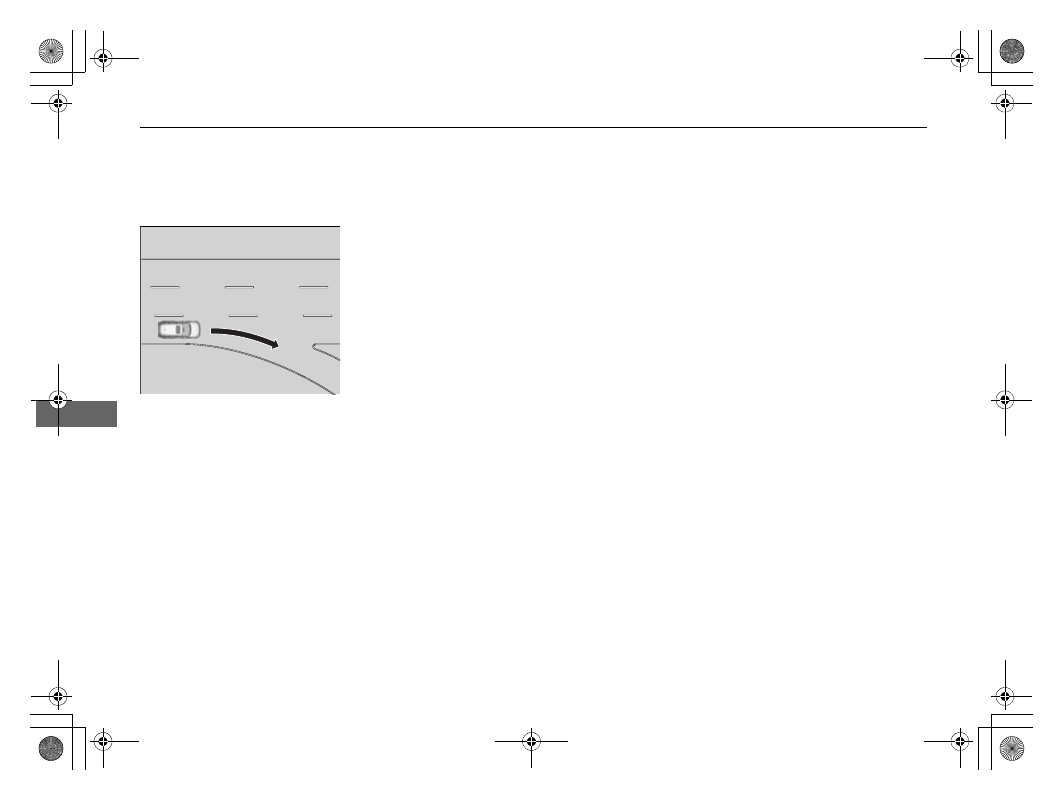
Lane void of lines at exit or 

interchange

543

uu

Honda Sensing

®

u

Road Departure Mitigation (RDM) System

Continued

Driving

Road Departure Mitigation (RDM) System

Alerts and helps to assist you when the system detects a possibility of your vehicle 
unintentionally crossing over detected lane markings and/or leaving the roadway 
altogether.

The front camera behind the rearview mirror 
monitors left and right lane markings (in white 
or yellow). If your vehicle is getting too close 
to detected lane markings without a turn 
signal activated, the system, in addition to a 
visual alert, applies steering torque and alerts 
you with rapid vibrations on the steering 
wheel, to help you remain within the detected 
lane.

As a visual alert, the 

Lane Departure


message appears on the driver information 
interface.

If the system determines that its steering input 
is insufficient to keep your vehicle on the 
roadway, it may apply braking.

u

Braking is applied only when the lane 
markings are solid continuous lines.

The system cancels assisting operations when you turn the steering wheel to avoid 
crossing over detected lane markings.

If the system operates several times without detecting driver response, the system 
beeps to alert you.

How the System Works

1

Road Departure Mitigation (RDM) System

Important Safety Reminder

Like all assistance systems, the RDM system has 
limitations.
Overreliance on the RDM system may result in a 
collision. It is always your responsibility to keep the 
vehicle within your driving lane.

The RDM system only alerts you when lane drift is 
detected without a turn signal in use. The RDM 
system may not detect all lane markings or lane or 
roadway departures; accuracy will vary based on 
weather, speed and lane marker condition. It is 
always your responsibility to safely operate the 
vehicle and avoid collisions.

You can read about handling information for the 
camera equipped with this system.

2

Front Sensor Camera

 P. 548

The RDM system may not work properly or may work 
improperly under the certain conditions:

2

RDM Conditions and Limitations

 P. 546

There are times when you may not notice RDM 
functions due to your operation of the vehicle, or 
road surface conditions.

uu

Honda Sensing

®

u

Road Departure Mitigation (RDM) System

544

Driving

The system activates when all the following conditions are met:

The vehicle is traveling between about 45 and 90 mph (72 and 145 km/h).

The vehicle is on a straight or slightly curved road.

The turn signals are off.

The brake pedal is not depressed.

The wipers are not in continuous operation.

The system makes a determination that the driver is not actively accelerating, 
braking, or steering.

How the System Activates

1

Road Departure Mitigation (RDM) System

If LKAS is off and you have selected 

Narrow

 from the 

customized options using the driver information 
interface

*

 or audio/information screen

*

, the message 

below will appear in case the system determines a 
possibility of your vehicle crossing over detected lane 
markings.

2

Driver Information Interface Warning and 
Information Messages

 P. 109

2

Customized Features

 P. 140, 369

1

How the System Activates

The RDM system may automatically shut off and the 

 indicator comes and stays on.

2

Indicators

 P. 90

RDM system function can be impacted when the 
vehicle is:

Not driven within a traffic lane.

Driven on the inside edge of a curve, or outside of 
a lane.

Driven in a narrow lane.

* Not available on all models

Continued

545

uu

Honda Sensing

®

u

Road Departure Mitigation (RDM) System

Driving

Press the RDM button to turn the system on 
and off.

u

The indicator in the button comes on and 
the message appears on the driver 
information interface when the system is 
on.

RDM On and Off

1

RDM On and Off

When you have selected 

Warning Only

 from the 

customized options using the driver information 
interface

*

 or audio/information screen

*

, the system 

does not operate the steering wheel and braking.

2

Customized Features

 P. 140, 369

The indicators for the Adaptive Cruise Control (ACC) 
with Low Speed Follow, Road Departure Mitigation 
(RDM), Vehicle Stability Assist

TM

 (VSA

®

) system, 

Vehicle Stability Assist

TM

 (VSA

®

) OFF, low tire 

pressure/TPMS, Collision Mitigation Braking System

TM


(CMBS

TM

), and Parking Brake and Brake System 

(Amber) may come on along with a message in the 
Driver Information Interface after reconnecting the 
12V-battery. Drive a short distance at more than 12 
mph (20 km/h). The indicator should go off. If it does 
not, have your vehicle checked by a dealer.

RDM Button

Indicator

* Not available on all models

546

uu

Honda Sensing

®

u

Road Departure Mitigation (RDM) System

Driving

The system may not properly detect lane markings and the position of your vehicle 
under certain conditions. Some examples of these conditions are listed below.

Environmental conditions

Driving in bad weather (rain, fog, snow, etc.).

Sudden changes between light and dark, such as an entrance or exit of a tunnel.

There is little contrast between lane lines and the roadway surface.

Driving into low sunlight (e.g., at dawn or dusk).

Strong light is reflected onto the roadway.

Driving in the shadows of trees, buildings, etc.

Shadows of adjacent objects are parallel to lane markings.

Roadway objects or structures are misinterpreted as lane markers.

Reflections on the interior of the front windshield.

Driving at night or in a dark condition such as a tunnel.

RDM Conditions and Limitations

547

uu

Honda Sensing

®

u

Road Departure Mitigation (RDM) System

Driving

Roadway conditions

Driving on a snowy or wet roadway (obscured lane marking, vehicle tracks, 
reflected lights, road spray, high contrast).

Driving on a road with temporary lane markings.

Faint, multiple, or varied lane markings are visible on the roadway due to road 
repairs or old lane markings.

The roadway has merging, split, or crossing lines (e.g., such as at an intersection 
or crosswalk).

The lane markings are extremely narrow, wide, or changing.

The vehicle in front of you is driving near the lane lines.

The road is hilly or the vehicle is approaching the crest of a hill.

Driving on rough or unpaved roads, or over bumpy surfaces.

When objects on the road (curb, guard rail, pylons, etc.) are recognized as white 
lines (or yellow lines).

Driving on roads with double lines.

Vehicle conditions

Headlight lenses are dirty or the headlights are not properly adjusted.

The outside of the windshield is streaked or blocked by dirt, mud, leaves, wet 
snow, etc.

The inside of the windshield is fogged.

The camera temperature gets too high.

An abnormal tire or wheel condition (incorrect sizes, varied sizes or construction, 
improperly inflated, etc.).

The vehicle is tilted due to a heavy load or suspension modifications.

When tire chains are installed.

548

uu

Honda Sensing

®

u

Front Sensor Camera

Driving

Front Sensor Camera

The camera, used in systems; such as RDM, LKAS, ACC with Low Speed Follow and 
CMBS

TM

, is designed to detect an object that triggers any of the systems to operate 

their functions.

This camera is located behind the rearview 
mirror.

To help reduce the likelihood that high interior 
temperatures will cause the camera’s sensing 
system to shut off, when parking, find a shady 
area or face the front of the vehicle away from 
the sun. If you use a reflective sun shade, do 
not allow it to cover the camera housing. 
Covering the camera can concentrate heat on 
it.

Camera Location and Handling Tips

1

Front Sensor Camera

Never apply a film or attach any objects to the 
windshield, the hood, or the front grille that could 
obstruct the camera’s field of vision and cause the 
system to operate abnormally.
Scratches, nicks, and other damage to the windshield 
within the camera’s field of vision can cause the 
system to operate abnormally. If this occurs, we 
recommend that you replace the windshield with a 
genuine Honda replacement windshield. Making 
even minor repairs within the camera’s field of vision 
or installing an aftermarket replacement windshield 
may also cause the system to operate abnormally.
After replacing the windshield, have a dealer 
recalibrate the camera. Proper calibration of the 
camera is necessary for the system to operate 
properly.

Front Sensor 

Camera

549

uu

Honda Sensing

®

u

Front Sensor Camera

Driving

1

Front Sensor Camera

Do not place an object on the top of the instrument 
panel. It may reflect onto the windshield and prevent 
the system from detecting lane lines properly.

If the 

Some Driver Assist Systems Cannot 

Operate:Camera Temperature Too High

:  

message appears:

Use the climate control system to cool down the 
interior and, if necessary, also use defroster mode 
with the air flow directed toward the camera.

Start driving the vehicle to lower the windshield 
temperature, which cools down the area around 
the camera.

If the 

Some Driver Assist Systems Cannot 

Operate:Clean Front Windshield

:  

message 

appears:

Park your vehicle in a safe place, and clean the 
windshield. If the message does not disappear after 
you have cleaned the windshield and driven for a 
while, have your vehicle checked by a dealer.

550

uu

Honda Sensing

®

u

Radar Sensor

Driving

Radar Sensor

The radar sensor is in the front grille.

1

Radar Sensor

Avoid strong impacts to the radar sensor cover.

For the CMBS

TM

 to work properly:

Always keep the radar sensor cover clean.

Never use chemical solvents or polishing powder 
for cleaning the sensor cover. Clean it with water 
or a mild detergent.

Do not put a sticker on the radar sensor cover or 
replace the radar sensor cover.

If you need the radar sensor to be repaired, or 
removed, or the radar sensor cover is strongly 
impacted, turn off the system by using the CMBS

TM


OFF button and take your vehicle to a dealer.

2

CMBS

TM

 On and Off

 P. 510

If the vehicle is involved in any of the following 
situations, the radar sensor may not work properly. 
Have your vehicle checked by a dealer:

Your vehicle is involved in a frontal collision.

Your vehicle drives through deep water or is 
submerged in deep water.

Your vehicle strongly strikes a bump, curb, chock, 
or embankment that could jar the radar sensor.

Radar Sensor

551

Continued

Driving

Braking

Brake System

Use the parking brake to keep the vehicle stationary when parked. When the 
parking brake is applied, you can manually or automatically release it.

To apply

The electric parking brake can be applied any 
time the vehicle has battery, no matter which 
position the power mode is in.

Pull the electric parking brake switch up gently 
and securely.

u

The parking brake and brake system 
indicator (red) comes on.

To release

The power mode must be in ON in order to 
release the electric parking brake.

1.

Depress the brake pedal.

2.

Press the electric parking brake switch.

u

The parking brake and brake system 
indicator (red) goes off.

Manually releasing the parking brake using 
the switch helps your vehicle to start slowly 
and smoothly when facing downhill on steep 
hills.

Parking Brake

1

Braking

When you depress the brake pedal, you may hear a 
whirring sound from the engine compartment. This is 
because the brake system is in operation, and it is 
normal.

1

Parking Brake

You may hear the electric parking brake system 
motor operating from the rear wheel area when you 
apply or release the parking brake. This is normal.

The brake pedal may slightly move due to the electric 
parking brake system operation when you apply or 
release the parking brake. This is normal.

You cannot apply or release the parking brake if the 
12V-battery goes dead.

2

If the 12-Volt Battery Is Dead

 P. 647

If you pull up and hold the electric parking brake 
switch while driving, the brakes on all four 
wheels are applied by the electric servo brake 
system until the vehicle come to a stop. The 
electric parking brake then applies, and the 
switch should be released.

Electric Parking 

Brake Switch

Electric Parking 

Brake Switch

uu

Braking

u

Brake System

552

Driving

Automatic parking brake feature operation

If the automatic parking brake feature has been activated:

The parking brake is applied automatically when you set the power mode to OFF.

To confirm that the parking brake is applied, check if the parking brake and brake 
system indicator (red) is on.

2

Activating and deactivating the automatic parking brake feature

 P. 553

To release automatically

Depressing the accelerator pedal releases the parking brake.
Use the accelerator pedal to release the brake when you are starting the vehicle 
facing uphill, or in a traffic jam.

Gently depress the accelerator pedal.
When on a hill, it may require more 
accelerator input to release.

u

The parking brake and brake system 
indicator (red) goes off.

You can release the parking brake automatically when:

You are wearing the driver’s seat belt.

The power system is on.

The transmission is not in 

(

P

 or 

(

N

.

1

Parking Brake

In the following situations, the parking brake 
automatically operates.

When the vehicle stops more than 10 minutes 
while ACC with Low Speed Follow is activated.

When the driver’s seat belt is unfastened while 
your vehicle is stopped automatically by ACC with 
Low Speed Follow.

When the power system is turned off while ACC 
with Low Speed Follow is activated.

When the vehicle stops with the automatic brake 
hold system activated for more than 10 minutes.

When the driver’s seat belt is unfastened while 
your vehicle is stopped and brake hold is applied.

When the power system is turned off while brake 
hold is applied.

When there is a problem with the Brake Hold 
System while brake hold is applied.

If the parking brake cannot be released 
automatically, release it manually.

When the vehicle is traveling uphill, the accelerator 
pedal may need to be pressed farther to 
automatically release the electric parking brake.

The parking brake cannot be released automatically 
while the following indicators are on:

Malfunction indicator lamp

Transmission system indicator

Accelerator Pedal

Continued

553

uu

Braking

u

Brake System

Driving

Activating and deactivating the automatic parking brake feature

With the power mode is ON, carry out the following steps to either activate or 
deactivate the automatic parking brake feature.

1.

Put the transmission into 

(

P

.

2.

Without depressing the brake pedal, pull up the electric parking brake switch.

u

Check that the parking brake and brake system indicator (red) has come on.

3.

Pull up and hold the electric parking brake switch. When you hear a beeping 
sound, release the switch and within 3 seconds pull up and hold the switch again.

4.

When you hear a sound indicating that the procedure is completed, release the 
switch.

u

Two beeps indicates that the feature has been activated.

u

One beep indicates that the feature has been deactivated.

u

When you have completed activating the feature, the parking brake will 
remain applied after you turn off the power system.

u

To confirm that the parking brake is applied, check if the parking brake and 
brake system indicator (red) is on.

If you need to temporarily deactivate the feature while putting your vehicle through 
a conveyor type car wash. You can follow the procedure explained below.

1.

Depress the brake pedal and bring the vehicle to a stop.

2.

Set the power mode to VEHICLE OFF and then within 2 seconds push down the 
electric parking brake switch.

u

Activation and deactivation settings for the feature will not be affected.

u

Before temporarily deactivating the feature, make sure to first turn off both 
ACC with Low Speed Follow and the automatic brake hold system.

u

To confirm that the parking brake is applied, check if the parking brake and 
brake system indicator (red) is on.

1

Parking Brake

The parking brake may not be released automatically 
while the following indicators are on:

Parking brake and brake system indicator (amber)

VSA

®

 system indicator

ABS

 indicator

Supplemental restraint system indicator

In cold climates, the parking brake may freeze in 
place if applied.
When parking the vehicle, chock the wheels and 
make sure the automatic parking brake feature is 
deactivated.
Also, when putting your vehicle through a conveyor-
type car wash or when having your vehicle towed, 
deactivate the automatic parking brake feature and 
leave the parking brake released.

uu

Braking

u

Brake System

554

Driving

Your vehicle is equipped with disc brakes at all four wheels. The brake assist system 
increases the stopping force when you depress the brake pedal hard in an 
emergency situation. The anti-lock brake system (ABS) helps you retain steering 
control when braking very hard.

2

Brake Assist System

 P. 558

2

Anti-lock Brake System (ABS)

 P. 557

Foot Brake

1

Foot Brake

Check the brakes after driving through deep water, 
or if there is a buildup of road surface water. If 
necessary, dry the brakes by lightly depressing the 
pedal several times.

If you hear a continuous metallic friction sound when 
applying the brakes, this is caused by the brake wear 
indicator rubbing on the brake rotor and indicates 
that the brake pads need to be replaced. Have the 
vehicle checked by a dealer. If you hear only an 
occasional squeak or squeal when you initially apply 
the brake pedal, this may be normal and caused by 
high frequency vibration of the brake pads against 
the rotating brake disc.

Applying constant pressure to the brakes while going 
down a long hill can cause the brakes to heat up, 
resulting in a loss of stopping power. Therefore, 
when descending a long hill, release the accelerator 
pedal and allow regenerative braking to slow the 
vehicle down. To adjust the rate of deceleration, use 
the deceleration paddle selector.
When the high voltage battery has fully recharged, 
regenerative braking may not be possible.

2

POWER/CHARGE Gauge

 P. 126

2

High Voltage Battery Charge Level Gauge

 P. 127

2

Deceleration Paddle Selector

 P. 484

Do not rest your foot on the brake pedal while 
driving, as it will lightly apply the brakes and cause 
them to lose effectiveness over time and reduce pad 
life. It will also confuse drivers behind you.

Continued

555

uu

Braking

u

Brake System

Driving

Keeps the brake applied after releasing the brake pedal until the accelerator pedal is 
pressed. You can use this system while the vehicle is temporarily stopped, like at 
traffic lights and in heavy traffic.

Automatic Brake Hold

1

Automatic Brake Hold

3

WARNING

Activating the automatic brake hold system 

on steep hills or slippery roads may still 

allow the vehicle to move if you remove 

your foot from the brake pedal.

If a vehicle unexpectedly moves, it may 

cause a crash resulting in serious injury or 

death.

Never activate the automatic brake hold 

system or rely on it to keep a vehicle from 

moving when stopped on a steep hill or 

slippery roads.

3

WARNING

Using the automatic brake hold system to 

park the vehicle may result in the vehicle 

unexpectedly moving.

If a vehicle moves unexpectedly, it may 

cause a crash, resulting in serious injury or 

death.

Never leave the vehicle when braking is 

temporarily kept by automatic brake hold 

and always park the vehicle by putting the 

transmission in 

(

P

 and applying the parking 

brake.

Turning on the system

Fasten your seat belt 

properly, then start the 

power system. Press the 

automatic brake hold 

button.

The automatic brake 
hold system indicator 
comes on. The system 
is turned on.

Activating the system

Depress the brake pedal 

to come to a complete 

stop. The transmission 

must not be in 

(

P

 or 

(

R

.

The automatic brake 
hold indicator comes 
on. Braking is kept for 
up to 10 minutes.

Release the brake pedal 
after the automatic 
brake hold indicator 
comes on.

Canceling the system

Depress the accelerator 

pedal while the 

transmission is in a 

position other than 

(

P

 or 

(

N

. The system is 

cancelled and the vehicle 

starts to move.

The automatic brake 
hold indicator goes 
off. The system 
continues to be on.

Accelerator Pedal

Brake Pedal

Automatic Brake 

Hold Button

Goes 

Off

On

On

Comes 
On

Comes 
On

uu

Braking

u

Brake System

556

Driving

The system automatically cancels when:

You engage the parking brake.

You depress the brake pedal and put the transmission into 

(

P

 or 

(

R

.

The system automatically cancels and the parking brake is applied when:

Braking is kept for more than 10 minutes.

The driver’s seat belt is unfastened.

The power system is turned off.

There is a problem with automatic brake hold system.

Turning off the automatic brake hold system

While the system is on, press the automatic 
brake hold button again.

u

The automatic brake hold system 
indicator goes off.

If you want to turn off automatic brake hold 
while the system is in operation, press the 
automatic brake hold button with the brake 
pedal depressed.

1

Automatic Brake Hold

While the system is activated, you can turn off the 
power system or park the vehicle through the same 
procedure as you normally do.

2

When Stopped

 P. 559

Whether the system is on, or the system is activated, 
the automatic brake hold turns off once the power 
system is off.

1

Turning off the automatic brake hold system

Make sure to turn off the automatic brake hold 
system before using an automated car wash.

You may hear an operating noise if the vehicle moves 
while the automatic brake hold system is in 
operation.

Automatic Brake 

Hold Button

Goes 

Off

557

uu

Braking

u

Anti-lock Brake System (ABS)

Driving

Anti-lock Brake System (ABS)

Helps prevent the wheels from locking up, and helps you retain steering control by 
pumping the brakes rapidly, much faster than you can.

The electronic brake distribution (EBD) system, which is part of the ABS, also 
balances the front-to-rear braking distribution according to vehicle loading.

You should never pump the brake pedal. Let the ABS work for you by always 
keeping firm, steady pressure on the brake pedal. This is sometimes referred to as 
“stomp and steer.“

ABS operation

The brake pedal may pulsate slightly when the ABS is working. Depress the brake 
pedal and keep holding the pedal firmly down. On dry pavement, you will need to 
press on the brake pedal very hard before the ABS activates. However, you may feel 
the ABS activate immediately if you are trying to stop on snow or ice.

ABS may activate when you depress the brake pedal when driving on:

Wet or snow covered roads.

Roads paved with stone.

Roads with uneven surfaces, such as potholes, cracks, manholes, etc.

When the vehicle speed goes under 6 mph (10 km/h), the ABS stops.

ABS

1

Anti-lock Brake System (ABS)

NOTICE

The ABS may not function correctly if you use a tire of 
the incorrect size or type.

If the 

ABS

 indicator comes on while driving, there 

may be a problem with the system.
While normal braking is not affected, there is a 
possibility that the ABS will not be operating. Have 
your vehicle checked by a dealer immediately.

The ABS is not designed for the purpose of reducing 
the time or distance it takes for a vehicle to stop: It is 
designed to limit brake lockup which can lead to 
skidding and loss of steering control.

In the following cases, your vehicle may need more 
distance to stop than a vehicle without the ABS:

You are driving on rough or uneven road surfaces, 
such as gravel or snow.

The following may be observed with the ABS system:

Motor sounds coming from the engine 
compartment when the brakes are applied, or 
when system checks are being performed after the 
engine has been started and while the vehicle 
accelerates.

Brake pedal and/or the vehicle body vibration when 
ABS activates.

These vibrations and sounds are normal to ABS 
systems and are no cause for concern.


Content      ..     32      33      34      35     ..