Ford Transit (2022 year). Manual in english - page 4
 

  Index      Manuals     Ford Transit (2022 year). Manual in english


Search            copyright infringement  


Content      ..     2      3      4      5     ..


Ford Transit (2022 year). Manual in english - page 4


WARNING: 

Do not lean your head

on the door. The side airbag could injure
you as it deploys from the side of the
seatback.

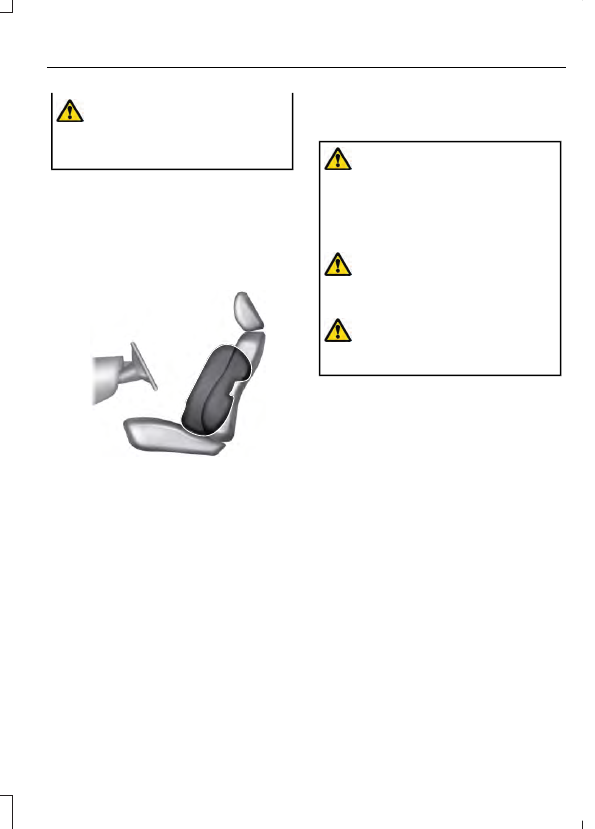
The side airbags are on the outermost side
of the seat backrests of the front seats. In
certain sideways crashes or rollovers, the
airbags will be inflated. The airbag was
designed to inflate between the door panel
and occupant to further enhance the
protection provided to occupants in side
impact crashes.

E152533

The system consists of the following:

A label or embossed side panel
indicating that side airbags are fitted
to your vehicle.

Side airbags inside the driver and front
passenger seat backrests.

Crash sensors and monitoring system
with readiness indicator.  See 

Crash

Sensors and Airbag Indicator

 (page

72).

HOW DOES THE SAFETY
CANOPY™ WORK

WARNING: 

Do not place objects

or mount equipment on or near the
headliner at the siderail that may come
into contact with a deploying curtain
airbag. Failure to follow these
instructions may increase the risk of
personal injury in the event of a crash.

WARNING: 

Do not lean your head

on the door. The curtain airbag could
injure you as it deploys from the
headliner.

WARNING: 

To reduce risk of injury,

do not obstruct or place objects in the
deployment path of the airbag.

The Safety Canopy deploys during
significant side crashes or when a certain
likelihood of a rollover event is detected
by the rollover sensor. The Safety Canopy
is mounted to the roof side-rail sheet
metal, behind the headliner, above each
row of seats. In certain sideways crashes
or rollover events, the Safety Canopy will
be activated, regardless of which seats are
occupied. The Safety Canopy inflates
between the side window area and
occupants to further enhance protection
provided in side impact crashes and
rollover events.

69

Airbags

E75004

The system consists of the following:

Safety Canopy curtain airbags above
the trim panels over the front and rear
side windows identified by a label or
wording on the headliner or roof-pillar
trim.

A flexible headliner which opens above
the side doors to allow air curtain
deployment

E67017

· Crash sensors and monitoring
system with a readiness
indicator.  See 

Crash Sensors

and Airbag Indicator

 (page 72).

Properly restrain children 12 years old and
under in the rear seats. The Safety Canopy
will not interfere with children restrained
using a properly installed child or booster
seat because it is designed to inflate
downward from the headliner above the
doors along the side window opening.

AIRBAG PRECAUTIONS

WARNING: 

Airbags do not inflate

slowly or gently, and the risk of injury
from a deploying airbag is the greatest
close to the trim covering the airbag
module.

WARNING: 

All occupants of your

vehicle, including the driver, should
always properly wear their seatbelts,
even when an airbag supplemental
restraint system is provided. Failure to
properly wear your seatbelt could
seriously increase the risk of injury or
death.

WARNING: 

Properly secure

children 12 years old and under in a rear
seating position whenever possible. If
you are unable to properly secure all
children in a rear seating position,
properly secure the largest child on the
front seat. If you must use a forward
facing child restraint on the front seat,
move the seat as far back as possible.
Failure to follow these instructions could
result in personal injury or death.

WARNING: 

Do not place your arms

on the airbag cover or through the
steering wheel. Failure to follow this
instruction could result in personal injury.

WARNING: 

Keep the areas in front

of the airbags free from obstruction. Do
not affix anything to or over the airbag
covers. Objects could become projectiles
during airbag deployment. Failure to
follow this instruction could result in
personal injury or death.

WARNING: 

To reduce risk of injury,

do not obstruct or place objects in the
deployment path of the airbag.

WARNING: 

Do not place a

rearward facing child restraint in front of
an active airbag. Failure to follow this
instruction could result in personal injury
or death.

70

Airbags

WARNING: 

Do not attempt to

service, repair, or modify the
supplementary restraint system or
associated components. Failure to
follow this instruction could result in
personal injury or death.

WARNING: 

Several airbag system

components get hot after inflation. To
reduce the risk of injury, do not touch
them after inflation.

WARNING: 

If a supplementary

restraint system component has
deployed, it will not function again. Have
the system and associated components
inspected as soon as possible. Failure to
follow this instruction could result in
personal injury or death.

PROPERLY ADJUSTING THE
DRIVER AND FRONT
PASSENGER SEATS

WARNING: 

National Highway

Traffic Safety Administration (NHTSA)
recommends a minimum distance of at
least 10 in (25 cm) between an
occupant's chest and the driver airbag
module.

To properly position yourself away from
the airbag:

Move your seat to the rear as far as you
can while still reaching the pedals
comfortably.

Recline the seat slightly one or two
degrees from the upright position.

After all occupants have adjusted their
seats and put on seatbelts, it is very
important that they continue to sit
properly. Properly seated occupants sit
upright, lean against the seat backrest, and
center themselves on the seat cushion,
with their feet comfortably extended on
the floor. Sitting improperly can increase
the chance of injury in a crash event. For
example, if an occupant slouches, lies
down, turns sideways, sits forward, leans
forward or sideways, or puts one or both
feet up, the chance of injury during a crash
greatly increases.

CHILDREN AND AIRBAGS

WARNING: 

Do not place a

rearward facing child restraint in front of
an active airbag. Failure to follow this
instruction could result in personal injury
or death.

E142846

Children must always be properly
restrained. Accident statistics suggest that
children are safer when properly restrained
in the rear seating positions than in the
front seating position. Failure to follow
these instructions may increase the risk of
injury in a crash.

71

Airbags

If two adults and a child occupy a vehicle
without rear seats, properly restrain the
child in the center front seat unless doing
so would interfere with driving your vehicle.
This provides lap and shoulder belt
protection for all occupants, and airbag
protection for the adults. A child or infant
properly restrained in the center front seat
should have a reduced risk to serious injury
from the airbags.

CRASH SENSORS AND
AIRBAG INDICATOR

WARNING: 

Modifying or adding

equipment to the front end of your
vehicle (including hood, bumper system,
frame, front end body structure, tow
hooks and hood pins) may affect the
performance of the deployable hood
system, increasing the risk of injury. Do
not modify or add equipment to the front
end of your vehicle.

Your vehicle has a collection of crash and
occupant sensors. These sensors provide
information to the restraints control
module which activates the following:

Front and rear seatbelt pretensioners.

Driver airbag.

Passenger airbag.

Seat mounted side airbags.

Safety Canopy.

Based on the type of crash, the restraints
control module deploys the appropriate
safety devices.

The restraints control module also
monitors the readiness of the above safety
devices plus the crash and occupant
sensors. The readiness of the safety
system is indicated by a warning indicator
light in the instrument cluster or by a
backup tone if the warning light is not
working. Routine maintenance of the
airbag is not required.

A difficulty with the system is indicated by
one or more of the following:

E67017

The readiness light will not
illuminate immediately after you
switch the ignition on.

The readiness light either flashes or
stays on.

You hear a series of five tones. The
tone pattern repeats periodically until
the problem, the light or both are
repaired.

If any of these things happen, even
intermittently, have the supplemental
restraint system serviced immediately.
Unless serviced, the system may not
function properly in the event of a crash.

The fact that the seatbelt pretensioners
or front airbags did not activate for both
front seat occupants in a crash does not
mean that something is wrong with the
system. Rather, it means the restraints
control module determined the accident
conditions (crash severity, seatbelt usage)
were not appropriate to activate these
safety devices.

The front airbags activate only in
frontal and near-frontal crashes. Front
airbags may activate in rollovers, side
impacts or rear impacts if the crash
causes sufficient frontal deceleration.

The seatbelt pretensioners activate in
frontal, near-frontal and side crashes,
and in rollovers.

72

Airbags

The side airbags inflate in certain side
impact crashes or rollover events. Side
airbags may activate in other types of
crashes if the vehicle experiences
sufficient sideways motion or
deformation.

The Safety Canopy inflates in certain
side impact crashes or rollover events.
The Safety Canopy may activate in
other types of crashes if the vehicle
experiences sufficient sideways motion
or deformation, or a certain likelihood
of rollover.

DISPOSING OF AIRBAGS

Contact your authorized dealer as soon as
possible. Airbags must be disposed of by
qualified personnel.

73

Airbags

WHAT IS THE PEDESTRIAN
ALERT SYSTEM

Electric drive vehicles can be extremely

quiet.  The pedestrian alert system is
designed to generate a sound to alert
pedestrians to the presence of an electric
drive vehicle.

PEDESTRIAN ALERT SYSTEM – TROUBLESHOOTING

PEDESTRIAN ALERT SYSTEM – INFORMATION MESSAGES

Action

Condition

Message

Have your vehicle checked
as soon as possible.

The system has malfunc-
tioned.

Pedestrian Sounder Fault
Service Now

74

Pedestrian Alert System - Electric Motor

WHAT IS 911 ASSIST

911 Assist is a SYNC system feature that
can call for help.

For more information, visit

www.owner.ford.com

.

HOW DOES 911 ASSIST WORK
- 3.5L DURATEC/3.5L
ECOBOOST™

If a crash deploys an airbag, excluding knee
airbags and rear inflatable seatbelts, or
activates the fuel pump shut-off, your
vehicle may be able to contact emergency
services by dialing 911 through a paired and
connected 

Bluetooth®

-enabled phone.

Not all crashes will deploy an airbag or
activate the fuel pump shut-off. If a
connected cell phone sustains damage or
loses its connection to SYNC during a
crash, SYNC will search for and try to
connect to a previously paired cell phone.
SYNC will then attempt to call the
emergency services.

Before making the call:

SYNC provides about 10 seconds to
cancel the call. If you fail to cancel the
call, SYNC attempts to dial 911.

SYNC says the following, or a similar
message: "SYNC will attempt to call
911, to cancel the call, press Cancel on
your screen or press and hold the
phone button on your steering wheel."

If you do not cancel the call and SYNC
makes a successful call a pre-recorded
message plays for the 911 operator. The
occupants in your vehicle are able to talk
with the operator. Be prepared to provide
your name, phone number and location
immediately because not all 911 systems
are capable of receiving this information
electronically.

During an emergency call the system
transmits vehicle data to the emergency
service.

HOW DOES 911 ASSIST WORK
- ELECTRIC MOTOR

If a crash deploys an airbag, excluding knee
airbags and rear inflatable seatbelts, or
activates the battery shut-off, your vehicle
may be able to contact emergency services
by dialing 911 through a paired and
connected 

Bluetooth®

-enabled phone.

Not all crashes will deploy an airbag or
activate the battery shut-off. If a
connected cell phone sustains damage or
loses its connection to SYNC during a
crash, SYNC will search for and try to
connect to a previously paired cell phone.
SYNC will then attempt to call the
emergency services.

Before making the call:

SYNC provides about 10 seconds to
cancel the call. If you fail to cancel the
call, SYNC attempts to dial 911.

SYNC says the following, or a similar
message: "SYNC will attempt to call
911, to cancel the call, press Cancel on
your screen or press and hold the
phone button on your steering wheel."

If you do not cancel the call and SYNC
makes a successful call a pre-recorded
message plays for the 911 operator. The
occupants in your vehicle are able to talk
with the operator. Be prepared to provide
your name, phone number and location
immediately because not all 911 systems
are capable of receiving this information
electronically.

During an emergency call the system
transmits vehicle data to the emergency
service.

75

911 Assist

EMERGENCY CALL
REQUIREMENTS

WARNING: 

Do not wait for 911

Assist to make an emergency call if you
can do it yourself. Dial emergency
services immediately to avoid delayed
response time which could increase the
risk of serious injury or death after a
crash. If you do not hear 911 Assist within
five seconds of the crash, the system or
phone may be damaged or
non-functional.

WARNING: 

Always place your

phone in a secure location in your vehicle
so it does not become a projectile or get
damaged in a crash. Failure to do so may
cause serious injury to someone or
damage the phone which could prevent
911 Assist from working properly.

WARNING: 

Unless the 911 Assist

setting is set on before a crash, the
system will not dial for help which could
delay response time, potentially
increasing the risk of serious injury or
death after a crash.

SYNC must be powered and working
properly at the time of the incident and
throughout feature activation and use.

The 911 Assist feature must be set on
before the incident.

You must pair and connect a

Bluetooth®

 enabled and compatible

cell phone to SYNC.

A connected 

Bluetooth®

 enabled

phone must have the ability to make
and maintain an outgoing call at the
time of the incident.

A connected 

Bluetooth®

 enabled

phone must have adequate network
coverage, battery power and signal
strength.

The vehicle must have battery power
and be located in the U.S., Canada or
in a territory in which 911 is the
emergency number.

Note:

If any user sets 911 Assist to on or off,

that setting applies for all paired phones. If
911 Assist is switched off and the phone is
connected to SYNC, an icon displays on the
status bar.

Note:

Every phone operates differently.

While SYNC 911 Assist works with most
cellular phones, some may have trouble
using this feature.

EMERGENCY CALL
LIMITATIONS

The SYNC 911 Assist feature only operates
in the U.S., Canada or in a territory in which
911 is the emergency number.

Your cellular phone or 911 Assist
hardware sustains damage in a crash.

The vehicle's battery or the SYNC
system has no power.

The phone(s) thrown from your vehicle
are the ones paired and connected to
the system.

76

911 Assist

REMOTE CONTROL
LIMITATIONS

WARNING: 

Changes or

modifications not expressively approved
by the party responsible for compliance
could void the user's authority to operate
the equipment. The term "IC:" before the
radio certification number only signifies
that Industry Canada technical
specifications were met.

This device complies with Part 15 of the
FCC Rules and with Industry Canada
license-exempt RSS standard(s).
Operation is subject to the following two
conditions: (1) This device may not cause
harmful interference, and (2) This device
must accept any interference received,
including interference that may cause
undesired operation.

Make sure a valid remote control is within
5 ft (1.5 m) from the front door handles
and rear of vehicle.

The system may not function if:

The remote control remains stationary
for about a minute.

The vehicle battery has no charge.

The remote control battery has no
charge.

There is interference causing issues
with the remote control frequencies.

The remote control is too close to
metal objects or electronic devices, for
example keys or a cell phone.

OPENING AND CLOSING THE
FLIP KEY

E302821

Press the button to release the key. Press
and hold the button to fold the key back
when not in use.

REMOVING THE KEY BLADE -
VEHICLES WITH: PUSH
BUTTON START

E306249

Push the release button and pull the key
blade out.

77

Keys and Remote Controls

SOUNDING THE PANIC ALARM

E138624

Press the button to sound the
panic alarm.  Press the button
again or switch the vehicle on to

turn it off.

Note:

The panic alarm only operates when

the vehicle is off.

LOCATING YOUR VEHICLE

E267111

Press the lock button on the key
twice within three seconds.  The
direction indicators will flash.

CHANGING THE REMOTE
CONTROL BATTERY -
VEHICLES WITH: KEYED
IGNITION

WARNING: 

Keep batteries away

from children to prevent ingestion.
Failure to follow this instruction could
result in personal injury or death. If
ingested, immediately seek medical
attention.

WARNING: 

If the battery

compartment does not securely close,
stop using the remote control and
replace it as soon as possible. In the
meantime, keep the remote control away
from children. Failure to follow this
instruction could result in personal injury
or death.

E358330

CAUTION: The battery can cause
severe or fatal injuries in two
hours or less if swallowed or

placed inside any part of the body. Seek
medical attention immediately.

E107998

Make sure that you dispose of
old batteries in an
environmentally friendly way.

Seek advice from your local authority
about recycling old batteries.

The remote control uses one coin-type
three-volt lithium battery CR2032 or
equivalent.

1.

Press the key release button.

E302822

2. Insert a suitable tool, for example a

screwdriver, in the position shown and
gently push the clip.

3. Press the clip down to release the

battery cover.

E151799

4. Carefully remove the cover.

78

Keys and Remote Controls

E151800

5. Insert a screwdriver as shown to

release the battery.

Note:

Do not touch the battery contacts or

the printed circuit board with the
screwdriver.

E151801

6. Remove the battery.

7.

Install a new battery with the 

+

 facing

upward.

8. Replace the battery cover.

CHANGING THE REMOTE
CONTROL BATTERY -
VEHICLES WITH: PUSH
BUTTON START

WARNING: 

Keep batteries away

from children to prevent ingestion.
Failure to follow this instruction could
result in personal injury or death. If
ingested, immediately seek medical
attention.

WARNING: 

If the battery

compartment does not securely close,
stop using the remote control and
replace it as soon as possible. In the
meantime, keep the remote control away
from children. Failure to follow this
instruction could result in personal injury
or death.

E107998

Make sure that you dispose of
old batteries in an
environmentally friendly way.

Seek advice from your local authority
about recycling old batteries.

The remote control uses one coin-type
three-volt lithium battery CR2450 or
equivalent.

79

Keys and Remote Controls

E306249

1.

Push the release button and pull the
key blade out.

E218401

2. Twist a thin coin under the tab hidden

behind the key blade head to remove
the battery cover.

80

Keys and Remote Controls

E218402

3. Insert a suitable tool, for example a

screwdriver, in the position shown and
carefully remove the battery.

4. Install a new battery with the 

+

 facing

upward.

Note:

Do not wipe off any grease on the

battery terminals or on the back surface of
the circuit board.

5. Reinstall the battery cover and the key

blade.

REPLACING A LOST KEY OR
REMOTE CONTROL

You can purchase replacement keys or
remote controls from an authorized dealer.
If possible, provide them with the key
number from the tag provided with the
original key. You can also obtain extra keys.

PROGRAMMING THE REMOTE
CONTROL

Contact an authorized dealer to program
remote controls for your vehicle.

KEYS AND REMOTE CONTROLS – TROUBLESHOOTING

KEYS AND REMOTE CONTROLS – INFORMATION MESSAGES

Action

Message

Displays when the remote control battery requires replacing.

Key Battery Low Replace
Soon

81

Keys and Remote Controls

FREQUENTLY ASKED QUESTIONS

Answer

Question

This is the blower motor pushing fresh air

into the cabin and out through cabin

exhaust vents. Your vehicle has air purge

that could turn on when you press the

unlock button on the remote control or

when certain conditions are met.

What is the fan noise I hear when I press

the unlock button on the remote control?

82

Keys and Remote Controls

WHAT IS MYKEY

MyKey allows you to program keys with
restricted settings to promote good driving
habits.

MYKEY SETTINGS

NON-CONFIGURABLE MYKEY
SETTINGS

Seatbelt Reminder or Belt-
Minder™

MyKey mutes the audio system until the
front seat belts are buckled.

Note:

If your vehicle includes an AM/FM

radio or a very basic audio system, then the
radio may not mute.

Satellite Radio

 (If Equipped)

Some Satellite radio channels have
restricted access to adult radio content.

Driving and Parking Aids

Settings for parking aids, blind spot
information system, and cross traffic alert
cannot be configured. These systems turn
on when the vehicle turns on and cannot
be switched off with a MyKey.

Settings for pre-collision assist and lane
keeping cannot be configured. These
systems turn on when the vehicle turns on
but can be switched off with a MyKey.

A new destination in the navigation system
can only be set using voice commands
when using a MyKey, and with your vehicle
moving.

Note:

MyKey drivers may be able to turn

the lane departure warning feature off, but
this feature turns back on automatically
with every new key cycle.

CONFIGURABLE MYKEY
SETTINGS

You can configure the following settings
after creating a MyKey.  See 

Creating a

MyKey

 (page 84).

Speed Limit

WARNING: 

Do not set MyKey

maximum speed limit to a limit that will
prevent the driver from maintaining a
safe speed considering posted speed
limits and prevailing road conditions. The
driver is always responsible to drive in
accordance with local laws and
prevailing conditions. Failure to do so
could result in accident or injury.

You can set a speed limit for your vehicle.
Warning messages appear in the
information display and a tone sounds if
your vehicle reaches the set speed. You
cannot override the set speed when using
a MyKey.

Speed Reminder

You can set a speed reminder for your
vehicle. Warning messages appear in the
information display and a tone sounds if
your vehicle exceeds the set speed.

Audio System Volume Limit

The audio system maximum volume is
reduced. A message appears in the
information display if you attempt to
exceed the volume limit. Automatic
volume control turns off.

Emergency Assistance

If you set emergency assistance to be
always on, it cannot be switched off with
a MyKey.

83

MyKey™

Do Not Disturb

If you set do not disturb to be always on,
it cannot be switched off with a MyKey.

Traction and Stability Control

If you set traction control or stability
control to be always on, you cannot switch
it off with a MyKey.

CREATING A MYKEY -
VEHICLES WITH: KEYED
IGNITION

1.

Switch the ignition on using an admin
key.

2. Using the information display controls

on the steering wheel, select 

Settings

.

3. Select 

MyKey

.

4. Select 

Create MyKey

.

5. Press and hold the 

OK

 button until a

confirmation message appears in the
information display.

6. Switch the ignition off.

Note:

We recommend that you label this

key.

CREATING A MYKEY -
VEHICLES WITH: PUSH
BUTTON START

1

2

E245386

1.

Remove the rubber mat.

2. Place the admin key in the position

shown, with the buttons facing upward.

3. Switch the ignition on.

4. Using the information display controls

on the steering wheel, select 

Settings

.

5. Select 

MyKey

.

6. Select 

Create MyKey

.

7.

Press and hold the 

OK

 button until a

confirmation message appears in the
information display.

8. Switch the ignition off.

Note:

We recommend that you label this

key.

PROGRAMMING A MYKEY

You can only program MyKeys to the same
settings.

1.

Switch the ignition on using an admin
key.

2. Using the information display controls

on the steering wheel, select 

Settings

.

3. Select 

MyKey

.

84

MyKey™


Content      ..     2      3      4      5     ..