Ford Galaxy / Ford S-MAX. Manual - part 739
 

  Index      Ford     Ford Galaxy / Ford S-MAX - service repair manual 2006 year


Search            


Content   ..  737  738  739  740   ..


Ford Galaxy / Ford S-MAX. Manual - part 739


Is the resistance less than 1 ohm? 
Yes 

GO to B9

.  

No 

REPAIR the circuit. TEST the system for normal 
operation. 

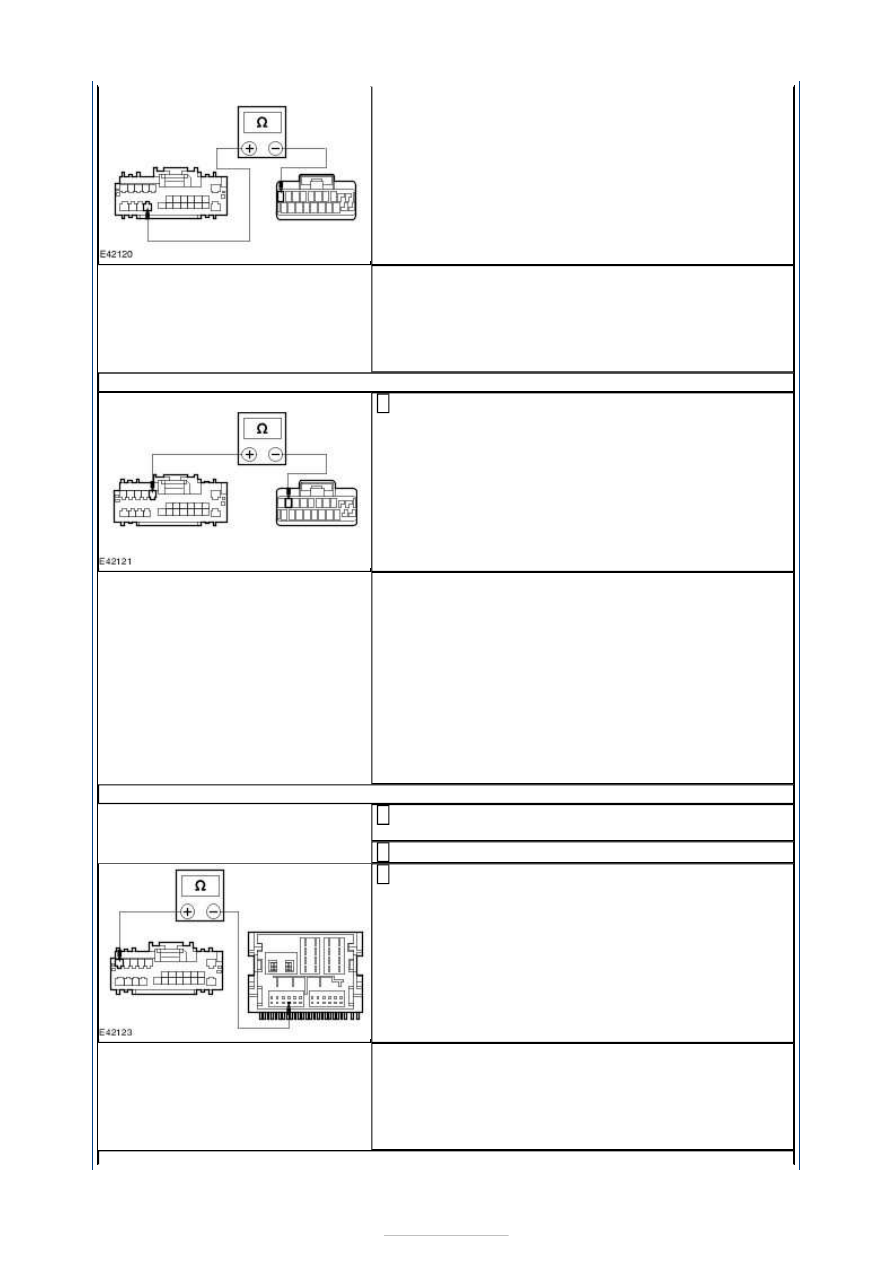
B9: CHECK CIRCUIT VMN12A (GN/BK) FOR OPEN CIRCUIT

Measure the resistance between the navigation 
system display module C2ME03-F pin 9, circuit 

VMN12A (GN/BK), harness side and the navigation 
system DVD unit C2ME04 pin 8, circuit VMN12A 
(GN/BK), harness side. 

Is the resistance less than 1 ohm? 
Yes 

GO to B10

.  

No 

REPAIR the circuit. TEST the system for normal 
operation. If the concern persists, INSTALL a new 
navigation system display module.  
REFER to: Navigation System Display Module - 
Vehicles With: DVD Navigation System with 
Touchscreen (415-01 Information and Entertainment 
System, Removal and Installation). 
TEST the system for normal operation. 

B10: CHECK CIRCUIT RMN14A (BU/RD) FOR OPEN CIRCUIT

Connect Navigation System Display Module C2ME03-
F. 

Disconnect Audio Unit C2ME03-C. 

Measure the resistance between the navigation 
system DVD unit C2ME04 pin 12, circuit RMN14A 

(BU/RD), harness side and the audio unit C2ME03-C 
pin 9, circuit RMN14A (BU/RD), harness side. 

Is the resistance less than 1 ohm? 
Yes 

GO to B11

.  

No 

REPAIR the circuit. TEST the system for normal 
operation. 


B11: CHECK CIRCUIT VMN14A (BN/RD) FOR OPEN CIRCUIT

Measure the resistance between the navigation 
system DVD unit C2ME04 pin 11, circuit VMN14A 

(BN/RD), harness side and the audio unit C2ME03-C 
pin 3, circuit VMN14A (BN/RD), harness side. 

Is the resistance less than 1 ohm? 
Yes 

INSTALL a new navigation system DVD unit.  
REFER to: Navigation System Digital Versatile Disc 
(DVD) Unit (415-01 Information and Entertainment 
System, Removal and Installation). 
TEST the system for normal operation. 

No 

REPAIR the circuit. TEST the system for normal 
operation. If the concern persists, INSTALL a new 
audio unit.  
REFER to: Navigation System Display Module - 
Vehicles With: DVD Navigation System with 
Touchscreen (415-01 Information and Entertainment 
System, Removal and Installation). 
TEST the system for normal operation. 


Information and Entertainment System - 
General Information - Navigation System 
Map Updating

S-MAX/Galaxy 2006.5 (02/2006-)


Print


General Procedures 

NOTE: Remove the button. 

NOTE: Carefully remove the front cover. 

NOTE: Installation position of the spring for the front cover. 

1. Switch the ignition to the ON position. 

2.  

3.  

4. Press the <NAV> and <MENU> button at the 

same time. 

5. Select <Eject DVD> and enter the RADIO PIN 

CODE. 

6. Remove the road data DVD. 

7. Insert the new road data DVD. 

8.

NOTE: The update will start automatically 
after a short wait. Do NOT abort this process 
and do NOT change the ignition key position. 
NOTE: The display will show the software 
version available on the DVD. 

Select <Continue> to start the update. 

9.  

10.  


11.

NOTE: The navigation system will need to 
recalibrate itself after this update. As a 
result, the vehicle position may be displayed 
incorrectly for the first few miles. This will be 
corrected after the vehicle has been driven a 
short while and has changed direction a few 
times. 

Drive the vehicle for approximately five 
miles/eight kilometers. 


Content   ..  737  738  739  740   ..