Ford Galaxy / Ford S-MAX. Manual - part 66
 

  Index      Ford     Ford Galaxy / Ford S-MAX - service repair manual 2006 year


Search            


Content   ..  64  65  66  67   ..


Ford Galaxy / Ford S-MAX. Manual - part 66


Rear Disc Brake - Brake Pads—Vehicles 
With: Electronic Parking Brake (EPB)

S-MAX/Galaxy 2006.5 (02/2006-)


Print


Removal and Installation 

Materials 

Removal 

CAUTION: Refer to: 

Brake System Health and Safety Precautions

 (100-00 General 

Information, Description and Operation). 
NOTE: Removal steps in this procedure may contain installation details. 

Installation 

Name

Specification

Brake Fluid - Super DOT4 WSS-M6C57-A2

1. Refer to: 

Wheel and Tire

 (204-04 Wheels and 

Tires, Removal and Installation). 

2. Activate the electronic parking brake caliper 

actuator service mode. 

Refer to: 

Electronic Parking Brake (EPB) Release 

Using the Vehicle Systems

 (206-05 Parking 

Brake and Actuation, General Procedures). 

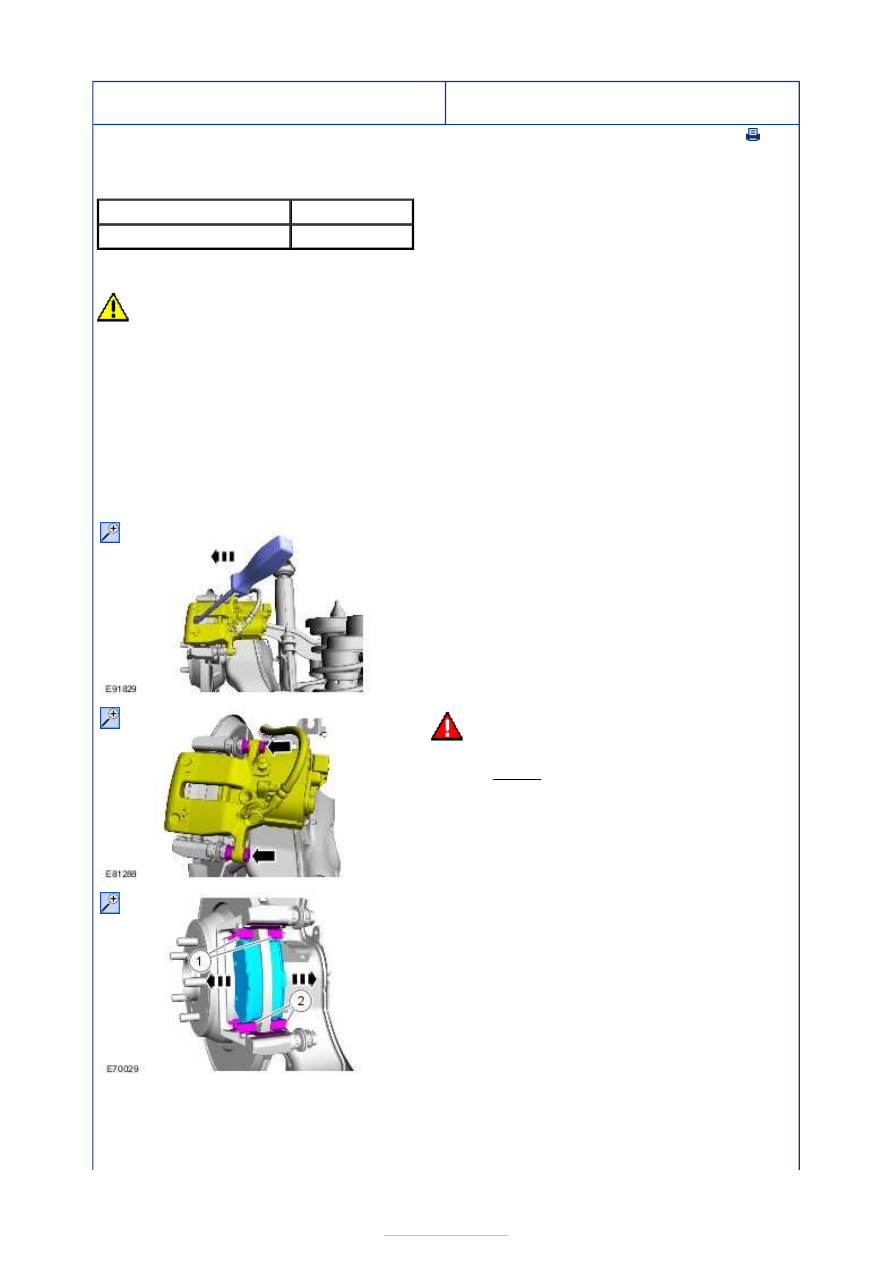
3.  

4.

WARNING: Make sure that no load is 

placed on the brake hose. 

Torque: 

35 Nm 

5.

NOTE: Note the position of each component 
before removal. 

1.

CAUTIONS: 


Make sure that the mating faces are 

clean and free of foreign material. 

Make sure that the clips are correctly 

located. 

Make sure that the component is not 

bent. 

Remove the adhesive foil from the rear of the 
outer brake pad. 

2. To install, reverse the removal procedure. 

3. Deactivate the electronic parking brake caliper 

actuator service mode. 

Refer to: 

Electronic Parking Brake (EPB) Release 

Using the Vehicle Systems

 (206-05 Parking 

Brake and Actuation, General Procedures). 

4. Depress and release the brake pedal 3 times, 

check the brake fluid level in the brake fluid 
reservoir and top up as necessary with brake 
fluid. 

Material: 

Brake Fluid - Super DOT4 (WSS-

M6C57-A2)


Rear Disc Brake - Brake Caliper

S-MAX/Galaxy 2006.5 (02/2006-)


Print


Removal and Installation 

Materials 

General Equipment 

Removal 

CAUTION: Refer to: 

Brake System Health and Safety Precautions

 (100-00 General 

Information, Description and Operation). 
NOTE: Removal steps in this procedure may contain installation details. 

Name

Specification

Brake Fluid - Super DOT4 WSS-M6C57-A2

Hose clamp(s)

1. Remove the wheel and tire.  

Refer to: 

Wheel and Tire

 (204-04 Wheels and 

Tires, Removal and Installation). 

2.  

3.   

1. General Equipment: 

Hose clamp(s)


2. Torque: 18 Nm 
3. Torque: 35 Nm 

4.

CAUTION: Make sure that all openings 

are sealed. 

5.

NOTE: Note the position of the brake pads to 
aid installation. 


Installation 

6. Torque: 110 Nm 

1.

CAUTIONS: 

Make sure that the mating faces are 

clean and free of foreign material. 

Make sure that the clips are correctly 

located. 

Make sure that the component is not 

bent. 

To install, reverse the removal procedure. 

2. Depress and release the brake pedal 3 times, 

check the brake fluid level in the brake fluid 
reservoir and top up as necessary with brake 
fluid. 

Material: 

Brake Fluid - Super DOT4 (WSS-

M6C57-A2)


Content   ..  64  65  66  67   ..