Citroën C5 X (2022 year). Manual in english - page 8
 

  Index      Manuals     Citroën C5 X (2022 year). Manual in english


Search            copyright infringement  


Content      ..     6      7      8      9     ..


Citroën C5 X (2022 year). Manual in english - page 8


114

Driving

not allow the vehicle to begin moving again 

within 3 seconds of stopping, press 

2-I I>

 or the 

accelerator pedal to move off.

Cruise control remains active following a 

gear change.

When cruise control is paused and the 

driver tries to reactivate it, the message 

"

Activation refused, conditions unsuitable

is temporarily displayed if reactivation is 

impossible (required conditions not met).

Changing the programmed speed setting 

with the Road signs recognition function

►  Press 

4-OK

 to accept the speed suggested 

by the function on the instrument panel, then 

press again to confirm.

If the selected speed is far from the 

current vehicle speed, a strong 

acceleration or deceleration is felt.

Changing the inter-vehicle distance

►  Press 

3

 to display distance setting thresholds 

(“

Distant

”, “

Normal

” or “

Close

”), then make 

successive short presses upwards/downwards to 

select a threshold.

After a few seconds, the option is accepted and 

will be memorised when the ignition is switched 

off.

The driver must keep a sufficient safety distance 

from the vehicle in front.

Temporarily exceeding the speed setting

►  Depress the accelerator pedal. The system 

is suspended as long as the acceleration is 

maintained. The speed setting flashes as long 

as the current speed of the vehicle is higher than 

the speed setting.

Deselecting the system

►  Press successively on 

1-ASSIST

 until 

OFF


mode is displayed on the instrument panel. 

►  After a few seconds, cruise control mode 

is deselected. The Driving aids mini-view 

disappears.

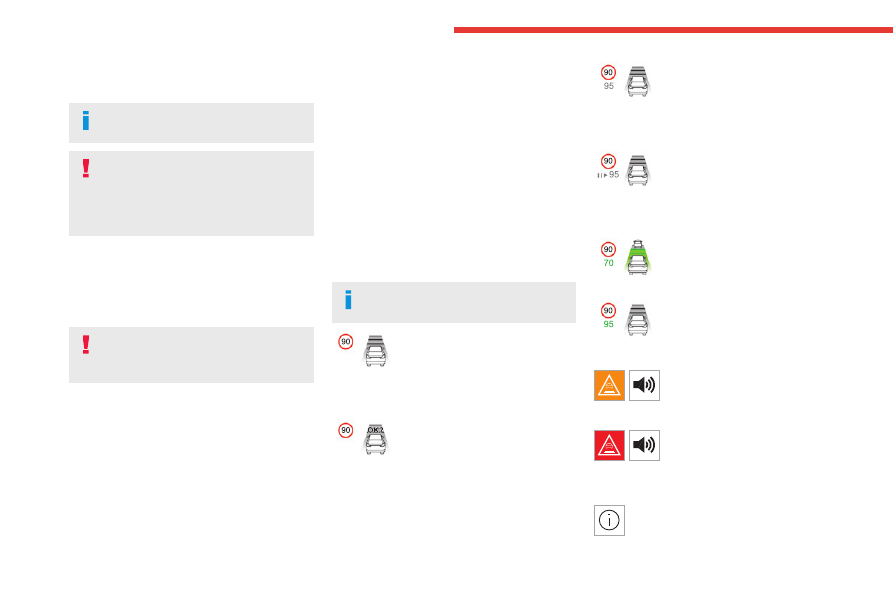
Messages and alerts

The actual order of display of the 

messages or alerts may be different.

Cruise control selected, but 

cannot be activated.

All the operating conditions have 

not been met.

(grey)

Cruise control selected, awaiting 

confirmation for activation.

All the operating conditions are 

met.

(grey)

Cruise control paused, but 

cannot be activated.

All the operating conditions have 

not been met.

(grey)/(grey)

Cruise control paused, awaiting 

confirmation for reactivation.

All the operating conditions are 

met.

(grey)/(grey)

Cruise control active, vehicle 

detected.

(green)/(green)

Cruise control suspended, 

following brief acceleration by 

the driver.

(green)/(grey)

(orange)

"

Take back control

"

►  Brake or accelerate, depending on the 

context.

(red)

"

Take back control

"

► 

Take back control of the vehicle 

immediately

: the system cannot manage the 

current driving situation.

"

Activation refused, conditions 

unsuitable

"

-------------------------------------------------------------------------------------------------------------------------------------------------------------

115

Driving

6

The system refuses to activate cruise control, as 

the necessary conditions are not fulfilled.

Stop & Go function

The system has brought the 

vehicle to a complete stop.

(green)/(green)

Within 3 seconds of stopping, the vehicle 

gradually and automatically begins moving 

again.

Beyond 3 seconds of stopping, the driver must 

accelerate or press 

2-I I>

 to move off.

If the driver takes no action after the 

vehicle has been stopped, the electric 

parking brake is applied automatically after 

about 5 minutes.

While the vehicle is immobilised, the 

following recommendations apply:

–  The driver should not leave the vehicle.

–  Do not open the boot.

–  Do not drop off or pick up passengers.

–  Do not engage reverse gear.

When restarting the vehicle, beware of 

cyclists, pedestrians or animals who are 

not taken into account by the system.

The driver must monitor their surroundings.

Operating limits

Cruise control operates by day and night, in dry 

weather or moderate rainfall.

Certain situations cannot be managed by the 

system and require driver intervention.

Cases not taken into account by the system:

–  Pedestrians, cyclists, animals.

–  Stationary vehicles (e.g. traffic jams, 

breakdown).


–  Vehicles crossing your lane.

–  Vehicles driving in the opposite direction.

Situations where the driver must suspend the 

system:


–  Vehicles in a tight bend.

–  When approaching a roundabout.


–  When following a narrow vehicle.

Reactivate the system when conditions allow.

Situations in which the driver is prompted to 

immediately resume control:

–  Excessively sharp deceleration by the vehicle 

in front of you.


–  When a vehicle cuts in sharply between your 

vehicle and the one in front.

Some vehicles on the road may be 

poorly perceived or interpreted by the 

camera and/or the radar (e.g. truck), which 

can lead to an incorrect evaluation of 

distances and result in inappropriate 

acceleration or braking of the vehicle.

Pay particular attention:

–  When motorcycles are present and 

when there are vehicles staggered across the 

traffic lane.

-------------------------------------------------------------------------------------------------------------------------------------------------------------

116

Driving

–  When entering a tunnel or crossing a 

bridge.

If any of the following malfunctions 

occurs, do not use the system:

–  Following an impact on the windscreen 

close to the camera or on the front bumper.

–  In case of a brake lamp failure.

If the vehicle has undergone any of the 

following modifications, do not use the 

system:

–  Carrying long objects on roof bars.

– Towing.

–  Front end of the vehicle modified (for 

example by adding long-range headlamps or 

painting the front bumper).

–  Obstructed radar.

Malfunction

In the event of a malfunction, dashes are 

displayed (orange) instead of the speed setting.

This warning lamp comes on, 

accompanied by a message and an 

audible signal, to confirm the malfunction.

Have it checked by a CITROËN dealer or a 

qualified workshop.

Lane positioning assist

For more information, refer to the 

General recommendations on the use 

of driving and manoeuvring aids

.


The system identifies the limits of the traffic 

lane and steers the vehicle inside this lane to 

maintain it in the lateral position chosen by the 

driver.

To do this, the system uses a camera placed on 

the upper part of the windscreen.

This function is primarily suitable for driving on 

motorways and main roads.

Activation/Deactivation

Lane positioning assist is automatically activated, 

after selecting Highway Driver Assist mode.

For more information on 

Highway Driver Assist

refer to the corresponding section.

The selection is confirmed by the display of the 

symbols on the instrument panel, representing 

the steering wheel and the side lines.

The colour of the symbols depends on the 

operating state of the system:

(grey)

One or more operating conditions is not met; the 

system is paused.

(green)

All operating conditions are met; the 

system is active.

(orange)

System malfunction.

If the driver no longer wishes to use the system 

for some time, they can deactivate it by pressing 

the 

ASSIST

 button again (confirmed by the 

disappearance of the Driving aids mini-view on 

the instrument panel).

The system status is saved when the 

ignition is switched off.

Operating conditions

– Adaptive cruise control active.

–  ESC system operational.

–  ASR system activated.

–  No trailer detected.

–  No 'space-saver' spare wheel in use.

–  Vehicle not subject to strong lateral g-forces.

–  Direction indicators off upon activation of the 

system.

Cruise control

The driver must hold the steering wheel properly.

When cruise control is activated, the symbols are 

displayed in green: with small steering inputs, 

the system steers the vehicle and keeps it in the 

position chosen by the driver in the traffic lane. 

-------------------------------------------------------------------------------------------------------------------------------------------------------------

117

Driving

6

This position is not necessarily the centre of the 

lane.

You can feel the steering wheel moving.

At any time, the driver can change the position of 

the vehicle by intervening on the steering wheel 

and maintaining the position until the system has 

taken it into account. If the chosen position is too 

off-centre, an automatic re-centering manoeuvre 

can occur. The system adjusts to the newly 

defined position.

Pausing/Suspending the 

system

The driver must act promptly if they 

believe that the traffic conditions or the 

state of the road surface require their 

intervention, by moving the steering wheel to 

temporarily suspend system operation. Any 

intervention on the brake pedal that causes 

the Adaptive cruise control to pause will also 

cause the system to pause.

If the system detects that the driver is not 

holding the wheel firmly enough, it 

triggers a series of gradual alerts and then 

deactivates itself if there is no response from 

the driver.

If the function is suspended due to the 

prolonged release of the force holding 

the steering wheel, the system must be 

reactivated by pressing the 

ASSIST

 button 

again.

Automatic pause

Pausing the system is accompanied by a specific 

audible signal.

–  Triggering of the ESC.

–  Insufficient lane detection. In this case, the 

Active lane departure warning system function 

can take over, and the system will reactivate 

itself once the operating conditions are met 

again.

Suspension by the driver

–  Travelling outside the lane limits.

–  Too tight a grip on the steering wheel or 

dynamic action on the steering wheel.

–  Action on the brake pedal (resulting in a pause 

until cruise control is reactivated) or accelerator 

pedal (suspension for as long as the pedal is 

depressed).

–  Pausing of Adaptive cruise control.

–  Deactivation of the ASR.

Driving situations and related alerts

The tables below describe the displays associated with the main driving situations. The actual order of display of these alerts may be different.

Steering wheel-mounted 

controls

Symbols

Comments

ASSIST or I I>


(grey) / (grey)

Cruise control paused.

Highway Driver Assist switched off.

-------------------------------------------------------------------------------------------------------------------------------------------------------------

118

Driving

Steering wheel-mounted 

controls

Symbols

Comments

ASSIST or OK


(green) /(green)

Cruise control on.

Highway Driver Assist switched off.

ASSIST


(green)/(green)

Highway Driver Assist activated.

Lane positioning assist operates normally (presence of steering wheel 

correction).

I I>


(grey) /(grey)

Highway Driver Assist paused by the driver.

ASSIST or OK


(green)/(grey)

Highway Driver Assist on standby.

All the operating conditions for lane positioning assist have not been met.

ASSIST or I I>


(grey)/(grey)

Highway Driver Assist suspended.

Cruise control and lane positioning assist are suspended.

Messages

Driving situations

"

Keep your hands on the steering wheel

"

Prolonged driving without holding the steering wheel, holding it improperly or 

without applying any force.

"

Hold the steering wheel

"

(framed in orange)

Actual or imminent loss of lane positioning assist.

-------------------------------------------------------------------------------------------------------------------------------------------------------------

119

Driving

6

Messages

Driving situations

"

Hold the steering wheel

"

(framed in red)

Simultaneous loss of cruise control and lane positioning assist.

Operating limits

The system may issue an alert when the 

vehicle is travelling on a long, straight 

road with smooth road surface even if the 

driver thinks they are holding the steering 

wheel correctly.

The system may not operate or may produce 

unsuitable corrections to the steering in the 

following situations:

–  Wearing thick gloves (with Highway Driver 

Assist 2.0).

–  Poor visibility (insufficient road lighting, 

snowfall, rain, fog).

–  Dazzle (headlamps of an oncoming vehicle, 

low sun, reflections on a wet road surface, 

leaving a tunnel, alternating light and shade).

–  Windscreen area in front of the camera 

dirty, misted up, frost-covered, snow-covered, 

damaged or covered by a sticker.

–  Lane markings eroded, partially hidden (snow, 

mud) or multiple (roadworks, surface joints).

–  Travelling in a tight bend.

–  Winding roads.

–  Road surface repairs.

Risk of undesirable operation

The system should be deactivated in the 

following situations:

–  When changing a wheel or working near a 

wheel.

–  Towing or with a bicycle carrier on a towing 

device, especially with trailer not plugged in or 

not approved.

–  Adverse weather conditions.

–  Road with low grip (risk of aquaplaning, 

snow, ice).

–  Road works and toll areas.

–  Driving on racing circuits.

–  Driving on a rolling road.

Malfunction

In the event of a malfunction, the 

Service warning lamp comes on 

and this (orange) symbol appears on the 

instrument panel, accompanied by the display of 

a message and an audible signal.

Have it checked by a CITROËN dealer or a 

qualified workshop.

Speed adjustment during 

cornering

(with Highway Driver Assist 2.0)

For more information, refer to the 

General recommendations on the use 

of driving and manoeuvring aids

 and the 

Cruise control - particular 

recommendations

.

In addition to Adaptive Cruise Control with 

Stop&Go and Lane positioning assist systems, 

this system regulates the speed of the vehicle in 

bends.

It adapts the speed, with or without target 

vehicle, in certain bends on motorways or main 

roads.

The speed is only adjusted if the vehicle speed is 

not compatible with the angle of the bend.

The reduction in speed on a bend is adapted 

to the situation in order to ensure the bend is 

navigated comfortably.

In the presence of a target vehicle, it also 

maintains the inter-vehicle distance.

This system does not manage bends that 

are too tight ("hairpin bend" for example).

-------------------------------------------------------------------------------------------------------------------------------------------------------------

120

Driving

Operating conditions

–  Eligible roads: roads with separate 

carriageways with prohibited access for 

pedestrians and cyclists.

–  Highway Driver Assist 2.0 activated.

–  Vehicle speed between 43 and 112 mph (70 

and 180 km/h).

Operation

The vehicle is moving at the 

speed setting and is monitoring 

bends.

The system gradually decreases 

the speed in the bend to 

negotiate it comfortably.

Temporary driver intervention

If the driver believes that the speed is too slow or 

too fast, they can act on the pedals.

Pressing the brake pedal deactivates Highway 

Driver Assist 2.0, while pressing the accelerator 

pedal temporarily suspends it.

Semi-automatic lane 

changing

(with Highway Driver Assist 2.0)

For more information, refer to the 

General recommendations on the use 

of driving and manoeuvring aids

.

This system assists the driver in changing lanes.

To do this, it uses the camera located at the top 

of the windscreen, the radar located at the front 

and the four angle radars fitted in the bumpers.

The steering wheel is equipped with a 

hands-on detection system to avoid 

distraction on the part of the driver.

For more information on the 

Hands-on 

detection

, refer to the corresponding section.

The system cannot in any circumstances 

replace the need for vigilance on the part 

of the driver. The driver remains responsible 

for their driving by monitoring their 

surroundings and keeping their hands on the 

steering wheel.

The driver must act promptly if they believe 

that the traffic conditions or the state of the 

road surface require their intervention, by 

moving the steering wheel to temporarily 

suspend system operation.

Any intervention on the brake pedal or the 

accelerator pedal that causes the adaptive 

cruise control to be paused or suspended will 

also cause the system to deactivate.

System selection

Two possibilities:

–  Either, when the vehicle is already driving on 

an eligible road, the driver selects the system via 

the Highway Driver Assist 2.0 system activation.

–  Or, when the driver is already using Highway 

Driver Assist, the vehicle suggests selecting 

the system upon arriving at an eligible road by 

pressing the 

OK

 button.

Activation/Deactivation


►  Activate the direction indicator on the side 

corresponding to the lane change, whether or 

not passing the resistance point of the lighting 

control stalk.

The driver can regain control of the vehicle at 

any time:

–  by deactivating the direction indicator if the 

vehicle has not yet crossed the line.

–  by firmly holding the steering wheel.

-------------------------------------------------------------------------------------------------------------------------------------------------------------

121

Driving

6

–  by acting on the pedals.

For more information on the 

Direction 

indicators

, refer to the corresponding section.

Operating conditions

–  Eligible roads: roads with separate 

carriageways with prohibited access for 

pedestrians and cyclists.

–  The line separating the lanes must be clear 

enough to be identified by the system.

–  The position and speed of other vehicles must 

enable the system to safely change lanes.

–  Highway Driver Assist 2.0 activated.

–  Lane positioning assist activated.

–  Vehicle speed between 43 and 112 mph (70 

and 180 km/h).

Authorised lane change 

request

When operating the direction indicator, if the 

necessary conditions are met, the message 

"

OK?

" is displayed on the instrument panel, 

accompanied by an audible signal.


►  After checking the surroundings, press 

2-OK

 to confirm the start of the lane change 

manoeuvre.

The message "

Stay alert

" is displayed as a 

reminder that the driver is responsible for the 

manoeuvre.


The system then proceeds with the vehicle’s 

lane change.

Once the manoeuvre has been carried out, the 

system is automatically deactivated and the lane 

positioning assist takes over.

If the direction indicator has been set beyond the 

point of resistance, the driver must pull it back.

The driver must hold the steering wheel 

correctly.

As soon as the semi-automatic lane change 

begins, the system directs the vehicle to the 

target lane by small actions on the steering to 

position it in the destination lane.

You can feel the steering wheel moving.

Interruption of lane change

It is possible that during a lane change, the 

necessary conditions for the functioning of the 

system may no longer be met.


If this occurs before either wheel has crossed 

the line between the two lanes, the system will 

automatically return the vehicle to its original 

lane (confirmed by displaying a manoeuvre 

cancellation message on the digital instrument 

panel and an audible signal). Then the system 

automatically deactivates itself.


If this occurs while the lane change has begun, 

the system asks the driver to immediately 

regain control of the vehicle (confirmed by the 

display of a message on the digital instrument 

-------------------------------------------------------------------------------------------------------------------------------------------------------------

122

Driving

panel and an audible signal). Then the system 

automatically deactivates itself.

Refused lane change 

request

When pressing 

2-OK

, if the necessary conditions 

are not met, the lines appear in orange on the 

instrument panel, accompanied by an audible 

signal.


The system keeps the vehicle in the original 

lane. The system is deactivated and the semi-

automatic lane change is not carried out.

Messages and alerts

The actual order of display of the messages or alerts may be different.

Display

Comments


(grey)/(continuous grey)/(grey)

System awaiting selection.


(grey)/(continuous green)/(green)

System selection request.


(green)/(continuous green)/(green)

System selected.

-------------------------------------------------------------------------------------------------------------------------------------------------------------

123

Driving

6

Display

Comments


(green)/(broken green)/(green)

Confirmation request for a lane change manoeuvre.


(green)/(broken green)/(green)

Lane change manoeuvre in progress.


(green)/(continuous orange)/(green)

Refused lane change manoeuvre.

(orange)

"

Lane change interrupted: stay in the 

lane"

Brake, accelerate or use the steering wheel, 

depending on the context.

(blue)

"Lane change cancelled

"

Continuation of Lane positioning assist and 

Adaptive cruise control systems.

(red)

"

Take back control

"

The system cannot manage the current driving 

situation.

Operating limits

The system may not work in the following 

situations:

–  Wearing thick gloves.

–  Poor visibility (insufficient road lighting, 

snowfall, rain, fog).

–  Dazzle (headlamps of an oncoming vehicle, 

low sun, reflections on a wet road surface, 

leaving a tunnel, alternating light and shade).

–  Windscreen area in front of the camera 

dirty, misted up, frost-covered, snow-covered, 

damaged or covered by a sticker.

–  Lane markings eroded, partially hidden (snow, 

mud) or multiple (roadworks, surface joints).

–  Travelling in a tight bend.

–  Winding roads.

–  Road surface repairs.

The system must not be activated in the 

following situations:

–  When changing a wheel or working near a 

wheel.

-------------------------------------------------------------------------------------------------------------------------------------------------------------

124

Driving

–  Towing or with a bicycle carrier on a towing 

device, especially with trailer not plugged in or 

not approved.

–  Adverse weather conditions.

–  Road with low grip (risk of aquaplaning, 

snow, ice).

–  Road works and toll areas.

–  Driving on racing circuits.

–  Driving on a rolling road.

If the system detects that the driver is not 

holding the steering wheel enough, it 

triggers a series of progressive alerts and 

then, if there is no response from the driver, 

the system deactivates itself.

Malfunction

In the event of a malfunction, this warning 

lamp lights up on the instrument panel, 

accompanied by the display of a message and 

an audible signal.

Have it checked by a CITROËN dealer or a 

qualified workshop.

Active Safety Brake with 

Collision Risk Alert and 

Intelligent emergency 

braking assistance

For more information, refer to the 

General recommendations on the use 

of driving and manoeuvring aids

.


This system:

–  warns the driver that their vehicle is at risk of 

collision with the preceding vehicle, a pedestrian 

or a cyclist.

–  reduces the vehicle's speed to avoid a 

collision or to limit its severity.

The speed will be reduced by a 

maximum of 16 mph (25 km/h) (versions 

with camera only) or by a maximum of 31 

mph (50 km/h) (versions with camera and 

radar).

The system also takes motorcyclists into 

account. It may also react on animals. 

Animals (especially animals smaller than 

0.5 m) and objects on the road are not 

necessarily detected.

This system includes three functions:

–  Collision Risk Alert.

–  Intelligent emergency braking assistance 

(iEBA).

–  Active Safety Brake (automatic emergency 

braking).


The vehicle has a multifunction camera located 

at the top of the windscreen and, depending on 

version, a radar located in the front bumper.

This system does not replace the need 

for driver vigilance.

This system is designed to assist the driver 

and improve road safety.

It is the driver's responsibility to continuously 

monitor traffic conditions in accordance with 

applicable driving regulations.

As soon as the system detects a 

potential collision, it prepares the braking 

circuit. This may cause a slight noise and a 

slight sensation of deceleration.

-------------------------------------------------------------------------------------------------------------------------------------------------------------

125

Driving

6

Deactivation/Activation

By default, the system is automatically activated 

at every engine start.

It is configured in the 

ADAS

 touch screen 

application.

Deactivation of the system is signalled by 

the illumination of this warning lamp, 

accompanied by the display of a message.

Operating conditions and 

limits

Vehicle moving forward without trailer.

Brake system operational.

ASR / ESP system activated.

Seat belts fastened for all passengers.

Stabilised speed on roads with no or low 

curvature.

This warning lamp lights up on the 

instrument panel without any additional 

message, to indicate that the “automatic braking 

system” is not available. This is a normal 

behavior indicating that a condition is not fulfilled 

and which does not request the support of a 

workshop. 

In any situations with ignition on where automatic 

braking presents a risk, deactivating the 

system via 

ADAS

 touch screen application is 

recommended, for instance:

–  Towing a trailer (particularly a trailer without its 

own braking system).

–  Carrying long objects on roof bars.

–  Driving with snow chains.

–  Using an automatic car wash.

–  Performing any maintenance (e.g. changing a 

wheel, working underhood).

–  Placing the vehicle on a rolling bench in a 

workshop.

–  Towing the vehicle.

–  Following a front bumper deformation (version 

with radar).

–  Following an impact to the windscreen close to 

the detection camera.

The system is automatically deactivated 

if:

–  A spare wheel with a too small diameter is 

detected.

–  A fault with the brake pedal switch or with 

the right or left brake lamp is detected.

–  A fault in the sensors, in the electronic or in 

the brake system is detected.

–  A trailer is detected by the equipped vehicle 

hitch (with an electrical connection plug).

The system diagnoses permanently its 

capability and may inhibit itself without 

specific driver indication, if the system is 

outside of the regular operating conditions. 

Examples: sensor initialization, board voltage 

out of regular range, activation of stability 

system… 

Therefore the system may not be available 

just after starting the vehicle. 

It can be dangerous to drive if the brake 

lamps are not in perfect working order.

The driver must not load his vehicle 

excessively (respect of MTAC values, 

MTRA values and loading height on roof 

bars).

Following an impact (e.g. a collision), the 

system is automatically deactivated.

Have it checked by a CITROËN dealer or a 

qualified workshop.

Collision Risk Alert

This function warns the driver if there is a risk 

of collision with the preceding vehicle, or with a 

pedestrian or cyclist.

Modifying the alert trigger threshold

The trigger threshold determines the sensitivity 

with which the function warns of the risk of 

collision.

It is configured in the 

ADAS

 touch screen 

application.

►  Select one of the 3 preset thresholds: “

Far

”, 

Medium

” or “

Near

”.

The selected threshold is memorised when the 

ignition is switched off.

Operation

Depending on the collision risk detected by the 

system and the alert trigger threshold chosen 

-------------------------------------------------------------------------------------------------------------------------------------------------------------

126

Driving

by the driver, different levels of alert may be 

triggered and displayed on the instrument panel.

The system takes into account the vehicle 

dynamics, the difference speed of the own 

vehicle and the object identified for the collision 

risk, and the operation of the vehicle (actions on 

the pedals, steering wheel, etc.) to trigger the 

alert at the most relevant moment.

(orange)

Level 1

: visual alert only, warning that the 

preceding vehicle is very close.

The message "

Vehicle close

" is displayed.

(red)

Level 2

: visual and audible alert, warning 

that a collision is imminent.

The message "

Brake!

" is displayed.

Level 3

: a micro-braking may be given, 

confirming the risk of collision (optional).

While approaching a vehicle too quickly, 

the level 2 alert may be displayed 

directly.

Important:

 the level 1 alert depends on the 

trigger threshold selected. It reacts only on 

moving vehicles. It is disabled automatically 

at lower speed.

It is possible that collision warnings are 

not given, are given too late or seem 

unjustified.

The driver must always stay in control of the 

vehicle and be prepared to react at any time 

to avoid an accident.

If you select “

Far

” in the 

ADAS

 touch 

screen application, then the system 

warns sooner. This increases the safety but 

increases also the amount of alerts, if the 

legal safety distance is not kept. To reduce 

the alert occurrence, you can change the 

setting to “

Medium

” or “

Near

”.

Intelligent emergency 

braking assistance (iEBA)

This function increases vehicle deceleration 

if the driver doesn't brake enough to avoid a 

collision.

This assistance is only provided if the driver 

presses the brake pedal.

Active Safety Brake


This function, also called "automatic emergency 

braking", intervenes after the acoustic alert if the 

driver does not operate the brake pedal quickly 

enough.

The system aims at reducing the speed of 

impact or avoiding a collision if the driver fails to 

react.

The speed will be reduced by a 

maximum of 16 mph (25 km/h) (versions 

with camera only) or by a maximum of 31 

mph (50 km/h) (versions with camera and 

radar).

-------------------------------------------------------------------------------------------------------------------------------------------------------------

127

Driving

6

Operation

The system operates subject to the following 

conditions:

–  The vehicle's speed does not exceed 50 

mph (80 km/h) when a pedestrian or a cyclist is 

detected.

–  The vehicle's speed does not exceed 50 mph 

(80 km/h) when a stationary vehicle is detected.

–  The vehicle's speed is between 6 mph and 

53 mph (10 km/h and 85 km/h) (versions with 

camera only) or 87 mph (140 km/h) (versions 

with camera and radar) when a moving vehicle 

is detected.

This warning lamp flashes (for 

approximately 10 seconds) as soon as 

the function applies the vehicle’s brakes. During 

the flashing time, the function is not available.

In the event of automatic emergency braking, 

keep the brake pedal depressed, also after a 

complete stop is reached, to prevent the vehicle 

from rolling away.

The driver can override the "automatic 

emergency braking" at any time by firmly 

turning the steering wheel and/or firmly 

depressing the accelerator pedal.

The brake pedal may feel hard and 

vibrate slightly while the function is 

operating.

If the vehicle comes to a complete stop, 

automatic braking is maintained for 1 to 2 

seconds.

Turning scenarios

Crossing road with another vehicle


The system may operate when the vehicle is 

turning and detects another vehicle, on the 

adjacent lane, approaching from the opposite 

direction if:

–  The corresponding direction indicator is 

activated.

–  Then the vehicle is about to cross the path of 

another vehicle.

–  The vehicle speed is between 3 and 12 mph 

(5 and 20 km/h).

–  A collision on the side of the other vehicle is 

probable.

Crossing road with a pedestrian


The system may operate when the vehicle 

is turning left or right and detects a crossing 

pedestrian if: 

–  The pedestrian is crossing in front of the 

vehicle.

–  The pedestrian can clearly be detected by the 

sensors.

–  The scenery is detectable by the sensors (e.g. 

brightness, contrast vs background).

–  The vehicle speed is between 3 and 15 mph 

(5 and 25 km/h).

Malfunction

This warning lamp lights up on the 

instrument panel with the message 

"Sensor blind" in certain cases. With the variant 

"camera only", the system is deactivated. With 

the variant "camera and radar", the system may 

continue to operate in a degraded mode. This 

may be caused by a reduced visibility (rain, fog, 

snow, blending by low sun…) or by a real sensor 

blockage. In this case, stop the vehicle and verify 

-------------------------------------------------------------------------------------------------------------------------------------------------------------

128

Driving

if the front camera or the front radar is covered 

by dirt, snow, ice or anything preventing the 

sensing.

In the event of a malfunction, this warning 

lamp lights up on the instrument panel, 

accompanied by the display of a message and 

an audible signal.

Have it checked by a CITROËN dealer or a 

qualified workshop.

If these warning lamps come on 

after the engine has been switched 

off and then restarted, contact a CITROËN 

dealer or a qualified workshop to have the 

system checked.

These warning lamps light up on 

the instrument panel and/or in the 

warning lamp display for seat belts and front 

passenger airbag to indicate that the driver's 

and/or front passenger's seat belt is not fastened 

(depending on version). The automatic braking 

system is deactivated until the seat belts are 

fastened.

Distraction detection

For more information, refer to the 

General recommendations on the use 

of driving and manoeuvring aids

.

The function comprises the "Coffee Break Alert" 

system combined with the "Driver Attention 

Warning" system.

These systems are in no way designed 

to keep the driver awake or to prevent 

the driver from falling asleep at the wheel. 

It is the driver’s responsibility to stop if feeling 

tired.

Take a break if you are feeling tired or at least 

every 2 hours.

Activation/Deactivation

By default, the function is automatically activated 

at every engine start.

It is configured in the 

ADAS

 touch screen 

application.

Coffee Break Alert

The system triggers an alert when it 

detects that the driver has not taken a 

break after two hours of driving at a speed above 

43 mph (70 km/h).

This alert is issued via the display of a message 

encouraging the driver to take a break, 

accompanied by an audible signal.

If the driver does not follow this advice, the alert 

is repeated hourly until the vehicle is stopped.

The system resets itself if one of the following 

conditions is met:

–  With the engine running, the vehicle has been 

stationary for more than 15 minutes.

–  The ignition has been switched off for a few 

minutes.

–  The driver's seat belt is unfastened and their 

door is opened.

As soon as the speed of the vehicle 

drops below 43 mph (70 km/h), the 

system goes into standby.

Driving time starts being counted again once 

the speed reaches above 43 mph (70 km/h).

Driver Attention Warning


The system assesses the driver's level of 

alertness, fatigue and distraction by 

identifying trajectory changes in relation to the 

lane markings.

To do this, the system uses a camera, placed on 

the upper part of the windscreen.

This system is particularly suited to fast roads 

(speed higher than 43 mph (70 km/h)).

At a first alert level, the driver is warned by 

the message "

Caution!

“, accompanied by an 

audible signal.

After three first-level alerts, the system triggers 

a further alert with the message "

Driving 

-------------------------------------------------------------------------------------------------------------------------------------------------------------

129

Driving

6

risk: Take a break

", accompanied by a more 

pronounced audible signal.

Active lane departure 

warning system

For more information, refer to the 

General recommendations on the use 

of driving and manoeuvring aids

.

The system corrects the vehicle's trajectory by 

alerting the driver as soon as it detects a risk of 

involuntary lane departure or crossing of a verge 

or hard shoulder (depending on version).

To do this, the system uses a camera, placed on 

the upper part of the windscreen, identifying the 

lane markings on the ground and the side of the 

road (depending on version).

This system is particularly useful on motorways 

and main roads.


Conditions for operation

–  Vehicle speed between 43 and 112 mph (70 

and 180 km/h).

–  Road marked with a central dividing line.

–  Steering wheel held in both hands.

–  Direction indicators off upon activation of the 

system.

–  ESC system activated and operational.

The system helps the driver only if there 

is a risk of the vehicle unintentionally 

wandering from the lane it is being driven in. It 

does not manage the safe driving distance, 

vehicle speed or braking.

The driver must hold the steering wheel with 

both hands so that they can maintain control 

when the conditions no longer allow the 

system to intervene (e.g. in the event that 

the central dividing line marking on the road 

surface disappears). 

Operation

As soon as the system identifies a risk of 

involuntarily crossing one of the lane markings 

detected on the ground or a lane boundary 

(e.g. grass verge), it performs the trajectory 

correction necessary to restore the vehicle to its 

original lane.

The driver will notice a turning movement of the 

steering wheel.

This warning lamp flashes during 

trajectory correction.

The driver can prevent the correction by 

firmly holding the steering wheel 

(e.g. during an emergency manoeuvre).

The correction is interrupted immediately if 

the direction indicators are operated.

While the direction indicators are activated and 

for a few seconds after switching them off, the 

system considers that a change of trajectory is 

intentional and no correction is triggered during 

this period.

-------------------------------------------------------------------------------------------------------------------------------------------------------------


Content      ..     6      7      8      9     ..