Acura MDX HYBRID (2020 year). Manual in english - page 7
 

  Index      Manuals     Acura MDX HYBRID (2020 year). Manual in english


Search            copyright infringement  


Content      ..     5      6      7      8     ..


Acura MDX HYBRID (2020 year). Manual in english - page 7


111

uu

Indicators

u

Multi-Information Display (MID) Warning and Information Messages

Continued

In

strum

ent Pa

nel

Message

Condition

Explanation

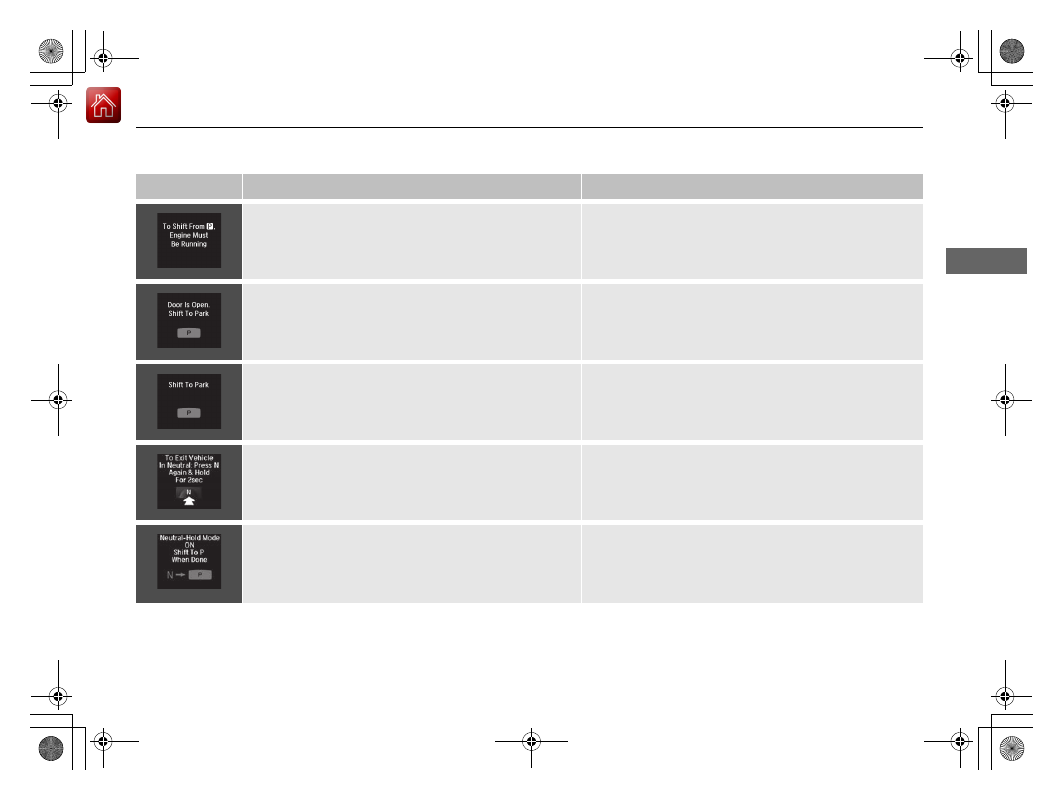
Appears when you attempt to put the transmission into 
another gear position with the transmission in 

(

P

 and 

the engine OFF.

To select another gear position while in 

(

P

 the engine 

must be ON.

Appears when you try to change the gear position after 
the position has automatically been changed to 

(

P

 with 

the driver’s door open and the driver’s seat belt 
unfastened.

Press the 

(

P

 button If you leave the vehicle.

Appears when the vehicle is stopped with the driver’s 
seat belt unfastened and there is a chance that the 
vehicle may roll unintentionally.

Press the 

(

P

 button before release the brake pedal 

when idling, parking or exiting the vehicle.

2

Shift Operation

 P. 467

Appears for a few seconds if you have not pressed the 

(

N

 button long enough to initiate Neutral-Hold mode.

2

If you want to keep the transmission in 

(

N


position [car wash mode]

 P. 469

Appears when you press and hold 

(

N

 button for more 

than 2 seconds.

Disappears when you set the gear position to other than 

(

N

.

2

If you want to keep the transmission in 

(

N


position [car wash mode]

 P. 469

-------------------------------------------------------------------------------------------------------------------------------------------------------------

112

uu

Indicators

u

Multi-Information Display (MID) Warning and Information Messages

In

strum

ent Pa

nel

Message

Condition

Explanation

Appears when you try to change the gear position 
without depressing the brake pedal.

Depress the brake pedal, then select a shift button.

Appears when you try to change the gear position 
without releasing your foot off the accelerator pedal.

Release your foot off the accelerator pedal, then select a 
shift button.

Appears when the 

(

P

 button is pressed while the 

vehicle is moving.

Appears if you change the gear position to 

(

R

 while the 

vehicle is moving forward, or to 

(

D

 while the vehicle is 

reversing.

Make sure that the vehicle comes to a stop before 
operating the select button.

Appears when you set the power mode to ON without 
fastening the driver’s seat belt.

Appears when you change the gear position after 

(

P


has been automatically selected with the driver’s door 
open, the driver’s seat belt unfastened, then the brake 
pedal is released.

Fasten the seat belt properly before you start to drive.

2

Shift Operation

 P. 467

Appears when you press the 

(

P

 button but it is not 

engaged due to low ATF temperature.

Depress the brake pedal until this message disappear.

-------------------------------------------------------------------------------------------------------------------------------------------------------------

113

uu

Indicators

u

Multi-Information Display (MID) Warning and Information Messages

Continued

In

strum

ent Pa

nel

Message

Condition

Explanation

Appears when pressing the 

Dynamic Mode

 button.

u

Press again to change the next mode.

2

Integrated Dynamics System

 P. 474

Appears if there is a problem with the active damper 
system.

Have your vehicle checked by a dealer. With this icon 
on, your vehicle has limited damping ability without the 
active damper system.

Appears if there is a problem with the cooling system.

Drive slowly to prevent overheating and have your 
vehicle checked by a dealer as soon as possible.

Appears when there is a problem with the headlights.

Appears while driving

 - The headlights may not be 

on. When conditions allow you to drive safety, have 
your vehicle checked by a dealer as soon as possible.

Appears if there is a problem with the parking sensor 
system.

Check if the area around the sensor(s) is covered with 
mud, ice, snow, etc. If the indicator(s) stays on or the 
beeper does not stop even after you clean the area, 
have the system checked by a dealer.

-------------------------------------------------------------------------------------------------------------------------------------------------------------

114

uu

Indicators

u

Multi-Information Display (MID) Warning and Information Messages

In

strum

ent Pa

nel

Message

Condition

Explanation

Appears if the automatic brake hold is automatically 
canceled while it is in operation.

Immediately depress the brake pedal.

Appears when the automatic brake hold system is 
turned off.

2

Automatic Brake Hold

 P. 522

Appears when the automatic brake hold button is 
pressed without wearing the driver’s seat belt.

Fasten the driver’s seat belt.

2

Automatic Brake Hold

 P. 522

Appears when the automatic brake hold button is 
pressed without depressing the brake pedal while the 
automatic brake hold is in operation.

Press the automatic brake hold button with the brake 
pedal depressed.

2

Automatic Brake Hold

 P. 522

Appears when the parking brake is applied 
automatically while it is in operation.

2

Automatic Brake Hold

 P. 522

2

Parking Brake

 P. 518

-------------------------------------------------------------------------------------------------------------------------------------------------------------

115

uu

Indicators

u

Multi-Information Display (MID) Warning and Information Messages

Continued

In

strum

ent Pa

nel

Message

Condition

Explanation

Appears if there is a problem with the Auto high-beam.

Manually operate the headlight switch.

If you are driving with the high-beam headlights when 
this happens, the headlights are changed to low beams.

Appears if the temperature inside the camera is too 
high and either the auto high beams are in operation or 
the headlight switch is turned to 

AUTO

.

Use the climate control system to cool down the 
camera.

 Goes off

 - The camera has cooled down. To resume 

the system, turn the headlight switch to 

AUTO

.

2

Front Sensor Camera

 P. 475

Appears when the area around the camera is blocked 
by dirt, mud, etc. Stop your vehicle in a safe place, and 
wipe it off with a soft cloth.

May appear when driving in bad weather (rain, snow, 
fog, etc.)

Have your vehicle checked by a dealer if the message 
comes back on after you have cleaned the area around 
the camera.

Appears after the 12-volt battery charging system 
indicator comes on.

Your vehicle has less ability to accelerate and may be 
harder to start on an incline.

Contact a dealer immediately.

Appears if there is a problem with the acoustic vehicle 
alerting system.

Have your vehicle checked by a dealer immediately.

-------------------------------------------------------------------------------------------------------------------------------------------------------------

116

uu

Indicators

u

Multi-Information Display (MID) Warning and Information Messages

In

strum

ent Pa

nel

Message

Condition

Explanation

Appears when the high voltage battery temperature is 
too low to operate (approx. –22°F [–30°C] or below).

You can start the engine and use the climate control 
system to warm up the interior, which will also warm 
the high voltage battery enough for you to drive the 
vehicle.

The engine speed does not increase even if you fully 
depress the accelerator pedal.

Appears when the high voltage battery and other 
system control temperatures are too low to operate 
(approx. –40°F [–40°C] or below).

You must wait for an increase in the ambient 
temperature or move the vehicle to a warmer location.

Consult a dealer.

Appears when the high voltage battery is running 
extremely low due to continuous slow driving.

Driving at low speed for a long time decreases the 
amount of electricity generated, leading to high voltage 
battery drain.

Appears when the high voltage battery is drained even 
further and a stop is needed to charge the battery.

Stop in a safe place in 

(

P

, then charge the high voltage 

battery by idling the engine.

2

If the 12-Volt Battery Charging System Indicator 
Comes On

 P. 642

Appears while the high voltage battery is being charged 
with the engine running after the vehicle is parked with 
an extremely low battery level.

Do not drive the vehicle until 

Ready To Drive

 appears.

2

READY Indicator

 P. 92

-------------------------------------------------------------------------------------------------------------------------------------------------------------

117

uu

Indicators

u

Multi-Information Display (MID) Warning and Information Messages

Continued

In

strum

ent Pa

nel

Message

Condition

Explanation

Appears when the rear motor fluid temperature is 
extremely low.

The vehicle speed is temporarily limited up to 81 mph 
(130 km/h).
This is canceled after the fluid temperature rises.

Appears if the AWD system has a problem due to a 
hybrid system or power distribution control failure.

Set the power mode to OFF, then set it back to ON.
Have your vehicle checked by a dealer if the message 
appears again.

-------------------------------------------------------------------------------------------------------------------------------------------------------------

118

uu

Indicators

u

Multi-Information Display (MID) Warning and Information Messages

In

strum

ent Pa

nel

Message

Condition

Explanation

Flashes when the system senses a likely collision with a 
vehicle in front of you.

Take the appropriate means to prevent a collision (apply 
the brakes, change lanes, etc.)

2

Collision Mitigation Braking System

TM

 (CMBS

TM

)


P. 526

2

Adaptive Cruise Control (ACC) with Low Speed 
Follow

 P. 477

Appears when ACC with Low Speed Follow has been 
automatically canceled.

You can resume the set speed after the condition that 
caused ACC with Low Speed Follow to cancel improves. 
Press the 

RES/+

/

SET/–

 switch up.

2

Adaptive Cruise Control (ACC) with Low Speed 
Follow

 P. 477

Appears when the vehicle speed slows down to 25 mph 
(40 km/h) and the vehicle ahead of you goes out of the 
ACC with Low Speed Follow range while ACC with Low 
Speed Follow is in operation.

ACC with Low Speed Follow has been automatically 
canceled.

2

Adaptive Cruise Control (ACC) with Low Speed 
Follow

 P. 477

Appears when pressing the 

RES/+

/

SET/–

 switch down 

while the vehicle speed is less than 25 mph (40 km/h) 
and the vehicle ahead of you goes out of the ACC with 
Low Speed Follow range.

ACC with Low Speed Follow cannot be set.

2

Adaptive Cruise Control (ACC) with Low Speed 
Follow

 P. 477

Appears when the distance between your vehicle and 
the vehicle ahead of you is too close while ACC with 
Low Speed Follow is in operation.

ACC with Low Speed Follow has been automatically 
canceled.

2

Adaptive Cruise Control (ACC) with Low Speed 
Follow

 P. 477

-------------------------------------------------------------------------------------------------------------------------------------------------------------

119

uu

Indicators

u

Multi-Information Display (MID) Warning and Information Messages

Continued

In

strum

ent Pa

nel

Message

Condition

Explanation

Appears when pressing the 

RES/+

/

SET/–

 switch down 

while the distance between your vehicle and the vehicle 
ahead of you is too close.

ACC with Low Speed Follow cannot be set.

2

Adaptive Cruise Control (ACC) with Low Speed 
Follow

 P. 477

Appears when pressing the 

RES/+

/

SET/–

 switch down 

while the driver’s seat belt is unfastened.

ACC with Low Speed Follow cannot be set.

2

Adaptive Cruise Control (ACC) with Low Speed 
Follow

 P. 477

Appears when pressing the 

RES/+

/

SET/–

 switch down 

while the transmission is not in 

(

D

.

ACC with Low Speed Follow cannot be set.

2

Adaptive Cruise Control (ACC) with Low Speed 
Follow

 P. 477

-------------------------------------------------------------------------------------------------------------------------------------------------------------

120

uu

Indicators

u

Multi-Information Display (MID) Warning and Information Messages

In

strum

ent Pa

nel

Message

Condition

Explanation

Appears when the vehicle is stopped on a very steep 
slope while ACC with Low Speed Follow is in operation.

ACC with Low Speed Follow has been automatically 
canceled.

2

Adaptive Cruise Control (ACC) with Low Speed 
Follow

 P. 477

Appears when pressing the 

RES/+

/

SET/–

 switch down 

while the vehicle is stopped on a very steep slope.

ACC with Low Speed Follow cannot be set.

2

Adaptive Cruise Control (ACC) with Low Speed 
Follow

 P. 477

Appears when pressing the 

RES/+

/

SET/–

 switch down 

while the parking brake is applied.

ACC with Low Speed Follow cannot be set.

2

Adaptive Cruise Control (ACC) with Low Speed 
Follow

 P. 477

2

Parking Brake

 P. 518

-------------------------------------------------------------------------------------------------------------------------------------------------------------

121

uu

Indicators

u

Multi-Information Display (MID) Warning and Information Messages

Continued

In

strum

ent Pa

nel

Message

Condition

Explanation

Appears if ACC with Low Speed Follow is canceled 
while your vehicle is automatically stopped by ACC with 
Low Speed Follow. The beeper sounds.

Immediately depress the brake pedal.

Appears when pressing the 

RES/+

/

SET/–

 switch down 

while the vehicle is moving and the brake pedal is 
depressed.

ACC with Low Speed Follow cannot be set.

2

Adaptive Cruise Control (ACC) with Low Speed 
Follow

 P. 477

Appears when you unlock and open the driver’s door 
while the power system is on by two-way keyless access 
remote.

2

Remote Engine Start with Vehicle Feedback

 P. 459

-------------------------------------------------------------------------------------------------------------------------------------------------------------

122

uu

Indicators

u

Multi-Information Display (MID) Warning and Information Messages

In

strum

ent Pa

nel

Message

Condition

Explanation

Appears when the vehicle is driving out of a detected 
lane. The steering wheel vibrates rapidly.

Keep the vehicle within the lane you are driving.

2

Lane Keeping Assist System (LKAS)

 P. 498

Appears when the vehicle is driving out of a detected 
lane.

-

The steering wheel vibrates rapidly when the vehicle is 
drifting out of a detected lane.

-

The steering wheel vibrates rapidly when the vehicle is 
drifting out of a detected lane. The system also steers 
the vehicle to help you remain within your driving 
lane.

Keep the vehicle within the lane you are driving.

2

Road Departure Mitigation (RDM) System

 P. 493

You can change the setting for the road departure 
mitigation system. 

Normal

Wide

, and 

Warning Only


can be selected.

2

Customized Features

 P. 131

Blinks when you fail to steer the vehicle. The beeper 
sounds simultaneously.

Operate the steering wheel to resume the LKAS.

Appears when the LKAS is in operation, or the LKAS 
button is pressed, but there is a problem with a system 
related to the LKAS. The LKAS cancels automatically. 
The beeper sounds simultaneously.

If any other system indicators come on, such as the 
VSA

®

, ABS and brake system, take appropriate action.

2

Indicators

 P. 84

Lane Keeping Assist System (LKAS)

Road Departure Mitigation (RDM) System

When you selected 

Warning Only

When you selected 

Normal

 or 

Wide

-------------------------------------------------------------------------------------------------------------------------------------------------------------

123

Continued

In

strum

ent Pa

nel

Gauges and Multi-Information Display (MID)

Gauges

Gauges include the speedometer, tachometer, fuel gauge, high voltage battery 
charge level gauge, and related indicators. They are displayed when the power 
mode is in ON.

Displays your driving speed in mph (U.S.) or km/h (Canada).

Shows the number of engine revolutions per minute.

Displays the amount of fuel left in the fuel tank.

Speedometer

Tachometer

Fuel Gauge

1

Fuel Gauge

NOTICE

You should refuel when the reading approaches 

.

Running out of fuel can cause the engine to misfire, 
damaging the catalytic converter.

The actual amount of remaining fuel may differ from 
the fuel gauge reading.

E

-------------------------------------------------------------------------------------------------------------------------------------------------------------

uu

Gauges and Multi-Information Display (MID)

u

Gauges

124

In

strum

ent Pa

nel

Shows the remaining high voltage battery charge level.

High Voltage Battery Charge Level Gauge

1

High Voltage Battery Charge Level Gauge

The high voltage battery charge level may decrease 
under the following conditions:

When the 12-volt battery has been replaced.

When the 12-volt battery has been disconnected.

When the high voltage battery control system 
corrects its reading.

The charge level reading will be corrected 
automatically while driving.

Changes in the temperature of the high voltage 
battery can increase or decrease the battery’s 
charging capacity. If temperature changes cause the 
battery’s capacity to change, the number of 
indicators in the battery charge level gauge may also 
change, even if the amount of charging remains the 
same.

-------------------------------------------------------------------------------------------------------------------------------------------------------------

125

uu

Gauges and Multi-Information Display (MID)

u

MID

Continued

In

strum

ent Pa

nel

MID

The MID shows the odometer, trip meter, outside temperature indicator, and other 
gauges. It also displays important messages such as warnings and other helpful 
information.

Main displays

Roll the multi-function steering-wheel controls to change the display.

Switching the Display

Blank

Instant Fuel 

Economy/

Average Fuel 

Economy

Range

Elapsed Time

Average Speed

SH-AWD

®

/

Dynamic Mode

Vehicle 

Settings

Tire Pressure 

for Each Tire

Engine Oil Life

Turn-by-Turn 

Directions

Multi-function Steering-

wheel Controls

Compass

-------------------------------------------------------------------------------------------------------------------------------------------------------------

126

uu

Gauges and Multi-Information Display (MID)

u

MID

In

strum

ent Pa

nel

Lower displays

Press the 

TRIP

 button to change the display.

Shows the total number of miles (U.S.) or kilometers (Canada) that your vehicle has 
accumulated.

Odometer

TRIP

 Button

Outside Temperature

Trip A

Trip B

Odometer

TRIP

TRIP

TRIP

-------------------------------------------------------------------------------------------------------------------------------------------------------------


Content      ..     5      6      7      8     ..