Acura MDX HYBRID (2020 year). Manual in english - page 6
 

  Index      Manuals     Acura MDX HYBRID (2020 year). Manual in english


Search            copyright infringement  


Content      ..     4      5      6      7     ..


Acura MDX HYBRID (2020 year). Manual in english - page 6


95

uu

Indicators

u

Continued

In

strum

ent Pa

nel

Indicator

Name

On/Blinking

Explanation

Message

Speed-sensitive 
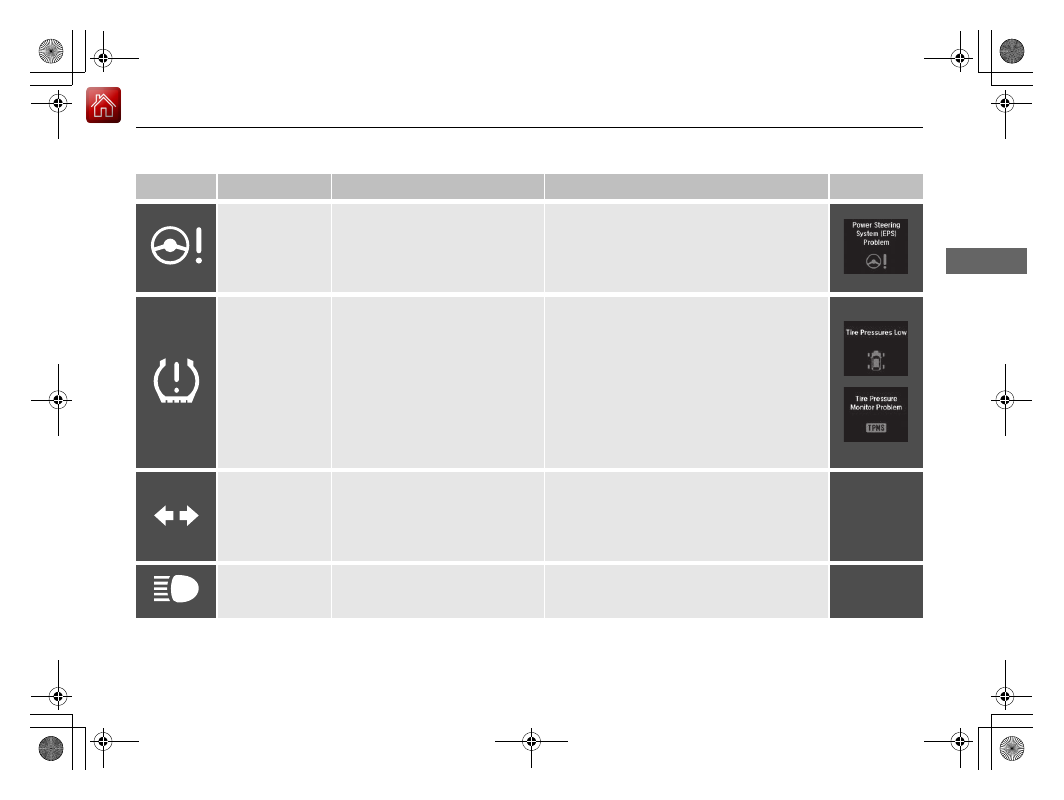
Electric Power 
Steering (EPS) 
System Indicator

Comes on when you set the 
power mode to ON, and goes off 
when the power system is on.

Comes on if there is a problem 
with the EPS system.

Stays on constantly or does not come on 
at all

 - Have your vehicle checked by a dealer.

2

If the Speed-Sensitive Electric Power 
Steering (EPS) System Indicator Comes 
On

 P. 644

Low Tire Pressure/
TPMS Indicator

Comes on for a few seconds 
when you set the power mode to 
ON, then goes off.

Comes on if the tire pressure of 
any of the tires becomes 
significantly low.

Blinks for about one minute, and 
then stays on if there is a problem 
with the TPMS, or when a spare 
tire

*

 is temporarily installed.

Comes on while driving

 - Stop in a safe 

place, check tire pressures, and inflate the 
tire(s) if necessary.

Blinks and remains on

 - Have your vehicle 

checked by a dealer. If the vehicle is fitted with 
a spare, get your regular tire repaired or 
replaced and put back on your vehicle as soon 
as you can.

Turn Signal and 
Hazard Warning 
Indicators

Blinks when you operate the turn 
signal lever.

Blink along with all turn signals 
when you press the hazard 
warning button.

Does not blink or blinks rapidly

2

Replacing Light Bulbs

 P. 582

High Beam 
Indicator

Comes on when the high beam 
headlights are on.

* Not available on all models

-------------------------------------------------------------------------------------------------------------------------------------------------------------

96

uu

Indicators

u

In

strum

ent Pa

nel

Indicator

Name

On/Blinking

Explanation

Message

Lights On 
Indicator

Comes on when the light switch 
in a position other than 

OFF

 or 

when the switch is set to 

AUTO


and the exterior lights come on.

If you set the power mode to ACCESSORY or 
VEHICLE OFF while the exterior lights are on, a 
chime sounds when the driver’s door is 
opened.

Fog Light 
Indicator

*

Comes on when the fog lights 
are on.

Immobilizer 
System Indicator

Comes on briefly when you set 
the power mode to ON, then 
goes off.

Comes on if the immobilizer 
system cannot recognize the key 
information.

Blinks

 - You cannot start the power system. 

Set the power mode to VEHICLE OFF, then 
select the ON mode again.

Repeatedly blinks

 - The system may be 

malfunctioning. Have your vehicle checked by 
a dealer.

Do not attempt to alter this system or add 
other devices to it. Electrical problems can 
occur.

* Not available on all models

-------------------------------------------------------------------------------------------------------------------------------------------------------------

97

uu

Indicators

u

Continued

In

strum

ent Pa

nel

Indicator

Name

On/Blinking

Explanation

Message

Security System 
Alarm Indicator

Blinks when the security system 
alarm has been set.

2

Security System Alarm

 P. 165

System Message 
Indicator

Comes on for a few seconds 
when you set the power mode to 
ON, then goes off.

Comes on along with a beep 
when a problem is detected. A 
system message on the MID 
appears at the same time.

While the indicator is on, roll the multi-
function steering wheel control to see the 
message again.

Refer to the Indicators information in this 
chapter when a system message appears on 
the MID. Take the appropriate action for the 
message.

The MID does not return to the normal screen 
unless the warning is canceled, or the multi-
function steering-wheel controls is rolled.

Keyless Access 
System Indicator

Comes on for a few seconds 
when you set the power mode to 
ON, then goes off.

Comes on as soon as a problem is 
detected in the keyless access 
system or keyless starting system.

Have your vehicle checked by a dealer.

-------------------------------------------------------------------------------------------------------------------------------------------------------------

98

uu

Indicators

u

In

strum

ent Pa

nel

Indicator

Name

On/Blinking

Explanation

Message

Lane Keeping 
Assist System 
(

LKAS

) Indicator 

(Amber)

Comes on for a few seconds 
when you set the power mode to 
ON, then goes off.

Comes on if there is a problem 
with the LKAS.

Stays on constantly

 - Have your vehicle 

checked by a dealer.

Lane Keeping 
Assist System 
(

LKAS

) Indicator 

(Green)

Comes on when you press the 

MAIN

 button.

2

Lane Keeping Assist System (LKAS)


P. 498

Comes on when the LKAS is in 
operation, or the LKAS button is 
pressed, but the temperature 
inside the front sensor camera is 
too high. The LKAS cancels 
automatically. The beeper sounds 
simultaneously.

Use the climate control system to cool down 
the camera.

Goes off

 - The camera has been cooled down 

and the system activates normally.

2

Front Sensor Camera

 P. 475

Comes on when the area around 
the camera is blocked by dirt, 
mud, etc. Stop your vehicle in a 
safe place, and wipe it off with a 
soft cloth.

May come on when driving in 
bad weather (rain, snow, fog, 
etc.)

Have your vehicle checked by a dealer if the 
indicator and message come back on after 
you cleaned the area around the camera.

-------------------------------------------------------------------------------------------------------------------------------------------------------------

99

uu

Indicators

u

Continued

In

strum

ent Pa

nel

Indicator

Name

On/Blinking

Explanation

Message

Road Departure 
Mitigation (RDM) 
Indicator

Comes on for a few seconds 
when you set the power mode to 
ON, then goes off.

Comes on if there is a problem 
with the RDM system.

Stays on constantly

 - Have your vehicle 

checked by a dealer.

Comes on when the RDM system 
shuts itself off.

Stays on

 - The temperature inside the camera 

is too high.
Use the climate control system to cool down 
the camera.
The system activates when the temperature 
inside the camera cools down.

2

Front Sensor Camera

 P. 475

Stays on

 - The area around the camera is 

blocked by dirt, mud, etc. Stop your vehicle in 
a safe place, and wipe it off with a soft cloth.

Have your vehicle checked by a dealer if the 
indicator and message come back on after 
you cleaned the area around the camera.

2

Front Sensor Camera

 P. 475

-------------------------------------------------------------------------------------------------------------------------------------------------------------

100

uu

Indicators

u

In

strum

ent Pa

nel

Indicator

Name

On/Blinking

Explanation

Message

Adaptive Cruise 
Control (

ACC

with Low Speed 
Follow Indicator 
(Amber)

Comes on for a few seconds 
when you set the power mode to 
ON, then goes off.

Comes on if there is a problem 
with ACC with Low Speed 
Follow.

Comes on while driving

 - Have your vehicle 

checked by a dealer.

Adaptive Cruise 
Control (

ACC

with Low Speed 
Follow Indicator 
(Green)

Comes on when you press the 

MAIN

 button.

2

Adaptive Cruise Control (ACC) with Low 
Speed Follow

 P. 477

Comes on if anything covers the 
radar sensor cover and prevents 
the sensor from detecting a 
vehicle in front.

May come on when driving in 
bad weather (rain, snow, fog, 
etc.)

ACC with Low Speed Follow has 
been automatically canceled.

When the radar sensor gets dirty, stop your 
vehicle in a safe place, and wipe off dirt using 
a soft cloth.

Have your vehicle checked by a dealer if the 
message does not disappear even after you 
clean the sensor cover.

-------------------------------------------------------------------------------------------------------------------------------------------------------------

101

uu

Indicators

u

Continued

In

strum

ent Pa

nel

Indicator

Name

On/Blinking

Explanation

Message

Adaptive Cruise 
Control (

ACC

with Low Speed 
Follow Indicator 
(Green)

Comes on when ACC with Low 
Speed Follow is in operation, but 
the temperature inside the front 
sensor camera is too high. ACC 
with Low Speed Follow cancels 
automatically. The beeper sounds 
simultaneously.

Use the climate control system to cool down 
the camera.

Goes off

 - The camera has been cooled down 

and the system activates normally.

Comes on when the area around 
the camera is blocked by dirt, 
mud, etc. Stop your vehicle in a 
safe place, and wipe it off with a 
soft cloth.

May come on when driving in 
bad weather (rain, snow, fog, 
etc.)

Have your vehicle checked by a dealer if the 
indicator and message come back on after 
you cleaned the area around the camera.

-------------------------------------------------------------------------------------------------------------------------------------------------------------

102

uu

Indicators

u

In

strum

ent Pa

nel

Indicator

Name

On/Blinking

Explanation

Message

Collision 
Mitigation Braking 
System

TM


(CMBS

TM

Indicator

Comes on for a few seconds 
when you set the power mode to 
ON, then goes off.

Comes on when you deactivate 
the CMBS

TM

. A multi-information 

display message appears for five 
seconds.

Comes on if there is a problem 
with the CMBS

TM

.

Stays on constantly without the CMBS

TM


off

 - Have your vehicle checked by a dealer.

2

Collision Mitigation Braking System

TM


(CMBS

TM

)

 P. 526

-------------------------------------------------------------------------------------------------------------------------------------------------------------

103

uu

Indicators

u

Continued

In

strum

ent Pa

nel

Indicator

Name

On/Blinking

Explanation

Message

Collision 
Mitigation Braking 
System

TM


(CMBS

TM

Indicator

Comes on when the CMBS

TM


system shuts itself off.

Stays on

 - The area around the camera is 

blocked by dirt, mud, etc. Stop your vehicle in 
a safe place, and wipe it off with a soft cloth.

2

Front Sensor Camera

 P. 475

When the radar sensor gets dirty, stop your 
vehicle in a safe place, and wipe off dirt using 
a soft cloth.

Have your vehicle checked by a dealer if the 
message does not disappear even after you 
clean the sensor cover.

2

Collision Mitigation Braking System

TM


(CMBS

TM

)

 P. 526

Stays on

 - The temperature inside the camera 

is too high. Use the climate control system to 
cool down the camera. The system activates 
when the temperature inside the camera cools 
down.

2

Front Sensor Camera

 P. 475

-------------------------------------------------------------------------------------------------------------------------------------------------------------

104

uu

Indicators

u

In

strum

ent Pa

nel

Indicator

Name

On/Blinking

Explanation

Message

Blind spot 
information 
System Indicator

Comes on for a few seconds 
when you set the power mode to 
ON, then goes off.

Stays on while blind spot 
information system is turned off.

2

Customized Features

 P. 131

Comes on when mud, snow, or 
ice accumulates in the vicinity of 
sensor.

Comes on while driving 

- Remove the 

obstacle in the vicinity of sensor.

2

Blind spot information System

 P. 510

Comes on if there is a problem 
with the system.

Comes on while driving 

- Have your vehicle 

checked by a dealer.

-------------------------------------------------------------------------------------------------------------------------------------------------------------

105

uu

Indicators

u

Multi-Information Display (MID) Warning and Information Messages

Continued

In

strum

ent Pa

nel

Multi-Information Display (MID) Warning and Information Messages

The following messages appear only on the MID. Roll the multi-function steering-wheel controls to see the message again with the system 
message indicator on.

Message

Condition

Explanation

Appears if any door or the tailgate is not completely 
closed.

Goes off when all doors and the tailgate are closed.

Appears when the hood is opened.

Close the hood.

-------------------------------------------------------------------------------------------------------------------------------------------------------------

106

uu

Indicators

u

Multi-Information Display (MID) Warning and Information Messages

In

strum

ent Pa

nel

Message

Condition

Explanation

Appears when the washer fluid is low.

Refill washer fluid.

2

Refilling Window Washer Fluid

 P. 581

Appears while you are customizing the settings and the 
transmission is in other than 

(

P

.

2

Customized Features

 P. 131

Appears when there is a problem with the sensor on the 
12-volt battery.

Have your vehicle checked by a dealer.

2

Checking the 12-Volt Battery

 P. 600

Appears along with the battery charging system 
indicator when the battery is not charging.

Turn off the climate control system and rear defogger to 
reduce electricity consumption.

2

If the 12-Volt Battery Charging System Indicator 
Comes On

 P. 642

-------------------------------------------------------------------------------------------------------------------------------------------------------------

107

uu

Indicators

u

Multi-Information Display (MID) Warning and Information Messages

Continued

In

strum

ent Pa

nel

Message

Condition

Explanation

Appears when the scheduled maintenance is due soon.

Consequently, 

Maintenance Due Now

 and 

Maintenance Past Due

 follow.

2

Maintenance Minder Messages on the Multi-
Information Display (MID)

 P. 566

Appears when there is a problem with the power 
tailgate system.

Manually open or close the power tailgate.

Have your vehicle checked by a dealer.

U.S.

Canada

-------------------------------------------------------------------------------------------------------------------------------------------------------------

108

uu

Indicators

u

Multi-Information Display (MID) Warning and Information Messages

In

strum

ent Pa

nel

Message

Condition

Explanation

Appears if there is a problem with the starter system.

Hold the 

POWER

 button up to 15 seconds to start the 

power system.

2

Turning on the Power

 P. 457

Have your vehicle checked by a dealer.

Appears when you set the power mode to ACCESSORY 
or ON.

2

Turning on the Power

 P. 457

Appears three seconds after you bring the keyless 
access remote in front of the 

POWER

 button when 

To 

Start, Hold Remote Near Start Button

 appears. 

To 

Start Engine: Brake + Push

 appears sequentially.

Unless you bring the keyless access remote in front of 
the 

POWER

 button, this message does not appear.

2

If the Keyless Access Remote Battery is Weak

 P. 636

U.S.

Canada

-------------------------------------------------------------------------------------------------------------------------------------------------------------

109

uu

Indicators

u

Multi-Information Display (MID) Warning and Information Messages

Continued

In

strum

ent Pa

nel

Message

Condition

Explanation

Appears when the power mode is in ACCESSORY.

Appears after the driver’s door is opened when the 
power mode is in ACCESSORY.

Change the power mode to VEHICLE OFF.

2

POWER Button

 P. 171

Appears when you close the door with the power mode 
is in ON without the keyless access remote inside the 
vehicle.

Disappears when you bring the keyless access remote 
back inside the vehicle and close the door.

2

Keyless Access Remote Reminder

 P. 173

Appears when the keyless access remote’s battery 
becomes weak.

2

Replacing the Button Battery

 P. 601

Appears if the keyless access remote’s battery is too 
weak to start the power system or the key is not within 
operating range to start the power system.
The beeper sounds six times.

Bring the keyless access remote in front of the 

POWER


button to be touched with.

2

If the Keyless Access Remote Battery is Weak

 P. 636

-------------------------------------------------------------------------------------------------------------------------------------------------------------

110

uu

Indicators

u

Multi-Information Display (MID) Warning and Information Messages

In

strum

ent Pa

nel

Message

Condition

Explanation

Appears when the transmission system temperature is 
too high.

Immediately stop in a safe place in 

(

P

.

Let the engine idle until the message disappears.

Appears when you turn the power system on with the 
transmission not in 

(

P

.

Press the 

(

P

 button.

Appears if there is a problem with the electric system.

Appears when you set the power mode to OFF while 
driving.

Immediately stop in a safe place and set the parking 
brake.

Continue driving if the message goes off soon after.

If there is a problem with the transmission system, the 
transmission system indicator comes on.

2

Transmission System Indicator

 P. 90

Appears if you depress the accelerator pedal when the 
transmission is in 

(

N

.

Release the accelerator pedal.
After that, depress the brake pedal and change the 
transmission position.

-------------------------------------------------------------------------------------------------------------------------------------------------------------


Content      ..     4      5      6      7     ..