FANUC Robotics SYSTEM R-30iA and R-30iB Controller. KAREL Reference Manual - page 5
Chapter 7
FILE INPUT/OUTPUT OPERATIONS
Contents
Chapter 7
FILE INPUT/OUTPUT OPERATIONS
7-1
7.1
OVERVIEW
7-3
7.2
FILE VARIABLES
7-3
7.3
OPEN FILE STATEMENT
7-4
7.3.1
Setting File and Port Attributes
7-5
7.3.2
File String
7-10
7.3.3
Usage String
7-11
7.4
CLOSE FILE STATEMENT
7-14
7.5
READ STATEMENT
7-14
7.6
WRITE STATEMENT
7-16
7.7
INPUT/OUTPUT BUFFER
7-17
7.8
FORMATTING TEXT (ASCII) INPUT/OUTPUT
7-18
7.8.1
Formatting INTEGER Data Items
7-19
7.8.2
Formatting REAL Data Items
7-22
7.8.3
Formatting BOOLEAN Data Items
7-25
7.8.4
Formatting STRING Data Items
7-27
7.8.5
Formatting VECTOR Data Items
7-31
7.8.6
Formatting Positional Data Items
7-32
7.9
FORMATTING BINARY INPUT/OUTPUT
7-34
7.9.1
Formatting INTEGER Data Items
7-35
7.9.2
Formatting REAL Data Items
7-36
7.9.3
Formatting BOOLEAN Data Items
7-36
7.9.4
Formatting STRING Data Items
7-36
7.9.5
Formatting VECTOR Data Items
7-37
7.9.6
Formatting POSITION Data Items
7-37
7.9.7
Formatting XYZWPR Data Items
7-37
7.9.8
Formatting XYZWPREXT Data Items
7-38
7.9.9
Formatting JOINTPOS Data Items
7-38
7-1
7. FILE INPUT/OUTPUT OPERATIONS
MARRC75KR07091E Rev D
7.10
USER INTERFACE TIPS
7-38
7.10.1
USER Menu on the Teach Pendant
7-38
7.10.2
USER Menu on the CRT/KB
7-40
7-2
MARRC75KR07091E Rev D
7. FILE INPUT/OUTPUT OPERATIONS
7.1
OVERVIEW
The KAREL language facilities allow you to perform the following serial input/output (I/O)
operations:
• Open data files and serial communication ports using the OPEN FILE Statement
• Close data files and serial communication ports using the CLOSE FILE Statement
• Read from files, communication ports, and user interface devices using the READ Statement
• Write to files, communication ports, and user interface devices using the WRITE Statement
• Cancel read or write operations
File variables are used to indicate the file, communication port, or device on which a serial I/O
operation is to be performed.
Buffers are used to hold data that has not yet been transmitted. The use of data items in READ and
WRITE statements and their format specifiers depend on whether the data is text (ASCII) or binary,
and on the data type.
7.2
FILE VARIABLES
A KAREL program can perform serial I/O operations on the following:
• Data files residing in the KAREL file system
• Serial communication ports associated with connectors on the KAREL controller
• User interface devices including the CRT/KB and teach pendant
A file variable is used to indicate the file, communication port, or device on which you want to
perform a particular serial I/O operation.
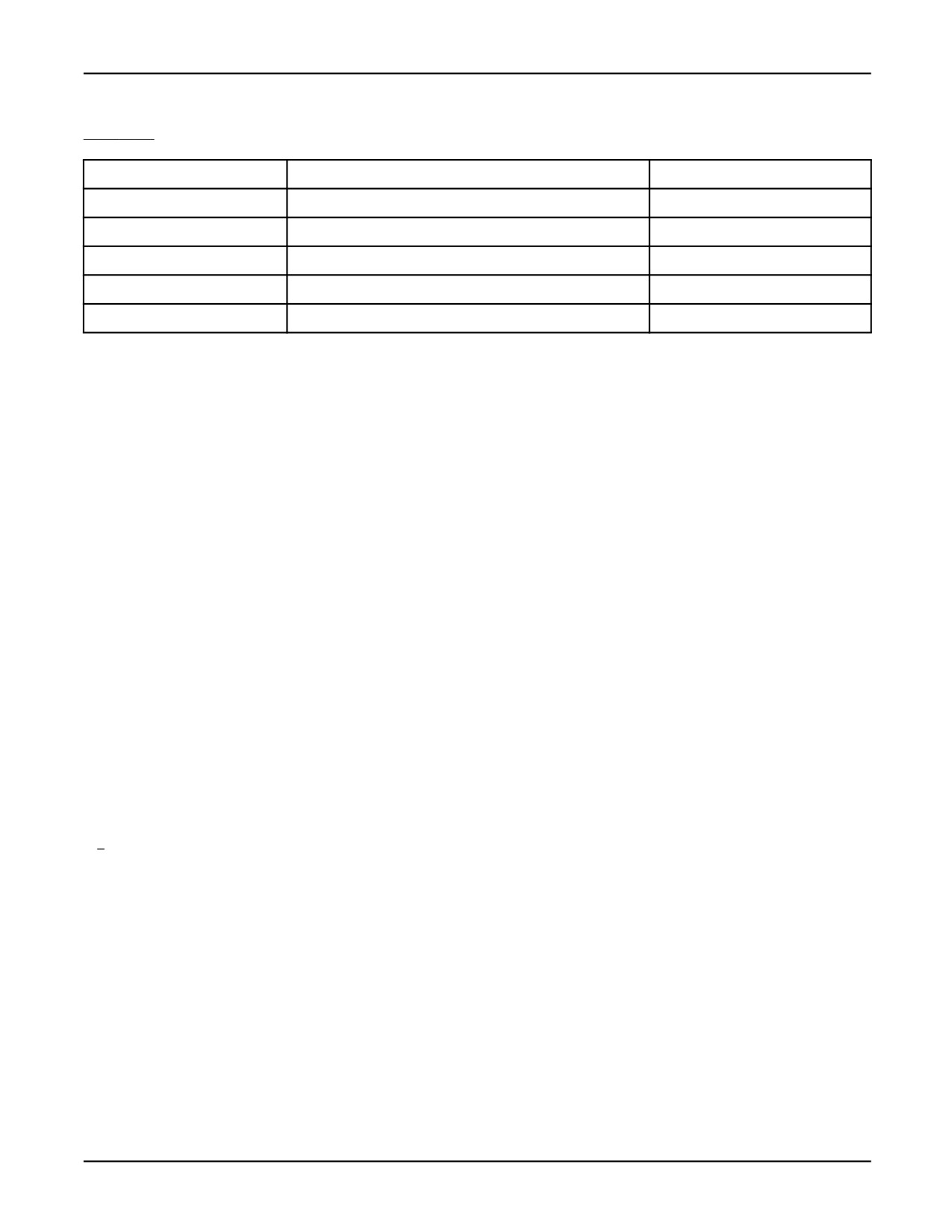
Table 7-1 lists the predefined file variables for user interface devices. These file variables are already
opened and can be used in the READ or WRITE statements.
Table 7-1. Predefined File Variables
IDENTIFIER
DEVICE
OPERATIONS
TPFUNC*
Teach pendant function key line
Both
TPDISPLAY*
Teach pendant KAREL display
Both
TPPROMPT*
Teach pendant prompt line
Both
TPERROR
Teach pendant message line
Write
TPSTATUS*
Teach pendant status line
Write
7-3
7. FILE INPUT/OUTPUT OPERATIONS
MARRC75KR07091E Rev D
Table 7-1. Predefined File Variables (Cont’d)
CRTFUNC*
CRT/KB function key line
Both
INPUT
CRT/KB keyboard
Read
OUTPUT*
CRT/KB KAREL screen
Write
CRTPROMPT*
CRT/KB prompt line
Both
CRTERROR
CRT/KB message line
Write
CRTSTATUS*
CRT/KB status line
Write
* Only displayed when teach pendant or CRT is in the user menu.
A file variable can be specified in a KAREL statement as a FILE variable. Using FILE in a KAREL
Program shows an example of declaring a FILE variable and of using FILE in the executable section
of a program.
Using FILE in a KAREL Program
PROGRAM lun_prog
VAR
curnt_file : FILE
ROUTINE input_data(file_spec:FILE) FROM util_prog
BEGIN
OPEN FILE curnt_file (’RW’,’text.dt’)
--variable FILE
input_data(curnt_file)
--file variable argument
WRITE TPERROR (’Error has occurred’)
END lun_prog
Sharing FILE variables between programs is allowed as long as a single task is executing the
programs. Sharing file variables between tasks is not allowed.
7.3
OPEN FILE STATEMENT
The OPEN FILE statement associates the file variable with a particular data file or communication
port.
The association remains in effect until the file is closed, either explicitly by a CLOSE FILE statement
or implicitly when program execution terminates or is aborted.
The OPEN FILE statement specifies how the file is to be used (usage string), and which file or
port (file string) is used.
7-4
MARRC75KR07091E Rev D
7. FILE INPUT/OUTPUT OPERATIONS
7.3.1
Setting File and Port Attributes
Attributes specify the details of operation of a serial port, or KAREL FILE variable. The
SET_PORT_ATR and SET_FILE_ATR built-ins are used to set these attributes. SET_FILE_ATR
must be called before the FILE is opened. SET_PORT_ATR can be called before or after the FILE
that is using a serial port, is opened.
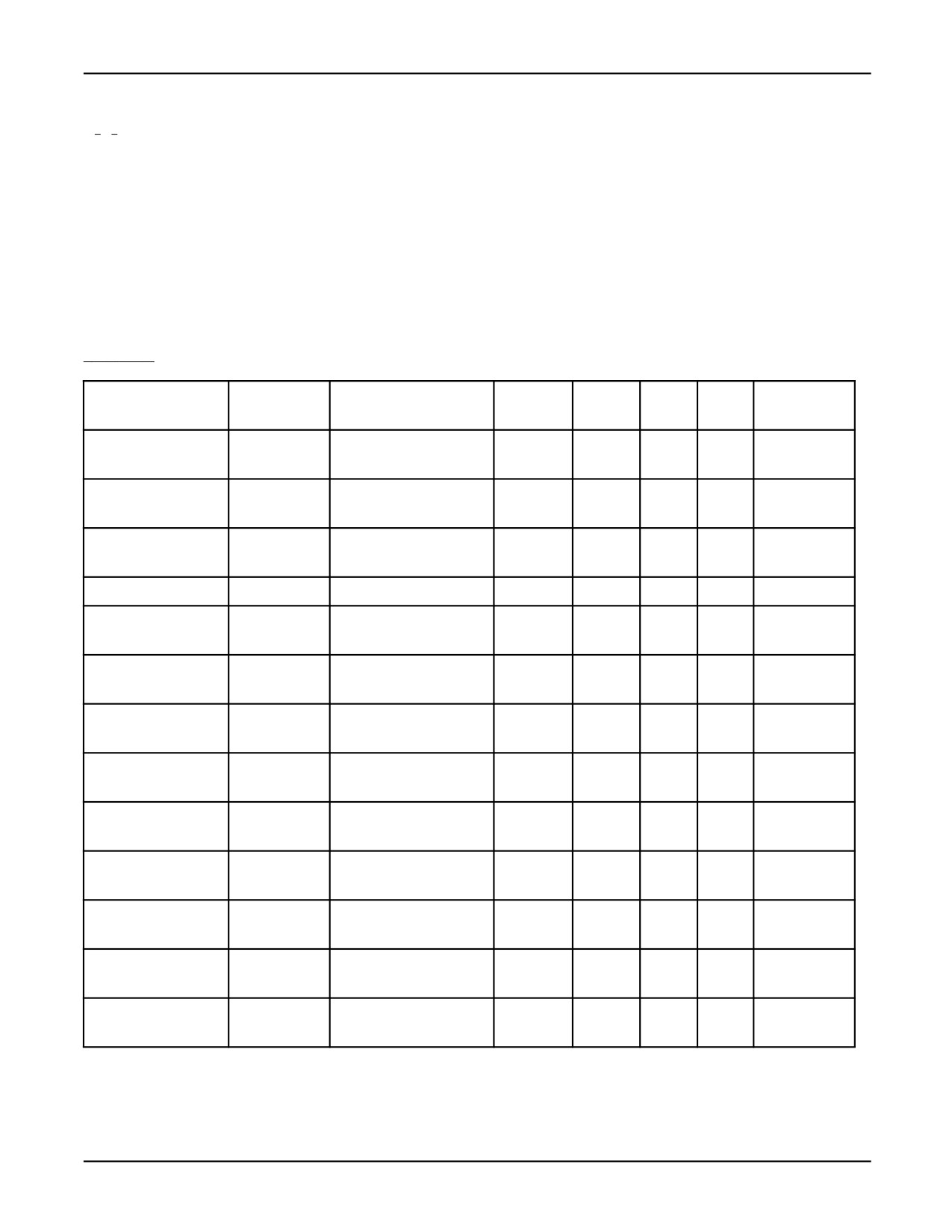
Table 7-2 lists each attribute type, its function and whether the attribute is intended for use with
teach pendant and CRT/KB devices, serial ports, data files, or pipes. Refer to Appendix A for more
information.
Table 7-2. Predefined Attribute Types
ATTRIBUTE TYPE
FUNCTION
SET_PORT_ATR OR
TP/ CRT
SERIAL
DATA
PIPES
SOCKET
SET_FILE_ATR
PORTS
FILES
MESSAGING
ATR_BAUD
Baud rate
SET_PORT_ATR
not used
valid
not
not
not used
used
used
ATR_DBITS
Data length
SET_PORT_ATR
not used
valid
not
not
not used
used
used
ATR_EOL
End of line
SET_FILE_ATR
not used
valid
not
valid
valid
used
ATR_FIELD
Field
SET_FILE_ATR
valid
valid
valid
valid
valid
ATR_IA
Interactively
SET_FILE_ATR
valid
valid
valid
valid
valid
write
ATR_MODEM
Modem line
SET_PORT_ATR
not used
valid
not
not
not used
used
used
ATR_PARITY
Parity
SET_PORT_ATR
not used
valid
not
not
not used
used
used
ATR_PASSALL
Passall
SET_FILE_ATR
valid
valid
not
valid
valid
used
ATR_READAHD
Read ahead
SET_PORT_ATR
not used
valid
not
not
not used
buffer
used
used
ATR_REVERSE
Reverse
SET_FILE_ATR
not used
valid
valid
valid
valid
transfer
ATR_SBITS
Stop bits
SET_PORT_ATR
not used
valid
not
not
not used
used
used
ATR_TIMEOUT
Timeout
SET_FILE_ATR
valid
valid
not
valid
valid
used
ATR_UF
Unformatted
SET_FILE_ATR
not used
valid
valid
valid
valid
transfer
7-5

7. FILE INPUT/OUTPUT OPERATIONS
MARRC75KR07091E Rev D
Table 7-2. Predefined Attribute Types (Cont’d)
ATTRIBUTE TYPE
FUNCTION
SET_PORT_ATR OR
TP/ CRT
SERIAL
DATA
PIPES
SOCKET
SET_FILE_ATR
PORTS
FILES
MESSAGING
ATR_XONOFF
XON/XOFF
SET_PORT_ATR
not used
valid
not
not
not used
used
used
ATR_PIPOVADV
Pipe
SET_FILE_ATR
not used
not
not
valid
valid
Overflow
used
used
ATR_PIPWAIT
Wait for data
SET_FILE_ATR
not used
not
not
valid
valid
used
used
Table 7-3 contains detailed explanations of each attribute.
Table 7-3. Attribute Values
Attribute Type
Description
Valid Device
Usage Mode
Valid Values
Default Value
ATR_BAUD
The baud rate of a serial
PORT
Read/ Write
BAUD_9600:
BAUD_9600
Baud rate
port can be changed to
9600 baud
one of the valid attribute
BAUD_4800:
values.
4800 baud
BAUD_2400:
2400 baud
BAUD_1200:
1200 baud
ATR_DBITS
If specified, the data
PORT
Read/ Write
DBITS_5: 5 bits
DBITS_8
Data length
length for a serial port is
DBITS_6: 6 bits
changed to the specified
DBITS_7: 7 bits
attribute values.
DBITS_8: 8 bits
ATR_EOL
If specified, the serial port
PORT
Read/ Write
Any ASCII
13
(carriage return)
End of line
is changed to terminate
character code
read when the specified
attribute value. Refer to
Appendix D , for a listing
of valid attribute values.
ATR_FIELD
If specified, the amount
TP/CRT,
Read only
Ignored
Read data until
Field
of data read depends on
PORT, FILE
terminator character
the format specifier in
(EOL) appears
the READ statement, or
the default value of the
data type being read. If
not specified, the data is
read until the terminator
character (EOL) appears.
7-6

MARRC75KR07091E Rev D
7. FILE INPUT/OUTPUT OPERATIONS
Table 7-3. Attribute Values (Cont’d)
Attribute Type
Description
Valid Device
Usage Mode
Valid Values
Default Value
ATR_IA
If specified, the contents
TP/CRT,
Write only
Ignored
TP/CRT is
Interactively write
of the buffer are output
PORT, FILE
interactive, PORT,
when each write operation
FILE are not
to the buffer is complete.
interactive
(Interactive)
If not specified, the
contents of the buffer
are output only when the
buffer becomes full or
when CR is specified.
The size of the output
buffer is 256 bytes. (Not
interactive)
ATR_MODEM
Refer to "Modem Line"
Modem line
section that follows for
information.
ATR_PARITY
The parity for a serial port
PORT
Read/ Write
PARITY_NONE:
PARITY_NONE
Parity
can be changed to one of
No parity
the valid attribute values.
PARITY_ODD:
Odd parity
PARITY_EVEN:
Even parity
ATR_PASSALL
If specified, input is read
TP/CRT, PORT
Read only
Ignored
Read only the
Passall
without interpretation
displayable keys
or transaction. Since
until enter key is
the terminator character
pressed
(EOL) will not terminate
the read, the field attribute
automatically assumes
the ‘‘field’’ option.
ATR_PIPOVADV
Configures the behavior of
PIPE
Read
The value must
The value parameter
the read when an overflow
be between 0
is either OVF_EOF
occurs. By default the
and the total
(sets the default
behavior is to signal an
number of bytes
behavior) or the
end of file (EOF) when the
in the pipe. The
number of bytes to
overflow occurs.
value will be
advance when an
rounded up
overflow occurs.
to the nearest
binary record.
7-7

7. FILE INPUT/OUTPUT OPERATIONS
MARRC75KR07091E Rev D
Table 7-3. Attribute Values (Cont’d)
Attribute Type
Description
Valid Device
Usage Mode
Valid Values
Default Value
ATR_PIPWAIT
The read operation waits
PIPE
Read
WAIT_USED or
The default is
for data to arrive in the
WAIT_NOTUSED
snapshot which
pipe.
means that the
system returns an
EOF when all the
data in the pipe has
been read.
ATR_READAHD
The attribute value is
PORT
Read/ Write
any positive
1
(128 byte buffer)
Read Ahead Buffer
specified in units of 128
integer
bytes, and allocates a
1=128 bytes
read ahead buffer of the
2=256 bytes
indicated size.
0=disable bytes
ATR_REVERSE
The bytes will be
PORT, FILE
Read/ Write
Ignored
Not reverse transfer
Reverse transfer
swapped.
ATR_SBITS
This specifies the number
PORT
Read/ Write
SBITS_1:1 bit
SBITS_1
Stop bits
of stop bits for the serial
SBITS_15: 1.5
port.
bits
SBITS_2:2 bits
ATR_TIMEOUT
If specified, an error will be
TP/CRT, PORT
Read only
Any integer
0
(external)
Timeout
returned by IO_STATUS
value (units are
if the read takes longer
in msec)
than the specified attribute
value.
ATR_UF
If specified, a binary
PORT, FILE
Read/ Write
Ignored
ASCII transfer
Unformatted
transfer is performed.
transfer
For read operations,
the terminator character
(EOL) will not terminate
the read, and therefore
automatically assumes
the ‘‘field’’ option. If not
specified, ASCII transfer
is performed.
ATR_XONOFF
If specified, the
PORT
Read/ Write
XF_NOT_USED:
XF_USED
XON/XOFF
XON/XOFF for a serial
Not used
port is changed to the
XF_USED: Used
specified attribute value.
7-8
MARRC75KR07091E Rev D
7. FILE INPUT/OUTPUT OPERATIONS
Modem line
Valid device : PORT
Usage mode : Read/Write
Default value : MD_NOT_USED: DSR, DTR, and RTS not used
Valid attribute values : MD_NOT_USED: DSR, DTR, and RTS not used
MD_USE_DSR: DSR used
MD_NOUSE_DSR: DSR not used
MD_USE_DTR: DTR used
MD_NOUSE_DTR: DTR not used
MD_USE_RTS: RTS used
MD_NOUSE_RTS: RTS not used
• This attribute controls the operation of the modem line. The control is based on the following
binary mask, where the flag bits are used to indicate what bit value you are changing.
RTS value
DSR value
DTR value
RTS flag
DSR flag
DTR flag
— RTS (request to send) and DTR (data terminal ready) are both outputs.
— DSR (data set ready) is an input.
• Set the modem line attribute by doing the following.
— To indicate RTS is used (HIGH/ON): status = SET_PORT_ATR (port_name, ATR_MODEM,
MD_USE_RTS)
— To indicate RTS is NOT used (LOW/OFF):status = SET_PORT_ATR (port_name,
ATR_MODEM, MD_NOUSE_RTS)
— To indicate RTS is used (HIGH/ON) and DTR is not used (LOW/OFF):status =
SET_PORT_ATR (port_name, ATR_MODEM, MD_USE_RTS or MD_NOUSE_DTR)
• The following examples demonstrate how to use the returned attribute value from the
GET_PORT_ATR built-in.
status = GET_PORT_ATR (port, ATR_MODEM, atr_value)
— To determine if DTR is used:
IF ((atr_value AND MD_USE_DTR) = MD_USE_DTR) THEN
7-9
7. FILE INPUT/OUTPUT OPERATIONS
MARRC75KR07091E Rev D
write (’DTR is in use’,cr)
ENDIF
— To determine if DTR is not used (LOW/OFF)
IF (atr_value AND MD_USE_DTR) = MD_NOUSE_DTR) THEN
write (’DTR is not in use’, cr)
ENDIF
For more information on GET_PORT_ATR Built-in, refer to Appendix A .
7.3.2
File String
The file string in an OPEN FILE statement specifies a data file name and type, or a communication
port.
•
The OPEN FILE statement associates the data file or port specified by the file string with the file
variable. For example, OPEN FILE file_var (‘RO’, ‘data_file.dt’) associates the data file called
‘data_file.dt’ with the file file_var.
•
If the file string is enclosed in single quotes, it is treated as a literal. Otherwise, it is treated
as a STRING variable or constant identifier.
•
When specifying a data file, you must include both a file name and a valid KAREL file type (any
1, 2, or 3 character file extension).
•
The following STRING values can be used to associate file variables with serial communication
ports on the KAREL controller. Defaults for are:
— ’P2:’ - Debug console connector on the outside of the operator panel
— ’P3:’ - RS-232-C, JD17 connector on the Main CPU board (CRT/KB)
— ’P4:’ - RS-422, JD17 connector on the Main CPU board
— ’KB:tp kb’ - Input from numeric keypad on the teach pendant. TPDISPLAY or TPPROMPT
are generally used, so OPEN FILE is not required.
— ’KB:cr kb’ - Input from CRT/KB. INPUT or CRTPROMPT are generally used, so OPEN
FILE is not required.
— ’WD:window_name’ - Writes to a window.
— ’WD:window_name</keyboard_name>’ , where keyboard_name is either ’tpkb’ or
’crkb’ - Writes to the specified window. Inputs are from the TP keypad (tpkb) or the CRT
keyboard (crkb). Inputs will be echoed in the specified window.
7-10

MARRC75KR07091E Rev D
7. FILE INPUT/OUTPUT OPERATIONS
See Also: Chapter 9 FILE SYSTEM , for a description of file names and file types.
7.3.3
Usage String
The usage string in an OPEN FILE statement indicates how the file is to be used.
• It is composed of one usage specifier.
• It applies only to the file specified by the OPEN FILE statement and has no effect on other FILEs.
• It must be enclosed in single quotes if it is expressed as a literal.
• It can be expressed as a variable or a constant.
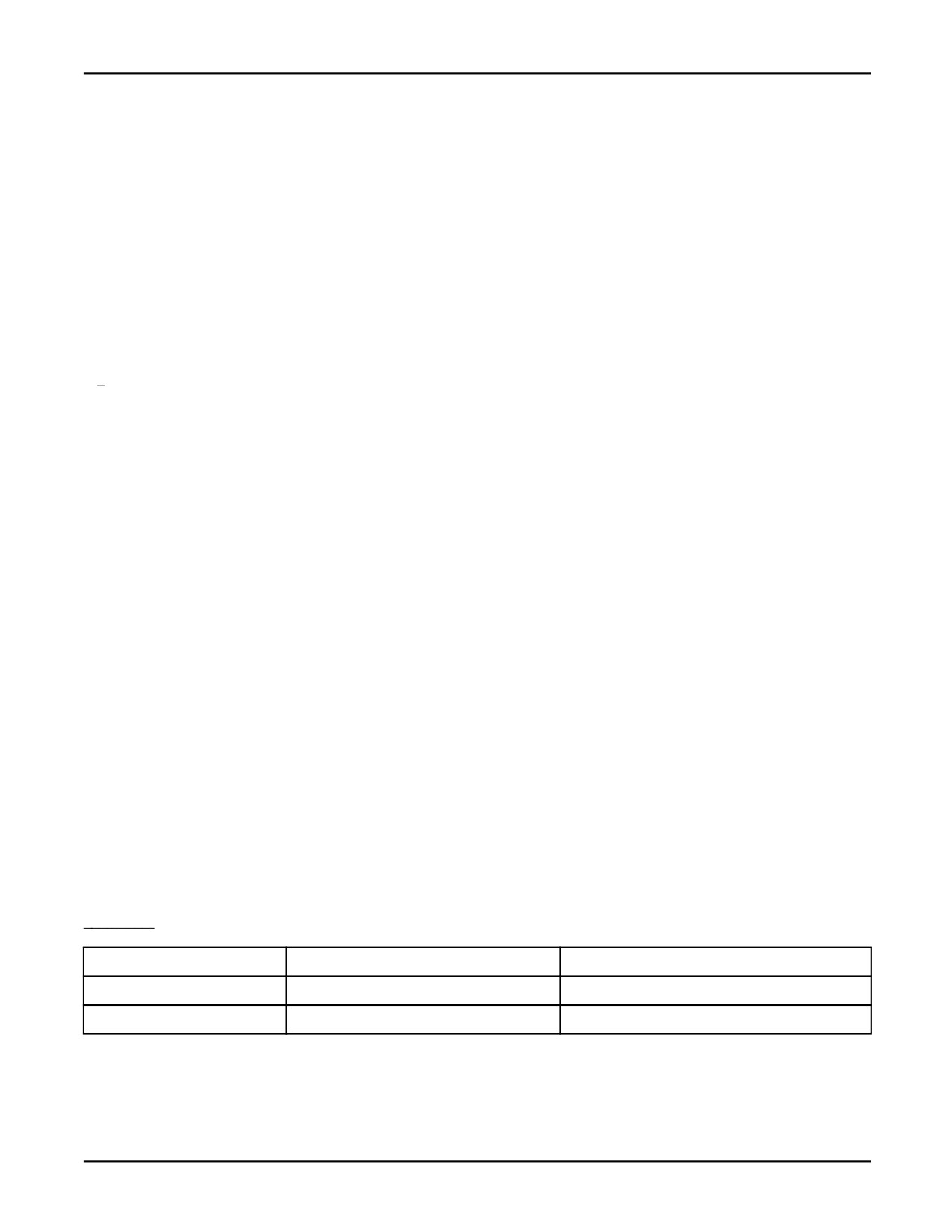
Table 7-4 lists each usage specifier, its function, and the devices or ports for which it is intended.
•
‘‘TP/CRT’’ indicates teach pendant and CRT/KB.
•
‘‘Ports’’ indicates serial ports.
•
‘‘Files’’ indicates data files.
•
‘‘Pipes’’ indicates pipe devices.
•
‘‘Valid’’ indicates a permissible use.
•
‘‘No use’’ indicates a permissible use that might have unpredictable side effects.
Table 7-4.
Usage Specifiers
SPECIFIER
FUNCTION
TP/CRT
PORTS
FILES
PIPES
RO
valid
valid
valid
valid
— Permits only read
operations
— Sets file position to
beginning of file
— File must already exist
7-11

7. FILE INPUT/OUTPUT OPERATIONS
MARRC75KR07091E Rev D
Table
7-4.
Usage Specifiers (Cont’d)
RW
valid
valid
valid
valid
No use on
— Rewrites over existing
FRx:
data in a file, deleting
existing data
— Permits read and
write operations
— Sets file position to
beginning of file
— File will be created if it
does not exist
AP
no use
valid
valid -RAM
valid
disk* no use
— Appends to end of
on FRx:
existing data
— Permits read and
write (First operation
must be a write.)
— Sets file position to
end of file
— File will be created if it
does not exist
UD
no use
valid
valid -RAM
no use
disk* no use
— Updates from
on FRx:
beginning of existing
data.
(Number of
characters to be
written must equal
number of characters
to be replaced.)
— Overwrites the
existing data with
the new data
— Permits read and
write
— Sets file position to
beginning of existing
file
7-12
MARRC75KR07091E Rev D
7. FILE INPUT/OUTPUT OPERATIONS
* AP and UD specifiers can only be used with uncompressed files on the RAM disk. Refer to Chapter
9 FILE SYSTEM , for more information on the RAM disk and Pipe devices.
File String Examples shows a program that includes examples of various file strings in OPEN FILE
statements. The CONST and VAR sections are included to illustrate how file and port strings are
declared.
File String Examples
PROGRAM open_luns
CONST
part_file_c =’parts.dt’ --data file STRING constant
comm_port = ’P3:’
--port STRING constant
VAR
file_var1 : FILE
file_var2 : FILE
file_var3 : FILE
file_var4 : FILE
file_var5 : FILE
file_var12 : FILE
temp_file : STRING[19]
--a STRING size of 19 accommodates 4 character device names,
--12 character file names, the period, and 2 character,
--file types.
port_var : STRING[3]
BEGIN
--literal file name and type
OPEN FILE file_var1 (’RO’,’log_file.dt’)
--constant specifying parts.dt
OPEN FILE file_var2 (’RW’, part_file_c)
--variable specifying new_file_dt
temp_file = ’RD:new_file.dt’
OPEN FILE file_var3 (’AP’, temp_file)
--literal communication port
OPEN FILE file_var4 (’RW’, ’P2:’)
--constant specifying C0:
OPEN FILE file_var5 (’RW’, comm_port)
--variable specifying C3:
port_var = ’C3:’
OPEN FILE file_var12 (’RW’, port_var)
END open_luns
See Also: Chapter 9 FILE SYSTEM , for more information on the available storage devices
Chapter 14 INPUT/OUTPUT SYSTEM , for more information on the C0: and C3: ports
7-13
7. FILE INPUT/OUTPUT OPERATIONS
MARRC75KR07091E Rev D
7.4
CLOSE FILE STATEMENT
The CLOSE FILE statement is used to break the association between a specified file variable and its
data file or communication port. It accomplishes two objectives:
• Any buffered data is written to the file or port.
• The file variable is freed for another use.
CLOSE FILE Example shows a program that includes an example of using the CLOSE FILE
statement in a FOR loop, where several files are opened, read, and then closed. The same file variable
is used for each file.
CLOSE FILE Example
PROGRAM read_files
VAR
file_var
: FILE
file_names : ARRAY[10] OF STRING[15]
loop_count : INTEGER
loop_file
: STRING[15]
ROUTINE read_ops(file_spec:FILE) FROM util_prog
--performs some read operations
ROUTINE get_names(names:ARRAY OF STRING) FROM util_prog
--gets file names and types
BEGIN
get_names(file_names)
FOR loop_count = 1 TO 10 DO
loop_file = file_names[loop_count]
OPEN FILE file_var (’RO’, loop_file)
read_ops(file_var) --call routine for read operations
CLOSE FILE file_var
ENDFOR END read_files
See Also: CLOSE FILE Statement, Appendix A .
IO_STATUS Built-In Function, Appendix A for a description of errors.
7.5
READ STATEMENT
The READ statement is used to read one or more specified data items from the indicated device. The
data items are listed as part of the READ statement. The following rules apply to the READ statement:
7-14
MARRC75KR07091E Rev D
7. FILE INPUT/OUTPUT OPERATIONS
•
The OPEN FILE statement must be used to associate the file variable with the file opened in
the statement before any read operations can be performed unless one of the predefined files is
used (refer to Table 7-1 ).
•
If the file variable is omitted from the READ statement, then TPDISPLAY is used as the default.
•
Using the %CRTDEVICE directive will change the default to INPUT (CRT input window).
•
Format specifiers can be used to control the amount of data that is read for each data item. The
effect of format specifiers depends on the data type of the item being read and on whether the data
is in text (ASCII) or binary (unformatted) form.
•
When the READ statement is executed (for ASCII files), data is read beginning with the next
nonblank input character and ending with the last character before the next blank, end of line, or
end of file for all input types except STRING.
•
With STRING values, the input field begins with the next character and continues to the end of
the line or end of the file. If a STRING is read from the same line following a nonstring field, any
separating blanks are included in the STRING.
•
ARRAY variables must be read element by element; they cannot be read in unsubscripted form.
Frequently, they are read using a READ statement in a FOR loop.
•
PATH variables can be specified as follows in a READ statement, where ‘‘path_name’’ is a PATH
variable and ‘‘n’’ and ‘‘m’’ are PATH node indexes:
— path_name : specifies that the entire path, starting with a header and including all of the
nodes and their associated data, is to be read. The header consists of the path length and the
associated data description in effect when the PATH was written.
— path_name [0] : specifies that only the header is to be read. The path header consists of
the path length and the associated data description in effect when the PATH was written.
Nodes are deleted or created to make the path the correct length, and all new nodes are set
uninitialized.
— path_name [n] : specifies that data is to be read into node[n] from the current file position.
The value of n must be in the range from 0 to the length of the PATH.
— path_name [n .. m] : specifies that data is to be read into nodes n through m. The value of n
must be in the range from 0 to the length of the PATH and can be less than, equal to, or greater
than the value of m. The value of m must be in the range from 1 to the length of the PATH.
If an error occurs while reading node n (where n is greater than 0), it is handled as follows:
If n > original path length (prior to the read operation), the nodes from n to the new path length
are set uninitialized.
If n <= original path length , the nodes from n to the original path length remain as they were prior
to the read operation and any new nodes (greater than the original path length) are set uninitialized.
• If the associated data description that is read from the PATH does not agree with the current user
associated data, the read operation is terminated and the path will remain as it was prior to the
read operation. The IO_STATUS built-in function will return an error if this occurs.
7-15
7. FILE INPUT/OUTPUT OPERATIONS
MARRC75KR07091E Rev D
• PATH data must be read in binary (unformatted) form.
READ Statement Examples shows several examples of the READ statement using a variety of file
variables and data lists.
READ Statement Examples
READ (next_part_no)
--uses default TPDISPLAY
OPEN FILE file_var (’RO’,’data_file.dt’)
READ file_var (color, style, option)
READ host_line (color, style, option, CR)
FOR i = 1 TO array_size DO
READ data (data_array[i])
ENDFOR
If any errors occur during input, the variable being read and all subsequent variables up to CR in the
data list are set uninitialized unless the file variable is open to a window device.
If reading from a window device, an error message is displayed indicating the bad data_item and you
are prompted to enter a replacement for the invalid data_item and to reenter all subsequent items.
The built-in function IO_STATUS can be used to determine the success or failure (and the reason
for the failure) of a READ operation.
See Also: READ Statement, Appendix A .
IO_STATUS Built-In Functions, Appendix A for a list of I/O error messages
%CRTDEVICE Translator Directive, Appendix A .
7.6
WRITE STATEMENT
The WRITE statement is used to write one or more specified data items to the indicated device. The
data items are listed as part of the WRITE statement. The following rules apply to the WRITE
statement:
• The OPEN FILE statement must be used to associate the file variable with the file opened in
the statement before any write operations can be performed unless one of the predefined files is
used (refer to Table 7-1 ).
• If the file variable is omitted from the WRITE statement, then TPDISPLAY is used as the default.
• Using the %CRTDEVICE directive will change the default to OUTPUT (CRT output window).
7-16
MARRC75KR07091E Rev D
7. FILE INPUT/OUTPUT OPERATIONS
• Format specifiers can be used to control the format of data that is written for each data_item. The
effect of format specifiers depends on the data type of the item being written and on whether the
data is in text (ASCII) or binary (unformatted) form.
• ARRAY variables must be written element by element; they cannot be written in unsubscripted
form. Frequently, they are written using a WRITE statement in a FOR loop.
• PATH variables can be specified as follows in a WRITE statement, where ‘‘path_name’’ is
a PATH variable and ‘‘n’’ and ‘‘m’’ are PATH node indexes:
— path_name : specifies that the entire path is to be written, starting with a header that provides
the path length and associated data table, and followed by all of the nodes, including their
associated data.
— path_name [0] : specifies that only the header is to be written. The path header consists of the
path length and a copy of the associated data table.
— path_name [n] : specifies that node[n] is to be written.
— path_name [n .. m] : specifies that nodes n through m are to be written. The value of n must
be in the range from 0 to the length of the PATH and can be less than, equal to, or greater than
the value of m. The value of m must be in the range from 1 to the length of the PATH.
• PATH data must be written in binary (unformatted) form.
WRITE Statement Examples shows several examples of the WRITE statement using a variety of
file variables and data lists.
WRITE Statement Examples
WRITE TPPROMPT(’Press T.P. key "GO" when ready’)
WRITE TPFUNC (’ GO
RECD
QUIT
BACK1
FWD-1’)
WRITE log_file (part_no:5, good_count:5, bad_count:5, operator:3,
CR)
WRITE (’This is line 1’, CR, ’This is line 2’, CR)
--uses default TPDISPLAY
FOR i = 1 TO array_size DO
WRITE data (data_array[i])
ENDFOR
See Also: WRITE Statement, Appendix A .
IO_STATUS Built-In Functions, Appendix A .
7.7
INPUT/OUTPUT BUFFER
An area of RAM, called a buffer , is used to hold up to 256 bytes of data that has not yet been
transmitted during a read or write operation.
7-17
7. FILE INPUT/OUTPUT OPERATIONS
MARRC75KR07091E Rev D
Buffers are used by the READ and WRITE statements as follows:
• During the execution of a READ statement, if more data was read from the file than required by
the READ statement, the remaining data is kept in a buffer for subsequent read operations. For
example, if you enter more data in a keyboard input line than is required to satisfy the READ
statement the extra data is kept in a buffer.
• If a WRITE statement is executed to a non-interactive file and the last data item was not a CR, the
data is left in a buffer until a subsequent WRITE either specifies a CR or the buffer is filled.
• The total data that can be processed in a single READ or WRITE statement is limited to 127 bytes.
7.8
FORMATTING TEXT (ASCII) INPUT/OUTPUT
This section explains the format specifiers used to read and write ASCII (formatted) text for each
data type.
The following rules apply to formatting data types:
•
For text files, data items in READ and WRITE statements can be of any of the simple data types
(INTEGER, REAL, BOOLEAN, and STRING).
•
Positional and VECTOR variables cannot be read from text files but can be used in WRITE
statements.
•
ARRAY variables cannot be read or written in unsubscripted form. The elements of an ARRAY
are read or written in the format that corresponds to the data type of the ARRAY.
•
PATH variables cannot be read or written.
•
Some formats and data combinations are not read in the same manner as they were written or
become invalid if read with the same format.
The amount of data that is read or written can be controlled using zero, one, or two format
specifiers for each data item in a READ or WRITE statement. Each format specifier, represented
as an INTEGER literal, is preceded by double colons (::).
Table 7-5 summarizes the input format specifiers that can be used with the data items in a READ
statement. The default format of each data type and the format specifiers that can affect each
data type are explained in Section 7.8.1 , through Section 7.8.6 .
Table
7-5.
Text (ASCII) Input Format Specifiers
DATA TYPE
1ST FORMAT SPECIFIER
2ND FORMAT SPECIFIER
INTEGER
Total number of characters read
Number base in range 2 - 16
REAL
Total number of characters read
Ignored
7-18
MARRC75KR07091E Rev D
7. FILE INPUT/OUTPUT OPERATIONS
Table 7-5. Text (ASCII) Input Format Specifiers (Cont’d)
DATA TYPE
1ST FORMAT SPECIFIER
2ND FORMAT SPECIFIER
BOOLEAN
Total number of characters read
Ignored
STRING
Total number of characters read
0 - unquoted STRING
2 - quoted STRING
Table 7-6 summarizes the output format specifiers that can be used with the data items in a WRITE
statement. The default format of each data type and the format specifiers that can affect each data type
are explained in Section 7.8.1 through Section 7.8.6 .
Table 7-6. Text (ASCII) Output Format Specifiers
DATA TYPE
1ST FORMAT SPECIFIER
2ND FORMAT SPECIFIER
INTEGER
Total number of characters written
Number base in range 2-16
REAL
Total number of characters written
Number of digits to the right of decimal
point to be written
If negative, uses scientific notation
BOOLEAN
Total number of characters written
0 - Left justified
1 - Right justified
STRING
Total number of characters written
0 - Left justified
1 - Right justified
2 - Left justified in quotes (leading blank)
3 - Right justified n quotes (leading blank)
VECTOR
Uses REAL format for each component
Uses REAL format for each component
POSITION
Uses REAL format for each component
Uses REAL format for each component
XYZWPR
Uses REAL format for each component
Uses REAL format for each component
XYZWPREXT
Uses REAL format for each component
Uses REAL format for each component
JOINTPOSn
Uses REAL format for each component
Uses REAL format for each component
7.8.1
Formatting INTEGER Data Items
INTEGER data items in a READ statement are processed as follows:
Default: Read as a decimal (base 10) INTEGER, starting with the next nonblank character on the
input line and continuing until a blank or end of line is encountered. If the characters read do not
form a valid INTEGER, the read operation fails.
7-19
7. FILE INPUT/OUTPUT OPERATIONS
MARRC75KR07091E Rev D
First Format Specifier: Indicates the total number of characters to be read. The input field must be
entirely on the current input line and can include leading, but not trailing, blanks.
Second Format Specifier: Indicates the number base used for the input and must be in the range of 2
(binary) to 16 (hexadecimal).
For bases over 10, the letters A, B, C, D, E, and F are used as input for the digits with values 10, 11,
12, 13, 14, and 15, respectively. Lowercase letters are accepted.
Table 7-7 lists examples of INTEGER input data items and their format specifiers. The input data
and the resulting value of the INTEGER data items are included in the table. (The symbol [eol]
indicates end of line.)
Table 7-7. Examples of INTEGER Input Data Items
DATA ITEM
INPUT DATA
RESULT
int_var
-2[eol]
int_var = -2
int_var
20 30 ...
int_var = 20
int_var::3
10000
int_var = 100
int_var::5::2
10101
int_var = 21
(base 2 input)
(base 10 value)
int_var
1.00
format error
(invalid INTEGER)
int_var::5
100[eol]
format error
(too few digits)
INTEGER data items in a WRITE statement are formatted as follows:
Default: Written as a decimal (base 10) INTEGER using the required number of digits and one
leading blank. A minus sign precedes the digits if the INTEGER is a negative value.
First Format Specifier: Indicates the total number of characters to be written, including blanks and
minus sign. If the format specifier is larger than required for the data, leading blanks are added. If it is
smaller than required, the field is extended as required.
The specifier must be in the range of 1 to 127 for a file or 1 to 126 for other output devices.
Second Format Specifier: Indicates the number base used for the output and must be in the range of
2
(binary) to 16 (hexadecimal).
If a number base other than 10 (decimal) is specified, the number of characters specified in the first
format specifier (minus one for the leading blank) is written, with leading zeros added if needed.
For bases over 10, the letters A, B, C, D, E, and F are used as input for the digits with values 10,
11, 12, 13, 14, and 15, respectively.
7-20

MARRC75KR07091E Rev D
7. FILE INPUT/OUTPUT OPERATIONS
Table 7-8 lists examples of INTEGER output data items and their format specifiers. The output
values of the INTEGER data items are also included in the table. Double quotes are used in the table
as delimiters to show leading blanks; however, double quotes are not written by KAREL programs.
Table 7-8. Examples of INTEGER Output Data Items
DATA ITEM
OUTPUT
COMMENT
123
Leading blank
"
123
"
-5
Leading blank
"
-5
"
123::6
Right justified (leading blanks)
"
123
"
-123::2
Expanded as required
"
-123
"
1024::0::16
Hexadecimal output
"
400
"
7-21

7. FILE INPUT/OUTPUT OPERATIONS
MARRC75KR07091E Rev D
Table 7-8. Examples of INTEGER Output Data Items (Cont’d)
DATA ITEM
OUTPUT
COMMENT
5::6::2
Binary output (leading zeros)
"
00101
"
-1::9::16
Hexadecimal output
"
FFFFFFFF
"
7.8.2
Formatting REAL Data Items
REAL data items in a READ statement are processed as follows:
Default: Read starting with the next nonblank character on the input line and continuing until a
blank or end of line is encountered.
Data can be supplied with or without a fractional part. The E used for scientific notation can be in
upper or lower case. If the characters do not form a valid REAL, the read operation fails.
First Format Specifier: Indicates the total number of characters to be read. The input field must be
entirely on the current input line and can include leading, but not trailing, blanks.
Second Format Specifier: Ignored for REAL data items.
Table 7-9 lists examples of REAL input data items and their format specifiers. The input data and the
resulting value of the REAL data items are included in the table. The symbol [eol] indicates end of
line and X indicates extraneous data on the input line.
7-22
MARRC75KR07091E Rev D
7. FILE INPUT/OUTPUT OPERATIONS
Table 7-9. Examples of REAL Input Data Items
DATA ITEM
INPUT DATA
RESULT
real_var
1[eol]
1.0
real_var
1.000[eol]
1.0
real_var
2.5 XX
2.50
real_var
1E5 XX
100000.0
real_var::7
2.5 XX
format error (trailing blank)
real_var
1E
format error (no exponent)
real_var::4
1E 2
format error (embedded blank)
REAL data items in a WRITE statement are formatted as follows:
Default: Written in scientific notation in the following form:
(blank)(msign)(d).(d)(d)(d)(d)(d)E(esign)(d)(d)
where:
(blank) is a single blank
(msign) is a minus sign, if required
(d) is a digit
(esign) is a plus or minus sign
First Format Specifier: Indicates the total number of characters to be written, including all the digits,
blanks, signs, and a decimal point. If the format specifier is larger than required for the data, leading
blanks are added. If it is smaller than required, the field is extended as required.
In the case of scientific notation, character length should be greater than (8 + 2nd format specifier)
to write the data completely.
The specifier must be in the range of 1 to 127 for a file or 1 to 126 for other output devices.
Second Format Specifier: Indicates the number of digits to be output to the right of the decimal
point, whether or not scientific notation is to be used.
The absolute value of the second format specifier indicates the number of digits to be output to the
right of the decimal point.
If the format specifier is positive, the data is displayed in fixed format (that is, without an exponent).
If it is negative, scientific notation is used.
7-23

7. FILE INPUT/OUTPUT OPERATIONS
MARRC75KR07091E Rev D
Table 7-10 lists examples of REAL output data items and their format specifiers. The output values of
the REAL data items are also included in the table. Double quotes are used in the table as delimiters
to show leading blanks; however, double quotes are not written by KAREL programs.
Table 7-10.
Examples of REAL Output Data Items
DATA ITEM
OUTPUT
COMMENT
123.0
Scientific notation (default format)
"
1.23000E+02
"
123.456789
Rounded to 5 digits in fractional part
"
1.23457E+02
"
.00123
Negative exponent
"
1.23000E-03
"
-1.00
Negative value
"
-1.00000E+00
"
-123.456::9
Field expanded
"
-1.234560E+02
"
123.456::12
Leading blank added
"
1.234560E+02
"
7-24

MARRC75KR07091E Rev D
7. FILE INPUT/OUTPUT OPERATIONS
Table 7-10. Examples of REAL Output Data Items (Cont’d)
DATA ITEM
OUTPUT
COMMENT
123.456::9::2
Right justified and rounded
"
123.46
"
123.::12::-3
Scientific notation
"
1.230E+02
"
7.8.3
Formatting BOOLEAN Data Items
BOOLEAN data items in a READ statement are formatted as follows:
Default: Read starting with the next nonblank character on the input line and continuing until a
blank or end of line is encountered.
Valid input values for TRUE include TRUE, TRU, TR, T, and ON. Valid input values for FALSE
include FALSE, FALS, FAL, FA, F, OFF, and OF. If the characters read do not form a valid
BOOLEAN, the read operation fails.
First Format Specifier: Indicates the total number of characters to be read. The input field must be
entirely on the current input line and can include leading, but not trailing, blanks.
Second Format Specifier: Ignored for BOOLEAN data items.
Table 7-11 lists examples of BOOLEAN input data items and their format specifiers. The input data
and the resulting value of the BOOLEAN data items are included in the table. (The symbol [eol]
indicates end of line and X indicates extraneous data on the input line.)
7-25
7. FILE INPUT/OUTPUT OPERATIONS
MARRC75KR07091E Rev D
Table 7-11.
Examples of BOOLEAN Input Data Items
DATA ITEM
INPUT DATA
RESULT
bool_var
FALSE[eol]
FALSE
bool_var
FAL 3...
FALSE
bool_var
T[eol]
TRUE
bool_var::1
FXX
FALSE (only reads ‘‘ F’’)
bool_var
O[eol]
format error (ambiguous)
bool_var
1.2[eol]
format error (not BOOLEAN)
bool_var::3
F [eol]
format error (trailing blanks)
bool_var::6
TRUE[eol]
format error (not enough data)
BOOLEAN data items in a WRITE statement are formatted as follows:
Default: Written as either ‘‘TRUE’’ or ‘‘FALSE". (Double quotes are used in the table as delimiters
to show leading blanks; however, double quotes are not written by KAREL programs.)
First Format Specifier: Indicates the total number of characters to be written, including blanks (a
leading blank is always included). If the format specifier is larger than required for the data, trailing
blanks are added. If it is smaller than required, the field is truncated on the right.
The specifier must be in the range of 1 to 127 for a file or 1 to 126 for other output devices.
Second Format Specifier: Indicates whether the data is left or right justified. If the format specifier
is equal to 0, the output word is left justified in the output field with one leading blank, and trailing
blanks as required. If it is equal to 1, the output word is right justified in the output field, with
leading blanks as required.
Table 7-12 lists examples of BOOLEAN output data items and their format specifiers. The output
values of the BOOLEAN data items are also included in the table. Double quotes are used in the table
as delimiters to show leading blanks; however, double quotes are not written by KAREL programs.
7-26

MARRC75KR07091E Rev D
7. FILE INPUT/OUTPUT OPERATIONS
Table 7-12.
Examples of BOOLEAN Output Data Items
DATA ITEM
OUTPUT
COMMENT
FALSE
Default includes a leading blank
"
FALSE
"
TRUE
TRUE is shorter than FALSE
"
TRUE
"
FALSE::8
Left justified (default)
"
FALSE
"
FALSE::8::1
Right justified
"
FALSE
"
TRUE::2
Truncated
"
T
"
7.8.4
Formatting STRING Data Items
STRING data items in a READ statement are formatted as follows:
Default: Read starting at the current position and continuing to the end of the line. If the length of the
data obtained is longer than the declared length of the STRING, the data is truncated on the right. If it
is shorter, the current length of the STRING is set to the actual length.
7-27

7. FILE INPUT/OUTPUT OPERATIONS
MARRC75KR07091E Rev D
First Format Specifier: Indicates the total field length of the input data. If the field length is longer
than the declared length of the STRING, the input data is truncated on the right. If it is shorter, the
current length of the STRING is set to the specified field length.
Second Format Specifier: Indicates whether or not the input STRING is enclosed in single quotes. If
the format specifier is equal to 0, the input is not enclosed in quotes.
If it is equal to 2, the input must be enclosed in quotes. The input is scanned for the next nonblank
character. If the character is not a quote, the STRING is not valid and the read operation fails.
If the character is a quote, the remaining characters are scanned until another quote or the end of line
is found. If another quote is not found, the STRING is not valid and the read operation fails.
If both quotes are found, all of the characters between them are read into the STRING variable, unless
the declared length of the STRING is too short, in which case the data is truncated on the right.
Table 7-13 lists examples of STRING input data items and their format specifiers, where str_var
has been declared as a STRING[5]. The input data and the resulting value of the STRING data
items are included in the table. The symbol [eol] indicates end of line and X indicates extraneous
data on the input line.
Table 7-13.
Examples of STRING Input Data Items
DATA ITEM
INPUT DATA
RESULT
str_var
"
"
ABC[eol]
ABC
"
"
str_var
"
"
ABCDEFG[eol]
ABCDE
"
"
(FG is read but the STRING is truncated to 5
characters)
7-28

MARRC75KR07091E Rev D
7. FILE INPUT/OUTPUT OPERATIONS
Table 7-13.
Examples of STRING Input Data Items (Cont’d)
DATA ITEM
INPUT DATA
RESULT
str_var
"
"
’ABC’XX
’AB
"
"
(blanks and quote are read as data)
str_var::0::2
"
"
’ABC’XX
’ABC’
"
"
(read ends with second quote)
STRING data items in a WRITE statement are formatted as follows:
Default: Content of the STRING is written with no trailing or leading blanks or quotes.
The STRING must not be over 127 bytes in length for files or 126 bytes in length for other output
devices. Otherwise, the program will be aborted with the ‘‘STRING TOO LONG’’ error.
First Format Specifier: Indicates the total number of characters to be written, including blanks. If
the format specifier is larger than required for the data, the data is left justified and trailing blanks are
added. If the format specifier is smaller than required, the STRING is truncated on the right.
The specifier must be in the range of 1 to 127 for a file or 1 to 126 for other output devices.
Second Format Specifier: Indicates whether the output is to be left or right justified and whether the
STRING is to be enclosed in quotes using the following values:
0 left justified, no quotes
1 right justified, no quotes
2 left justified, quotes
3 right justified, quotes
Quoted STRING values, even if left justified, are preceded by a blank. Unquoted STRING values are
not automatically preceded by a blank.
7-29

7. FILE INPUT/OUTPUT OPERATIONS
MARRC75KR07091E Rev D
Table 7-14 lists examples of STRING output data items and their format specifiers. The output values
of the STRING data items are also included in the table. Double quotes are used in the table as
delimiters to show leading blanks; however, double quotes are not written by KAREL programs.
Table 7-14.
Examples of STRING Output Data Items
DATA ITEM
OUTPUT
COMMENT
’ABC’
No leading blanks
"
ABC
"
’ABC’::2
Truncated on right
"
AB
"
’ABC’::8
Left justified
"
ABC
"
’ABC’::8::0
Same as previous
"
ABC
"
’ABC’::8::1
Right justified
"
ABC
"
’ABC’::8::2
Note leading blank
"
’ABC’
"
7-30

MARRC75KR07091E Rev D
7. FILE INPUT/OUTPUT OPERATIONS
Table 7-14. Examples of STRING Output Data Items (Cont’d)
DATA ITEM
OUTPUT
COMMENT
’ABC’::8::3
Right justified
"
’ABC’
"
’ABC’::4::2
Truncated
"
’A’
"
Format specifiers for STRING data items can cause the truncation of the original STRING values
or the addition of trailing blanks when the values are read again.
If STRING values must be successively written and read, the following guidelines will help you
ensure that STRING values of varying lengths can be read back identically:
• The variable into which the STRING is being read must have a declared length at least as long as
the actual STRING that is being read, or truncation will occur.
• Some provision must be made to separate STRING values from preceding variables on the
same data line. One possibility is to write a ’ ’ (blank) between a STRING and the variable
that precedes it.
• If format specifiers are not used in the read operation, write STRING values at the ends of their
respective data lines (that is, followed in the output list by a CR) because STRING variables
without format specifiers are read until the end of the line is reached.
• The most general way to write string values to a file and read them back is to use the format
::0::2 for both the read and write.
7.8.5
Formatting VECTOR Data Items
VECTOR data items cannot be read from text (ASCII) files. However, you can read three REAL
values and assign them to the elements of a VECTOR variable. VECTOR data items in a WRITE
statement are formatted as three REAL values on the same line.
Table 7-15 lists examples of VECTOR output data items and their format specifiers, where vect.x
= 1.0, vect.y= 2.0, vect.z = 3.0. The output values of the VECTOR data items are also included in
7-31