FANUC Robotics SYSTEM R-30iA and R-30iB Controller. KAREL Reference Manual - page 4
MARRC75KR07091E Rev D
5. ROUTINES
• Routines that are local to the program are completely defined in the program. Declarations
of local routines include:
— The ROUTINE statement
— Any VAR and/or CONST declarations for the routine
— The executable statements of the routine
• While the VAR and CONST sections in a routine are identical in syntax to those in a program, the
following restrictions apply:
— PATH, FILE, and vision data types cannot be specified.
— FROM clauses are not allowed.
— IN clauses are not allowed.
• Routines that are local to the program can be defined after the executable section if the routine
is declared using a FROM clause with the same program name. The parameters should only be
defined once. See Defining Local Routines Using a FROM Clause .
Defining Local Routines Using a FROM Clause
PROGRAM funct_lib
ROUTINE done_yet(x: REAL; s1, s2: STRING): BOOLEAN FROM funct_lib
BEGIN
IF done_yet(3.2, ’T’, ’’)
--
END funct_lib
ROUTINE done_yet
BEGIN
--
END done_yet
• Routines that are external to the program are declared in one program but defined in another.
— Declarations of external routines include only the ROUTINE statement and a FROM clause.
— The FROM clause identifies the name of the program in which the routine is defined.
— The routine must be defined local to the program named in the FROM clause.
• You can include a list of parameters in the declaration of a routine. A parameter list is an optional
part of the ROUTINE statement.
• If a routine is external to the program, the names in the parameter list are of no significance but
must be included to specify the parameters. If there are no parameters, the parentheses used to
enclose the list must be omitted for both external and local routines.
The examples in Local and External Procedure Declarations illustrate local and external procedure
routine declarations.
5-3
5. ROUTINES
MARRC75KR07091E Rev D
Local and External Procedure Declarations
PROGRAM procs_lib
ROUTINE wait_a_bit
--local procedure, no parameters
BEGIN
DELAY 20
END wait_a_bit
ROUTINE toggle_out(i: INTEGER)
--local procedure, one parameter
BEGIN
DOUT[i] = ON
--reference to parameter i
DELAY 1000
DOUT[i] = OFF
END toggle_out
ROUTINE calc_dist(p1,p2: POSITION; dist: REAL)& FROM math_lib
--external procedure defined in math_lib.kL
BEGIN
END procs_lib
The example in Function Declarations illustrate local and external function routine declarations.
Function Declarations
PROGRAM funct_lib
ROUTINE done_yet(x: REAL; s1, s2 :STRING): BOOLEAN&
FROM bool_lib
--external function routine defined in bool_lib.kl
--returns a BOOLEAN value
ROUTINE xy_dist(x1,y1,x2,y2: REAL): REAL
--local function, returns a REAL value
VAR
sum_square: REAL
--dynamic local variable
dx,dy: REAL
--dynamic local variables
BEGIN
dx = x2-x1
--references parameters x2 and x1
dy = y2-y1
--references parameters y2 and y1
sum_square = dx * dx + dy * dy
RETURN(SQRT(sum_square))
--SQRT is a built-in
END xy_dist
BEGIN
END funct_lib
See Also: FROM Clause, Appendix A , ROUTINE Statement, Appendix A .
5-4
MARRC75KR07091E Rev D
5. ROUTINES
5.1.2
Invoking Routines
Routines that are declared in a program can be called within the executable section of the program, or
within the executable section of any routine contained in the program. Calling a routine causes the
routine to be invoked. A routine is invoked according to the following procedure:
• When a routine is invoked, control of execution passes to the routine.
• After execution of a procedure is finished, control returns to the next statement after the point
where the procedure was called.
• After execution of a function is finished, control returns to the assignment statement where the
function was called.
The following rules apply when invoking procedure and function routines:
• Procedure and function routines are both called with the routine name followed by an argument
for each parameter that has been declared for the routine.
• The argument list is enclosed in parentheses.
• Routines without parameters are called with only the routine name.
• A procedure is invoked as though it were a statement. Consequently, a procedure call constitutes
a complete executable statement.
Procedure Calls shows the declarations for two procedures followed by the procedure calls to invoke
them.
Procedure Calls
ROUTINE wait_a_bit FROM proc_lib
--external procedure with no parameters
ROUTINE calc_dist(p1,p2: POSITION; dist: REAL)&
FROM math_lib
--external procedure with three parameters
BEGIN
wait_a_bit
--invokes wait_a_bit procedure
calc_dist (start_pos, end_pos, distance)
--invokes calc_dist using three arguments for
--the three declared parameters
• Because a function returns a value, a function call must appear as part or all of an expression.
• When control returns to the calling program or routine, execution of the statement containing the
function call is resumed using the returned value.
Function Calls shows the declarations for two functions followed by the function calls to invoke them.
5-5
5. ROUTINES
MARRC75KR07091E Rev D
Function Calls
ROUTINE error_check : BOOLEAN FROM error_prog
--external function with no parameters returns a BOOLEAN value
ROUTINE distance(p1, p2: POSITION) : REAL &
FROM funct_lib
--external function with two parameters returns a REAL value
BEGIN
--Main program
--the function error_check is invoked and returns a BOOLEAN
--expression in the IF statement
IF error_check THEN
ENDIF
travel_time = distance(prev_pos, next_pos)/current_spd
--the function distance is invoked as part of an expression in
--an assignment statement
• Routines can call other routines as long as the other routine is declared in the program containing
the initial routine. For example, if a program named master_prog contains a routine named
call_proc , that routine can call any routine that is declared in the program, master_prog .
• A routine that calls itself is said to be recursive and is allowed in KAREL. For example, the
routine factorial , shown in Recursive Function , calls itself to calculate a factorial value.
Recursive Function
ROUTINE factorial(n: INTEGER) : INTEGER
--calculates the factorial value of the integer n
BEGIN
IF n = 0 THEN RETURN (1)
ELSE RETURN (n * factorial(n-1))
--recursive call to factorial
ENDIF
END factorial
• The only constraint on the depth of routine calling is the use of the KAREL stack , an area used
for storage of temporary and local variables and for parameters. Routine calls cause information
to be placed in memory on the stack. When the RETURN or END statement is executed in the
routine, this information is taken off of the stack. If too many routine calls are made without this
information being removed from the stack, the program will run out of stack space.
See Also: Section 5.1.6 for information on how much space is used on the stack for routine calls
5-6
MARRC75KR07091E Rev D
5. ROUTINES
5.1.3
Returning from Routines
The RETURN statement is used in a routine to restore execution control from a routine to the
calling routine or program.
The following rules apply when returning from a routine:
• In a procedure, the RETURN statement cannot include a value.
• If no RETURN statement is executed, the END statement restores control to the calling program
or routine.
Procedure RETURN Statements illustrates some examples of using the RETURN statement in a
procedure.
Procedure RETURN Statements
ROUTINE gun_on (error_flag: INTEGER)
--performs some operation while a "gun" is turned on
--returns from different statements depending on what,
--if any, error occurs.
VAR gun: INTEGER
BEGIN
IF error_flag = 1 THEN RETURN
--abnormal exit from routine, returns before
--executing WHILE loop
ENDIF
WHILE DIN[gun] DO
--continues until gun is off
IF error_flag = 2 THEN RETURN
--abnormal exit from routine, returns from
--within WHILE loop
ENDIF
ENDWHILE
--gun is off
END gun_on
--normal exit from routine
• In a function, the RETURN statement must specify a value to be passed back when control
is restored to the calling routine or program.
• The function routine can return any data type except
— FILE
— PATH
— Vision types
• If the return type is an ARRAY, you cannot specify a size. This allows an ARRAY of any length
to be returned by the function. The returned ARRAY, from an ARRAY valued function, can
5-7
5. ROUTINES
MARRC75KR07091E Rev D
be used only in a direct assignment statement. ARRAY valued functions cannot be used as
parameters to other routines. Refer to Correct Passage of an ARRAY , for an example of an
ARRAY passed between two function routines.
• If no value is provided in the RETURN statement of a function, a translator error is generated.
• If no RETURN statement is executed in a function, execution of the function terminates when the
END statement is reached. No value can be passed back to the calling routine or program, so
the program aborts with an error.
Function RETURN Statements illustrates some examples using the RETURN statement in function
routines.
Function RETURN Statements
ROUTINE index_value (table: ARRAY of INTEGER;
table_size: INTEGER): INTEGER
--Returns index value of FOR loop (i) depending on
--condition of IF statement. Returns 0 in cases where
--IF condition is not satisfied.
VAR i: INTEGER
BEGIN
FOR i = 1 TO table_size DO
IF table[i] = 0 THEN RETURN (i)
--returns index
ENDIF
ENDFOR
RETURN (0)
--returns 0
END index_value
ROUTINE compare (test_var_1: INTEGER;
test_var_2: INTEGER): BOOLEAN
--Returns TRUE value in cases where IF test is
--satisfied. Otherwise, returns FALSE value.
BEGIN
IF test_var_1 = test_var_2 THEN
RETURN (TRUE)
--returns TRUE
ELSE
RETURN (FALSE)
--returns FALSE
ENDIF
END compare
See Also: ROUTINE Statement, Appendix A .
5.1.4
Scope of Variables
The scope of a variable declaration can be
• Global
5-8
MARRC75KR07091E Rev D
5. ROUTINES
• Local
Global Declarations and Definitions
The following rules apply to global declarations and definitions:
• Global declarations are recognized throughout a program.
• Global declarations are referred to as static because they are given a memory location that does
not change during program execution, even if the program is cleared or reloaded (unless the
variables themselves are cleared.)
• Declarations made in the main program, as well as predefined identifiers, are global.
• The scope rules for predefined and user-defined routines, types, variables, constants, and labels
are as follows:
— All predefined identifiers are recognized throughout the entire program.
— Routines, types, variables, and constants declared in the declaration section of a program are
recognized throughout the entire program, including routines that are in the program.
Local Declarations and Definitions
The following rules apply to local declarations and definitions:
• Local declarations are recognized only within the routines where they are declared.
• Local data is created when a routine is invoked. Local data is destroyed when the routine finishes
executing and returns.
• The scope rules for predefined and user-defined routines, variables, constants, and labels are
as follows:
— Variables and constants, declared in the declaration section of a routine, and parameters,
declared in the routine parameter list, are recognized only in that routine.
— Labels defined in a program (not in a routine of the program) are local to the body of the
program and are not recognized within any routines of the program.
— Labels defined in a routine are local to the routine and are recognized only in that routine.
• Types cannot be declared in a routine, so are never local.
5.1.5
Parameters and Arguments
Identifiers that are used in the parameter list of a routine declaration are referred to as parameters.
A parameter declared in a routine can be referenced throughout the routine. Parameters are used to
pass data between the calling program and the routine. The data supplied in a call, referred to as
arguments, can affect the way in which the routine is executed.
The following rules apply to the parameter list of a routine call:
5-9
5. ROUTINES
MARRC75KR07091E Rev D
• As part of the routine call, you must supply a data item, referred to as an argument, for each
parameter in the routine declaration.
• An argument can be a variable, constant, or expression. There must be one argument
corresponding to each parameter.
• Arguments must be of the same data type as the parameters to which they correspond, with
three exceptions:
— An INTEGER argument can be passed to a REAL parameter. In this case, the INTEGER
value is treated as type REAL, and the REAL equivalent of the INTEGER is passed by
value to the routine.
— A BYTE or SHORT argument can be passed by value to an INTEGER or REAL parameter.
— Any positional types can be passed to any other positional type. If they are being passed
to a user-defined routine, the argument positional type is converted and passed by value to
the parameter type.
— ARRAY or STRING arguments of any length can be passed to parameters of the same
data type.
Corresponding Parameters and Arguments shows an example of a routine declaration and three
calls to that routine.
Corresponding Parameters and Arguments
PROGRAM params
VAR
long_string: STRING[10]; short_string: STRING[5]
exact_dist: REAL; rough_dist: INTEGER
ROUTINE label_dist (strg: STRING; dist: REAL) &
FROM procs_lib
BEGIN
label_dist(long_string, exact_dist)
--long_string corresponds to strg;
--exact_dist corresponds to dist
label_dist(short_string, rough_dist)
--short_string, of a different length,
--corresponds to strg; rough_dist, an
--INTEGER, corresponds to REAL dist
label_dist(’new distance’, (exact_dist * .75))
--literal constant and REAL expression
--arguments correspond to the parameters
END params
• When the routine is invoked, the argument used in the routine call is passed to the corresponding
parameter. Two methods are used for passing arguments to parameters:
— Passing Arguments By Reference
5-10
MARRC75KR07091E Rev D
5. ROUTINES
If an argument is passed by reference, the corresponding parameter shares the same memory
location as the argument. Therefore, changing the value of the parameter changes the value
of the corresponding argument.
— Passing Arguments By Value
If an argument is passed by value, a temporary copy of the argument is passed to the routine.
The corresponding parameter uses this temporary copy. Changing the parameter does not
affect the original argument.
•
Constant and expression arguments are always passed to the routine by value. Variables are
normally passed by reference. The following variable arguments, however, are passed by value:
— Port array variables
— INTEGER variables passed to REAL parameters
— BYTE and SHORT arguments passed to INTEGER or REAL parameters
— System variables with read only (RO) access
— Positional parameters that need to be converted
•
While variable arguments are normally passed by reference, you can pass them by value by
enclosing the variable identifier in parentheses. The parentheses, in effect, turn the variable
into an expression.
•
PATH, FILE, and vision variables can not be passed by value. ARRAY elements (indexed form
of an ARRAY variable) can be passed by value, but entire ARRAY variables cannot.
Passing Variable Arguments shows a routine that affects the argument being passed to it differently
depending on how the variable argument is passed.
Passing Variable Arguments
PROGRAM reference
VAR arg : INTEGER
ROUTINE test(param : INTEGER)
BEGIN
param = param * 3
WRITE (’value of param:’, param, CR)
END test
BEGIN
arg = 5
test((arg))
--arg passed to param by value
WRITE(’value of arg:’, arg, CR)
test(arg)
--arg passed to param by reference
WRITE(’value of arg:’, arg, CR)
END reference
The output from the program in Passing Variable Arguments is as follows:
value of param: 15
5-11
5. ROUTINES
MARRC75KR07091E Rev D
value of arg: 5
value of param: 15
value of arg: 15
If the routine calls from Passing Variable Arguments were made in reverse order, first passing arg
by reference using "test(arg)" and then passing it by value using "test ((arg))," the output would
be affected as follows:
value of param: 15
value of arg: 15
value of param: 45
value of arg: 15
• To pass a variable as a parameter to a KAREL routine you can use one of two methods:
— You can specify the name of the variable in the parameter list. For example,
other_rtn(param_var) passes the variable param_var to the routine other_rtn. To write
this statement, you have to know the name of the variable to be passed.
— You can use BYNAME. The BYNAME feature allows a program to pass as a parameter to a
routine a variable whose name is contained in a string. For example, if the string variables
prog_name and var_name contain the name of a program and variable the operator has
entered, this variable is passed to a routine using this syntax:
other_rtn(BYNAME(prog_name,var_name, entry))
Refer to Appendix A for more information about BYNAME.
• If a function routine returns an ARRAY, a call to this function cannot be used as an argument to
another routine. If an incorrect pass is attempted, a translation error is detected.
Correct Passage of an ARRAY shows the correct use of an ARRAY passed between two function
routines.
Correct Passage of an ARRAY
PROGRAM correct
VAR a : ARRAY[8] of INTEGER
ROUTINE rtn_ary : ARRAY of INTEGER FROM util_prog
ROUTINE print_ary(arg : ARRAY of INTEGER)
VAR i : INTEGER
BEGIN
FOR i = 1 to ARRAY_LEN(arg) DO
WRITE(arg[i],cr)
ENDFOR
END print_ary
BEGIN
a = rtn_ary
print_ary(a)
5-12
MARRC75KR07091E Rev D
5. ROUTINES
END correct
Incorrect Passage of an ARRAY shows the incorrect use of an ARRAY passed between two function
routines.
Incorrect Passage of an ARRAY
PROGRAM wrong
ROUTINE rtn_ary : ARRAY of INTEGER FROM util_prog
ROUTINE print_ary(arg : ARRAY of INTEGER)
VAR i : INTEGER
BEGIN
FOR i = 1 to ARRAY_LEN(arg) DO
WRITE(arg[i],cr)
ENDFOR
END print_ary
BEGIN
print_ary(rtn_ary)
END wrong
See Also: ARRAY_LEN Built-In Function, Appendix A , STR_LEN Built-In Function, Appendix
A , Appendix E , "Syntax Diagrams
5.1.6
Stack Usage
When a program is executed, a stack of 300 words is allocated unless you specify a stack size. The
stack is allocated from available user RAM.
Stack usage can be calculated as follows:
• Each call (or function reference) uses at least five words of stack.
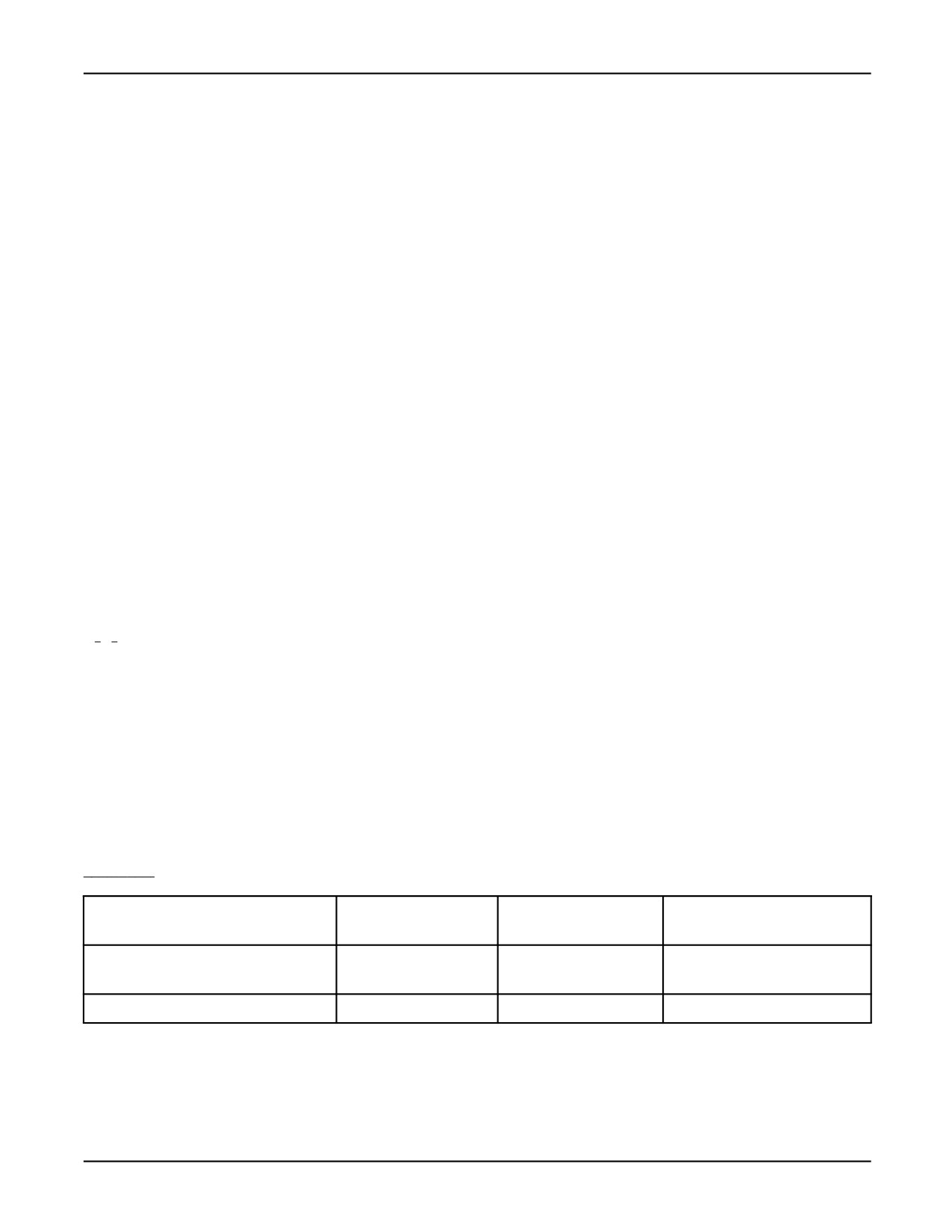
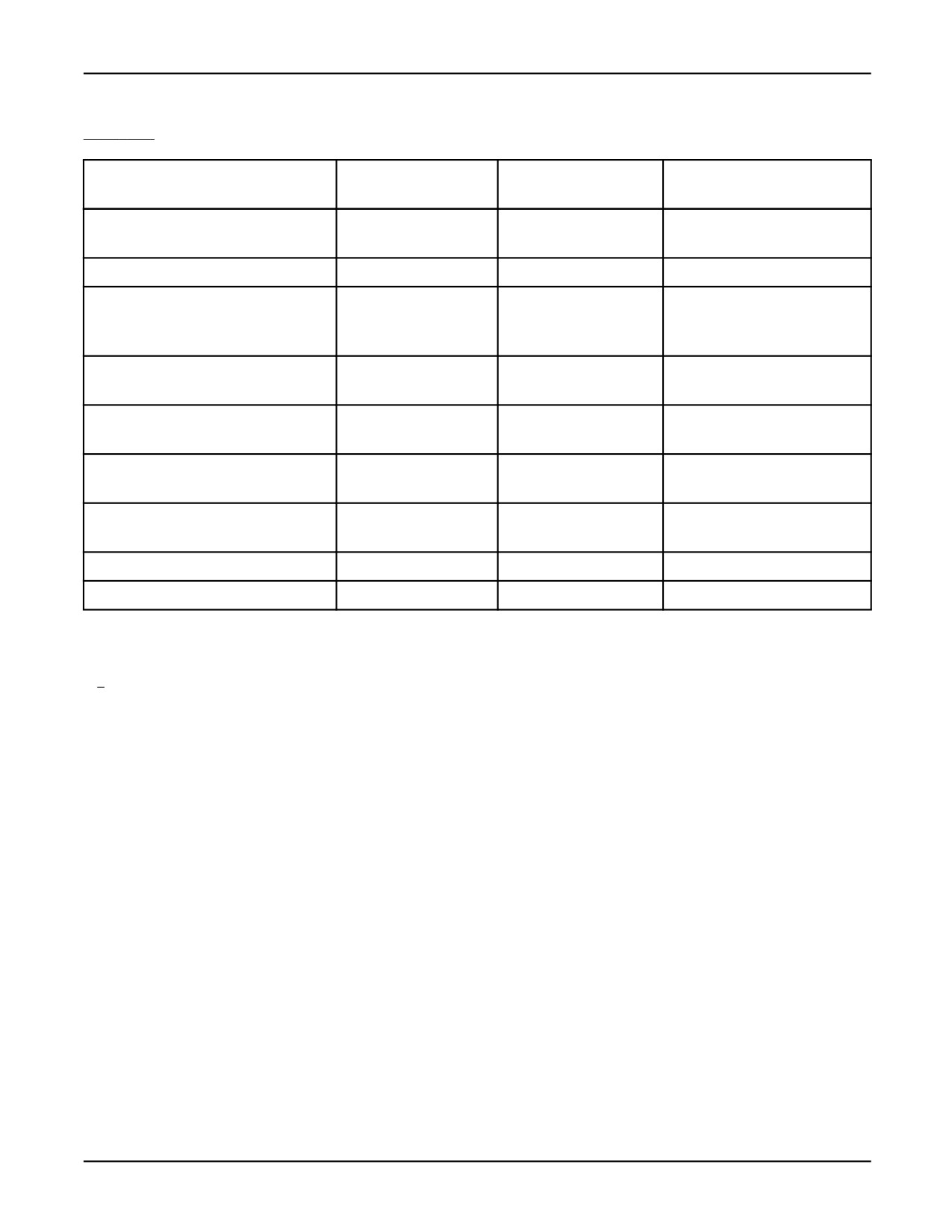
• In addition, for each parameter and local variable in the routine, additional space on the stack is
used, depending on the variable or parameter type as shown in Table 5-1 .
Table 5-1. Stack Usage
Type
Parameter Passed by
Parameter Passed by
Local Variable
Reference
Value
BOOLEAN
1
2
1
ARRAY OF BOOLEAN
not allowed
1 + array size
ARRAY OF BYTE
1
not allowed
1 + (array size)/4
5-13

5. ROUTINES
MARRC75KR07091E Rev D
Table 5-1. Stack Usage (Cont’d)
Type
Parameter Passed by
Parameter Passed by
Local Variable
Reference
Value
CAM_SETUP
1
not allowed
not allowed
ARRAY OF CAM_SETUP
not allowed
not allowed
CONFIG
1
2
1
ARRAY OF CONFIG
not allowed
1 + array size
INTEGER
1
2
1
ARRAY OF INTEGER
not allowed
1 + array size
FILE
1
not allowed
not allowed
ARRAY OF FILE
not allowed
not allowed
JOINTPOS
2
12
10
ARRAY OF JOINTPOS
1
not allowed
1 + 10 * array size
JOINTPOS1
2
4
2
ARRAY OF JOINTPOS1
1
not allowed
1 + 2 * array size
JOINTPOS2
2
5
3
ARRAY OF JOINTPOS2
1
not allowed
1 + 3 * array size
JOINTPOS3
2
6
4
ARRAY OF JOINTPOS3
1
not allowed
1 + 4 * array size
JOINTPOS4
2
7
5
ARRAY OF JOINTPOS4
1
not allowed
1 + 5 * array size
JOINTPOS5
2
8
6
ARRAY OF JOINTPOS5
1
not allowed
1 + 6 * array size
JOINTPOS6
2
9
7
ARRAY OF JOINTPOS6
1
not allowed
1 + 7 * array size
JOINTPOS7
2
10
8
ARRAY OF JOINTPOS7
1
not allowed
1 + 8 * array size
JOINTPOS8
2
11
9
ARRAY OF JOINTPOS8
1
not allowed
1 + 9 * array size
JOINTPOS9
2
12
10
ARRAY OF JOINTPOS9
1
not allowed
1 + 10 * array size
MODEL
1
not allowed
not allowed
ARRAY OF MODEL
1
not allowed
not allowed
PATH
2
not allowed
not allowed
POSITION
2
16
14
ARRAY OF POSITION
1
not allowed
1 + 14 * array size
5-14
MARRC75KR07091E Rev D
5. ROUTINES
Table 5-1. Stack Usage (Cont’d)
Type
Parameter Passed by
Parameter Passed by
Local Variable
Reference
Value
REAL
1
2
1
ARRAY OF REAL
1
not allowed
1 + array size
ARRAY OF SHORT
1
not allowed
1 + (array size)/2
STRING
2
2 + (string
(string length+2)/4
ARRAY OF STRING
1
length+2)/4not allowed
1+((string length+2)
*array size)/4
VECTOR
1
4
3
ARRAY OF VECTOR
1
not allowed
1 + 3 * array size
VIS_PROCESS
1
not allowed
not allowed
ARRAY OF VIS_PROCESS
1
not allowed
not allowed
XYZWPR
2
10
8
ARRAY OF XYZWPR
1
not allowed
1 + 8 * array size
XYZWPREXT
2
13
11
ARRAY OF XYZWPREX
1
not allowed
1 + 11 * array size
ARRAY [m,n] OF some_type
1
not allowed
m(ele size/4 * n + 1)+1
ARRAY [l,m,n] OF some_type
1
not allowed
l(m(ele size/4 * n + 1)+1)+1
5.2
BUILT- IN ROUTINES
The KAREL language includes predefined routines referred to as KAREL built-in routines, or
built-ins. Predefined routines can be either procedure or function built-ins. They are provided as a
programming convenience and perform commonly needed services.
Many of the built-ins return a status parameter that signifies an error if not equal to 0. The error
returned can be any of the error codes defined in the application-specific FANUC Robotics Setup and
Operations Manual . These errors can be posted to the error log and displayed on the error line by
calling the POST_ERR built-in routine with the returned status parameter.
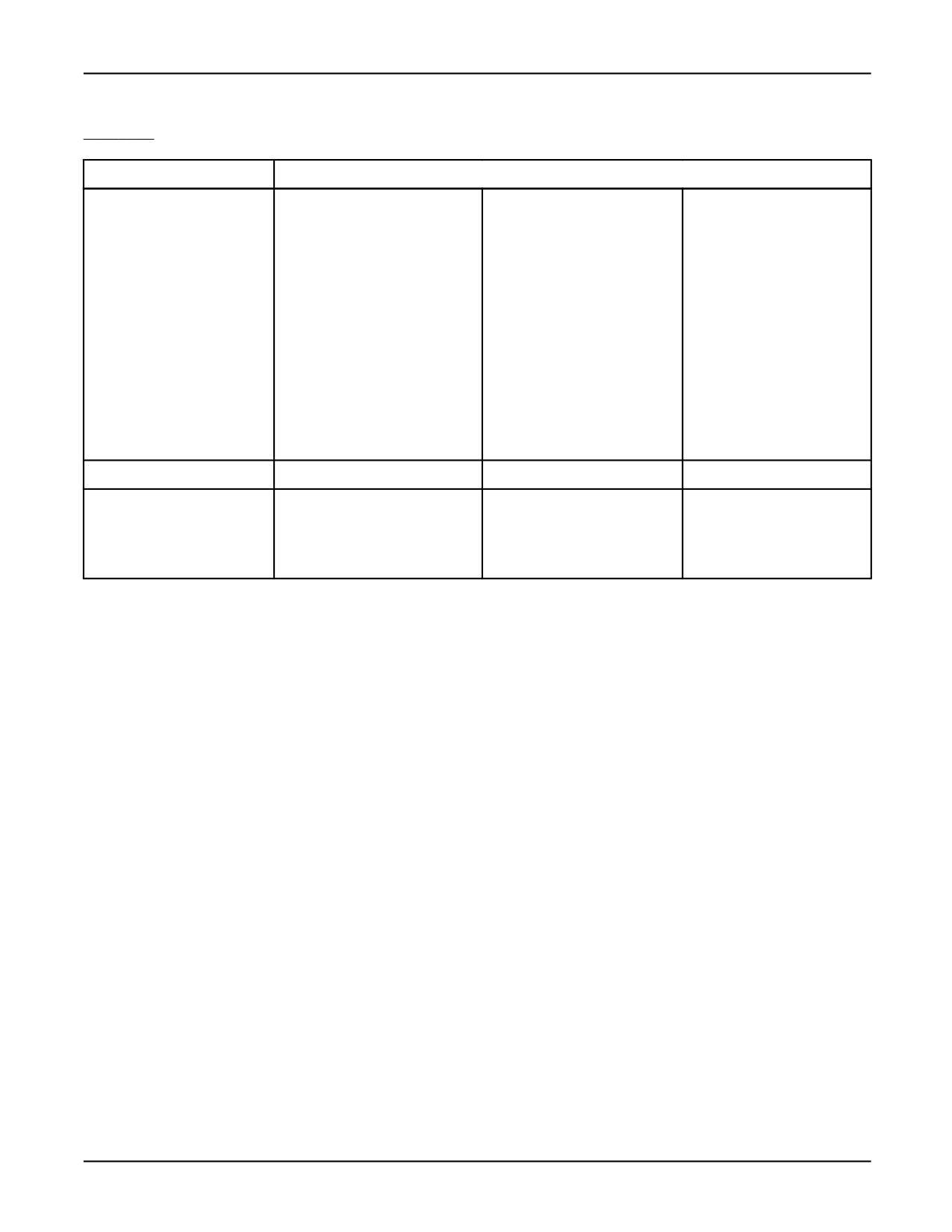
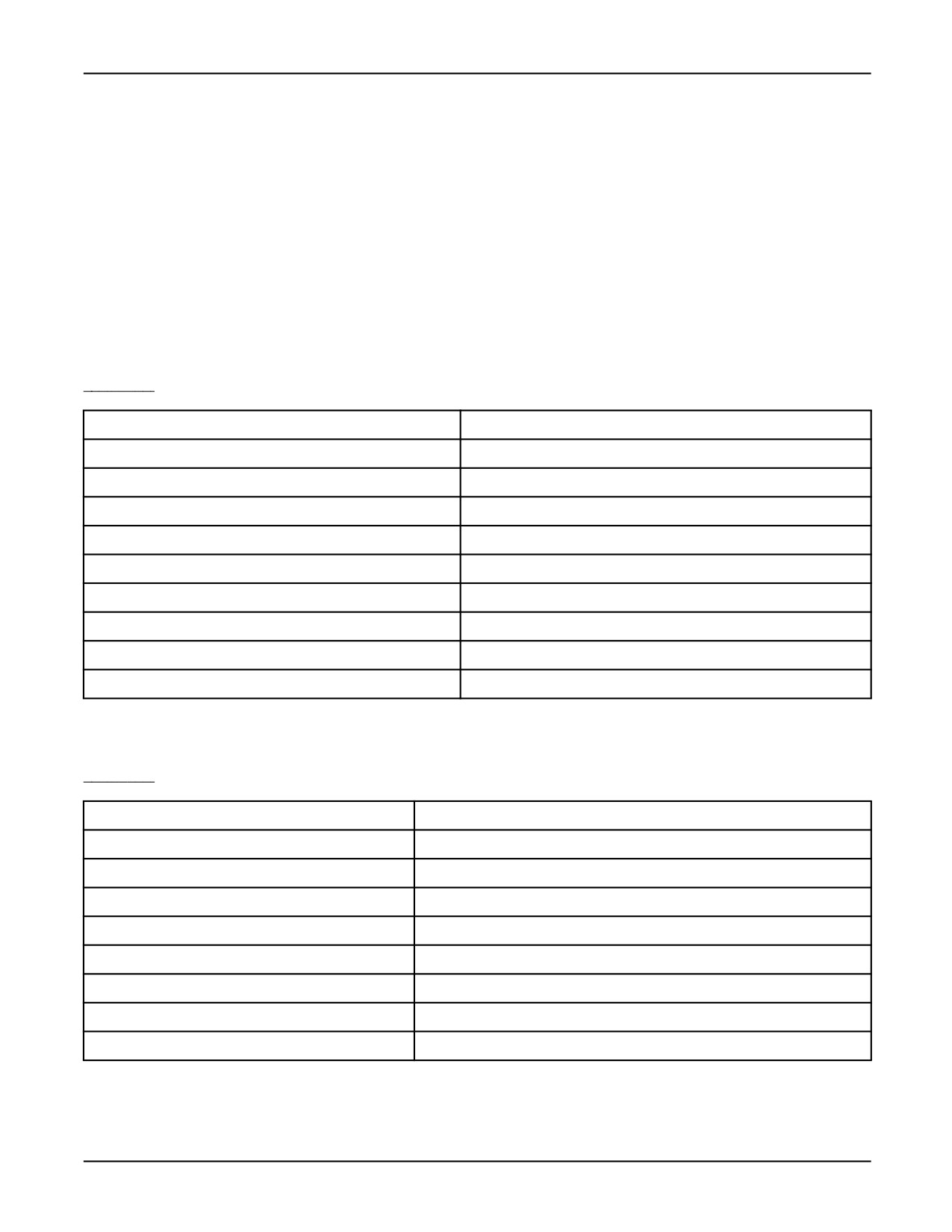
Table A-7 is a summary list of all the predefined built-in routines included in the KAREL language.
A detailed description of all the KAREL built-in routines is provided in Appendix A .
See Also: Appendix A , which lists optional KAREL built-ins and where they are documented.
5-15

5. ROUTINES
MARRC75KR07091E Rev D
Table 5-2. KAREL Built—In Routine Summary
Category
Identifier
Byname
CALL_PROG
CURR_PROG
PROG_LIST
CALL_PROGLIN
FILE_LIST
VAR_INFO
VAR_LIST
Data Acquisition
DAQ_CHECKP
DAQ_START
DAQ_UNREG
DAQ_REGPIPE
DAQ_STOP
DAQ_WRITE
Error Code Handling
ERR_DATA
POST_ERR
POST_ERR_L
File and Device Operation
CHECK_NAME
MOUNT_DEV
XML_ADDTAG
COMPARE_FILE
MOVE_FILE
XML_GETDATA
COPY_FILE
PRINT_FILE
XML_REMTAG
DELETE_FILE
PURGE_DEV
XML_SCAN
DISMOUNT_DEV
RENAME_FILE
XML_SETVAR
DOSFILE_INF
FORMAT_DEV
Serial I/O, File Usage
BYTES_AHEAD
IO_STATUS
SET_FILE_ATR
BYTES_LEFT
MSG_CONNECT
SET_FILE_POS
CLR_IO_STAT
MSG_DISCO
SET_PORT_ATR
GET_FILE_POS
MSG_PING
VOL_SPACE
GET_PORT_ATR
PIPE_CONFIG
Process I/O Setup
CLR_PORT_SIM
GET_PORT_SIM
SET_PORT_CMT
GET_PORT_ASG
GET_PORT_VAL
SET_PORT_MOD
GET_PORT_CMT
IO_MOD_TYPE
SET_PORT_SIM
GET_PORT_MOD
SET_PORT_ASG
SET_PORT_VAL
KCL Operation
KCL
KCL_NO_WAIT
KCL_STATUS
Memory Operation
CLEAR
PROG_BACKUP
RENAME_VARS
CREATE_VAR
PROG_CLEAR
SAVE
LOAD
PROG_RESTORE
SAVE_DRAM
LOAD_STATUS
RENAME_VAR
Mirror
MIRROR
Motion and Program
CNCL_STP_MTN
MOTION_CTL
RESET
Control
Multi-programming
ABORT_TASK
PAUSE_TASK
SEMA_COUNT
CLEAR_SEMA
PEND_SEMA
SET_TSK_ATTR
CONT_TASK
POST_SEMA
SET_TSK_NAME
GET_TSK_INFO
RUN_TASK
UNLOCK_GROUP
LOCK_GROUP
Path Operation
APPEND_NODE
DELETE_NODE
NODE_SIZE
COPY_PATH
INSERT_NODE
PATH_LEN
5-16

MARRC75KR07091E Rev D
5. ROUTINES
Table 5-2. KAREL Built—In Routine Summary (Cont’d)
Category
Identifier
Personal Computer
ADD_BYNAMEPC
ADD_REALPC
SEND_DATAPC
Communications
ADD_INTPC
ADD_STRINGPC
SEND_EVENTPC
Position
CHECK_EPOS
FRAME
POS
CNV_JPOS_REL
IN_RANGE
POS2JOINT
CNV_REL_JPOS
J_IN_RANGE
SET_PERCH
CURPOS
JOINT2POS
UNPOS
CURJPOS
Queue Manager
APPEND_QUEUE
GET_QUEUE
INSERT_QUEUE
COPY_QUEUE
INIT_QUEUE
DELETE_QUEUE
MODIFY_QUEUE
Register Operation
CLR_POS_REG
GET_SREG_CMT
SET_POS_REG
GET_JPOS_REG
GET_STR_REG
SET_PREG_CMT
GET_POS_REG
POS_REG_TYPE
SET_REAL_REG
GET_PREG_CMT
SET_EPOS_REG
SET_REG_CMT
GET_REG
SET_INT_REG
SET_SREG_CMT
GET_REG_CMT
SET_JPOS_REG
SET_STR_REG
String Operation
CNV_CNF_STRG
CNV_STR_CONF
STR_LEN
CNV_CONF_STR
CNV_STR_INT
SUB_STR
CNV_INT_STR
CNV_STR_REAL
CNV_REAL_STR
System
ABS
COS
ROUND
ACOS
EXP
SET_VAR
ARRAY_LEN
GET_VAR
SIN
ASIN
INDEX
SQRT
ATAN2
INV
TAN
BYNAME
LN
TRUNC
CHR
ORD
UNINIT
Time-of-Day Operation
CNV_STR_TIME
GET_TIME
GET_USEC_TIM
CNV_TIME_STR
GET_USEC_SUB
SET_TIME
TPE Program
AVL_POS_NUM
GET_POS_FRM
SET_ATTR_PRG
CLOSE_TPE
GET_POS_TPE
SET_EPOS_TPE
COPY_TPE
GET_POS_TYP
SET_JPOS_TPE
CREATE_TPE
GET_TPE_CMT
SET_POS_TPE
DEL_INST_TPE
GET_TPE_PRM
SET_TPE_CMT
GET_ATTR_PRG
OPEN_TPE
SET_TRNS_TPE
GET_JPOS_TPE
SELECT_TPE
Translate
TRANSLATE
5-17
5. ROUTINES
MARRC75KR07091E Rev D
Table 5-2. KAREL Built—In Routine Summary (Cont’d)
Category
Identifier
User Interface
ACT_SCREEN
DET_WINDOW
INI_DYN_DISS
ADD_DICT
DISCTRL_ALPH
INIT_TBL
ATT_WINDOW_D
DISCTRL_FORM
POP_KEY_RD
ATT_WINDOW_S
DISCTRL_LIST
PUSH_KEY_RD
CHECK_DICT
DISCTRL_PLMN
READ_DICT
CNC_DYN_DISB
DISCTRL_SBMN
READ_DICT_V
CNC_DYN_DISE
DISCTRL_TBL
READ_KB
CNC_DYN_DISI
FORCE_SPMENU
REMOVE_DICT
CNC_DYN_DISP
INI_DYN_DISB
SET_CURSOR
CNC_DYN_DISR
INI_DYN_DISE
SET_LANG
CNC_DYN_DISS
INI_DYN_DISI
WRITE_DICT
DEF_SCREEN
INI_DYN_DISP
WRITE_DICT_V
DEF_WINDOW
INI_DYN_DISR
Vector
APPROACH
ORIENT
Vision Operation
V_CAM_CALIB
V_INIT_QUEUE
V_START_VTRK
V_GET_OFFSET
V_RALC_QUEUE
V_STOP_VTRK
V_GET_PASSFL
V_RUN_FIND
VREG_FND_POS
V_GET_QUEUE
V_SET_REF
VREG_OFFSET
5-18
Chapter 6
CONDITION HANDLERS
Contents
Chapter 6
CONDITION HANDLERS
6-1
6.1
CONDITION HANDLER OPERATIONS
6-3
6.1.1
Global Condition Handlers
6-3
6.2
CONDITIONS
6-6
6.2.1
Port_Id Conditions
6-7
6.2.2
Relational Conditions
6-7
6.2.3
System and Program Event Conditions
6-8
6.3
ACTIONS
6-11
6.3.1
Assignment Actions
6-11
6.3.2
Motion Related Actions
6-13
6.3.3
Routine Call Actions
6-13
6.3.4
Miscellaneous Actions
6-14
6-1
6. CONDITION HANDLERS
MARRC75KR07091E Rev D
The condition handler feature of the KAREL language allows a program to respond to external
conditions more efficiently than conventional program control structures allow.
These condition handlers, also known as Global condition handlers, allow specified conditions to
be monitored in parallel with normal program execution and, if the conditions occur, corresponding
actions to be taken in response.
For a condition handler to be monitored, it must be defined first and then enabled. Disabling a
condition handler removes it from the group being scanned. Purging condition handlers deletes
their definition.
Table 6-1 lists the conditions that can be monitored by condition handlers.
Table 6-1. Conditions
port_id[n]
ERROR[n]
NOT port_id[n]
EVENT[n]
port_id[n]+
ABORT
port_id[n]-
PAUSE
operand = operand
CONTINUE
operand <> operand
SEMAPHORE[n]
operand < operand
operand <= operand
operand > operand
operand >= operand
Table 6-2
lists the actions that can be taken.
Table 6-2. Actions
variable = expression
NOABORT
port_id[n] = expression
NOMESSAGE
STOP
NOPAUSE
CANCEL
ENABLE CONDITION[n]
RESUME
DISABLE CONDITION[n]
HOLD
PULSE DOUT[n] FOR t
UNHOLD
UNPAUSE
routine_name
ABORT
SIGNAL EVENT[n]
CONTINUE
6-2
MARRC75KR07091E Rev D
6. CONDITION HANDLERS
Table 6-2. Actions (Cont’d)
PAUSE
SIGNAL SEMAPHORE[n]
6.1
CONDITION HANDLER OPERATIONS
Table 6-3 summarizes condition handler operations.
Table 6-3. Condition Handler Operations
OPERATION
GLOBAL CONDITION HANDLER
Define
CONDITION[n]:<WITH $SCAN_TIME = n>.
WHEN conditions DO actions
ENDCONDITION
Enable
ENABLE CONDITION[n] (statement or action)
Disable
DISABLE CONDITION[n] (statement or action) or conditions satisfied
Purge
PURGE CONDITION[n] (statement), program terminated
6.1.1
Global Condition Handlers
Global condition handlers are defined by executing a CONDITION statement in the executable
section of a program. The definition specifies conditions/actions pairs. The following rules apply
to global condition handlers.
• Each global condition handler is referenced throughout the program by a specified number, from
1 to 1000. If a condition handler with the specified number was previously defined, it must be
purged before it is replaced by the new one.
• The conditions/action s pairs of a global condition handler are specified in the WHEN clauses
of a CONDITION statement. All WHEN clauses for a condition handler are enabled, disabled,
and purged together.
• The condition list represents a list of conditions to be monitored when the condition handler is
scanned.
• By default, each global condition handler is scanned at a rate based on the value of
$SCR.$cond_time. If the ‘‘WITH $SCAN_TIME = n’’ clause is used in a CONDITION
statement, the condition will be scanned roughly every ‘‘n’’ milliseconds. The actual interval
between the scans is determined as shown in Table 6-4 .
6-3
6. CONDITION HANDLERS
MARRC75KR07091E Rev D
Table 6-4. Interval Between Global Condition Handler Scans
"n"
Interval Between Scans
n <= $COND_TIME
$COND_TIME
$COND_TIME < n <= (2 * $COND_TIME)
(2 * $COND_TIME)
(2 * $COND_TIME) < n <= (4 * $COND_TIME)
(4 * $COND_TIME)
(4 * $COND_TIME) < n <= (8 * $COND_TIME)
(8 * $COND_TIME)
(8 * $COND_TIME) < n <= (16 * $COND_TIME)
(16 * $COND_TIME)
(16 * $COND_TIME) < n <= (32 * $COND_TIME)
(32 * $COND_TIME)
(32 * $COND_TIME) < n <= (64 * $COND_TIME)
(64 * $COND_TIME)
(64 * $COND_TIME) < n <= (128 * $COND_TIME)
(128 * $COND_TIME)
(128 * $COND_TIME) < n <= (256 * $COND_TIME)
(256 * $COND_TIME)
(256 * $COND_TIME) < n
(512 * $COND_TIME)
• Multiple conditions must all be separated by the AND operator or the OR operator. Mixing of
AND and OR is not allowed.
• If AND is used, all of the conditions of a single WHEN clause must be satisfied simultaneously
for the condition handler to be triggered.
• If OR is used, the actions are triggered when any of the conditions are TRUE.
• The action list represents a list of actions to be taken when the corresponding conditions of the
WHEN clause are simultaneously satisfied.
• Multiple actions must be separated by a comma or a new line.
Global Condition Handler Definitions shows three examples of defining global condition handlers.
See Also: $SCR.$cond_time System Variable, FANUC Robotics Software Reference Manual
$SCAN_TIME Condition Handler Qualifier, FANUC Robotics Software Reference Manual
Global Condition Handler Definitions
CONDITION[1]:
--defines condition handler number
1
WHEN DIN[1] DO DOUT[1] = TRUE
--triggered if any one
WHEN DIN[2] DO DOUT[2] = TRUE
--of the WHEN clauses
WHEN DIN[3] DO DOUT[3] = TRUE
--is satisfied
ENDCONDITION
CONDITION[2]:
--defines condition handler number 2
WHEN PAUSE DO
--one condition triggers
AOUT[speed_out] = 0
--multiple actions
DOUT[pause_light] = TRUE
ENABLE CONDITION [2]
--enables this condition
6-4
MARRC75KR07091E Rev D
6. CONDITION HANDLERS
ENDCONDITION
--handler again
CONDITION[3]:
WHEN DIN[1] AND DIN[2] AND DIN[3] DO --multiple
DOUT[1] = TRUE
--conditions separated by AND;
DOUT[2] = TRUE
--all three conditions must be
DOUT[3] = TRUE
--satisfied at the same time
ENDCONDITION
• You can enable, disable, and purge global condition handlers as needed throughout the program.
Whenever a condition handler is triggered, it is automatically disabled, unless an ENABLE action
is included in the action list. (See condition handler 2 in Global Condition Handler Definitions .)
— The ENABLE statement or action enables the specified condition handler. The condition
handler will be scanned during the next scan operation and will continue to be scanned
until it is disabled.
— The DISABLE statement or action removes the specified condition handler from the group
of scanned condition handlers. The condition handler remains defined and can be enabled
again with the ENABLE statement or action.
— The PURGE statement deletes the definition of the specified condition handler.
• ENABLE, DISABLE, and PURGE have no effect if the specified condition handler is not
defined. If the specified condition handler is already enabled, ENABLE has no effect; if it is
already disabled, DISABLE has no effect.
Using Global Condition Handlers shows examples of enabling, disabling, and purging global
condition handlers.
Using Global Condition Handlers
CONDITION[1]:
--defines condition handler number 1
WHEN line_stop = TRUE DO DOUT[1] = FALSE
ENDCONDITION
CONDITION[2]:
--defines condition handler number 2
WHEN line_go = TRUE DO
DOUT[1] = TRUE, ENABLE CONDITION [1]
ENDCONDITION
ENABLE CONDITION[2]
--condition handler 2 is enabled
IF ready THEN line_go = TRUE; ENDIF
--If ready is TRUE condition handler 2 is triggered (and
--disabled) and condition handler 1 is enabled.
--Otherwise, condition handler 2 is not triggered (and is
--still enabled), condition handler 1 is not yet enabled,
--and the next two statements will have no effect.
DISABLE CONDITION[1]
ENABLE CONDITION[2]
6-5
6. CONDITION HANDLERS
MARRC75KR07091E Rev D
ENABLE CONDITION[1] --condition handler 1 is enabled
line_stop = TRUE
--triggers (and disables) condition handler 1
PURGE CONDITION[2]
--definition of condition handler 2 deleted
ENABLE CONDITION[2] --no longer has any effect
line_go = TRUE
--no longer a monitored condition
6.2
CONDITIONS
One or more conditions are specified in the condition list of a WHEN or UNTIL clause, defining the
conditions portion of a conditions/actions pair. Conditions can be
• States - which remain satisfied as long as the state exists. Examples of states are DIN[1] and
(VAR1 > VAR2).
• Events - which are satisfied only at the instant the event occurs. Examples of events are
ERROR[n], DIN[n]+, and PAUSE.
The following rules apply to system and program event conditions:
• After a condition handler is enabled, the specified conditions are monitored.
— If all of the conditions of an AND, WHEN, or UNTIL clause are simultaneously satisfied, the
condition handler is triggered and corresponding actions are performed.
— If all of the conditions of an OR, WHEN, or UNTIL clause are satisfied, the condition
handler is triggered and corresponding actions are performed.
• Event conditions very rarely occur simultaneously. Therefore, you should never use AND
between two event conditions in a single WHEN or UNTIL clause because, both conditions
will not be satisfied simultaneously.
• While many conditions are similar in form to BOOLEAN expressions in KAREL, and are
similar in meaning, only the forms listed in this section, not general BOOLEAN expressions,
are permitted.
• Expressions are permitted within an EVAL clause. More general expressions may be used on
the right side of comparison conditions, by enclosing the expression in an EVAL clause: EVAL
(expression). However, expressions in an EVAL clause are evaluated when the condition handler
is defined. They are not evaluated dynamically.
• The value of an EVAL clause expression must be INTEGER, REAL, or BOOLEAN.
See Also: EVAL Clause, Appendix A .
6-6
MARRC75KR07091E Rev D
6. CONDITION HANDLERS
6.2.1
Port_Id Conditions
Port_id conditions are used to monitor digital port signals. Port_id must be one of the predefined
BOOLEAN port array identifiers (DIN, DOUT, OPIN, OPOUT, TPIN, TPOUT, RDI, RDO, WDI, or
WDO). The value of n specifies the port array signal to be monitored. Table 6-5 lists the available
port_id conditions.
Table 6-5. Port_Id Conditions
CONDITION
SATISFIED (TRUE) WHEN
port_id[n]
Digital port n is TRUE. (state)
NOT port_id[n]
Digital port n is FALSE. (state)
port_id[n]+
Digital port n changes from FALSE to TRUE. (event)
port_id[n]-
Digital port n changes from TRUE to FALSE. (event)
• For the state conditions, port_id[n] and NOT port_id[n] , the port is tested during every scan.
The following conditions would be satisfied if, during a scan, DIN[1] was TRUE and DIN[2]
was FALSE:
WHEN DIN[1] AND NOT DIN[2] DO . . .
Note that an input signal should remain ON or OFF for the minimum scan time to ensure that
its state is detected.
• For the event condition port_id[n]+ , the initial port value is tested when the condition handler is
enabled. Each scan tests for the specified change in the signal. The change must occur while the
condition handler is enabled.
The following condition would only be satisfied if, while the condition handler was enabled,
DIN[1] changed from TRUE to FALSE since the last scan.
WHEN DIN[1]- DO . . .
6.2.2
Relational Conditions
Relational conditions are used to test the relationship between two operands. They are satisfied
when the specified relationship is TRUE. Relational conditions are state conditions, meaning the
relationship is tested during every scan. Table 6-6 lists the relational conditions.
6-7
6. CONDITION HANDLERS
MARRC75KR07091E Rev D
Table 6-6. Relational Conditions
CONDITION
SATISFIED (TRUE) WHEN
operand = operand
Relationship specified is TRUE. Operands on the left can be a port array
element, referenced as port_id[n], or a variable. Operands on the right can
operand < > operand
be a variable, a constant, or an EVAL clause. (state)
operand < operand
operand < = operand
operand > operand
operand > = operand
The following rules apply to relational conditions:
• Both operands must be of the same data type and can only be of type INTEGER, REAL, or
BOOLEAN. (As in other situations, INTEGER constants can be used where REAL values are
required, and will be treated as REAL values.)
• The operand on the left side of the condition can be any of the port array signals, a user-defined
variable, a static variable, or a system variable that can be read by a KAREL program.
• The operand on the right side of the condition can be a user-defined variable, a static variable, a
system variable that can be read by a KAREL program, any constant, or an EVAL clause. For
example:
WHEN DIN[1] = ON DO . . .
--port_id and constant
WHEN flag = TRUE DO . . .
--variable and constant
WHEN AIN[1] >= temp DO . . .
--port_id and variable
WHEN flag_1 <> flag_2 DO . . . --variable and variable
WHEN AIN[1] <= EVAL(temp * scale) DO . . .
--port_id and EVAL clause
WHEN dif > EVAL(max_count - count) DO . . .
--variable and EVAL clause
• The EVAL clause allows you to include expressions in relational conditions. However, it is
evaluated only when the condition handler is defined. The expression in the EVAL clause cannot
include any routine calls.
See Also: EVAL Clause, Appendix A .
6.2.3
System and Program Event Conditions
System and program event conditions are used to monitor system and program generated events. The
specified condition is satisfied only if the event occurs when the condition handler is enabled.
6-8
MARRC75KR07091E Rev D
6. CONDITION HANDLERS
Enabled condition handlers containing ERROR, EVENT, PAUSE, ABORT, POWERUP, or
CONTINUE conditions are scanned only if the specified type of event occurs. For example, an
enabled condition handler containing an ERROR condition will be scanned only when an error occurs.
Table 6-7 lists the available system and program event conditions.
Table 6-7. System and Program Event Conditions
CONDITION
SATISFIED (TRUE) WHEN
ERROR [n]
The error specified by n is reached or, if n = *, any error occurs. (event)
EVENT[n]
The event specified by n is signaled. (event)
ABORT
The program is aborted. (event)
PAUSE
The program is paused. (event)
CONTINUE
The program is continued. (event)
POWERUP
The program is continued. (event)
SEMAPHORE[n]
The value of the semaphore specified by n is posted.
The following rules apply to these conditions:
ERROR Condition
• The ERROR condition can be used to monitor the occurrence of a particular error by specifying
the error code for that error. For example, ERROR[15018] monitors the occurrence of the error
represented by the error code 15018.
The error codes are listed in the following format:
ffccc (decimal)
where
ff represents the facility code of the error
ccc represents the error code within the specified facility
For example, 15018 is MOTN-018, which is "Position not reachable." The facility code is 15
and the error code is 018. Refer to the FANUC Robotics Error Code Manual for a complete
listing of error codes.
• The ERROR condition can also be used to monitor the occurrence of any error by specifying an
asterisk (*), the wildcard character, in place of a specific error code. For example, ERROR[*]
monitors the occurrence of any error.
• The ERROR condition is satisfied only for the scan performed when the error was detected. The
error is not remembered in subsequent scans.
6-9
6. CONDITION HANDLERS
MARRC75KR07091E Rev D
EVENT Condition
• The EVENT condition monitors the occurrence of the specified program event. The SIGNAL
statement or action in a program indicates that an event has occurred.
• The EVENT condition is satisfied only for the scan performed when the event was signaled. The
event is not remembered in subsequent scans.
ABORT Condition
• The ABORT condition monitors the aborting of program execution. If an ABORT occurs, the
corresponding actions are performed. However, if one of the actions is a routine call, the routine
will not be executed because program execution has been aborted.
If an ABORT condition is used in a condition handler all actions, except routine calls, will be
performed even though the program has aborted.
PAUSE Condition
• The PAUSE condition monitors the pausing of program execution. If one of the corresponding
actions is a routine call, it is also necessary to specify a NOPAUSE or UNPAUSE action.
CONTINUE Condition
• The CONTINUE condition monitors the resumption of program execution. If program execution
is paused, the CONTINUE action, the KCL> CONTINUE command, a CYCLE START from
the operator panel, or the teach pendant FWD key will continue program execution and satisfy
the CONTINUE condition.
POWERUP Condition
• The POWERUP condition monitors the resumption of program execution after a power failure
recovery. The controller must be able to recover successfully from a power failure before the
program can be resumed.
SEMAPHORE Condition
• The SEMAPHORE condition monitors the specified semaphore. The CLEAR_SEMA built-in can
be used to set the semaphore value to 0. The POST_SEMA built-in or the SIGNAL SEMAPHORE
action can be used to increment the semaphore value and satisfy the SEMAPHORE condition.
See Also: In Appendix A :
ABORT Condition
CONTINUE Condition
ERROR Condition
6-10
MARRC75KR07091E Rev D
6. CONDITION HANDLERS
EVENT Condition
PAUSE Condition
POWERUP Condition
SEMAPHORE Condition
application-specific FANUC Robotics Setup and Operations Manual for error codes. FANUC Robotics
Error Code Manual.
6.3
ACTIONS
Actions are specified in the action list of a WHEN clause. Actions can be
• Specially defined KAREL actions that are executed in parallel with the program
• A routine call, which will interrupt program execution
When the conditions of a condition handler are satisfied, the condition handler is triggered. The
actions corresponding to the satisfied conditions are performed in the sequence in which they appear
in the condition handler definition, except for routine calls. Routines are executed after all of the
other actions have been performed.
Note that, although many of the actions are similar in form to KAREL statements and the effects are
similar to corresponding KAREL statements, the actions are not executable statements. Only the
forms indicated in this section are permitted.
See Also: Actions and Statements, Appendix A .
6.3.1
Assignment Actions
The available assignment actions are given in Table 6-8 .
6-11
6. CONDITION HANDLERS
MARRC75KR07091E Rev D
Table 6-8. Assignment Actions
ACTION
RESULT
variable = expression
The value of the expression is assigned to the variable. The
expression can be a variable, a constant, a port array element, or
an EVAL clause.
port_id[n] = expression
The value of the expression is assigned to the port array element
referenced by n. The expression can be a variable, a constant, or
an EVAL clause.
The following rules apply to assignment actions:
• The assignment actions, ‘‘variable = expression’’ and ‘‘port_id[n] = expression’’ can be used to
assign values to variables and port array elements.
— The variable must be either a user-defined variable, a static variable, or a system variable
without a minimum/maximum range and that can be written to by a KAREL program.
— The port array, if on the left, must be an output port array that can be set by a KAREL program.
— The expression can be a user-defined variable, a static variable. a system variable that can be
read by a KAREL program, any constant, or an EVAL clause.
• If a variable is on the left side of the assignment, the expression can also be a port array element.
However, you cannot assign a port array element to a port array element directly. For example,
the first assignment shown is invalid, but the next two are valid:
DOUT[1] = DOUT[2]
--invalid action
port_var = DOUT[2]
--valid action, where port_var is a variable
DOUT[1] = port_var
--another valid action, which if executed
--after port_var = DOUT[2], would in effect
--assign DOUT[2] to DOUT[1]
• If the expression is a variable, it must be a global variable. The value used is the current value
of the variable at the time the action is taken, not when the condition handler is defined. If the
expression is an EVAL clause, it is evaluated when the condition handler is defined and that
value is assigned when the action is taken.
• Both sides of the assignment action must be of the same data type. An INTEGER or EVAL
clause is permitted on the right side of the assignment with an INTEGER, REAL, or BOOLEAN
on the left.
6-12
MARRC75KR07091E Rev D
6. CONDITION HANDLERS
6.3.2
Motion Related Actions
Motion related actions affect the current motion and might affect subsequent motions. They are
given in Table 6-9 .
Table 6-9.
Motion Related Actions
ACTION
RESULT
STOP
Current motion is stopped.
RESUME
The last stopped motion is resumed.
CANCEL
Current motion is canceled.
HOLD
Current motion is held. Subsequent motions are not started.
UNHOLD
Held motion is released.
The following rules apply to motion related actions:
• If a STOP is issued, the current motion and any queued motions are pushed as a set on a stopped
motion stack. If no motion is in progress, an empty entry is pushed on the stack.
• If a RESUME is issued, the newest stopped motion set on the stopped motion stack is queued
for execution.
• If a CANCEL is issued, the motion currently in progress is canceled. Any motions queued to
the same group behind the current motion are also canceled. If no motion is in progress, the
action has no effect.
• If a HOLD is issued, the current motion is held and subsequent motions are prevented from
starting. The UNHOLD action releases held motion.
6.3.3
Routine Call Actions
Routine call actions, or interrupt routines, are specified by
<WITH $PRIORITY = n> routine_name
The following restrictions apply to routine call actions or interrupt routines:
• The interrupt routine cannot have parameters and must be a procedure (not a function).
• If the interrupted program is using READ statements, the interrupt routine cannot read from the
same file variable. If an interrupted program is reading and the interrupt routine attempts a read
from the same file variable, the program is aborted.
• When an interrupt routine is started, the interrupted KAREL program is suspended until the
routine returns.
6-13
6. CONDITION HANDLERS
MARRC75KR07091E Rev D
• Interrupt routines, like KAREL programs, can be interrupted by other routines. The maximum
depth of interruption is limited only by stack memory size.
• Routines are started in the sequence in which they appear in the condition handler definition, but
since they interrupt each other, they will actually execute in reverse order.
• Interrupts can be prioritized so that certain interrupt routines cannot be interrupted by others. The
$PRIORITY condition handler qualifier can be used to set the priority of execution for an indicated
routine action. $PRIORITY values must be 0-255 where the lower value represents a lower
priority. If a low priority routine is called while a routine with a higher priority is running, it will
be executed only when the higher priority routine has completed. If $PRIORITY is not specified,
the routine’s priority will default to the current value of the $PRIORITY system variable.
See Also: WITH Clause, Appendix A, ‘‘KAREL Language Alphabetical Description," for more
information on $PRIORITY
6.3.4
Miscellaneous Actions
Table 6-10 describes other allowable actions.
Table 6-10. Miscellaneous Actions
ACTION
RESULT
SIGNAL EVENT[n]
The event specified by n is signaled.
NOMESSAGE
The error message that otherwise would have been generated is not
displayed or logged.
NOPAUSE
Program execution is resumed if the program was paused, or is prevented
from pausing.
NOABORT
Program execution is resumed if the program was aborted, or is prevented
from aborting.
ABORT
Program execution is aborted.
CONTINUE
Program execution is continued.
PAUSE
Program execution is paused.
SIGNAL SEMAPHORE[n]
Specified semaphore is signaled.
ENABLE CONDITION[n]
Condition handler n is enabled.
DISABLE CONDITION[n]
Condition handler n is disabled.
PULSE DOUT[n] FOR t
Specified port n is pulsed for the time interval t (in milliseconds).
UNPAUSE
If a routine_name is specified as an action, but program execution is
paused, execution is resumed only for the duration of the routine and then
is paused again.
6-14
MARRC75KR07091E Rev D
6. CONDITION HANDLERS
See Also: Appendix A for more information on each miscellaneous action.
6-15