FANUC Robotics SYSTEM R-30iA and R-30iB Controller. KAREL Reference Manual - page 3
MARRC75KR07091E Rev D
2. LANGUAGE ELEMENTS
--from an original POSITION and puts them down
--at a destination POSITION.
original : POSITION
--POSITION of objects
destination : POSITION
--Destination of objects
count
: INTEGER
--Number of objects moved
A comment is marked by a pair of consecutive hyphens (- -). On a program line, anything to the
right of these hyphens is treated as a comment.
Comments can be inserted on lines by themselves or at the ends of lines containing any program
statement. They are ignored by the translator and have absolutely no effect on a running program.
2.2
TRANSLATOR DIRECTIVES
Translator directives provide a mechanism for directing the translation of a KAREL program.
Translator directives are special statements used within a KAREL program to
• Include other files into a program at translation time
• Specify program and task attributes
All directives except %INCLUDE must be after the program statement but before any other
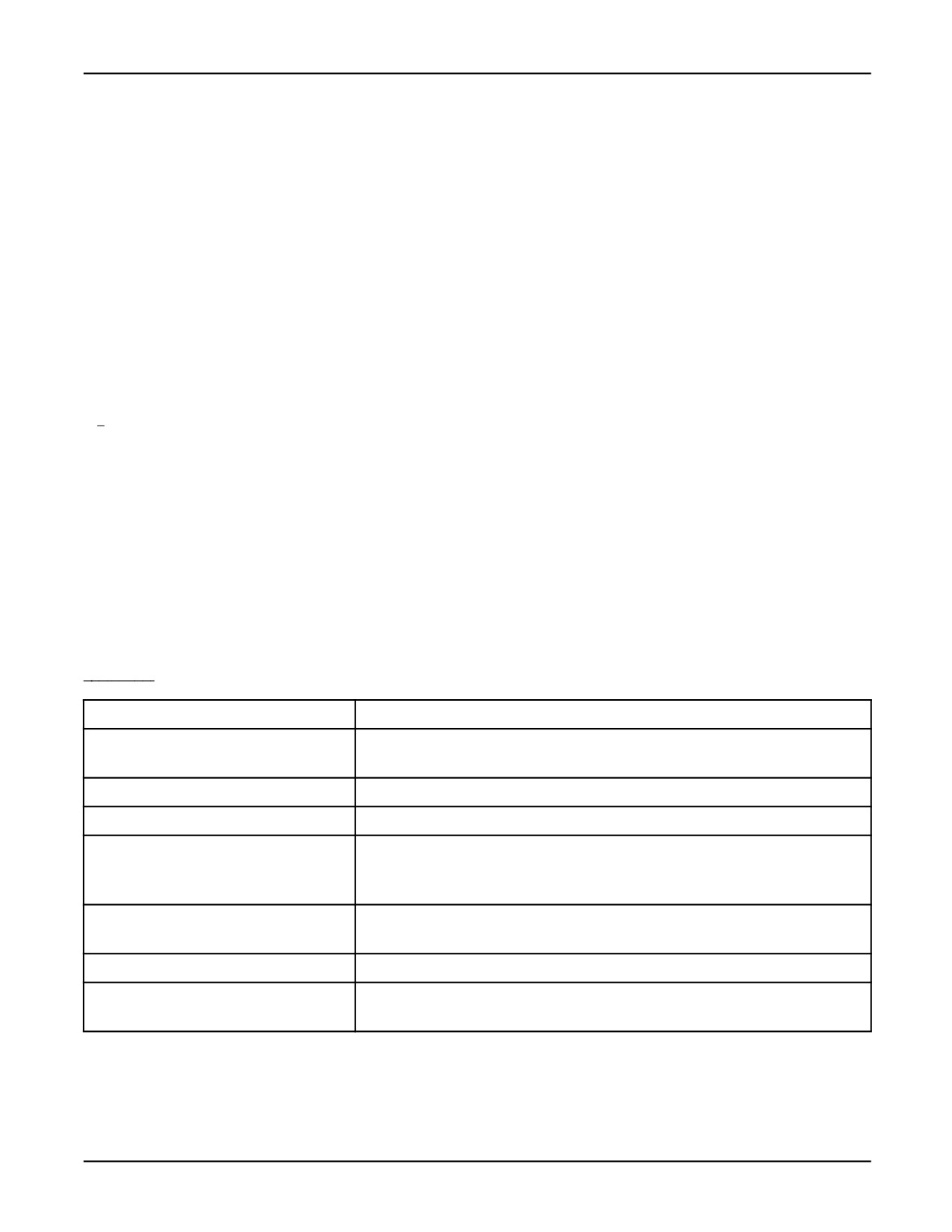
statements. Table 2-9 lists and briefly describes each translator directive. Refer to Appendix A for a
complete description of each translator directive.
Table 2-9. Translator Directives
Directive
Description
%ALPHABETIZE
Specifies that variables will be created in alphabetical order when p-code is
loaded.
%CMOSVARS
Specifies the default storage for KAREL variables is CMOS RAM.
%CMOS2SHADOW
Instructs the translator to put all CMOS variables in SHADOW memory.
%COMMENT = ’comment’
Specifies a comment of up to 16 characters. During load time, the comment is
stored as a program attribute and can be displayed on the SELECT screen of
the teach pendant or CRT/KB.
%CRTDEVICE
Specifies that the CRT/KB user window will be the default in the READ and
WRITE statements instead of the TPDISPLAY window.
%DEFGROUP = n
Specifies the default motion group to be used by the translator.
%DELAY
Specifies the amount of time the program will be delayed out of every 250
milliseconds.
2-11

2. LANGUAGE ELEMENTS
MARRC75KR07091E Rev D
Table 2-9. Translator Directives (Cont’d)
Directive
Description
%ENVIRONMENT filename
Used by the off-line translator to specify that a particular environment file should
be loaded.
%INCLUDE filename
Specifies files to insert into a program at translation time.
%LOCKGROUP =n,n
Specifies the motion group(s) locked by this task.
%NOABORT = option
Specifies a set of conditions which will be prevented from aborting the program.
%NOBUSYLAMP
Specifies that the busy lamp will be OFF during execution.
%NOLOCKGROUP
Specifies that no motion groups will be locked by this task.
%NOPAUSE = option
Specifies a set of conditions which will be prevented from pausing the program.
%NOPAUSESHFT
Specifies that the task is not paused if the teach pendant shift key is released.
%PRIORITY = n
Specifies the task priority.
%SHADOWVARS
Specifies that all variables by default are created in SHADOW.
%STACKSIZE = n
Specifies the stack size in long words.
%TIMESLICE = n
Supports round-robin type time slicing for tasks with the same priority.
%TPMOTION
Specifies that task motion is enabled only when the teach pendant is enabled.
%UNINITVARS
Specifies that all variables are by default uninitialized.
%INCLUDE Directive in a KAREL Program illustrates the %INCLUDE directive. Include File
mover_decs for a KAREL Program shows the included file.
%INCLUDE Directive in a KAREL Program
PROGRAM mover
-- This program, called mover, picks up 10 objects
-- from an original position and puts them down
-- at a destination position.
%INCLUDE mover_decs
-- Uses %INCLUDE directive to include the file
-- called mover_decs containing declarations
BEGIN
OPEN HAND gripper
-- Loop to move total number of objects
FOR count = 1 TO num_of_parts DO
-- Put position in Position Register 1
SET_POS_REG(1,original,status)
-- Call TP program to move to Position Register
move_to_pr
CLOSE HAND gripper
2-12
MARRC75KR07091E Rev D
2. LANGUAGE ELEMENTS
SET_POS_REG(1,destination,status)
move_to_pr
OPEN HAND gripper
ENDFOR
-- End of loop
END mover
The TP program move_to_pr is a one line program
to do the move:
1:J PR[1] 100% FINE
Include File mover_decs for a KAREL Program
-- Declarations for program mover in file mover_decs
VAR
original
: XYZWPR
--POSITION of objects
destination : XYZWPR
--Destination of objects
count
: INTEGER
--Number of objects moved
CONST
gripper = 1
-- Hand number 1
num_of_parts = 10
-- Number of objects to move
2.3
DATA TYPES
Three forms of data types are provided by KAREL to define data items in a program:
• Simple type data items
— Can be assigned constants or variables in a KAREL program
— Can be assigned actual (literal) values in a KAREL program
— Can assume only single values
• Structured type data items
— Are defined as data items that permit or require more than a single value
— Are composites of simple data and structured data
• User-defined type data items
— Are defined in terms of existing data types including other user-defined types
— Can be defined as structures consisting of several KAREL variable data types
— Cannot include itself
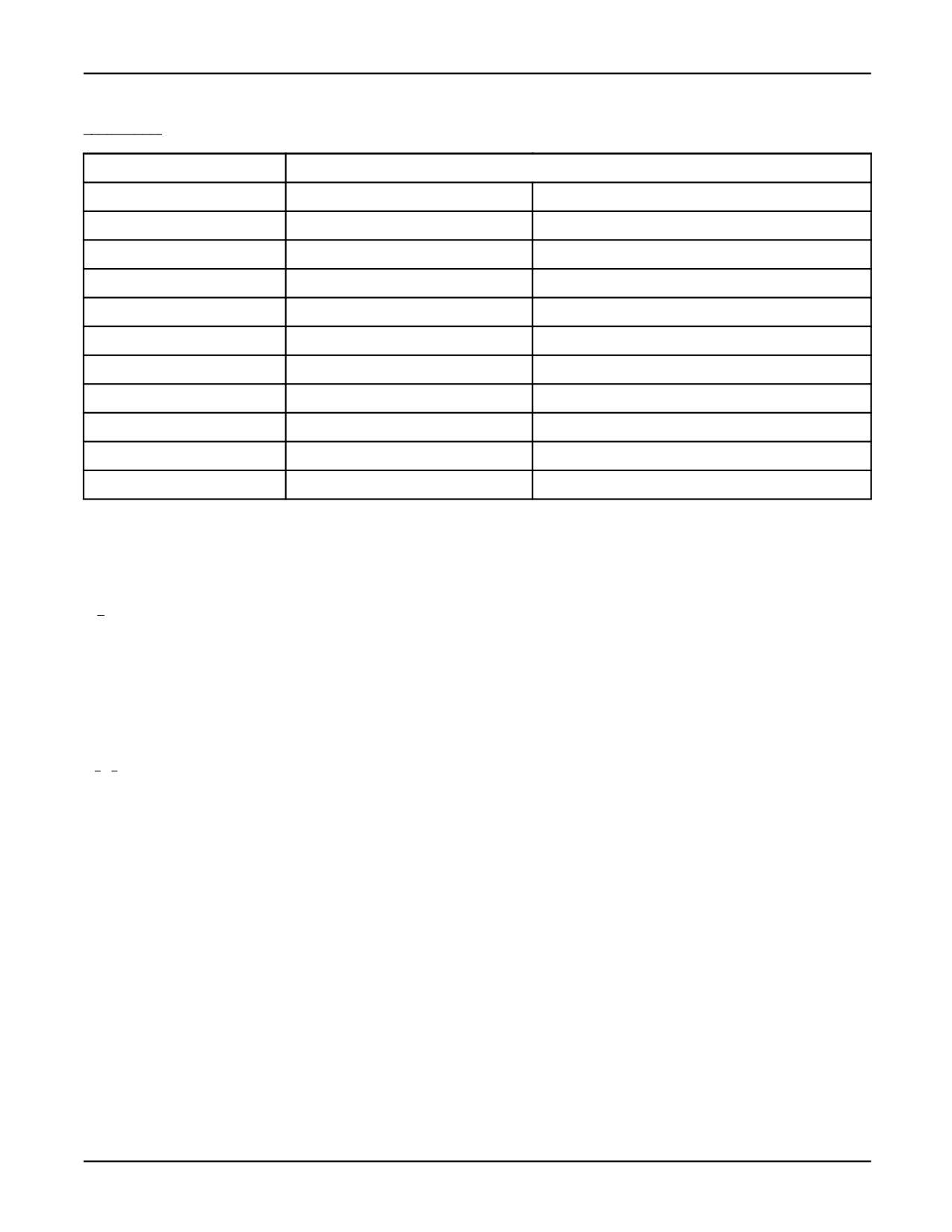
Table 2-10 lists the simple and structured data types available in KAREL. User-defined data types
are described in Section 2.4 .
2-13
2. LANGUAGE ELEMENTS
MARRC75KR07091E Rev D
Table 2-10. Simple and Structured Data Types
Simple
Structured
BOOLEAN
ARRAY OF BYTE
JOINTPOS8
FILE
CAM_SETUP
JOINTPOS9
INTEGER
CONFIG
MODEL
REAL
JOINTPOS
PATH
STRING
JOINTPOS1
POSITION
JOINTPOS2
QUEUE_TYPE
JOINTPOS3
ARRAY OF SHORT
JOINTPOS4
VECTOR
JOINTPOS5
VIS_PROCESS
JOINTPOS6
XYZWPR
JOINTPOS7
XYZWPREXT
See Also: Appendix A for a detailed description of each data type.
2.4
USER-DEFINED DATA TYPES AND STRUCTURES
User-defined data types are data types you define in terms of existing data types. User-defined data
structures are data structures in which you define a new data type as a structure consisting of several
KAREL variable data types, including previously defined user data types.
2.4.1
User-Defined Data Types
User-defined data types are data types you define in terms of existing data types. With user-defined
data types, you
• Include their declarations in the TYPE sections of a KAREL program.
• Define a KAREL name to represent a new data type, described in terms of other data types.
• Can use predefined data types required for specific applications.
User-defined data types can be defined as structures, consisting of several KAREL variable data types.
The continuation character, "&", can be used to continue a declaration on a new line.
User-Defined Data Type Example shows an example of user-defined data type usage and continuation
character usage.
2-14
MARRC75KR07091E Rev D
2. LANGUAGE ELEMENTS
User-Defined Data Type Example
CONST
n_pages = 20
n_lines = 40
std_str_lng = 8
TYPE
std_string_t = STRING [std_str_lng]
std_table_t = ARRAY [n_pages]&
--continuation character
OF ARRAY [n_lines] OF std_string_t
path_hdr_t FROM main_prog = STRUCTURE
--user defined data type
ph_uframe: POSITION
ph_utool: POSITION
ENDSTRUCTURE
node_data_t FROM main_prog = STRUCTURE
gun_on: BOOLEAN
air_flow: INTEGER
ENDSTRUCTURE
std_path_t FROM main_prog =
PATH PATHDATA = path_hdr_t NODEDATA = node_data_t
VAR
msg_table_1: std_table_t
msg_table_2: std_table_t
temp_string: std_string_t
seam_1_path: std_path_t
Usage
User-defined type data can be
• Assigned to other variables of the same type
• Passed as a parameter
• Returned as a function
Assignment between variables of different user-defined data types, even if identically declared, is not
permitted. In addition, the system provides the ability to load and save variables of user-defined data
types, checking consistency during the load with the current declaration of the data type.
Restrictions
A user-defined data type cannot
• Include itself
• Include any type that includes it, either directly or indirectly
• Be declared within a routine
2-15
2. LANGUAGE ELEMENTS
MARRC75KR07091E Rev D
2.4.2
User-Defined Data Structures
A structure is used to store a collection of information that is generally used together. User-defined
data structures are data structures in which you define a new data type as a structure consisting of
several KAREL variable data types.
When a program containing variables of user-defined data types is loaded, the definitions of these
types are checked against a previously created definition. If a previously created definition does not
exist, a new one is created.
With user-defined data structures, you
• Define a data type as a structure consisting of a list of component fields, each of which can be a
standard data type or another, previously defined, user data type. See Defining a Data Type as
a User-Defined Structure .
Defining a Data Type as a User-Defined Structure
new_type_name = STRUCTURE
field_name_1: type_name_1
field_name_2: type_name_2
ENDSTRUCTURE
• Access elements of a data type defined as a structure in a KAREL program. The continuation
character, "&", can be used to continue access of the structure elements. See Accessing Elements
of a User-Defined Structure in a KAREL Program .
Accessing Elements of a User-Defined Structure in a KAREL Program
var_name = new_type_name.field_nam_1
new_type_name.field_name_2 = expression
outer_struct_name.inner_struct_name&
.field_name = expression
• Access elements of a data type defined as a structure from the CRT/KB and at the teach pendant.
• Define a range of executable statements in which fields of a STRUCTURE type variable can
be accessed without repeating the name of the variable. See Defining a Range of Executable
Statements .
2-16
MARRC75KR07091E Rev D
2. LANGUAGE ELEMENTS
Defining a Range of Executable Statements
USING struct_var, struct_var2 DO
statements
ENDUSING
In the above example, struct_var and struct_var2 are the names of structure type variables.
Note If the same name is both a field name and a variable name, the field name is assumed. If the same
field name appears in more than one variable, the right-most variable in the USING statement is used.
Restrictions
User-defined data structures have the following restrictions:
• The following data types are not valid as part of a data structure:
— STRUCTURE definitions; types that are declared structures are permitted. See Valid
STRUCTURE Definitions .
Valid STRUCTURE Definitions
The following is valid:
TYPE
sub_struct = STRUCTURE
subs_field_1: INTEGER
subs_field_2: BOOLEAN
ENDSTRUCTURE
big_struct = STRUCTURE
bigs_field_1: INTEGER
bigs_field_2: sub_struct
ENDSTRUCTURE
The following is not valid:
big_struct = STRUCTURE
bigs_field_1: INTEGER
bigs_field_2: STRUCTURE
subs_field_1: INTEGER
subs_field_2: BOOLEAN
ENDSTRUCTURE
ENDSTRUCTURE
— PATH types
2-17
2. LANGUAGE ELEMENTS
MARRC75KR07091E Rev D
— FILE types
— VISION types
— Variable length arrays
— The data structure itself, or any type that includes it, either directly or indirectly
— Any structure not previously defined.
• A variable can not be defined as a structure, but can be defined as a data type previously defined
as a structure. See Defining a Variable as a Type Previously Defined as a Structure .
Defining a Variable as a Type Previously Defined as a Structure
The following is valid:
TYPE
struct_t = STRUCTURE
st_1: BOOLEAN
st_2: REAL
ENDSTRUCTURE
VAR
var_name: struct_t
The following is not valid:
VAR
var_name: STRUCTURE
vn_1: BOOLEAN
vn_2: REAL
ENDSTRUCTURE
2.5
ARRAYS
You can declare arrays of any data type except PATH.
You can access elements of these arrays in a KAREL program, from the CRT/KB, and from the
teach pendant.
In addition, you can define two types of arrays:
• Multi-dimensional arrays
• Variable-sized arrays
2-18
MARRC75KR07091E Rev D
2. LANGUAGE ELEMENTS
2.5.1
Multi-Dimensional Arrays
Multi-dimensional arrays are arrays of elements with two or three dimensions. These arrays allow you
to identify an element using two or three subscripts.
Multi-dimensional arrays allow you to
• Declare variables as arrays with two or three (but not more) dimensions. See Declaring Variables
as Arrays with Two or Three Dimensions .
Declaring Variables as Arrays with Two or Three Dimensions
VAR
name: ARRAY [size_1] OF ARRAY [size_2] .., OF element_type
OR
VAR
name: ARRAY [size_1, size_2,...] OF element_type
• Access elements of these arrays in KAREL statements. See Accessing Elements of
Multi-Dimensional Arrays in KAREL Statements .
Accessing Elements of Multi-Dimensional Arrays in KAREL Statements
name [subscript_1, subscript_2,...] = value
value = name [subscript_1, subscript_2,...]
• Declare routine parameters as multi-dimensional arrays. See Declaring Routine Parameters as
Multi-Dimensional Arrays .
Declaring Routine Parameters as Multi-Dimensional Arrays
Routine expects 2-dimensional array of INTEGER.
ROUTINE array_user (array_param:ARRAY [*,*] OF INTEGER)
The following are equivalent:
ROUTINE rtn_name(array_param: ARRAY[*] OF INTEGER)
and
ROUTINE rtn_name(array_param: ARRAY OF INTEGER)
2-19
2. LANGUAGE ELEMENTS
MARRC75KR07091E Rev D
• Access elements with KCL commands and the teach pendant.
• Save and load multi-dimensional arrays to and from variable files.
Restrictions
The following restrictions apply to multi-dimensional arrays:
• A subarray can be passed as a parameter or assigned to another array by omitting one or more of
the right-most subscripts only if it was defined as a separate type. See Using a Subarray .
Using a Subarray
TYPE
array_30 = ARRAY[30] OF INTEGER
array_20_30 = ARRAY[20] OF array_30
VAR
array_1: array_30
array_2: array_20_30
array_3: ARRAY[10] OF array_20_30
ROUTINE array_user(array_data: ARRAY OF INTEGER
FROM other-prog
BEGIN
array_2 = array_3[10]
-- assigns elements array_3[10,1,1]
-- through array_3[10,20,30] to
array_2
array_2[2] = array_1
-- assigns elements array_1[1] through
-- array_1 [30] to elements array_2[2,1]
-- through array_2[2,30]
array_user(array_3[5,3])
-- passes elements array_3[5,3,1]
-- through array_3[5,3,30] to array_user
• The element type cannot be any of the following:
— Array (but it can be a user-defined type that is an array)
— Path
2.5.2
Variable-Sized Arrays
Variable-sized arrays are arrays whose actual size is not known, and that differ from one use of the
program to another. Variable-sized arrays allow you to write KAREL programs without establishing
dimensions of the array variables. In all cases, the dimension of the variable must be established
before the .PC file is loaded.
2-20
MARRC75KR07091E Rev D
2. LANGUAGE ELEMENTS
Variable-sized arrays allow you to
• Declare an array size as ‘‘to-be-determined ’’ (*). See Indicates that the Size of an Array is
"To-Be-Determined" .
Indicates that the Size of an Array is "To-Be-Determined"
VAR
one_d_array: ARRAY[*] OF type
two_d_array: ARRAY[*,*] OF type
• Determine an array size from that in a variable file or from a KCL CREATE VAR command
rather than from the KAREL source code.
The actual size of a variable-sized array will be determined by the actual size of the array if it already
exists, the size of the array in a variable file if it is loaded first, or the size specified in a KCL CREATE
VAR command executed before the program is loaded. Dimensions explicitly specified in a program
must agree with those specified from the .VR file or specified in the KCL CREATE VAR command.
Restrictions
Variable-sized arrays have the following restrictions:
• The variable must be loaded or created in memory (in a .VR file or using KCL), with a known
length, before it can be used.
• When the .PC file is loaded, it uses the established dimension, otherwise it uses 0.
• Variable-sized arrays are only allowed in the VAR section and not the TYPE section of a program.
• Variable-sized arrays are only allowed for static variables.
2-21
Chapter 3
USE OF OPERATORS
Contents
Chapter 3
USE OF OPERATORS
3-1
3.1
EXPRESSIONS AND ASSIGNMENTS
3-2
3.1.1
Rule for Expressions and Assignments
3-2
3.1.2
Evaluation of Expressions and Assignments
3-2
3.1.3
Variables and Expressions
3-4
3.2
OPERATIONS
3-4
3.2.1
Arithmetic Operations
3-5
3.2.2
Relational Operations
3-6
3.2.3
Boolean Operations
3-7
3.2.4
Special Operations
3-8
3-1
3. USE OF OPERATORS
MARRC75KR07091E Rev D
This chapter describes how operators are used with other language elements to perform operations
within a KAREL application program. Expressions and assignments, which are program statements
that include operators and operands, are explained first. Next, the kinds of operations that can be
performed using each available KAREL operator are discussed.
3.1
EXPRESSIONS AND ASSIGNMENTS
Expressions are values defined by a series of operands, connected by operators and cause desired
computations to be made. For example, 4 + 8 is an expression in which 4 and 8 are the operands and
the plus symbol (+) is the operator .
Assignments are statements that set the value of variables to the result of an evaluated expression.
3.1.1
Rule for Expressions and Assignments
The following rules apply to expressions and assignments:
• Each operand of an expression has a data type determined by the nature of the operator.
• Each KAREL operator requires a particular operand type and causes a computation that produces
a particular result type.
• Both operands in an expression must be of the same data type. For example, the AND operator
requires that both its operands are INTEGER values or that both are BOOLEAN values. The
expression i AND b , where i is an INTEGER and b is a BOOLEAN, is invalid.
• Five special cases in which the operands can be mixed provide an exception to this rule. These
five cases include the following:
— INTEGER and REAL operands to produce a REAL result
— INTEGER and REAL operands to produce a BOOLEAN result
— INTEGER and VECTOR operands to produce a VECTOR
— REAL and VECTOR operands to produce a VECTOR
— POSITION and VECTOR operands to produce a VECTOR
• Any positional data type can be substituted for the POSITION data type.
3.1.2
Evaluation of Expressions and Assignments
Table 3-1 summarizes the data types of the values that result from the evaluation of expressions
containing KAREL operators and operands.
3-2

MARRC75KR07091E Rev D
3. USE OF OPERATORS
Table 3-1. Summary of Operation Result Types
Operator
+
-
/
DIV MOD
< >,>= <=,
> =<
AND OR
#
@
:
<, >, =
NOT
Types of Operators
INTEGER
I
I
I
R
I
B
í
I
í
í
í
REAL
R
R
R
R
í
B
í
í
í
í
í
Mixed**
R
R
R
R
í
B
í
í
í
í
í
INTEGER-
REAL
BOOLEAN
í
í
í
í
í
B
í
B
í
í
í
STRING
S
í
í
í
í
B
í
í
í
í
í
Mixed**
í
í
V
V
í
í
í
í
í
í
í
INTEGER-
VECTOR
Mixed** REAL-
í
í
V
V
í
í
í
í
í
í
í
VECTOR
VECTOR
V
V
í
í
í
B***
í
í
V
R
í
POSITION
í
í
í
í
í
í
B
í
í
í
P
Mixed**
í
í
í
í
í
í
í
í
í
í
V
POSITION-
VECTOR
**Mixed means one operand of each type
***VECTOR values can be compared using = < > only
íOperation not allowed
I INTEGER
R REAL
B BOOLEAN
V VECTOR
P POSITION
3-3
3. USE OF OPERATORS
MARRC75KR07091E Rev D
3.1.3
Variables and Expressions
Assignment statements contain variables and expressions. The variables can be any user-defined
variable, a system variable with write access, or an output port array with write access. The expression
can be any valid KAREL expression. The following examples are acceptable assignments:
$SPEED = 200.00 -- assigns a REAL value to a system variable
count = count + 1 -- assigns an INTEGER value to an INTEGER variable
The data types of variable and expression must match with three exceptions:
• INTEGER variables can be assigned to REAL variables. In this case, the INTEGER is treated
as a REAL number during evaluation of the expression. However, a REAL number cannot be
used where an INTEGER value is expected.
• If required, a REAL number can be converted to an INTEGER using the ROUND or TRUNC
built-in functions.
• INTEGER, BYTE, and SHORT types can be assigned to each other, although a run-time error
will occur if the assigned value is out of range.
• Any positional type can be assigned to any other positional type. A run-time error will result if a
JOINTPOS from a group without kinematics is assigned to an XYZWPR.
See Also: Relational Operations, ROUND and TRUNC built-in functions, Appendix A, ‘‘KAREL
Language Alphabetical Description’’
3.2
OPERATIONS
Operations include the manipulation of variables, constants, and literals to compute values using the
available KAREL operators. The following operations are discussed:
• Arithmetic Operations
• Relational Operations
• Boolean Operations
• Special Operations
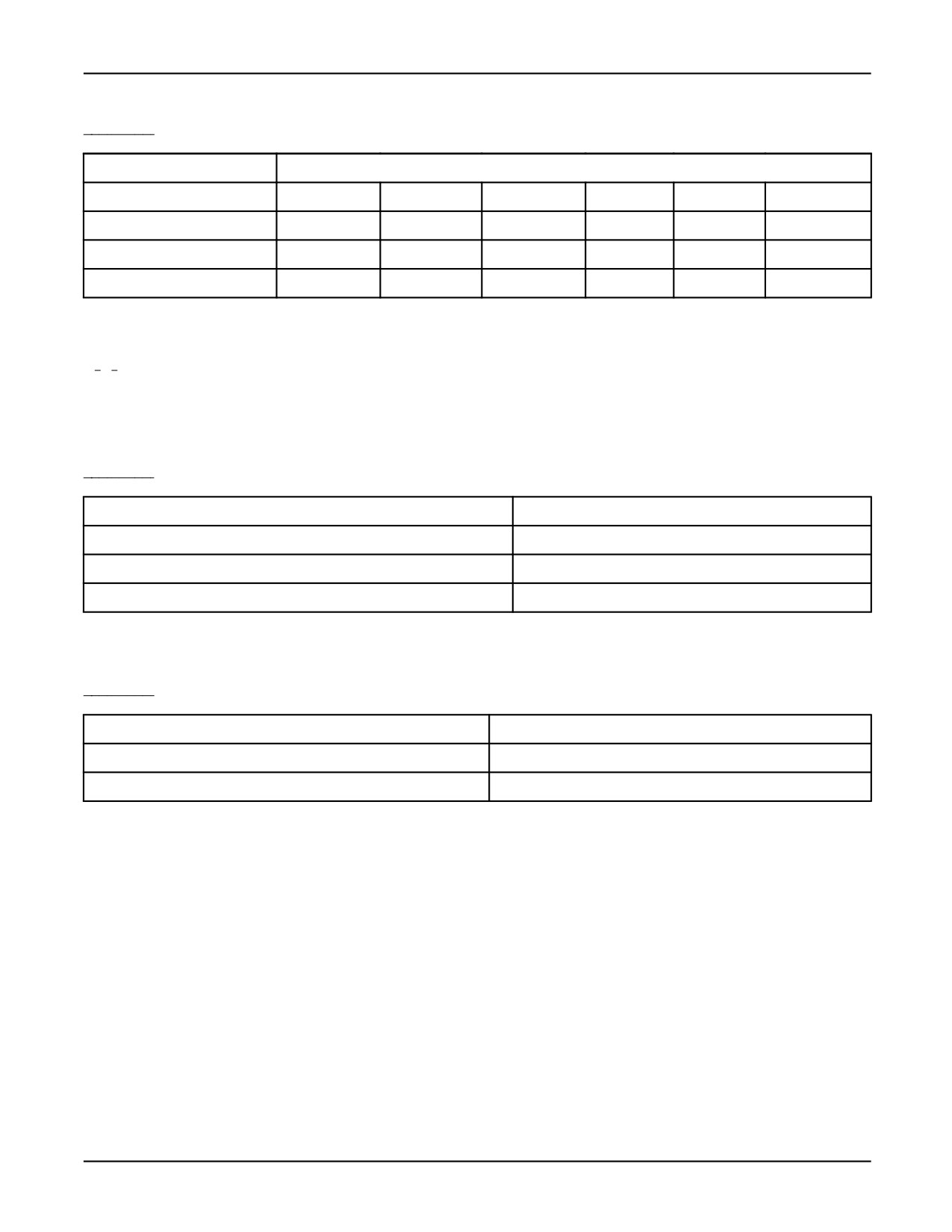
Table 3-2 lists all of the operators available for use with KAREL.
3-4
MARRC75KR07091E Rev D
3. USE OF OPERATORS
Table 3-2. KAREL Operators
Operation
Operator
Arithmetic
+
-
/
DIV
MOD
Relational
<
<=
=
<>
>=
>
Boolean
AND
OR
NOT
Special
>=<
:
#
@
3.2.1
Arithmetic Operations
The addition (+), subtraction (-), and multiplication (*) operators, along with the DIV and MOD
operators, can be used to compute values within arithmetic expressions. Refer to Table 3-3 .
Table 3-3. Arithmetic Operations Using +, -, and * Operators
EXPRESSION
RESULT
3 + 2
5
3 - 2
1
3 * 2
6
• The DIV and MOD operators are used to perform INTEGER division. Refer to Table 3-4 .
Table 3-4. Arithmetic Operations Examples
EXPRESSION
RESULT
11 DIV 2
5
11 MOD 2
1
— The DIV operator truncates the result of an equation if it is not a whole number.
— The MOD operator returns the remainder of an equation that results from dividing the
left-side operand by the right-side operand.
— If the right-side operand of a MOD equation is a negative number, the result is also negative.
— If the divisor in a DIV equation or the right-side operand of a MOD equation is zero, the
KAREL program is aborted with the ‘‘Divide by zero’’ error.
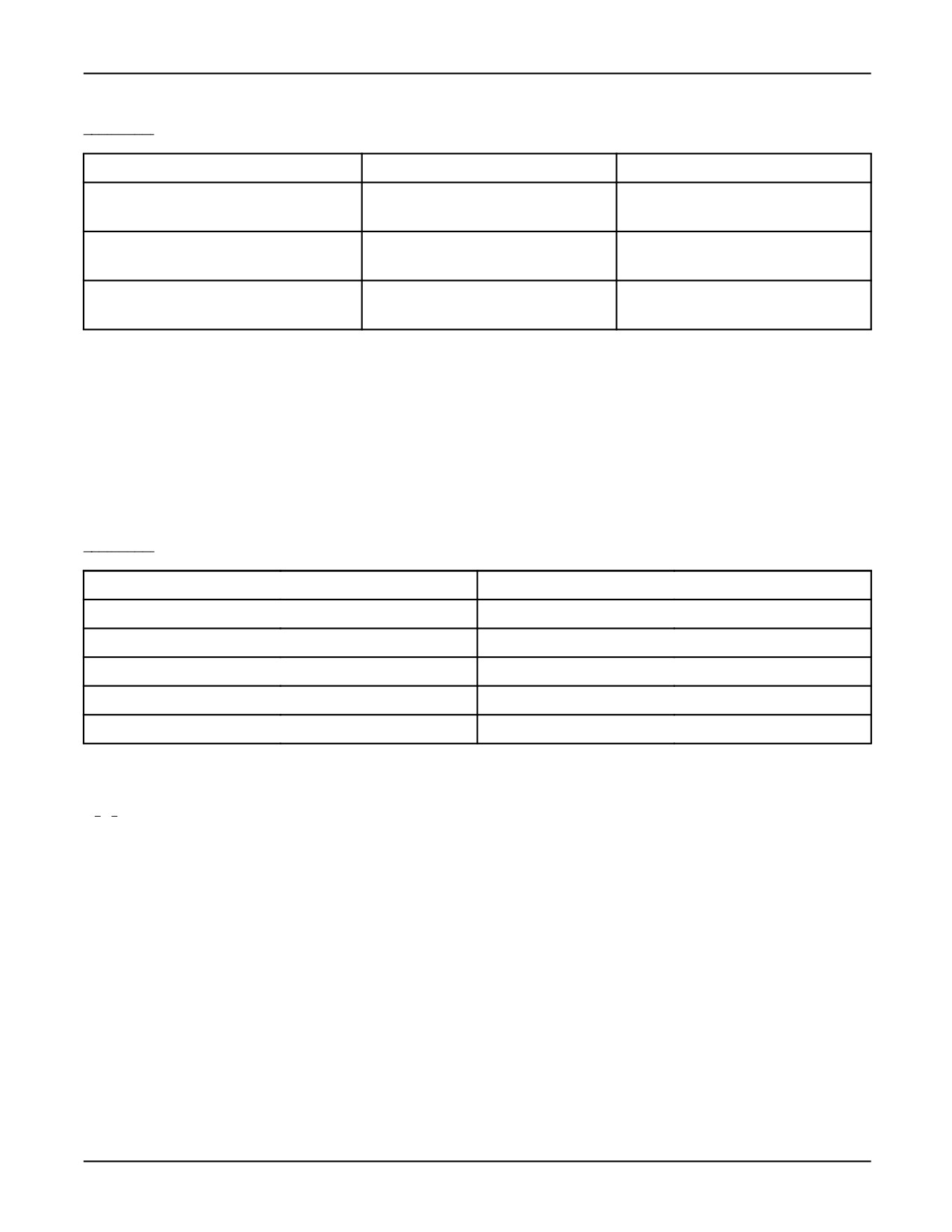
• The INTEGER bitwise operators, AND, OR, and NOT, produce the result of a binary AND, OR,
or NOT operation on two INTEGER values. Refer to Table 3-5 .
3-5
3. USE OF OPERATORS
MARRC75KR07091E Rev D
Table 3-5. Arithmetic Operations Using Bitwise Operands
EXPRESSION
BINARY EQUIVALENT
RESULT
5 AND 8
0101 AND 1000
0000 = 0
5 OR 8
0101 OR 1000
1101 = 13
-4 AND 8
1100 AND 1000
1000 = 8
-4 OR 8
1100 OR 1000
1100 = -4
NOT 5
NOT 0101
1010 = -6*
NOT -15
NOT 110001
1110 = 14*
*Because negative INTEGER values are represented in the two’s complement form, NOT i is not the
same as -i.
• If an INTEGER or REAL equation results in a value exceeding the limit for INTEGER or REAL
variables, the program is aborted with an error. If the result is too small to represent, it is set to
zero.
Table 3-6 lists the precedence levels for the KAREL operators.
Table 3-6. KAREL Operator Precedence
OPERATOR
PRECEDENCE LEVEL
NOT
High
:, @, #
Ļ
*, /, AND, DIV, MOD
Ļ
Unary + and -, OR, +, -
Ļ
<, >, =, < >, < =, > =, > = <
Low
3.2.2
Relational Operations
Relational operators (< >, =, >, <, <=, >=) produce a BOOLEAN (TRUE/FALSE) result corresponding
to whether or not the values of the operands are in the relation specified. In a relational expression,
both operands must be of the same simple data type. Two exceptions to this rule exist:
• REAL and INTEGER expressions can be mixed where the INTEGER operand is converted
to a REAL number.
For example, in the expression 1 > .56 , the number 1 is converted to 1.0 and the result is TRUE.
• VECTOR operands, which are a structured data type, can be compared in a relational expression
but only by using the equality (=) or inequality (<>) operators.
3-6
MARRC75KR07091E Rev D
3. USE OF OPERATORS
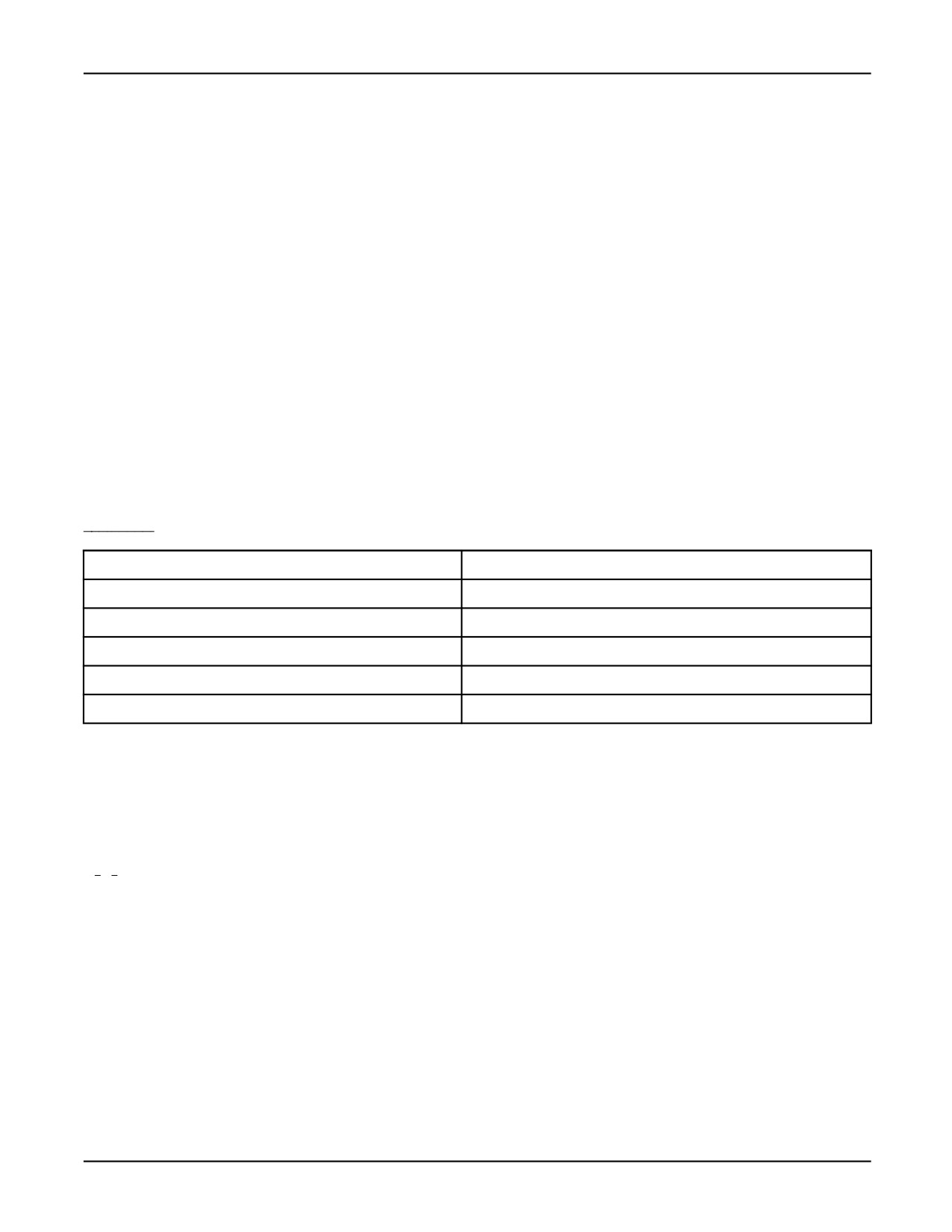
The relational operators function with INTEGER and REAL operands to evaluate standard
mathematical equations. Refer to Table 3-7 .
Note Performing equality (=) or inequality (<>) tests between REAL values might not yield the
results you expect. Because of the way REAL values are stored and manipulated, two values that
would appear to be equal might not be exactly equal. This is also true of VECTOR values which are
composed of REAL values. Use >= or <= where appropriate instead of =.
Relational operators can also have STRING values as operands. STRING values are compared
lexically character by character from left to right until one of the following occurs. Refer to Table 3-7
• The character code for a character in one STRING is greater than the character code for the
corresponding character in the other STRING. The result in this case is that the first string is
greater. For example, the ASCII code for A is 65 and for a is 97. Therefore, a > A = TRUE.
• One STRING is exhausted while characters remain in the other STRING. The result is that the
first STRING is less than the other STRING.
• Both STRING expressions are exhausted without finding a mismatch. The result is that the
STRINGs are equal.
Table 3-7. Relational Operation Examples
EXPRESSION
RESULT
’A’ < ’AA’
TRUE
’A’ = ’a’
FALSE
4 > 2
TRUE
17.3< > 5.6
TRUE
(3 *4) < > (4* 3)
FALSE
With BOOLEAN operands, TRUE > FALSE is defined as a true statement. Thus the expression
FALSE >= TRUE is a false statement. The statements FALSE >= FALSE and TRUE >= FALSE are
also true statements.
3.2.3
Boolean Operations
The Boolean operators AND, OR, and NOT, with BOOLEAN operands, can be used to perform
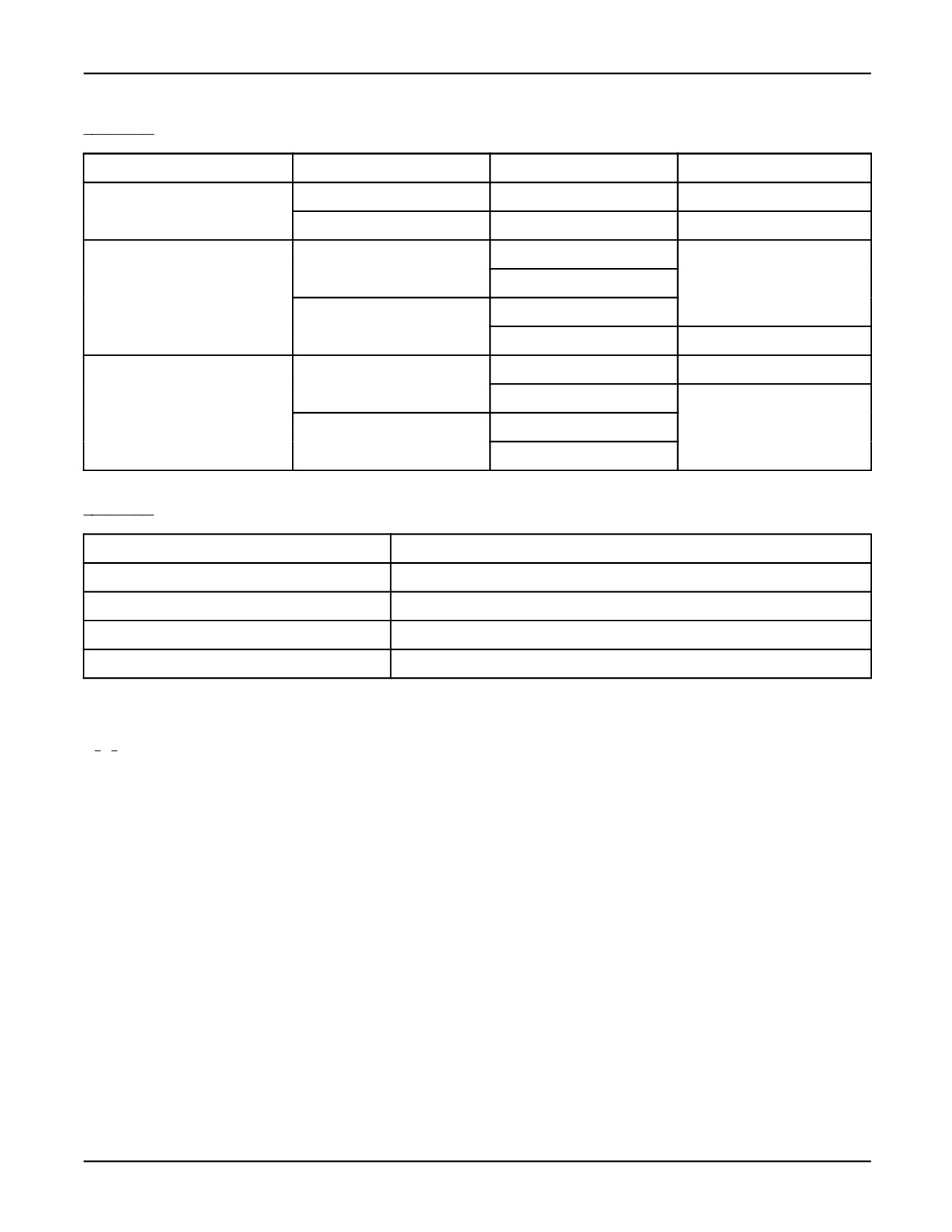
standard mathematical evaluations. Table 3-8 summarizes the results of evaluating Boolean
expressions, and some examples are listed in Table 3-9 .
3-7
3. USE OF OPERATORS
MARRC75KR07091E Rev D
Table 3-8. BOOLEAN Operation Summary
OPERATOR
OPERAND 1
OPERAND 2
RESULT
NOT
TRUE
í
FALSE
FALSE
í
TRUE
OR
TRUE
TRUE
TRUE
FALSE
FALSE
TRUE
FALSE
FALSE
AND
TRUE
TRUE
TRUE
FALSE
FALSE
FALSE
TRUE
FALSE
Table 3-9. BOOLEAN Operations Using AND, OR, and NOT Operators
EXPRESSION
RESULT
DIN[1] AND DIN[2]
TRUE if DIN[1] and DIN[2] are both TRUE; otherwise FALSE
DIN[1] AND NOT DIN[2]
TRUE if DIN[1] is TRUE and DIN[2] is FALSE; otherwise FALSE
(x < y) OR (y > z)
TRUE if x < y or if y > z; otherwise FALSE
(i = 2) OR (i = 753)
TRUE if i = 2 or if i = 753; otherwise FALSE
3.2.4
Special Operations
The KAREL language provides special operators to perform functions such as testing the value of
approximately equal POSITION variables, relative POSITION variables, VECTOR variables, and
STRING variables. This section describes their operations and gives examples of their usage.
The following rules apply to approximately equal operations:
• The relational operator (>=<) determines if two POSITION operands are approximately equal
and produces a BOOLEAN result. The comparison is similar to the equality (=) relation except
that the operands compared need not be identical. Extended axis values are not considered.
• Approximately equal operations must be used in conjunction with the system variables,
$LOCTOL, $ORIENTTOL, and $CHECKCONFIG to determine how close two positions must
be. Refer to the FANUC Robotics Software Reference Manual for a description of these variables.
3-8
MARRC75KR07091E Rev D
3. USE OF OPERATORS
• The relational operator (>=<) is allowed only in normal program use and cannot be used as a
condition in a condition handler statement.
In the following example the relational operator (>=<) is used to determine if the current robot
position (determined by using the CURPOS built-in procedure) is near the designated perch position:
Relational Operator
IF perch >=< CURPOS (0,0) THEN
—— Call move to perch program
move_to_perch
ELSE
ABORT
ENDIF
Relative Position Operations
To locate a position in space, you must reference it to a specific coordinate frame. In KAREL,
reference frames have the POSITION data type. The relative position operator (:) allows you to
reference a position or vector with respect to the coordinate frame of another position (that is, the
coordinate frame that has the other position as its origin point).
The relative position operator (:) is used to transform a position from one reference frame to another
frame.
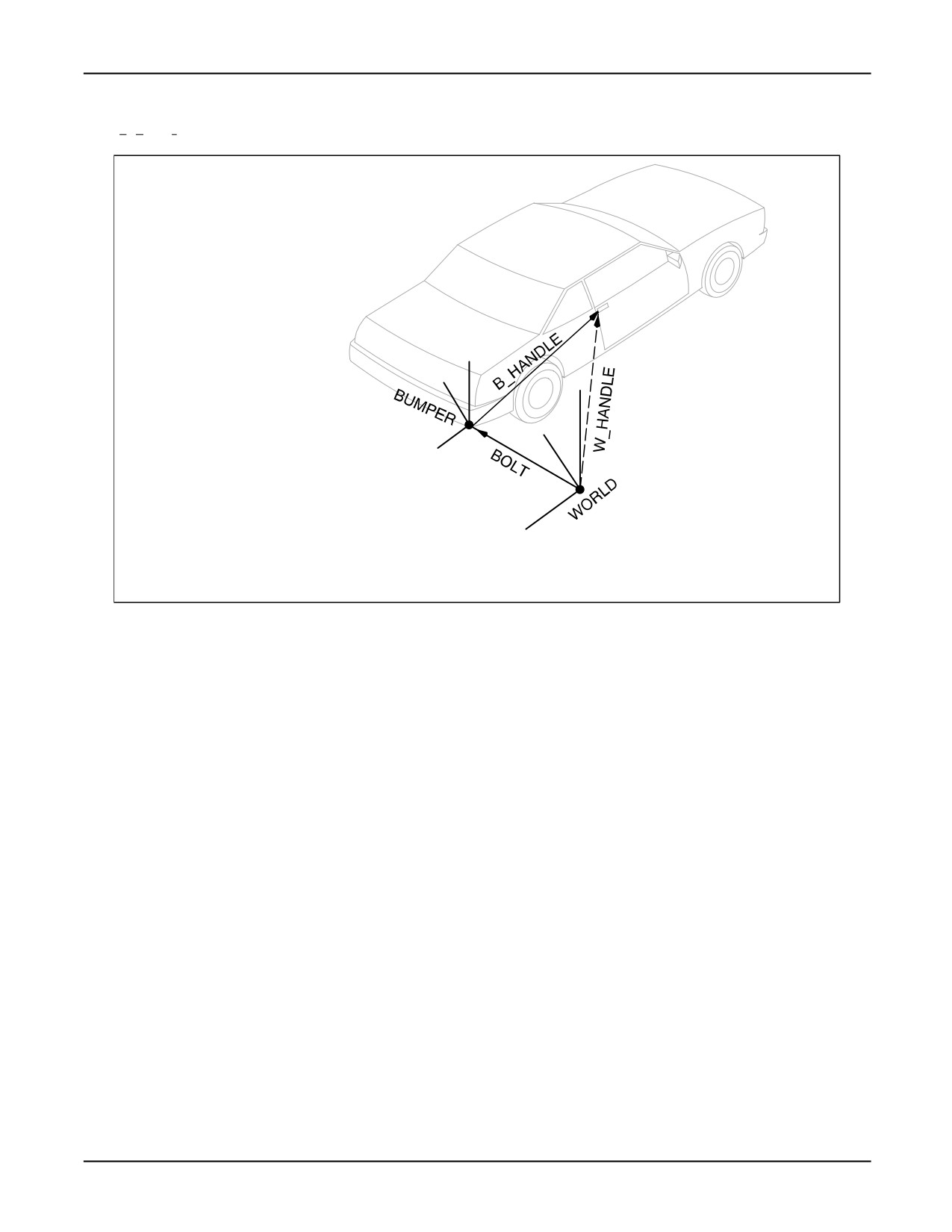
In the example shown in Figure 3-1 , a vision system is used to locate a target on a car such as a bolt
head on a bumper. The relative position operator is used to calculate the position of the door handle
based on data from the car drawings. The equation shown in Figure 3-1 is used to calculate the
position of w_handle in the WORLD frame.
3-9
3. USE OF OPERATORS
MARRC75KR07091E Rev D
Figure 3-1. Determining w_handle Relative to WORLD Frame
z
x
z
y
x
w_handle = bolt : b_handle
(world
(world
(bumper
frame)
frame)
frame)
y
where:
bolt is the position of the BUMPER frame origin referenced in the WORLD frame.
w_handle is the handle position referenced in the WORLD frame.
b_handle is the handle position referenced in the BUMPER frame.
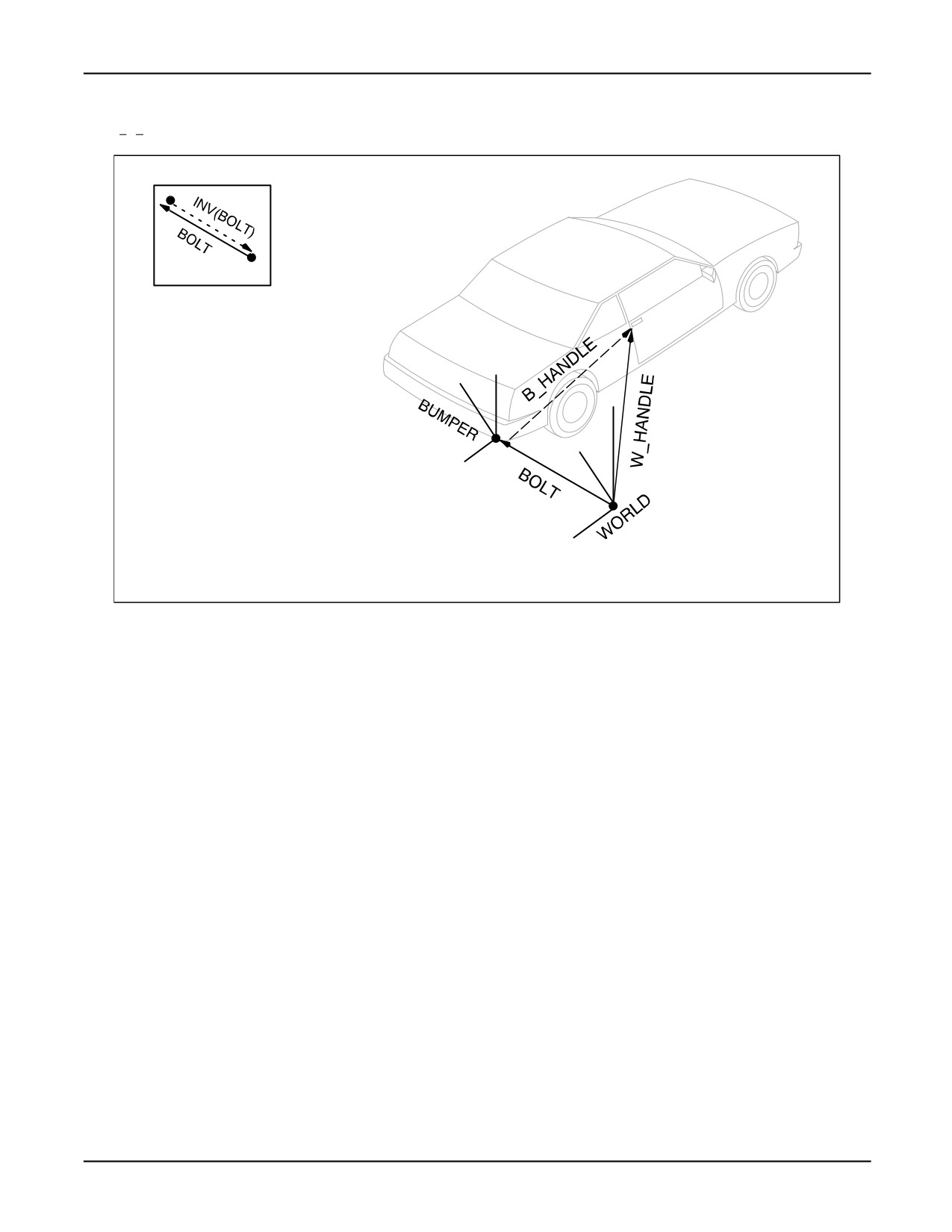
The KAREL INV Built-In Function reverses the direction of the reference.
For example, to determine the position of the door handle target (b_handle) relative to the position of
the bolt , use the equation shown in Figure 3-2 .
3-10
MARRC75KR07091E Rev D
3. USE OF OPERATORS
Figure 3-2. Determining b_handle Relative to BUMPER Frame
z
x
z
y
x
b_handle = INV(bolt) : w_handle
(bumper
(bumper
(world
frame) frame) frame)
y
where:
INV(bolt)
is the position of the WORLD frame origin referenced in the BUMPER frame.
w_handle is the handle position referenced in the WORLD frame.
b_handle is the handle position referenced in the BUMPER frame.
Note The order of the relative operator (:) is important.where:b_handle = bolt : w_handle is NOT the
same as b_handle = w_handle : bolt
See Also: Chapter 8 POSITION DATA , INV Built-In Function, Appendix A .
Vector Operations
The following rules apply to VECTOR operations:
• A VECTOR expression can perform addition (+) and subtraction (-) equations on VECTOR
operands. The result is a VECTOR whose components are the sum or difference of the
corresponding components of the operands. For example, the components of the VECTOR vect_3
will equal (5, 10, 9) as a result of the following program statements:
Vector Operations
vect_1.x = 4; vect_1.y = 8; vect_1.z = 5
vect_2.x = 1; vect_2.y = 2; vect_2.z = 4
vect_3 = vect_1 + vect_2
• The multiplication (*) and division (/) operators can be used with either
3-11
3. USE OF OPERATORS
MARRC75KR07091E Rev D
— A VECTOR and an INTEGER operand
— A VECTOR and a REAL operand
The product of a VECTOR and an INTEGER or a VECTOR and a REAL is a scaled version
of the VECTOR. Each component of the VECTOR is multiplied by the INTEGER (treated as
a REAL number) or the REAL.
For example, the VECTOR (8, 16, 10) is produced as a result of the following operation:
(4, 8, 5) * 2
VECTOR components can be on the left or right side of the operator.
•
A VECTOR divided by an INTEGER or a REAL causes each component of the VECTOR to
be divided by the INTEGER (treated as a REAL number) or REAL. For example, (4, 8, 5) / 2
results in (2, 4, 2.5).
If the divisor is zero, the program is aborted with the ‘‘Divide by zero’’ error.
•
An INTEGER or REAL divided by a VECTOR causes the INTEGER (treated as a REAL
number) or REAL to be multiplied by the reciprocal of each element of the VECTOR, thus
producing a new VECTOR. For example, 3.5 / VEC(7.0,8.0,9.0) results in (0.5,0.4375,0.38889).
If any of the elements of the VECTOR are zero, the program is aborted with the ‘‘Divide by
zero’’ error.
•
The cross product operator (#) produces a VECTOR that is normal to the two operands in the
direction indicated by the right hand rule and with a magnitude equal to the product of the
magnitudes of the two vectors and SIN(Ĭ), whereĬis the angle between the two vectors. For
example, VEC(3.0,4.0,5.0) # VEC(6.0,7.0,8.0) results in (-3.0, 6.0, -3.0).
If either vector is zero, or the vectors are exactly parallel, an error occurs.
•
The inner product operator (@) results in a REAL number that is the sum of the products of the
corresponding elements of the two vectors. For example, VEC(3.0,4.0,5.0) @ VEC(6.0,7.0,8.0)
results in 86.0.
•
If the result of any of the above operations is a component of a VECTOR with a magnitude too
large for a KAREL REAL number, the program is aborted with the ‘‘Real overflow’’ error.
Table 3-10 lists additional examples of vector operations.
3-12
MARRC75KR07091E Rev D
3. USE OF OPERATORS
Table 3-10. Examples of Vector Operations
EXPRESSION
RESULT
VEC(3.0,7.0,6.0) + VEC(12.6,3.2,7.5)
(15.6,10.2,13.5)
VEC(7.6,9.0,7.0) - VEC(14.0,3.5,17.0)
(-6.4,5.5,-10)
4.5 * VEC(3.2,7.6,4.0)
(14.4,34.2,18.0)
VEC(12.7,2.0,8.3) * 7.6
(96.52,15.2,63.08)
VEC(17.3,1.5,0.23) /2
(8.65,0.75,0.115)
String Operations
The following rules apply to STRING operations:
• You can specify that a KAREL routine returns a STRING as its value. See Specifying a KAREL
Routine to Return a STRING Value .
Specifying a KAREL Routine to Return a STRING Value
ROUTINE name(parameter_list): STRING
declares name as returning a STRING value
• An operator can be used between strings to indicate the concatenation of the strings. See Using an
Operator to Concatenate Strings .
Using an Operator to Concatenate Strings
string_1 = string_2 + string_3 + ’ABC’ + ’DEF’
• STRING expressions can be used in WRITE statements. See Using a STRING Expression in a
WRITE Statement .
Using a STRING Expression in a WRITE Statement
WRITE(CHR(13) + string_1 + string_2)
writes a single string consisting of a return
character followed by string_1 and string_2
3-13
3. USE OF OPERATORS
MARRC75KR07091E Rev D
• During STRING assignment, the string will be truncated if the target string is not large enough to
hold the same string.
• You can compare or extract a character from a string. For example if string_1 = ‘ABCDE’ . Your
output would be ‘D’ . See String Comparison .
String Comparison
IF SUB_STR(string_1, 4, 1) = ’D’ THEN
• You can build a string from another string. See Building a String from Another String .
Building a String from Another String
ROUTINE toupper(p_char: INTEGER): STRING
BEGIN
IF (p_char > 96) AND (p_char < 123) THEN
p_char = p_char - 32
ENDIF
RETURN (CHR(p_char))
END toupper
BEGIN
WRITE OUTPUT (’Enter string: ’)
READ INPUT (string_1)
string_2 = ’’
FOR idx = 1 TO STR_LEN(string_1) DO
string_2 = string_2 + toupper(ORD(string_1, idx))
ENDFOR
3-14
Chapter 4
PROGRAM CONTROL
Contents
Chapter 4
PROGRAM CONTROL
4-1
4.1
OVERVIEW
4-2
4.2
PROGRAM CONTROL STRUCTURES
4-2
4.2.1
Alternation Control Structures
4-2
4.2.2
Looping Control Statements
4-3
4.2.3
Unconditional Branch Statement
4-3
4.2.4
Execution Control Statements
4-3
4.2.5
Condition Handlers
4-4
4-1
4. PROGRAM CONTROL
MARRC75KR07091E Rev D
4.1 OVERVIEW
Program control structures define the flow of execution within a program or routine and include
alternation, looping, and unconditional branching as well as execution control.
4.2
PROGRAM CONTROL STRUCTURES
Program control structures can be used to define the flow of execution within a program or routine.
By default, execution starts with the first statement following the BEGIN statement and proceeds
sequentially until the END statement (or a RETURN statement) is encountered. The following control
structures are available in KAREL:
• Alternation
• Looping
• Unconditional Branching
• Execution Control
• Condition Handlers
For detailed information on each type of control structure, refer to Appendix A, ‘‘KAREL Language
Alphabetical Description.’’
4.2.1
Alternation Control Structures
An alternation control structure allows you to include alternative sequences of statements in a program
or routine. Each alternative can consist of several statements.
During program execution, an alternative is selected based on the value of one or more data items.
Program execution then proceeds through the selected sequence of statements.
Two types of alternation control structures can be used:
• IF Statement - provides a means of specifying one of two alternatives based on the value of
a BOOLEAN expression.
• SELECT Statement - used when a choice is to be made between several alternatives. An
alternative is chosen depending on the value of the specified INTEGER expression.
See Also: IF...THEN Statement, Appendix A , SELECT Statement, Appendix A .
4-2
MARRC75KR07091E Rev D
4. PROGRAM CONTROL
4.2.2
Looping Control Statements
A looping control structure allows you to specify that a set of statements be repeated an arbitrary
number of times, based on the value of data items in the program. KAREL supports three looping
control structures:
• The FOR statement - used when a set of statements is to be executed a specified number of
times. The number of times is determined by INTEGER data items in the FOR statement. At
the beginning of the FOR loop, the initial value in the range is assigned to an INTEGER counter
variable. Each time the cycle is repeated, the counter is reevaluated.
• The REPEAT statement - allows execution of a sequence of statements to continue as long as
some BOOLEAN expression remains FALSE. The sequence of executable statements within the
REPEAT statement will always be executed once.
• The WHILE statement - used when an action is to be executed as long as a BOOLEAN
expression remains TRUE. The boolean expression is tested at the start of each iteration, so it is
possible for the action to be executed zero times.
See Also: FOR Statement, Appendix A , REPEAT Statement, Appendix A , WHILE Statement,
Appendix A
4.2.3
Unconditional Branch Statement
Unconditional branching allows you to use a GO TO Statement to transfer control from one place
in a program to a specified label in another area of the program, without being dependent upon a
condition or BOOLEAN expression.
Warning
Never include a GO TO Statement into or out of a FOR loop. The program
might be aborted with a "Run time stack overflow" error.
See Also: GO TO Statement, Appendix A .
4.2.4
Execution Control Statements
The KAREL language provides the following program control statements, which are used to terminate
or suspend program execution:
• ABORT - causes the execution of the program, including any motion in progress, to be
terminated. The program cannot be continued after being aborted.
• DELAY - causes execution to be suspended for a specified time, expressed in milliseconds.
4-3
4. PROGRAM CONTROL
MARRC75KR07091E Rev D
• PAUSE - causes execution to be suspended until a CONTINUE operation is executed.
• WAIT FOR - causes execution to be suspended until a specified condition or list of conditions is
satisfied.
See Also: ABORT Statement, DELAY Statement, PAUSE Statement, WAIT FOR Statement, all in
Appendix A , Chapter 6 CONDITION HANDLERS
4.2.5
Condition Handlers
A condition handler defines a series of actions which are to be performed whenever a specified
condition is satisfied. Once defined, a condition handler can be ENABLED or DISABLED.
4-4
Chapter 5
ROUTINES
Contents
Chapter 5
ROUTINES
5-1
5.1
ROUTINE EXECUTION
5-2
5.1.1
Declaring Routines
5-2
5.1.2
Invoking Routines
5-5
5.1.3
Returning from Routines
5-7
5.1.4
Scope of Variables
5-8
5.1.5
Parameters and Arguments
5-9
5.1.6
Stack Usage
5-13
5.2
BUILT- IN ROUTINES
5-15
5-1
5. ROUTINES
MARRC75KR07091E Rev D
Routines, similar in structure to a program, provide a method of modularizing KAREL programs.
Routines can include VAR and/or CONST declarations and executable statements. Unlike programs,
however, a routine must be declared within an upper case program, and cannot include other routine
declarations.
KAREL supports two types of routines:
• Procedure Routines - do not return a value
• Function Routines - return a value
KAREL routines can be predefined routines called built-in routines or they can be user-defined.
The following rules apply to all KAREL routines:
• Parameters can be included in the declaration of a routine. This allows you to pass data to the
routine at the time it is called, and return the results to the calling program.
• Routines can be called or invoked:
— By the program in which they are declared
— By any routine contained in that program
— With declarations by another program, refer to Section 5.1.1
5.1
ROUTINE EXECUTION
This section explains the execution of procedure and function routines:
• Declaring routines
• Invoking routines
• Returning from routines
• Scope of variables
• Parameters and Arguments
5.1.1
Declaring Routines
The following rules apply to routine declarations:
• A routine cannot be declared in another routine.
• The ROUTINE statement is used to declare both procedure and function routines.
• Both procedure and function routines must be declared before they are called.
5-2