FANUC Series Series 16i-TB, Series 18i-TB, Series 160i-TB, Series 180i-TB. OPERATOR’S MANUAL - page 12
B-63524EN/01
PROGRAMMING
15. CUSTOM MACRO
S Also, be careful when rounding down a value.
Example:
When #2=#1*1000; is calculated where #1=0.002;, the resulting
value of variable #2 is not exactly 2 but 1.99999997.
Here, when #3=FIX[#2]; is specified, the resulting value of
variable #1 is not 2.0 but 1.0. In this case, round down the value
after correcting the error so that the result is greater than the
expected number, or round it off as follows:
#3=FIX[#2+0.001]
#3=ROUND[#2]
D Divisor
When a divisor of zero is specified in a division or TAN[90], alarm No.
112 occurs.
309
15. CUSTOM MACRO
PROGRAMMING
B-63524EN/01
The following blocks are referred to as macro statements:
15.4
MACRO
S Blocks containing an arithmetic or logic operation (=)
STATEMENTS AND
S Blocks containing a control statement (such as GOTO, DO, END)
NC STATEMENTS
S Blocks containing a macro call command (such as macro calls by
G65, G66, G67, or other G codes, or by M codes)
Any block other than a macro statement is referred to as an NC statement.
Explanations
D Differences from NC
S Even when single block mode is on, the machine does not stop. Note,
statements
however, that the machine stops in the single block mode when bit 5
(SBM) of parameter 6000 is 1.
S Macro blocks are not regarded as blocks that involve no movement in
the tool nose radius compensation mode (see Section II-15.7).
D NC statements that have
When parameter NPS (No. 3450#4) is set to 1, the NC statements in a
the same property as
block satisfying the following conditions are equivalent to macro
macro statements
statements.
S If a block contains a subprogram call command (M98, a subprogram
call using an M code, or a subprogram call using a T code) and does
not contain any command address other than O, N, P, or L, that block
is equivalent to a macro statement.
S If a block contains M99 and does not contain any command address
other than O, N, P, or L, that block is equivalent to a macro statement.
310

B-63524EN/01
PROGRAMMING
15. CUSTOM MACRO
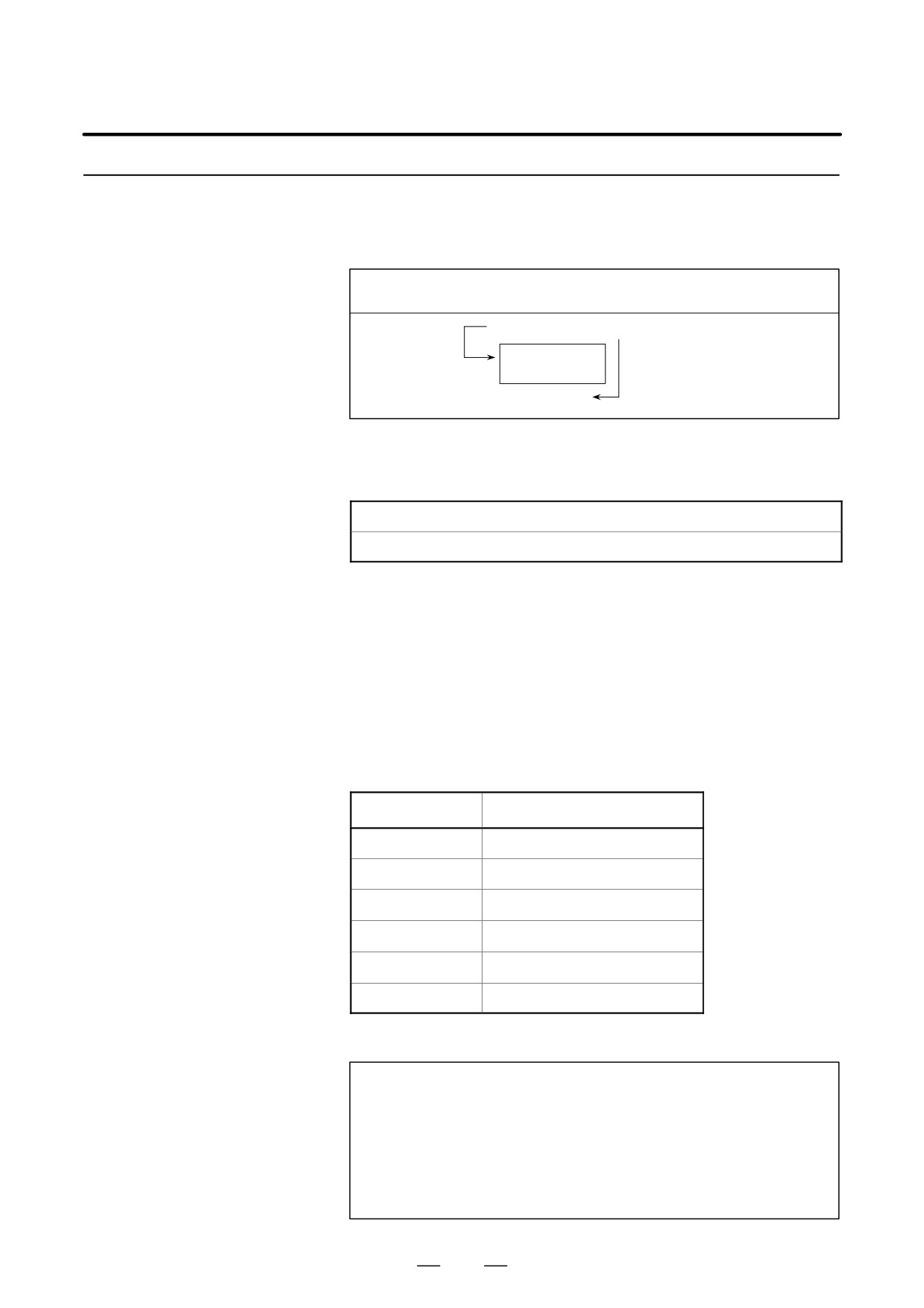
In a program, the flow of control can be changed using the GOTO
15.5
statement and IF statement. Three types of branch and repetition
BRANCH AND
operations are used:
REPETITION
Branch and repetition
GOTO statement (unconditional branch)
IF statement (conditional branch: if ..., then...)
WHILE statement (repetition while ...)
A branch to sequence number n occurs. When a sequence number outside
15.5.1
of the range 1 to 99999 is specified, P/S alarm No. 128 occurs. A sequence
Unconditional Branch
number can also be specified using an expression.
(GOTO Statement)
GOTO n ; n: Sequence number (1 to 99999)
Example:
GOTO1;
GOTO#10;
311
15. CUSTOM MACRO
PROGRAMMING
B-63524EN/01
15.5.2
Specify a conditional expression after IF. IF [<conditional expression>]
GOTO n If the specified conditional expression is satisfied, a branch to
Conditional Branch
sequence number n occurs. If the specified condition is not satisfied, the
(IF Statement)
next block is executed.
If the value of variable #1 is greater than 10, a branch to sequence number
N2 occurs.
If the condition
IF [#1 GT 10] GOTO 2 ;
is not satisfied
Processing
If the condition is satisfied
N2 G00 G91 X10.0 ;
:
IF[<conditional
If the specified conditional expression is satisfied, a predetermined macro
expression>]THEN
statement is executed. Only a single macro statement is executed.
If the values of #1 and #2 are the same, 0 is assigned to #3.
IF [#1 EQ #2] THEN #3=0;
Explanations
A conditional expression must include an operator inserted between two
D Conditional expression
variables or between a variable and constant, and must be enclosed in
brackets ([, ]). An expression can be used instead of a variable.
D Operators
Operators each consist of two letters and are used to compare two values
to determine whether they are equal or one value is smaller or greater than
the other value. Note that the inequality sign cannot be used.
Table 15.5.2 Operators
Operator
Meaning
EQ
Equal to(=)
NE
Not equal to(0)
GT
Greater than(>)
GE
Greater than or equal to(y)
LT
Less than(<)
LE
Less than or equal to(x)
Sample program
The sample program below finds the total of numbers 1 to 10.
O9500;
#1=0;Initial value of the variable to hold the sum
#2=1;Initial value of the variable as an addend
N1 IF[#2 GT 10] GOTO 2; . Branch to N2 when the addend is greater than
10
#1=#1+#2; Calculation to find the sum
#2=#2+1; Next addend
GOTO 1; Branch to N1
N2 M30;End of program
312

B-63524EN/01
PROGRAMMING
15. CUSTOM MACRO
15.5.3
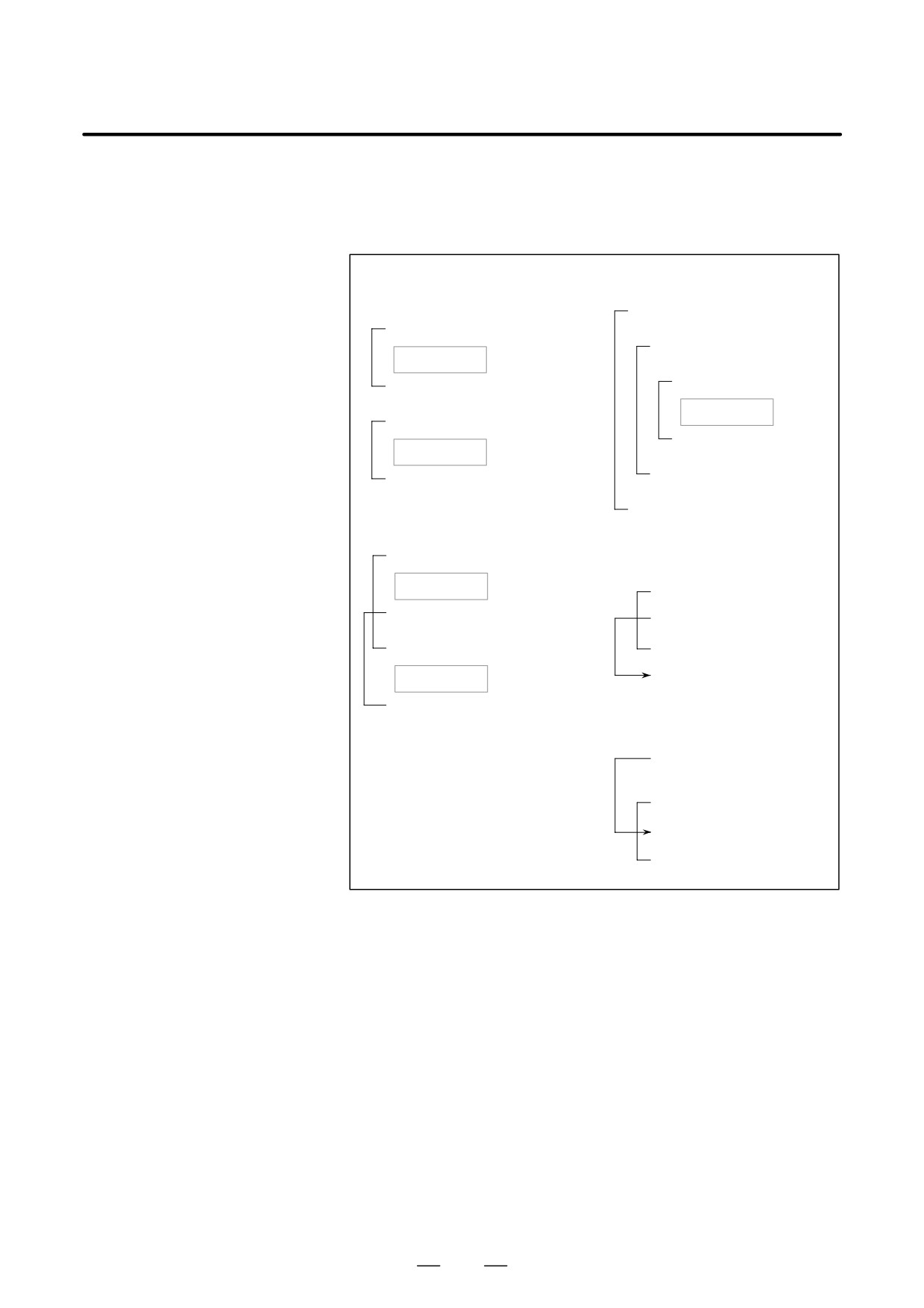
Specify a conditional expression after WHILE. While the specified
condition is satisfied, the program from DO to END is executed. If the
Repetition
specified condition is not satisfied, program execution proceeds to the
(While Statement)
block after END.
WHILE [conditional expression] DO m ; (m=1,2,3)
If the condition
If the condition
Processing
is not satisfied
is satisfied
END m ;
:
Explanations
While the specified condition is satisfied, the program from DO to END
after WHILE is executed. If the specified condition is not satisfied,
program execution proceeds to the block after END. The same format as
for the IF statement applies. A number after DO and a number after END
are identification numbers for specifying the range of execution. The
numbers 1, 2, and 3 can be used. When a number other than 1, 2, and 3
is used, P/S alarm No. 126 occurs.
313
15. CUSTOM MACRO
PROGRAMMING
B-63524EN/01
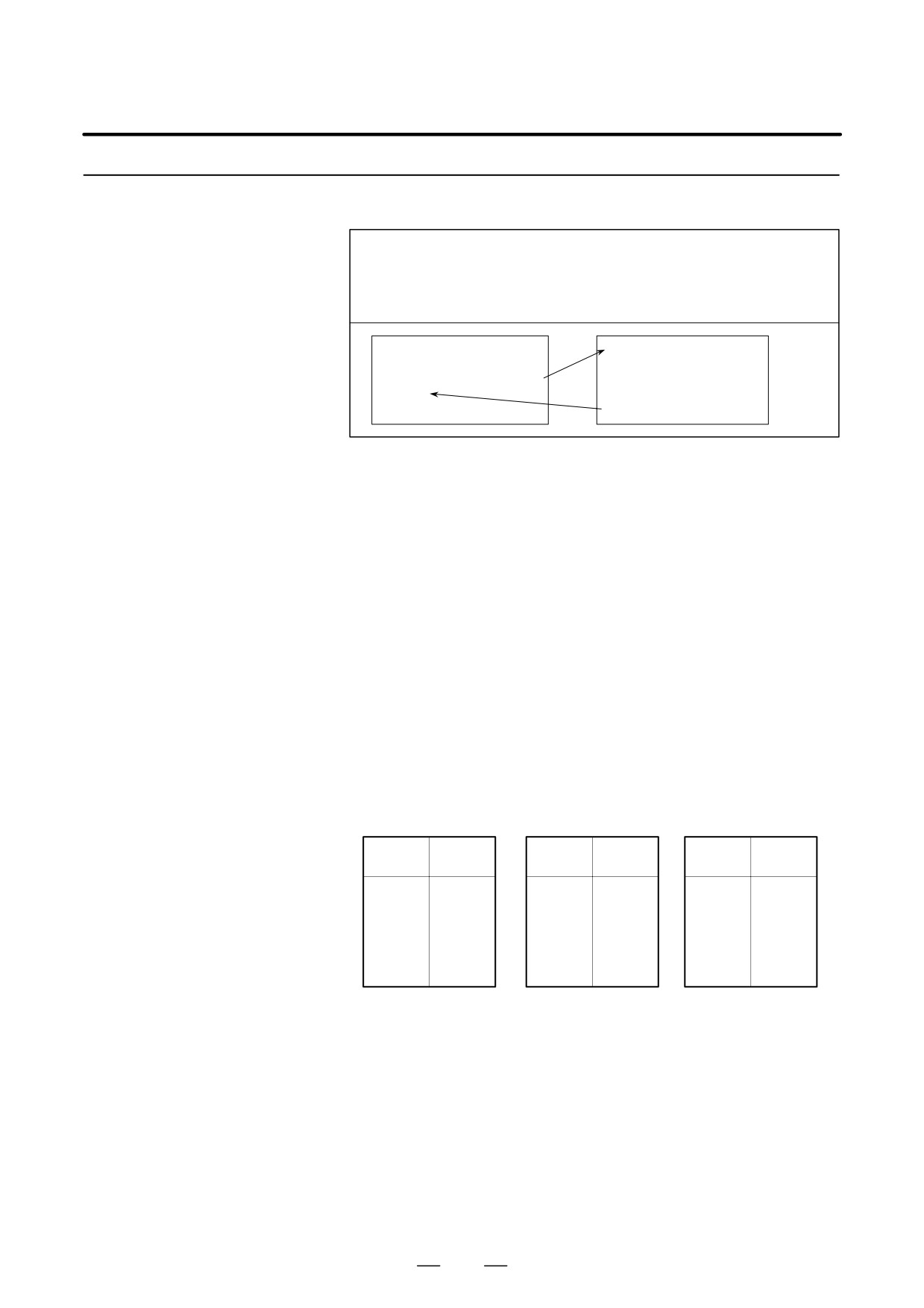
D Nesting
The identification numbers (1 to 3) in a DO-END loop can be used as
many times as desired. Note, however, when a program includes crossing
repetition loops (overlapped DO ranges), P/S alarm No. 124 occurs.
3. DO loops can be nested to a
1. The identification numbers
maximum depth of three levels.
(1 to 3) can be used as many
times as required.
WHILE [ … ] DO 1 ;
WHILE [ … ] DO 1 ;
:
WHILE [ … ] DO 2 ;
Processing
:
WHILE [ … ] DO 3 ;
END 1 ;
:
Processing
WHILE [ … ] DO 1 ;
END 3 ;
Processing
:
END 2 ;
END 1 ;
:
END 1 ;
2. DO ranges cannot overlap.
4. Control can be transferred to the
WHILE [ … ] DO 1 ;
outside of a loop.
Processing
WHILE [ … ] DO 1 ;
WHILE [ … ] DO 2 ;
IF [ … ] GOTO n ;
:
END 1 ;
END 1 ;
Processing
Nn
END 2 ;
5. Branches cannot be made to a
location within a loop.
IF [ … ] GOTO n ;
:
WHILE [ … ] DO 1 ;
Nn … ;
END 1 ;
Limitations
D Infinite loops
When DO m is specified without specifying the WHILE statement, an
infinite loop ranging from DO to END is produced.
D Processing time
When a branch to the sequence number specified in a GOTO statement
occurs, the sequence number is searched for. For this reason, processing
in the reverse direction takes a longer time than processing in the forward
direction. Using the WHILE statement for repetition reduces processing
time.
D Undefined variable
In a conditional expression that uses EQ or NE, a null value and zero have
different effects. In other types of conditional expressions, a null value
is regarded as zero.
314
B-63524EN/01
PROGRAMMING
15. CUSTOM MACRO
Sample program
The sample program below finds the total of numbers 1 to 10.
O0001;
#1=0;
#2=1;
WHILE[#2 LE 10]DO 1;
#1=#1+#2;
#2=#2+1;
END 1;
M30;
315

15. CUSTOM MACRO
PROGRAMMING
B-63524EN/01
A macro program can be called using the following methods:
15.6
MACRO CALL
Macro call
Simple call ((G65)
modal call (G66, G67)
Macro call with G code
Macro call with M code
Subprogram call with M code
Subprogram call with T code
Restrictions
D Differences between
Macro call (G65) differs from subprogram call (M98) as described below.
macro calls and
D With G65, an argument (data passed to a macro) can be specified. M98
subprogram calls
does not have this capability.
D When an M98 block contains another NC command (for example,
G01 X100.0 M98Pp), the subprogram is called after the command is
executed. On the other hand, G65 unconditionally calls a macro.
D When an M98 block contains another NC command (for example,
G01 X100.0 M98Pp), the machine stops in the single block mode. On
the other hand, G65 does not stops the machine.
D With G65, the level of local variables changes. With M98, the level
of local variables does not change.
316
B-63524EN/01
PROGRAMMING
15. CUSTOM MACRO
15.6.1
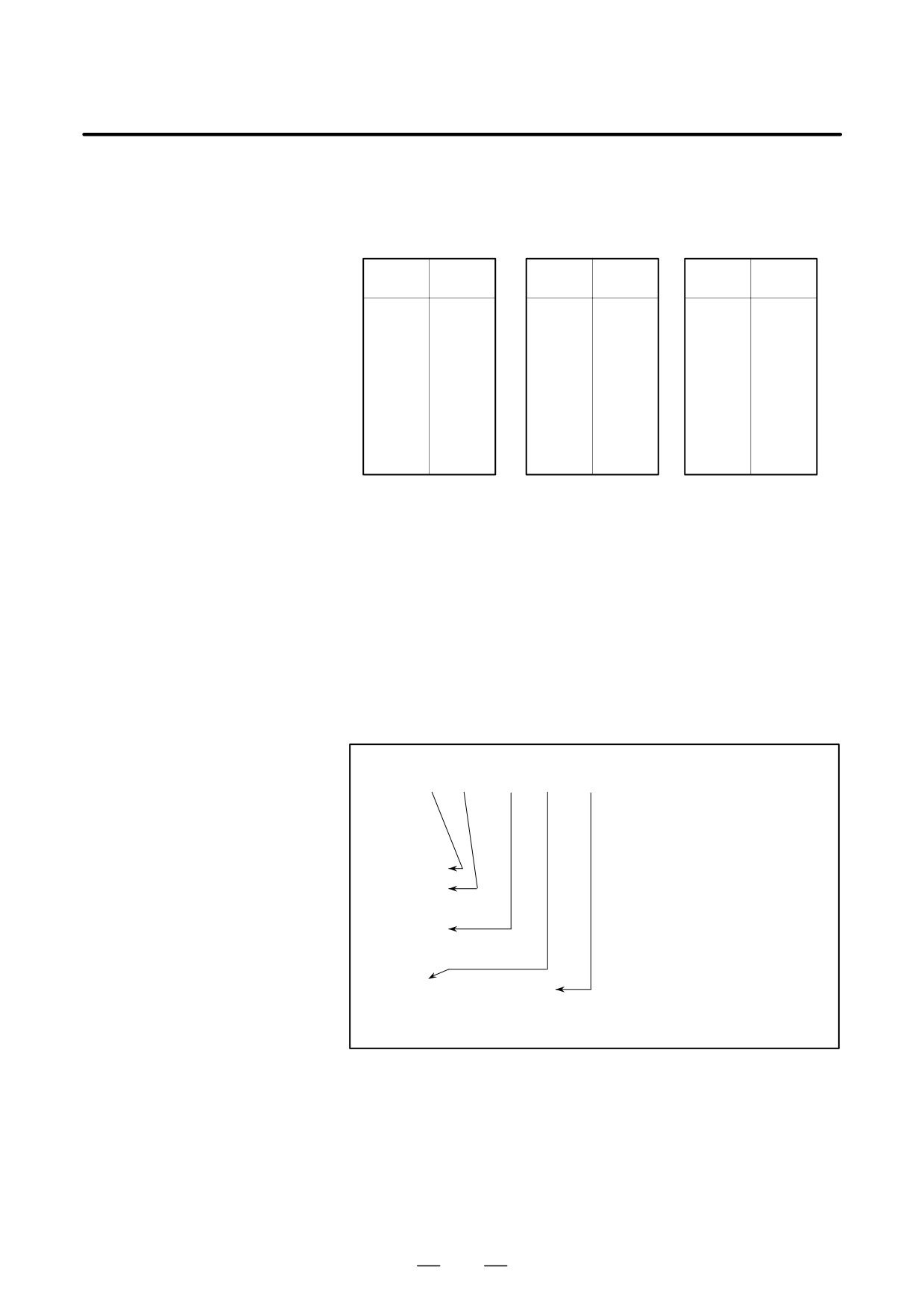
When G65 is specified, the custom macro specified at address P is called.
Data (argument) can be passed to the custom macro program.
Simple Call (G65)
G65 P_ L_ <argument-specification> ;
P_: Number of the program to call
L_
: Repetition count (1 by default)
Argument : Data passed to the macro
O0001 ;
O9010 ;
:
#3=#1+#2 ;
G65 P9010 L2 A1.0 B2.0 ;
IF [#3 GT 360] GOTO 9 ;
:
G00 X#3 ;
M30 ;
N9 M99 ;
Explanations
D Call
D After G65, specify at address P the program number of the custom
macro to call.
D When a number of repetitions is required, specify a number from 1 to
9999 after address L. When L is omitted, 1 is assumed.
D By using argument specification, values are assigned to corresponding
local variables.
D Argument specification
Two types of argument specification are available. Argument
specification I uses letters other than G, L, O, N, and P once each.
Argument specification II uses A, B, and C once each and also uses I, J,
and K up to ten times. The type of argument specification is determined
automatically according to the letters used.
Argument specification I
Address
Variable
Address
Variable
Address
Variable
number
number
number
A
#1
I
#4
T
#20
B
#2
J
#5
U
#21
C
#3
K
#6
V
#22
D
#7
M
#13
W
#23
E
#8
Q
#17
X
#24
F
#9
R
#18
Y
#25
H
#11
S
#19
Z
#26
D Addresses G, L, N, O, and P cannot be used in arguments.
D Addresses that need not be specified can be omitted. Local variables
corresponding to an omitted address are set to null.
D Addresses do not need to be specified alphabetically. They conform
to word address format.
I, J, and K need to be specified alphabetically, however.
Example
B_A_D_ … J_K_ Correct
B_A_D_ … J_I_ Incorrect
317
15. CUSTOM MACRO
PROGRAMMING
B-63524EN/01
Argument specification II
Argument specification II uses A, B, and C once each and uses I, J, and
K up to ten times. Argument specification II is used to pass values such
as three-dimensional coordinates as arguments.
Variable
Variable
Variable
Address
Address
Address
number
number
number
A
#1
K3
#12
J7
#23
B
#2
I4
#13
K7
#24
C
#3
J4
#14
I8
#25
I1
#4
K4
#15
J8
#26
J1
#5
I5
#16
K8
#27
K1
#6
J5
#17
I9
#28
I2
#7
K5
#18
J9
#29
J2
#8
I6
#19
K9
#30
K2
#9
J6
#20
I10
#31
I3
#10
K6
#21
J10
#32
J3
#11
I7
#22
K10
#33
D Subscripts of I, J, and K for indicating the order of argument
specification are not written in the actual program.
Restrictions
D Format
G65 must be specified before any argument.
D Mixture of argument
The CNC internally identifies argument specification I and argument
specifications I and II
specification II. If a mixture of argument specification I and argument
specification II is specified, the type of argument specification specified
later takes precedence.
Example
G65
A1.0 B2.0
I-3.0
I4.0
D5.0
P1000;
<Variables>
#1:1.0
#2:2.0
#3:
#4:-3.0
#5:
#6:
#7:
5.0
When both the I4.0 and D5.0 arguments are commanded for
variable #7 in this example, the latter, D5.0, is valid.
D Position of the decimal
The units used for argument data passed without a decimal point
point
correspond to the least input increment of each address. The value of an
argument passed without a decimal point may vary according to the
system configuration of the machine. It is good practice to use decimal
points in macro call arguments to maintain program compatibility.
D Call nesting
Calls can be nested to a depth of four levels including simple calls (G65)
and modal calls (G66). This does not include subprogram calls (M98).
318
B-63524EN/01
PROGRAMMING
15. CUSTOM MACRO
D Local variable levels
D Local variables from level 0 to 4 are provided for nesting.
D The level of the main program is 0.
D Each time a macro is called (with G65 or G66), the local variable level
is incremented by one. The values of the local variables at the previous
level are saved in the CNC.
D When M99 is executed in a macro program, control returns to the
calling program. At that time, the local variable level is decremented
by one; the values of the local variables saved when the macro was
called are restored.
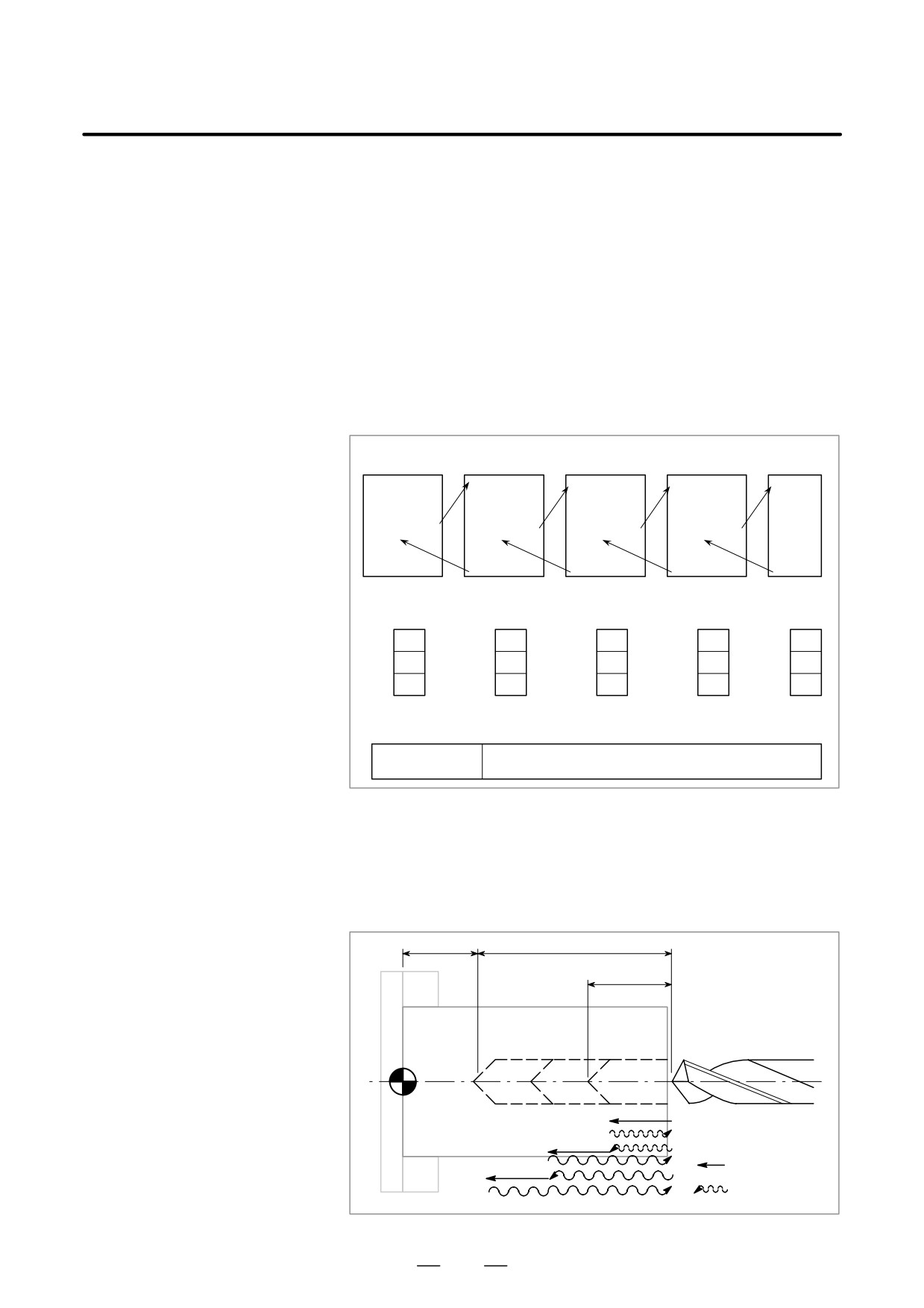
Main program
Macro
(level 0)
Macro (level 1) Macro (level 2) Macro (level 3)
(level 4)
O0001 ;
O0002 ;
O0003 ;
O0004 ;
O0005 ;
:
:
:
:
:
#1=1 ;
:
:
:
:
G65 P2 A2 ;
G65 P3 A3 ;
G65 P4 A4 ;
G65 P5 A5 ;
:
:
:
:
:
:
:
:
:
:
:
M30 ;
M99 ;
M99 ;
M99 ;
M99 ;
Local variables
(level 0)
(Level 1)
(Level 2)
(Level 3)
(Level 4)
#1
1
#1
2
#1
3
#1
4
#1
5
:
:
:
:
:
:
:
:
:
:
#33
#33
#33
#33
#33
Common variables
#100-, #500-
Variables that can be read from and written to by
macros at different levels
Sample program
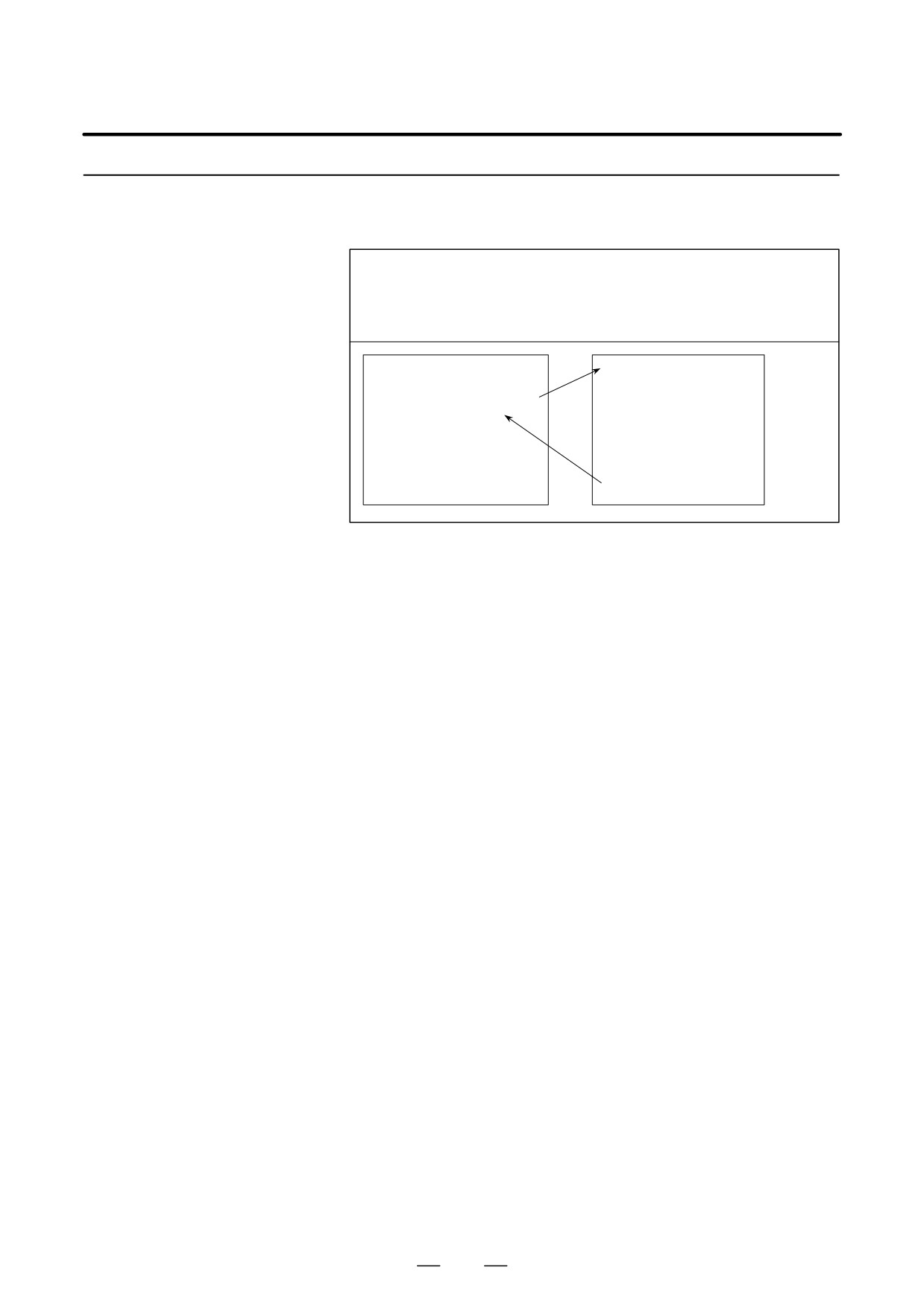
Move the tool beforehand along the X- and Z-axes to the position where
(Drill cycle)
a drilling cycle starts. Specify Z or W for the depth of a hole, K for the
depth of a cut, and F for the cutting feedrate to drill the hole.
Z
W
K
Cutting
Rapid traverse
319
15. CUSTOM MACRO
PROGRAMMING
B-63524EN/01
D Calling format
Zz
G65 P9100
Kk Ff ;
Ww
Z: Hole depth (absolute specification)
U: Hole depth (incremental specification)
K: Cutting amount per cycle
F : Cutting feedrate
D Program calling a macro
O0002;
program
G50 X100.0 Z200.0 ;
G00 X0 Z102.0 S1000 M03 ;
G65 P9100 Z50.0 K20.0 F0.3 ;
G00 X100.0 Z200.0 M05 ;
M30 ;
D Macro program
O9100;
(called program)
#1=0 ;
Clear the data for the depth of the current hole.
#2=0 ;
Clear the data for the depth of the preceding
hole.
IF [#23 NE #0] GOTO 1 ;
If incremental programming, specifies the
jump to N1.
IF [#26 EQ #0] GOTO 8 ;
If neither Z nor W is specified, an error occurs.
#23=#5002-#26 ;
Calculates the depth of a hole.
N1 #1=#1+#6 ;
Calculates the depth of the current hole.
IF [#1 LE #23] GOTO 2 ;
Determines whether the hole to be cut is
too deep?
#1=#23 ;
Clamps at the depth of the current hole.
N2 G00 W-#2 ;
Moves the tool to the depth of the preceding
hole at the cutting feedrate.
G01 W- [#1-#2] F#9 ;
Drills the hole.
G00 W#1 ;
Moves the tool to the drilling start point.
IF [#1 GE #23] GOTO 9 ;
Checks whether drilling is completed.
#2=#1 ;
Stores the depth of the current hole.
GOTO 1 ;
N9 M99 ;
N8 #3000=1 (NOT Z OR U COMMAND)
320
B-63524EN/01
PROGRAMMING
15. CUSTOM MACRO
15.6.2
Once G66 is issued to specify a modal call a macro is called after a block
specifying movement along axes is executed. This continues until G67
Modal Call (G66)
is issued to cancel a modal call.
G66 P p L ȏ <argument-specification> ;
P : Number of the program to call
ȏ : Repetition count (1 by default)
Argument : Data passed to the macro
O0001 ;
O9100 ;
:
:
G66 P9100 L2 A1.0 B2.0 ;
G00 Z-#1 ;
G00 G90 X100.0 ;
G01 Z-#2 F0.3 ;
X125.0 ;
:
X150.0 ;
:
G67 ;
:
:
:
M30 ;
M99 ;
Explanations
D Call
D After G66, specify at address P a program number subject to a modal
call.
D When a number of repetitions is required, a number from 1 to 9999 can
be specified at address L.
D As with a simple call (G65), data passed to a macro program is
specified in arguments.
D Cancellation
When a G67 code is specified, modal macro calls are no longer performed
in subsequent blocks.
D Call nesting
Calls can be nested to a depth of four levels including simple calls (G65)
and modal calls (G66). This does not include subprogram calls (M98).
D Modal call nesting
Modal calls can be nested by specifying another G66 code during a modal
call.
Restrictions
D In a G66 block, no macros can be called.
D G66 needs to be specified before any arguments.
D No macros can be called in a block which contains a code such as a
miscellaneous function that does not involve movement along an axis.
D Local variables (arguments) can only be set in G66 blocks. Note that
local variables are not set each time a modal call is performed.
321
15. CUSTOM MACRO
PROGRAMMING
B-63524EN/01
Sample program
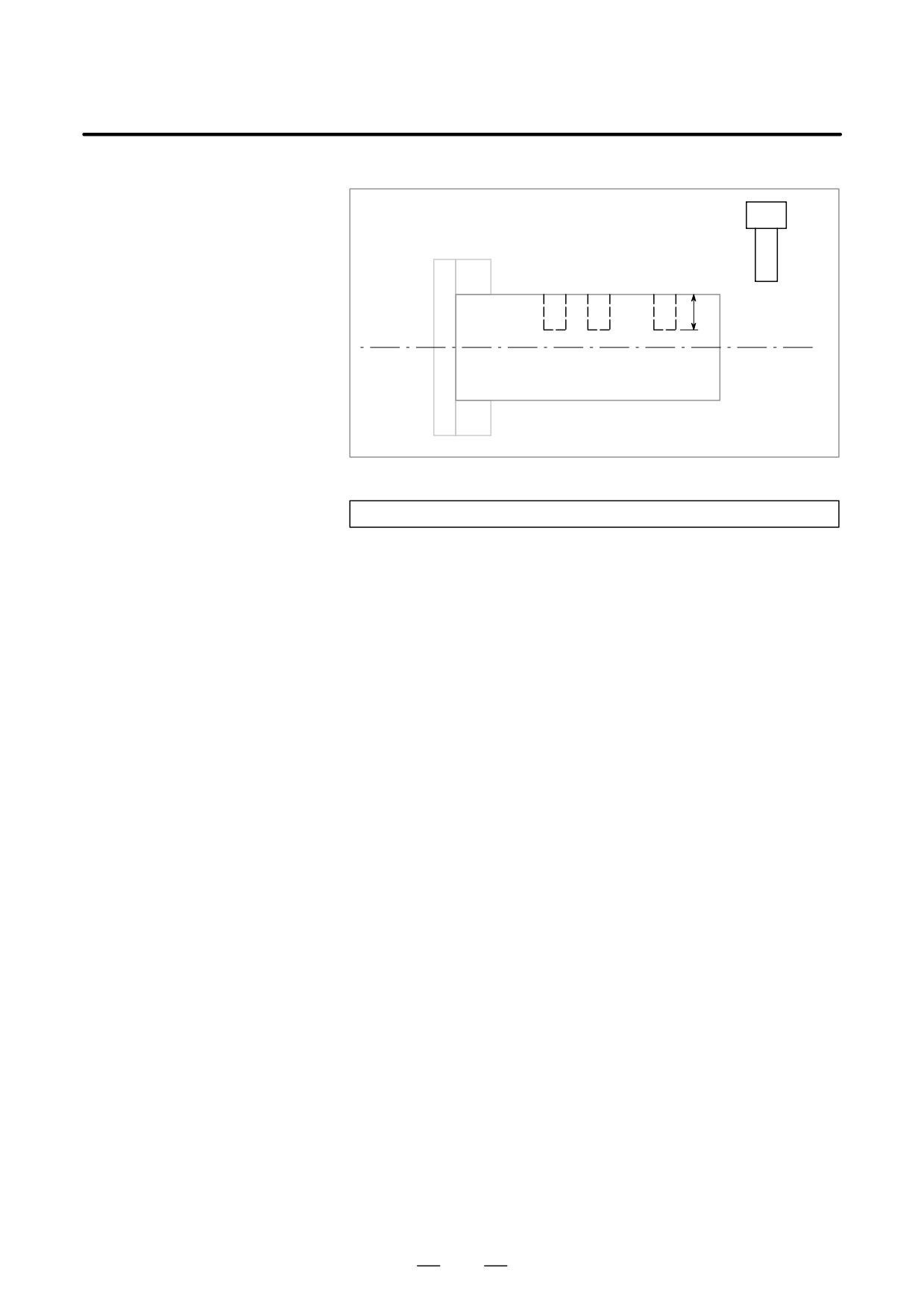
This program makes a groove at a specified position.
U
D Calling format
G66 P9110 Uu Ff ;
U: Groove depth (incremental specification)
F : Cutting feed of grooving
D Program that calls a
O0003 ;
macro program
G50 X100.0 Z200.0 ;
S1000 M03 ;
G66 P9110 U5.0 F0.5 ;
G00 X60.0 Z80.0 ;
Z50.0 ;
Z30.0 ;
G67 ;
G00 X00.0 Z200.0 M05 ;
M30;
D Macro program
O9110 ;
(program called)
G01 U-#21 F#9 ;
Cuts the workpiece.
G00 U#21 ;
Retracts the tool.
M99 ;
322
B-63524EN/01
PROGRAMMING
15. CUSTOM MACRO
15.6.3
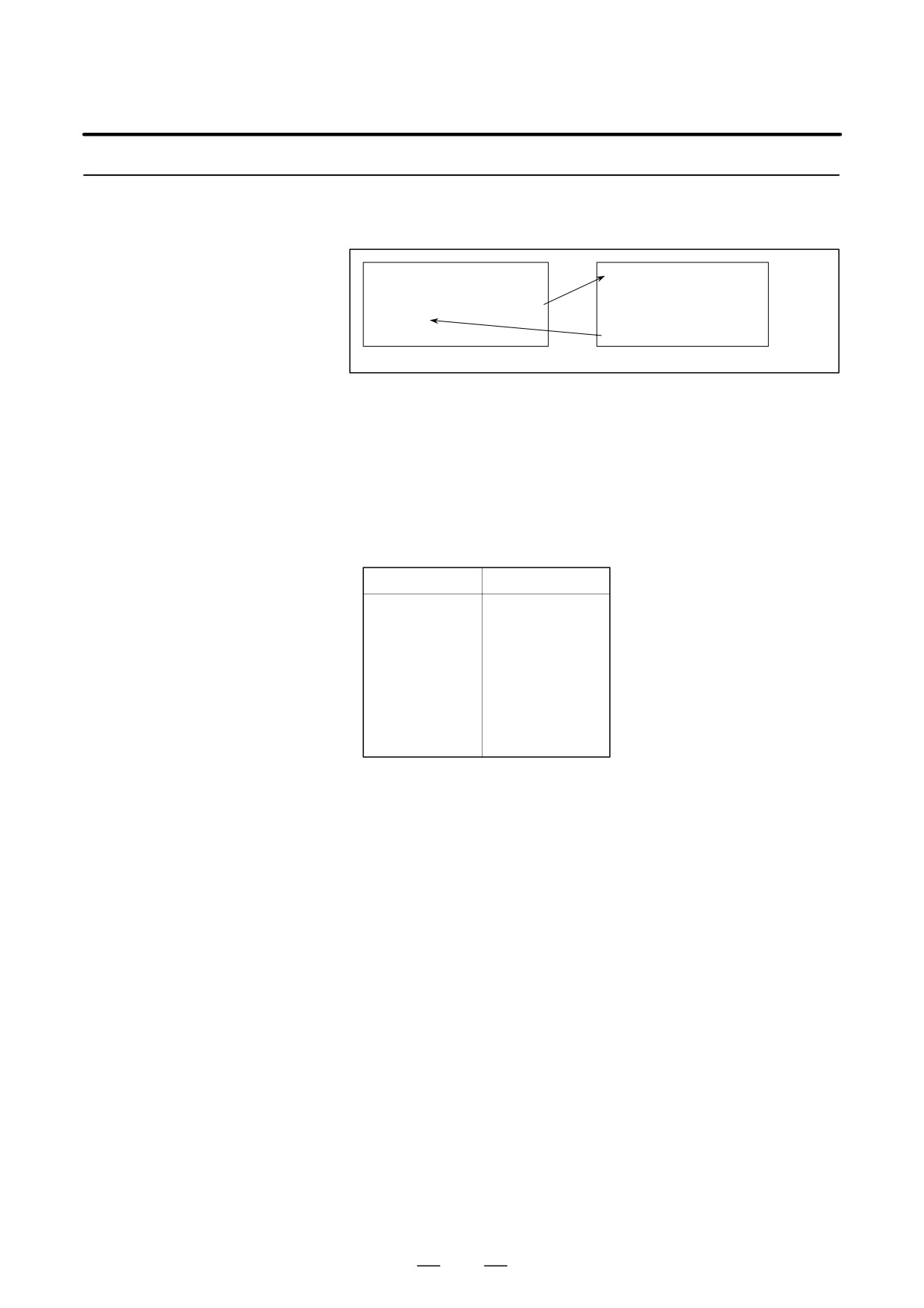
By setting a G code number used to call a macro program in a parameter,
the macro program can be called in the same way as for a simple call
Macro Call Using
(G65).
G Code
O0001 ;
O9010 ;
:
:
G81 X10.0 Z-10.0 ;
:
:
:
M30 ;
N9 M99 ;
Parameter No. 6050 = 81
Explanations
By setting a G code number from 1 to 9999 used to call a custom macro
program (9010 to 9019) in the corresponding parameter (Nos. 6050 to
6059), the macro program can be called in the same way as with G65.
For example, when a parameter is set so that macro program O9010 can
be called with G81, a user-specific cycle created using a custom macro
can be called without modifying the machining program.
D Correspondence
between parameter
Program number
Parameter number
numbers and program
O9010
6050
numbers
O9011
6051
O9012
6052
O9013
6053
O9014
6054
O9015
6055
O9016
6056
O9017
6057
O9018
6058
O9019
6059
D Repetition
As with a simple call, a number of repetitions from 1 to 9999 can be
specified at address L.
As with a simple call, two types of argument specification are available:
D Argument specification
Argument specification I and argument specification II. The type of
argument specification is determined automatically according to the
addresses used.
Restrictions
D Nesting of calls using G
In a program called with a G code, no macros can be called using a G code.
codes
A G code in such a program is treated as an ordinary G code. In a program
called as a subprogram with an M or T code, no macros can be called using
a G code. A G code in such a program is also treated as an ordinary G code.
323
15. CUSTOM MACRO
PROGRAMMING
B-63524EN/01
15.6.4
By setting an M code number used to call a macro program in a parameter,
the macro program can be called in the same way as with a simple call
Macro Call Using
(G65).
an M Code
O0001 ;
O9020 ;
:
:
M50 A1.0 B2.0 ;
:
:
:
M30 ;
M99 ;
Parameter 6080 = 50
Explanations
By setting an M code number from 1 to 99999999 used to call a custom
macro program (O9020 to O9029) in the corresponding parameter (Nos.
6080 to 6089), the macro program can be called in the same way as with
G65.
D Correspondence
between parameter
Program number
Parameter number
numbers and program
O9020
6080
numbers
O9021
6081
O9022
6082
O9023
6083
O9024
6084
O9025
6085
O9026
6086
O9027
6087
O9028
6088
O9029
6089
D Repetition
As with a simple call, a number of repetitions from 1 to 9999 can be
specified at address L.
As with a simple call, two types of argument specification are available:
D Argument specification
Argument specification I and argument specification II. The type of
argument specification is determined automatically according to the
addresses used.
Restrictions
- An M code used to call a macro program must be specified at the start
of a block.
- In a macro called with a G code or in a program called as a subprogram
with an M or T code, no macros can be called using an M code. An
M code in such a macro or program is treated as an ordinary M code.
324
B-63524EN/01
PROGRAMMING
15. CUSTOM MACRO
15.6.5
By setting an M code number used to call a subprogram (macro program)
in a parameter, the macro program can be called in the same way as with
Subprogram Call
a subprogram call (M98).
Using an M Code
O0001 ;
O9001 ;
:
:
M03 ;
:
:
:
M30 ;
M99 ;
Parameter 6071 = 03
Explanations
By setting an M code number from 1 to 99999999 used to call a
subprogram in a parameter (Nos. 6071 to 6076), the corresponding
custom macro program (O9001 to O9006) can be called in the same way
as with M98.
D Correspondence
between parameter
Program number
Parameter number
numbers and program
O9001
6071
numbers
O9002
6072
O9003
6073
O9004
6074
O9005
6075
O9006
6076
O9007
6077
O9008
6078
O9009
6079
D Repetition
As with a simple call, a number of repetitions from 1 to 9999 can be
specified at address L.
D Argument specification
Argument specification is not allowed.
D M code
An M code in a macro program that has been called is treated as an
ordinary M code.
Limitations
In a macro called with a G code or in a program called with an M or T code,
no subprograms can be called using an M code. An M code in such a
macro or program is treated as an ordinary M code.
325

15. CUSTOM MACRO
PROGRAMMING
B-63524EN/01
15.6.6
By enabling subprograms (macro program) to be called with a T code in
a parameter, a macro program can be called each time the T code is
Subprogram Calls
specified in the machining program.
Using a T Code
O0001 ;
O9000 ;
:
:
T0203 ;
:
:
:
M30 ;
M99 ;
Bit 5(TCS) of parameter No. 6001 = 1
Explanations
D Call
By setting bit 5 (TCS) of parameter No. 6001 to 1, the macro program
O9000 can be called when a T code is specified in the machining program.
A T code specified in a machining program is assigned to common
variable #149.
Limitations
In a macro called with a G code or in a program called with an M or T code,
no subprograms can be called using a T code. A T code in such a macro
or program is treated as an ordinary T code.
326

B-63524EN/01
PROGRAMMING
15. CUSTOM MACRO
15.6.7
By using the subprogram call function that uses M codes, the cumulative
usage time of each tool is measured.
Sample Program
Conditions
D The cumulative usage time of each of tool numbers 1 to 5 is measured.
The time is not measured for tools whose number is 6 or more.
D The following variables are used to store the tool numbers and
measured times:
#501
Cumulative usage time of tool number 1
#502
Cumulative usage time of tool number 2
#503
Cumulative usage time of tool number 3
#504
Cumulative usage time of tool number 4
#505
Cumulative usage time of tool number 5
D Usage time starts being counted when the M03 command is specified
and stops when M05 is specified. System variable #3002 is used to
measure the time during which the cycle start lamp is on. The time
during which the machine is stopped by feed hold and single block
stop operation is not counted, but the time used to change tools and
pallets is included.
Operation check
D Parameter setting
Set 3 in parameter No. 6071, and set 05 in parameter No. 6072.
D Variable value setting
Set 0 in variables #501 to #505.
D Program that calls a
O0001;
macro program
T0100 M06;
M03;
:
M05;
Changes #501.
T0200 M06;
M03;
:
M05;
Changes #502.
T0300 M06;
M03;
:
M05;
Changes #503.
T0400 M06;
M03;
:
M05;
Changes #504.
T0500 M06;
M03;
:
M05;
Changes #505.
M30;
327
15. CUSTOM MACRO
PROGRAMMING
B-63524EN/01
Macro program
O9001(M03);
Macro to start counting
(program called)
M01;
IF[FIX[#4120/100] EQ 0]GOTO 9;
No tool specified
IF[FIX[#4120/100] GT 5]GOTO 9;
Out-of-range tool number
#3002=0;
Clears the timer.
N9 M03;
Rotates the spindle in the forward direction.
M99;
O9002(M05);
Macro to end counting
M01;
IF[FIX[#4120/100] EQ 0]GOTO 9;
No tool specified
IF[FIX[#4120/100] GT 5]GOTO 9;
Out-of-range tool number
#[500+FIX[#4120/100]]=#3002+#[500+FIX[#4120/100]];
. . . . . . . . . . . . . . . . . . . . . . . . . . . . . . . . . Calculates cumulative time.
N9 M05;
Stops the spindle.
M99;
328
B-63524EN/01
PROGRAMMING
15. CUSTOM MACRO
For smooth machining, the CNC prereads the CNC statement to be
15.7
performed next. This operation is referred to as buffering. In tool nose
PROCESSING
radius compensation mode (G41, G42), the NC prereads NC statements
MACRO
two or three blocks ahead to find intersections. Macro statements for
STATEMENTS
arithmetic expressions and conditional branches are processed as soon as
they are read into the buffer. Blocks containing M00, M01, M02, or M30,
blocks containing M codes for which buffering is suppressed by setting
parameter(Nos. 3411 to 3420), and blocks containing G31 are not
preread.
Explanations
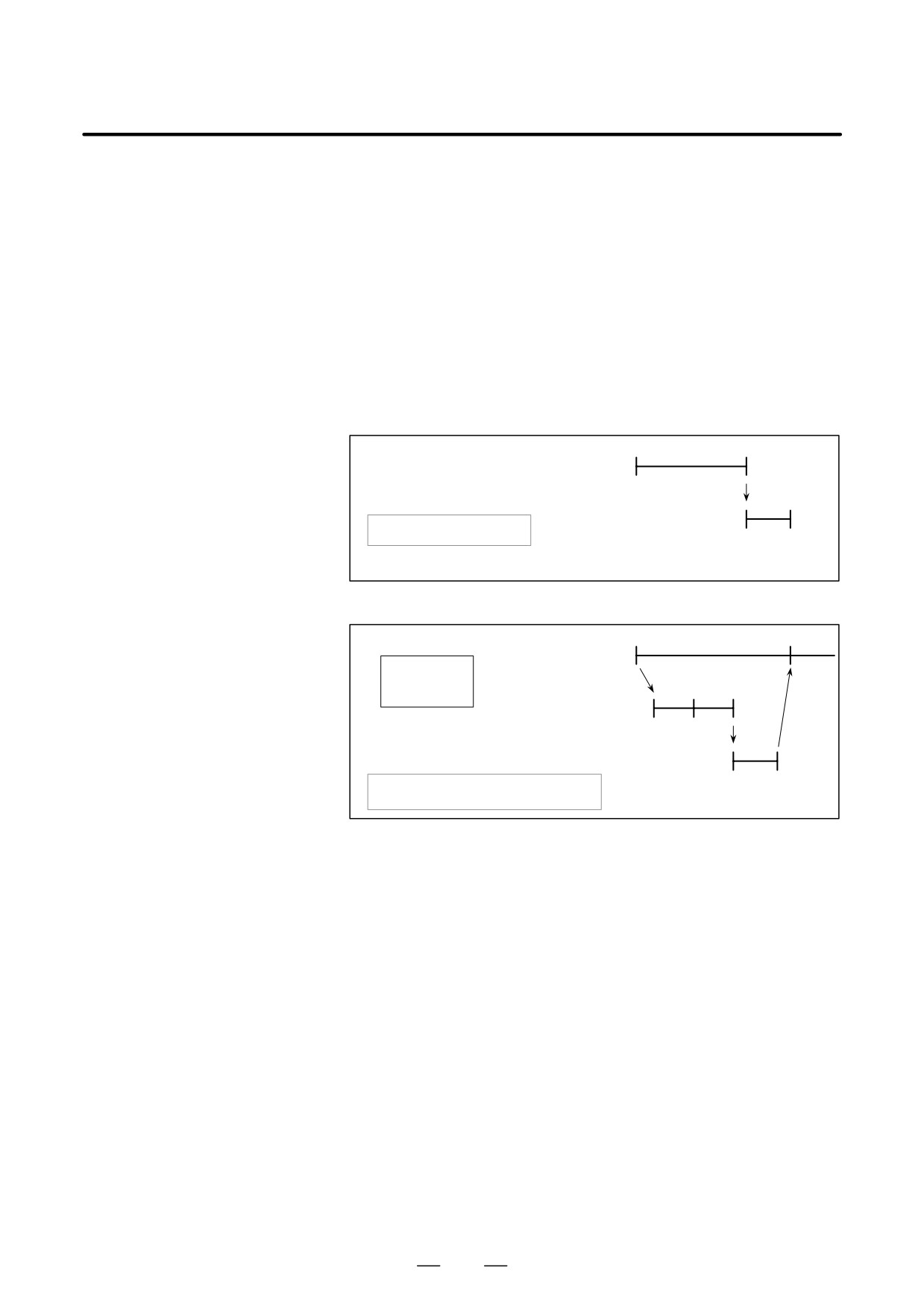
D When the next block is
not buffered
> N1 G31 X100.0 ;
N1
(M codes that are not
NC statement
N2 #100=1
buffered, G31, etc.)
execution
:
N2
Macro statement execution
> :Block being executed
Buffer
D Buffering the next block
in other than tool nose
> N1 X100.0 ;
N1
N4
radius compensation
NC statement
N2 #1=100 ;
execution
mode (G41, G42)
N3 #2=200 ;
(normally prereading one
N4 Z100.0 ;
N2
N3
block)
:
Macro statement
execution
N4
Buffer
> : Block being executed
V : Block read into the buffer
When N1 is being executed, the next NC statement (N4) is read into the
buffer. The macro statements (N2, N3) between N1 and N4 are processed
during execution of N1.
329
15. CUSTOM MACRO
PROGRAMMING
B-63524EN/01
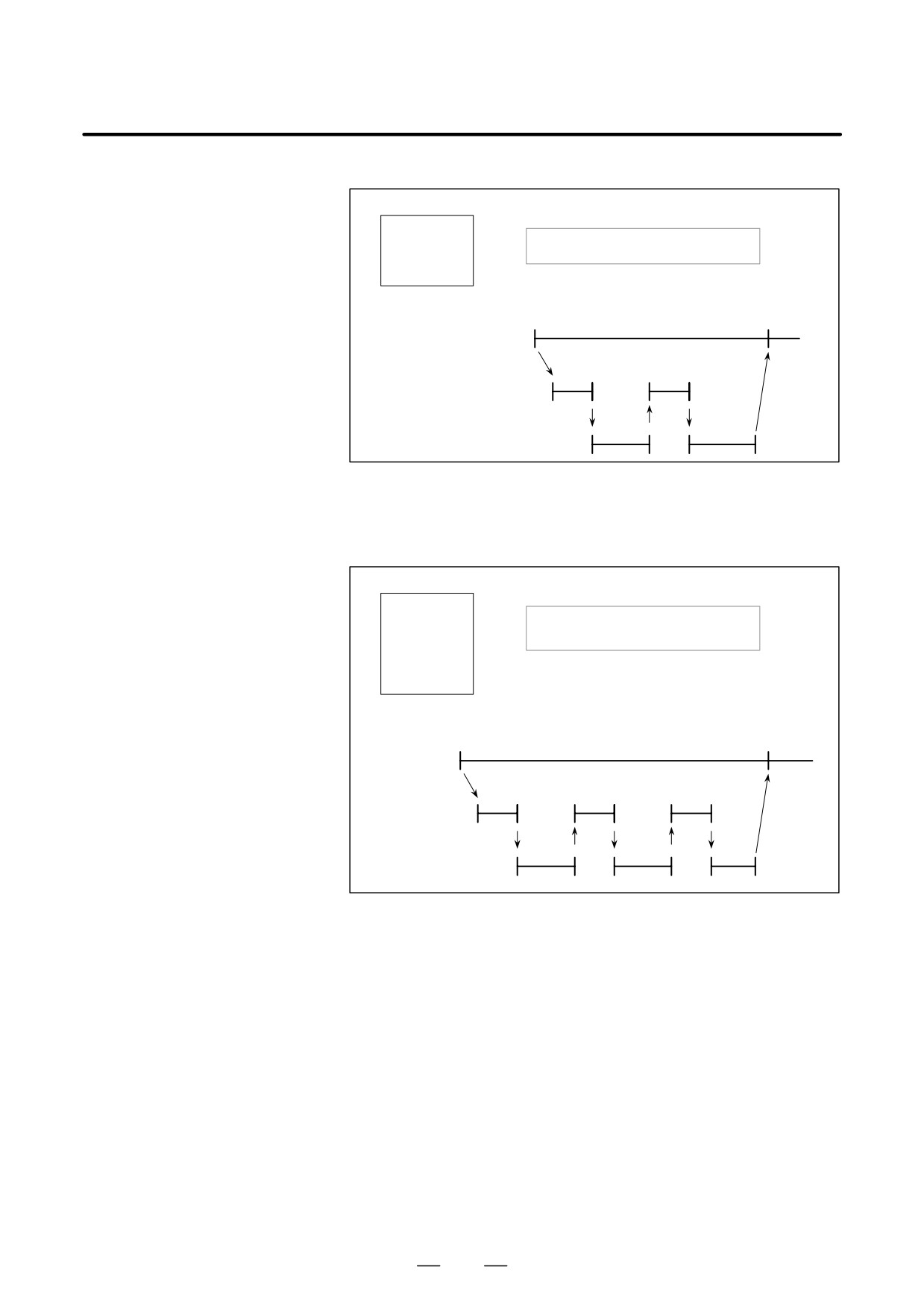
D Buffering the next block
in tool nose radius
> N1 G01 G41 G91 Z100.0 F100 T0101 ;
compensation mode
N2 #1=100 ;
(G41, G42)
> : Block being executed
N3 X100.0 ;
V : Blocks read into the buffer
N4 #2=200 ;
N5 Z50.0 ;
:
N1
N3
NC statement
execution
N2
N4
Macro statement
execution
N3
N5
Buffer
When N1 is being executed, the NC statements in the next two blocks (up
to N5) are read into the buffer. The macro statements (N2, N4) between
N1 and N5 are processed during execution of N1.
D When the next block
involves no movement in
> N1 G01 G41 X100.0 G100 T0101 ;
tool nose radius
N2 #1=100 ;
compensation C (G41,
> : Block being executed
N3 Z50.0 ;
G42) mode
V : Blocks read into the buffer
N4 #2=200 ;
N5 M08 ;
N6 #3=300 ;
N7 X200.0 ;
:
N1
N3
NC statement
execution
N2
N4
N6
Macro statement
execution
N3
N5
N7
Buffer
When the NC1 block is being executed, the NC statements in the next two
blocks (up to N5) are read into the buffer. Since N5 is a block that involves
no movement, an intersection cannot be calculated. In this case, the NC
statements in the next three blocks (up to N7) are read. The macro
statements (N2, N4, and N6) between N1 and N7 are processed during
execution of N1.
330
B-63524EN/01
PROGRAMMING
15. CUSTOM MACRO
Custom macro programs are similar to subprograms. They can be
15.8
registered and edited in the same way as subprograms. The storage
REGISTERING
capacity is determined by the total length of tape used to store both custom
CUSTOM MACRO
macros and subprograms.
PROGRAMS
331
15. CUSTOM MACRO
PROGRAMMING
B-63524EN/01
15.9
LIMITATIONS
D MDI operation
The macro call command can be specified in MDI mode too. During
automatic operation, however, it is impossible to switch to the MDI mode
for a macro program call.
D Sequence number
A custom macro program cannot be searched for a sequence number.
search
D Single block
Even while a macro program is being executed, blocks can be stopped in
the single block mode (except blocks containing macro call commands,
arithmetic operation commands, and control commands).
A block containing a macro call command (G65, G66, or G67) does not
stop even when the single block mode is on. Blocks containing arithmetic
operation commands and control commands can be stopped in single
block mode by setting SBM (bit 5 of parameter 6000) to 1.
Single block stop operation is used for testing custom macro programs.
Note that when a single block stop occurs at a macro statement in tool nose
radius compensation mode, the statement is assumed to be a block that
does not involve movement, and proper compensation cannot be
performed in some cases.
(Strictly speaking, the block is regarded as
specifying a movement with a travel distance 0.)
D Optional block skip
A / appearing in the middle of an <expression> (enclosed in brackets [
] on the right-hand side of an arithmetic expression) is regarded as a
division operator; it is not regarded as the specifier for an optional block
skip code.
By setting NE8 (bit 0 of parameter 3202) and NE9 (bit 4 of parameter
D Operation in EDIT mode
3202) to 1, deletion and editing are disabled for custom macro programs
and subprograms with program numbers 8000 to 8999 and 9000 to 9999.
Registered custom macro programs and subprograms should be protected
from being destroyed by accident. When the entire memory is cleared (by
pressing the
RESET
and
DELETE
keys at the same time to turn on the power),
the contents of memory such as custom macro programs are deleted.
D Reset
With a reset operation, local variables and common variables #100 to
#149 are cleared to null values. They can be prevented from being cleared
by setting, CLV and CCV (bits 7 and 6 of parameter 6001). System
variables #1000 to #1133 are not cleared.
A reset operation clears any called states of custom macro programs and
subprograms, and any DO states, and returns control to the main program.
D Display of the PROGRAM
As with M98, the M and T codes used for subprogram calls are not
RESTART screen
displayed.
D Feed hold
When a feed hold is enabled during execution of a macro statement, the
machine stops after execution of the macro statement. The machine also
stops when a reset or alarm occurs.
D Constant values that can
+0.0000001 to +99999999
be used in <expression>
-99999999 to -0.0000001
The number of significant digits is 8 (decimal). If this range is exceeded,
P/S alarm No. 003 occurs.
332
B-63524EN/01
PROGRAMMING
15. CUSTOM MACRO
In addition to the standard custom macro commands, the following macro
15.10
commands are available. They are referred to as external output
EXTERNAL OUTPUT
commands.
COMMANDS
- BPRNT
- DPRNT
- POPEN
- PCLOS
These commands are provided to output variable values and characters
through the reader/punch interface.
Explanations
Specify these commands in the following order:
Open command: POPEN
Before specifying a sequence of data output commands, specify this
command to establish a connection to an external input/output device.
Data output command: BPRNT or DPRNT
Specify necessary data output.
Close command: PCLOS
When all data output commands have completed, specify PCLOS to
release a connection to an external input/output device.
D Open command POPEN
POPEN
POPEN establishes a connection to an external input/output device. It
must be specified before a sequence of data output commands. The CNC
outputs a DC2 control code.
D Data output command
BPRNT
BPRNT [ a #b
[ c ]
… ]
Number of significant decimal places
Variable
Character
The BPRNT command outputs characters and variable values in binary.
(i) Specified characters are converted to corresponding ISO codes
according to the setting data (ISO) that is output at that time.
Specifiable characters are as follows:
- Letters (A to Z)
- Numbers
- Special characters (*, /, +, -, etc.)
An asterisk (*) is output by a space code.
(ii) All variables are stored with a decimal point. Specify a variable
followed by the number of significant decimal places enclosed in
brackets. A variable value is treated as 2-word (32-bit) data,
including the decimal digits. It is output as binary data starting from
the highest byte.
(iii)When specified data has been output, an EOB code is output
according to the ISO code settings.
(iv) Null variables are regarded as 0.
333
15. CUSTOM MACRO
PROGRAMMING
B-63524EN/01
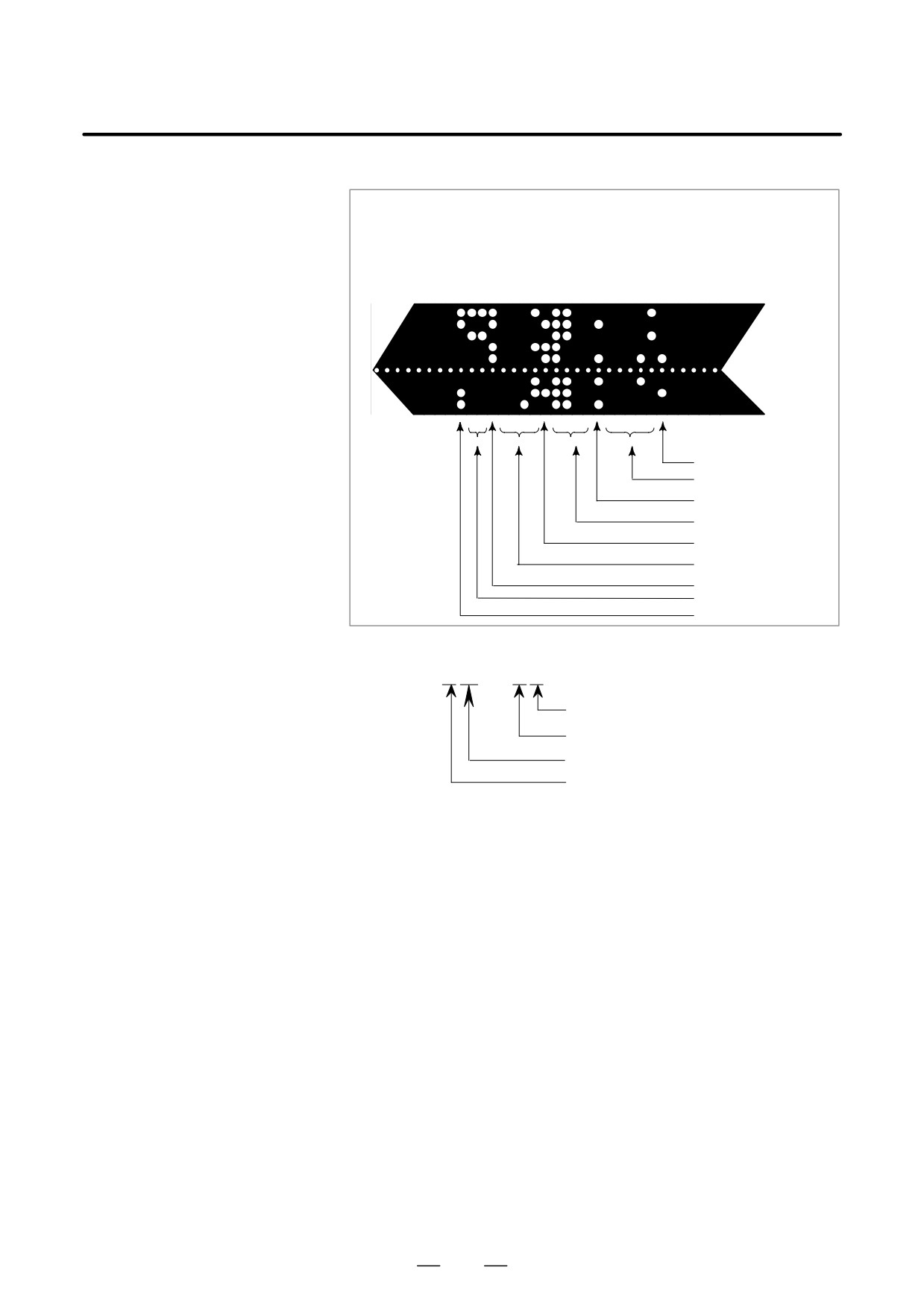
Example )
BPRINT [ C** X#100 [3] Z#101 [3] M#10 [0] ]
Variable value
#100=0.40596
#101=-1638.4
#10=12.34
LF
12 (0000000C)
M
-1638400(FFE70000)
Z
406(00000196)
X
Space
C
D Data output command
DPRNT
DPRNT [ a #b
[ c d ] … ]
Number of significant decimal places
Number of significant digits in the integer part
Variable
Character
The DPRNT command outputs characters and each digit in the value of
a variable according to the code set in the settings (ISO).
(i) For an explanation of the DPRNT command, see Items (i), (iii), and
(iv) for the BPRNT command.
(ii) When outputting a variable, specify # followed by the variable
number, then specify the number of digits in the integer part and the
number of decimal places enclosed in brackets.
One code is output for each of the specified number of digits, starting
with the highest digit. For each digit, a code is output according to
the settings (ISO). The decimal point is also output using a code set
in the settings (ISO).
Each variable must be a numeric value consisting of up to eight digits.
When high-order digits are zeros, these zeros are not output if PRT
(bit1 of parameter 6001) is 1. If PRT (bit 1 of parameter 6001) is 0,
a space code is output each time a zero is encountered.
When the number of decimal places is not zero, digits in the decimal
part are always output. If the number of decimal places is zero, no
decimal point is output. When PRT (bit 1 of parameter 6001) is 0, a
space code is output to indicate a positive number instead of +; if
PRT(bit 1 of parameter 6001) is 1, no code is output.
334
B-63524EN/01
PROGRAMMING
15. CUSTOM MACRO
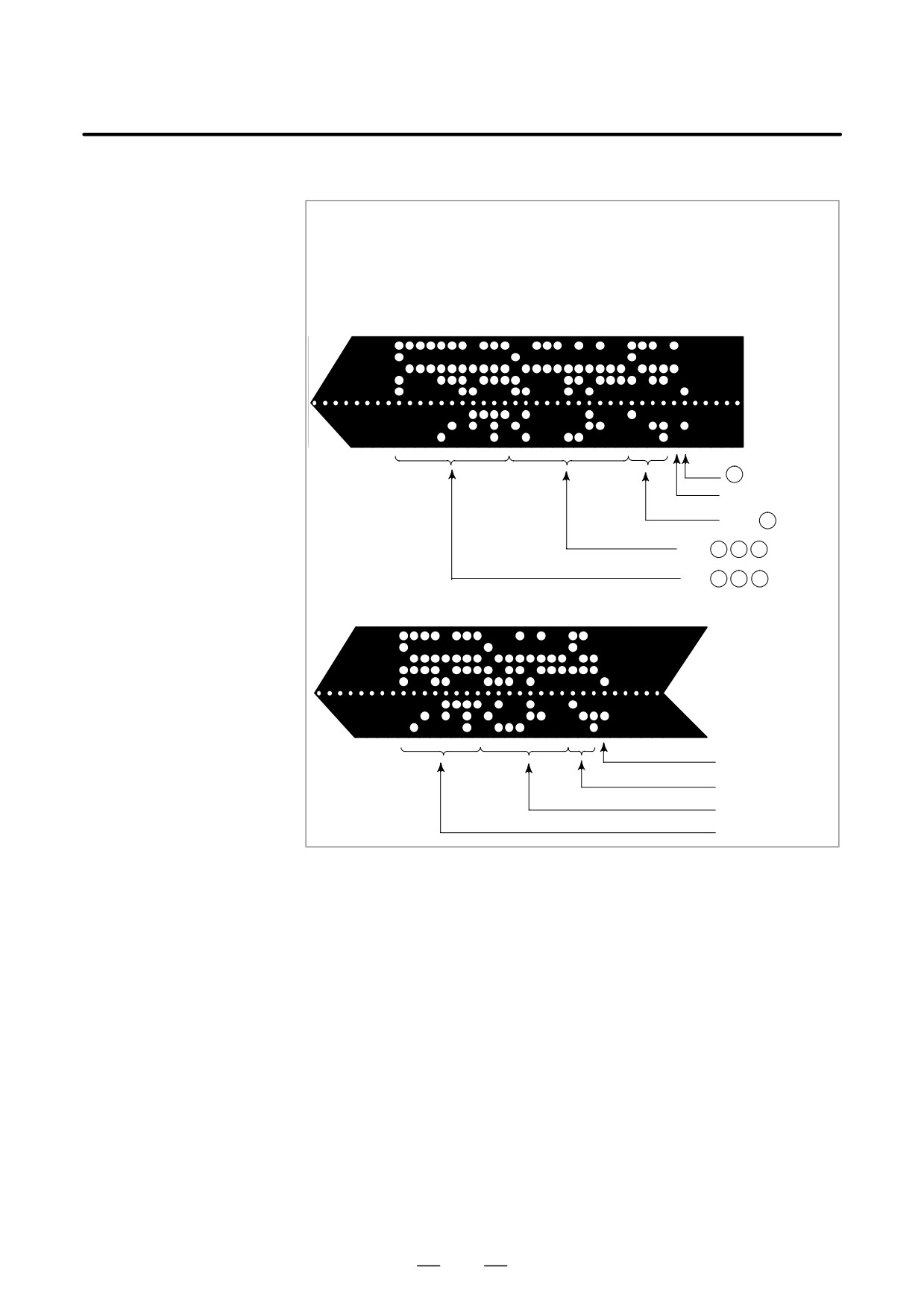
Example )
DPRNT [ X#2 [53] Z#5 [53] T#30 [20] ]
Variable value
#2=128.47398
#5=-91.2
#30=123.456
(1) Parameter PRT(No. 6001#1)=0
sp
L F
T
sp
23
Z -
sp
sp sp
91.200
X
sp sp sp
128.474
(2) Parameter PRT(No. 6001#1)=1
LF
T23
Z-91.200
X128.474
D Close command PCLOS
PCLOS ;
The PCLOS command releases a connection to an external input/output
device. Specify this command when all data output commands have
terminated. DC4 control code is output from the CNC.
D Required setting
Specify the channel use for parameter 020. According to the specification
of this parameter, set data items
(such as the baud rate) for the
reader/punch interface.
I/O channel 0 : Parameters 101, 102 and 103
I/O channel 1 : Parameters 111, 112 and 113
I/O channel 2 : Parameters 121, 122 and 123
Never specify output to the Fanuc Cassette or floppy disks.)
When specifying a DPRNT command to output data, specify whether
leading zeros are output as spaces (by setting PRT (bit 1 of parameter
6001) to 1 or 0). To indicate the end of a line of data in ISO code, specify
whether to use only an LF (NCR, of bit 3 of parameter 0103 is 0) or an
LF and CR (NCR is 1).
335

15. CUSTOM MACRO
PROGRAMMING
B-63524EN/01
NOTE
1
It is not necessary to always specify the open command
(POPEN), data output command (BPRNT, DPRNT), and
close command
(PCLOS) together. Once an open
command is specified at the beginning of a program, it does
not need to be specified again except after a close
command was specified.
2
Be sure to specify open commands and close commands
in pairs. Specify the close command at the end of the
program. However, do not specify a close command if no
open command has been specified.
3
When a reset operation is performed while commands are
being output by a data output command, output is stopped
and subsequent data is erased. Therefore, when a reset
operation is performed by a code such as M30 at the end
of a program that performs data output, specify a close
command at the end of the program so that processing such
as M30 is not performed until all data is output.
4
Abbreviated macro words enclosed in brackets [ ] remains
unchanged. However, note that when the characters in
brackets are divided and input several times, the second
and subsequent abbreviations are converted and input.
5
O can be specified in brackets [ ]. Note that when the
characters in brackets [ ] are divided and input several
times, O is omitted in the second and subsequent inputs.
336
B-63524EN/01
PROGRAMMING
15. CUSTOM MACRO
When a program is being executed, another program can be called by
15.11
inputting an interrupt signal (UINT) from the machine. This function is
INTERRUPTION TYPE
referred to as an interruption type custom macro function. Program an
CUSTOM MACRO
interrupt command in the following format:
Format
M96 Pffff ; Enables custom macro interrupt
M97 ;
Disables custom macro interrupt
Explanations
Use of the interruption type custom macro function allows the user to call
a program during execution of an arbitrary block of another program.
This allows programs to be operated to match situations which vary from
time to time.
(1) When a tool abnormality is detected, processing to handle the
abnormality is started by an external signal.
(2) A sequence of machining operations is interrupted by another
machining operation without the cancellation of the current
operation.
(3) At regular intervals, information on current machining is read.
Listed above are examples like adaptive control applications of the
interruption type custom macro function.
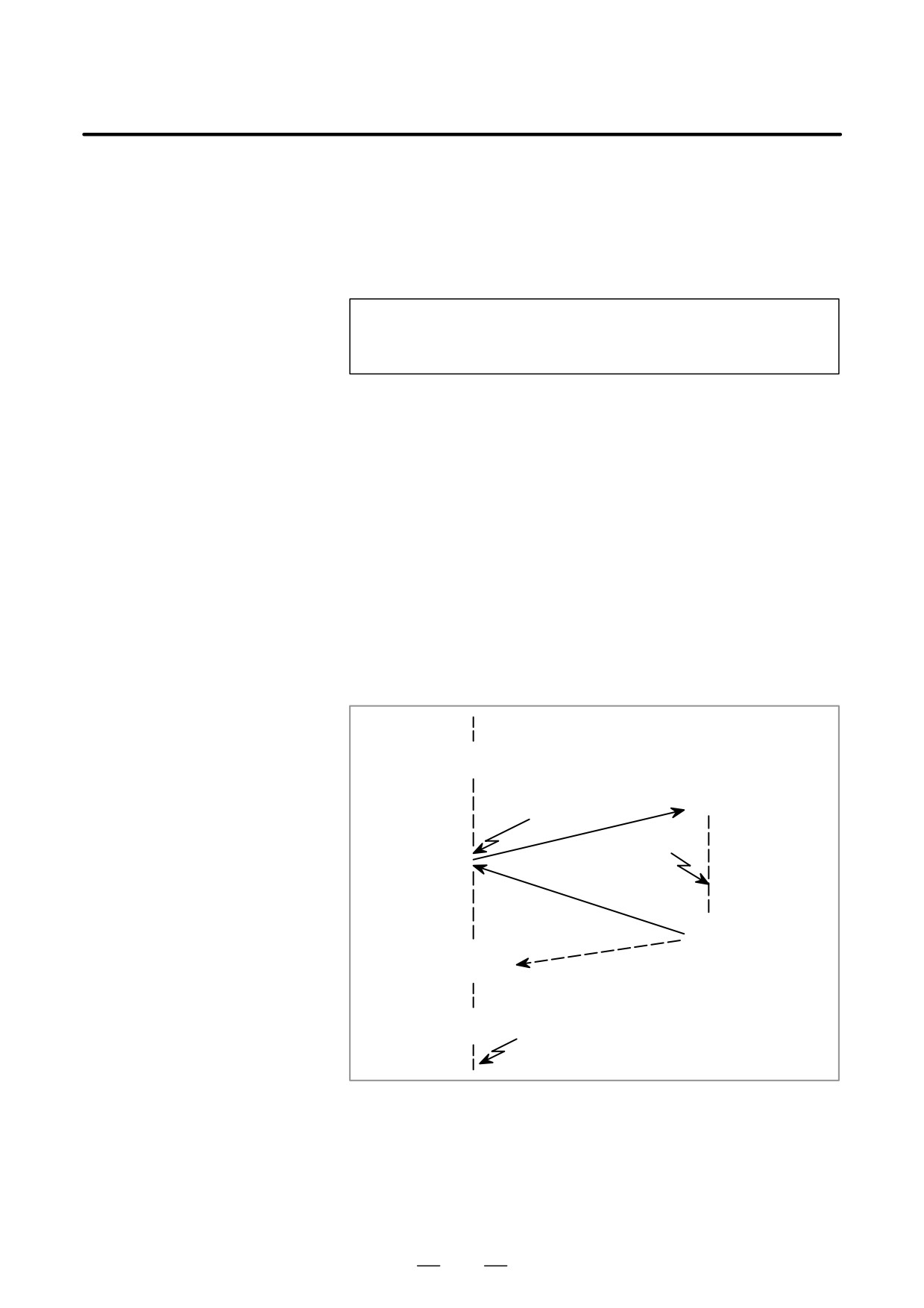
M96 Pxxxx;
Interrupt
signal
O xxxx;
(UINT)
Interrupt
signal
(UINT)*
M99 (Pffff);
Nffff;
M97 ;
Interrupt
signal
(UINT)*
Fig. 15.11 Interruption type custom macro function
When M96Pxxxx is specified in a program, subsequent program
operation can be interrupted by an interrupt signal (UINT) input to
execute the program specified by Pxxxx.
337
15. CUSTOM MACRO
PROGRAMMING
B-63524EN/01
CAUTION
When the interrupt signal (UINT, marked by * in Fig. 15.11)
is input after M97 is specified, it is ignored. And the interrupt
signal must not be input during execution of the interrupt
program.
15.11.1
Specification Method
Explanations
D Interrupt conditions
A custom macro interrupt is available only during program execution. It
is enabled under the following conditions
- When memory operation or MDI operation is selected
- When STL (start lamp) is on
- When a custom macro interrupt is not currently being processed
D Specification
Generally, the custom macro interrupt function is used by specifying M96
to enable the interrupt signal (UINT) and M97 to disable the signal.
Once M96 is specified, a custom macro interrupt can be initiated by the
input of the interrupt signal (UINT) until M97 is specified or the NC is
reset. After M97 is specified or the NC is reset, no custom macro
interrupts are initiated even when the interrupt signal (UINT) is input.
The interrupt signal (UINT) is ignored until another M96 command is
specified.
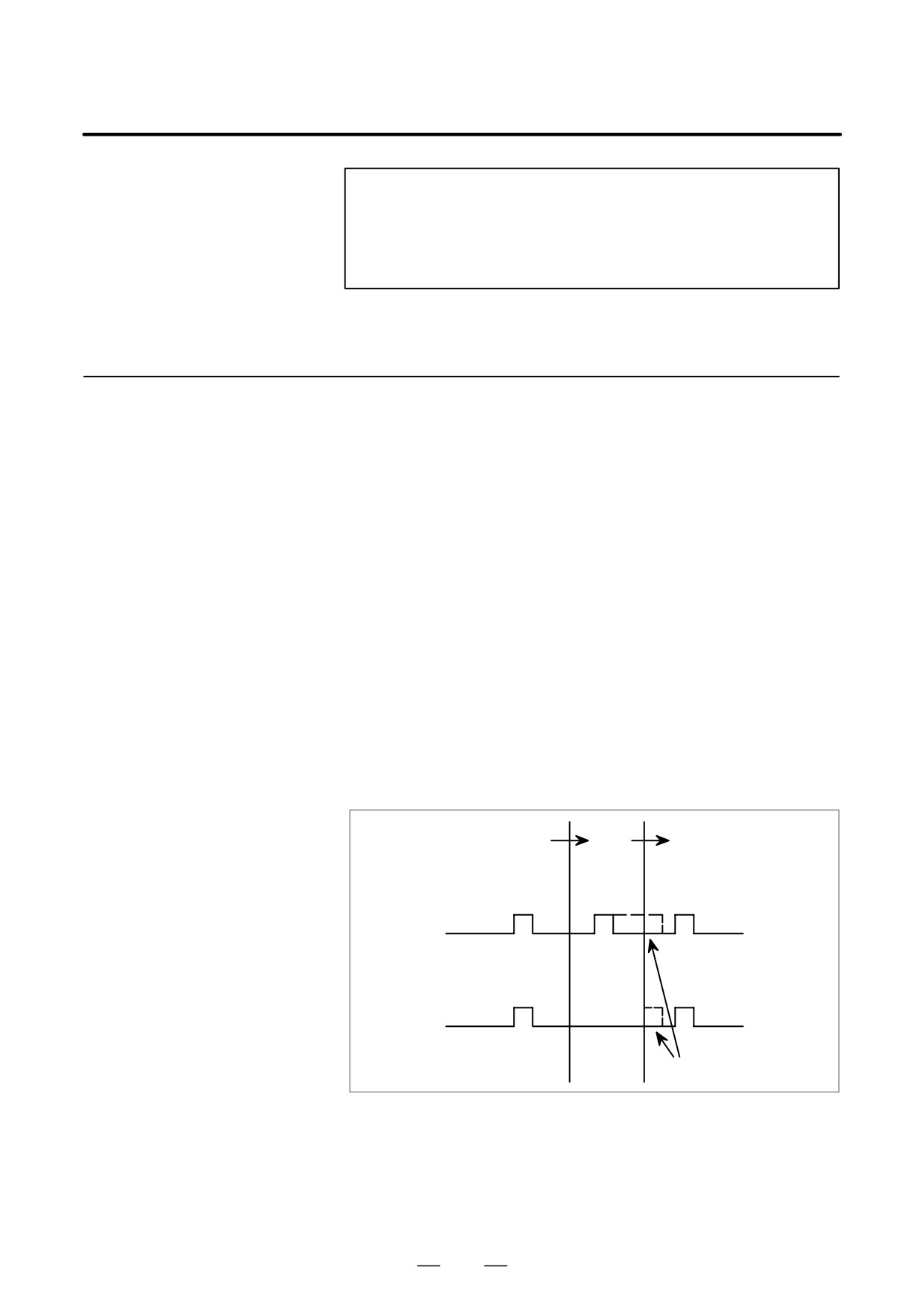
M96
M97
M96
1
0
Interrupt signal
(UINT)
Effective interrupt
input signal
When UINT is kept on
The interrupt signal (UINT) becomes valid after M96 is specified. Even
when the signal is input in M97 mode, it is ignored. When the signal input
in M97 mode is kept on until M96 is specified, a custom macro interrupt
is initiated as soon as M96 is specified (only when the status-triggered
scheme is employed); when the edge-triggered scheme is employed, the
custom macro interrupt is not initiated even when M96 is specified.
338