FANUC Series 0i-MODEL F Plus. CONNECTION MANUAL (FUNCTION) - page 342
 

  Index      Manuals     FANUC Series 0i-MODEL F Plus. CONNECTION MANUAL (FUNCTION) B-64693EN-1/01


Search            copyright infringement  


Content      ..     340      341      342      343     ..


FANUC Series 0i-MODEL F Plus. CONNECTION MANUAL (FUNCTION) - page 342


17. EMBEDDED ETHERNET FUNCTION


B-64693EN-1/01


- 2690 - 

No. 


#7 

#6 

#5 

#4 

#3 

#2 

#1 

#0 

F0088 


DIAER7 

DIAER6 

DIAER5 

DIAER4 

DIAER3 

DIAER2 

DIAER1 

DIAER0 


DIAER7

  <F0088.7> 


DIAER6

  <F0088.6> 


DIAER5

  <F0088.5> 


DIAER4

  <F0088.4> 


DIAER3

  <F0088.3> 


DIAER2

  <F0088.2> 


DIAER1

  <F0088.1> 


DIAER0

  <F0088.0> 


[Name]  Notification signals for a machine remote diagnosis error number 

  [Classification]  Output signal 
 

[Function]  Report an error number of machine remote diagnosis. 

[Output condition] These signals indicate an error number of machine remote diagnosis. The error number is 

0 to 255 in binary format. 


Signal Timing Charts 

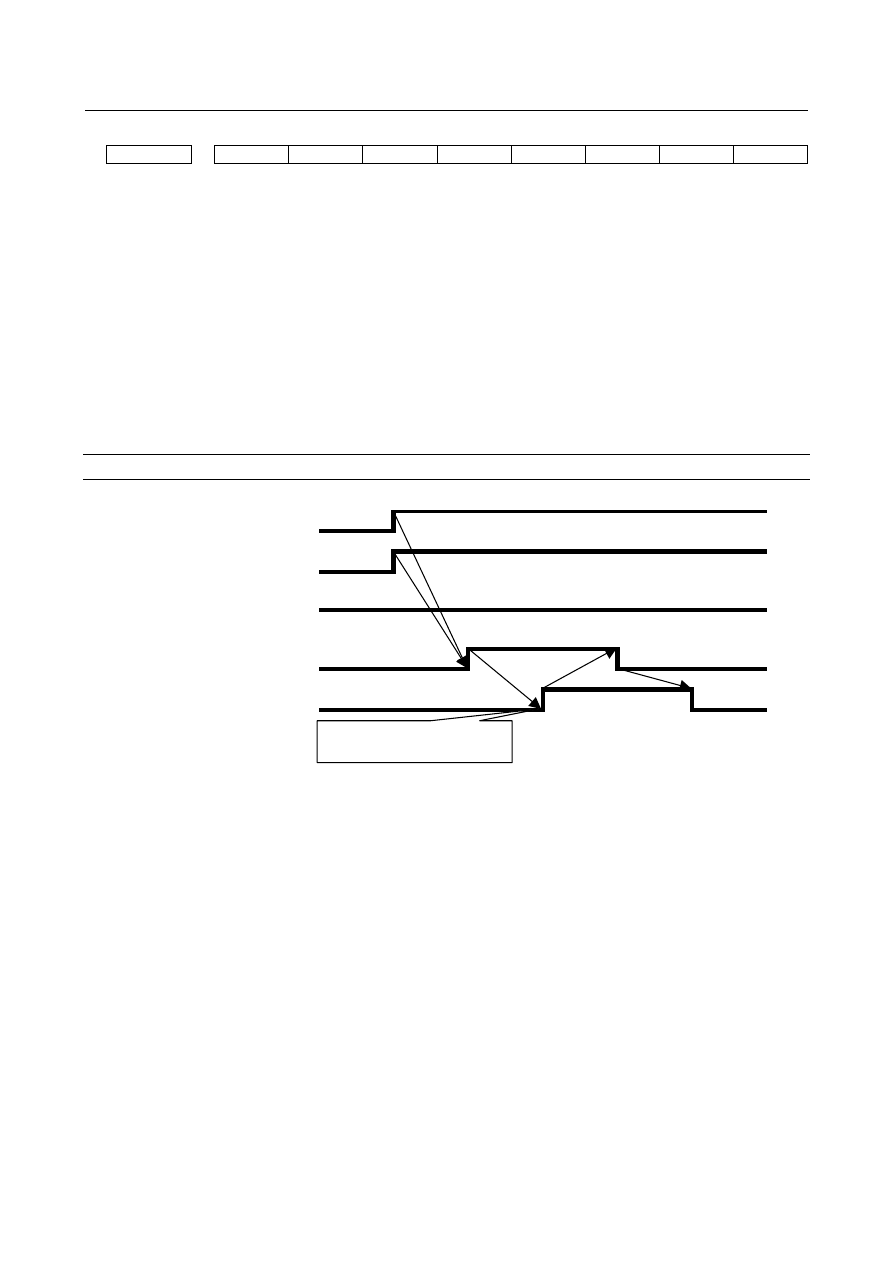
When the start of machine remote diagnosis is accepted 


INQU0 (G0141.0) 

INQU1 (G0141.1) 

INQU2 (G0141.2) 

DIAREQ (G0141.5) 

RMTEND (F0083.6) 

<1> 

<2> 


<3> 


<4> 


The start of machine remote 
diagnosis is accepted. 

<5> 


<1>  Before the signal to request machine remote diagnosis (DIAREQ) is set to "1", an inquiry 

destination for which to start the remote diagnosis functions is selected using the inquiry destination 
number signals (INQU0, INQU1, and INQU2). In this example, "inquiry destination 3" is selected 
by setting INQU0 = 1, INQU1 = 1, and INQU2 = 0. 

<2>  The signal to request machine remote diagnosis (DIAREQ) is set to "1". 
<3>  When the machine remote diagnosis package accepts the request to start diagnosis, the completion 

signal for machine remote diagnosis acceptance (RMTEND) is set to "1". 

<4>  When the completion signal for machine remote diagnosis acceptance (RMTEND) is set to "1", the 

signal to request machine remote diagnosis (DIAREQ) is set to "0". 

<5>  When the signal to request machine remote diagnosis (DIAREQ) is set to "0", the completion signal 

for machine remote diagnosis acceptance (RMTEND) is set to "0". 


B-64693EN-1/01


17. EMBEDDED ETHERNET FUNCTION


- 2691 - 

When the start of machine remote diagnosis is rejected 


INQU0 (G0141.0) 

INQU1 (G0141.1) 

INQU2 (G0141.2) 

DIAREQ (G0141.5) 

RMTCAN (F0083.7) 

<1> 

<2> 

<3> 

<4> 

The start of machine remote 
diagnosis is rejected. 

<5> 


<1>  Before the signal to request machine remote diagnosis (DIAREQ) is set to "1", an inquiry 

destination for which to start the remote diagnosis functions is selected using the inquiry destination 
number signals (INQU0, INQU1, and INQU2). In this example, "inquiry destination 3" is selected 
by setting INQU0 = 1, INQU1 = 1, and INQU2 = 0. 

<2>  The signal to request machine remote diagnosis (DIAREQ) is set to "1". 
<3>  When the machine remote diagnosis package rejects the request to start diagnosis, the reject signal 

for machine remote diagnosis acceptance (RMTCAN) is set to "1". 

<4>  When the reject signal for machine remote diagnosis acceptance (RMTCAN) is set to "1", the signal 

to request machine remote diagnosis (DIAREQ) is set to "0". 

<5>  When the signal to request machine remote diagnosis (DIAREQ) is set to "0", the reject signal for 

machine remote diagnosis acceptance (RMTCAN) is set to "0". 


When machine remote diagnosis is forcibly terminated 


DIASTP (G0141.4) 

RMTCLS (F0082.3) 

<1> 

<2> 

<3> 

Machine remote diagnosis is 
forcibly terminated. 


<1>  When the signal to request machine remote diagnosis cancellation (DIASTP) is set to  "1", the 

completion signal for machine remote diagnosis cancel acceptance (RMTCLS) is set to "1". 

<2>  When the completion signal for machine remote diagnosis cancel acceptance (RMTCLS) is set to 

"1", the signal to request machine remote diagnosis cancellation (DIASTP) is set to "0". 

<3>  When the signal to request machine remote diagnosis cancellation (DIASTP) is set to "0", the 

completion signal for machine remote diagnosis cancel acceptance (RMTCLS) is set to "0" and the 
machine remote diagnosis functions are forcibly terminated. 


17. EMBEDDED ETHERNET FUNCTION


B-64693EN-1/01


- 2692 - 

17.2.5.4 

Operating Machine Remote Diagnosis screen 

Procedure 

Press the function key 


Soft key [REMOTE DIAG] appear. (When there is no soft keys, press the continue key.) 

Press soft key [REMOTE DIAG] to display the machine remote diagnosis screen. 


Fig. 17.2.5.4 (a) Machine Remote Diagnosis screen 


Press soft key [(OPRT)] to display available soft keys. 


Fig. 17.2.5.4 (b) Soft keys of Machine Remote Diagnosis screen 


Display items 

INQUIRY NUMBER 

Displays the inquiry number indicating the machine remote diagnosis accepting server: "INQUIRY1," 
"INQUIRY2," or "INQUIRY3." 


INQUIRY 

Displays information for identifying the machine remote diagnosis accepting server. 


RMT DIAG STATUS 

Displays the status of machine remote diagnosis. 


RMT DIAG TIME 

Displays the time until the machine remote diagnosis status changes from "OPEN" to "CLOSE," "FORCE 
CLOSING," or "ERROR." 
At each start of diagnosis, the time is accumulated from "00:00:00." 


RECEIPT NUMBER 

Displays the receipt number issued by the machine remote diagnosis accepting server. 


ERROR NUMBER 

Displays the number of an error which occurs in operation of the machine remote diagnosis functions. 

B-64693EN-1/01


17. EMBEDDED ETHERNET FUNCTION


- 2693 - 

AVAILABLE DEVICE 

Displays the type of communication device for which the machine remote diagnosis functions can 
operate. 
 

ERROR MESSAGE 

Displays the message indicating an error which occurs in operation of  the machine remote diagnosis 
functions. 
 

Operation list 

DIAG OPEN 

Starts machine remote diagnosis. 
 

DIAG CLOSE 

Forcibly terminates machine remote diagnosis. 
 

INQUIRY1 

Selects inquiry destination 1. 
 

INQUIRY2 

Selects inquiry destination 2. 
 

INQUIRY3 

Selects inquiry destination 3. 
 

Selecting an Inquiry Destination 

Select an inquiry destination among inquiry destinations 1 to 3. 
 

Press soft key [(OPRT)]. 

Press soft key [INQUIRY1] to select inquiry destination 1. 

Similarly, press soft key [INQUIRY2] to select inquiry destination 2 and soft key [INQUIRY3] to 
select inquiry destination 3. 


Starting Diagnosis 

Start diagnosis. 

Press soft key [(OPRT)]. 

Press soft key [DIAG OPEN] to send the start request to the machine remote diagnosis 

When the machine remote diagnosis accepts the start request, the diagnosis begins. 


Diagnosis status 

Status 

Description 

--- 

No operation 

OPEN 

Soft key [DIAG OPEN] was pressed. 

OPENING 

An attempt is being made to connect the machine remote diagnosis accepting 
server. 

ACCEPTED 

The machine remote diagnosis accepting server accepted diagnosis. 

REFUSED 

The machine remote diagnosis accepting server rejected diagnosis. 

DIAGNOSING 

This message flashes in synchronization with data flowing on the communication 
line. 

FORCE CLOSING 

Soft key [DIAG CLOSE] was pressed. After the completion of forced termination 
processing, "CLOSE" is indicated in the RMT DIAG STATUS field. 

CLOSE 

The machine remote diagnosis accepting server terminated diagnosis. 

ERROR 

An error occurred on the communication line. 

17. EMBEDDED ETHERNET FUNCTION


B-64693EN-1/01


- 2694 - 

Error numbers and error messages 

Number 

Error message 

Meaning and action to be taken 

Diagnosis is busy 

Soft key [DIAG OPEN] was pressed during diagnosis. 

Router isn’t alive 

The IP address of the router may be invalid or the power to the router may be 
off. Check whether the IP address of the router is valid and whether the power 
to the router is on. 

Receipt Server isn’t 
alive 

The IP address of the machine remote diagnosis accepting server may be 
invalid or the machine remote diagnosis accepting server may not be 
operating. Check whether the IP address of the machine remote diagnosis 
accepting server is valid and whether the machine remote diagnosis accepting 
server is operating. 

System error 

A system error occurred. 
Check the log messages on the ETHERNET LOG screen and contact FANUC. 

Invalid Inquiry 
number. 

A value outside the valid setting range may be set for the inquiry destination. 
Check whether the correct inquiry destination is set. 

Invalid IP Address 

Set the IP address according to the IP address specification format. 

Invalid PORT number 

A value outside the valid setting range may be set for the port number. 
Check whether the correct port number is set. 

Invalid Router IP 
Address 

Set the IP address of the router according to the IP address specification 
format. 

Socket error 

A communication error occurred due to a cause as listed below. 
Check the network wiring and anti-noise measures. 

  The network quality degraded, data could not be received from the 

personal computer with which to communicate, and the logical 
communication path was disconnected. 

  The software component on the personal computer with which to 

communicate forcibly disconnected the logical communication path. 

  The Ethernet cable was disconnected. 

11 

Invalid Request 

An internal error related to machine remote diagnosis occurred in the CNC. 
Check the log messages on the ETHERNET LOG screen and contact FANUC. 

12 

Invalid Packet 

An unrecognizable packet was received. 
Check the log messages on the ETHERNET LOG screen and contact FANUC. 

13 

Diagnosis was 
already stopped 

Soft key [DIGA CLOSE] was pressed not during diagnosis. 

17 

Receive error 

An attempt to receive data failed. 
See Number 9 and check the network wiring and anti-noise measures. 

19 

HeartBeat timeout 

Communication with the machine remote diagnosis accepting server stopped. 
See Number 9 and check the network wiring and anti-noise measures. 

20 

HeartBeat error 

An attempt was failed to send a heartbeat packet for machine remote 
diagnosis. 
See Number 9 and check the network wiring and anti-noise measures. 

22 

DNS error 

An attempt was failed to connect the machine remote diagnosis accepting 
server using the DNS function. 
The IP address of the DNS server may be invalid or the power to the DNS 
server may be off. Check whether the IP address of the DNS server is valid 
and whether the power to the DNS server is on. 


Forcibly Terminating Diagnosis 

Forcibly terminate diagnosis. 
 

Press soft key [(OPRT)]. 

Press soft key [DIAG CLOSE] to forcibly terminate diagnosis. 


B-64693EN-1/01


17. EMBEDDED ETHERNET FUNCTION


- 2695 - 

17.2.6 

Setting of the Unsolicited Messaging Function 

This subsection describes  the  setting  required  to operate the unsolicited messaging function  with the 
embedded Ethernet function. 
 

17.2.6.1 

Overview 

This subsection provides an overview of the unsolicited messaging function and describes the execution 
procedure.


Overview of the unsolicited messaging function 

An overview of the unsolicited messaging function is provided below. 
With the unsolicited messaging function, the CNC transmits messages (CNC/PMC data) in an unsolicited 
manner to application software on the personal computer according to a command from an NC program 
or ladder program. By using this function, the need for application processing on the personal computer to 
periodically inquire about the state of the CNC can be eliminated. 
 

When the conventional function is used 


Application checks for 
CNC/PMC data changes. 

Application software 

Response 

Inquiry 


When the unsolicited messaging function is used 


NC program or ladder 
program checks for 
CNC/PMC data 
changes. 

アプリケーションソフトウェア


Application receives 
notification from CNC. 

Application software 

Notification 

NC program or ladder 
program 


NOTE 


The unsolicited messaging function is a part of the FOCAS2/Ethernet function. 


17. EMBEDDED ETHERNET FUNCTION


B-64693EN-1/01


- 2696 - 

Unsolicited messaging function execution procedure 

The execution procedure for the unsolicited messaging function is described below.


Preparation on the personal compute 


Create an application using the FOCAS2 function for the unsolicited messaging function and install 
the  unsolicited message server on a personal computer. For information on creating an application 
with FOCAS2 functions for the unsolicited messaging function and installing the unsolicited 
message server, refer to Chapter 5, "

UNSOLICITED MESSAGING FUNCTION

" in "Data Window 

Library Specifications" that comes with the FOCAS1/2 library.   

Preparation on the CNC 


Create an NC program or ladder program for controlling unsolicited messaging. 


For the method of creating an NC program or ladder program, see Subsection 17.2.6.6, "Execution 
methods". 

Setting of the communication parameters for the unsolicited messaging function 


To use the unsolicited messaging function, the following  communication  parameter  settings are 
needed: 
(1)  Setting for using the FOCAS2/Ethernet function 
(2)  Setting of the parameters for the unsolicited messaging function 


For (2), a choice can be made from two modes of setting: CNC mode for setting on the CNC screen 
and the PC mode for setting on the personal computer. 


For the setting  method  of (1) and (2), see Subsection  17.2.6.2, "Setting  of the FOCAS2/Ethernet 
function" through Subsection 17.2.6.5, "Setting on the personal computer". 

Starting the NC program or ladder program 


Start the NC program or ladder program created in step 2, "Preparation on the CNC". At this time, 
no unsolicited message is transmitted to the personal computer until step 5, "Starting the unsolicited 
messaging function", is executed. 

Starting the unsolicited messaging function 


Execute the FOCAS2 function cnc_unsolicstart on the personal computer. This execution places the 
CNC  in the state  (named "Ready") where a transmission  request  from the NC  program  or  ladder 
program  is awaited. Each time a transmission  request  is made from the NC  program  or  ladder 
program, an unsolicited message is automatically transmitted to the personal computer. 

Ending the unsolicited messaging function 


To end unsolicited message  transmission,  execute  the  FOCAS2  function  cnc_unsolicstop on the 
personal computer. This execution  places the CNC  in the state  (named "Not Ready") where no 
unsolicited message  is  transmitted  even when a request  for  transmission  is made from the  NC 
program or ladder program. 


17.2.6.2 

Setting of the FOCAS2/Ethernet function 

This  subsection  describes  the  setting  of the FOCAS2/Ethernet function  for operating the unsolicited 
messaging function. 
 

Procedure 

Enable the unsolicited messaging function according to "Related parameters" described later. 

Start the CNC again then press function key 


Soft key [EMBED] is displayed. (Press the continuous menu key until the soft key is displayed.) 

Press soft key [EMBED]. The Ethernet Setting screen for the embedded Ethernet port is displayed. 

Press soft keys [COMMON] and [FOCAS2] then make settings on each screen. 

Press soft key [UNSOLI MSG]. The Unsolicited Message screen is displayed. (Press the continuous 
menu key until the soft key [UNSOLI MSG] is displayed.) For details of the Unsolicited Message 
screen, see Subsections starting with Subsection 17.2.6.3, "Mode selection". 


B-64693EN-1/01


17. EMBEDDED ETHERNET FUNCTION


- 2697 - 

COMMON screen (BASIC) 

Press soft key [COMMON]. The COMMON screen (BASIC) (Fig. 17.2.6.2(a)) is displayed. 


Fig. 17.2.6.2 (a) COMMON screen (BASIC) 


Setting items 

Item 

Description 

IP ADDRESS 

Specify the IP address of the embedded Ethernet. 
(Example of specification format: "192.168.0.100") 

SUBNET MASK 

Specify a mask address for the IP addresses of the network. 
(Example of specification format: "255.255.255.0") 

ROUTER IP ADDRESS 

Specify the IP address of the router. 
Specify this item when the network contains a router. 
(Example of specification format: "192.168.0.253") 


Display items 

Item 

Description 

MAC ADDRESS 

Embedded Ethernet MAC address 

AVAILABLE DEVICE 

Enabled device of the embedded Ethernet. 
Either the embedded Ethernet port or the PCMCIA Ethernet card is displayed. 


NOTE 


Set page 2 (DETAIL screen) of the COMMON screen when using the 
DNS/DHCP function. For details, see Subsection 17.2.3, "Setting Up the 
DNS/DHCP Function". 


Content      ..     340      341      342      343     ..