FANUC Series 0i-MODEL F Plus. CONNECTION MANUAL (FUNCTION) - page 340
17. EMBEDDED ETHERNET FUNCTION
B-64693EN-1/01
- 2674 -
FTP transfer screen (CONNECT1, CONNECT2, CONNECT3)
1
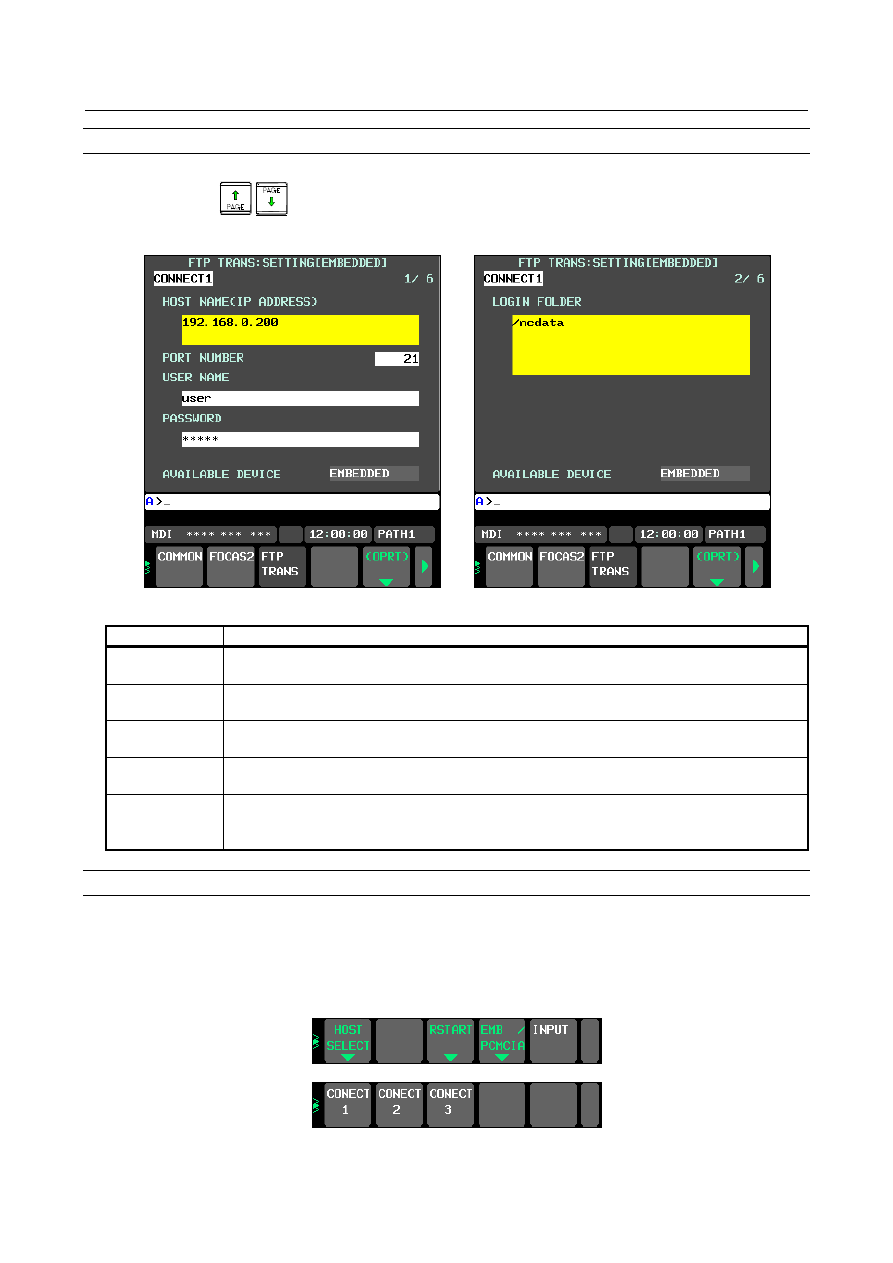
Press soft key [FTP TRANS]. The FTP transfer screen (Fig. 17.2.2.1(b) and (c)) is displayed.
2
Page keys
can be used to make settings for the three host computers for connection
destinations 1 to 3.
Fig. 17.2.2.1 (b) FTP transfer screen (1st page) Fig. 17.2.2.1 (c) FTP transfer screen (2nd page)
Item
Description
HOST NAME
Specify the IP address of the host computer.
(Example of specification format: "192.168.0.200")
PORT NUMBER
Specify a port number to be used with the FTP file transfer function. An FTP session is used,
so that "21" is to be specified usually.
USER NAME
Specify a user name to be used for logging in to the host computer with FTP.
(Up to 31 characters can be specified.)
PASSWORD
Specify a password for the user name specified above. (Up to 31 characters can be specified.)
Be sure to set a password.
LOGIN FOLDER
Specify a work folder to be used when logging in to the host computer. (Up to 127 characters
can be specified.)
If nothing is specified, the home folder specified in the host computer becomes the log-in folder.
Operation
Select a destination.
1
Pressing the [(OPRT)] soft key causes soft key [HOST SELECT] to be displayed. Pressing this soft
key causes soft keys [CONECT 1], [CONECT 2], and [CONECT 3] to be displayed. (Fig.
17.2.2.1(d))
Fig. 17.2.2.1 (d)