FANUC Series 0i-MODEL F Plus. CONNECTION MANUAL (FUNCTION) - page 338
 

  Index      Manuals     FANUC Series 0i-MODEL F Plus. CONNECTION MANUAL (FUNCTION) B-64693EN-1/01


Search            copyright infringement  


Content      ..     336      337      338      339     ..


FANUC Series 0i-MODEL F Plus. CONNECTION MANUAL (FUNCTION) - page 338


16. PMC CONTROL FUNCTION


B-64693EN-1/01


- 2658 - 

Kind of key 

Key 

PMC signal (Symbol) 

Horizontal soft key 

(See Fig. 17.11) 

HSKY1 

KEY_HS1 

HSKY2 

KEY_HS2 

HSKY3 

KEY_HS3 

HSKY4 

KEY_HS4 

HSKY5 

KEY_HS5 

HSKY6 

KEY_HS6 

HSKY7 

KEY_HS7 

HSKY8 

KEY_HS8 

HSKY9 

KEY_HS9 

HSKY10 

KEY_HS10 

HSKYL 

KEY_HSL 

HSKYR 

KEY_HSR 

Vertical soft key 

(See Fig. 17.11) 

VSKY1 

KEY_VS1 

VSKY2 

KEY_VS2 

VSKY3 

KEY_VS3 

VSKY4 

KEY_VS4 

VSKY5 

KEY_VS5 

VSKY6 

KEY_VS6 

VSKY7 

KEY_VS7 

VSKY8 

KEY_VS8 

VSKY9 

KEY_VS9 

Cursor key 


KEY_CRR 


KEY_CRL 


KEY_CRD 


KEY_CRU 

Page key 


KEY_PGD 


KEY_PGU 

Other key 

SHIFT 

KEY_SFT 


HSKY1 

HSKY4 

HSKY2 

HSKY6 

HSKY5 

HSKY7 

HSKY8 

HSKY9 

HSKY3 

HSKY10 

HSKYR 

HSKYL 

VSKY1 

VSKY8 

VSKY7 

VSKY6 

VSKY5 

VSKY4 

VSKY3 

VSKY2 

VSKY9 


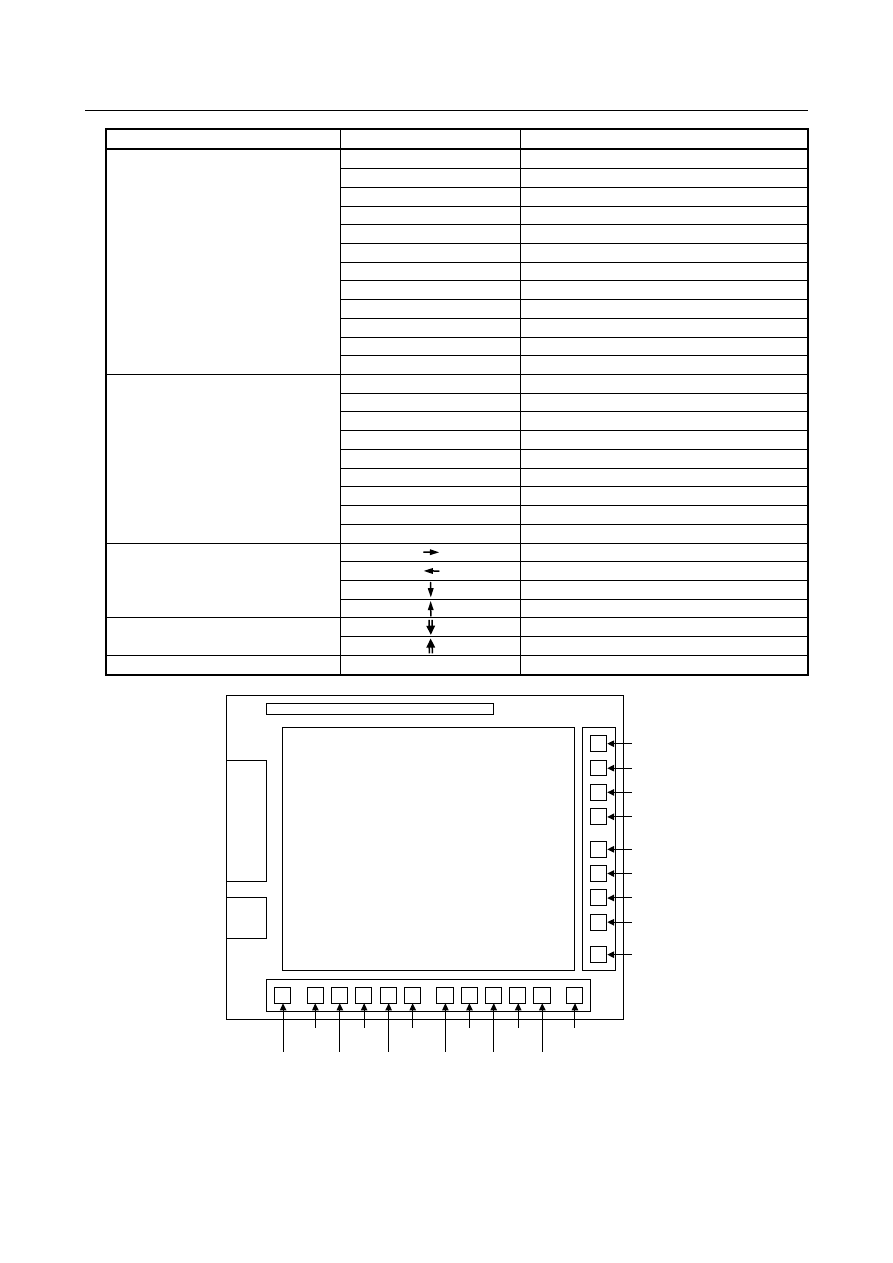
Fig. 16.10 (a) Arrangement of soft key (10.4” display unit, 15” display unit) 

B-64693EN-1/01


16. PMC CONTROL FUNCTION


- 2659 - 


HSKY6 

HSKY7 

HSKY8 

HSKY9  HSKY10  HSKYR 

HSKYL 


Fig. 16.10 (b) Arrangement of soft key (8.4” display unit) 


NOTE 


Hit status is not output to PMC signal if the key which is not supported is hit. 


Output format of PMC signal 

The key hit status is output to PMC signal which address kind is set by parameter No.13125 and which 
address offset is set by parameter No.13126 as follows. 


#7 

#6 

#5 

#4 

#3 

#2 

#1 

#0 

+0 

KEY_DG7 

KEY_DG6 

KEY_DG5 

KEY_DG4 

KEY_DG3 

KEY_DG2 

KEY_DG1 

KEY_DG0 

+1 


KEY_DG9 

KEY_DG8 

+2 

KEY_HS8 

KEY_HS7 

KEY_HS6 

KEY_HS5 

KEY_HS4 

KEY_HS3 

KEY_HS2 

KEY_HS1 

+3 


KEY_HSL 

KEY_HSR 

KEY_HS10 

KEY_HS9 

+4 

KEY_VS1 

KEY_VS2 

KEY_VS3 

KEY_VS4 

KEY_VS5 

KEY_VS6 

KEY_VS7 

KEY_VS8 

+5 


KEY_VS9 

+6 

KEY_SFT 


KEY_PGU 

KEY_PGD 

KEY_CRU 

KEY_CRD 

KEY_CRL 

KEY_CRR 

+7 


NOTE 

1  Blank bit in above table is not used. 
2  Key hit status is not output to PMC signal when 3 or more keys are hit in same 

time. 


Supported hardware 

This function is available on the following hardware. 
 

Soft key 
Hit status of the soft key is output to PMC signal if the following display unit are used. 

CNC type 

Kind of display unit 

LCD mounted type CNC 

8.4” color LCD (without Touch panel) 
10.4” color LCD A (without Touch panel) 
10.4” color LCD A (with Touch panel)   
10.4” color LCD B (without Touch panel) 
10.4” color LCD B (with Touch panel) 
15” color LCD (without Touch panel) 
15” color LCD (with Touch panel) 

16. PMC CONTROL FUNCTION


B-64693EN-1/01


- 2660 - 

CNC type 

Kind of display unit 

LCD mounted type CNC 
(Windows CE function) 

10.4” color LCD (without Touch panel) 
10.4” color LCD (with Touch panel) 
12.1” color LCD (without Touch panel) 
12.1” color LCD (with Touch panel) 
15” color LCD (without Touch panel) 
15” color LCD (with Touch panel) 

Stand-alone type CNC 

10.4” color LCD A (without Touch panel) 
10.4” color LCD A (with Touch panel) 
10.4” color LCD B (without Touch panel) 
10.4” color LCD B (with Touch panel) 
15” color LCD (without Touch panel) 
15” color LCD (with Touch panel) 

Stand-alone type CNC 
(Windows CE function) 

Display Unit with WindowsCE (10.4” LCD without Touch panel) 
Display Unit with WindowsCE (10.4” LCD with Touch panel) 
Display Unit with WindowsCE (12.1” LCD without Touch panel) 
Display Unit with WindowsCE (12.1” LCD with Touch panel) 
Display Unit with WindowsCE (15” LCD without Touch panel) 
Display Unit with WindowsCE (15” LCD with Touch panel) 


NOTE 

The hit status of soft key is not output to PMC signal in the following case. 

-  Soft key on touch panel is hit. 
-  The display unit that is not supported is used. 

On Stand-alone type CNC (Windows CE), the display and the CNC are connected 
by Ethernet.


MDI key 
Hit status of the MDI key is output to PMC signal if the following MDI unit is used. 

CNC type 

Kind of MDI unit 

LCD mounted type CNC 

MDI unit (Turning, ONG, vertical) 
MDI unit (Milling, ONG, vertical) 
MDI unit (QWERTY type A, vertical) 
MDI unit (QWERTY type B, vertical) 
MDI unit (Turning, ONG, horizontal) 
MDI unit (Milling, ONG, horizontal) 
MDI unit (Turning, ONG, vertical/horizontal) 
MDI unit (Milling, ONG, vertical/horizontal) 
MDI unit (Turning, small type, horizontal) 
MDI unit (Milling, small type, horizontal) 

LCD mounted type CNC 
(Windows CE function) 

MDI unit (Turning, ONG, vertical) 
MDI unit (Milling, ONG, vertical) 
MDI unit (QWERTY type A, vertical) 
MDI unit (QWERTY type B, vertical) 
MDI unit (Turning, ONG, horizontal) 
MDI unit (Milling, ONG, horizontal) 
MDI unit (Turning, ONG, vertical/horizontal) 
MDI unit (Milling, ONG, vertical/horizontal) 

Stand-alone type CNC 

MDI unit (Turning, ONG, vertical) 
MDI unit (Milling, ONG, vertical) 
MDI unit (QWERTY type A, vertical) 
MDI unit (QWERTY type B, vertical) 
MDI unit (Turning, ONG, horizontal) 
MDI unit (Milling, ONG, horizontal) 

B-64693EN-1/01


16. PMC CONTROL FUNCTION


- 2661 - 

CNC type 

Kind of MDI unit 

Stand-alone type CNC 
(Windows CE function) 

MDI unit (Turning, ONG, vertical) 
MDI unit (Milling, ONG, vertical) 
MDI unit (QWERTY type A, vertical) 
MDI unit (QWERTY type B, vertical) 
MDI unit (Turning, ONG, horizontal) 
MDI unit (Milling, ONG, horizontal)   


NOTE 


The hit status of MDI key is not output to PMC signal in the following case. 
-  Key was hit on touch panel. 
-  The MDI unit or keyboard that is not supported is used. 
-  The MDI unit which is connected via PANEL 

i

 is used. 


Parameter 

13125 


Address type of PMC signal area which outputs the key hit status 


[Input type]  Parameter input 


[Data type]  Byte 

[Valid data range]  1

2

11

21

31

41 

Set the address type of PMC signal area which outputs the key hit status. 
The relation between the setting value and the address type is as follows. 

Setting value 

Address type 

R address in 1st PMC 

E address in 1st to 5th PMC 

11 

R address in 2nd PMC 

21 

R address in 3rd PMC 

31 

R address in 4th PMC 

41 

R address in 5th PMC 


NOTE 

1  The key hit status is not output if the setting value is out of range. 
2  When this parameter is set, the power must be turned off before 

operation is continued. 


13126 


Top address of PMC signal area which outputs the key hit status 


[Input type]  Parameter input 


[Data type]  2-word 

[Valid data range]  0 to Maximum address 

 
Set the Top address of PMC signal area which outputs the key hit status. 
A continuous area in 8 bytes is necessary to output the key hit status. 
 
The maximum address in the PMC address is as follows. 


1st-5th PMC 


PMC memory A 

PMC memory B 

PMC memory C 

PMC memory D 

R address 

R0 to R1499 

R0 to R7999 

R0 to R15999 

R0 to R59999 

E address 

E0 to E9999 

E0 to E9999 

E0 to E9999 

E0 to E9999 


16. PMC CONTROL FUNCTION


B-64693EN-1/01


- 2662 - 

NOTE 

1  The key hit status is not output if the setting value is out of range. 
2  When this parameter is set, the power must be turned off before 

operation is continued. 


16.11 

SCREEN NUMBER NOTIFICATION FUNCTION


Overview


This function outputs the screen number (Large classification number and Small classification number) of 
the screen that is currently displayed to PMC signal. 
 

Signal 

Screen large classification notification signal SCRNL0 to SCRNL7<F523> 

  [Classification]  Output signal 
 

[Function]  Large classification of screen number is notified. 


[Operation]  The following screen numbers (Large classification number) can be read. 


Large classification 

Screen 

Function key 

Position screen 

POSITION 

Program screen 

PROGRAM 

Offset/setting screen 

OFFSET 

System screen 

SYSTEM 

Message screen 

MESSAGE 

Graphics screen 

GRAPHIC 

Custom screen 1 

CUSTOM1 

Custom screen 2 

CUSTOM2 

Main menu 


Screen small classification notification signal SCRNS0 to SCRNS7<F524> 

  [Classification]  Output signal 
 

[Function]  Small classification of screen number is notified. 


[Operation]  The following screen numbers (Small classification number) can be read. 


Large 

classification 

Small 

classification 

Content 

01H 

Current position (absolute coordinate) screen 


02H 

Current position (relative coordinate) screen 


03H 

Current position (overall) screen 


04H 

Handle interruption screen 


06H 

Operating monitor screen 


07H 

3-dimensional Manual Feed Screen 


0BH 

Current position (absolute coordinate) screen 
(15inch,19inch) 


0CH 

Current position (relative coordinate) screen 
(15inch,19inch) 


0DH 

Smart adaptive control screen 


32H 

C Language Executor application screen 1 


33H 

C Language Executor application screen 2 


34H 

C Language Executor application screen 3 


35H 

C Language Executor application screen 4 


36H 

C Language Executor application screen 5 

B-64693EN-1/01


16. PMC CONTROL FUNCTION


- 2663 - 

Large 

classification 

Small 

classification 

Content 

01H 

Screen displaying a program 


02H 

Program folder screen 


03H 

Next block display screen 


04H 

Program check screen 


06H 

Machining time display screen 


08H 

Program restart screen 


09H 

Robot connection Robot program select screen 


0AH 

Current block display screen 


32H 

C Language Executor application screen 1 


33H 

C Language Executor application screen 2 


34H 

C Language Executor application screen 3 


35H 

C Language Executor application screen 4 


36H 

C Language Executor application screen 5 

01H 

Tool offset screen 


02H 

Setting screen 


03H 

Work coordinates screen 


06H 

Custom macro screen 


07H 

Pattern menu screen 


08H 

Software operator's panel screen 


09H 

Displaying tool life management (list screen) 


0BH 

Y-axis offset screen 


0CH 

Workpiece coordinate system shift screen 


0DH 

Tool offset/second geometry tool offset screen 


0EH 

Tool geometry data screen 


11H 

Precision level selection screen/ 


12H 

4th/5th axis offset screen 


15H 

Chuck barrier setting screen 


16H 

Language screen 


17H 

Protection of data at 8levels screen 


18H 

Operation confirmation function setting screen 


1DH 

Tool geometry size data setting screen 


1FH 

Workpiece setting error screen 


24H 

Dynamic tool offset screen 


27H 

Machine configuration selecting screen 


28H 

Machining condition selection screen 


29H 

Eco setting screen 


2CH 

Machining setting switched screen 


32H 

C Language Executor application screen 1 


33H 

C Language Executor application screen 2 


34H 

C Language Executor application screen 3 


35H 

C Language Executor application screen 4 


36H 

C Language Executor application screen 5 

16. PMC CONTROL FUNCTION


B-64693EN-1/01


- 2664 - 

Large 

classification 

Small 

classification 

Content 

01H 

Parameter screen 


02H 

Diagnosis screen 


03H 

Servo guide mate screen 


04H 

System configuration screen 


06H 

Memory contents display screen 


07H 

Pitch error compensation screen 


08H 

Servo parameter setting screen 


09H 

Spindle setting screen 


0BH 

PMC diagnosis/maintenance screen 


0CH 

Ladder diagram monitor and editor screens 


0DH 

PMC configuration data setting screens 


10H 

Machining parameter setting screen 


11H 

ALL IO (RS-232C) screen 


12H 

ALL IO screen 


13H 

Operation history screen 


15H 

Color setting screen 


16H 

Periodic maintenance screen 


17H 

Maintenance information screen 


18H 

Waveform Diagnosis Screen 


1AH 

Touch panel calibration screen 


1BH 

FSSB setting screen 


1CH 

Menu screen for parameter tuning 


1DH 

Power Mate CNC manager screen 


1FH 

Embedded Ethernet port screen 


20H 

PCMCIA Ethernet card screen 


21H 

Ethernet screen 


22H 

PROFIBUS-DP Master screen 


24H 

Machine Remote Diagnosis screen 


25H 

M code group setting screen 


29H 

PROFIBUS-DP Slave screen 


2AH 

DeviceNet Master screen 


2BH 

FL-net (1st) screen 


2CH 

DeviceNet Slave screen 


2EH 

Dual Check Safety screen 


2FH 

Real time macro screen 


30H 

High pitch error compensation screen 


32H 

C Language Executor application screen 1 


33H 

C Language Executor application screen 2 


34H 

C Language Executor application screen 3 


35H 

C Language Executor application screen 4 


36H 

C Language Executor application screen 5 


38H 

CNC ID information screen 


39H 

C Language Executor Task execution status monitor screen 


3DH 

Parameter check sum screen 


3EH 

Ethernet log [Embedded/PCMCIA] screen 

B-64693EN-1/01


16. PMC CONTROL FUNCTION


- 2665 - 

Large 

classification 

Small 

classification 

Content 

40H 

Reference position setting with mechanical stopper screen 


41H 

Data modification detection setting screen 


42H 

CC-Link Remote device screen 


44H 

Robot connection robot status screen 


45H 

Robot connection setting screen 


46H 

Power consumption monitoring screen 


47H 

USB Maintenance screen 


49H 

FL-net (2nd) screen 


4AH 

Maintenance monitor screen 


4BH 

Machining condition setting screen 


4CH 

Machine state watch screen 


4DH 

Machine state history screen 


4EH 

Power consumption measurement setting screen 


4FH 

PROFINET IO device function setting maintenance screen 


51H 

EtherNet/IP Extended screen 


52H 

PMC axis control state display 


53H 

PROFINET IO controller function setting screen 


54H 

Machining short time setting screen 


55H 

Scroll waiting M Code setting screen 

01H 

Alarm screen 


02H 

Operator message screen 


03H 

Alarm history screen 


04H 

Operator message history screen 


06H 

Embedded Ethernet port log screen 


07H 

PCMCIA Ethernet card log screen 


08H 

Ethernet log screen 


09H 

FL-net (1st) communication history screen 


0BH 

System alarm history screen 


0CH 

USB log screen 


10H 

DeviceNet Master HISTORY 


11H 

DeviceNet Slave HISTORY 


12H 

FL-net (2nd) communication history screen 


13H 

Trouble diagnosis guidance screen 


14H 

Trouble diagnosis monitor screen 


15H 

Trouble diagnosis parameter screen 


16H 

PROFINET IO device function log screen 


18H 

EtherNet/IP Extended log screen 


19H 

Safety communication log 


1AH 

PROFINET IO controller function log screen 


32H 

C Language Executor application screen 1 


33H 

C Language Executor application screen 2 


34H 

C Language Executor application screen 3 


35H 

C Language Executor application screen 4 


36H 

C Language Executor application screen 5 

01H 

Graphic parameter screen 


02H 

Tool path graphic screen 


06H 

Graphic parameter screen of the dynamic graphic 


07H 

Path graphic screen of the dynamic graphic 


08H 

Animation graphic screen of the dynamic graphic 


09H 

Path graphic (tool position) screen of the dynamic graphic 


32H 

C Language Executor application screen 1 


33H 

C Language Executor application screen 2 


Content      ..     336      337      338      339     ..