Scion iQ. Service Manual - part 9
 

  Index      Manuals     Scion iQ. Service Manual


Search            copyright infringement  


Content      ..     7      8      9      10     ..


Scion iQ. Service Manual - part 9


152

2-5. Driving information

Selecting tire chains

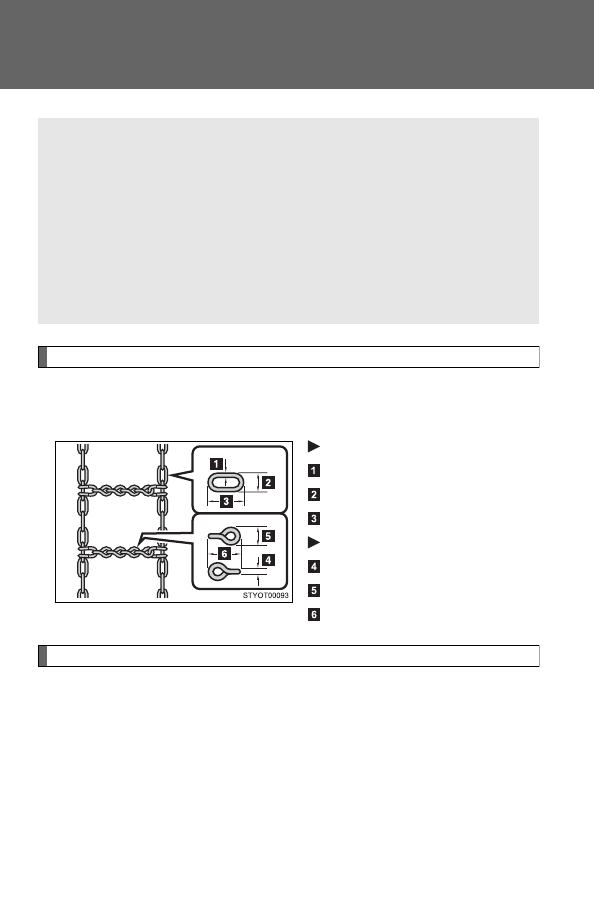
Use the correct tire chain size when mounting the snow chains. 
Chain size is regulated for each tire size.

Side chain

0.12 in. (3 mm) in diameter

0.39 in. (10 mm) in width

1.18 in. (30 mm) in length

Cross chain

0.16 in. (4 mm) in diameter

0.55 in. (14 mm) in width

0.98 in. (25 mm) in length

Regulations on the use of snow chains

● Regulations regarding the use of tire chains vary according to loca-

tion and type of road. Always check local regulations before install-
ing chains.

● Install the chains on the front tires.
● Retighten the chains after driving 1/4 - 1/2 mile (0.5 - 1.0 km).

When driving the vehicle

Accelerate the vehicle slowly and drive at a reduced speed suit-
able to road conditions.

When parking the vehicle

Park the vehicle and move the shift lever to P without setting the
parking brake. The parking brake may freeze up, preventing it
from being released. If necessary, block the wheels to prevent
inadvertent sliding or creeping.

-------------------------------------------------------------------------------------------------------------------------------------------------------------

153

2-5. Driving information

2

Wh

en drivin

g

Snow chain installation

Observe the following precautions when installing and removing chains.

Install and remove tire chains in a safe location.

Install tire chains on the front tires only. Do not install tire chains on the
rear tires.

Install the tire chains on front tires as tightly as possible. 

Install tire chains following the instructions provided in the accompanying
instructions.

CAUTION

Driving with snow tires

Observe the following precautions to reduce the risk of accidents. 
Failing to do so may result in a loss of vehicle control and cause death or
serious injury.

Use tires of the size specified for your vehicle.

Maintain the recommended level of air pressure.

Do not drive in excess of 75 mph (120 km/h) regardless of the type of
snow tires being used.

Snow tires should be installed on all wheels.

Driving with snow chains

Observe the following precautions to reduce the risk of accidents. 
Failing to do so may result in the vehicle being unable to be driven safely,
and may cause death or serious injury.

Do not drive in excess of the speed limit specified for the tire chains being
used or 30 mph (50 km/h), whichever is lower.

Avoid driving on bumpy road surfaces or over potholes.

Avoid sudden turns and braking.

Slow down sufficiently before entering a curve to ensure that vehicle con-
trol is maintained.

-------------------------------------------------------------------------------------------------------------------------------------------------------------

154

2-5. Driving information

NOTICE

Repairing or replacing snow tires

Request repairs of and obtain replacement snow tires from Scion dealers or
legitimate tire retailers. 
This is because the removal and attachment of snow tires affects the opera-
tion of the tire pressure warning valves and transmitters.

Fitting tire chains

The tire pressure warning valves and transmitters may not function correctly
when tire chains are fitted.

-------------------------------------------------------------------------------------------------------------------------------------------------------------

155

2-5. Driving information

2

Wh

en drivin

g

Trailer towing

Scion does not recommend towing a trailer with your vehicle. Scion

also does not recommend the installation of a tow hitch or the use of

a tow hitch carrier of a wheelchair, scooter, bicycle, etc. Your vehicle

is not designed for trailer towing or for the use of tow hitch mounted

carriers.

-------------------------------------------------------------------------------------------------------------------------------------------------------------

156

2-5. Driving information

Dinghy towing

NOTICE

To avoid serious damage to your vehicle

Do not tow your vehicle with four wheels on the ground.

Your vehicle is not designed to be dinghy towed (with 4 wheels on

the ground) behind a motor home.

-------------------------------------------------------------------------------------------------------------------------------------------------------------

-------------------------------------------------------------------------------------------------------------------------------------------------------------

158

3-1. Using the air conditioning system and defogger

Air conditioning system

Adjusting the settings

Adjusting the temperature setting

Turn the temperature control dial clockwise (warm) or counter-
clockwise (cool).

If 

 is not pressed, the system will blow ambient temperature air or

heated air.

For quick cooling, turn the temperature control dial to the MAX A/C posi-
tion and press the recirculated air mode switch to turn on the recirculated
air mode.

Adjusting the fan speed

Turn the fan speed control dial clockwise (increase) or counter-
clockwise (decrease).

Set the dial to “0” to turn the fan off.

Air outlet 
selection dial

Temperature control dial

Outside air or recirculated 
air mode switch

Fan speed 
control dial

Air conditioning 
ON/OFF button

-------------------------------------------------------------------------------------------------------------------------------------------------------------

159

3-1. Using the air conditioning system and defogger

3

Inte

rior fe

atures

Selecting the air outlets

Set the air outlet selection dial to an appropriate position.

The positions between the air outlet selections shown below can also be
selected for more detailed adjustment.

When the dial is set to 

, air

flows to the upper body.

When the dial is set to 

, air

flows to the upper body and feet.

: Some models

When the dial is set to 

, air

flows mainly to the feet.

: Some models

-------------------------------------------------------------------------------------------------------------------------------------------------------------

160

3-1. Using the air conditioning system and defogger

When the dial is set to 

, air

flows to the feet and the wind-
shield defogger operates.

The air intake selector is automat-
ically set to outside air mode.

In this position, the air intake
selector cannot be changed to the
recirculated air mode.

When the dial is set to 

, air

flows to the windshield and side
windows to defog them.

The air intake selector is automat-
ically set to outside air mode.

In this position, the air intake
selector cannot be changed to the
recirculated air mode.

Pressing


to turn the air

conditioning on clears the wind-
shield and side windows faster.

Switching between outside air and recirculated air modes

Press .

The mode switches between 

 (outside air mode) and 

(recirculated air mode) each time the switch is pressed.

: Some models

-------------------------------------------------------------------------------------------------------------------------------------------------------------

161

3-1. Using the air conditioning system and defogger

3

Inte

rior fe

atures

Adjusting the position and opening and closing the air outlets

Center outlets

Direct air flow to the left or
right, up or down.

Turn the knob to open or close
the vent.

-------------------------------------------------------------------------------------------------------------------------------------------------------------

162

3-1. Using the air conditioning system and defogger

Right and left side outlets

Direct air flow to the left or
right, up or down.

Turn the knob to open or close
the vent.

For quick cooling

Turn the temperature control dial to the “MAX A/C” position and select the
recirculated air mode.

Using the system in recirculated air mode

The windows will fog up more easily if the recirculated air mode is used for
an extended period.

When outside air temperature approaches 32°F (0°C)

The air conditioning system may not operate even when


is pressed.

When 


is selected for the air outlets used

For your driving comfort, air flowing to the feet may be warmer than air flow-
ing to the upper body depending on the position of the temperature adjust-
ment dial.

-------------------------------------------------------------------------------------------------------------------------------------------------------------

163

3-1. Using the air conditioning system and defogger

3

Inte

rior fe

atures

Ventilation and air conditioning odors

To let fresh air in, set the air conditioning system to the outside air mode.

During use, various odors from inside and outside the vehicle may enter
into and accumulate in the air conditioning system. This may then cause
odor to be emitted from the vents.

To reduce potential odors from occurring:
It is recommended that the air conditioning system be set to outside air
mode prior to turning the vehicle off.

CAUTION

To prevent the windshield from fogging up

Do not set the air outlet selection dial to 

 during cool air operation in

extremely humid weather. The difference between the temperature of the
outside air and that of the windshield can cause the outer surface of the
windshield to fog up, blocking your vision.

NOTICE

To prevent battery discharge

Do not leave the air conditioning system on longer than necessary when the
engine is stopped.

-------------------------------------------------------------------------------------------------------------------------------------------------------------

164

3-1. Using the air conditioning system and defogger

Rear window defogger

: If equipped

The rear window defogger can be operated when

The engine switch is in the ON position.

NOTICE

To prevent battery discharge

Do not leave the rear window defogger on longer than necessary when the
engine is stopped.

This feature is used to defog the rear window.

Turns the defogger on/off

Press the button to turn on the
rear window defogger. The
indicator will come on. Press-
ing the button again also turns
the defogger off.

-------------------------------------------------------------------------------------------------------------------------------------------------------------

165

3-1. Using the air conditioning system and defogger

3

Inte

rior fe

atures

Rear window and outside rear view mirror defoggers

: If equipped

The rear window and outside rear view mirror defoggers can be oper-
ated when

The engine switch is in the ON position.

CAUTION

When the outside rear view mirror defoggers are on

Do not touch the rear view mirror surfaces, as they can become very hot and
burn you.

This feature is used to defog the rear window. (Turning the rear win-

dow defogger on will also turn the outside rear view mirror defog-

gers on. The outside rear view mirror defoggers is used to remove

raindrops, dew and frost from the outside rear view mirrors.)

Turns the defoggers on/off

Press the button to turn on the
rear window defogger. The
indicator will come on. Press-
ing the button again also turns
the defoggers off.

-------------------------------------------------------------------------------------------------------------------------------------------------------------

166

3-1. Using the air conditioning system and defogger

NOTICE

To prevent battery discharge

Do not leave the rear window and outside rear view mirror defoggers on
longer than necessary when the engine is stopped.

-------------------------------------------------------------------------------------------------------------------------------------------------------------

167

3

Inte

rior fe

atures

3-2. Using the audio system

Using the AUX port/USB port

Operating portable audio devices connected to the audio system

The volume and sound quality can be adjusted using the vehicle’s audio
controls. All other adjustments must be made on the portable audio device
itself.

When using a portable audio device connected to the power outlet

Noise may occur during playback. Use the battery power source of the por-
table audio device to reduce noise.

This port can be used to connect a portable audio device and listen

to it through the vehicle’s speakers.

For more information, please refer to the “SCION Audio System

Owner’s Manual” or “SCION Navigation System Owner’s Manual”.

Open the cover and connect
the portable audio device.

-------------------------------------------------------------------------------------------------------------------------------------------------------------


Content      ..     7      8      9      10     ..