Scion iQ. Service Manual - part 10
 

  Index      Manuals     Scion iQ. Service Manual


Search            copyright infringement  


Content      ..     8      9      10      11     ..


Scion iQ. Service Manual - part 10


168

3-2. Using the audio system

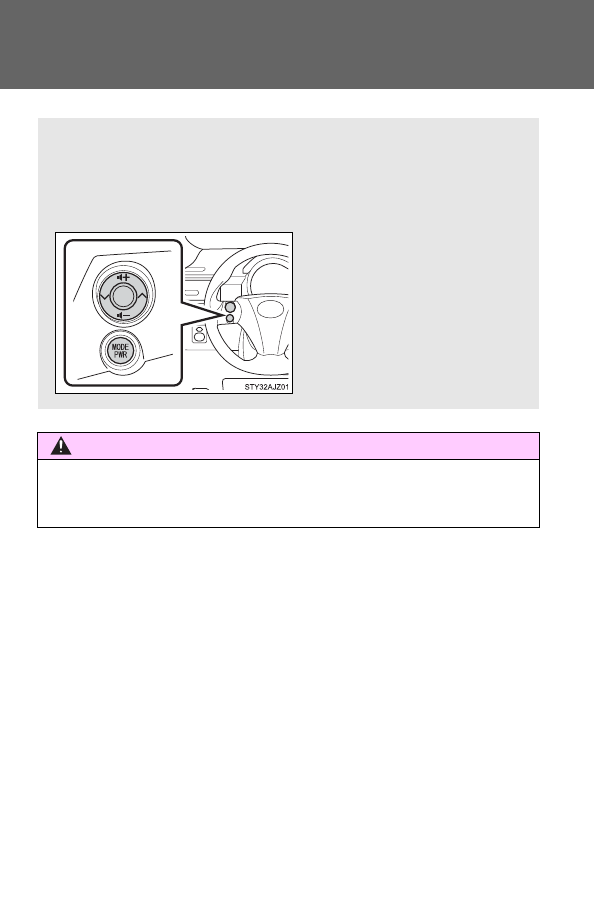
Using the steering wheel audio switches

CAUTION

To reduce the risk of an accident

Exercise care when operating the audio switches on the steering wheel.

Some audio features (audio volume control, radio, CD player etc.)

can be controlled using the switches on the steering wheel.

For more information, please refer to the “SCION Audio System

Owner’s Manual” or “SCION Navigation System Owner’s Manual”.

-------------------------------------------------------------------------------------------------------------------------------------------------------------

169

3

Inte

rior fe

atures

3-3. Using the interior lights

Interior lights list

Illuminated entry system

When the interior light switch is in the 

 position, the interior light auto-

matically turns on/off according to whether the doors are locked/unlocked,
whether the doors are open/closed, and the engine switch position.

To prevent the battery from being discharged

If the interior light remains on when the door is not fully closed and the inte-
rior light switch is in the 

 position, the light will go off automatically

after 20 minutes.

Customization that can be configured at Scion dealer

Settings (e.g. The time elapsed before lights turn off) can be changed. 
(Customizable features 

P. 343)

Interior light (

P. 170)

-------------------------------------------------------------------------------------------------------------------------------------------------------------

170

3-3. Using the interior lights

Interior light

Door position

Off

On

The interior light angle can be
adjusted.

Interior light

-------------------------------------------------------------------------------------------------------------------------------------------------------------

171

3

Inte

rior fe

atures

3-4. Using the storage features

List of storage features

CAUTION

Items that should not be left in the storage spaces

Do not leave glasses, lighters or spray cans in the storage spaces, as this
may cause the following when cabin temperature becomes high:

Glasses may be deformed by heat or cracked if they come into contact
with other stored items.

Lighters or spray cans may explode. If they come into contact with other
stored items, the lighter may catch fire or the spray can may release gas,
causing a fire hazard.

Bottle holders

Auxiliary box

Cup holder

-------------------------------------------------------------------------------------------------------------------------------------------------------------

172

3-4. Using the storage features

Cup holder

CAUTION

Items unsuitable for the cup holder

Do not place anything other than cups or aluminum cans in the cup holders.
Other items may be thrown out of the holders in the event of an accident or
sudden braking and cause injury. If possible, cover hot drinks to prevent
burns.

Cup holder

-------------------------------------------------------------------------------------------------------------------------------------------------------------

173

3-4. Using the storage features

3

Inte

rior fe

atures

Bottle holders

Front

Rear

NOTICE

Items that should not be stowed in the bottle holders

Put the cap on before stowing a bottle. Do not place open bottles in the bot-
tle holders, or glasses and paper cups containing liquid. The contents may
spill and glasses may break.

Bottle holders

-------------------------------------------------------------------------------------------------------------------------------------------------------------

174

3-4. Using the storage features

Auxiliary box

Lift up the tray and pull it forward.

CAUTION

While the vehicle is in motion

Keep the tray under the seat.

The pulled out tray may hit passengers or items in the tray may be thrown
out in the event of an accident or sudden braking and may cause an acci-
dent.
Injuries may result in the event of an accident or sudden braking.

Auxiliary box

-------------------------------------------------------------------------------------------------------------------------------------------------------------

175

3

Inte

rior fe

atures

3-5. Other interior features

Sun visors

Forward position: 
Flip down.

Side position: 
Flip down, unhook, and
swing to the side.

-------------------------------------------------------------------------------------------------------------------------------------------------------------

176

3-5. Other interior features

Vanity mirrors

Slide the cover.

-------------------------------------------------------------------------------------------------------------------------------------------------------------

177

3-5. Other interior features

3

Inte

rior fe

atures

Power outlet

The power outlet can be used when

The engine switch is in the ACC or ON position.

NOTICE

To avoid damaging the power outlet

Close the power outlet lid when the power outlet is not in use. 
Foreign objects or liquids that enter the power outlet may cause a short cir-
cuit.

To prevent the fuse from being blown

Do not use an accessory that uses more than 12 V 10 A.

To prevent battery discharge

Do not use the power outlet longer than necessary when the engine is not
running.

The power outlet can be used for 12 V accessories that run on less

than 10 A.

-------------------------------------------------------------------------------------------------------------------------------------------------------------

178

3-5. Other interior features

Assist grips

CAUTION

Assist grip

Do not use the assist grip when getting in or out of the vehicle or rising from
your seat.

NOTICE

To prevent damage to the assist grip

Do not hang any heavy object or put a heavy load on the assist grip.

An assist grip installed on the ceiling can be used to support your

body while sitting on the seat.

-------------------------------------------------------------------------------------------------------------------------------------------------------------

179

3-5. Other interior features

3

Inte

rior fe

atures

Floor mat

Use only floor mats designed specifically for vehicles of the same

model and model year as your vehicle. Fix them securely in place

onto the carpet.

Insert the retaining hooks
(clips) into the floor mat eye-
lets.

Turn the upper knob of each
retaining hook (clip) to secure
the floor mats in place.

*

: Always align the   marks.

The shape of the retaining hooks (clips) may differ from that shown in the
illustration.

*

-------------------------------------------------------------------------------------------------------------------------------------------------------------

180

3-5. Other interior features

CAUTION

Observe the following precautions. 
Failure to do so may cause the driver’s floor mat to slip, possibly interfering
with the pedals while driving. An unexpectedly high speed may result or it may
become difficult to stop the vehicle, leading to a serious accident.

When installing the driver’s floor mat

Do not use floor mats designed for other models or different model year
vehicles, even if they are Scion Genuine floor mats.

Only use floor mats designed for the driver’s seat.

Always install the floor mat securely using the retaining hooks (clips) pro-
vided.

Do not use two or more floor mats on top of each other.

Do not place the floor mat bottom-side up or upside-down.

Before driving

Check that the floor mat is securely
fixed in the correct place with all the
provided retaining hooks (clips). Be
especially careful to perform this check
after cleaning the floor.

With the engine stopped and the shift
lever in P, fully depress each pedal to
the floor to make sure it does not inter-
fere with the floor mat.

-------------------------------------------------------------------------------------------------------------------------------------------------------------

181

3-5. Other interior features

3

Inte

rior fe

atures

Luggage compartment features

CAUTION

Caution while driving

Keep the luggage box closed. Injuries may result in the event of an accident
or sudden braking.

Luggage box

Open the lid.

-------------------------------------------------------------------------------------------------------------------------------------------------------------

-------------------------------------------------------------------------------------------------------------------------------------------------------------

184

4-1. Maintenance and care

Cleaning and protecting the vehicle exterior

Automatic car washes

Fold the mirrors and remove the antenna before washing the vehicle.
Start washing from the front of the vehicle. Make sure to re-install the
antenna and extend the mirrors before driving.

Brushes used in automatic car washes may scratch the vehicle surface
and harm your vehicle’s paint.

High pressure car washes

Do not allow the nozzles of the car wash to come within close proximity
of the windows. 

Before car wash, check that the fuel filler door on your vehicle is closed
properly.

Bumpers

Do not scrub with abrasive cleaners.

Perform the following to protect the vehicle and maintain it in prime

condition.

● Working from top to bottom, liberally apply water to the vehicle

body, wheel wells and underside of the vehicle to remove any
dirt and dust. 
Wash the vehicle body using a sponge or soft cloth, such as a
car wash mitt.

● For hard-to-remove marks, use car wash soap and rinse thor-

oughly with water.

● Wipe away any water.
● Wax the vehicle when the waterproof coating deteriorates.

If water does not bead on a clean surface, apply wax when the vehicle
body is cool.

-------------------------------------------------------------------------------------------------------------------------------------------------------------


Content      ..     8      9      10      11     ..