Tractors X60 Series. Manual - part 11
 

  Index      Tractors     Tractors X60 Series - service repair manual 2012 year


Search            


Content   ..  9  10  11  12   ..


Tractors X60 Series. Manual - part 11


45

Controls - Cab

3

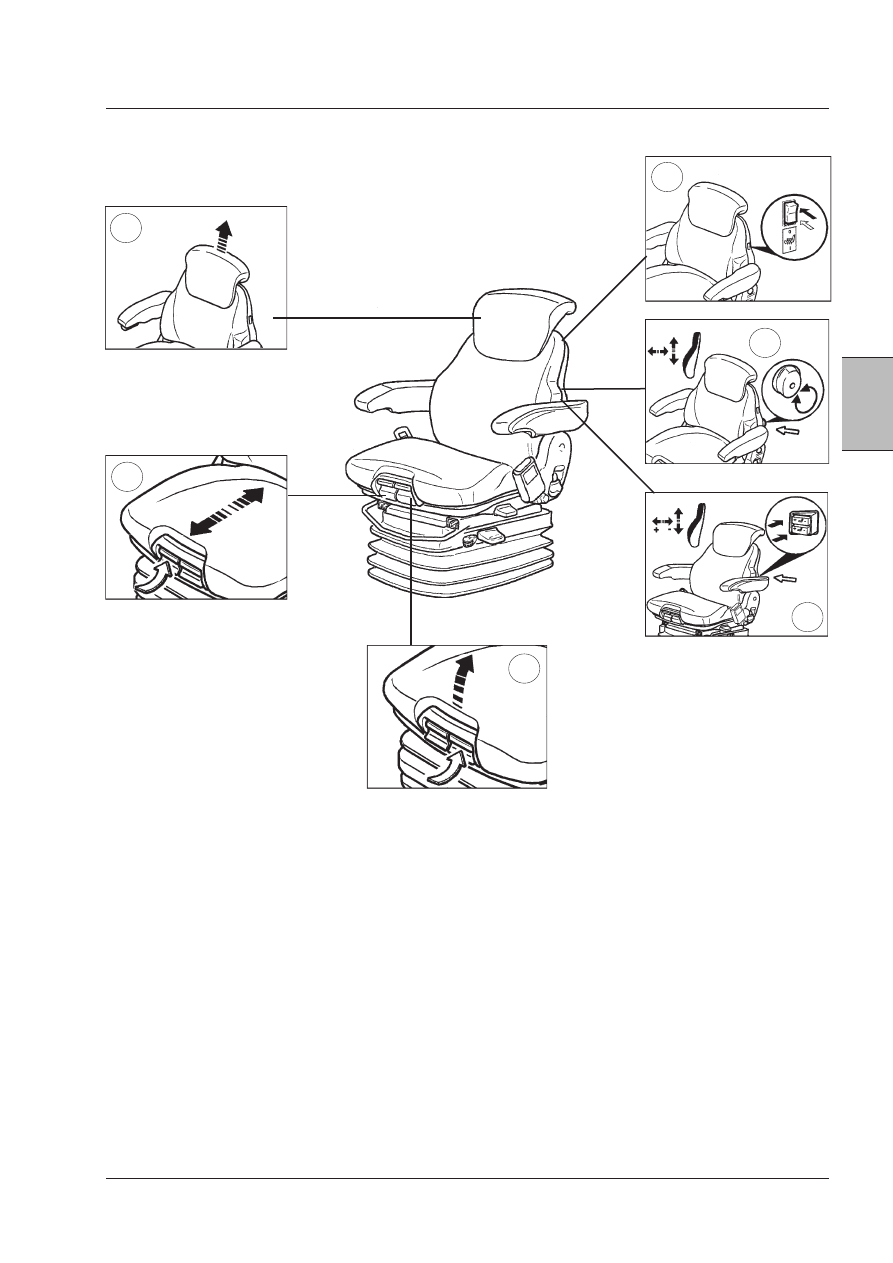
10. THERMIC SEAT CUSHION (only Super Deluxe seat) (if
equipped) - Depress the switch to operate seat heating.
Press the switch again to turn the heater OFF.

11. MANUAL LUMBAR ADJUSTMENT CONTROL - Turn
the adjustment knob as required.

12. AIR LUMBAR ADJUSTMENT CONTROL (only Deluxe
seats) - Operate the switches as required.

IMPORTANT:  Never  operate  the  compressor  for  longer 
than 1 minute.

10

12

11

9

8

7

7. CUSHION TILT ADJUSTMENT (Deluxe seat only) - Lift
lever to adjust seat cushion tilt angle.

8. CUSHION FORE/AFT ADJUSTMENT (Deluxe seat only)
- Lift lever to adjust seat cushion depth.

9.  BACK  REST  REMOVAL/HEIGHT  ADJUSTMENT  (if
equipped) - Raise or lower the back rest to the required
height. Pull up past end stop to remove the back rest.

46

Controls - Cab

Seat Belt

WARNING: Always securely fasten your safety 
belt.  Your  tractor  is  equipped  with  a  ROPS 
cab  for  your  protection.  The  seat  belt  can 
help insure your safety if it is properly used 
and maintained.  Never wear the belt in a 
twisted condition or pinched between the seat 
structural members.

Adjust the seat to your requirements.

Lean with your back straight against the back rest. Pull the
seat belt completely across your body and push the metal
eye (1) into the latch assembly (2) until it locks.

Adjust the position of the seat belt as low on your body
as possible.

To release the seat belt, push the red button (3) on the
latch assembly.

IMPORTANT:  From time to time, carefully inspect the 

seat belt and replace it if worn or damaged.

1

2

3

Mechanical suspension seat
(if equipped)

1.  FORE/AFT  ADJUSTMENT  CONTROL  -  Lift  lever  and
adjust seat as required, release lever to lock in position.

2. HEIGHT ADJUSTMENT CONTROL - Grasp the seat and
lift it to the required height. To lower it, raise the seat and
move it beyond the upper end stop, then lower to the
required height.

3.  WEIGHT  ADJUSTMENT  CONTROL  -  Without  the
operator in the seat, turn the knob as required, until the
operator's weight is displayed in the indicator.

WARNING:  To  avoid  injuries,  the  operator's 
weight  setting  should  be  checked  and  ad-
justed  to  the  operator  before  starting  the 
tractor. 

47

Controls - Cab

3

Passenger Seat 

The passenger seat allows a colleague to ride in safety
and comfort.

IMPORTANT:

1. Children are NOT allowed to use the passenger seat. 
2. The left-hand door MUST be closed at all times when-

ever the passenger seat is occupied and the tractor is 
in motion.

3.  See  Safety  Notes  section  for  further  safety  informa-

tion.

OPERATION 1

Raise the seat base.

OPERATION 2

Insert the seat base support between the seat base stops
as shown above.

IMPORTANT:  Before  using  the  passenger  seat,  make 

sure the seat base and support are fully secure.

OPERATION 3
Store the seat in the reverse sequence.

CAUTION: For machines with a seat for a second pas-
senger. The seat for a second passenger (with a seat 
belt that must be worn at all times) may be occupied 
only when driving on road, but not when working in 
the field.

Passenger Seat Safety

(if equipped).

-  The passenger seat allows a colleague to ride in safety

and comfort.

  This seat MAY NOT be used to transport chil-

dren.

-  When  the  passenger  seat  is  occupied,  the  following

precautions must be taken:

-  Tractor should be driven at a slow speed and on level

ground.

-  Avoid driving on highways or public roads.
-  Avoid quick starts or stops.
-  Avoid sharp turns.
-  The left-hand door MUST be closed at all times, while

the tractor is in motion.

WARNING: A frequent cause of personal injury 
or death is persons falling off and being run 
over. DO NOT permit others to ride, except on 
the designated Passenger Seat.

48

Controls - Cab

STEERING COLUMN ADJUSTMENT

WARNING: Do not adjust the steering column while driving. Adjusting the steering column while driving 
can cause loss of control resulting in injury or death.

Telescopic Column Adjustment

The steering column can be moved in or out at any tilt
position.

To adjust:

Lift and hold the locking lever up.
Pull or push the column in or out to the required position,
then release the lever to lock the column in position.

Column Tilt Adjustment

The  steering  column  can  be  adjusted  up  or  down  as
required.

To adjust:

Push down the lever and hold in this position. Move the
column up or down to the required position, then release
the lever to lock the column in position.


Content   ..  9  10  11  12   ..