SINUMERIK 840D sl. Service - Configuring Commissioning. Manual (2011-2020) - page 47
Generating user dialogs
2.7 XML identifier
Tag identifier
Meaning
IMG
The tag is used to display an image in the specified position. The BMP and PNG image formats
are supported.
Syntax:
<IMG xpos = "<X position>" ypos = "<Y position>" name = "<name>" />
<IMG … xrot="angle X axis" yrot=" angle Y axis " zrot=" angle Z axis
" />
Attributes:
• xpos
X position of the top left corner
• ypos
Y position of the top left corner
• name
Complete path name. The path information is made in lowercase letters.
• transparent
Transparent color of the bitmap
Further information is provided in Chapter "Color coding (Page 62)"
IMG continued
Example:
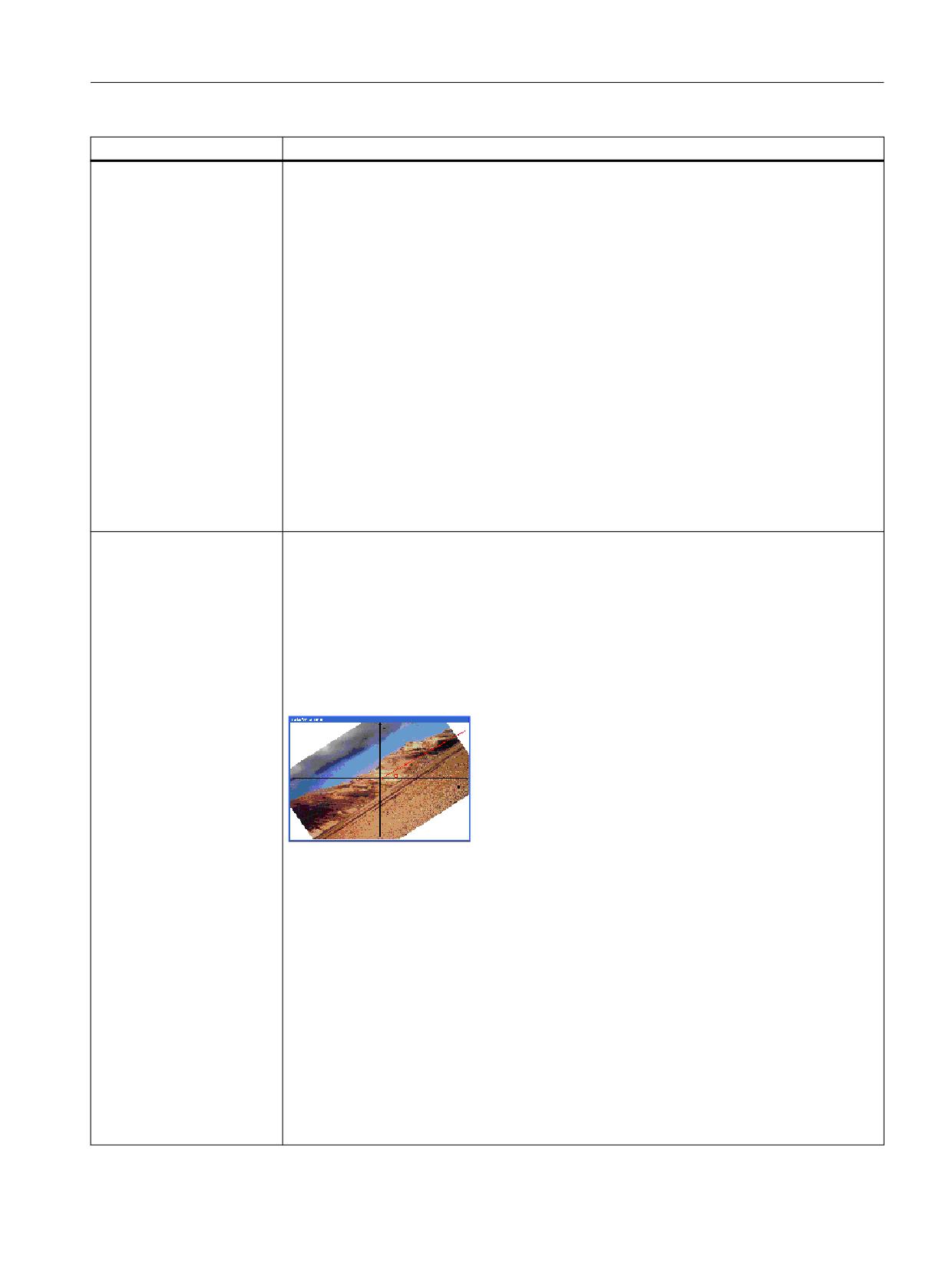
The image is rotated through 34 degrees around the Z axis:
<img xpos = "5" ypos = "23" name = "f:/appl/pic3.bmp" height="355"
width="550" zrot="34" color_bk="#ffffff" >
</img>
Note:
The drive designations vary depending on the system.
Optional:
If the image display is to differ from the original size, the dimensions can be defined using the
attributes width and height.
• width
Width in pixels
• height
Height in pixels
Examples:
<IMG xpos = "20" ypos = "40" name = "f:/appl/test.bmp" />
<IMG xpos = "5" ypos
= "23" name = "f:/appl/test.bmp" height = "355"
width = "550"/>
Easy XML
Programming Manual, 10/2020, 6FC5397-1DP40-6BA4
107
Generating user dialogs
2.7 XML identifier
Tag identifier
Meaning
IMG continued
Attribute:
AspectRatioMode
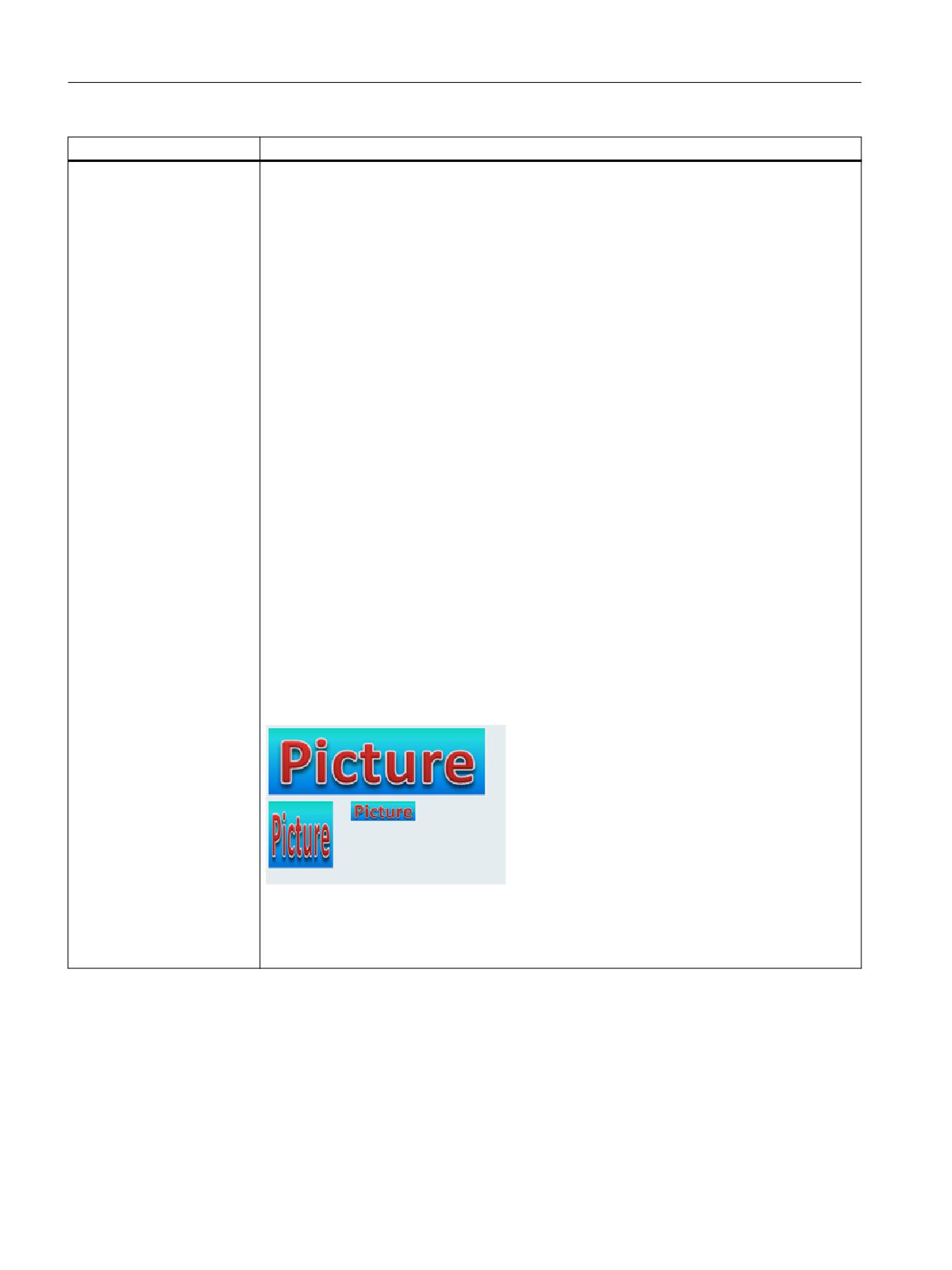
This attribute allows the control of the aspect ratio for an image wherever non-proportional
zooming is performed.
Values:
• Ignore
The aspect ratio of the bitmap is adapted to the prescribed height and width.
• Keep (default)
The aspect ratio is retained and ensures that the image is scaled to a rectangle which as-
sumes the greatest expansion within the prescribed height and width.
• KeepByExpanding
The aspect ratio is kept and ensures that the image is scaled to a rectangle which assumes
the greatest expansion outside of the prescribed height and width.
Example:
<img xpos = "8" ypos = "30" name = "test.bmp" height="155"
width="150" AspectRatioMode="KeepbyExpanding">
<property transparent="#00ff00" />
</img>
<img xpos = "8" ypos = "200" name = "test.bmp" height="155"
width="150" AspectRatioMode="Ignore">
<property transparent="#00ff00" />
</img>
<img xpos = "200" ypos = "200" name = "test.bmp" height="155"
width="150" AspectRatioMode="Keep">
<property transparent="#00ff00" />
</img>
• Top - KeepbyExpanding property set
• Bottom left - Ignore property set
• Bottom right - Keep property set
Easy XML
108
Programming Manual, 10/2020, 6FC5397-1DP40-6BA4
Generating user dialogs
2.7 XML identifier
Tag identifier
Meaning
IMG continued
Attributes:
ExpandingForRotation
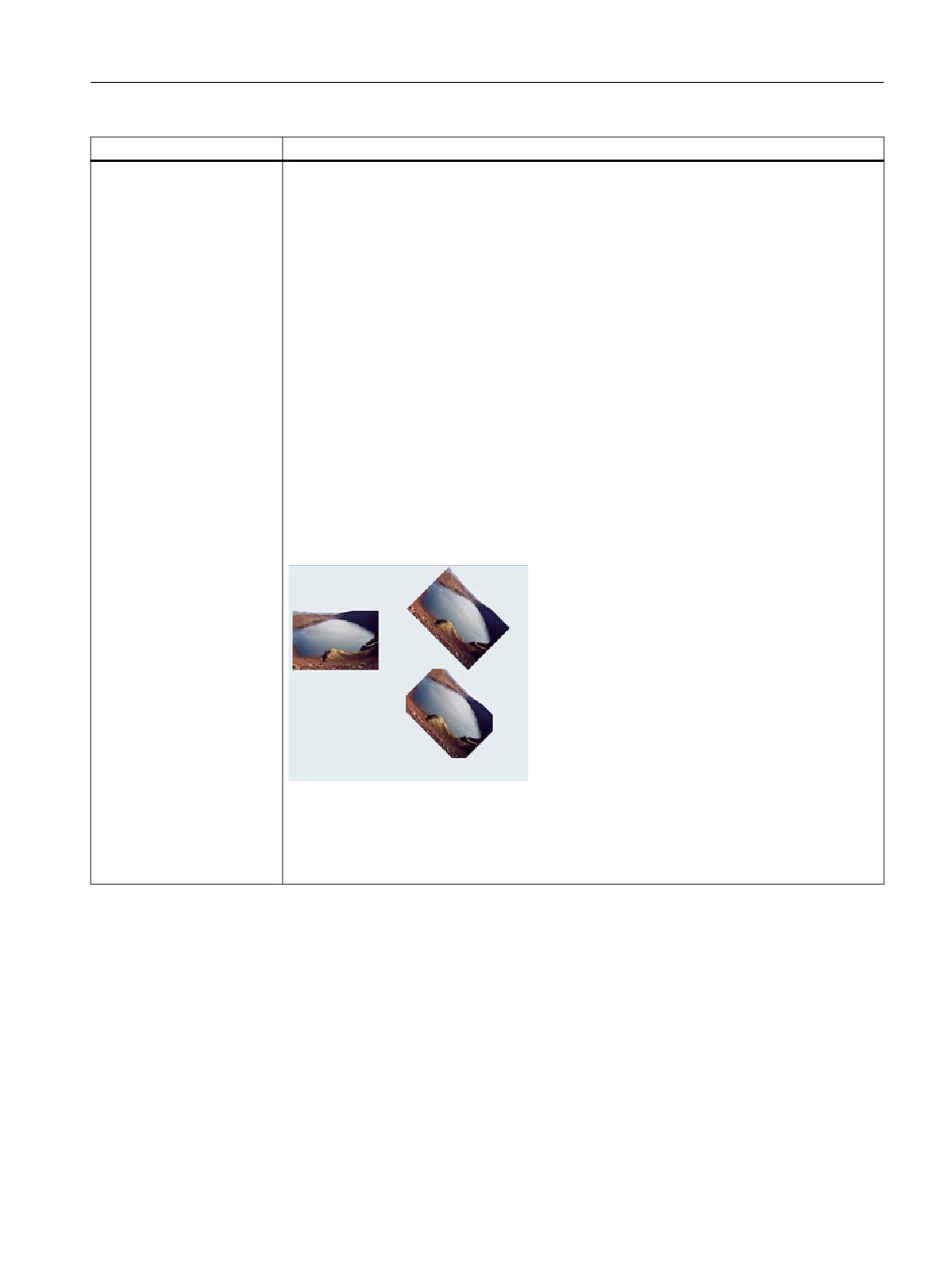
The aspect ration is retained. The image is scaled to a rectangle which corresponds with the
bounding box of the rotated and scaled image.
Example:
<img xpos = "8" ypos = "100" name = "pic1.bmp" height="155"
width="150" >
<property transparent="#ffffff" />
</img>
<op>
zrot = 45.0;
</op>
<img xpos = "205" ypos = "23" name = "pic1.bmp" height="155"
width="150" zrot="$zrot" AspectRatioMode="ExpandingForRotation">
<property transparent="#ffffff" />
</img>
<img xpos = "205" ypos = "200" name = "pic1.bmp" height="155"
width="150" zrot="$zrot" >
<property transparent="#ffffff" />
</img>
• Left - Image is scaled to a size of 150x155 pixels
• Top right - Image is scaled to a size of 150x155 pixels and is rotated around 45 degrees with
the ExpandingForRotation property
• Bottom right - Image is scaled to a size of 150x155 pixels and is rotated around 45 degrees
Easy XML
Programming Manual, 10/2020, 6FC5397-1DP40-6BA4
109
Generating user dialogs
2.7 XML identifier
Tag identifier
Meaning
ARC
The tag is used to draw a circle sector in a form.
Attributes:
Position within the form in pixels:
• xpos1- starting point of the circle segment X-coordinate
• ypos1- starting point of the circle segment Y-coordinate
• xpos2 - end point of the circle segment X-coordinate
• ypos2 - end point of the circle segment Y-coordinate
Position within the form in pixels:
• ccx - center of the circle segment X-coordinate
• ccy - center of the circle segment Y-coordinate
• radius - circle radius, value in pixels
Note:
Center point or radius
If both parameters are specified, the circle center is used.
ARC continued
• penwidth
The attribute specifies the line width of the line in pixels.
• color
Line color
• color_bk
Fill color of the circle segment
Further information is provided in Chapter "Color coding (Page 62)"
• style
The attribute defines the line type:
- "SolidLine" - solid line (default)
- "DashLine" - dashed line
- "DotLine" - dotted line
- "DashDotLine" - dot-dash line
- "DashDotDotLine" - dash-dot-dot line
Easy XML
110
Programming Manual, 10/2020, 6FC5397-1DP40-6BA4
Generating user dialogs
2.7 XML identifier
Tag identifier
Meaning
ARC continued
• type
- cw - clockwise
- ccw - counterclockwise
• arrow
Arrows are displayed at the segment ends:
- "P1" - arrow at the starting point of the line
- "P2" - arrow at the starting point of the line
- "P1P2" - arrows at the starting point and end point of the line
- "P1_FILLED" - filled arrow at the starting point of the line
- "P2_FILLED" - filled arrow at the starting point of the line
- "P1P2_FILLED" - filled arrows at the starting point and end point of the line
• arrow_size
If the Arrow attribute is used, the length of the arrow can be specified in pixels.
ARC continued
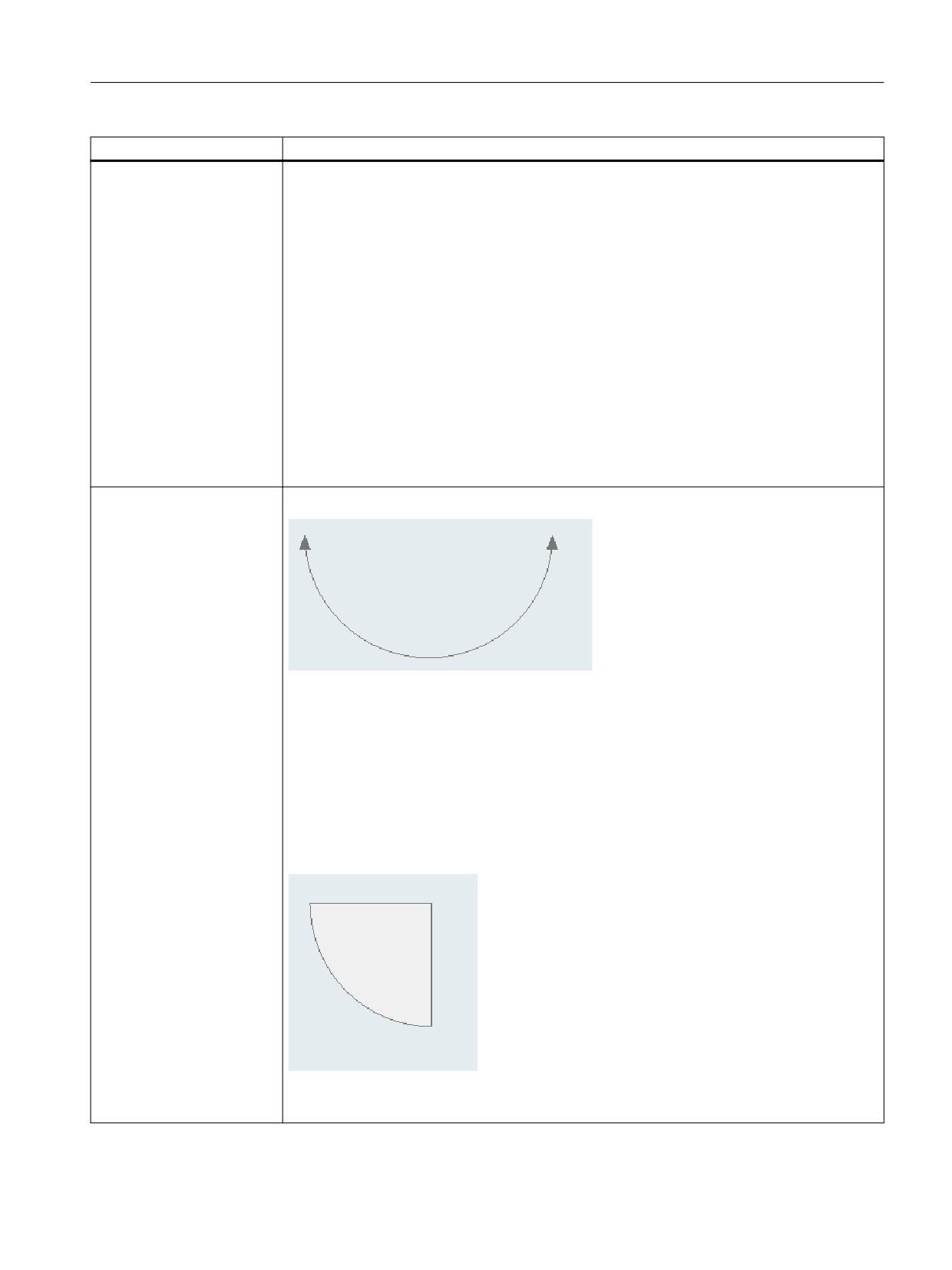
Examples:
<arc xpos1="20" ypos1="200" xpos2="180" ypos2="200" ccx="100"
ccy="200" type="ccw" PENWIDTH="1" color="#777777"
arrow="p1p2_filled"/>
or
<arc xpos1="20" ypos1="200" xpos2="180" ypos2="200" radius="80"
type="ccw" PENWIDTH="1" color="#777777" arrow="p1p2_filled"/>
<arc xpos1="20" ypos1="200" xpos2="100" ypos2="280" radius="80"
type="ccw" PENWIDTH="1" color="#777777" color_bk="#f0f0f0"/>
Easy XML
Programming Manual, 10/2020, 6FC5397-1DP40-6BA4
111
Generating user dialogs
2.7 XML identifier
Tag identifier
Meaning
BOX
The tag draws a rectangle at the specified position, colored as indicated.
Syntax:
<BOX xpos = "<X position>" ypos = "<Y position>" width = "<X
extension>" height = "<Y extension>" color = "<Color code>" />
Attributes:
• xpos
X position of the top left corner
• ypos
Y position of the top left corner
• width
Extension in X direction (in pixels)
• height
Extension in Y direction (in pixels)
• color
Color coding
Further information is provided in Chapter "Color coding (Page 62)"
ELLIPSE
The tag is used to draw an ellipse in a form.
Attributes:
Position within the form in pixels:
• xpos - starting point of the X-coordinate line
• ypos - starting point of the Y-coordinate line
• width - width of the surrounding rectangle (bounding box)
• height - height of the surrounding rectangle (bounding box)
• penwidth
The attribute specifies the line width of the line in pixels.
• color
Line color
• color_bk
Fill color of the ellipse
Further information is provided in Chapter "Color coding (Page 62)"
• style
The attribute defines the line type:
- "SolidLine" - solid line (default)
- "DashLine" - dashed line
- "DotLine" - dotted line
- "DashDotLine" - dot-dash line
- "DashDotDotLine" - dash-dot-dot line
Easy XML
112
Programming Manual, 10/2020, 6FC5397-1DP40-6BA4
Generating user dialogs
2.7 XML identifier
Tag identifier
Meaning
ELLIPSE continued
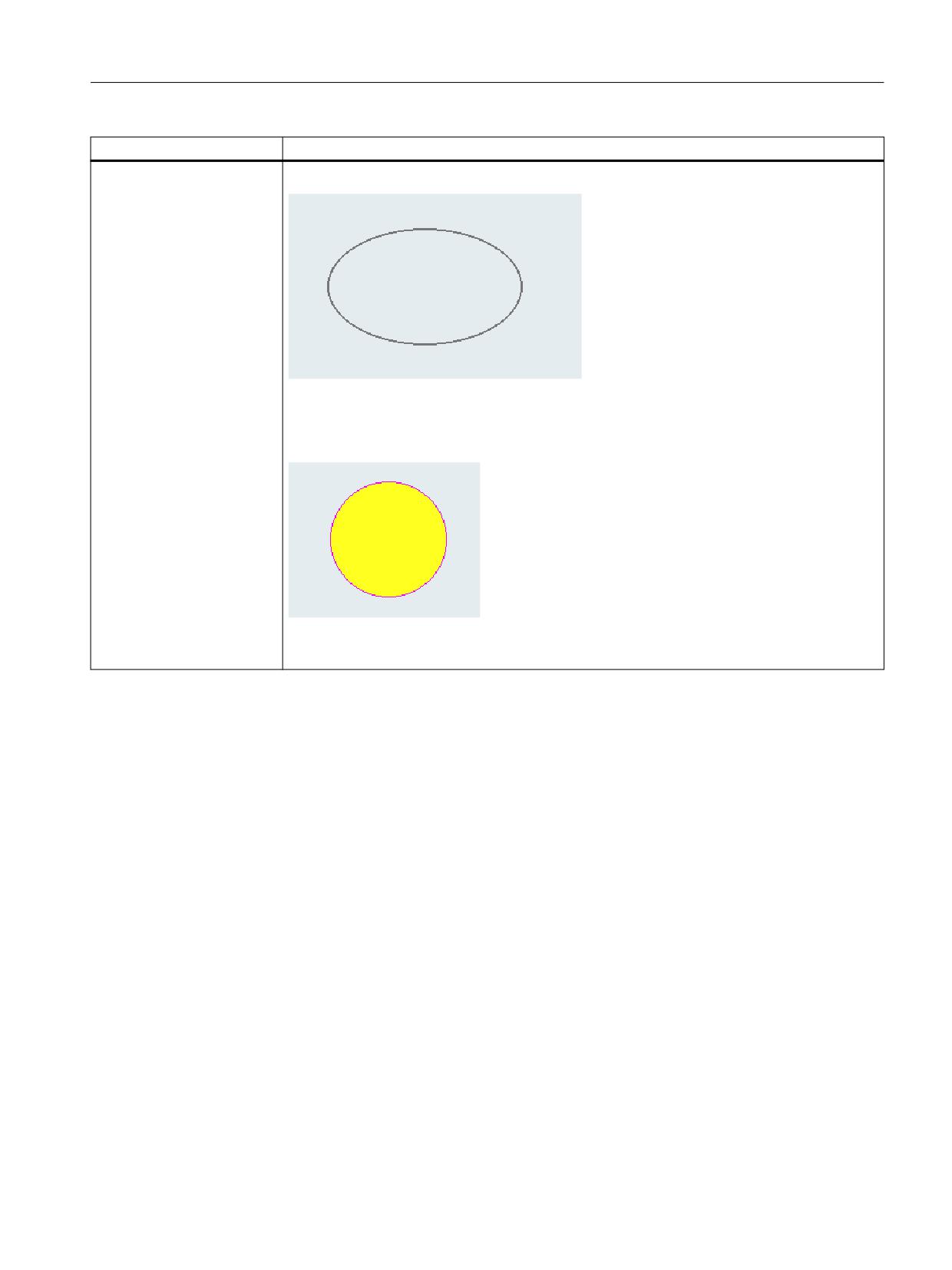
Examples:
<ellipse xpos="302" ypos="160" width="100" height="60" PENWIDTH="2"
color="#777777" />
<ellipse xpos="402" ypos="360" width="60" height="60" PENWIDTH="1"
color="#f800ff" color_bk="#ffff20"/>
Easy XML
Programming Manual, 10/2020, 6FC5397-1DP40-6BA4
113
Generating user dialogs
2.7 XML identifier
Tag identifier
Meaning
FUNCTION
Function call
The tag executes the function body, which is specified under the attribute "name".
Attributes:
• name = "name of the function body"
• return = "variable name for saving the result of the function"
Values:
List of variables to be transferred to the function body. The variables must be separated by a
comma. A maximum of 10 parameters can be transferred.
It is also possible to specify constants or text expressions as call parameters. The identifier _T
should be placed at the start as a means of identifying a text expression.
Syntax:
<FUNCTION name = "<function name>" />
Calling function expects a return value
<FUNCTION name = "<function name>" return = "<Variablenname>" />
Parameter transfer
<FUNCTION name = "<function name>"> var1, var2, var3 </FUNCTION>
<FUNCTION name = "<function name>"> _T"Text", 1.0, 1 </FUNCTION>
Examples:
See "FUNCTION_BODY"
Easy XML
114
Programming Manual, 10/2020, 6FC5397-1DP40-6BA4
Generating user dialogs
2.7 XML identifier
Tag identifier
Meaning
FUNCTION_BODY
Function body
The tag contains the function body of a subfunction. The function body needs to be program-
med within the DialogGui tag.
Attributes:
• name = "name of the function body"
• parameter = "parameter list" (optional)
The attribute lists the transfer parameters that are required. The parameters must be sepa-
rated by a comma.
When the function body is called, the values of the parameters specified in the function call
are copied to the transfer parameters listed.
• return = "true" (optional)
If the attribute is set to true then the local variable $return is created. The function's return
value which is forwarded to the calling function on quitting the function should be copied
to this variable.
Syntax:
Function body without parameter
<FUNCTION_BODY name = "<function name>">
…
…
…
</ FUNCTION_BODY>
Function body with parameter
<FUNCTION_BODY name = "<function_name>" parameter = "<p1, p2, p3>">
…
<LET name = "tmp></LET>
<OP> tmp = p1 </OP>
…
</FUNCTION_BODY>
Function body with return value
<FUNCTION_BODY name = "<function_name>" parameter = "<p1, p2, p3>"
return = "true">
…
<LET name = "tmp></LET>
<OP> tmp = p1 </OP>
…
<OP> $return = tmp </OP>
</FUNCTION_BODY>
Easy XML
Programming Manual, 10/2020, 6FC5397-1DP40-6BA4
115
Generating user dialogs
2.7 XML identifier
Tag identifier
Meaning
FUNCTION_BODY contin-
Example:
ued
<function_body name = "test" parameter = "c1,c2,c3" return = "true">
<LET name = "tmp">0</LET>
<OP> tmp = c1+c2+c3 </OP>
<OP> $return = tmp </OP>
</function_body>
…
…
…
<LET name = "my_var"> 4 </LET>
<function name = "test" return = " my_var "> 2, 3,4</function>
<print text = "result = %d"> my_var </print>
…
…
LINE
The tag is used to draw a line in a form.
Attributes:
Position within the form in pixels:
• xpos1 - starting point of the X-coordinate line
• ypos1 - starting point of the Y-coordinate line
• xpos2 - end point of the X-coordinate line
• ypos2 - end point of the Y-coordinate line
• penwidth
The attribute specifies the line width of the line in pixels.
• color
Line color
Further information is provided in Chapter "Color coding (Page 62)"
• style
The attribute defines the line type:
- "SolidLine" - solid line (default)
- "DashLine" - dashed line
- "DotLine" - dotted line
- "DashDotLine" - dot-dash line
- "DashDotDotLine" - dash-dot-dot line
Easy XML
116
Programming Manual, 10/2020, 6FC5397-1DP40-6BA4
Generating user dialogs
2.7 XML identifier
Tag identifier
Meaning
LINE continued
• arrow
Arrows are displayed at the line ends:
- "P1" - arrow at the starting point of the line
- "P2" - arrow at the starting point of the line
- "P1P2" - arrows at the starting point and end point of the line
- "P1_FILLED" - filled arrow at the starting point of the line
- "P2_FILLED" - filled arrow at the starting point of the line
- "P1P2_FILLED" - filled arrows at the starting point and end point of the line
• arrow_size
If the Arrow attribute is used, the length of the arrow can be specified in pixels.
Syntax:
<line xpos1="<X-coordinate start point>" ypos1="<Y-coordinate start
point>" xpos2="<X-coordinate end point>" ypos2="<Y-coordinate start
point>"
PENWIDTH="<line width>" color="<line color>" style="<line style>"
arrow="<arrow type>" arrow_size="<arrow size>"/>
Easy XML
Programming Manual, 10/2020, 6FC5397-1DP40-6BA4
117
Generating user dialogs
2.7 XML identifier
Tag identifier
Meaning
LINE continued
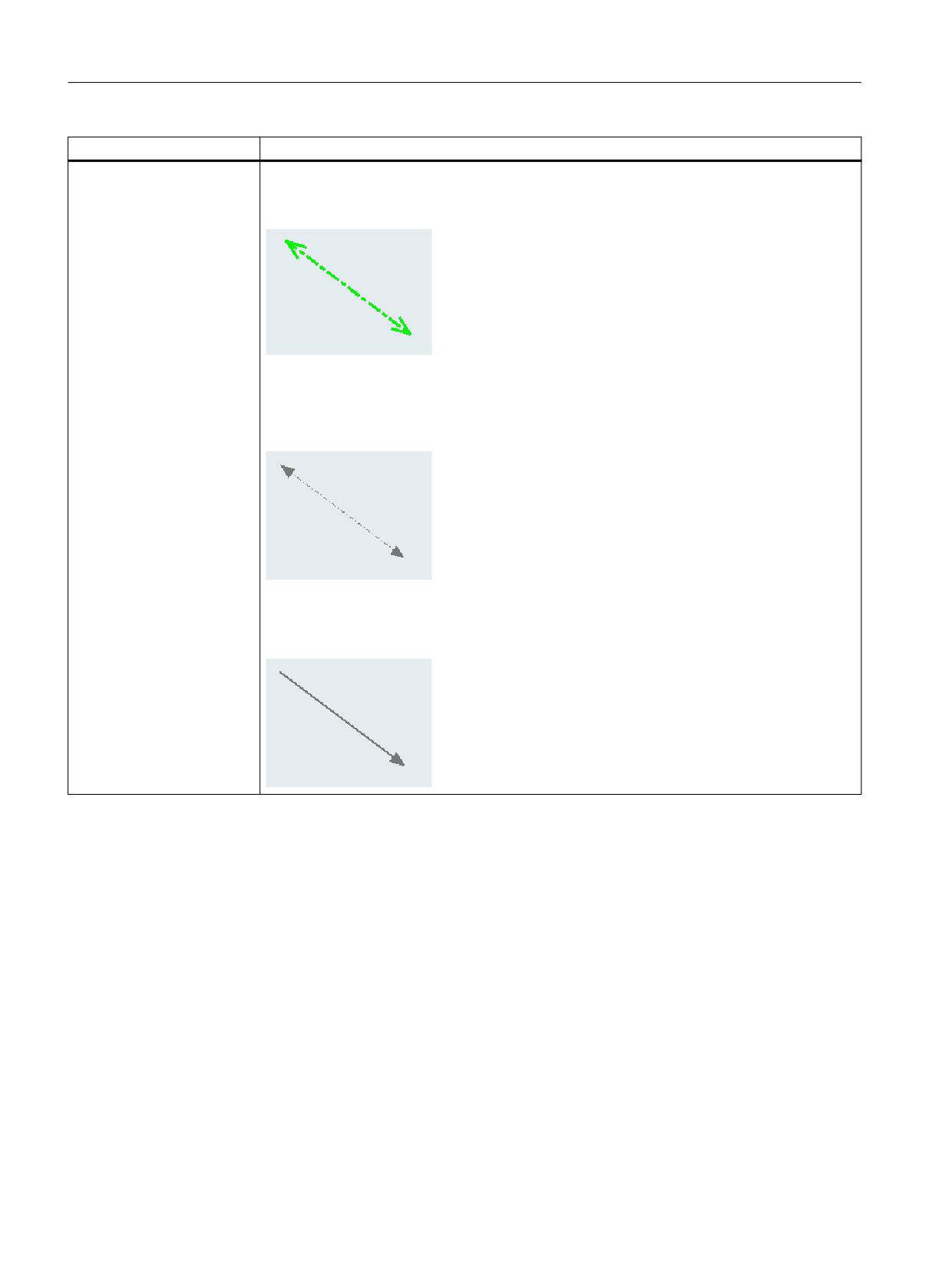
Examples:
<line xpos1="20" ypos1="40" xpos2="100" ypos2="100" PENWIDTH="3"
color="#0ff00f" style="DashDotLine" arrow="p1p2" arrow_size="12"/>
<line xpos1="20" ypos1="40" xpos2="100" ypos2="100" PENWIDTH="1"
color="#777777" style="DashDotLine" arrow="p1p2_filled"
arrow_size="9"/>
<line xpos1="20" ypos1="40" xpos2="100" ypos2="100" PENWIDTH="2"
color="#777777" arrow="p2_filled" arrow_size="9"/>
Easy XML
118
Programming Manual, 10/2020, 6FC5397-1DP40-6BA4
Generating user dialogs
2.7 XML identifier
Tag identifier
Meaning
REQUEST
The tag is used to add a variable to the cyclic reading service (Hotlink). As a consequence, the
access time to variables, which are not linked to the control, is reduced.
If a function is to be called automatically when a value changes, then the name of the function
should be specified as an additional attribute.
This tag is only processed within the INIT operation.
Attributes:
• name
Address identifier
• function
Function name
Syntax:
<REQUEST name = "<NC-Variable>" />
or
<REQUEST name = "<NC-Variable>" function="<function name>"/>
Example:
<request name ="plc/mb10" />
or
<function_body name="my_function" >
<print text="value changed" />
</function_body>
…
…
…
<request name ="plc/mb10" function="my_function"/>
Easy XML
Programming Manual, 10/2020, 6FC5397-1DP40-6BA4
119
Generating user dialogs
2.7 XML identifier
Tag identifier
Meaning
RECALL
This tag can be used in a menu if a navigation is to take place via Recall button. If the tag is
programmed, the Recall icon is shown, and the parser may process the Recall button.
Syntax:
<recall>
…
…
</recall>
UPDATE_CONTROLS
The tag runs a comparison between the operator controls and the reference variables.
Attribute:
• type
The attribute defines the direction of the data comparison.
= TRUE - data is read from the reference variables and copied to the operator controls.
= FALSE - data is copied from the operator controls to the reference variables.
Syntax:
<UPDATE_CONTROLS type = "<Direction>"/>
Example:
<SOFTKEY_OK>
< UPDATE_CONTROLS type="false"/>
</SOFTKEY_OK>
Easy XML
120
Programming Manual, 10/2020, 6FC5397-1DP40-6BA4
Generating user dialogs
2.8 Generating user menus
2.8
Generating user menus
2.8.1
Creating processing cycle forms
The cycle support function allows the automatic creation and decompilation of a cycle call
through the form dialog.
To manage this functionality, the following tags are available:
• NC_INSTRUCTION
• CREATE_CYCLE
To mark a cycle form, in the FORM tag, the attribute type should be specified with the value
cycle. This marking allows the NC_INSTRUCTION to be processed.
Example
<FORM name = "cycle100_form" type= "CYCLE">
…
…
</FORM>
The NC_INSTRUCTION tag contains the cycle call to be generated. All cycle parameters should
be reserved using space retainers.
Example
<FORM name = "cycle100_form" type= "CYCLE">
<NC_INSTRUCTION refvar= "cyc_string" >Cycle100 ($p1, $p2, $p3)</
NC_INSTRUCTION>
…
…
…
</FORM
The CREATE_CYCLE tag prepares the values saved in the space retainer variables and generates
the NC instruction.
Easy XML
Programming Manual, 10/2020, 6FC5397-1DP40-6BA4
121
Generating user dialogs
2.8 Generating user menus
This is then copied to the specified variable.
Tag identifier
Description
NC_INSTRUCTION
This tag is used to define the NC instruction to be generated.
All listed cycle parameters are automatically created as string variables of the FORM
and are available to the FORM.
Precondition: The FORMattribute type is set to the value CYCLE.
Attribute:
• refvar
If the tag is assigned a reference variable, all parameters are pre-assigned with
the values from the NC block saved in the reference variable.
Syntax:
<NC_INSTRUCTION> NC instruction with placeholders </
NC_INSTRUCTION>
Example:
<let name="cyc_string" type="string"> Cycle100(0, 1000, 5)</
let>
<FORM name = "cycle100_form" type= "CYCLE">
<NC_INSTRUCTION refvar= "cyc_string" >Cycle100($p1, $p2,
$p3)</ NC_INSTRUCTION>
…
…
…
</FORM>
Easy XML
122
Programming Manual, 10/2020, 6FC5397-1DP40-6BA4
Generating user dialogs
2.8 Generating user menus
Tag identifier
Description
CREATE_CYCLE
The tag generates an NC block, whose syntax is defined by the value of the NC_IN-
STRUCTION tag.
Before generating the NC instruction, the parser calls the CYCLE_CREATE_EVENT tag
of the FORM. This tag can be used to calculate the cycle parameters.
Syntax:
<CREATE_CYCLE/>
Option:
If a reference variable is specified, the instruction copies the generated call into this
variable.
<create_cycle refvar="name" />
Attribute:
• refvar
If the tag is assigned a reference variable, the NC instruction is copied to this
variable.
Example:
<LET name="cyc_string" type="string"> Cycle100(0, 1000, 5)</
LET>
<SOFTKEY_OK>
<caption>OK</caption>
<CREATE_CYCLE />
<close_form />
<navigation>main_menu</navigation>
</SOFTKEY_OK>
or
<SOFTKEY_OK>
<caption>OK</caption>
<CREATE_CYCLE refvar= "cyc_string" />
<close_form />
<navigation>main_menu</navigation>
</SOFTKEY_OK>
Easy XML
Programming Manual, 10/2020, 6FC5397-1DP40-6BA4
123
Generating user dialogs
2.8 Generating user menus
2.8.2
Substitution characters
The system offers the option of defining control properties (attribute values) for the runtime. In
order to use this function, the desired property must be set in a local variable and the variable
name must be transferred to the tag as an attribute value preceded by the character $.
If the tag expects a string as attribute value or value, the $$$ characters must be placed in front
of the variable name.
Example:
<let name="my_ypos">100</let>
<let name="field_name" type="string"></let>
<control name = "edit1" xpos = "322" ypos = "$my_ypos" refvar="nck/
Channel/Parameter/R[1]" />
<op>my_ypos = my_ypos +20 </op>
<control name = "edit2" xpos = "322" ypos = "$my_ypos" refvar="nck/
Channel/Parameter/R[2]" />
<print name ="field_name" text="edit%d">3</print>
<op>my_ypos = my_ypos +20 </op>
<control name = "$field_name" xpos = "322" ypos = "$my_ypos"
refvar="nck/Channel/Parameter/R3]" />
<caption>$$$field_name</caption>
Easy XML
124
Programming Manual, 10/2020, 6FC5397-1DP40-6BA4
Generating user dialogs
2.9 Creating the file struct_def.xml
2.9
Creating the file struct_def.xml
Procedure
In some functions, the file struct_def.xml is used for type definition. If you are missing this XML
file, create a file copy with the following markup and integrate it into the function project.
Note
Create the XML file in UTF8 format.
Easy XML
Programming Manual, 10/2020, 6FC5397-1DP40-6BA4
125
Generating user dialogs
2.9 Creating the file struct_def.xml
Script
struct_def.xml
<!--
(wolfram.kuhnert@siemens.com)
Permission to use, copy, modify, distribute, and sell this softwareand its
documentation for any purpose is hereby granted without fee,provided that
the above copyright notice appear in all copies and that both that copyright
notice and this permission notice appearin supporting documentation, and
that the names of Siemens AG and Wolfram Kuhnertnot be used in advertising
or publicity pertaining todistribution of the software without specific,
written priorpermission.
Siemens AG and Wolfram Kuhnert make no representations about the
suitability of this software for any purpose. It isprovided "as is" without
express or implied warranty.
Required software version: Operate 4.7 Sp1 HF1
-->
<!--
typedef struct tagRECT {
LONG left;
LONG top;
LONG right;
LONG bottom;
} RECT;
-->
<typedef name="StructRect" type="struct" >
<element name="left" type="int">0</element>
<element name="top" type="int">0</element>
<element name="right" type="int">0</element>
<element name="bottom" type="int">0</element>
</typedef>
<typedef name="StructPoint" type="struct" >
<element name="x" type="int">0</element>
<element name="y" type="int">0</element>
</typedef>
<typedef name="StructSize" type="struct" >
<element name="width" type="int">0</element>
<element name="height" type="int">0</element>
</typedef>
<typedef name="StructMDLimits" type="struct" >
<element name="lowerLimit" type="double">0</element>
<element name="upperLimit" type="double">0</element>
<element name="arrayDim1" >0</element>
<element name="arrayDim2" >0</element>
</typedef>
Easy XML
126
Programming Manual, 10/2020, 6FC5397-1DP40-6BA4
Generating user dialogs
2.10 Addressing components
2.10
Addressing components
Address identifiers for the desired data must be created to address NC variables, PLC blocks or
drive data. An address consists of the subpaths component name and variable address. A slash
should be used as a separating character.
2.10.1
PLC addressing
Addressing the PLC starts with the path section plc.
Table 2-3
The following addresses are permissible:
DBx.DB(f)
Data block
I(f)x
Input
Q(f)x
Output
M(f)x
Bit memory
V(f)x
Variable
DBx.DBXx.b
Data block
Ix.b
Input
Qx.b
Output
Mx.b
Bit memory
Vx.b
Variable
Table 2-4
Data format f:
B
Byte
W
Word
D
Double word
Data format identification is not applicable to bit addressing.
Address x:
Valid S7-200 address identifier
Bit addressing:
b - Bit number
Examples:
<data name = "plc/mb170">1</data>
<data name = "i0.1"> 1 </data>
<op> "m19.2" = 1 </op>
refvar="plc/db9062.dbb0:string"
Easy XML
Programming Manual, 10/2020, 6FC5397-1DP40-6BA4
127
Generating user dialogs
2.10 Addressing components
2.10.2
Addressing NC variables
Addressing the NC variables starts with the path section nck.
This section is followed by the data address; its structure should be taken from the List Manual
NC Variables and Interface Signals.
Example:
<LET name = "tempStatus"></LET>
<OP> tempStatus ="nck/channel/state/chanstatus" </OP>
2.10.3
Channel-specific addressing
If no channel number is defined in the address token, access is always to Channel 1 of the
operating software.
If it is necessary to read data from a specific channel, the identifier u (Unit) with the desired
channel number is added to the address.
Example:
nck/Channel/MachineAxis/actFeedRate[3]
nck/Channel/MachineAxis/actFeedRate[u1, 3]
2.10.4
Generating NC/PLC addresses during the runtime
It is possible to generate an address identifier during runtime.
In this case, the content of a string variable is used as address in an operation statement as well
as in the nc.cap.read and nc.cap.write functions.
Observe the following for this type of addressing mode:
• Write the variable names in quotation marks.
• Use three ‚$’ characters as prefix for variable names.
Syntax:
"$$$variable name"
Example:
<PRINT name="var_adr" text="DB9000.DBW%d"> 2000</PRINT>
<OP> "$$$var_adr" = 1 </OP>
Easy XML
128
Programming Manual, 10/2020, 6FC5397-1DP40-6BA4
Generating user dialogs
2.10 Addressing components
2.10.5
Addressing drive components
Addressing the drive components starts with the path section drive.
Then the drive device is specified:
CU - Control Unit
DC - Drive Control (Motor Module)
CULNK - Expansion Modules (HUBs)
TM - Terminal Modules
LM - Line Modules
The parameter to be set is added to this section.
Example:
<LET name="r0002_content"></LET>
<LET name="p107_content"></LET>
<!- Reading of value r0002 on the CU ->
<OP> r0002_content = "drive/cu/r0002" </OP>
<OP> r0002_content = "drive/cu/r0002[CU1]" </OP>
<!- Reading of value r0002 on NX1 ->
<OP> r0002_content = "drive/cu/r0002[CU2]" </OP>
<!- Reading of value p107[0] on the CU ->
<OP> p107_content = "drive/cu/p107[0]" </OP>
<PRINT text="%d"> p107_content </PRINT>
<!- Reading of value p107[0] on the CU ->
<OP> p107_content = "drive/cu/p107[0, CU1]" </OP>
<PRINT text="%d"> p107_content </PRINT>
<!- Reading of value p107[0] on the NX1 ->
<OP> p107_content = "drive/cu/p107[0, CU2]" </OP>
<PRINT text="%d"> p107_content </PRINT>
Addressing the drive objects:
To address individual objects, the desired object should be entered in square brackets after the
parameter.
Easy XML
Programming Manual, 10/2020, 6FC5397-1DP40-6BA4
129
Generating user dialogs
2.10 Addressing components
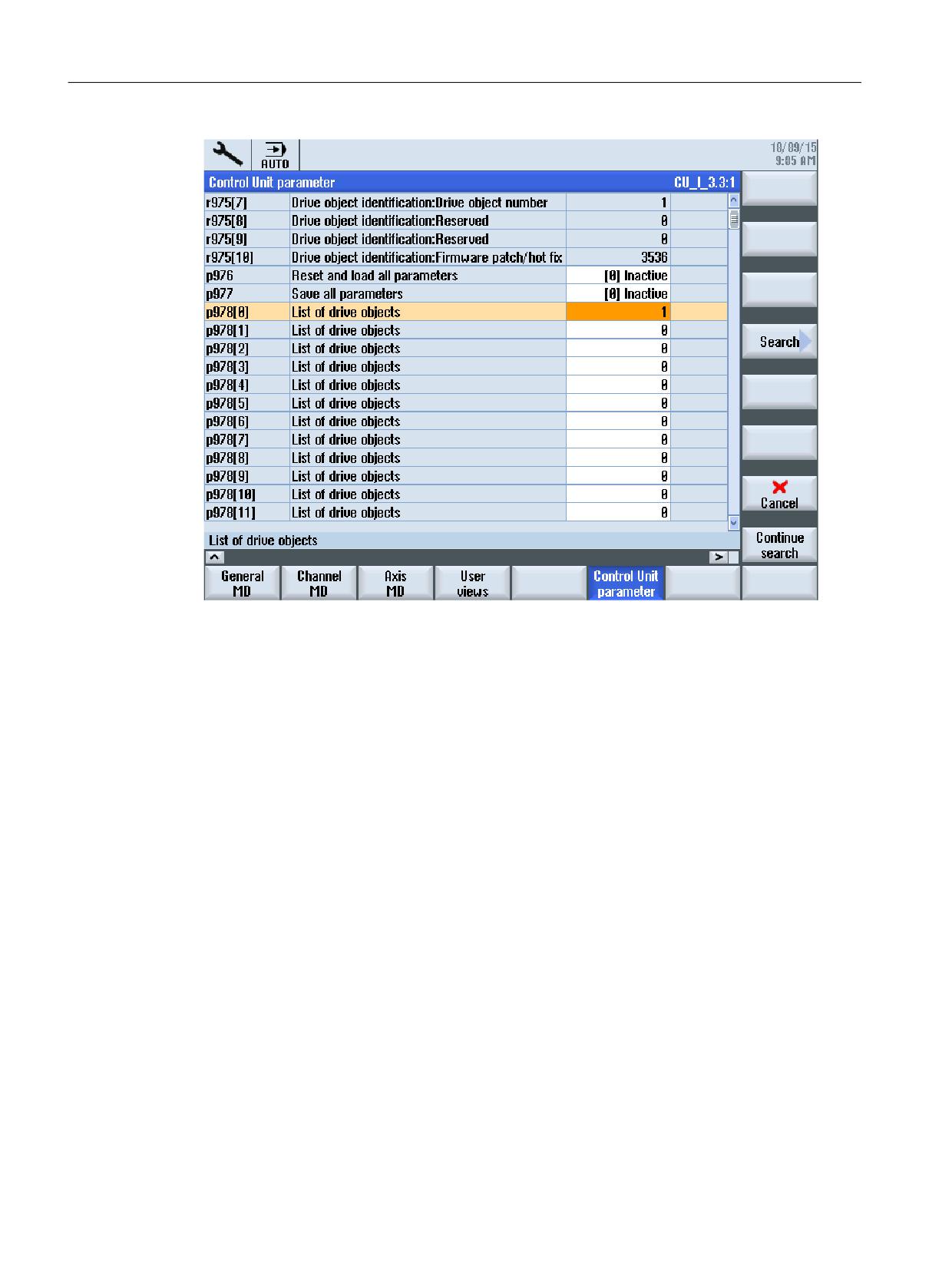
Figure 2-7
Drive parameter p0978 [ ...] at the control
Parameter number[do<DO-index>]
Example:
p0092[do1]
Alternatively, the drive index can be read from a local variable using $<variable name>
"substitution characters".
z.B. DO$local variable
Example:
<DATA name ="drive/cu/p0092">1</DATA>
<DATA name ="drive/dc/p0092[do1] ">1</DATA>
Indirect addressing:
<LET name = "driveIndex> 0 </LET>
<OP> driveIndex = $ctrlout_module_nr[0, AX1] </OP>
<DATA name ="drive/dc[do$driveIndex]/p0092">1</DATA>
Easy XML
130
Programming Manual, 10/2020, 6FC5397-1DP40-6BA4
Generating user dialogs
2.10 Addressing components
2.10.6
Example: Determine the DO number for the Motor Module
The DO number of a type 11 (servo) Motor Module can be determined as follows:
All connected drive objects are listed with their slot number in field p978 of the relevant CU. The
component type numbers are listed in the field p101 and the component types are listed in the
field p107 simultaneously.
A separate indexing is to be used for each of the following component types:
CU - Control Units
DC - Drive Controls (Motor Module)
CULNK - Expansion Modules (HUBs)
TM - Terminal Modules
LM - Line Modules
The addressing index can be determined by running through the field p107 in ascending order
for each connected CU, and the type index is incremented by one each time the desired type
occurs. The basic value is one. If NX components are found in this field, the counting on an NX
component is not continued until the current array has been run through completely. The NX
and CU components are executed in the order found.
Index determination: CUI with NX
CUI
NX1
Addressing index
DO
CU
p107[0]
[3]SINAMICS
1
p107[2]
[11]SERVO
1
p107[3]
[11]SERVO
2
p107[4]
[11]SERVO
3
p107[5]
[254]CU-LINK
2
p107[6]
[11]SERVO
4
p107[1]
[11]SERVO
5
p107[2]
[11]SERVO
6
p107[3]
[11]SERVO
7
This topology contains seven Motor Modules. Indices one to four address the Motor Modules
assigned to the CU. Indices five to seven address the Motor Modules of the NX. Index one is to
be used to access the CU. The NX is addressed twice by the index.
Easy XML
Programming Manual, 10/2020, 6FC5397-1DP40-6BA4
131
Generating user dialogs
2.10 Addressing components
Sample scripts: xmldial.xml and drv_sys_hlpfunct.xml
xmldial.xml
<DialogGui>
<?include src="f:\appl\drv_sys_hlpfunct.xml" ?>
<menu name = "main">
<open_form name = "main_form" />
<softkey POSITION="1">
<caption></caption>
<navigation>main</navigation>
</softkey>
</menu>
<form name="main_form">
<init>
<caption>Component arrangement</caption>
<let name="count" />
<let name="str" type="string" />
<let name="do_name" type="string" />
<let name="cu_name" type="string" />
<let name="cui_idx" />
<op>
cui_idx = 0;
</op>
<function name="load_component" />
<print text="%d CUs found">num_cus</print>
<function name="calculate_do_index" />
<control name="list_comp_no_do_idx" xpos="8" ypos="80"
fieldtype="listbox" width="360" height="500" >
<property item_data="100" />
</control>
<op>
count = 0;
</op>
<while>
<condition>count < 32 && address_idx_map[$count].comp_no != 0</
condition>
<op>
do_name= _T"";
</op>
<function name="read_do_name_fast" return="do_name">count</function>
<function name="read_cu_name_fast"
return="cu_name">address_idx_map[$count].cu_idx</function>
<print name="str" text="%3d %3d %3d %s
%s">address_idx_map[$count].cu_idx, address_idx_map[$count].comp_no,
address_idx_map[$count].do_idx, do_name, cu_name</print>
Easy XML
132
Programming Manual, 10/2020, 6FC5397-1DP40-6BA4
Generating user dialogs
2.10 Addressing components
xmldial.xml
<function name="control.additem">_T"list_comp_no_do_idx", str, count</
function>
<op>
count = count +1;
</op>
</while>
<paint>
<text xpos="8" ypos="30">Motor moduls</text>
<text xpos="8" ypos="60">CU</text>
<text xpos="40" ypos="60">Comp.</text>
<text xpos="92" ypos="60">DO Index</text>
<text xpos="172" ypos="60">Name</text>
</paint>
</form>
</DialogGui>
Easy XML
Programming Manual, 10/2020, 6FC5397-1DP40-6BA4
133
Generating user dialogs
2.10 Addressing components
drv_sys_hlpfunct.xml
<typedef name="components" type="struct">
<element name="cu_p978" dim="25" />
<element name="do_p0101" dim="25" />
<element name="do_p0107" dim="25" />
</typedef>
<typedef name="comp_no_do_idx_map" type="struct">
<!-- cu index -->
<element name="cu_idx" />
<!-- component number -->
<element name="comp_no" />
<!-- address index -->
<element name="do_idx" />
</typedef>
<let name="componentsList" dim="5" type="components" />
<let name="address_idx_map" dim="32" type="comp_no_do_idx_map" />
<let name="num_cus" />
<let name="_drv_sys_comp_array_size">23</let>
<!-- ------------------------------------------------------------
function: load_components_description
This function loads the parameter arrays p978, p101 and p107 into a local
memory
input:
cuno: CU index 0 based (index 0 == CUI)
output:
componentsList structure
---------------------------------------------------------------- -->
<function_body name="load_components_description" parameter="cuno">
<let name="count" />
<let name="next_nx" >0</let>
<let name="cuidx"></let>
<let name="error" />
<op>
count = _drv_sys_comp_array_size;
next_nx = cuno;
cuidx = cuno+1;
</op>
<print text="gather data" />
<function name="ncfunc.cap.read" return="error"
rows="$count">componentsList[$cuno].cu_p978, "drive/cu/p0978[0, cu
$cuidx]"</function>
<function name="ncfunc.cap.read" return="error"
rows="$count">componentsList[$cuno].do_p0101, "drive/cu/p0101[0, cu
$cuidx]"</function>
Easy XML
134
Programming Manual, 10/2020, 6FC5397-1DP40-6BA4
Generating user dialogs
2.10 Addressing components
drv_sys_hlpfunct.xml
<function name="ncfunc.cap.read" return="error"
rows="$count">componentsList[$cuno].do_p0107, "drive/cu/p0107[0, cu
$cuidx]"</function>
<print text="gather data finished" />
<sleep value="20" />
<op>
count = 0;
</op>
<while>
<condition>count < _drv_sys_comp_array_size</condition>
<if>
<condition>componentsList[$cuno].cu_p978[$count] == 60</condition>
<then>
<op>
next_nx= next_nx +1;
</op>
<print text="next nx %d">next_nx</print>
<function name="load_components_description">next_nx</function>
</then>
</if>
<op>
count = count+1;
</op>
</while>
<op>
num_cus = next_nx+1;
</op>
</function_body>
<!-- ------------------------------------------------------------
function: calculate_do_index
This function is looking for components of type 11 (SERVO) and lists these
in the componentsList array.
input:
-
output:
componentsList array filled
---------------------------------------------------------------- -->
<function_body name="calculate_do_index">
<let name="cuno" />
<let name="count" />
<let name="do_index" >1</let>
<let name="map_index" />
<while>
<condition>
cuno < num_cus</condition>
<op>
Easy XML
Programming Manual, 10/2020, 6FC5397-1DP40-6BA4
135
Generating user dialogs
2.10 Addressing components
drv_sys_hlpfunct.xml
count = 0;
</op>
<while>
<condition>count < _drv_sys_comp_array_size</condition>
<if>
<condition> componentsList[$cuno].do_p0107[$count] == 11</condition>
<then>
<op>
address_idx_map[$map_index].cu_idx = cuno+1;
address_idx_map[$map_index].comp_no =
componentsList[$cuno].do_p0101[$count];
address_idx_map[$map_index].do_idx = do_index;
do_index = do_index+1;
map_index = map_index +1;
</op>
</then>
</if>
<op>
count = count +1;
</op>
</while>
<op>
cuno = cuno +1;
</op>
</while>
</function_body>
Easy XML
136
Programming Manual, 10/2020, 6FC5397-1DP40-6BA4
Generating user dialogs
2.10 Addressing components
2.10.7
Addressing machine and setting data
Drive and setting data is identified by the character $ followed by the name of the data.
Machine data:
$Mx_<name[index, AX<axis_number>]>
Setting data:
$Sx_<name[index, AX<axis_number>]>
x:
N - General machine or setting data
C - Channel-specific machine or setting data
A - Axis-specific machine or setting data
Index:
For a field, the parameter indicates the index of the data.
AX<axis_number>:
The required axis (<axis_number>) has to be specified for axis-specific data.
Alternatively, the axis index can be read from a local variable using $<variable name>
"substitution characters".
e.g. AX$localvariable
Example:
<DATA name ="$MN_AXCONF_MACHAX_NAME_TAB[0] ">X1</DATA>
Direct addressing of the axis:
<DATA name ="$MA_CTRLOUT_MODULE_NR[0, AX1] ">1</DATA>
…
…
Indirect addressing of the axis:
<LET name ="axisIndex"> 1 </LET>
<DATA name ="$MA_CTRLOUT_MODULE_NR[0, AX$axisIndex] ">1</DATA>
Easy XML
Programming Manual, 10/2020, 6FC5397-1DP40-6BA4
137
Generating user dialogs
2.10 Addressing components
2.10.8
Channel-specific machine data
If no channel number is defined in the address token, access is always to the currently set channel
of the operating software.
If it is necessary to read data from a specific channel, the identifier u (Unit) with the desired
channel number in square brackets is added to the address. In an array-addressing, the channel
definition is the last argument in the square brackets.
Example:
$MC_RESET_MODE_MASK
or
$MC_AXCONF_GEOAX_ASSIGN_TAB[0]
$MC_RESET_MODE_MASK[u1]
or
$MC_AXCONF_GEOAX_ASSIGN_TAB[0, u1]
$MC_RESET_MODE_MASK
Easy XML
138
Programming Manual, 10/2020, 6FC5397-1DP40-6BA4
Generating user dialogs
2.10 Addressing components
2.10.9
Addressing user data
Addressing user data starts with the path section gud, followed by the GUD name.
For a field, after the name, the required field index should be specified in square brackets.
Example:
<DATA name ="gud/syg_rm[0]"
<OP>"gud/syg_rm[0]" = 10 </op>
Addressing the global user data
Addressing starts with the path section gud, followed by the specification of the area CHANNEL.
This address section is followed by the specification of the GUD areas:
GUD areas
Assignment
sgud
Siemens GUD
mgud
Machine manufacturer GUD
ugud
User GUD
Then enter the GUD name. If an array is to be addressed, the name is
followed by the array subscript in square brackets.
Example:
<data name ="gud/channel/mgud/syg_rm[0]">1</data>
<op>"gud/channel/mgud/syg_rm[0]" = 5*2 </op>
Addressing multi-dimensional arrays
In the addressing of multi-dimensional arrays, the line index is expected to be followed by the
column index. The indices are to be entered separated from one another by a period.
The following applies to channel-specific GUDs:
• The channel number must be noted with the marking u (unit) followed by the number before
or after the lines/columns specification.
• The sequences must be separated by a comma.
• If no channel number is entered, the first channel is accessed.
Example:
"gud/Channel/sgud/_WP[u2, 2.0]"
or
"gud/Channel/sgud/_WP[2.0, u2]"
Easy XML
Programming Manual, 10/2020, 6FC5397-1DP40-6BA4
139
Generating user dialogs
2.11 Predefined functions
2.11
Predefined functions
The script language offers various string processing and standard mathematical functions. The
function names listed below are reserved and cannot be overloaded.
Function name
Meaning
Ncfunc cap read
The function copies a value from the specified address into a local vari-
able. If the read operation was error-free, then the return variable con-
tains the value zero.
Contrary to the operation instruction, in the event of a fault, this func-
tion does not interrupt the processing of the script operations.
Attributes:
• return - Execution status
- Value = 0 - fault-free
- Value = 1 - The variables could not be read
• rows - Number of additional lines of an array to be read (optional)
If an array index is defined for the reference variables, as from this index,
the function copies the values read into the target variable.
Syntax:
<function name="ncfunc.cap.read" return="error">
lokale variable, "address"</function>
Example:
<let name="error"></let>
<function name="ncfunc.cap.read" return="error"> 3,
"drive/cu/p0009"</function>
<if>
<condition>error != 0</condition>
<then>
<break />
</then>
</if>
or
<let name="cu_p978" dim="25" ></let>
<function name="ncfunc.cap.read" return="error"
rows="23">cu_p978, "drive/cu/p0978[0, 1]"
</function>
Easy XML
140
Programming Manual, 10/2020, 6FC5397-1DP40-6BA4
Generating user dialogs
2.11 Predefined functions
Function name
Meaning
Ncfunc cap write
The function writes a value into the specified variable. If the write oper-
ation was error-free, then the return variable contains the value zero.
Contrary to the operation instruction, in the event of a fault, this func-
tion does not interrupt the processing of the script operations.
Attributes:
• return - Execution status
- Value = 0 - fault-free
- Value = 1 - The variables could not be read
• rows - Number of additional lines of an array to be written (optional)
If an array index is defined for the reference variables, as from this index,
the function copies the values into the target variable.
Syntax:
<function name="ncfunc.cap.read" return="error">
local variable or constant, "address"</function>
Example:
<let name="error"></let>
<function name="ncfunc.cap.write" return="error">
0, "drive/cu/p0009"</function>
<if>
<condition>error != 0</condition>
<then>
<break />
</then>
</if>
or
<let name="cu_p978" dim="25" ></let>
<function name="ncfunc.cap.write" return="error"
rows="23">cu_p978, "drive/cu/p0978[0, 1]"
</function>
Easy XML
Programming Manual, 10/2020, 6FC5397-1DP40-6BA4
141
Generating user dialogs
2.11 Predefined functions
Function name
Meaning
Ncfunc PI-Service
Jobs can be transferred to the NCK using the program invocation (PI)
service.
If the service has been executed error-free, the function returns the val-
ue 1 in the return variable.
Manipulation of the tool list:
_N_CREATO - Create tool
_N_DELETO - Delete tool
_N_CREACE - Create tool cutting edge
_N_DELECE - Delete tool cutting edge
Activate work offsets:
_N_SETUFR - Activates the actual user frame
_N_SETUDT - Activates the actual user data
Block search:
_N_FINDBL - Activate block search
_N_FINDAB - Cancel block search
Reconfigure machine data:
_N_CONFIG - Machine data with activation level NEW_CONF, which the
operator entered one after the other, are simultaneously activated
Syntax:
<function name="ncfunc.pi_service" return="return
var"> pi name, var1, var2, var3, var4, var5
</function>
Attributes:
name - function name
return- Name of the variable in which the execution result is saved:
• Value == 1 - job executed successfully
• Value == 0 - faulty job
Tag values:
pi name - Name of the PI service (string)
var1 to var5 - PI specific arguments
Easy XML
142
Programming Manual, 10/2020, 6FC5397-1DP40-6BA4
Generating user dialogs
2.11 Predefined functions
Function name
Meaning
Ncfunc PI-Service continued
Arguments:
• _N_CREATO
var1 - Tool number
• _N_DELETO
var1 - Tool number
• _N_CREACE
var1 - Tool number
var2 - Cutting edge number
• _N_DELECE
var1 - Tool number
var2 - Cutting edge number
• _N_SETUFR
No arguments
• _N_SETUDT
var1- User data area to be activated
-
1 - Tool offset data
–
2 - Active basic frame
–
3 - Active adjustable frame
• _N_FINDBL
var1 - Search mode
-
2 - Search with contour calculation
–
4 - Search for the block end point
–
1 - Block search without calculation
• _N_FINDAB
No arguments
• _N_CONFIG
No arguments
Example:
Creating a tool - tool number 3
<function name="ncfunc.pi_service">_T"_N_CREATO",
3</function>
Delete cutting edge 1 of tool 5
<function name="ncfunc.pi_service">_T"_N_DELECE",
5, 1
</function>
Easy XML
Programming Manual, 10/2020, 6FC5397-1DP40-6BA4
143
Generating user dialogs
2.11 Predefined functions
Function name
Meaning
ncfunc chan PI-Service
The function executes a PI service in a channel-related manner. The
channel number is passed after the PI service name. This is followed by
all other call parameters.
Parameter:
channel - Channel number
Syntax:
<function name="ncfunc.chan_pi_service"
return="error"> _T"_N_SETUFR", channel, …</function>
Example:
<let name="chan" >1</let>
<function name="ncfunc.chan_pi_service"
return="error"> _T"_N_SETUFR", chan</function>
<function name="ncfunc.chan_pi_service"
return="error"> _T"_N_SETUDT", chan, _T"016",
_T"00000", _T"00000"</function>
Ncfunc display resolution
This function supplies the conversion rule for floating point numbers
defined in the control. A string variable must be provided as variable.
See also display machine data MD203 DISPLAY_RESOLUTION and
MD204 DISPLAY_RESOLUTION_INCH
Syntax:
<function name="ncfunc.displayresolution"
return="dislay_res" />
Example:
<let name="dislay_res" type="string"></let>
…
<function name="ncfunc.displayresolution"
return="dislay_res" />
<control name = "cdistToGo" xpos = "210" ypos =
"156" refvar="nck/Channel/GeometricAxis/
progDistToGo[2]" hotlink="true" height="34"
fieldtype="readonly" format="$$$dislay_res"
time="superfast" color_bk="#ffffff"/>
Easy XML
144
Programming Manual, 10/2020, 6FC5397-1DP40-6BA4
Generating user dialogs
2.11 Predefined functions
Function name
Meaning
Ncfunc Get drive by axis name
This function returns the addressing index of a motor module by speci-
fying the associated axis name.
The function returns the value -1 if the assignment cannot be deter-
mined. This can happen, for example, if the axis/drive assignment has
not been made.
Parameter:
str - Axis name
Return value:
Index of the motor module - Name on a variable in which the determined
index is written.
Syntax:
<function name="NCFUNC.GETDRVBYAX_NAME"
return="<index>"><axis name></function>
Example:
<let name="drv_idx" />
<function name="NCFUNC.GETDRVBYAX_NAME"
return="drv_idx">_T"X1"</function>
<control name = "c_do2" xpos = "140" ypos = "114"
width = "320" fieldtype="itemlist" refvar="drive/dc/
p10[do$ drv_idx]" hotlink="true" color_bk="#f1f1f1">
<item value="0">Ready</item>
<item value="1">Quick commissioning</item>
<item value="2">Power unit commissioning</item>
<item value="3">Motor commissioning</item>
<item value="4">Encoder commissioning</item>
<item value="5">Technological application/units
</item>
<item value="15">Data sets</item>
<item value="17">Basic positioning commissioning
</item>
<item value="25">Commissioning the position
control</item>
<item value="29">Download</item>
<item value="30">Parameter reset</item>
<item value="95">Safety Integrated commissioning
</item>
</control>
</init>
Easy XML
Programming Manual, 10/2020, 6FC5397-1DP40-6BA4
145
Generating user dialogs
2.11 Predefined functions
Function name
Meaning
Ncfunc Get drive by axis index
This function returns the addressing index of a motor module by speci-
fying the associated axis index.
The function returns the value -1 if the assignment cannot be deter-
mined. This can happen, for example, if the axis/drive assignment has
not been made.
Parameter:
index - Axis index
Return value:
Index of the motor module - Name on a variable in which the determined
index is written.
Syntax:
<function name="NCFUNC.GETDRVBYAX_IDX"
return="<index>"><axis index></function>
Example:
<let name="drv_idx" />
<function name="NCFUNC.GETDRVBYAX_IDX"
return="drv_idx">1</function>
<control name = "c_do2" xpos = "140" ypos = "114"
width = "320" fieldtype="itemlist" refvar="drive/dc/
p10[do$ drv_idx]" hotlink="true" color_bk="#f1f1f1">
<item value="0">Ready</item>
<item value="1">Quick commissioning</item>
<item value="2">Power unit commissioning</item>
<item value="3">Motor commissioning</item>
<item value="4">Encoder commissioning</item>
<item value="5">Technological application/units
</item>
<item value="15">Data sets</item>
<item value="17">Basic positioning commissioning
</item>
<item value="25">Commissioning the position
control</item>
<item value="29">Download</item>
<item value="30">Parameter reset</item>
<item value="95">Safety Integrated commissioning
</item>
</control>
</init>
Easy XML
146
Programming Manual, 10/2020, 6FC5397-1DP40-6BA4
Generating user dialogs
2.11 Predefined functions
Function name
Meaning
Ncfunc Get drive by drive name
This function returns the addressing index of a motor module by speci-
fying the motor module name.
The function returns the value -1 if the assignment cannot be deter-
mined. This can happen, for example, if the axis/drive assignment has
not been made.
Parameter:
string - Name of motor module
Return value:
Index of the motor module - Name on a variable in which the determined
index is written.
Syntax:
<function name="NCFUNC.GETDRVBYDRV_NAME"
return="<index>"><drive name></function>
Example:
<let name="drv_idx" />
<function name="NCFUNC.GETDRVBYDRV_NAME"
return="drv_idx">_T"SERVO_3.13:4"</function>
<control name = "c_do2" xpos = "140" ypos = "114"
width = "320" fieldtype="itemlist" refvar="drive/dc/
p10[do$ drv_idx]" hotlink="true" color_bk="#f1f1f1">
<item value="0">Ready</item>
<item value="1">Quick commissioning</item>
<item value="2">Power unit commissioning</item>
<item value="3">Motor commissioning</item>
<item value="4">Encoder commissioning</item>
<item value="5">Technological application/units
</item>
<item value="15">Data sets</item>
<item value="17">Basic positioning commissioning
</item>
<item value="25">Commissioning the position
control</item>
<item value="29">Download</item>
<item value="30">Parameter reset</item>
<item value="95">Safety Integrated commissioning
</item>
</control>
</init>
Easy XML
Programming Manual, 10/2020, 6FC5397-1DP40-6BA4
147
Generating user dialogs
2.11 Predefined functions
Function name
Meaning
Ncfunc Get drive by bud address
This function returns the addressing index of a motor module by speci-
fying the bus address of the motor module.
The function returns the value -1 if the assignment cannot be deter-
mined. This can happen, for example, if the axis/drive assignment has
not been made.
Parameter:
bus - Bus number
slave - Slave number
component - component number
Return value:
Index of the motor module - Name on a variable in which the determined
index is written.
Syntax:
<function name="NCFUNC.GETDRVBYBUS_ADDR"
return="<index>"><bus>,<slave>,<component></
function>
Example:
<let name="drv_idx" />
<function name="NCFUNC.GETDRVBYBUS_ADDR"
return="drv_idx"> 3,13,4 </function>
<control name = "c_do2" xpos = "140" ypos = "114"
width = "320" fieldtype="itemlist" refvar="drive/dc/
p10[do$ drv_idx]" hotlink="true" color_bk="#f1f1f1">
<item value="0">Ready</item>
<item value="1">Quick commissioning</item>
<item value="2">Power unit commissioning</item>
<item value="3">Motor commissioning</item>
<item value="4">Encoder commissioning</item>
<item value="5">Technological application/units
</item>
<item value="15">Data sets</item>
<item value="17">Basic positioning commissioning
</item>
<item value="25">Commissioning the position
control</item>
<item value="29">Download</item>
<item value="30">Parameter reset</item>
<item value="95">Safety Integrated commissioning
</item>
</control>
</init>
Easy XML
148
Programming Manual, 10/2020, 6FC5397-1DP40-6BA4
Generating user dialogs
2.11 Predefined functions
Function name
Meaning
Ncfunc Get MD limits
The function copies the limits of a machine data to the specified variable,
data type StructMDLimits. The structure definition is contained in file
struct_def.xml.
Further information is provided in Chapter "Creating the file
struct_def.xml (Page 125)"
Parameter:
range - A string should be transferred that specifies the machine data
area:
• displayMD - Display machine data
• generalMD - NC global machine data
• channelMD - NC channel-specific machine data
• axisMD - NC axis-specific machine data
• generalSettingMD - NC global setting data
• channelSettingMD - NC channel-specific setting data
• axisSettingMD - NC axis-specific setting data
• channelGUD - NC channel-specific user data
• globalGUD - NC global user data
MD-number - Machine data number of the area
variable name - After the function call, this variable contains the value
of the limits
range/unit - Optional (e.g. channel number)
Syntax:
<function name="NCFUNC.GETMD_LIMITS"><range>, <MD-
number, <variabel name>, <range/unit>></function>
Example:
<let name="limits" type="StructMDLimits" />
<function
name="NCFUNC.GETMD_LIMITS">_T"generalMD", 19220,
_T"limits"</function>
<op>
upper_BAGS = limits.upperLimit;
</op>
Ncfunc bico to int
The function converts a string specified in BICO format into an integer
value. (see SINAMICS).
Syntax:
<function name="ncfunc.bicotoint" return="integer
variable">bico-string</function>
Example:
<let name="s_np0480_0" type="string"></let>
<let name="i_p0480_0">0</let>
<function name="ncfunc.bicotoint"
return="i_p0480_0">s_np0480_0</function>
Easy XML
Programming Manual, 10/2020, 6FC5397-1DP40-6BA4
149
Generating user dialogs
2.11 Predefined functions
Function name
Meaning
Ncfunc int to bico
The function converts an integer value into a BICO format string. (see
SINAMICS).
Syntax:
<function name="ncfunc.inttobico" return="string
variable">integer variable</function>
Example:
<function name="ncfunc.inttobico"
return="s_p0480_0">"drive/dc/
p0480[0, DO2]"</function>
Ncfunc is bico str valid
This function returns the value zero for a string specified in BICO format.
(see SINAMICS)
Syntax:
<function name="ncfunc.isbicostrvalid"
return="integer variable">string varaible</function>
Example:
…
<let name="s_np0480_0" type="string"></let>
…
…
<control name = "cp0480_0" xpos = "402"
ypos = "76" hotlink="true" refvar="s_np0480_0" >
<property item_data="4001" />
</control>
…
…
<function name="ncfunc.isbicostrvalid"
return="valid">cp0480_0</function>
Easy XML
150
Programming Manual, 10/2020, 6FC5397-1DP40-6BA4
Generating user dialogs
2.11 Predefined functions
Function name
Meaning
Ncfunc password
This function sets or deletes a password level from the NC.
• Set password:
The password should be specified for the required password level as
parameter.
• Delete password:
A blank string deletes the password level.
Syntax:
<function name="ncfunc.password">password
</function>
Example:
<let name="password" type="string"></let>
<function name="ncfunc.password" > password
</function>
<function name="ncfunc.password" > _T"CUSTOMER"
</function>
Delete password:
<function name="ncfunc.password" > _T"" </function>
Control form color
The function returns the text or backg31round color of the dialog box as a
string.
Further information is provided in Chapter "Color coding (Page 62)"
Range:
• BACKGROUND - request color value of the backg31round
• TEXT - request color value of the text (foreground)
Syntax:
<function name="control.formcolor"
return="variable">_T"Area"</function>
Example:
<let name="bk_color" type="string"></let>
<function name="control.formcolor"
return="bk_color">_T"BACKGROUND"</function>
Easy XML
Programming Manual, 10/2020, 6FC5397-1DP40-6BA4
151
Generating user dialogs
2.11 Predefined functions
Function name
Meaning
Control local time
The function copies the local time in a field with 7 array elements.
The name of the variable is expected as call parameter.
The following is stored in an array element:
• Index 0 - year
• Index 1 - month
• Index 2 - weekday
• Index 3 - day
• Index 4 - hour
• Index 5 - minute
• Index 6 - second
Syntax:
<function name ="control.localtime">_T"time_array"
</function>
Example:
<!-- index
0 = Year
1 = Month
2 = Day of week
3 = Day
4 = Hour
5 = Minute
6 = Second
-->
<let name="time_array" dim="7" />
<function name ="control.localtime">_T"time_array"
</function>
Control exist
The function returns the value 1 if the specified control exists.
Syntax:
<function name="CONTROL.EXIST" return="<return
variable>"><control name></function>
Example:
<let name="ret" /> <function name="CONTROL.EXIST"
return="ret">_T"edit"</function>
Easy XML
152
Programming Manual, 10/2020, 6FC5397-1DP40-6BA4
Generating user dialogs
2.11 Predefined functions
Function name
Meaning
Control is modified
The function returns the value 1 if the content of the specified edit con-
trol was changed.
Syntax:
<function name="CONTROL.ISMODIFIED" return="<return
variable>"><control name></function>
Example:
<let name="ret" /> <function
name="CONTROL.ISMODIFIED" return="ret">_T"edit"</
function>
Control is visible
The function returns the value 1 if the specified control is visible.
Syntax:
<function name="CONTROL.ISVISIBLE" return="<return
variable>"><control name></function>
Example:
<let name="ret" /><function
name="CONTROL.ISVISIBLE" return="ret">_T"edit"</
function>
Control set modified
The function changes the modified flag of the specified edit control.
Parameter:
control name
• Value = 1 - mark field as changed
• Value = 0 - mark field as unchanged
Syntax:
<function name="CONTROL.SETMODIFIED"
return="<return variable>"><control name>, <Flag></
function>
Example:
<let name="b" >1</let>
<let name="ret" />
<control name="edit" xpos="10" ypos="80" width="30"
refvar="b" hotlink = "true" />
<function name="CONTROL.SETMODIFIED"
return="ret">_T"edit", 1</function>
Easy XML
Programming Manual, 10/2020, 6FC5397-1DP40-6BA4
153
Generating user dialogs
2.11 Predefined functions
Function name
Meaning
Control set working area
If you change the contents of a scroll view, e.g. by deleting or adding
controls, the visible area of the scroll view must be recalculated.
The calculation is performed by calling this function.
Value:
Name of the scrollview
Example:
<control name="area" xpos="8" ypos="72" width="554"
height="320" fieldtype="scrollarea" >
<control name="test" xpos="20" ypos="40"
width="20" fieldtype="readonly" />
</control >
<control name="test1" xpos="20" ypos="80"
width="20" fieldtype="readonly" parent="area"/>
<control name="test2" xpos="20" ypos="100"
width="20" fieldtype="readonly" parent="area"/>
<function name="CONTROL.SETWORKINGAREA">_T"area"</
function>
String to compare
Two strings are compared with one another from a lexicographical per-
spective.
The function gives a return value of zero if the strings are the same, a
value less than zero if the first string is smaller than the second string or
a value greater than zero if the second string is smaller then the first
string.
Parameter:
str1 - string
str2 - comparison string
Syntax:
<function name="string.cmp" return ="<int var>" >
str1, str2 </function>
Example:
<let name="rval">0</let>
<let name="str1" type="string">A brown bear hunts a
brown dog.</let>
<let name="str2" type="string">A brown bear hunts a
brown dog.</let>
<function name="string.cmp" return="rval"> str1,
str2 </function>
Result:
rval= 0
Easy XML
154
Programming Manual, 10/2020, 6FC5397-1DP40-6BA4
Generating user dialogs
2.11 Predefined functions
Function name
Meaning
String to compare without making a distinction
Two strings are compared from a lexicographical perspective (the com-
between uppercase/lowercase
parison is not case-sensitive).
The function gives a return value of zero if the strings are the same, a
value less than zero if the first string is smaller than the second string or
a value greater than zero if the second string is smaller then the first
string.
Parameter:
str1 - string
str2 - comparison string
Syntax:
<function name="string.icmp" return ="<int var>" >
str1, str2 </function>
Example:
<let name="rval">0</let>
<let name="str1" type="string">A brown bear hunts a
brown dog.</let>
<let name="str2" type="string">A brown Bear hunts a
brown Dog.</let>
<function name="string.icmp" return="rval"> str1,
str2 </function>
Result:
rval= 0
String left
The function extracts the first nCount character from string 1 and copies
this to the return variable.
Parameter:
str1 - string
nCount - number of characters
Syntax:
<function name="string.left" return="<result
string>"> str1, nCount </function>
Example:
<let name="str1" type="string">A brown bear hunts a
brown dog.</let>
<let name="str2" type="string"></let>
<function name="string.left" return="str2"> str1,
12 </function>
Result:
str2="A brown bear"
Easy XML
Programming Manual, 10/2020, 6FC5397-1DP40-6BA4
155
Generating user dialogs
2.11 Predefined functions
Function name
Meaning
String right
The function extracts the last nCount character from string 1 and copies
this to the return variable.
Parameter:
str1 - string
nCount - number of characters
Syntax:
<function name="string.right" return="<result
string>"> str1, nCount </function>
Example:
<let name="str1" type="string">A brown bear hunts a
brown dog.</let>
<let name="str2" type="string"></let
<function name="string.right" return="str2"> str1,
10 </function>
Result:
str2="brown dog."
String middle
The function extracts the specified number of characters from string 1,
starting from the iFirst index, and copies these to the return variable.
Parameter:
str1 - string
iFirst - start index
nCount - number of characters
Syntax:
<function name="string.middle" return="<result
string>"> str1, iFirst, nCount </function>
Example:
<let name="str1" type="string">A brown bear hunts a
brown dog.</let>
<let name="str2" type="string"></let
<function name="string.middle" return="str2"> str1,
2, 5 </function>
Result:
str2="brown"
Easy XML
156
Programming Manual, 10/2020, 6FC5397-1DP40-6BA4
Generating user dialogs
2.11 Predefined functions
Function name
Meaning
String length
The function gives the number of characters in a string.
Parameter:
str1 - string
Syntax:
<function name="string.length" return="<int var>">
str1 </function>
Example:
<let name="length">0</let>
<let name="str1" type="string">A brown bear hunts a
brown dog.</let>
<function name="string.length" return="length">
str1 </function>
Result:
length = 31
Strings to replace
The function replaces all the substrings found with the new string.
Parameter:
string - string variable
find string - string to be replaced
new string - new string
Syntax:
<function name="string.replace"> string, find
string, new string </function>
Example:
<let name="str1" type="string">A brown bear hunts a
brown dog. </let>
<function name="string.replace" > str1, _T"a brown
dog" , _T"a big salmon"</function>
Result:
str1 = "A brown bear hunts a big salmon!"
Easy XML
Programming Manual, 10/2020, 6FC5397-1DP40-6BA4
157
Generating user dialogs
2.11 Predefined functions
Function name
Meaning
Strings to remove
The function removes all the substrings found.
Parameter:
string - string variable
remove string - substring to be deleted
Syntax:
<function name="string.remove"> string, remove
string </function>
Example:
<let name="index">0</let>
<let name="str1" type="string">A brown bear hunts a
brown dog. </let>
<function name="string.remove" > str1, _T"a brown
dog" </function>
Result:
str1 = "A brown bear hunts"
Strings to insert
The function inserts a string at the index specified.
Parameter:
string - string variable
index - index (zero based)
insert string - string to be inserted
Syntax:
<function name="string.insert"> string, index,
insert string </function>
Example:
<let name="str1" type="string">A brown bear hunts.
</let>
<let name="str2" type="string">a brown dog</let>
<function name="string.insert" > str1, 19, str2
</function>
Result:
str1 = "A brown bear hunts a brown dog"
Easy XML
158
Programming Manual, 10/2020, 6FC5397-1DP40-6BA4
Generating user dialogs
2.11 Predefined functions
Function name
Meaning
String delete
The function deletes the defined number of characters starting from the
start position specified.
Parameter:
string - string variable
start index - start index (zero based)
nCount - number of characters to be deleted
Syntax:
<function name="string.delete"> string, start
index , nCount </function>
Example:
<let name="str1" type="string">A brown bear hunts.
</let>
<function name="string.delete" > str1, 2, 5
</function>
Result:
str1 = "A bear hunts"
Easy XML
Programming Manual, 10/2020, 6FC5397-1DP40-6BA4
159
Generating user dialogs
2.11 Predefined functions
Function name
Meaning
String find
The function searches the transferred string for the first match with the
substring.
If the substring is found, the function provides the index to the first
character (starting with zero) or, failing this, -1.
Parameter:
string - string variable
findstring - string to be found
startindex - start index (optional)
Syntax:
<function name="string.find" return="<int val>">
str1, find string
</function>
Example:
<let name="index">0</let>
<let name="str1" type="string">A brown bear hunts a
brown dog. </let>
<function name="string.find" return="index"> str1,
_T"brown"
</function>
Result:
Index = 2
or
<function name="string.find" return="index"> str1,
_T"brown", 1
</function>
Easy XML
160
Programming Manual, 10/2020, 6FC5397-1DP40-6BA4
Generating user dialogs
2.11 Predefined functions
Function name
Meaning
String reverse find
The function searches the transferred string for the last match with the
substring.
If the substring is found, the function provides the index to the first
character (starting with zero) or, failing this, -1.
Parameter:
string - string variable
find string - string to be found
startindex - start index (optional)
Syntax:
<function name="string.reversefind" return="<int
val>"> str1, find string </function>
Example:
<let name="index">0</let>
<let name="str1" type="string">A brown bear hunts a
brown dog. </let>
<function name="string.reversefind" return="index">
str1, _T"brown" </function>
Result:
Index = 21
or
<function name="string.reversefind" return="index">
str1, _T"brown" 10 </function>
Result:
Index = 2
String GetAt
This function reads a character from the specified position.
Parameter:
str - String
index - Zero-based index for the character being read
Return value:
The name of a string variable must be specified in which the character is
to be stored.
Syntax:
<function name="string.getat" return="<result
string>"><string>, <index></function>
Example:
<let name="resStr" type="string" />
<function name="string.getat"
return="resStr">_T"brown", 2</function>
Easy XML
Programming Manual, 10/2020, 6FC5397-1DP40-6BA4
161
Generating user dialogs
2.11 Predefined functions
Function name
Meaning
String pixel height
Calculation of the height of a string in pixels. The calculation is per-
formed using the current font of the specified control or form. The name
of the control must be transferred as a string. If an empty string is speci-
fied, the calculation refers to the form.
Parameter:
control name
Character string
The string can be specified directly as text or a string variable must be
specified.
Return:
The name of an integer variable is expected, in which the height is writ-
ten.
Syntax:
<function name="STRING.PIXELHEIGHT" return="<return
variable>"><control name>,<varaible or text></
function>
Example:
Calculation of the width in relation to the font of a form
<let name="pixelsh" />
<function name="STRING.PIXELHEIGHT"
return="pixelsh">_T"", cedit1</function>
Calculation of the width in relation to the font of a control
<function name="STRING. PIXELHEIGHT"
return="pixelsh"> cedit1, cedit1</function>
Easy XML
162
Programming Manual, 10/2020, 6FC5397-1DP40-6BA4
Generating user dialogs
2.11 Predefined functions
Function name
Meaning
String pixel width
Calculation of the width of a string in pixels. The calculation is performed
using the current font of the specified control or form. The name of the
control must be transferred as a string. If an empty string is specified, the
calculation refers to the form.
Parameter:
control name
Character string
The string can be specified directly as text or a string variable must be
specified.
Return:
The name of an integer variable is expected, in which the text width is
written.
Syntax:
<function name="STRING.PIXELWIDTH" return="<return
variable>"><control name>,<varaible or text></
function>
Example:
Calculation of the width in relation to the font of a form
<let name="pixels" />
<function name="STRING. PIXELWIDTH"
return="pixels">_T"", cedit1</function>
Calculation of the width in relation to the font of a control
<function name="STRING.PIXELWIDTH" return="pixels">
cedit1, cedit1</function>
String SetAt
This function writes a character to the specified position. The index must
be smaller than the maximum text length.
Parameter:
str - String
char - Character which is to be written to the specified position
index - Zero-based index for the character string of the target variable
Syntax:
<function name="string.setat" ><destination
string>, <character string>, <index></function>
Example:
<let name="str" type="string" >br_wn</string>
<function name="string.setat">str, ">_T"o", 2
</function>
Easy XML
Programming Manual, 10/2020, 6FC5397-1DP40-6BA4
163
Generating user dialogs
2.11 Predefined functions
Function name
Meaning
String Split
This function deconstructs a string into a number of substrings and cop-
ies them into the string array specified. Separation is implemented at the
specified separator. The separator is not saved in the substring.
This function expands the array automatically if the number of separa-
tors located is greater than the defined array size.
Parameter:
str - String
char - Name on a variable which includes the separator
number - Name on a variable which includes the number of generated
substrings after the function has been performed.
Return value:
The name of a string array must be specified which includes the sub-
strings after the function has been performed.
Syntax:
<function name=" string.split" return="<result
string array>"><string>, <char>, <number></function>
Example:
<let name="strlist" type="string" dim="2"/>
<let name="str_num" />
<function name="string.split" return="strlist">
_T"brown;green;blue;red", _T";", str_num </function>
String trim left
The function trims the starting characters from a string.
Parameter:
str1 - string variable
Syntax:
<function name="string.trimleft" > str1 </function>
Example:
<let name="str1" type="string">test trim left</let>
<function name="string.trimleft" > str1 </function>
Result:
str1 = "test trim left"
Easy XML
164
Programming Manual, 10/2020, 6FC5397-1DP40-6BA4
Generating user dialogs
2.11 Predefined functions
Function name
Meaning
String trim right
The function trims the closing characters from a string.
Parameter:
str1 - string variable
Syntax:
<function name="string.trimright" > str1 </function>
Example:
<let name="str1" type="string"> test trim right
</let>
<function name="string.trimright" > str1
</function>
Result:
str1 = "test trim right"
Sine
The function calculates the sine of the value transferred in degrees.
Parameter:
double - angle
Syntax:
<function name="sin" return="<double val>"> double
</function>
Example:
<let name= "sin_val" type="double"></let>
<function name="sin" return="sin_val"> 20.0
</function>
Cosine
The function calculates the cosine of the value transferred in degrees.
Parameter:
double - angle
Syntax:
<function name="cos" return="<double val>"> double
</function>
Example:
<let name= "cos_val" type="double"></let>
<function name="cos" return="cos_val"> 20.0
</function>
Easy XML
Programming Manual, 10/2020, 6FC5397-1DP40-6BA4
165
Generating user dialogs
2.11 Predefined functions
Function name
Meaning
Tangent
The function calculates the tangent of the value transferred in degrees.
Parameter:
double - angle
Syntax:
<function name="tan" return="<double val>"> double
</function>
Example:
<let name= "tan_val" type="double"></let>
<function name="tan" return="tan_val"> 20.0
</function>
ARCSIN
The function calculates the arcsine of the value transferred in degrees.
Parameter:
double - x in the range from -PI/2 to +PI/2
Syntax:
<function name="arcsin" return="<double val>">
double </function>
Example:
<let name= "arcsin_val" type="double"></let>
<function name="arcsin" return="arcsin_val"> 20.0
</function>
ARCOS
The function calculates the arccosine of the value transferred in degrees.
Parameter:
double - x in the range from -PI/2 to +PI/2
Syntax:
<function name="arcos" return="<double val>">
double </function>
Example:
<let name= "arccos_val" type="double"></let>
<function name="arccos" return="arccos_val"> 20.0
</function>
Easy XML
166
Programming Manual, 10/2020, 6FC5397-1DP40-6BA4
Generating user dialogs
2.11 Predefined functions
Function name
Meaning
ARCTAN
The function calculates the arctan of the value transferred in degrees.
Parameter:
double - arctan of y/x
Syntax:
<function name="arctan" return="<double val>">
double </function>
Example:
<let name= "arctan_val" type="double"></let>
<function name="arctan" return="arctan_val"> 20.0
</function>
File processing
Easy XML
Programming Manual, 10/2020, 6FC5397-1DP40-6BA4
167
Generating user dialogs
2.11 Predefined functions
Function name
Meaning
Reading a file
The function reads the contents of the specified file into a string variable.
The number of characters to be read can optionally be specified as a
second parameter.
Attribute:
name - The file name should be written in lowercase letters.
Files in other directories are accessed via a relative path that uses the
appl or dvm directory as a starting point.
return - name of the local variable
Parameter:
progname - file name
number of characters - number of characters to be read in bytes (op-
tional)
Syntax:
<function name="doc.readfromfile" return="<string
var>"> progname, number of characters </function>
Example:
<let name = "my_var" type="string" ></let>
NC file system
<function name="doc.readfromfile" return="my_var">
_T"n:\mpf\test.mpf" </function>
CompactFlash card
<function name="doc.readfromfile" return="my_var">
_T"f:\appl\test.mpf" </function>
or
<function name="doc.readfromfile" return="my_var">
_T".\test.mpf" </function>
Easy XML
168
Programming Manual, 10/2020, 6FC5397-1DP40-6BA4
Generating user dialogs
2.11 Predefined functions
Function name
Meaning
Writing to a file
The function writes the contents of a string variable to the file specified.
The file name should be written in lowercase letters.
Files in other directories are accessed via a relative path that uses the
appl or dvm directory as a starting point.
Parameter:
progname - file name
str1 - string
Syntax:
<function name="doc.writetofile" > progname, str1 </
function>
Example:
<let name = "my_var" type="string" > file content </
let>
NC file system
<function name="doc.writetofile">_T"n:\mpf
\test.mpf", my_var </function>
CompactFlash card
<function name="doc.writetofile">_T"f:\appl
\test.mpf", my_var </function>
or
<function name="doc.writetofile">_T".\test.mpf",
my_var </function>
Easy XML
Programming Manual, 10/2020, 6FC5397-1DP40-6BA4
169
Generating user dialogs
2.11 Predefined functions
Function name
Meaning
Deleting a file
The function removes the file specified from the directory.
The file name should be written in lowercase letters.
Files in other directories are accessed via a relative path that uses the
appl or dvm directory as a starting point.
Parameter:
progname - file name
Syntax:
<function name="doc.remove" > progname </function>
Example:
NC file system
<function name="doc.remove">_T"n:\mpf\test.mpf"
</function>
CompactFlash card
<function name="doc.remove">_T"f:\appl\test.mpf"
</function>
or
<function name="doc.remove">_T".\test.mpf"
</function>
Easy XML
170
Programming Manual, 10/2020, 6FC5397-1DP40-6BA4
Generating user dialogs
2.11 Predefined functions
Function name
Meaning
Extracting script parts
The function copies a dialog description embedded in a part program
into the specified local variable.
The call parameters to be specified are the program name, the dialog
name, and a variable for storing the main menu name. If the name of the
dialog description was found in the part program, the return variable
contains this description. If the content of the variable is stored in a file,
the script can be executed with an indirect call.
The system provides a script that extracts the dialog description from the
active part program and activates the dialog. This script can be called in
an MMC command to activate the screen associated with the part pro-
gram.
Syntax:
<function name="doc.loadscript"
return="<name of script variable>">progname,
_T"dialog part name", main menu </function>
Attribute:
return - variable in which the extracted script is stored
Parameter:
progname - full path to the program. (The path name can be passed to
the function in DOS notation.)
main menu - the menu name found is copied into this variable
dialog part name - tag name in which the dialog description is embed-
ded
Example:
<function name="doc.loadscript"
return="contents">prog_name, _T"main_dialog",
entry</function>
Easy XML
Programming Manual, 10/2020, 6FC5397-1DP40-6BA4
171
Generating user dialogs
2.11 Predefined functions
Function name
Meaning
Exist
If the file exists, the function returns the value 1.
The file name should be written in lowercase letters.
Files in other directories are accessed via a relative path that uses the
appl or dvm directory as a starting point.
Parameter:
progname - file name
Syntax:
<function name="doc.exist" return="<int_var>" >
progname </function>
Example:
<let name ="exist">0</let>
NC file system
<function name="doc.exist" return="exist">_T"n:\mpf
\test.mpf" </function>
CompactFlash card
<function name="doc.exist" return="exist">_T"f:\appl
\test.mpf" </function>
or
<function name="doc.exist"
return="exist">_T".\test.mpf" </function>
NC program selection
The function selects the program specified for execution. The program
must be stored in the NC file system.
Parameter:
progname - file name
Syntax:
<function name="ncfunc.select"> progname </function>
Example:
NC file system
<function name="ncfunc.select"> _T"n:\mpf\test.mpf"
</function>
Easy XML
172
Programming Manual, 10/2020, 6FC5397-1DP40-6BA4
Generating user dialogs
2.11 Predefined functions
Function name
Meaning
Setting an individual bit
The function is used to manipulate individual bits of the specified varia-
bles.
The bits can either be set or reset.
Syntax:
<function name="ncfunc.bitset" refvar="address"
value="set/reset" > bit0, bit1, … bit9 </function>
Attributes:
refvar - specifies the name of the variable, in which the bit combination
should be written
value - bit value, value range 0 and 1
Values:
The bit numbers starting with zero should be transferred as function
values.
A maximum of 10 bits per call can be modified.
Example:
<function name="ncfunc.bitset" refvar="nck/Channel/
Parameter/R[1]" value="1" > 0, 2, 3, 7 </function>
<function name="ncfunc.bitset" refvar="nck/Channel/
Parameter/R[1]" value="0" > 1, 4 </function>
Delete control
The function deletes the specified picture control.
Syntax:
<function name="control.delete"> control name </
function>
Attribute:
name - function name
Value:
control name - name of the control
Example:
<function name="control.delete"> _T"my_editfield"
</function>
Easy XML
Programming Manual, 10/2020, 6FC5397-1DP40-6BA4
173
Generating user dialogs
2.11 Predefined functions
Function name
Meaning
Add Item
The function inserts a new element at the end of the list.
Note:
The function is only available for the control types "listbox" and "graph-
icbox".
Syntax:
<function name="control.additem"> control name,
item </function>
Attribute:
name - function name
Values:
control name - control name
item - expression to be inserted
itemdata - integer value; defined by the user
Example:
<let name ="itemdata">1</let>
…
…
…
<op> item_string = _T"text1" </op>
<function name="control.additem">_T"listbox1",
item_string, itemdata
</function>
Easy XML
174
Programming Manual, 10/2020, 6FC5397-1DP40-6BA4
Generating user dialogs
2.11 Predefined functions
Function name
Meaning
Insert Item
The function inserts a new element at the specified position.
Note:
The function is only available for the control type "listbox".
Syntax:
<function name="control.insertitem"> control name,
index, item, itemdata </function>
Attribute:
name - function name
Values:
control name - Control name
index - Position starting with zero
item - expression to be inserted
itemdata - integer value; defined by the user
Example:
<let name ="itemdata">1</let>
…
…
…
<op> item_string = _T"text2" </op>
<function name="control.insertitem">_T"listbox1",
1, item_string, itemdata </function>
Delete item
The function deletes an element at the specified position.
Note:
The function is only available for the control type "listbox".
Syntax:
<function name="control.deleteitem"> control name,
index </function>
Attribute:
name - function name
Values:
control name - Control name
index- index starting at 0
Example:
<function name="control.deleteitem">_T"listbox1",
1</function>
Easy XML
Programming Manual, 10/2020, 6FC5397-1DP40-6BA4
175