Volvo S90 Twin Engine (2020 year). Manual in english - page 11
||
SEATS AND STEERING WHEEL
* Option/accessory.
188
2. Select
Massage
in the seat settings view.
3. To choose between the different massage
functions, select either directly in the cen-
tre display or by moving the cursor up/
down using the multi-function control's
upper
/lower
button. Change the
setting in the selected function directly in
the centre display, by pressing the arrows,
or by using the multi-function control's
front
/rear
button.
Related information
•
•
•
•
Storing position for seat, door mirrors and
head-up display
•
Using a stored position for seat, door mir-
rors and head-up display
•
the length of the seat cushion
•
•
•
•
Adjusting the passenger seat from the
driver's seat
Adjusting
*
the length of the seat
cushion in the front seat
Depending on equipment level selected, seat
cushion length is adjusted either using the
multifunction control
*
on the side of the
seat's seat cushion, or manually using a con-
trol on the front of the seat cushion.
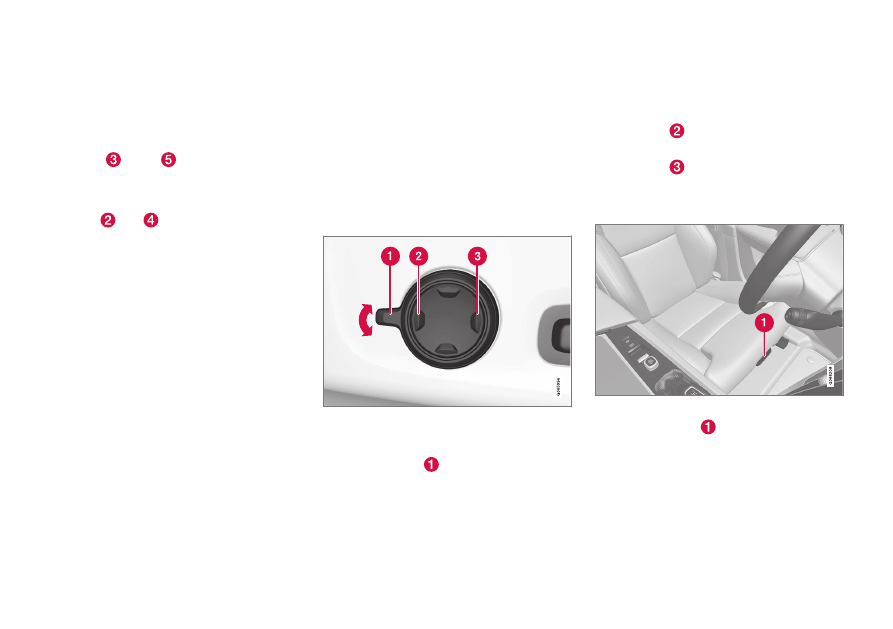
Adjusting the length of the seat
cushion using the multifunction
control
Multifunction control, located on the side of the seat
cushion.
1. Activate the multi-function control by turn-
ing the control
upwards/downwards.
The seat settings view will be shown in
the centre display.
2. Select
Cushion extension
in the seat set-
tings view.
•
Press the front section of the four-way
button
to extend the seat cushion.
•
Press the rear section of the four-way
button
to retract the seat cushion.
Adjusting the length of the seat
cushion manually
Control for seat cushion adjustment.
1. Grip the handle
on the front of the seat
and pull upwards.
2. Adjust the length of the seat cushion.
3. Release the handle and make sure that the
seat cushion has reached the correct posi-
tion.