Volvo XC90 Excellence (2018 year). Instruction - part 32
WHEELS AND TYRES
* Option/accessory.
533
Checking tyre pressure with the tyre
monitoring system
*
With the system for tyre monitoring, Indirect Tyre
Pressure Monitoring System (ITPMS), tyre pres-
sure status can be viewed in the centre display.
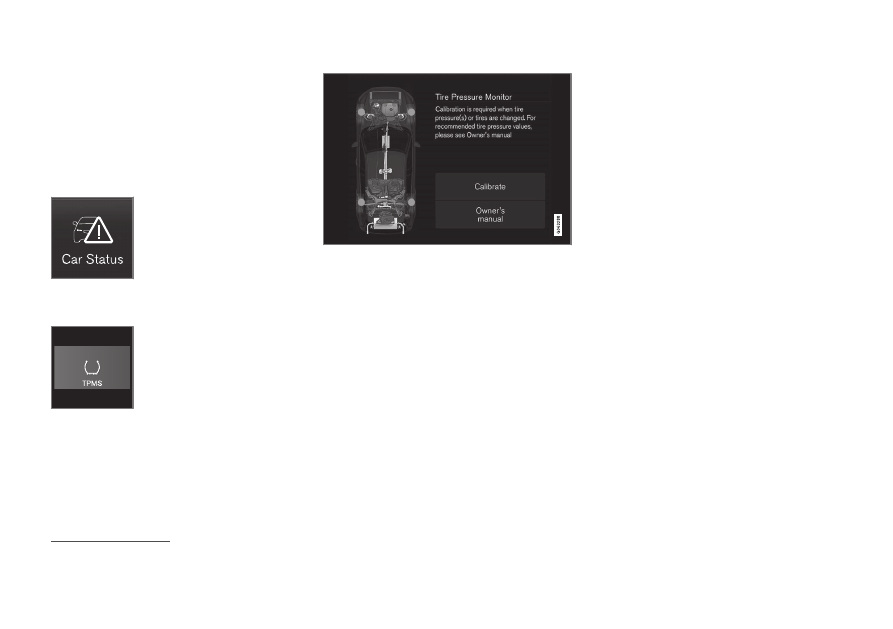
Checking status
1. Open the
Car status
app in the app view.
2. Tap on
TPMS
to show the status of the
tyres.
Status indication
The graphics show the status for each tyre
2
.
Green tyre:
•
The tyre pressure is above the limit value for
a warning.
Yellow tyre:
•
The tyre's pressure is too low. Stop and
check/rectify the tyre pressure as soon as
possible. Calibrate ITPMS after the tyre pres-
sure has been adjusted.
All tyres yellow:
•
The pressure is too low in two or more tyres.
Stop and check/rectify the tyre pressures as
soon as possible. Calibrate ITPMS after the
tyre pressures have been adjusted.
All tyres grey:
•
Calibration in progress.
•
Unknown status.
Several minutes driving above 35 km/h (22 mph)
may be required for the system to become active.
All tyres grey and a message:
•
Tyre pressure system
Temporarily
unavailable
. The indicator symbol flashes
and changes to constant glow after approx. 1
minute. The system is currently unavailable,
activated shortly.
•
Tyre pressure system
Service required
.
The indicator symbol flashes and changes to
constant glow after approx. 1 minute. The
system is not working correctly, contact an
authorised Volvo workshop (recommended).
Related information
•
•
•
Rectifying low tyre pressure with tyre moni-
toring
•
2
The figure is schematic. Layout may vary depending on car model or updated software.