Toyota Prius (2024 year). Manual in english - page 10
 

  Index      Toyota     Toyota Prius (2024 year). Manual in english


Search            copyright infringement  


Content      ..     8      9      10      11     ..


Toyota Prius (2024 year). Manual in english - page 10


289

4-5. Using the driving support systems

4

Dr
iv

ing

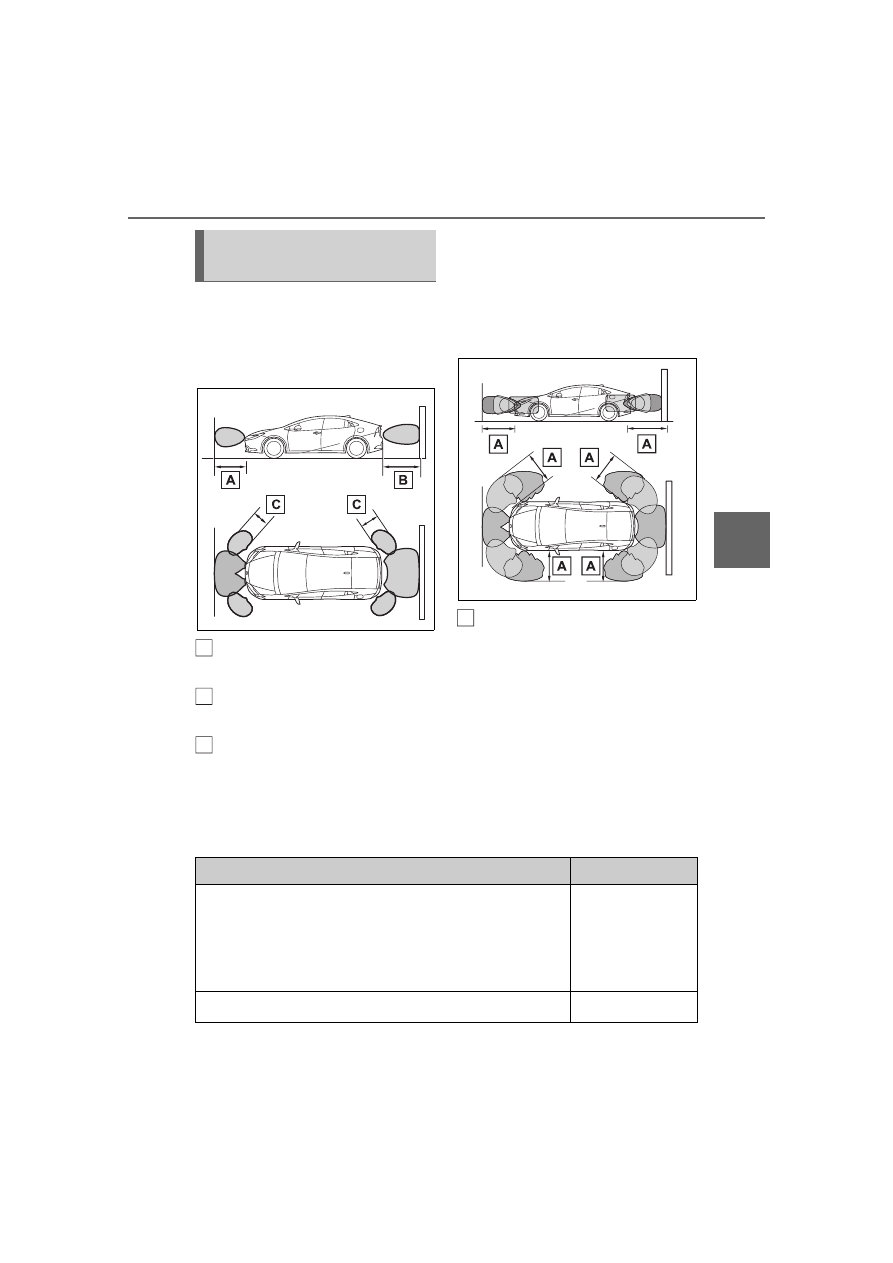
Detection range of the sen-
sors

Vehicles without Advanced 
Park

Approximately 3.3 ft. (100 
cm)

Approximately 4.9 ft. (150 
cm)

Approximately 2.0 ft. (60 cm)

The diagram shows the detection 
range of the sensors. Note that the 

sensors cannot detect objects that 
are extremely close to the vehicle.

The range of the sensors may 
change depending on the shape of 
the object, etc.

Vehicles with Advanced Park

Approximately 6.6 ft. (200 
cm)

The diagram shows the detection 
range of the sensors. Note that the 
sensors cannot detect objects that 
are extremely close to the vehicle.

The range of the sensors may 
change depending on the shape of 
the object etc.

The distance and buzzer

Vehicles without Advanced Park

Sensor detection display, 
object distance

A

B

C

A

Approximate distance to obstacle

Buzzer

Front center sensor:

Approximately 3.3 ft. (100 cm) to 2.0 ft. (60 cm)

*

Rear center sensor:

Approximately 4.9 ft. (150 cm) to 2.0 ft. (60 cm)

*

Slow

Approximately 2.0 ft. (60 cm) to 1.5 ft. (45 cm)

*

Medium

290

4-5. Using the driving support systems

*

: Automatic buzzer mute function is enabled. (

P.291)

Vehicles with Advanced Park

Approximately 1.5 ft. (45 cm) to 1.0 ft. (30 cm)

*

Fast

Approximately 1.0 ft. (30 cm) to 0.5 ft. (15 cm)

Continuous

Less than approximately 0.5 ft. (15 cm)

Approximate distance to obstacle

Buzzer

Front center sensor:

Approximately 6.6 ft. (200 cm) to 3.3 ft. (100 cm)

Rear center sensor:

Approximately 6.6 ft. (200 cm) to 4.9 ft. (150 cm)

Corner sensor:

Approximately 6.6 ft. (200 cm) to 2.0 ft. (60 cm)

Side sensor:

Approximately 6.6 ft. (200 cm) to 5.4 ft. (165 cm)

Does not sound 

(Display only)

Front center sensor:

Approximately 3.3 ft. (100 cm) to 2.0 ft. (60 cm)

*

Rear center sensor:

Approximately 4.9 ft. (150 cm) to 2.0 ft. (60 cm)

*

Side sensor:

Approximately 5.4 ft. (165 cm) to 2.0 ft. (60 cm)

*

Slow

Except side sensor:

Approximately 2.0 ft. (60 cm) to 1.5 ft. (45 cm)

*

Side sensor:

Approximately 2.0 ft. (60 cm) to 1.3 ft. (40 cm)

*

Medium

Except side sensor:

Approximately 1.5 ft. (45 cm) to 1.0 ft. (30 cm)

*

Side sensor:

Approximately 1.3 ft. (40 cm) to 1.0 ft. (30 cm)

*

Fast

Approximate distance to obstacle

Buzzer

291

4-5. Using the driving support systems

4

Dr
iv

ing

*

: Automatic buzzer mute function is enabled. (

P.291)

Buzzer operation and dis-
tance to an object

A buzzer sounds when the sen-
sors are operating.

The buzzer beeps faster as 
the vehicle approaches a 
static object. When the vehi-
cle comes within the approxi-
mately 1.0 ft. (30 cm) of the 
static object, the buzzer will 
sound continuously.

When 2 or more sensors 
simultaneously detect a static 
object, the buzzer sounds for 
the nearest object.

After a buzzer begins sound-
ing, if the distance between 
the vehicle and the detected a 
static object does not become 
shorter, the buzzer will be 
muted automatically. (auto-
matic buzzer mute function)

Adjusting the buzzer vol-
ume

The buzzer volume of the intui-
tive parking assist, RCTA (if 
equipped), and RCD (if 
equipped) can be adjusted all 

together on 

 of the multi-infor-

mation display. (

P.540)

Muting a buzzer temporarily

When an object is detected, the 
temporary mute switch is dis-
played on the Multimedia Display. 
Select the switch to mute a buzzer 
of the intuitive parking assist, 
RCTA (if equipped), and RCD (if 
equipped) all together.

Mute will be automatically can-
celed in the following situations.

• When the shift position is 

changed.

• When the vehicle speed exceeds 

a certain speed.

• When there is a malfunction in a 

sensor or the system is temporar-
ily unavailable.

• When the operating function is 

disabled manually.

• When the power switch is turned 

off.

The object warning function 
informs the driver of the exis-
tence of objects along the side 
of the vehicle, using a display 
and buzzer, if the objects are 
within the estimated path of the 
vehicle.

Approximately 1.0 ft. (30 cm) to 0.5 ft. (15 cm)

Continuous

Less than approximately 0.5 ft. (15 cm)

Approximate distance to obstacle

Buzzer

Intuitive parking assist 
object warning function 
(vehicles with Advanced 
Park)

292

4-5. Using the driving support systems

Object

Calculated vehicle route

When the vehicle is moving, the side sensors or side cameras can 
detect objects. While the vehicle is moving, if a detected object can 
no longer be detected by the side sensors or side cameras, the loca-
tion of the object relative to the vehicle is estimated. If the object is 
determined to be in the estimated path of the vehicle, the object 
warning function will operate.

Object detected by side sensors or side cameras

1

The vehicle is stopped and objects along the sides of the vehicle 
are not detected.

2

Objects are detected as the vehicle is moving.

3

Even though the objects are outside of the detection area of the 
side sensors or side cameras, a warning is displayed and a 
buzzer sounds.

The intuitive parking assist 
object warning function is oper-
ational when

The vehicle moves about 23.0 ft. 
(7 m) after the hybrid system is 
started.

The R shift position is selected.

After the shift position has been 
changed from R to D, the vehicle 

has moved approximately 23.0 ft. 
(7 m) or less

 switch has been pressed and 

the Multimedia Display is dis-
played.

The front or rear sensor detects a 
stationary object.

A

B

A

293

4-5. Using the driving support systems

4

Dr

iv

ing

Detection of objects along the 

sides of the vehicle

Objects along the sides of the 

vehicle are not instantaneously 

detected. The location of objects 

in relation to the vehicle is esti-

mated after they are first detected 

by the front or rear side sensors, 

or side cameras. Therefore, after 

the power switch is changed to 

ON, even if an object is along the 

side of the vehicle, it may not be 

detected until the vehicle has 

been driven a small amount and 

the side sensors or side cameras 

completely scan the areas along 

the sides of the vehicle.

If a vehicle, person, animal, etc., is 

detected by a side sensors or side 

cameras, but then leaves the 

detection area of the side sensors 

or side cameras, the system will 

assume the object has not moved.

WARNING

Side sensors and side cam-

eras

In situations such as the following, 

the function may not operate cor-

rectly, possibly leading to an acci-

dent. Proceed carefully.

When starting off shortly after 

the power switch is turned to 

ON and a small vehicle or other 

object which cannot be detected 

by a front side sensor is next to 

the vehicle.

In the situation shown in the fol-

lowing illustration, even if the 

vehicle starts off, the vehicle on 

the left will not be detected and 

the object warning function will 

not operate.

When an object or person is in a 

position which cannot be 

detected by the side sensors or 

side cameras.

When, after the side sensors 

have completed scanning the 

areas along the sides of the 

vehicle, a vehicle, person, or 

other object approaches the 

side of the vehicle and cannot 

be detected.

When the outside rear view mir-

ror is closed, the side sensors 

or side cameras cannot detect 

objects.

If the 12-volt battery was dis-

charged or has been removed 

and installed, fold and extend 

the outside rear view mirrors.

294

4-5. Using the driving support systems

*

: If equipped

Meter control switches

Operate the meter control switches 

to enable/disable the RCTA func-

tion on the multi-information dis-

play.

Outside rear view mirror indi-

cators

If a vehicle is detected as 

approaching from the left or right 

behind the vehicle, both outside 

rear view mirror indicators will blink 

and a buzzer will sound.

Multimedia Display

If a vehicle approaching from the 

right or left at the rear of the vehicle 

is detected, the RCTA icon 

(

P.295) for the detected side will 

be displayed on the Multimedia Dis-
play. This illustration

*

 shows an 

example of a vehicle approaching 

from both sides of the vehicle.

*

: Depending on the vehicle grade 

and equipped options, the actual 

screen may be different from this 

illustration.

Driving assist information 

indicator

Illuminates when the RCTA is 

turned off. At this time, a message 

will be displayed on the multi-infor-

RCTA (Rear Cross 

Traffic Alert) function

*

The RCTA function uses the 

BSM rear side radar sensors 

installed behind the rear 

bumper. This function is 

intended to assist the driver 

in checking areas that are 

not easily visible when 

backing up.

WARNING

Cautions regarding the use of 

the system

The driver is solely responsible for 

safe driving. Always drive safely, 

taking care to observe your sur-

roundings.
The RCTA function is only a sup-

plementary function which alerts 

the driver that a vehicle is 

approaching from the right or left 

at the rear of the vehicle.
As the RCTA function may not 

function correctly under certain 

conditions, the driver’s own visual 

confirmation of safety is neces-

sary.
Over reliance on this function may 

lead to an accident resulting 

death or serious injury.

To ensure the system can 

operate properly

P.276

System components

A

B

C

D

295

4-5. Using the driving support systems

4

Dr
iv

ing

mation display.

The RCTA can be enabled/dis-

abled on 

 of the multi-infor-

mation display. (

P.540)

When the RCTA function is off, 
the driving assist information 
indicator (

P.84) will illuminate 

and a message will be displayed 
on the multi-information display. 
Each time the power switch is 
turned to ON, the RCTA function 
is enabled.

Outside rear view mirror indica-
tor visibility

In strong sunlight, the outside rear 
view mirror indicator may be difficult 
to see.

Hearing the RCTA buzzer

The RCTA buzzer may be difficult to 
hear over loud noises, such as if the 
audio system volume is high.

Rear side radar sensors

P.276

Operation of the RCTA 
function

The RCTA function uses rear 
side radar sensors to detect 
vehicles approaching from the 
right or left at the rear of the 
vehicle and alerts the driver of 
the presence of such vehicles 
by flashing the outside rear view 
mirror indicators and sounding a 

buzzer.

Approaching vehicles

Detection areas of approach-
ing vehicles

RCTA icon display

When a vehicle approaching 
from the right or left at the rear 
of the vehicle is detected, the 
following will be displayed on 
the Multimedia Display.
• Example: Vehicles are 

approaching from both sides 
of the vehicle

RCTA function detection 
areas

The areas that vehicles can be 
detected in are outlined below.

Turning the RCTA func-
tion on/off

RCTA function

A

B

296

4-5. Using the driving support systems

The buzzer can alert the driver 
of faster vehicles approaching 
from farther away.

Example:

The RCTA function is opera-
tional when

The RCTA function operates when 
all of the following conditions are 
met:

The power switch is in ON.

The RCTA function is on.

The shift position is in R.

The vehicle speed is less than 
approximately 9 mph (15 km/h).

The approaching vehicle speed is 
between approximately 5 mph (8 
km/h) and 34 mph (56 km/h).

Setting the buzzer volume

The buzzer volume can be adjusted 
on the multi-information display.

The buzzer volume of the RCTA, 
intuitive parking assist, and RCD (if 
equipped) can be adjusted all 

together on 

 of the multi-informa-

tion display. (

P.540)

Muting a buzzer temporarily

When an object is detected, the 
temporary mute switch is displayed 
on the Multimedia Display.

Select the switch to mute the buzzer 
of the intuitive parking assist, RCTA, 
and RCD (if equipped) all together.

Mute will be canceled automatically 
in the following situations:

When the shift position is 
changed.

When the vehicle speed exceeds 
a certain speed.

When there is a malfunction in a 
sensor or the system is temporar-
ily unavailable.

When the operating function is 
disabled manually.

When the power switch is turned 
off.

Conditions under which the 
system will not detect a vehicle

The RCTA function is not designed 
to detect the following types of vehi-
cles and/or objects:

Vehicles approaching from 
directly behind

Vehicles backing up in a parking 
space next to your vehicle

Vehicles that the sensors cannot 
detect due to obstructions

Guardrails, walls, signs, parked 
vehicles and similar stationary 
objects

*

Small motorcycles, bicycles, 
pedestrians, etc.

*

Approaching 

vehicle speed

 Approximate 

alert distance

34 mph (56 
km/h) (fast)

98 ft. (30 m)

5 mph (8 km/h) 

(slow)

13 ft. (4 m)

A

297

4-5. Using the driving support systems

4

Dr
iv

ing

Vehicles moving away from your 
vehicle

Vehicles approaching from the 
parking spaces next to your vehi-
cle

*

The distance between the sensor 
and approaching vehicle gets too 
close

*

: Depending on the conditions, 

detection of a vehicle and/or 
object may occur.

Situations in which the system 
may not operate properly

The RCTA function may not detect 
vehicles correctly in the following 
situations:

When the sensor is misaligned 
due to a strong impact to the sen-
sor or its surrounding area

When mud, snow, ice, a sticker, 
etc., is covering the sensor or sur-
rounding area on the position 
above the rear bumper

When driving on a road surface 
that is wet with standing water 
during bad weather, such as 
heavy rain, snow, or fog

When multiple vehicles are 
approaching with only a small gap 
between each vehicle

When a vehicle is approaching at 
high speed

When equipment that may 
obstruct a sensor is installed, such 
as a towing eyelet, bumper pro-
tector (an additional trim strip, 
etc.), bicycle carrier, or snow plow

When backing up on a slope with 
a sharp change in grade

When backing out of a sharp 
angle parking spot

Immediately after the RCTA func-
tion is turned on

Immediately after the hybrid sys-
tem is started with the RCTA func-
tion on

When the sensors cannot detect a 
vehicle due to obstructions

When towing with the vehicle

When there is a significant differ-
ence in height between your vehi-
cle and the vehicle that enters the 
detection area

When a sensor or the area around 
a sensor is extremely hot or cold

If the suspension has been modi-
fied or tires of a size other than 
specified are installed

If the front of the vehicle is raised 
or lowered due to the carried load

When turning while backing up

298

4-5. Using the driving support systems

When a vehicle turns into the 
detection area

Situations in which the system 
may operate even if there is no 
possibility of a collision

Instances of the RCTA function 
unnecessary detecting a vehicle 
and/or object may increase in the 
following situations:

When the parking space faces a 
street and vehicles are being 
driven on the street

When the distance between your 
vehicle and metal objects, such as 
a guardrail, wall, sign, or parked 
vehicle, which may reflect electri-
cal waves toward the rear of the 
vehicle, is short

When equipment that may 
obstruct a sensor is installed, such 
as a towing eyelet, bumper pro-
tector (an additional trim strip, 
etc.), bicycle carrier, or snow plow

When a vehicle passes by the 
side of your vehicle

When a detected vehicle turns 
while approaching the vehicle

When there are spinning objects 
near your vehicle such as the fan 
of an air conditioning unit

When water is splashed or 
sprayed toward the rear bumper, 
such as from a sprinkler

Moving objects (flags, exhaust 
fumes, large rain droplets or 
snowflakes, rain water on the road 
surface, etc.)

When the distance between your 
vehicle and a guardrail, wall, etc., 
that enters the detection area is 
short

Gratings and gutters

299

4-5. Using the driving support systems

4

Dr

iv

ing

When a sensor or the area around 

a sensor is extremely hot or cold

If the suspension has been modi-

fied or tires of a size other than 

specified are installed

If the front of the vehicle is raised 

or lowered due to the carried load

When towing with the vehicle

*

: If equipped

RCD (Rear Camera 

Detection) function

*

When the vehicle is back-

ing up, the rear camera 

detection function can 

detect pedestrians in the 

detection area behind the 

vehicle. If a pedestrian is 

detected, a buzzer will 

sound and an icon will be 

displayed on the Multimedia 

Display to inform the driver 

of the pedestrian.

WARNING

Cautions regarding the use of 

the system

The recognition and control capa-

bilities for this system are limited.
The driver should always drive 

safely by always being responsi-

ble without over relying on the 

system and have a understanding 

of the surrounding situations.

To ensure the system can 

operate properly

Observe the following, otherwise 

there is the danger that could lead 

to an accident.

Always clean the camera with-

out damaging it.

Do not install market electronic 

parts (such as Illuminated 

license plate, fog lamps, etc.) in 

the camera vicinity.

300

4-5. Using the driving support systems

Location of the rear camera

Pedestrian detection icon

Displayed automatically when a 

pedestrian is detected behind the 

vehicle.

The RCD function can be 
enabled/disabled on   of the 

multi-information display. 

(

P.540)

When the RCD function is disabled, 

the driving assist information indi-

cator (

P.84) illuminates, and a 

message is displayed on the multi-

information display.
Each time the power switch is 

turned off then changed to ON, the 

RCD function will be enabled auto-

matically.

If a pedestrian is in the area 

behind the vehicle or if the rear 

camera detected that a pedes-

trian is approaching the vehicle 

from behind, the system urges 

WARNING

Do not subject the camera vicin-

ity to strong impacts. If the vicin-

ity is subjected to a strong 

impact, have the vehicle 

inspected by your Toyota 

dealer.

Do not disassemble, remodel or 

paint the camera.

Do not attach accessories or 

stickers to the camera.

Do not install market protection 

parts (bumper trim, etc.) to the 

rear bumper.

Maintain suitable tire air pres-

sure.

Make sure the back door is 

completely closed.

RCD function is turned off

In the following situations the sys-

tem turns off. The RCD function 

may not operate properly and 

thus there is the danger that an 

accident may occur.

The contents mentioned above 

are not observed.

Suspensions other than genu-

ine parts are installed.

System components

RCD display

Turning the RCD function 

on/off

When a pedestrian is 

detected

A

301

4-5. Using the driving support systems

4

Dr
iv

ing

caution from the driver by 
sounding the buzzer and dis-
playing the detection of a pedes-
trian on the Multimedia Display 
as follows:

If a pedestrian is detected in 

area 
Buzzer: Sounds repeatedly
Pedestrian detection icon: 
Blinks

If a pedestrian is detected in 

area 
Buzzer (When the vehicle is 
stationary): Sounds 3 times
Buzzer (When the vehicle is 
backing up, when a pedes-
trian approaches the rear of 
the vehicle): Sounds repeat-
edly
Pedestrian detection icon: 
Blinks

If the system determines that 
your vehicle may collide with 

a pedestrian in area 
Buzzer: Sounds repeatedly

Pedestrian detection icon: 
Blinks

The rear camera detection func-
tion is operational when

The power switch is in ON.

RCD function is on.

The shift position is in R.

Advanced Park is not operating 
(vehicles with Advanced Park)

Setting the buzzer volume

The buzzer volume of the intuitive 
parking assist, RCTA, and RCD can 

be adjusted all together on 

 of 

the multi-information display. 
(

P.540)

Muting a buzzer temporarily

When an object is detected, the 
temporary mute switch is displayed 
on the Multimedia Display.

Select the switch to mute a buzzer 
of the intuitive parking assist, RCTA, 
and RCD all together.

Mute will be automatically canceled 
in the following situations:

When the shift position is 
changed.

When the vehicle speed exceeds 
a certain speed.

When there is a malfunction in a 
sensor or the system is temporar-
ily unavailable.

When the operating function is 
disabled manually.

When the power switch is turned 
off.

Situations in which the system 
may not operate properly

Some pedestrians, such as the 
following, may not be detected by 
the rear camera detection func-
tion, preventing the function from 
operating properly:

• Pedestrians who are bending for-

A

A

B

B

C

C

302

4-5. Using the driving support systems

ward or squatting

• Pedestrians who are lying down
• Pedestrians who are running
• Pedestrians who suddenly appear 

from the shadow of the vehicle or 
a building

• Pedestrians who are riding mov-

ing objects such as a bicycle or 
skateboard

• Pedestrians wearing oversized 

clothing such as a rain coat, long 
skirt, etc., making their silhouette 
obscure

• Pedestrians whose body is par-

tially hidden by an object, such as 
a cart or umbrella

• Pedestrians which are obscured 

by darkness, such as at night

In some situations, such as the 
following, pedestrians may not be 
detected by the rear camera 
detection function, preventing the 
function from operating properly:

• When backing up in inclement 

weather (rain, snow, fog, etc.)

• When the rear camera is 

obscured (dirt, snow, ice, etc. are 
attached) or scratched

• When a very bright light, such as 

the sun, or the headlights of 
another vehicle, shines directly 
into the rear camera

• When backing up in a place where 

the surrounding brightness 
changes suddenly, such as at the 
entrance or exit of a garage or 
underground parking lot

• When backing up in a dim envi-

ronment such as during dusk or in 
an underground parking lot

• When the camera position and 

direction are deviated

• When a towing hook is attached
• When towing with the vehicle
• When water droplets are flowing 

on the camera lens

• When the vehicle height is 

extremely changed (nose up, 
nose down, etc.)

• When tire chains or an emergency 

tire puncture repair kit are used

• When the suspension has been 

lowered or tires that have a differ-
ent size than the genuine tires are 

installed

• When an aftermarket electronic 

part (backlit license plate, fog 
light, etc.) is installed near the rear 
camera

• If a bumper protector, such as an 

additional trim strip, is installed to 
the rear bumper

Situations in which the system 
may operate unexpectedly

Even though there are no pedes-
trians in the detection area, some 
objects, such as the following, 
may be detected, possibly caus-
ing the rear camera detection 
function to operate.

• Three dimensional objects, such 

as a pole, traffic cone, fence, or 
parked vehicle

• Moving objects, such as a car or 

motorcycle

• Objects moving toward your vehi-

cle when backing up, such as 
flags or puddles (or airborne mat-
ter, such as smoke, steam, rain, or 
snow)

• Cobblestone or gravel roads, tram 

rails, road repairs, white lines, 
pedestrian crossings or fallen 
leaves on the road

• Metal covers (gratings), such as 

those used for drainage ditches

• Objects reflected in a puddle or on 

a wet road surface

• Shadows on the road

In some situations, such as the 
following, the rear camera detec-
tion function may operate even 
though there are no pedestrians in 
the detection area.

• When backing up toward the road-

side or a bump on the road

• When backing up toward an 

incline/decline

• When the vehicle height is 

extremely changed (nose up, 
nose down, etc.)

• If a bumper protector, such as an 

additional trim strip, is installed to 
the rear bumper

• When an aftermarket electronic 

part (backlit license plate, fog 
light, etc.) is installed near the rear 

303

4-5. Using the driving support systems

4

Dr
iv

ing

camera

• If the orientation of the rear cam-

era has been changed due to a 
collision or other impact, or 
removal and installation

• If a towing eyelet is installed to the 

rear of the vehicle

• When towing with the vehicle
• When water is flowing over the 

rear camera lens

• When the rear camera is 

obscured (dirt, snow, ice, etc. are 
attached) or scratched

• If there is a flashing light in the 

detection area, such as the emer-
gency flashers of another vehicle

• When tire chains or an emergency 

tire puncture repair kit are used.

Situations in which the rear cam-
era detection function may be diffi-
cult to notice

• The buzzer may be difficult to hear 

if the surrounding area is noisy or 
the audio system volume is high.

• If the temperature in the cabin is 

extremely high or low, the Multi-
media Display may not operate 
correctly.

*

: If equipped

PKSB (Parking Sup-

port Brake)

*

The PKSB (Parking Support 
Brake) is a system that 
issues warnings and auto-
matically performs braking 
to help reduce collision 
damage with operation tar-
gets that were detected 
when traveling at a low 
speed such as when park-
ing.

This system consists of the 
following functions: a Park-
ing Support Brake function 
(static objects to the front 
and rear) that detects static 
objects such as walls, a 
Parking Support Brake 
function (rear-crossing 

vehicles)

*

 that detects vehi-

cles approaching from the 
rear while backing up, a 
Parking Support Brake 

function (rear pedestrians)

*


that detects pedestrians 
behind the vehicle, and a 
Parking Support Brake 
function (static objects 
around the vehicle) (vehi-
cles with Advanced Park) 
that detects static objects 
around the vehicle.

*

: If equipped

304

4-5. Using the driving support systems

The system has detected the 

following as operation targets. 

(The operation targets vary 

depending on the function.)

Parking Support Brake func-

tion (static objects to the front 

and rear):

P.309

Parking Support Brake func-

tion (rear-crossing vehicles) 

(if equipped):

P.313

Parking Support Brake func-

tion (rear pedestrians) (if 

equipped):

P.314

Parking Support Brake func-

tion (static objects around the 

vehicle) (vehicles with 

Advanced Park):

P.309

PKSB (Parking Support 

Brake) system

WARNING

Cautions regarding the use of 

the system

Do not overly rely on the system, 

as doing so may lead to an acci-

dent.

Always drive while checking the 

safety of the surroundings of the 

vehicle.
Depending on the vehicle and 

road conditions, weather, etc., the 

system may not operate.
The detection capabilities of sen-

sors and radars are limited.

Always drive while checking the 

safety of the surroundings of the 

vehicle.

The driver is solely responsible 

for safe driving. Always drive 

carefully, taking care to observe 

your surroundings. The Parking 

Support Brake system is 

designed to provide support to 

lessen the severity of collisions. 

However, it may not operate in 

some situations.

The Parking Support Brake sys-

tem is not designed to stop the 

vehicle completely. Addition-

ally, even if the system has 

stopped the vehicle, it is neces-

sary to depress the brake pedal 

immediately as brake control 

will be canceled after approxi-

mately 2 seconds.

It is extremely dangerous to 

check the system operations by 

intentionally driving the vehicle 

into the direction of a wall, etc. 

Never attempt such actions.

When to disable the Parking 

Support Brake

In the following situations, disable 

the Parking Support Brake as the 

system may operate even though 

there is no possibility of a colli-

sion.

305

4-5. Using the driving support systems

4

Dr

iv

ing

All of the Parking Support Brake 

functions (static objects to the 

front and rear, rear-crossing 

vehicles [if equipped], rear 

pedestrians [if equipped], and 

static objects around the vehicle 

[vehicles with Advanced Park]) 

are enabled/disabled simultane-

ously.
The Parking Support Brake 

function can be enabled/dis-
abled on   of the multi-infor-

WARNING

When inspecting the vehicle 

using a chassis roller, chassis 

dynamo or free roller

When loading the vehicle onto a 

boat, truck or other transport 

vessel

If the suspension has been 

modified or tires of a size other 

than specified are installed

If the front of the vehicle is 

raised or lowered due to the 

carried load

When equipment that may 

obstruct a sensor is installed, 

such as a towing eyelet, trans-

port hook, bumper protector (an 

additional trim strip, etc.), bicy-

cle carrier, or snow plow

When using automatic car 

washing devices

If the vehicle cannot be driven in 

a stable manner, such as when 

the vehicle has been in an acci-

dent or is malfunctioning

When the vehicle is driven in a 

sporty manner or off-road

When the tires are not properly 

inflated

When the tires are very worn

When tire chains, a compact 

spare tire or an emergency tire 

puncture repair kit are used.

When towing with the vehicle

Precautions for the suspen-

sion

Do not modify the suspension of 

the vehicle. If the height or tilt of 

the vehicle is changed, the sen-

sors may not be able to detect 

detectable objects and the system 

may not operate correctly, possi-

bly leading to an accident.

NOTICE

If “System Stopped See 

Owner’s Manual” is displayed 

on the multi-information dis-

play and the driving assist 

information indicator is illu-

minated

If this message is displayed 

immediately after the power 

switch is changed to ON, operate 

the vehicle carefully, paying atten-

tion to your surroundings. It may 

be necessary to drive the vehicle 

for a certain amount of time 

before the system returns to nor-

mal. (If the system is not return to 

normal after driving for a while, 

clean the sensor or rear camera 

lens.)

Enabling/Disabling the 

Parking Support Brake

306

4-5. Using the driving support systems

mation display. (

P.97)

When the PKSB (Parking Support 
Brake) is disabled, the driving 
assist information indicator 
(

P.84) illuminates, and a mes-

sage is displayed on the multi-infor-
mation display.

If the system switches to OFF (dis-
abled) and the PKSB (Parking Sup-
port Brake) is stopped, the PKSB 
(Parking Support Brake) will not be 
re-enabled until ON (enabled) is 
selected again on the multi-infor-
mation display and the system 
operates.

If the system is disabled, it will 
remain off even if the power switch 
is turned to ON after the power 
switch has been turned to OFF.

If the hybrid system output 
restriction control or brake con-
trol operates, a buzzer will 
sound and a message will be 
displayed on the Multimedia 
Display and multi-information 
display, to alert the driver.

Depending on the situation, hybrid 
system output restriction control will 
operate to either limit acceleration 
or restrict output as much as possi-
ble.

Hybrid system output restric-
tion control is operating 
(acceleration restriction)

Acceleration greater than a certain 

amount is restricted by the system.

Multimedia Display (vehicles with 
panoramic view monitor): No warn-
ing displayed

Multi-information display: “Object 
Detected Acceleration Reduced”

Driving assist information indicator: 
Not illuminated

Buzzer: Does not sound

Hybrid system output restric-
tion control is operating (out-
put restricted as much as 
possible)

The system has determined that 
stronger-than-normal brake opera-
tion is necessary.

Multimedia Display (vehicles with 
panoramic view monitor): “BRAKE!”

Multi-information display: “BRAKE!”

Driving assist information indicator: 
Not illuminated

Buzzer: Short beep

Brake control is operating

The system determined that emer-
gency braking is necessary.

Multimedia Display (vehicles with 
panoramic view monitor): “BRAKE!”

Multi-information display: “BRAKE!”

Driving assist information indicator: 
Not illuminated

Buzzer: Short beep

Vehicle stopped by system 
operation

The vehicle has been stopped by 
brake control operation.

Multimedia Display (vehicles with 
panoramic view monitor): “Press 
Brake Pedal”

Display and buzzer for 
hybrid system output 
restriction control and 
brake control

307

4-5. Using the driving support systems

4

Dr
iv

ing

Multi-information display: “Acceler-
ator Pedal is Pressed Press Brake 
Pedal” (If the accelerator pedal is 
not depressed, “Press Brake Pedal” 
will be displayed.)

Driving assist information indicator: 
Illuminated

Buzzer: Sounds repeatedly

If the Parking Support Brake 
determines that a collision with a 
detected object or pedestrian (if 
equipped) is possible, the hybrid 
system output will be restricted 
to restrain any increase in the 
vehicle speed. (Hybrid system 
output restriction control: See 
figure 2.)
Additionally, if the accelerator 
pedal continues to be 
depressed, the brakes will be 
applied automatically to reduce 
the vehicle speed. (Brake con-
trol: See figure 3.)

Figure 1: When the PKSB 
(Parking Support Brake) is not 
operating

Hybrid system output

Braking force

Time

Figure 2: When hybrid system 
output restriction control oper-
ates

Hybrid system output

Braking force

Time

Hybrid system output restric-
tion control begins operating 
(System determines that pos-
sibility of collision with 
detected object is high)

Figure 3: When hybrid system 
output restriction control and 
brake control operates

Hybrid system output

Braking force

Time

Hybrid system output restric-

System overview

A

B

C

A

B

C

D

A

B

C

D

308

4-5. Using the driving support systems

tion control begins operating 
(System determines that pos-
sibility of collision with 
detected object is high)

Brake control begins operat-
ing (System determines that 
possibility of collision with 
detected object is extremely 
high)

If the Parking Support Brake 
has operated

If the vehicle is stopped due to oper-
ation of the Parking Support Brake, 
the Parking Support Brake will be 
disabled and the driving assist infor-
mation indicator will illuminate. In 
addition, even when the PKSB 
(Parking Support Brake) operates, 
the brake control is canceled after 
approximately 2 seconds to start off. 
Furthermore, the brake control also 
can be canceled by depressing the 
brake pedal. Depressing the accel-
erator pedal again after that allows 
the vehicle to start off.

Re-enabling the Parking Sup-
port Brake

To re-enable the Parking Support 
Brake when it is disabled due to 
operation of the PKSB (Parking 
Support Brake), either enable the 
system again, or turn the power 
switch off and then back to ON. 
Additionally, if any of the following 
conditions are met, the system will 
be re-enabled automatically and the 
driving assist information indicator 
will turn off (

P.84):

The P shift position is selected

Drive with no operation targets in 
the traveling direction of the vehi-
cle

Change the traveling direction of 
the vehicle

Buzzer

Regardless of whether the intuitive 
parking assist is enabled or not 
(

P.285), if the PKSB (Parking 

Support Brake) system is enabled 
(

P.305), the buzzer will sound to 

notify the driver of the approximate 
distance to the object when the 
brake control and the hybrid system 
output restriction control are oper-
ated.

E

309

4-5. Using the driving support systems

4

Dr
iv

ing

*

: If equipped

This function will operate in situ-
ations such as the following if an 
object is detected in the travel-
ing direction of the vehicle.

When traveling at a low 
speed and the brake pedal 
is not depressed, or is 
depressed late

When the accelerator pedal 
is depressed excessively

Parking Support Brake 

function (static 

objects to the front 

and rear/static objects 

around the vehicle)

*

If the sensors detect a static 
object, such as a wall, in the 
traveling direction of the 
vehicle and the system 
determines that a collision 
may occur due to the vehi-
cle suddenly moving for-
ward due to an accidental 
accelerator pedal opera-
tion, the vehicle moving the 
unintended direction due to 
the wrong shift position 
being selected, or while 
parking or traveling at low 
speeds, the system will 
operate to lessen the impact 
with the detected static 
object and reduce the 
resulting damage.

Examples of function 
operation (static objects 
to the front and rear)

310

4-5. Using the driving support systems

When the vehicle moves 
forward due to the incorrect 
shift position being 
selected

The system will operate in the 
following situations when a sta-
tionary object is detected in the 
surrounding area.

When moving forward and a 
collision with a stationary 
object on the inner side of a 
turn is likely

When reversing and a colli-
sion with a stationary 
object on the outer side of a 
turn is likely

P.284

Examples of function 
operation (static objects 
around the vehicle) (vehi-
cles with Advanced Park)

Types of sensors

311

4-5. Using the driving support systems

4

Dr

iv

ing

The Parking Support Brake 

function (static objects to the 

front and rear) will operate 

when

The function will operate when the 

driving assist information indicator is 

not illuminated (

P.82, 84) and all 

of the following conditions are met:

Hybrid system output restriction 

control

• The Parking Support Brake is 

enabled.

• The vehicle speed is approxi-

mately 9 mph (15 km/h) or less.

• There is a static object in the trav-

eling direction of the vehicle and 

approximately 6 to 13 ft. (2 to 4 m) 

away.

• The Parking Support Brake deter-

mines that a stronger-than-nor-

mal brake operation is necessary 

to avoid a collision.

Brake control

• Hybrid system output restriction 

control is operating

• The Parking Support Brake deter-

mines that an immediate brake 

operation is necessary to avoid a 

collision.

The Parking Support Brake 

function (static objects around 

the vehicle)

*

 will operate when

*

: Vehicles with Advanced Park

This function is operable when any 

of the following conditions are met in 

addition to the operating conditions 

for stationary objects in around the 

vehicle.

After the hybrid system has been 

started, the vehicle has moved 

approximately 23.0 ft. (7 m) or 

less

The R shift position is selected

After the shift position has been 

changed from R to D, the vehicle 

has moved approximately 23.0 ft. 

(7 m) or less

The Parking Support Brake 

function (static objects to the 

front and rear/static objects 

around the vehicle

*

) will stop 

operating when

*

: Vehicles with Advanced Park

The function will stop operating if 

any of the following conditions are 

met:

Hybrid system output restriction 

control

• The Parking Support Brake is dis-

abled.

• The system determines that the 

collision has become avoidable 

with normal brake operation.

• The static object is no longer 

approximately 6 to 13 ft. (2 to 4 m) 

away from the vehicle or in the 

traveling direction of the vehicle.

Brake control

• The Parking Support Brake is dis-

abled.

• Approximately 2 seconds have 

elapsed since the vehicle was 

stopped by brake control.

• The brake pedal is depressed 

after the vehicle is stopped by 

brake control.

• The static object is no longer 

approximately 6 to 13 ft. (2 to 4 m) 

away from the vehicle or in the 

traveling direction of the vehicle.

WARNING

To ensure the system can 

operate properly

P.285

If the PKSB (Parking Support 

Brake) operates unnecessar-

ily, such as at a railroad 

crossing

P.308

Notes when washing the vehi-

cle

P.286

312

4-5. Using the driving support systems

Detection range of the Parking 
Support Brake function (static 
objects to the front and 
rear/static objects around the 
vehicle

*

)

*

: Vehicles with Advanced Park

The detection range of the Parking 
Support Brake function (static 
objects to the front and rear/static 
objects around the vehicle) differs 
from the detection range of the intui-
tive parking assist (

P.284). There-

fore, even if the intuitive parking 
assist detects an object and pro-
vides a warning, the Parking Sup-
port Brake function (static objects to 
the front and rear/static objects 
around the vehicle) may not start 
operating.

Situations in which the system 
may not operate properly

P.287

Situations in which the system 
may operate even if there is no 
possibility of a collision

P.288

Situations in which the system 
may operate even though there 
is no possibility of a collision 
(static objects around the vehi-
cle) (vehicles with Advanced 
Park)

In addition to the situations in which 
stationary objects front and rear 
(

P.311) may not be detected, 

objects may not be detected by the 
sensors in the following situations:

When moving sideways, such as 
when parallel parking (

P.329)

Detection of objects along the 
sides of the vehicle (static 
objects around the vehicle) 
(vehicles with Advanced Park)

Objects along the sides of the 
vehicle are not instantaneously 
detected. The location of objects 
in relation to the vehicle is esti-
mated after they are first detected 
by the front or rear side sensors, 

or side cameras. Therefore, after 
the power switch is changed to 
ON, even if an object is along the 
side of the vehicle, it may not be 
detected until the vehicle has 
been driven a small amount and 
the side sensors or side cameras 
completely scan the areas along 
the sides of the vehicle.

If a vehicle, person, animal, etc., is 
detected by a side sensors or side 
cameras, but then leaves the 
detection area of the side sensors 
or side cameras, the system will 
assume the object has not moved.

313

4-5. Using the driving support systems

4

Dr

iv

ing

*

: If equipped

This function will operate in situ-

ations such as the following if a 

vehicle is detected in the travel-

ing direction of the vehicle.

When reversing, a vehicle is 

approaching and the brake 

pedal is not depressed, or 

is depressed late

P.276

The Parking Support Brake 

function (rear-crossing vehi-

cles) will operate when

The function will operate when the 

driving assist information indicator is 

not illuminated (

P.8284) and all 

of the following conditions are met:

Hybrid system output restriction 

control

• The Parking Support Brake is 

enabled.

• The vehicle speed is approxi-

mately 9 mph (15 km/h) or less.

• Vehicles are approaching from the 

right or left at the rear of the vehi-

cle at a traveling speed of approx-

imately 5 mph (8 km/h) or more.

• The shift position is in R.

• The Parking Support Brake deter-

mines that a stronger than normal 

brake operation is necessary to 

avoid a collision with an approach-

ing vehicle.

Brake control

• Hybrid system output restriction 

control is operating

• The Parking Support Brake deter-

mines that an emergency brake 

operation is necessary to avoid a 

collision with an approaching vehi-

cle.

The Parking Support Brake 

function (rear-crossing vehi-

cles) will stop operating when

The function will stop operating if 

any of the following conditions are 

met:

Hybrid system output restriction 

control

Parking Support Brake 

function (rear-crossing 

vehicles)

*

If a rear radar sensor 

detects a vehicle approach-

ing from the right or left at 

the rear of the vehicle and 

the system determines that 

the possibility of a collision 

is high, this function will 

perform brake control to 

reduce the likelihood of an 

impact with the approach-

ing vehicle.

Examples of function 

operation

Types of sensors

WARNING

To ensure the system can 

operate properly

P.276

314

4-5. Using the driving support systems

• The Parking Support Brake is dis-

abled.

• The collision becomes avoidable 

with normal brake operation.

• A vehicle is no longer approaching 

from the right or left at the rear of 
the vehicle.

Brake control

• The Parking Support Brake is dis-

abled.

• Approximately 2 seconds have 

elapsed since the vehicle was 
stopped by brake control.

• The brake pedal is depressed 

after the vehicle is stopped by 
brake control.

Detection area of the Parking 
Support Brake function (rear-
crossing vehicles)

The detection area of the Parking 
Support Brake function (rear-cross-
ing vehicles) differs from the detec-
tion area of the RCTA function 
(

P.295). Therefore, even if the 

RCTA function detects a vehicle 
and provides an alert, the Parking 
Support Brake function (rear-cross-
ing vehicles) may not start operat-
ing.

Situations in which the system 
may not operate properly

P.297

Situations in which the system 
may operate even if there is no 
possibility of a collision

P.298

*

: If equipped

The system operates when an 
approaching pedestrian is 
detected behind the vehicle 
while backing up, and when the 
brake pedal is not depressed or 
is depressed late.

Parking Support Brake 

function (rear pedes-

trians)

*

If the rear camera sensor 
detects a pedestrian behind 
the vehicle while backing up 
and the system determines 
that the possibility of collid-
ing with the detected pedes-
trian is high, a buzzer will 
sound. If the system deter-
mines that the possibility of 
colliding with the detected 
pedestrian is extremely 
high, the brakes will be 
applied automatically to 
help reduce the impact of 
the collision.

Examples of system oper-
ation

315

4-5. Using the driving support systems

4

Dr

iv

ing

Displays a message to urge the 

driver to take evasive action 

when a pedestrian is detected in 

the detection area behind the 

vehicle.

Pedestrian detection icon
“BRAKE!”

Parking Support Brake func-

tion (rear pedestrians) will oper-

ate when

The function will operate when the 

driving assist information indicator is 

not illuminated (

P.82, 84) and all 

of the following conditions are met:

Hybrid system output restriction 

control

• The Parking Support Brake is 

enabled.

• The vehicle speed is 9 mph (15 

km/h) or less.

• The shift position is in R.

• A pedestrian is to the rear of the 

vehicle

• The PKSB (Parking Support 

Brake) determines that a stronger-

than-normal brake operation is 

necessary to avoid a collision.

Brake control

• Hybrid system output restriction 

control is operating.

• The Parking Support Brake deter-

mines that an emergency brake 

operation is necessary to avoid a 

collision with a pedestrian.

The Parking Support Brake 

function (rear pedestrians) will 

stop operating when

The function will stop operating if 

any of the following conditions are 

met:

Hybrid system output restriction 

control

• The Parking Support Brake is dis-

abled.

• The collision becomes avoidable 

with normal brake operation.

• The pedestrian is no longer 

detected behind your vehicle.

Brake control

• The Parking Support Brake is dis-

abled.

• Approximately 2 seconds have 

elapsed since the vehicle was 

stopped by brake control.

• The brake pedal is depressed 

after the vehicle is stopped by 

brake control.

Re-enabling the Parking Sup-

port Brake function (rear pedes-

trians)

P.308

Detection area of the Parking 

Support Brake function (rear 

pedestrians)

The detection area of the Parking 

Screen display of rear 

pedestrian

WARNING

If the Parking Support Brake 

function (rear pedestrians) 

operates unnecessarily

Depress the brake pedal immedi-

ately after the Parking Support 

Brake function (rear pedestrians) 

operates. (Operation of the func-

tion is canceled by depressing the 

brake pedal.)

Correct use of the Parking 

Support Brake function (rear 

pedestrians)

P.299

A

B

316

4-5. Using the driving support systems

Support Brake function (rear pedes-
trians) differs from the detection 
area of the RCD function (

P.299)

Therefore, even if the RCD function 
detects a pedestrian and provides 
an alert, the Parking Support Brake 
function (rear pedestrians) may not 
start operating.

Situations in which the system 
may not operate properly

P.301

Situations in which the system 
may operate unexpectedly

P.302

*

: If equipped

The Advanced Park is a system 
which assists in a safe and 
smooth parking or exiting from a 
parking space by displaying the 
blind spots around the vehicle 
and the target parking spot 
through a bird’s eye view, deliv-
ering operation guidance 
through displays and buzzer 
operation, and changing the 
shift position, operating the 
steering wheel, accelerator 
pedal, and brake pedal.

Additionally, the panoramic view 

monitor

*

 can display the area in 

front, behind, and from above 
the vehicle, helping confirm the 
condition of the area around the 
vehicle.

The turn signal lights will blink 
automatically when the parking 
assistance starts until the vehi-
cle reaches the target parking 
spot, to notify people around the 
vehicle that parking is being per-
formed.

Depending on the condition of 
the road surface or the vehicle, 
the distance between the vehi-
cle and a parking space, etc., it 
may not be possible to assist in 
parking in the target space.

Toyota Teammate 
Advanced Park

*

Function description

317

4-5. Using the driving support systems

4

Dr

iv

ing

*

: For details on the panoramic view 

monitor refer to “MULTIMEDIA 

OWNER’S MANUAL”.

Perpendicular parking (for-

ward/reverse) function

Assistance is provided from the 

position the vehicle is stopped 

near the target parking space 

until the vehicle is in the parking 

space. (

P.324)

Perpendicular exiting (for-

ward/reverse) function

Assistance is provided from the 

parked position until the vehicle 

is in a position where you can 

easily exit from the parking 

space. (

P.327)

Parallel parking function

Assistance is provided from the 

position the vehicle is stopped 

near the target parking space 

until the vehicle is in the parking 

space. (

P.329)

Parallel exiting function

Assistance is provided from the 

parked position until the vehicle 

is in a position where you can 

easily exit from the parking 

space. (

P.333)

Memory function

Assistance is provided until the 

vehicle is guided into a previ-

ously registered parking space. 

(

P.335)

Functions

WARNING

Cautions regarding the use of 

the system

The recognition and control capa-

bilities for this system are limited. 

The driver should always drive 

safety by always being responsi-

ble without over relying on the 

system and have a understanding 

of the surrounding situations.

As with a normal vehicle, take 

care to observe your surround-

ings while the vehicle is moving.

Always pay attention to the 

vehicle’s surroundings while the 

system is operating and 

depress the brake pedal as nec-

essary to slow or stop the vehi-

cle.

When parking, make sure that 

the vehicle can be parked in the 

target parking space before 

beginning operation.

Depending on the condition of 

the road surface or the vehicle, 

the distance between the vehi-

cle and a parking space, etc., it 

may not be possible to detect a 

parking space or the system 

may not be able to provide 

assistance to the point the vehi-

cle is fully parked.

This system will guide the vehi-

cle to appropriate positions for 

changing the direction of travel, 

however, if you feel that the 

vehicle is approaching too close 

to an adjacent parked vehicle at 

any time, depress the brake 

pedal and change the shift posi-

tion. However, if this is per-

formed, the number of times the 

vehicle changes direction may 

increase, and the vehicle may 

be parked at an angle.

318

4-5. Using the driving support systems

WARNING

As following objects may not be 

detected, make sure to check 

the safety of the area around 

your vehicle and depress the 

brake pedal to stop the vehicle if 

it may collide with an object.

• Wires, fences, ropes, etc.
• Cotton, snow and other materi-

als that absorb sound waves

• Sharply-angled objects
• Low objects (curb stones, park-

ing blocks, etc.)

• Tall objects with upper sections 

projecting outwards in the direc-

tion of your vehicle

Even if there is an object in the 

target parking space, it may not 

be detected and assistance 

may be performed.

While the system is operating, if 

it is likely that your vehicle will 

collide with a nearby vehicle, 

parking block, object, or person, 

depress the brake pedal to stop 

the vehicle and press the 

Advanced Park main switch to 

disable the system.

Never use only the Multimedia 

Display to view the area behind 

the vehicle. The image dis-

played may differ than the 

actual situation. Using only the 

screen when backing up may 

lead to an accident, such as a 

collision with another vehicle. 

When backing up, make sure to 

look directly or use the mirrors 

to check the safety of the area 

around your vehicle, especially 

behind the vehicle.

When the ambient temperature 

is extremely low, the screen 

may appear dark or the dis-

played image may become 

unclear. Also, as moving 

objects may appear distorted or 

may not be able to be seen on 

the screen, make sure to 

directly check the safety of the 

area around your vehicle.

In the following situations, while 

the vehicle is stopped and held 

by Advanced Park, it may be 

canceled and the vehicle may 

start moving. Immediately 

depress the brake pedal. Fail-

ure to do so may lead to an 

accident.

• When the driver’s door is 

opened

• When operations instructed by 

the system are not performed 

within a certain amount of time

• When the brake pedal is 

depressed and the vehicle is 

stopped for a certain amount of 

time

• When the system malfunctions

As the steering wheel will turn 

while this system is operating, 

pay attention to the following.

• Be careful so that a necktie, 

scarf, or arm does not get 

caught. Keep your upper body 

away from the steering wheel. 

Also, keep children away from 

the steering wheel.

• Long fingernails may be caught 

and when the steering wheel is 

rotating, leading to injury.

• In an emergency, depress the 

brake pedal to stop the vehicle, 

and then press the Advanced 

Park main switch to disable the 

system.

319

4-5. Using the driving support systems

4

Dr

iv

ing

WARNING

Do not allow anyone to put their 

hands outside of a window while 

this system is operating.

To ensure correct operation 

of the Advanced Park

Observe the following precau-

tions. Failing to do so may result 

in the vehicle being unable to be 

driven safely and possibly cause 

an accident.

Do not use this system in situa-

tions such as the following:

• When in areas other than com-

mon parking spaces

• When the surface of the parking 

space is sand or gravel and is 

not clearly defined with parking 

space lines

• When the parking space is not 

level, such as when on a slope 

or has differences in height

• Mechanical parking system
• Parking lot with a device which 

raises to contact the bottom of 

the vehicle

• When the road surface is fro-

zen, slick, or covered with snow

• When it is extremely hot and the 

asphalt is melting

• When there are objects around 

the vehicle

• When there is an object 

between your vehicle and the 

target parking spot or within the 

target parking spot (within the 

displayed blue box)

• When there is a gutter between 

your vehicle and the target park-

ing space or within the target 

parking spot (within the dis-

played blue box)

• When there is a hole or gutter in 

the exit direction

• When in high pedestrian or 

vehicle traffic areas

• When the parking space is in a 

location that is difficult to park in 

(too narrow for your vehicle, 

etc.)

• When images are unclear due 

to dirt or snow attached to the 

camera lens, light being shined 

into the camera or shadows

• When tire chains or a compact 

spare tire is installed to the vehi-

cle

• When the doors or back door 

are not completely closed

• When an arm is held outside of 

a window

• In inclement weather such as 

heavy rain or snow

Make sure to use only standard 

sized tires, such as those that 

were installed to the vehicle 

when it was shipped from the 

factory. Otherwise, Advanced 

Park may not operate properly. 

Also, when the tires have been 

replaced, the displayed position 

of the lines or box displayed on 

the screen may become incor-

rect. When replacing the tires, 

contact your Toyota dealer.

In situations such as the follow-

ing, it may not be possible for 

the system to provide assis-

tance to a registered parking 

spot:

• When the tires are extremely 

worn or the tire inflation pres-

sure is low

• When carrying a heavy load
• When the vehicle is tilted due to 

the carried load

320

4-5. Using the driving support systems

Cameras and sensors are used 

to detect parked vehicles, mak-

ing it easier to identify parking 

spaces.

Front camera

Side cameras

Rear camera

Depending on the vehicle grade 

and equipped options, the 

actual rear camera may be dif-

ferent from this illustration.

Sensors

P.284

Camera images

As special cameras are used, the 

colors in displayed images may dif-

fer from the actual color.

WARNING

• When a heater is installed in the 

surface of the parking space 

(road surface freeze prevention 

heater)

• When the wheels are mis-

aligned, such after a wheel has 

been subjected to a strong 

impact

• When a pedestrian or passing 

vehicle is detected during assis-

tance

• When something is incorrectly 

detected as a parking line (light, 

reflections from a building, dif-

ference in height on the parking 

surface, a gutter, painted road 

lines, redrawn lines, etc.)

If the vehicle deviates greatly from 

the set parking space in any situa-

tion other than the above, have 

the vehicle inspected by your 

Toyota dealer.

NOTICE

Precautions for use 

Advanced Park

If the 12-volt battery was dis-

charged or has been removed 

and installed, fold and extend the 

outside rear view mirrors.

Types of cameras and 

sensors used for the 

Advanced Park


Content      ..     8      9      10      11     ..